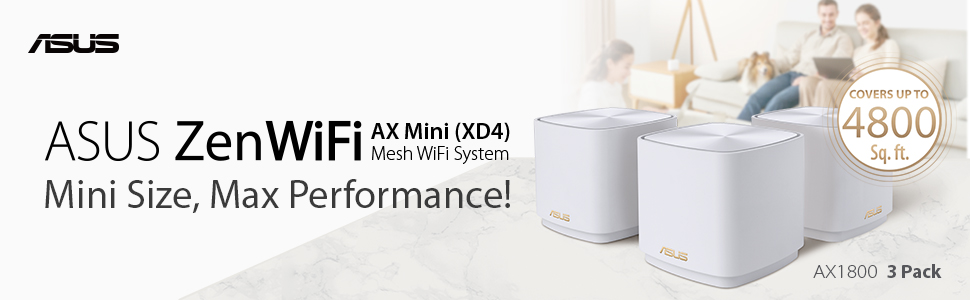
ASUS ZenWiFi AX Mini (XD4) Whole Home Mesh WiFi System (3 Pack), WiFi 6, 802.11ax, up to 6000 sq ft & 25+ devices, AiMesh, Lifetime Free Internet Security, Parental Controls, Easy Setup 3 pack
| | | |
|---|---|---|
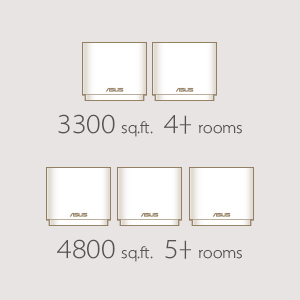
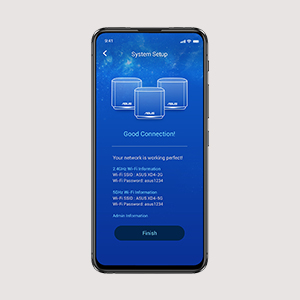
Whole-home CoverageThe ZenWiFi AX Mini system consists of one ASUS AX1800 WiFi 6 router and two extending node, featuring unique technologies that give you superfast, reliable and secure WiFi connections — inside or outside your home! | WiFi 6ZenWiFi AX Mini puts your WiFi into top gear! With a total bandwidth of up to of 1800 Mbps, it’s up to 1.4X faster* than WiFi 5 routers **. * Compatible WiFi 6 device required. ** The data compares speed of 2X2 11ax on 5GHz 80 MHz bandwidth with 1024QAM modulation to speed of 2×2 11ac on 5GHz 80MHz with 256QAM modulation. | Easier-than-ever Setup3-step setup with the ASUS Router app:
|

| | | |
|---|---|---|
Smart Looks for Smart HomesZenWiFi AX Mini works perfectly with smart-home services — including Alexa skills and IFTTT — and is available in charcoal or white to suit your décor. | Make the Internet a Safer Place for EveryoneAiProtection Classic with Parental Controls is free for life. It gives you total peace of mind, and you can keep an eye on everything that’s happening on your network via the mobile app.
| Parental ControlsURL filter and scheduling allow you to protect your family from inappropriate content and unhealthy Internet usage behaviour. |


| | | |
|---|---|---|
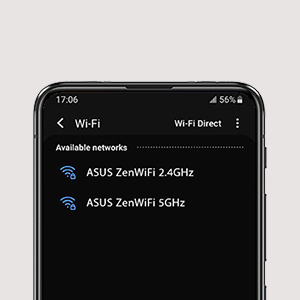
Flexible Network NamingUniquely, ZenWiFi lets you choose how you name your WiFi networks: a single name for everything, or separate names for each frequency band. The choice is yours! | More Stable WiFi with Wired Connections between ZenWiFi HubsIf you have Ethernet ports in your walls, you can set ZenWiFi AX Mini to use Ethernet backhaul, reserving all WiFi bands for your wireless devices for even more stable and reliable networking. | AiMesh TechnologyEven non-experts can quickly set up AiMesh technology, while more experienced users will appreciate the comprehensive advanced networking features. More Stable WiFi with Wired Connections between ZenWiFi Hubs |


Commercial Grade Security
- No Subscription Fee: Some routers only offer 3 years of protection, ASUS AiProtection has you covered for the life of your product.



| Dimensions: | 9 x 8 x 9 cm; 1 Kilograms |
| Model: | 90IG05N0-MO3R20 |
| Batteries Included: | 1 A batteries required. |
| Manufacture: | Asus |
| Origin: | China |
Purchased to fix a wifi dead spo
Purchased this product direct from the Asus website to fix a wifi dead spot in our house. Purchased the single XD4 mini rather than 3 pack. We already have a Zen Wifi setup in the house, however one room in our lower ground floor never had reliable wifi. Be aware with the XD4 mini that in order to make it work properly, you do need to use Ethernet cabling to connect to main router if you are using this as a node.
Works ok in garage
Purchased to extend the signal and provide a socket for CCTV in the garage. It’s neat and works ok, sometimes the signal does flash up as being weak, however I do think that’s more to do the setup I have than the actual box. Overall I’m really pleased with it.
Perfect fit for your home
Topk me 15 min to setup exactly how the guide says. Range is really good. In the back of my garden (15 m away) the 5Ghz network full signal amd more than 100mbps. The good thing is tuat any device connects to it automatically depending on the network signal quality. Really happy with this purchase as I have an asus router with wifi 6
Great little device
Wired into our extension where Wi-Fi coverage was weak and homeplugs were dropping out. Really impressed so far as now get excellent coverage on the old hard to reach spots and our devices seem to switch seamlessly from the main router to the Xd5.
No more family complaints about the internet dropping ou
Due to the router been located in the corner of the house we could not get wifi in all rooms.
I tried several solutions including boosters and power line carriers but they had stability and speed issues requiring the system to be rebooted very regularly.
After purchasing these, i have stable, fast wifi everywhere and have not had to reboot anything to date.
Purchased this to replace an old Asus router that was hooked up as a ai mesh node on my network. Set up was straight forward and complete within a couple of minutes using ethernet backhaul. Now with the added benefit of full WiFi 6 which the old router being replaced did not have, speeds are a lot quicker as a bonus.
Extends my existing Asus powered wireless network
Already had an Asus mesh WiFi 6 router and had used another Asus mesh capable older router so had created a mesh network but had an issue with coverage in one part of house so bought this node and added to mesh network without any problems.
Super effective
It solved all wifi coverage issues in my two floor apartment. A bit pricy but worth it.
Works well with my Asuswrt merlin ac88u
Quite pleased with the performance on 5g backhaul I only get total bandwidth 150-200mbps but 20+ clients connected to it work very reliably mobile devices switch well, while previously with some tplink extenders signal was lost and switching between zones would not happen. For more bandwidth I’d probably need ethernet or powerline but I am not to bothered
Works well as AIMesh node
Replacing my old WiFi5 devices.
This works great as a cheap AIMesh node.
No issues with setting up. Great! Updates to latest firmware with no dramas
Edit March 2023 – just bought another one. Added to my mesh and works like a charm. Very stable connection with this mesh setup
Great mesh/network route
This router is easy to set up, the signal is good for the size, but if you have a lot of walls and expect good single in every corner get the router with 6 antenna,I have this plugged into my broadband providers router, I bought this so that I could connect all my smart home devices too, so I don’t have to keep setting everything up on a new router when we change broadband providers, worth its weight in gold!
Excellent device let down by poorly made power adapte
The Asus ZenWifi XT8 (AX) is an excellent router – creating a stable and strong mesh network which allowed me to seamlessly connect all of my devices. I am a heavy user and have upwards of 100+ devices which are handled extremely well with no noticeable compromise to my network speed (I have a 1 gigabit internet connection for reference). The only let down are the power bricks provided which are prone to breaking extremely easily. Unfortunately, ASUS are unable to help with this but Amazon customer service stepped in.
I would most definitely recommend this product.
out standing performance
very expensive, but excellent performance, remember the WiFi is only as stable as the internet connection to it, but over all the best WiFi I’ve used
Plugged it all in, used the app to setup and never had to go back. No restarting it, or messing around, been in for weeks now and works well. Got wifi in the front and back gardens from a unit upstairs, good enough for reliable wifi calling on iPhone 12 with Vodafone.
The way tech should be, completely seamless.
Ist Venture into MESH wiFi
When my long serving and ancient ASUS router eventually expired I was pleased to find this system with the familiar user interface. With a hard wired network around my house I am able to take advantage of the wired backhaul facility which is a must for this two band Mesh system. Each satellite is hard wired via a network switch. Very easy to set up and transfer portfwarding from old router. Early days yet but it is giving a stable and strong WiFi signal throughout the house.
Does what is expected
Works well I now have a strong Wi-Fi signal throughout my house. Easy connection to my original Wi-Fi router so I can use this item as a mesh node. Works very well for my needs.
Very happy with the product.
At last! After a year of struggle with Orbi…
Orbi was Great when it worked. But it often didn’t and support was poor – mostly just a community that helped each other. Asus was easy to set up, filled with customization options that are important to me (binding a desktop to a particular node for example) and it works without a flaw. My blood pressure is much lower than with Netgear and my Wi-Fi speeds are great. I bought router plus two nodes. And am happy. Through away the boxes for potential return today.
Running for a few weeks now with no issues and good WiFi coverage.
Was uncertain if the Asus mesh router would bring a significant improvement to my previous ageing high-end Asus AC router. Lots of mixed reviews seem to be posted for all the main router brands, but luckily for me so far I’ve had no issues yet. The WiFi coverage has been a significant improvement over my old router and after a few weeks running I’ve had no stability issues. I’ve not really tested for speed improvement on the local LAN and since I dropped my internet speed to 100Mbps to save money on greater bandwidth not needed by me very often, the WiFi and Ethernet speeds to the router exceed my internet connection speed easily.
Great produc
Waited a few weeks to write this review and have to say I’m really pleased with the purchase.
It was really easy to set up, no major issues and I have a moderately sophisticated set up, multiple SSIDs, guest network, VLANS, etc.
Miles easier for setting fixed IP addresses to devices than my previous single router Netgear.
I set one up in the living room and one in the loft with a straight line of around 15m I’d say through 4 walls / ceilings and the whole house is now getting 400-500 Mb/s off a BT 500 service plan. Approx. 50 smart devices and at any one time 1-3 4k or HD streams and downloading going on with barely a noticeable dip in performance.
Best point for me though, I am getting 30Mb/s in the non-connected garage where I got nothing before.
So have managed to replace a four node powerline system, 1 in the garage and two in bedrooms that had brick walls surrounding them that were very poor for wifi before.
The app IMHO is miles better than the Netgear with more functionality and I really only had to switch to the web interface 2-3 times for the more advanced features I needed. For a typical home that just wants to setup and go I think the app is probably all you’d need.
Very pleased no hesitation in recommending this even at this high price.
Excellent, wish I bought one soone
I Can’t get over good these are, I was worried as there are so many different types and they price seems to go from cheap to expensive. This seems a happy medium.
I live in a old house so wifi routers didn’t manage to reach everywhere. This ASUS system gets all the spots throughout the house (and attic) and garage! I can even get signal at the bottom of my garden! Wish I bought it sooner rather than the powerful WiFi routers
Well it is working
I have got it to work, and it is going OK, signal is strong in this one…. I used exactly the same name and password as my existing system, and this worked, though I had to restart some devices, it was easier than changing all of the passwords. Quite pleased, and no one has noticed that I have changed things, hopefully it will prove to be more stable than the existing system. the only complaint is that the installation instruction could be clearer.
Fast, Stable, Easy Set Up - Working Well with a WiFI Backhaul
I bought this because my internet connection got upgraded to be 1gbps fibre and, within my house, I was limited to 50Mbps WiFi speeds or 100Mbps powerline speeds.
I replaced a BT Home Hub 2 device with this device and I found set up to be very easy and quick.
I bought a 2-pack and I have the main router downstairs in my house & the second mesh router is upstairs with perhaps 3-4 walls in the way and a total distance of perhaps 8-12 metres.
It is not possible to route a cable between the 2 devices so I do not use a wired backhaul, I use a WiFi backhaul between the 2 mesh routers and then I connect devices via wire into the remote mesh router.
So I have LAPTOP->WIRE->REMOTE ROUTER->WIFI backhaul->MAIN ROUTER->fibre and I get around 500Mbps to 700Mbps of measured connection speed at that laptop.
I work with this setup 5 days a week and I’ve had the setup for around 4-6 weeks and I have found it to be extremely stable.
I’d thoroughly recommend these units for anyone in a similar situation.
Buy it!
Yep it’s expensive, but it’s probably the best mesh Wi-Fi system. So I switched broadband providers and signal from ISP router had several not spots with associated slow speed. I Installed Asus XT8 twin pack and I’m maxing out my broadband speed in all areas of the house with full signal bars. Well impressed, mightily pleased Easy to install and I like having control over my router and Wi-Fi. Get rid of your ISP router, freedom, although it costs!
It works! It’s fast!
Very easy setup, I also have a lot of legacy wifi equipment (lights etc) that would on often not connect using Apple homekit. NOW everything works! My home automation is complete! Lifx, Philips hue, Alexa and Apple all now working in harmony due to this ASUS ZenWifi setup. I went for x2 units and the wifi signal is more than enough!
Great Route
I am not a tech savy person as such but have a house full of products requiring WiFi including Sky Glass. Even though Sky Glass was plugged into the free issue router from broadband provider by cables, it would buffer and freeze, tablets and phones would drop WiFi and range was an issue. Swapped to this router and haven’t looked back. Excellent range 255m2, no drop outs and easy to set up and control. Most people blame provider of broadband for issues, whereas most of the time issues can be attributed to the cheap routers they provide. Have had it a couple of months now. Highly recommended this product.
Brillia
Used to have a EA9500 and used access points for full home speed but as my Linksys died after 6 years I thought I’d try this. Full house coverage wirelessly and speeds of 600mbps on my Samsung phones. Wireless speed between router and node is 1092mbps which is fantastic.
Improves internet accross the entire house
Setup is super simple and I was able to pair it with the node and quickly get running in less then 20 mins. Covers almost all areas of my house.
Since purchased I have had no dropped signal, there was a day where internet kept dropping but it turned out that the issue was caused by my ISP router the Virgin Media Super hub 4. The web interface and app provides alot of features to manage your network appropriately.
This router I feel was definitely worth it for me. It was pricy, but for the price you get 2 nodes that would cover your whole home and can mesh using either a dedicated link from its triband wifis or via ethernet.
Simple yet powerful
Brilliant mesh system, swapped out my older, cheaper TP link system for these, software is reasonably good, really easy to setup, if you find the units blink after moving them, post initial setup, just hit reset and they will sort themselves out. The parental controls are basic and there are no device specific statistics however all in all the interface is nice, setup is straight forward and it’s flexible enough to make a really nice, clear network map of all your connected devices. Definitely a step up in terms of functionality of the DECO units.
Simple yet powerful
Brilliant mesh system, swapped out my older, cheaper TP link system for these, software is reasonably good, really easy to setup, if you find the units blink after moving them, post initial setup, just hit reset and they will sort themselves out. The parental controls are basic and there are no device specific statistics however all in all the interface is nice, setup is straight forward and it’s flexible enough to make a really nice, clear network map of all your connected devices. Definitely a step up in terms of functionality of the DECO units.
Best Upgrade I made
Got this over black friday and never regretted it. Tons of options in the router and it is able to connect directly to my Eir Fiber OTN so I can just chuck the Eir modem away.
No issues handling the high number of devices I have at home. Started with wifi 5GHZ backhoul which was reliable however since I have a cat5 running to the room from downstairs living, I was able to use the ethernet backhaul and full speed all around the house.
Best Upgrade I made
Got this over black friday and never regretted it. Tons of options in the router and it is able to connect directly to my Eir Fiber OTN so I can just chuck the Eir modem away.
No issues handling the high number of devices I have at home. Started with wifi 5GHZ backhoul which was reliable however since I have a cat5 running to the room from downstairs living, I was able to use the ethernet backhaul and full speed all around the house.
Best extender so fa
Use this as an Ai-mesh extender for my ASUS router to fill a couple of dead spots upstairs. Has been running a while now and has been faultless to date, consistent Wi-fi signal everywhere upstairs an no having to restart it every other day like others I have tried.
Great bit of kit for bedroom
Got this to extend my gigabit broadband coverage via wifi in the bedroom, using Ethernet backhaul. This has worked flawlessly, I’ve used AiMesh and roaming works great with my Apple devices. And it’s been rock solid stable so far.
Better still this device is small and discreet for the bedroom.
Incredible upgrade
Simply can’t fault this product – I recently had Virgin Media (350 package) and had the router installed in my upstairs office, knowing fine well the WiFi signal would not cut it before installation I already had this Asus product in mind.
The app is very user friendly, after completing a simple step by step setup via the app, the router was ready from the get-go – all I had to do was plug in the additional router downstairs which was automatically connected and configured.
I have attached a breakdown of speeds before and after, the property is around 100 years old and has solid thick brick walls throughout the house – I no longer need to worry about dropping signal at any part of the house.
Exceeded my expectations.
Incredible upgrade
Simply can’t fault this product – I recently had Virgin Media (350 package) and had the router installed in my upstairs office, knowing fine well the WiFi signal would not cut it before installation I already had this Asus product in mind.
The app is very user friendly, after completing a simple step by step setup via the app, the router was ready from the get-go – all I had to do was plug in the additional router downstairs which was automatically connected and configured.
I have attached a breakdown of speeds before and after, the property is around 100 years old and has solid thick brick walls throughout the house – I no longer need to worry about dropping signal at any part of the house.
Exceeded my expectations.
Fantastic piece of ki
As I upgraded to Virgins 1gig broadband, I needed to upgrade my previous AMPLIFI HD mesh system to fully utilise the upgraded speed. Our house is fairly large and have over 52 devices connected to the router ( WiFi & Ethernet) the old mesh system was for example giving me speeds up to 200 mbps via 5ghz which ok is not too bad but like I said if you have 1019gig speed coming into your router, you want to make the most of it. I knew when I upgraded that the new mesh system had to be tri band and have WiFi 6 connectivity to future proof. I did my research and settled on the ASUS purchase. As the price tag of 592 for 3 nodes is quite high, I thought let me purchase and if the difference is noticeable then I would keep, if not then I would return. Received package and set up was done within a few mins. My tip is to separate out each channel (2.4ghz, 5ghz & 5.2 ghz) have smart features off and when connecting all the nodes initially, have them close by and then move to desired location. I ran the same test speed on the same device, location etc and instead of 200mbps, I was now getting around 700mbps! Safe to say after fully configuring and re linking all devices to the mesh system that I am keeping the system and I cannot highly recommend it enough. The set up is a breeze and it’s a big investment however it should keep for a long time and worth it!