Honeywell T6 Wired Smart Thermostat – Works with Amazon Alexa
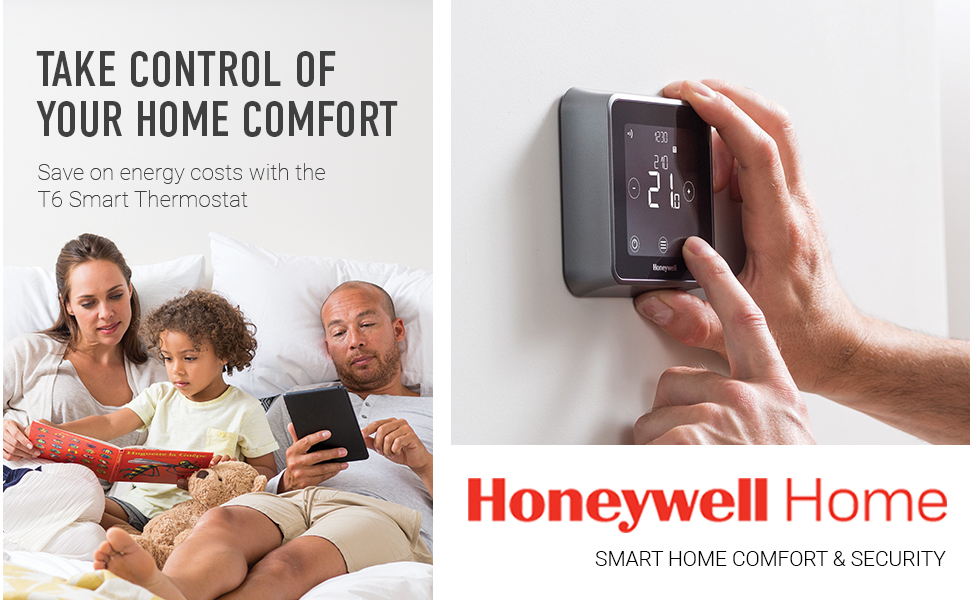
The Honeywell Home T6 Smart Thermostat is a next-generation, programmable thermostat made to fit your life. Take comfort in an innovative thermostat that adapts to your schedule, helps save energy, and makes your home smarter.
- Simple to set up, straight out-of-the-box.
- Save money on heating with adaptable, intuitive programming.
- Energy efficient and more Earth-wise than older or more basic thermostats.
- Full control via the thermostat’s simple touchscreen, even without the Honeywell Home App.
The T6 thermostat knows how long it takes to get your home to the right temperature, removing the guesswork and saving you money. Ask for 21 degrees at 7 a.m., no problem, the T6 works out how to get there, whatever the temperature is outside. The T6’s intelligent comfort control helps maintain the desired temperature when you need it. So your home will always be comfy and cosy, whatever the weather.
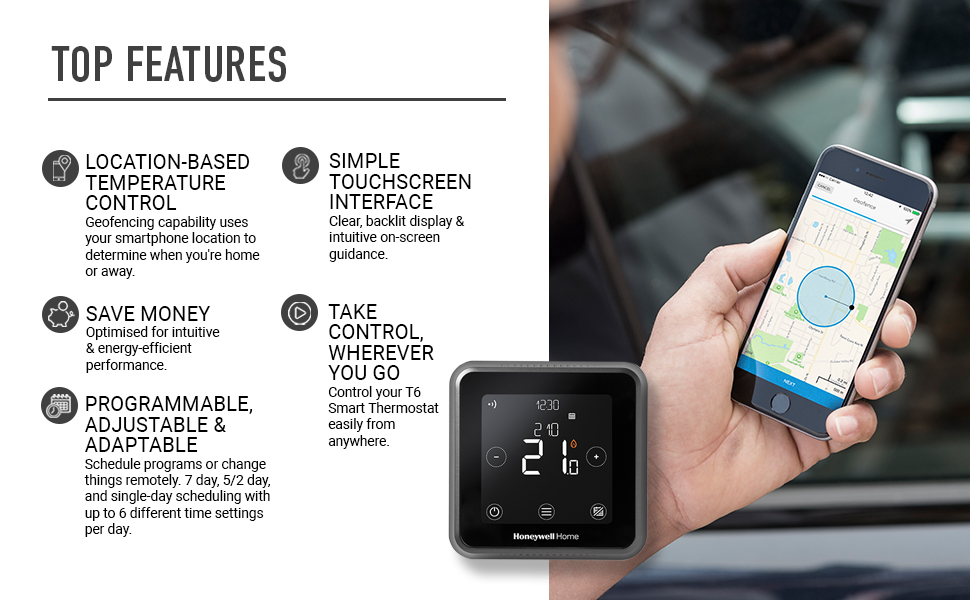
SIMPLE TOUCHSCREEN INTERFACE: The T6 touchscreen makes scheduling, changing and overriding temperatures easy with a large, clear display and intuitive on-screen text guidance. Temperature can be adjusted in 0.5 degree increments. The thermostat display is backlit all the time, providing low-level nighttime illumination and temperature display at all times. You can set the light level via the touchscreen.
TAKE CONTROL, WHEREVER YOU GO: Pair with the Honeywell Home app, which gives you complete control over your home heating. Control your thermostat via smartphone or tablet.
INTUITIVE GEOFENCING: The T6 adapts to your lifestyle using innovative geofencing technology. It knows when you’re away, helping to save energy. It also knows when you’re just around the corner — and ensures your home is at the perfect temperature when you arrive.
SAVE MONEY: The T6 offers a number of optimisation features, including “optimum start and stop” boiler control, allowing the thermostat and boiler to work more efficiently together. ERP Class 5, 3%.
SMARTER CONTROLS: Built-in TPI (Time Proportional & Integral) controls simply switch current supplied to the boiler on or off at different times. The T6’s integrated system ensures the boiler fires for the minimum amount of time required to maintain the required temperature set point, making heating your home even more efficient. The T6 also includes frost detection protection, ensuring the pipes will not freeze if the temperature dips too low.
ADJUSTABLE & ADAPTABLE: We know life is unpredictable. That’s why you can choose either 7-Day Scheduling or change things remotely if your plans change.
T6 MODEL OPTIONS: The T6 Series features three models; the wired T6 and the wireless T6R, and the T6R-HW that is wireless and also includes hot water control.
Installation Basics
Compatibility
Is the T6 suitable for my property and will it fit my heating installation? The T6 and T6R Smart Thermostats are suitable for most water-based heating systems, including combination and system boilers, either gas or oil-fired. They can also be used as part of S-plan and Y-plan system. The T6 receiver module can be used with ON/OFF boilers and it has OpenTherm capabilities offering boiler modulation. Some boilers with modulation functions have restrictions on what connections will work and therefore we recommend contacting the boiler manufacturer.
Do I need WiFi to operate my thermostat? The thermostat will work perfectly without WiFi. It is not required for setup or programming. You will need internet connection to be able to remotely control your heating system. Honeywell Home’s Connected Thermostats use a proprietary communication protocol that work on the 868Mhz band. This should not interfere with any other wireless devices. The T6 will work with any wireless 2.4 GHz router and is easy to connect to existing WiFi networks.
Installation
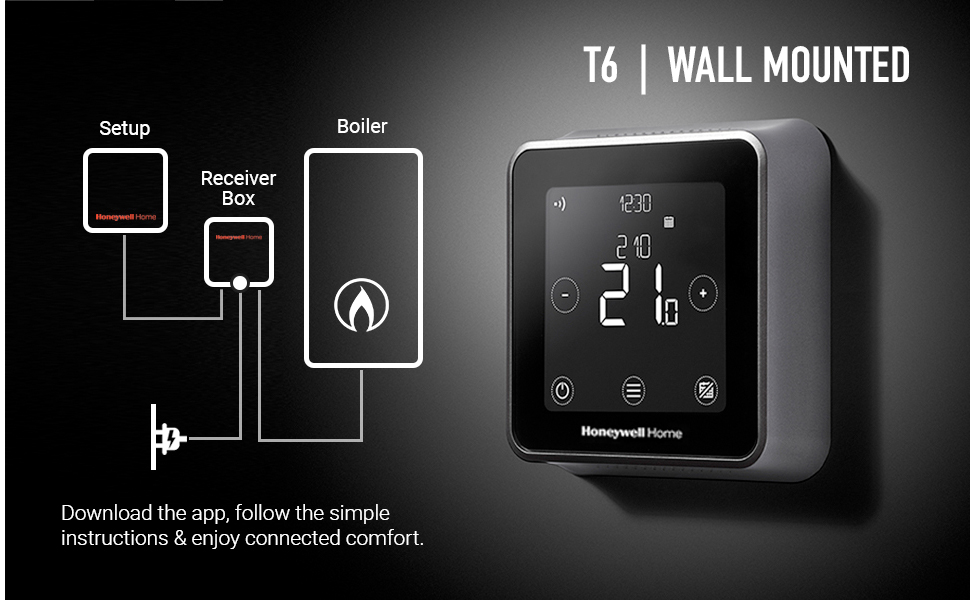
The T6 lets you do it yourself. Easy and fast to install, the Honeywell Home T6 offers many features to simplify setup. These include a flip-up wiring bar for easy access, clearly labelled terminals, and strain relief for simplified, secure wiring. Before installing, turn off power for safety and remove your old thermostat. Carefully review the wiring diagram included in your instruction manual.
FITTING THE RELAY BOX: This box contains connections for your power, boiler, and thermostat. Choose a suitable location near your boiler and use proper wall mountings for your wall materials.
CONNECTING THE T6 TO YOUR WALL: Once your old setup is removed, the existing cables will attach to your new T6 thermostat. Feed them through the wall panel to begin and align the wall plate. Attach the T6 thermostat face to the wall plate.
SETUP & CONFIGURATION: Once installed, the Honeywell Home T6 features an intuitive and guided setup that can be accessed from the Honeywell Home app, or the thermostat itself. Follow the prompts to begin setting up your upgraded home temperature control system.
Connecting with Smart Brands
| | | | |
|---|---|---|---|
Apple HomeKit & Apple WatchThe T6 Smart Thermostat works with Apple HomeKit, so you can efficiently manage your smart home using Apple’s voice assistant, Siri. You can take comfort knowing you can control your home comforts, now and in the future. Control your T6 thermostat from your Apple Watch, with the Honeywell Home app, wherever you are. Interact with your thermostat quickly and easily from home or away, and control the temperature in your home, at any time. (Note: Using Apple devices requires iOS 8.1 or later) | Amazon AlexaTake your home comfort to the next level with Amazon Echo. The T6 Smart Thermostat works in perfect harmony with its cloud-based voice service, Alexa, so you can easily set the temperature, or turn the heat up or down using voice commands. | Google HomeYour T6 Smart Thermostat connects seamlessly to Google Home and its voice activated Google Assistant, so you can set the perfect temperature using simple voice commands. Just start with ‘Ok Google.’ | IFTTTWith IFTTT, you can automatically link and manage your T6 Smart Thermostat by creating simple Applets. These can be turned on and off, and link multiple smart devices, giving you flexibility and infinite possibilities. |
Smarter Connection
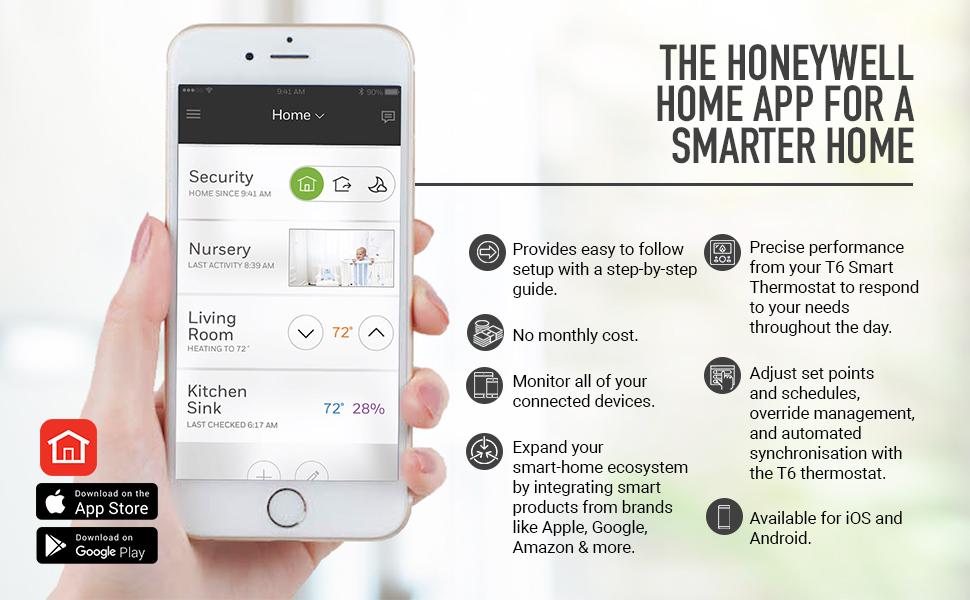
The Honeywell Home app allows you to connect, control, and monitor your smart devices.
- One-touch dashboard.
- Alerts to let you know what’s happening in your home.
- Geofencing provides location awareness to respond to your needs throughout your day.
Control and adjust your T6 thermostat with the Honeywell Home app. This includes adjustment of set points and schedules, override management and automated synchronisation with the thermostat. At the beach. In the air. At your desk. Take comfort knowing you can control your T6 Smart Thermostat simply and easily — anywhere, any time.
- To get you started quickly, the Honeywell Home app will guide you through the simple set up, step-by-step.
- Compatible with Android and iOS, the app puts you in charge of your T6 Smart Thermostat, so you’re always in control of your home comforts. Note: The thermostat cannot be operated from a computer or laptop.
- Link multiple smartphones and tablets to your thermostat for all the family. The app also supports multi-zoning for multiple thermostats and zones.
The Honeywell Home app can be downloaded on your devices. It is available in the App Store or on Google Play. Make the Honeywell Home app your app for controlling all of your connected Honeywell Home devices anywhere, anytime.
| Weight: | 200 g |
| Dimensions: | 10.3 x 2.8 x 10.3 cm; 200 Grams |
| Model: | Y6R910WF6042 |
| Part: | Y6R910WF6042 |
| Colour: | Black |
| Pack Quantity: | 1 |
| Batteries Required: | No |
| Batteries Included: | No |
| Manufacture: | Honeywell Home |
| Colour: | Black |
| Quantity: | 1 |
Quite simply, it just works. Easy to install.
Bought to replace a Nest that after 8 years of mostly fault-free service simply refused to connect wirelessly to the boiler control unit. The joy of the Honeywell is that it is a radio, not WiFi or Bluetooth connection and is set at the factory. One less thing to go wrong. Easy to set-up on home WiFi and apps on phones for tweaking temps when away from home. It can do the learning thing if you want it, but we haven’t bothered having learnt a lesson on how erratic and stupid the supposedly clever Nest was. The Honeywell hasn’t made a mis-step yet. The Resideo App isn’t the grooviest, and is rather dull tbh, but makes up in reliability for its lack of style and wow factor. Very pleased with it and so easy to install, if you have a couple of screwdrivers and have read this far, then I’m sure you will be able to fit this yourself. Enjoy.
Ps: I bought ours from Screwfix, as I needed it today rather than tomorrow….
Honeywell
Ha llegado antes de lo esperado. Ahora falta instalarlo. En alguna foto he visto que vena un cable de red, en la caja no me ha llegado. Por ese detalle le pongo 5*
I got 2 of them for my house in Greece. Setting them up was very easy. Adding them in the WiFi network without an app was also easy and then adding them to HomeKit (Apple) was even easier.
The problem is that honeywell doesn’t officially support these thermostats in Greece so you can’t find the app in the Greek Appstore and that will create a problem for syncing them with Alexa.
excelente producto
un equipo con las posibilidades de este nunca es lo mas facil de configurar ,la calidad de materiales muy buena ,a destacar la compatibilidad con opentherm
Excellent mais compliqué à installe
Trs bon et beau thermostat, l’application est trs facile et simple utiliser c’est donc se que je voulais
Par contre l’installation est complique et doit passer par un professionnel, et mme comme a l’installation n’a pas t simple
Prcision
Sur une chaudire gaz Junkers
Mais tout fonctionne parfaiteme
Buon termostato ma app molto grezza.
Il termostato ben realizzato e di facile installazione, lo schermo touch non molto reattivo ma nella pratica non dovrebbe essere usato quasi mai dato che si pu fare tutto da app.
L’app per non ben realizzata, soprattutto nella fase di configurazione delle fasce orarie si riscontrano molti problemi che vanno aggirati inserendo gli orari come vuole lei e non come vorrei io. La funzione di geotag che dovrebbe rilevare quando ti allontani da casa inutilizzabile perch fa quello che vuole lei e non quello che vuoi tu. Superati i problemi di configurazione comunque si riesce ad usare abbastanza facilmente anche da remoto accendendo/spegnendo o impostando una temperatura diversa che resta in vigore fino alla prossima temperatura programmata.
Funciona perfectamente
El termostato lo instal en mi casa de campo hace ms de un ao para controlar la caldera de calefaccin a distancia a travs del wifi que instal con un router que funciona con tarjeta SIM. Al principio me costo instalarlo pero llame al servicio tcnico y lo solucione. Estoy tan satisfecho que este ao me he instalado el mismo termostato Honeywell en la casa que vivo y puedo controlar los dos termostatos a distancia con la misma aplicacin. Muy recomendable una vez instalado. ( Importante si es para una casa de campo y si instalas un router para tener wifi, indicar a la aplicacin que tiene el router que memorice el cdigo pin del wifi y asi cuando se va la electricidad se vuelve a conectar automticamente sin problema). Esto es no es un problema del termostato o su aplicacin ya que funcionan perfectamente. Indicar que no utilizo la funcionalidad del Geofencing ya que prefiero controlarlo yo personalmente.
wifi is a bit difficilt to set up, but once set up it works well.
wifi is a bit difficilt to set up, but once set up it works well.
Very easy to install and works as expected
I was worried about replacing my old wireless thermostat with a smart one, but after watching the video on line about how to install it it looked straightforward, and it was. Replacing the contol unit was simply a case of taking a picture of the wiring in the old one, and then matching with the new one. Setting up the thermostat for Wifi and configuring it was also very easy. Connecting to Alexa was also easy, sinple create an account at Resideo (Owners of Honeywell), install the Honeywell Skill and connect the accounts and it works. The onyl drawback is sometimes alexa will see the Honeywell Home device and the Resideo device as 2 different thermostats and tell you she can’t change the temperature as there are more than one Thermostats, but it’s easily fixed and probably down to my complicated smart home setup.
Almost Happy
Easy to install. Connected readily to Alexa. Had problem with app, reset but then loss of some voice functions.
Easy to connect, can't get it to talk to my mobile. Really frustrating.
Easy electrical set up. Monitor clear and functional. Can’t get it to talk to my mobile which was the key factor in my buying decision.
Instruction sheet poorly written and illustrated.
Fiable
Tras un tiempo usandole puedo decir que es el mejor que he tenido nunca, s es cierto que su precio es ms elevado, pero tanto la aplicacin como el control de temperatura y la conexin con Alexa me han aparecido increbles. As que esta marca es totalmente recomendable. Muy fcil de conectar e instalar , y estticamente precioso.
After a month of use, a good wifi thermostat for a modulating boiler. Easy and quick installation by private individual. Attention not adaptable for the Junkers brand. Bug-free operation.
After a month of use, a good wifi thermostat for a modulating boiler. Easy and quick installation by private individual. Attention not adaptable for the Junkers brand. Bug-free operation.
Perfect Smart Heating, It just works
Really good reliable product with no extra nonsense to deal with. Connects to WiFi and powers itself with all that comes in the box. No need for a wifi hub or batteries like Hive.
Works perfectly with Google Voice control so will work the same with Alexa. Can also connect to IFTTT if you want even more control!
It’s not a super simple install if the wiring doesn’t already exist in your home so if you are not DIY savvy with electrics then get someone in to fit it.
Good integration with Apple HomeKi
Fitted this as a replacement for standard Honeywell thermostat with clear instructions. Using this with Apple Home Kit system and integration is good for central heating rather than hot water control (so use the Honeywell Home App for this). app works well apart from occasional Geo-fencing confusion. Very pleased with this.
Installed myself. My old thermostat was a wireless Honeywell, so the wiring connections were the same. Very easy to setup with the app. It did struggle at first to connect to WiFi, but the app recommended an alternate procedure which worked. I have it working from a geofence.
Straight forward - take your time
I installed this myself. It is relatively straightforward as long as you familiarise yourself with the instructions, be patient, be safe by ensuring your switch off the power before doing the wiring that is required. If you have any doubts get a professional to do the installation.
Great piece of ki
Great, easy to install had an old Honeywell controller so was as easy as removing old and using same wires and space for new one. Easy to set up to app and Alexa and to sort out schedule. Very happy
Good produc
Easily installed. Unfortunately my T6R thermostat had been registered previously, so had to contact Honeywell Customer Services to de-register prior to being able to connect to my own account. Honeywell very quick to resolve.
Now works great and looks good. App works well also, simple and easy to use.
Sarebbe un bellissimo prodotto: touch screen reattivo, interfaccia intuitiva, elegante e pratico. La connessione wi-fi permette un controllo estremo, tanto dalla app Honeywell che da app di terze parti.
Alexa in grado di elaborare e applicare istruzioni tipo “imposta il termostato a 21 per un’ora” e si possono creare routine per programmazioni aggiuntive rispetto alle fasce orarie massime disponibili nella app Honeywell: quest’ultima prevede fino a 6 cambi di temperatura programmabili, ma con le routine di Alexa possono diventare infiniti.
ATTENZIONE: una sera le funzioni wi-fi del termostato mi hanno piantato in asso senza spiegazioni. Per un errore “imprevisto” ha perso la connessione e ne ho provate _di_tutte_ per farlo ripartire: reset, spegnimento e riaccensione, ripristino a valori di fabbrica, disinstallazione reinstallazione della app, reset del router, ripristino ai valori di fabbrica del router… NIENTE. Numerosi utenti online lamentano questo problema.
Poi ho avuto l’illuminazione di cambiare il cellulare usato per la configurazione (da iOS ad Android) per ripartire con una reinstallazione da zero: ha funzionato. Che sia stato un caso o meno, per ora funziona.
In conclusione: mettete in conto che a fronte di un bel prodotto si corre il rischio di disavventure come la mia e, nel caso, tenete presente questa presunta soluzione per poter ovviare.
Smart heating
Got this to make life with our heating easier :p getting lazy…didn’t install as our gas man did it for us. It comes with an app that you can control from as well as alexa
Alexa, turn the heating up
Works great, easy to use display, but of a pain to connect to the WiFi, would be better if battery option and not just hard wired. Worth the money? Not sure, it works well but does not feel quality, the thermostat display feels plasticky and poorly put together (rattles a little like it don’t fit properly)
Really good 7 day programmable central heating timer.
Really simple to install, replaced the old fixed timer no problem. You can change the program very easily from either the temperature display unit which can be positioned anywhere in the home or a simple to use App on your smart phone. Temperature can be controlled either by a daily schedule or a really clever Geofencing system which will switch the heating off when you leave the house and switch it on again as you travel home, brilliant. Also temperature can be manually adjusted if you need a quick boost.
Really good produc
El producto est genial, ya que al poder moverlo de un lado a otro (siempre ha de estar conectado) es una ventaja. Pues en mi caso al tener una casa tengo unas zonas ms fras que otras y este lo llevo all donde estoy de ese modo se que as esa zona estar a la temperatura que deseo. Es fcil de usar pues es tctil y muy intuitivo adems al poderlo controlar por el mvil da igual ios que android puedes activar o desactivar la calefaccin antes de llegar a casa si no eres de esas personas que la tiene todo el da puesta. Tambin incorpora la opcin de programado por si a la noche quieres una temperatura diferente a la del da o si no vas a estar en casa etc etc..
Lo nico malo es que dependes de la conexin wifi entre el receptor y el termostato esto quiere decir que si el receptor lo tienes lejos ( al lado de la caldera fuera de la casa) o hay muchas paredes hasta el termostato est pierde la conexin y no puedes darle rdenes. La solucin es colocar el receptor ms cerca o en la vivienda y listo, aunque esto implica otro aparato ms en la pared con conexin elctrica.. vamos como si tuvieras el termostato de toda la vida y otro porttil ( es decir dos en vez de un solo aparato) as que si no vas a mover el termostato de sitio recomiendo el otro modelo pues te ahorras tener receptor y termostato dentro de casa.
Brilliant control over you heating system
Love it- so much clearer than our previous one. Very easy to setup the schedule and very easy to adjust during the day with one touch on the screen. Had a little issue setting up as it would not work off my iPhone due the IOS version but tech support very helpful. The house feels warm at the right time, without spikes of heat or cold. Recommend it.
Brillia
I have connected this to a holiday lodge via mobile Wi-Fi. It works great and I now have remote control at a reasonable price. Simple to setup and simple to use.
Very Pleased..
I wanted my thermostat controllable from my mobile and Alexa, and this does the same. Its a great piece of kit with all the customization for your combi boiler. Installation of relay terminal was very easy. Configuration of the wireless terminal was easy enough. I am very happy with the performance so far.
Un termostato excelente con una app para el teléfono mejorable
El termostato funciona muy bien. Yo lo tengo conectado a una caldera mediante rel seco. Una cosa que me gusta mucho de los termostatos de Honeywell es que van activando la caldera a intervalos y cuando se acercan a la temperatura deseada disminuyen la duracin de las actuaciones de forma que la temperatura se alcanza suavemente sin fluctuaciones indeseadas. Creo que Honeywell le llama a sto funcin TPI.
No le pongo cinco estrellas al termostato porque creo que la app para el telfono es mejorable. Le encuentro dos fallos principalmente:
1 — Tiene dos modos de programacin. Por tiempos, donde puedes programar hasta 6 intervalos de tiempo con temperaturas diferentes y el Geofencing que permite programar diferentes temperaturas dependiendo de si ests cerca o lejos de casa. Sin embargo ambos modos son excluyentes o sea que no puedes definir que funcione la programacin por tiempos cuando ests en casa y otra temperatura cuando ests fuera. En modo Geofencing solamente puedes programar una temperatura cuando ests en casa, una cuando ests fuera y una por la noche. En mi caso me interesa programar diferentes temperaturas por la maana y por la tarde adems de otra temperatura inferior cuando estoy fuera lo cual no es posible con este termostato.
2 — El Geofencing funciona bien y puedes configurar un crculo de tamao definido alrededor de casa para que la calefaccin se apague cuando sales de dicho crculo. Sin embargo el radio mnimo del crculo es de 500 metros, lo cual para mi es excesivo. Debera ser posible definir un crculo ms pequeo.
El termostato tambin es compatible con IFTTT lo cual junto con la app Tasker permite soslayar las limitaciones anteriores y crear programaciones muy sofisticadas. Claro que para sto hay que tener ciertas habilidades informticas.
Finalmente, decir que tambin funciona con Alexa permitiendo subir o bajar la calefaccin de grado en grado o ajustarla a una temperatura determinada con comandos tales como “Alexa, sube la temperatura de la calefaccin”, “Alexa, baja la temperatura de la calefaccin” o “Alexa, pon la calefaccin a xx grados”. Con Siri no lo he probado porque no tengo pero supongo que funcionar igual porque Alexa y Siri son aplicaciones muy parecidas.
Great screen, easy fitting, decent app
Nice and easy to install. I got an electrician friend to do it mainly because the location for the controller was a bit tight for space and he’d make a better job of it. Took him about 40 minutes. Overall the thermostat looks great and has a nice responsive screen. It has to be connected to the mains electricity which is the only downside really. A rechargeable one would have been better but it’s not a major complaint. It seemed to take about a week to ‘learn’ the heating characteristics of the house. That first week was a little odd with the thermostat not demanding heat when I thought it should have but after 7 or 8 days it has been fine. Works great with Alexa and the app, although that is pretty basic really. Geo-fencing not all that reliable but I put that down to the Google accuracy on my phone more than the app itself, since other geo enabled apps are unreliable too. All in all, very pleased with the purchase.
Purchased and installed this product to give me and my family a modern and greater control, mainly over our heating system, but water heating schedule too. The wifi thermostat totally replaces our old thermostat and improves the heating schedules massively with the ability to control and modify almost infinitely throughout the day and night, with daily events, 5/2 events, independent events, not only from the unit but from our smartphones, Google assistant and also using ifttt triggers, ie if the temperature drops below -3 outside or snows etc, it can automatically increase the temperature in the house by 2 degrees.
Overall, I’m thoroughly impressed with the product, interface, looks, it’s flexibility and it’s performance.
Wiring up was fun, but complicated solely by the fact my house was extended and the cabling to various devices changed colour and was unmarked, I would recommend a professional installer is used unless you have experience and confidence to install yourself as the wiring centre can be very daunting unless you know what all the wires from the boiler, immersion stat, room stat, and 3 way valves are, or you have the ability to identify these via wiring diagrams and testing.
Central heating control
The Honeywell T6r Thermostat replaces our Honeywell wireless setup on our central heating, it was quite easy to install and works well, we do sometimes use our smartphone or Alexa to control the settings, the home app works ok but appears limited to earlier apps, on the whole well worth the money !!!!!
After a little help confirming with friendly electrician what wire should go where I successfully installed the two units.
No problems.
However then spent many hours cursing and registering unit to my WiFi router and then HomeKit.
But I didn’t give up googling and trying different things and did it!!
Some top tips.
Ensure using the latest Honeywell Home App.
Create and connect to thermostat first through its ‘local network’.
Also ensure one’s router can and has been set up to a put out a ‘separate’ 2.4G network.
Also ensure Home and KeyChain is selected within iCloud when one tries to register unit with HomeKit.
If at any time one cannot see thermostat within HomeKit inside the home it’s no doubt down to a brief disconnection to router rather than issue with thermostat. Selecting Auto-Join to one’s WiFi Network Settings seemed to solved this…
HomeKit from outside the home required an Apple TV (4gen) or HomePod or a late iPad…
I have to say the Honeywell App has v limited functionality but it does work..
I haven’t sussed out if one can turn off / turn on GeoFencing and switch to Schedule (without creating a whole new Schedule again)
I’m sure there is a way – perhaps somebody could let us know if they have sussed.
Good luck…
Thank you to everybody who has contributed on the internet / You Tube / below to pass on their installation tips !!
Good reliable product - when not using the location service
I am surprised at all the negative reviews – I had no problem installing it after taking the time to understand what has to be done and it isn’t rocket science (I’m not an electrician but do have a good IT background).
It works well (occasionally complains about poor strength of signal between the room stat and box on the wall (it’s not particularly far away, but there are a couple of corners and solid brick walls) , but it still has worked faultlessly for a month or two since I installed it.
The only disappointing aspect is the location service where it can automatically turn off when you’re away from home. It does seem to work, but it can be very slow to react (perhaps a fault with the app – if returning from a trip, you need to remember to turn it on remotely if you want it to be warm when you get home as otherwise it will turn on too late if your radius is not big enough) and when using the service, you can’t set different schedules other than a daytime and night-time temperature.