Behringer X-TOUCH Universal Control Surface with 9 Touch-Sensitive Motor Faders, LCD Scribble Strips and Ethernet/USB/MIDI Interface
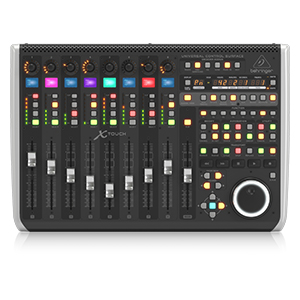
X-TOUCH
Universal Control Surface with 9 Touch-Sensitive Motor Faders, LCD Scribble Strips and Ethernet/USB/MIDI Interface
- Universal DAW Remote Control for Studio and Live applications
- Supports HUI* and Mackie Control* protocols for seamless integration with every compatible music production software
- 9 fully automated and touch-sensitive 100 mm motorized faders
- 8 dynamic LCD Scribble Strips for instant overview of track names and parameters
- Ethernet interface for RTP (Real-Time Protocol) MIDI and future Behringer X32 remote control
- 8 rotary controls with LED-collars for on-the-fly adjustments of your favorite parameters
- 92 dedicated illuminated buttons for direct access of key functions
- 8-segment LED meters per channel for precise level control
X-TOUCH
| | | |
|---|---|---|
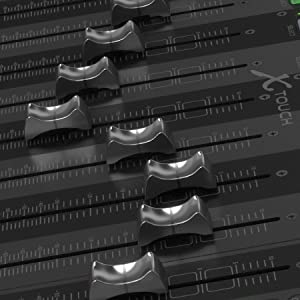
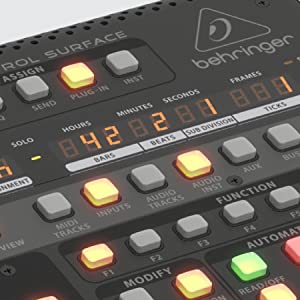
X-TOUCHLay your hands on your music with the X-TOUCH Universal Control Surface. This brilliant controller has everything you need for your home studio or live setup, yet can grow as your needs expand. From the 9 touch-sensitive, motorized faders and the 8 dynamic LCD scribble strips, to the 8 rotary encoders, 92 illuminated buttons, 8-segment LED meters per channel and dedicated transport controls, the X-TOUCH transforms what’s on your DAW’s screen into one ultra-compatible, feature-packed surface for precision control and a bird’s eye view of critical mix parameters. Connectivity is flexible with both traditional USB and MIDI connections, and it also has an Ethernet port for connection via wired or wireless network. | Universally YoursWhen it comes to integration, the X-TOUCH has you covered with the most widely used protocols in the industry. With included support for HUI* and Mackie Control*, you can be sure it will work seamlessly with all compatible music production software, allowing you to focus on what counts… the music. | Faders that Dance with Your MusicYour music is the embodiment of your imagination and creativity. Your controller should be equally inspired and dynamic in its response to your creation. That’s why the X-TOUCH features 9 fully automated and touch-sensitive 100 mm motorized faders. Every move or automation you write can be seen in the movements of each fader in real time, perfectly synced with your DAW. |

X-TOUCH
| | | |
|---|---|---|
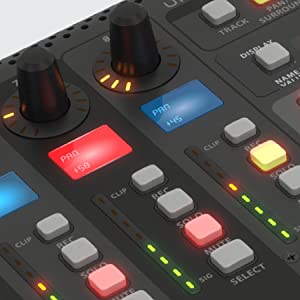
LCD Scribble Strips – Instant ReadoutLCD scribble strips grace the top of each channel fader providing an instant visual readout of which track and parameter you are adjusting – totally eliminating old school tape-and-marker labelling. | A Symphony of LightsWith over 92 dedicated illuminated buttons, 8 rotary controls with LED collars, 8-segment LED meters per channel and an LED time code display, the X-TOUCH is a feast for the eyes as well as the hands. Know in brilliant color if a channel is muted or soloed and see how hot the level is pumping as you make changes during recording or mixing. Arm multiple tracks or adjust panning at the same time and marvel at how you ever relied on a mouse to do a controller’s job. | The FeelNavigation is a breeze with the abundant features on the X-TOUCH’s surface. The large jog/shuttle wheel and tape-style transport controls provide intuitive control over the most used actions in your DAW. Race between fader banks with the touch of a button and make changes with the turn of actual knobs, the movement of real faders or the push of physical, illuminated buttons. It’s like bringing your on-screen DAW controls to life! |

| Weight: | 4.27 kg |
| Dimensions: | 30.1 x 45.21 x 10.01 cm; 4.27 Kilograms |
| Model: | XTOUCH |
| Colour: | Black |
| Colour: | Black |
Preso per MSFS (con spad.next)
L’ho preso per comandare il simulatore di volo (manette e interruttori), ma serve un programma tipo spad.next per utilizzarlo.
Molto contento della scelta.
(l’ho anche affiancato a Akai MINI, sempre MIDI)
Ultraschnelle Lieferung
Preis wurde kurzfristig deutlich erhht.
Anwwendung bei der Flugsimulation erfordert umfangreiche Einarbeitung.
Great produc
Well as I am new to this kind of thing.
It was a headache for a few attempts trying to get it to talk to cakewalk.
I followed instructions etc from youtube. Nothing! lights worked etc with just baffled me more
Then decided to look at manual online. And wot the videos didn’t mention was keeping your finger on the left bottom button when starting the mixer up.
That’s turns it into Mackie mode and boom!!!!
Worked at once.
Now I knew I had done everything as explained on YouTube. But was baffled at the fact you had to start the mixer up as explained!
I am very pleased with the outcome at last and hope anyone else as daft as me takes note lol.
Super !
Achet pour contrler mon mlangeur audio Windows avec le logiciel midi mixer. C’est juste super tout fonctionne bien rien a dire !
MIDI Board an Lightroom
Hab das Midi Pult fr die Bildbearbeitung mit Lightroom gekauft und es hat meinen Alltag sehr vereinfacht und beschleunigt.
Als Flugsimulator-Fan kann man dieses Gert als gnstige FCU mittels einer Software zweckentfremden.
Die Drehknpfe und Knpfe sind wertig, Overlays lassen sich bestellen und die Tasten konfigurieren.
Ich bin sehr zufrieden.
Great product!
Help me streamline my Adobe Lightroom picture editing in a very intuitive way using midi2lr.
Strong quality build
Good sold rotaries that click nicely, and the buttons have a good solod feel. Overall the whole build feels strong and solid.
Útil y versátil.
Me gusta mucho este tipo. Queda muy bien junto a mi teclado, est construido como un tanque, es muy verstil y me libera mucho del ratn. El Hub USB es un gran aadido tambin. No he ledo ni las instrucciones, conectar, seleccionar el protocolo adecuado en mi DAW (MCU) y listo. Reason lo auto-detecta y en Studio One lo hice manualmente. 10/10. Muy recomendable.
Ottimo
Materiali di costruzione ottimi e di facile installazione. Non servono software da scaricare e installare. Si attacca via usb e si configura la DAW di utilizzo (StudioOne, Cubase, Ableton ecc). Molte sono le funzioni accessibili direttamente da questo gioiellino senza dover usare tastiera e mouse. Alcune funzioni poste sul lato destro possono cambiare a seconda del software utilizzato per i vostri progetti ma si possono impostare, ovviamente, dalla vostra DAW di utilizzo. Le slitte meccaniche sono molto fluide e non rumorose. Nel mio caso il prodotto arrivato con installato il firmware aggiornato alla 1.21 e quindi ho fatto un upgrade alla 1.22 (ultima release). Per effettuare l’aggiornamento non sono presenti software proprietari in dotazione per facilmente reperibili in rete di terze parti. Consiglio vivamente di consultare qualche tutorial in rete prima di procedere con l’upgrade. Nel suo complesso veramente un ottimo prodotto. Consigliato!!!
Controlador MIDI para vMix
Lo utilizo como controlador MIDI para vMix, para mi la mejor opcin.
Calidad/Precio lo mejor. Me gusta porque tengo potencimetros que utilizo para el audio
y botones que uso para el mezclador. Si lo compras no te defraudar.
Eigentlich ganz gu
Leider hatte ich ein defektes Gert erhalten, das hat aber keinen Einfluss auf meine Bewertung. Passiert halt mal.
Inzwischen habe ich ein neues Gert seit einiger Zeit in meinem Studio. Absolut daneben empfinde ich das vollstndige Fehlen irgendwelcher Bedienungsanleitungen, nicht mal in Englisch. Alles muss man sich mhsam im Netz zusammen suchen, wirklich ein nogo, klarer Punktabzug.
Ansonsten zuerst das Positive,
Wenn man dann wei wie das Gert zum laufen zu bringen ist, luft es recht gut und vor allen Dingen stabil. Ich benutze es mit Cubase und Behringer XR16 Mixer. Wirklich Klasse das man zwischen Cubase und XR whrend des Betriebs problemlos hin und her schalten kann. Nach langer Recherche ist es inzwischen auch einfach super mit diesem Gert zu arbeiten. Man kann viele Einstellungen in Cubase direkt ber den Xtouch erledigen. Der Xair kann fast komplett ber den xtouch bedient werden. Die letzte Firmware 1.22 empfehle ich dringend auf zu spielen. Bei mir hat die 1.15 fter Probleme mit den Motorfadern gehabt. Mit letzterer ist dieses Problem behoben. Das Gert steht stabil, ist recht schwer und macht gesamt, einen fast guten Eindruck.
Warum fast: Nun ja das Scrubbl Rad ist Mega schlecht. Mit einen Finger kaum zu drehen und eiert. Fr mich nicht sehr problematisch, da ich es in meinen Arbeitsablauf kaum benutze.
Die Motorfader sind aus Plastik und relativ laut, da habe ich schon bessere erlebt. Aber die Funktion geht dennoch in Ordnung. Muss man halt den Preis mit einbeziehen. Ich hoffe die halten.
Ein grsseres rgerniss waren fr mich die Displays. Da sie vollkommen Flach eingebaut sind kann man diese, wenn der Mixer auf den Arbeitsplatz steht, im Sitzen nicht lesen. Abhilfe hat hier bei mir ein schrger Laptop Stnder gebracht.
Fr mich war es eine gute Anschaffung, da es mir doch manche Arbeit mit Cubase erleichtert. Vor allen Dingen aber zur Bedienung des Xairs fr mich jeden Cent wert. Gibt ein gutes Gefhl wenn man beim Lifeauftritt Regler in die Hand nehmen kann, welche nicht nur aufs Tablet mit evtl. ausfallenden Funk angewiesen sind.
Great piece of ki
Well built, works perfectly with Logic Pro X and was easy to set up. Couldn’t recommend it more.
Ottimo acquisto
Sono molto contento di avere acquistato X-touch mini.
E’ robusto, semplice da usare, i pulsanti e knobs sembrano solidi.
Il suo utilizzo immediato, non servono nemmeno i drivers, lo colleghi e va!
Io lo uso per pilotare esternamente un’app da me realizzata che gira su un browser. Dunque addirittura dialoga con le Web Midi API senza usare nessun driver. Fantastico
Ideal para FL Studio
Una de las mejores compras de hardware que hice hasta la fecha, buena integracin con FL STUDIO gracias a los scripts hechos por la comunidad, aunque en modo mackie universal tambin funciona.
La compr por 350, aunque ahora veo que cuesta 100 ms. Al precio que est ahora la seguira comprando.
Semplice efficace e molto ben fatto
Un set di funzionalit gi configurate come sembra nessun altro abbia fatto. Semplice ed intuitivo permette di velocizzare il lavoro di record e mixing in un ambiente home studio. Costruito in maniera impeccabile con la massima cura per i singoli dettagli. Il fader motorizzato ed il knob a ciclo continuo lo rendono un controller di ottimo livello. Non costa pochissimo, ma a mio avviso per la tipologia di funzionalit che mette a disposizione non ha rivali.
Great compact controlle
I must admit this is the first controller I have purchased. I use it with my Reaper DAW and it works perfectly. The controller comes with overlays for quite a number of major DAWs. Setup was very easy after watching a video on how to set it up. Like most Behringer products, the manuals that come with them are very sparse in supplying information but the internet always has what I’m looking for. The build quality is very good. Buttons and faders are solid with no issues. I would have to agree with most reviewers though, Behringer should have added a power switch for this unit although it doesn’t affect my setup since I always shut off the power bar when I’m finished.
If you are looking for a reasonably priced controller then I would recommend this one but like I said, this is my first one so I have nothing to compare it to.
I got this for two reasons. Cubase and Flight simulation. Maps really well with Cubase and is great with vst synths. Turning actual knobs is so much better than using the mouse.
Similarly with Msfs. Look for a piece of software called ‘axis and ohs’. Mapping this to the various knobs and switches in the cockpit is pretty easy. Gives you a total of 16 rotaries and 48 push switches.
The seller Cosmo Music did an excellent job of shipping even though there were some delays. The unit arrived undamaged even though the box showed some damage on it's exterior. I haven't has much time to delve into the unit yet but will start in the new year coming. I was thrilled that Cosmo had a few in stock as it is certainly hard to find.
The seller Cosmo Music did an excellent job of shipping even though there were some delays. The unit arrived undamaged even though the box showed some damage on it’s exterior. I haven’t has much time to delve into the unit yet but will start in the new year coming. I was thrilled that Cosmo had a few in stock as it is certainly hard to find.
Very good for flight simulation, I use it as MCP w/Lorby’s software, PMDG737NGXu and P3Dv5.3. Push buttons and rotary switches work good as MCP’s ones, as well lights also work on/off as a switch is activated/deactivated 😏🐸
Very good for flight simulation, I use it as MCP w/Lorby’s software, PMDG737NGXu and P3Dv5.3. Push buttons and rotary switches work good as MCP’s ones, as well lights also work on/off as a switch is activated/deactivated
Behringer X-Touch Mini
Using it on different Linux distro (Manjaro, Mint etc) with Ardour DAW, LMMS, with Jack2, vst & vst3 like Surge etc. Can control easy and with precision the software controls knobs.
I use just Open Source. And everything is working.
Delighted to pick this up on a Black Friday deal
This is brilliant, even better than I thought it would be, I am using more features than I was expecting to. Seamless integration with Logic and very easy to set up and get going.
The only grip is the jog shuttle wheel had fallen off when I opened the box, however it pushed on and has been working fine.
Super fürs Cockpi
Super Erweiterung fr den Microsoft Flugsimulator. Mit der richtigen Software funktioniert der Controller als perfektes Autopilot-Panel. Alle Drehregler und Knpfe lassen sich frei programmieren und geben optisches Feedback. Fr den Preis wirklich unfassbar. Vergleichbare Panels die extra fr Flugsimulatoren hergestellt werden kosten locker das 4-5 fache. Absolute Kaufempfehlung!
Mit der kleinste und leistungsfähigste MIDI-Controller für ganz kleines Geld
Wenn MIDI-mig etwas zu steuern ist, ist der kleine Behringer super.
Ich nutze den zur Steuerung einer vArranger Software, welche aus meinem alten MIDI-Keyboard, nem Table PC mit besagter Software und dem x-touch mini ein komplettes Arranger Keyboard aller erster Gte macht.
Great little controlle
Well built, works perfectly on PC win10. Easy to edit with Behringer software. One thing to note although controllers are endless the light ring is 0-127 so relative MIDI pickup is odd. I can’t get it to work with pro tools to pick up an existing MIDI value even in relative mode but less confusing for me if it always shows real midi value anyway.
Good size and feel.
OK so out of the box this thing is a bit of a nightmare. Little to no instructions even about what the unit is capable of…if it’s even compatible with your studio software.
I used it in mackie mode and had to go into ebay to find a cubase overlay for sale to see which button does what. Searching youtube was little to no help altho behringer have put a few limited videos up of general use of the unit. Again not that helpful!
You can program the 8/16 function keys which is what stopped me sending the unit back really. Very handy, but complete button remapping would be a great feature. The extra USB slots are smart…altho looking at the price for an extender I doubt I’ll get to use them!
So to sum up…looks great…handles great. Weighs a ton but you’re not sitting with it on your lap as it’s big! Buttons have good feel and the motorised faders are awesome. It’ll defo make a lot of the music process quicker and more immersive but!….
I need to buy a cubase overlay as most button functions are different to how they are labelled and my OCD hates my handwritten label! Just a shit idea on their part really. Include a blank magnetic one at least! I assume the unit functions differently depending on if you’re using it hui or mackie not to mention which recording software you use so yeah….dumb!
Behringer are awful for instructions/customer care…I speak from experience! It’s such a beast of a machine that you need details…working out which button does what or how to even connect it was more complicated than it needed to be as I was working blind!
I wish it lit up like they show but that only happens if you use it with a mixer…how annoying!
The cost at around 300 is OK but really only just, as once you have it nailed you’re really only buying a basic mixer with some handy extra hot keys and motorised faders.
I do love it……now! But the initial experience was terrible until I found a button map. I’d also consider researching the compatibility with your software before buying!
Great loupe desk alternative.
Great alternative to a loupe desk costing 4 times more.
Easy to program to your own set up.
I have also managed to cut a card menu overlay which can be printed with your own menu options, give me a shout if interested
Great piece of kit for the price
I use the Behringer midi with Adobe Lightroom. Being a photographer I am always looking for way to speed up my workflow. with the aid of midi2LR this is certainly one of them and at a fantastic price.
Can be used for flight sim.
This makes an excellent add on for flight sim, rotaries for changing AP controls. Button lights can be on when the light they control is on.
Each of the 16 buttons and 8 rotary switches has two layers, and each can a combo key or not. Each button has a long and short press for each.
128 button combinations and 32 rotary.
Great controller / used Conditio
The controller itself is amazing, it arrived quickly as always with prime delivery. Works as it should though i noticed one of the buttons is a bit sticky.
It is clearly a used Item that probably got missed on control checks. As you can see from the images it has some sort of residue on the controller as if someone may have be had labels on it from the past.
Therefore this will be returned
I previously made a big mistake in my review. I really apologize to the seller! The product is new and I was able to register. Also considering all the music stores in Japan were back ordered on this product I was very happy that this seller had this product at a reasonable price.
I previously made a big mistake in my review. I really apologize to the seller! The product is new and I was able to register. Also considering all the music stores in Japan were back ordered on this product I was very happy that this seller had this product at a reasonable price.
Top
Ich nutze es fr Lightroom fr den Preis empfehlenswert macht das was es soll.
Nur das mitgelieferte Kabel war mist Stecker am Gert zu locker, jedesmal wen ich angekommen bin war der Kontakt weg und man mu lightroom neu starten, anderes Kabel und die Probleme sind behoben.
Good quality
Bought as input device for MS Flight Simulator 2020 to control a Garmin GNS530 GPS instrument via third party interface. Works well if items started in the correct sequence. Amazing build quality and feature packed for a very low price.
Compact, light and tidy
The small footprint of this product makes it perfect for minimalistic/mobile gig setups.
Once the setup on the software side was done (most notably the differences of “Note” versus “CC” data), it gave me total control, which I didn’t have before due to the limited functionality of my tiny Bluetooth keyboards.
Almost everything could be done inside the VST host applications by “MIDI learn” and a first live gig with this newly integrated part worked flawlessly.
Nice piece of kit for Msfs 2020
Great piece of kit to use with Microsoft Flight Simulator 2020
Wonderful
This is an outstanding bit of kit for the price.
Surface controller ottimo
Devo dire he visto la marca ero un po titubante. Mi sono convinto leggendo le recensioni qui e li on line su vari siti. Devo dire che l’x-touch e veramente ben fatto. Eccetto al cune cose che sono di plastica (per il prezzo qualche compromesso bisogna pure accettarlo) per il resto la scocca, gli lcd, i led e i pulsanti danno un senso di robustezza. Appena arrivato l’ho aggiornato direttamente usando sysex librarian su OSX, ed appena accesso logic e’ stato riconosciuto all-istanza e tutto funziona perfettamente. Devo ancora giocarci bene ma il primo impatto e ‘ sto ottimo.
Bought this piece of kit to use with the windows application “Midi-Mixer”, which allows me to utilize my midi controller in place of my windows volume mixer, I can change individual applications’ volumes up and down with ease. Now I’ve done it, i can’t go back. One thing I love is that these are knobs, and not potentiometers, so they can be turned infinitely, so if i bind a new app to the knob then I don’t need to worry about what volume it was previously at.
One flaw I find with this device is its cable (Annoyingly a mini-USB), which seems to come undone quite often, but it’s a deal-breaker and nothing that an after market cable could fix.
Fantastic
I’m in love with this product. It feels and works spectacular. Behringer doesn’t have the greatest reputation for putting out high quality hardware but the X-Touch line stands out as a MAJOR exception to that rule.
If you produce music digitally and are used to using virtual mixing boards in all popular DAW software (Logic, Studio One, etc) then the chances are good you should go for the Behringer X-Touch One. It’s cheaper but retains the giant knob functionality that is EXCELLENT.
Great cheap little midi controlle
Awesome deck, used in a hacky way for windows 10 volume controls of individual apps (using midi mixer app) perfect for when you need to turn down music during a conference call or lower the volume of YouTube without changing master volume.
Great device for the price
Great little device, I use it with Midi-Mixer to control audio from different programs whilst streaming. The LED levels around the knobs are very handy, the knobs and fader have good feedback and don’t feel cheap.
Fast perfek
Das Teil ist toll, aber leider gibt es keine ordentliche Docu dafr. Schablonen fr die einzelnen DAWs, wie sie bei der X-Touch one beigefgt sind, gibt es auch nicht. Deswegen nur 4 Sterne.
Useful beyond its design!
I’ve hooked this midi controller up to some free midi software and now I use it as volume control for my PCs applications. I can adjust the volume of Spotify, Chrome, my mic and my games independently using Midi Mixer. I’ve assigned the buttons to play/stop/skip etc. But I can also use spare buttons for macros to open programs or press complicated key combinations.
A flagship produc
A huge advancement of the previous BCR/BCF2000 range and like those early models this too occupies a place in the market that is really untouchable for features and price. The X-Touch also appears/feels to have an increase in quality over those early models and certainly a huge jump in features. Considering the excellent original products like this that Behringer can and does produce, its a shame they feel it necessary to undertake the rather dodgy approaches and practices they are with regards to some (not all) of the “reproduction” and “clone” products they are releasing.
Good stuff - UPDATE THE FIRMWARE!
Very nice once it’s up an running. Ships with 1.04 firmware – should be updated to 1.08. It didn’t work at all with Pro Tools until I did that. Really tricky to do, and took ages to figure out what the problem was, so -1 star for that.
Very good device
This can make a professional-sounding mix very easy because you can record multiple fader movements at once. Way less fatiguing than using a mouse, and better than using a tablet app as you get physical controls meaning you don’t have to be constantly looking at your screen to see what you’re controlling – you can go by feel and close your eyes and really listen. I pair it with Reaper. While you can’t get all the Behringer controls to affect things in Reaper, the main thing I use it for is automated mixing for tweaking multitrack mixes. The faders were very “jittery” at first (faint ozone smell from the brushes in the fader motors) but if you update the control frequency to 30Hz it works better. If you need a control surface it’s a very good option.
Excellent product to pair with X-Air 18. I’ve purchased an overlay from ebay so hoping this will clear up the incorrect button labels.
The unit was shipped with the wrong firmware version so it didn’t recognise the X-Air until I upgraded which was a difficult process, but once upgraded I am very happy.
Für Voicmeeter perfek
Ich habe nach einer gnstigen Mglichkeit gesucht in dem Programm Voicmeeter Potato die Audio Spuren, also meine einzelnen selbst definierten Kanle mit einer Hardware zu steuern ohne dabei den Fokus im Fenster wechseln zu mssen.
Man kann im Voicmeeter das Midi-Gert whlen und seine Wunschbelegung selbst vornehmen.
Somit kann ich zb die Musik, die ber die 5.1 Lautsprecher kommt mit einem Regler leiser machen oder Stummschalten und mit einem anderen meine Kopfhrer oder das Mikrofon verndern.
Top Produkt!
Like a mini X32
Needed a firmware update so that the instructions to connect to my X-air made sense. But once done it works like a charm.
Using in reaper . Basic functions straight out of the box . I still need to get deeper integration sorted but im confident that this will be fine
I use an application called “MIDI Mixer” to use this product as a volume controller applying each knob to their own respective application. It’s a super easy plug and play device however it was very annoying have to set it up for the first time. What no one says is that you have to enable “MC Mode” to get this feature to work so please do make sure that it’s on when trying this.
I highly recommend this to anyone who’s got some spare money laying around due to COVID and are looking into streaming, super handy being able to easily change certain application volume on the fly! However, make sure you’ve got the room on your desk as it is around about the the same size as a 65-70% keyboard.
Good Midi Controller.
I like this device. It’s pretty well built and handy. I wish it had more buttons to assign but that just me.
Game change
Easy to set up out of the box. My only real issue is there needs to be more in depth user manual in the box.
The benefit of home studios these days is that you can near enough have everything you need on a PC. The downside is that it loses that hands-on tactile feel that a professional studio offers. If like me, you’re a bit old school and like to physically push buttons but are also limited with space, this lovely little midi controller is perfect. Using USB it plugs straight into your PC and the buttons and knobs are fully assignable to actions within your DAW. The price point is spot on and it’s super easy to set up. Definitely gives you a semi-pro fee in your home studio.
This is probably the single most important investment I’ve made into my studio over the last few years – I adore this thing!! The manual says barely anything about how to use it, the multi-coloured LED screen feature is basically false-advertising as Mackie Control doesn’t support it, but in terms of work-flow this is a real game-changer. I managed to order the extender unit from Thomann in Germany since it’s not on Amazon which (with 16 faders) suddenly makes you feel like you’re back in the analog mixing desk days again.
Hopefully MC mode will improve
It doesn’t have a great MC mode, hopefully this will improve as Firmware is updated. Works well with software that you can define what it will receive as opposed to software that defines the MIDI messages it will receive.
Supergerät für Lightroom
Ich bin begeistert, der Controller lt sich mit der Freeware Midi2LR als Plugin fr LR individuell konfigurieren.
LR ldt ihn als Zusatzmodul automatisch.
Ich brauchte etwas Zeit um die grundlegenden Funktionen zu ergrnden, aber dann ging es los. Fr meine Ansprche reichen die vorhandenen Regler und Knpfe voll aus. Es sind 8 Drehregler, 16 Tasten und ein Schieberegler die sich doppelt fr jeweils ein Profil belegen lassen. Ich habe mir drei Profile erstellt, um zwischen den Profilen zu switchen, habe ich zwei Knpfe belegt. Die Belegung habe ich als Tabelle ausgedruckt. Das Hauptprofil habe ich ausgeschnitten und draufgeklebt. Nun sitze ich entspannt, zurckgelehnt vor dem Monitor und arbeite mich durch meine Bilder. Zur Maus greife ich nur noch fr Verlufe, Korrekturpinsel und Bereichsreparatur, also deutlich seltener:-)
Durch die Arbeit mit dem Controller kann ich mich viel besser auf die Bearbeitung konzentrieren, es ist jetzt im Full-screen deutlich besser mglich und es geht schneller von der Hand.
Der Controller macht einen stabilen Eindruck, die Drehregler zeigen die Position ber LED an. Das mitgelieferte USB-Kabel ist ca. 150 cm lang, ist aber etwas dick und starr. Bluetooth wre toll.
Den rechten Schieberegler mu ich etwas rauf und runter schieben bevor er startet, aber damit kann ich gut leben.
rgerlich ist nur, dass ich den Controller erst jetzt entdeckt habe.
Suche die Software!
Mobile Notebooknutzer sollten wissen dass das Ding grer und schwerer als ein Korg nanoKontrol2 oder Akai LPD8 ist.
Mir gefllt die Ring-LED Anzeige der Drehregler in 5 Modi.
Die LED/Controllerwerte knnen auch vom PC aus gesetzt werden.
Die Software X-TOUCH-EDITORv1-21.zip war fast nicht zu finden, daher 1 (*) Abzug.
Die Tasten und Controller lassen sich in 2 Layer konfigurieren, die Tasten knnen sogar Program Change mit Bank MSB/LSB senden. Der Editor lsst hier keine Wnsche offen.
Ein Mackie-Control kompatibler Modus mit fixen Zuweisungen ist auch einstellbar.
There’s nothing better than having tactile experience with home studio setup and after awhile using a mouse all the time can slow down your workflow. The Behringer X Touch One helps with my workflow. It’s basically plug and play with most DAW’s depending on which DAW you use. I use Logic Pro for composing and use Harrison Mixbus for mixing which isn’t plug and play, but it’s very easy to setup using the Mackie protocol. Outstanding piece of kit.
Bin begeistert.
Ich habe den Controller ganz neu erworben, es ist also nur ein erster Eindruck. ich nutze ihn, um mittels des Midi2LR-Plugins Fotoentwicklungen in Adobe Lightroom zu steuern. DIe Installation des Plugins war einfach, erste Versuche der Fotoentwicklung liefen sehr gut. Es ist sehr praktisch, nicht mehr mit der Maus die Schieberegler auf der Oberflche von Lightroom zu bettigen, sondern an einem echten Drehregler zu drehen. Nicht nur kann man dadurch feinere Einstellungen vornehmen, man kann auch sehr gut zwischen den verschiedenen Parametern wechseln.
Etwas altmodisch erscheint der Mini-USB-Anschluss, auch ist das Kabel verhltnismig dick und starr. Eine Version mit Bluetooth wre interessant. Sicher bin ich noch nicht, ob nicht ein paar Regler mehr noch besser wren. Die acht Stck lassen sich doppelt belegen, alo fr insgesamt 16 Parameter. Dazu kommen natrlich noch die Tasten. Sehr praktisch ist auch, dass die Drehregler auch als Taster funktionieren. Ich habe mir dann den jeweiligen Reset zugeordnet, um einfach den genderten Wert wieder auf den Ursprung (also auf den Lightroom-Standard) zurcksetzen zu knnen.
Ich hatte mich ein paar Wochen nicht zum bestellen berwinden knnen, musste jetzt aber feststellen, dass der Controller sein Geld allemal wert ist. Die Entwicklung der Bilder in Lightroom erscheint wesentlich einfacher und schneller.
I bought this to use with my growing collection of MIDI controllers for music production/performance. Whilst I suspect it would be good for production, I am not sure of the durability of the rotary dials for performance purposes.
I also have two M-Audio keyboards, an Akai pad controller and two Akai MIDIMIX units, all of which feel far more sturdy. Next to these the X-Touch Mini looks and feels more like a toy.
I am sure it has its place and I believe for static production work it is probably fine. But for live music work where your attention is not on fine detail work, I suspect it mihht be easy to break the rotary dials.
With that said, it is weighty. The buttons have a very positive, resistive feel. The “click” of the endless rotary encoders is deliberate, the knobs for which are also easy to grip and difficult to accidentally turn. The fader also feels good. Just not really confident in it for my purposes, so I have returned it and bought an alternative product.
Sehr praktsich!
Fr Audio benutze ich den groen X-touch plus Extender, dieser kleine hier ist ein universelles Tool, das bei mir eher zur Steuerung von Videoschnittprogrammen genutzt wird. Natrlich ist es als Controller fr Audioanwendungen konzipiert und muss mittels einer Software fr andere Anwendungen bersetzt werden, was bei den Encodern etwas schwierig ist bis man die Logik verstanden hat, aber das Gert wirkt fr seine Bauart ziemlich stabil, die Encoder wirken nicht ganz so hochwertig wie auf den groen Modellen was aber wohl eher an den mechanischen Voraussetzungen des Gehuses liegt. Fr einen Preis von 45 Euro htte ich etwas mehr Qualitt erwartet.
Bought to use as a midi controller for moving lights.
Really light for touring and all buttons/knobs are decently secure and decent to use. Although it is made of plastic its feels sturdy (writing this after 6 months of it being thrown around the tool box on tours)
Ideal size / USB Bus powered
Using this as a multi application audio mixer coupled with NK2 tray and its perfect for that.
No configuration options with it, users would have to know a reasonable amount about what they are doing prior to installing.
Guter Controller für Fotographie mit Lightroom.
Der Hersteller solle mal darber nachdenken Controller fr Fotographen zu bauen. Dann wrde die Beschriftung stimmen. Die Basistechnologie beherrscht er.
Ich kann das Teil fr seinen eigentlichen Verwendungszweck (Musik) nicht bewerten, da ich kein Musiker bin, aber fr Fotografie ist es richtig gut. Ich benutze es zusammen mit dem Interface-Programm Midi2LR und Lightroom 6. Die Knpfe fhlen sich gut an, und es ist ein klarer Fortschritt gegenber Maus/Tastatur besonders auch weil man das Foto Full-screen bewerten kann whrend man optimiert.
Gegenber speziellen Lightroom Controllern hat dieser ein exzellentes Preis-Leistungsverhltnis.
Es ist auch schn dass sie die Knpfe die Position ber die LED-Ringe anzeigen.
Den Schieberegler habe ich noch nicht geschafft zu konfigurieren … der wre aber interessant fr Zoom.
Ich hoffe nur dass ich ihn in Zukunft mit den Konkurrenzprogrammen von Lightroom auch noch benutzen kann (Bis jetzt bin ich mit Lightroom 6 noch zufrieden – werde aber wahrscheinlich nicht auf das Abo-Modell der neueren Versionen umsteigen)
This is my first “real” MIDI controller, I bought it because I develop video games and wanted to use it as an input device to tweak values, and maybe even for some games themselves. Since it is MIDI, it is very easy to use and doesn’t need any special drivers.
I have seen people use this for Photoshop Lightroom, and I use it for Fairlight / Davinci Resolve, haven’t tried it for Audacity and other softwares yet, because as I said my main use is to bind it to data in Unity 3D.
Build & Tech:
Solid construction, The black plastic is pretty decent, but it is plastic. It doesn’t have any of the soft-touch plastic nonsense, but the buttons are rubbery and translucent (I like them).
The Encoders are fully digital (no start/end, other than a logical one in software), have nice LEDs and value ranges that you can configure. You can even load values into them by sending back the midi message you would have expected from them. This is THE KILLER FEATURE for me, because it means unlike the Korg NanoKontrol, the device has only logical state, not physical state.
The encoders themselves are also buttons, which is amazing if you wan to save snapshots of your values etc.
I need to try this with Mixxx next, I use Mixxx for live soundtrack and effects mixing in storyteller games and pen and paper RPGs
The keys (that can also be freely configured) are pretty decent, a little mushy, but have a very good and haptic, but quiet, pressure point. You can also send values to them to make them light up, if I am not mistaken.
The main fader is great, but I would have loved a faint detent at the 0 db point.
You get a bunch of free VST plugins etc. with this controller, you can download all of this at the Behringer website. I have no use for this. I also don’t understand the MC feature at all, but I think that is for some special software.
Room for improvement:
The programming software is pretty shit (and I am convinced they all are shit), but it gets the job done. Unfortunately, it is very easy to overwrite the wrong layer on the controller, and you cannot get your defaults back. With 24 controls per layer, that is a lot of manual configuration you may have to do.
The manual says NOTHING about how to use this device, or even about the write back feature (I just tried it because I hoped it would work that way). The manual is literally a sheet of paper that tells you how to plug the USB in and then some warning and regulatory messagesa.
This should come with a travel bag, and I have seen one, but it is not part of the default package. The size makes it fairly transportable already.
Overall: Very happy with what I bought here. In this price class and with this feature set, Behringer gives the Korg a serious run for its money!
Brillia
Amazing device, I use it with BOME MIDI to control different not music programs.
Lo uso per controllare un mixer Midas mr18 e Cubase 5 / 10. E’ consigliabile fare l’upgrade del firmware a quello pi aggiornato, fatto senza problemi seguendo i tutorial in rete. Si perde un p di tempo a capire come impostare la corretta configurazione. Il rapporto qualit prezzo eccellente, costruito bene, solido per utilizzo in studio, nel live farebbe un ottimo lavoro usando cautela perch i materiali di cui fatto non consentono di maltrattarlo troppo. I fader da 10 cm sono molto precisi la leggibilit dei display ottima. E molto diffuso quindi si trovano molti materiali in rete che possono aiutare a risolvere i piccoli problemi di configurazione e uso. L’accoppiata con MR18 o X-Air 18 vincente.
cheap but does what its meant to do nicely
Nice controller boughtvit to use with Adobe Lightroom.
There are guides and plugins available online to help with set up.Also managed to fond a printable overlay.
In overal pretty good budget version of more expansive devices that are specifically designed for photo editing.
Would recommend.
Great unit with some flaws - that aren’t necessarily behringer faul
Really well made piece of equipment. It functions exactly as expected with the exception of two issues. 1) the lcd window isn’t easily viewable from some angles and so requires you to be looking down on it – not always what you need 2) not a fault of the unit itself, more Mackie control; you have to scroll through banks of 8 faders to select a channel to work on. This is not a massive issue but the bit that stops me using it as much as I’d like is the fact that clicking on a track that isn’t in the current selected bank means you can’t control it 🙁
Pros are : well made, looks professional, good selection of controls, time display is very clear.
It worked! No problem!
Bought this as a complete surprise for the hubster’s photo editing. I was very nervous that my son would find the software & programming a nightmare- but one YouTube video and a download later it was all done! All I did was write very small on some stickers for each function and bobs your uncle! Nothing ever goes like that for me normally!
Using for Lightroom and LOVE it!
I’m a wedding photographer and use this for editing in lightroom (using MIDI2LR). Works seemlessly and has sped up my workflow dramatically! Love how portable this is and the build quality is excellent. Highly recommend.
Que n’ai-je fait une telle acquisition plus tt !!!
Si les faders en plastique font vraiment plastoc, pour le reste c’est trs agrable et a rpond au doigt et l’oeil.
Utilis avec Reaper en complment d’un cran tactile Dell 24″ qui permet de se balader rapidement (le xtouch suit les pistes slectionnes en mode MC mais pas MC Klinke), c’est un rgal.
J’ai mes actions pr programmes que j’ai attribu aux diffrents boutons disponible le tout en restant en mode Mackie control, certains prconisent le MC Klinke pour grer les sends par exemple, vous de voir.
Avec Cubase 10.5, l’intgration est encore plus pousse, par exemple une barre blanche s’affiche en bas des 8 pistes et la plupart des boutons rpondent une commande, je ne comprends pas pourquoi Cockos qui veitn de lancer sa version 6.0 n’a pas potass le sujet plus que a.
Pour le prix c’est vraiment une belle bte et on prend vite le pli, c’est moins bruyant que je le pensais, on se balde entre les pistes, on zoom et puis il y a un fader master si qui est bien utile mais trange de ne pas lui avoir attribu un bouton mute.
attention les crans ne sont pas colors avec un DAW mais seulement avec une extension genre x32.
je m’quipe d’un nouveau rack pour ajouter 8 pistes ds que possible
midi signal back to software?
great little mido controller. does anyone know how to make the toggle work in TRAKTOR? it seems to make me double tap buttons to toggle them if i have setup toggle in the editor?
Great upgrade for lightroom
I use it for photo editing and it works great with MIDI2LR. Good alternative to the more expensive dedicated LR consoles.
I was looking for ages for a more compact replacement for my old M-Audio Project Mix control surface. I simply didn’t need loads of faders and chanells as I’m used to doing most things in my DAW, but I found certain features on the Project Mix really useful, mainly the transport controls, zooming, jog wheel and just having a decent fader to record in volume fades etc. When Behringer released the X-Touch One I thought it looked ideal as it had everything I wanted to improve my workflow. On unboxing I was impressed as the build quality is excellent. It’s almost entirely metal with very nice rubber buttons, the lights look impressive too. It was easy to hook up and get working with Logic Pro and it worked almost as I wanted it to straight away. There was one quite big problem though. When clicking on a track in Logic, the X-Touch didn’t automatically switch to controlling that channel instead you had to manually select the track using the channel select buttons. This was quite infuriating and a major drawback. Luckily Behringer has fixed this issue in a recent firmware update (v1.07). Now it works (almost) perfectly. Now when selecting a track in Logic, the X-Touch automatically switches to that channel and the fader moves to the correct position etc. There is one weird issue that remains that prevents me giving this 5 stars, and that’s if using the channel select buttons on the X-Touch it doesn’t automatically move onto the next bank. To be honest I can live with this as I don’t often select tracks in this way anyway, but those who prefer to control most things using a physical controller might find this frustrating. Overall I would certainly recommend this controller. Don’t be put off by the budget Behringer brand, this is a very well made and quality product. They’ve designed a controller with just the essentials that I need (and I’m sure many others want too). Other nice things about the design include a couple of USB ports on the back (so it acts like a mini USB hub), the screen is useful and displays track name and a few other details (the viewing angle isn’t great though) and I really like the bundled sticky skins that show what all the buttons do for specific DAWs. From memory, skins for Logic, Cubase, Pro Tools plus a couple of others are included in the box.
Lightroom edit time saving device
Great piece of kit. There were lots of online videos (DIY Photography or Dan Orst) two of the best advising how to set up and downloadable profiles available if you don’t want to customise yourself. Not to mention templates if you don’t want to put labels on there.
If you edit a lot of photos in lightroom ie events or weddings then it’s a real time saver. Easily half your editing time once you get accustomed to it.
Nulla a che vedere con le varie cinesate che si trovano in giro, la qualit costruttiva al top! Tasti e Handle precisissimi e ben fatti, illuminazione precisa e curatissima nei particolari (gli handle con i led sono uno spettacolo!). Geniale la trovata di utilizzare i led per indicare il riferimento degli handle a corsa infinita, in questo modo, modificando l’illuminazione dei led si pu modificare il riferimento del valore ( come avere dei controlli motorizzati). Considerando il costo un vero affare.
Great ki
Using with Logic.. Apart from some lack of functionality with the machine, it’s definitely does what I need it to do
Brilliant with lightroom
Excellent piece of kit. Using it for lightroom and had to spend a day tinkering and remapping buttons but it was easy to do and saves me a bunch of time during editing.
Very good investment !!!
Very nice machine! Very good workmanship Although I didn’t expect it from this brand!
Do for what was made!!! Recommended saves time…
Really speeds up my Lightroom workflow (using the MIDI2LR plugin)
Bought this off the back of some of the reviews here and I haven’t been disappointed. It really speeds up my Lightroom workflow (using the MIDI2LR plugin)
Great affordable midi controller for lightroom
I purchased this to use with lightroom to speed up my workflow and it works great using midi2lr.
Great addition to my editing workflow
I bought this as a controller for editing in Lightroom. It has greatly sped up my work flow and is very intuitive to use. I am using LR2midi (free software) to map the button functions. You need Lightroom 6 and above to work in conjunction with the software.
Infravalorada por ser de Behringer, es tan til y funcional como otras soluciones mucho ms caras.
A favor: barata, bonita (las fotos no le hacen justicia) y bien construida.
En contra: la visibilidad de los nombres requieren cierto ngulo, la asignacin estndar no corresponde con Cubase (yo le puse pegatinas) y los botones de panorama podran ser mejores.
Yo tuve ms Avid Artist y las cambi por estas sin pensarlo.
I have to admit I was very wary of this initially. I’ve always thought Behringer audio gear was a bit cheap and toylike – I’m used to professional equipment that’s built like a tank.
Now I work for myself I can’t justify the prices that Avid/Pro Tools want for a control surface. So after a lot of research (a big thanks to the Gearslutz website) I changed to Logic Pro X DAW and bought this control surface.
And I’m staggered by what 450 buys you. This thing works so smoothly with Logic Pro. And it’s more solid than it looks in the pictures.
At the price I can live with the niggles some people mention like…
1) You can’t see the backlit LCD scribble strips when the desk is flat – an easy solution is to tilt it
2) The faders are a little bit noisy/juddery. At the level I monitor at I don’t hear them and they track accurately, which is the big concern.
Just some of the things I love..
1) Solidly built and a small footprint. Just right for a small studio.
2) When you touch a fader, Logic jumps to that channel.
3) Works reliably all day without locking up.
4) When nudging a piece of audio, each encoder has a different step value. So handy for moving cues around quickly.
5) Although Behringer don’t publish a user’s manual, there’s a series of brilliant tutorials on Youtube.
6) Intuitive – you get up and running very quickly.
Edit: Just bought a footswitch and am finding it very useful . For the sockets at the rear of the surface, Footswitch 1 operates the transport start/stop. Footswitch 2 toggles the record punch in and out – great for working on your own. Both pedals need to be a momentary footswitch with NO (Normally open contacts) terminated in 1/4″ mono jack.
This controller has to be set to USB mode and then works as a Mackie contgroller. I am using it with Sonar and there are a number of downloads available which impove the functionality. There is also an SDK available form Cakewalk which allows the casual programmer to make their own device handler for Sonar – I am currently working on that. Sadly Sonat has been killed off by Gibson guitars so they will not be doing any updates themselves.
The motorised faders can be a bit noisy and clicky but they work ok. It may work better with a DAW such as Logic since that seems to be the one all the tutorial videos refer to. It is rather expensive, but it does mean that most things can be done without resorting to a keyboard (although I use both). Beware though that this cannot be used in Midi learn mode to control features in a DAW as the functionality is entirely through the Mackie interface.
Si ests buscando una consola midi tras ver varios tutoriales en internet de como funciona, sta es totalmente vlida y recomendable con un coste muy inferior a las que estn dedicadas exclusivamente a tal programa.
Con un par de ajustes que fcilmente se pueden encontrar en internet y y algo de curva de aprendizaje, puedes ganar tiempo editando fotos y sobretodo, ser bastante mas preciso en la edicin.
Como nota importante advertir que, el idioma del programa Lightroom debe ser configurado en ingls; aunque creo que es as con la mayora de herramientas de este tipo que son dedicadas a la edicin de fotos.
Das X-Touch Mini gehrt zu den Artikeln, die ich mir schon viel frher htte bestellen sollen. Es vereinfacht mir die Bildbearbeitung durch die Drehregler und Tasten, welche ich mir nach individuellen Bedrfnissen selber zusammengestellt habe. Als Basis diente mir eine Anpassung der Layer und dem passenden Layout vom User rsjaffe fr Midi2Lr, wobei ich im Nachhinein vieles gendert und erweitert habe. Nachdem ich inzwischen einige Stunden mit dem X-Touch Mini produktiv gearbeitet habe, kann ich sagen, dass es in der Bedienung mir LR wirklich super komfortabel ist. Ich bin total begeistert!
Die Drehregler sind ohne Stop und drehen unendlich. Das hat den Vorteil, dass man nach Wechsel der Layers (verschiedene Belegungen der Tasten und Regler) sofort “losdrehen” kann, und eine LED Anzeige rund um dem Regler am X-Touch ber den aktuellen Wert informiert. Im Moment des Drehens wrde ich jedoch die Werte-Einblendung in LR am Bildschirm verfolgen, statt auf den Regler zu achten.
Trotz aller Euphorie: Man sollte in der Lage sein, die Tasten- und Drehreglerbelegung in Midi2Lr bzw. die Tastenkombinationen in den Optionen des PlugIns programmieren zu knnen. Ansonsten knnte die Begeisterung etwas gedmpfter ausfallen, wenn man Tasten und Regler nicht so wie gewnscht belegen kann. Wenn man aber das System verstanden hat und sich etwas Zeit fr die Anpassung nimmt, ist eine Funktionsbelegung des X-Touch Mini nach eigenen Bedrfnisse problemlos mglich.
Die Gre des X-Touch Mini ist ideal. Es liegt bei mir entweder neben oder vor der Tastatur und fllt den Schreibtisch nicht komplett aus. Das Zusammenspiel mit Tastatur ist fr mich wichtig, da ich regelmssig zum Beispiel noch Stichwrter in Metadaten oder andere Dinge eingeben muss. Gewicht und Gummife sichern den stabilen Stand auch dem Schreibtisch und auch die Verarbeitung der Drehregler und Tasten sind tadellos.
Fr LR User kann ich das X-Touch Mini absolut empfehlen. An den Regler zu drehen und dabei das Bild stndig im Auge zu haben ist eine tolle Sache. Auch der Workflow bei mehreren Fotos hat sich wesentlich verbessert bzw. vereinfacht. Das X-Touch Mini ist eines meiner besten Anschaffungen in den letzten Jahren. Daumenhoch und fnf Sterne.
I ordered the X Touch Mini to use with Adobe Lightroom as an image processing tool. It’s well built and the controls feel solid. Mapped to Lightroom using MIDI2LR. Works perfectly and helps speed up workflow.
as easy as tha
Plug and play, as easy as that. I am using it for editing on Lightroom and it is so versatile. You can make various modification to go in greater dept once you set up midi2lr. Perfect tool to speed up your workflow.
Wie viele Rezensenten zuvor schrieben, nutze auch ich das X-Touch Mini fr die Bildbearbeitung in Lightroom.
Ich habe absolut NICHTS an dem Gert auszusetzen.
Man kann sich auch ohne Informatikstudium alle Tasten nach persnlichem Belieben mit dem Tool Midi2Lr belegen und damit die Regler in Lightroom steuern. Das beschleunigt die Bearbeitung deutlich und macht den gesamten Workflow rund.
Im Gegensatz zu speziellen fr Lightroom entwickelten Tastaturen, bekommt man hier ein Werkzeug, das man nach eigenen Vorlieben anpassen kann und das zu einem Preis, der ein vielfaches unter dem der Konkurrenzprodukte liegt.
Ich rgere mich tatschlich, dass ich dieses Tool nicht schon viel frher entdeckt habe und kann empfehle jedem Interessierten dem Midicontroller eine Chance zu geben.
I’d give this 5 stars except for viewing angle of the channel windows. It’s a great addition to my studio, just works with Logic Pro X. One word of warning, give it room to breathe, it does get quite warm.
Bought this to use in lightroom as an editing controller. Absolutely fantastic, and has sped up my work flow no end.
It is BIG and takes a lot of room up on the desk, but well worth the real estate when you consider how much time it saves. Thoroughly recommended.
I bought this controller to use with Adobe Lightroom and I am using it mainly in this capacity with the PeltMade LRControl plug-in filter for Lightroom. The combination works really well and my Lightroom editing speed is steadily increasing as I gain more experience with it and the software. I also dabble with desktop audio and as a MIDI controller this works very well. It is very solidly built and made a good decision to get this both because of the features as well as the price. I am using this X-Touch Mini along with a Contour Design ShuttlePROv2 which comes with an app that will link with over 130 different apps, including Lightroom, Photoshop, PremierePro, etc. Using both of these controllers has made an enormous difference to my photo editing workflow.
Midi Controller fuer Adobe Lightroom
Ich habe mir dieses kleine Geraet angeschafft weil ich es fuer Adobe Lightroom benutzten wollte.
Die Installation ging recht gut vorran, Treiber LR2MIDI installieren und die Tasten und Regler mit den Lightroom Befehlen belegen.
Alle Regler und Tasten habe ich alle belegt und mit einem PTouch beschriftet. Im Netz und youtube kann man zu diesem Thema einiges an Erfahrung aneignen was auch sehr hilfreich ist.
Das Geraet ist sehr stabil, die Koepfe sind gut zu druecken und die Regler fuehlen sich gut an beim drehen.
Gruende fuer die Anschaffung war das die Regler unendlich gedreht werden koennen, das es klein und mobil ist und das es USB powered ist.
Nicht schlimm, aber erwaehnenswert fuer mich ist dass das beigelegt USB Kabel fuer meinen Zweck zu dick ist. Haette mich ueber ein abgewinkelten Stecker gefreut, aber es gibt trotzdem volle 5 Sterne fuer dieses Produkt.
Wow!!!! it never crossed my mind that it was possible to use a physical surface to edit pictures. As a small wedding studio we spend a great deal of time in lightroom, i have to say since using this controller i’m putting in 10 hours of work where previously i was doing 30-40+… it is an absolute NO BRAINER to buy this controller.
I’m using the Midi2LR plugin (which is free, but please do make a donation to the developer!) which i found very easy to setup and configure to my style of editing. The Behringer controller is very responsive, light and easy to use and is fully supported by the MIDI2LR plugin.
Using this as an input device with lightroom on Mac with the LRCONTROL plugin. A real productivity boost.