DIGITNOW! Slide Scanner Convert 35mm Negative Film &Slide to Digital JPEG Save into SD Card with LCD Display No Computer/Software Required.


Had the urge to review the old photos and wanted to find precious memories of the past time? Old photos freeze each memorable moment. A portable cube can easily meet all your fantasy. Without any PC or software, it supports converting film and slide to digital photo promptly.
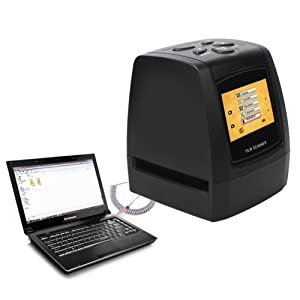
You are supposed to load slides and negatives in board holder. After that insert an SD card to the back card slot. Plugging the scanner in power, to turn on scanner, you need to press scanning button. Then you can operate according to indication of manual on device screen and scan. You can read it from PC through USB connection.
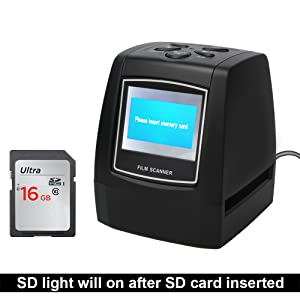
Support to 35mm/135 mm Negative & Slide, transform to JPEG format, saved directly to 32 GB SD card (Not included).
This item can be powered by DC 5V or USB cable with charged device. Without any limitation of PC operation, can work with Wins XP, Wins 7, Wins 8,Wins 10 and MAC. Just need an USB cable, you can view and edit the digital format that just scanned in PC.
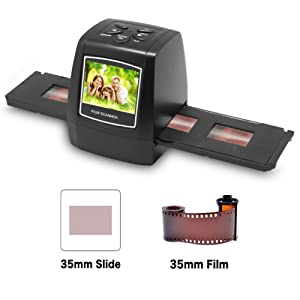
Pressing manual key to enter into main manual, you can choose slide style on shooting mode. Choose needed image type like positive film, negative film, B&W. If you want to scan B&W film, you are suppose to choose B&W. And you need to choose positive film if there is positive film at board holder. When the negative film at board holder, please choose negative film. Meanwhile, you can adjust exposure compensation to make sure that you get the best scanning result.
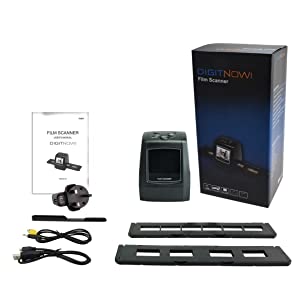
Package included:
1 X DIGITNOW! Scanner
1 X USB cable
1 X Video cable
1 X 135-Negative film holder
1 X Positive slide holder
1 X Rapid slide feeder
1 X DC 5V power adapter
1 X Cleaning brush
1 X User Manual
| Weight: | 269 g |
| Dimensions: | 10 x 8.5 x 8.5 cm; 268.9 Grams |
| Brand: | DIGITNOW! |
| Model: | M121 |
| Colour: | M121 |
| Batteries Included: | No |
| Manufacture: | BR |
| Colour: | M121 |
4.0 out of 5 stars Instructions unclea
OK to save a lot of mucking about – you must have an SD card in, otherwise the USB to PC will not work. Once in, you can use File Explorer to copy files across. The resolution is not what I’d hoped for to be honest. Very fast though.
4.0 out of 5 stars Does the job
I bought the film scanner to digitise some very old Instamatic photos. It certainly does the job OK but it isn’t perfect as the 126KPK negative strips don’t fit in the negative holder.
So far I’ve managed by just sliding the negative strips through the film slots. It works OK but the images come out a bit distorted.
I can’t work out how to send the images direct to my laptop, so I’m using an SD Card. It may be that it doesn’t work with Windows 11.
DigitNow Film Scanne
Simple to use scanner to save slides to a memory card. I had problems with the first scanner, but a replacement was sent very quickly. I will enjoy using it to save some old family slides.
We bought this bit of kit to view old negatives and to be able to convert them to digital photos. We didn’t want to pay a huge amount as once we had viewed all the negatives we would no longer have a use for it but we were not disappointed. Once you get the hang of what you are doing, it is dead easy to use – simply view the picture, decide if you want to capture it and then transfer to a SD card for future posterity.
4.0 out of 5 stars Very good value
I am using a rapid scanner to collect “index” images of about 8,000 slides and negs (scan time about 2 secs per image). I re-scan the best on my Epson V600 (scan time about 1 min. per image). I do not expect (or get) the same quality from the rapid scans as from the Epson but they mustn’t be too bad!
This is my third rapid slide/film scanner. The first (5MP) died after much use and was just about OK. The second (14MP) was shoddy, the scans were very fuzzy, the colour quality was unreliable and the scanned images have suddenly gone out of alignment within the scanner. This new scanner (5MP) is by far the best of the three. The build seems good, the slide/filmholders are well and accurately made and the scanned images are pin-sharp (very much better than the 14MP scanner and much smaller files).
The scanner worked well straight from the box except that the USB link failed with the scanner not being recognised by Windows 10. The cable supplied with the scanner was faulty and it now all works fine.
I’ve only had it a few days but so far so good for what I need from it.
It does feel a bit fragile but honestly, I can live with that and everything else. Runs off USB so I just have it connected to the laptop. You cannot save direct to PC so get a 32 GB SD Card for 7 pounds from anywhere. You can then click USB mode in the menu and it’ll appear as a file window to let you drag them to a PC, no dramas.
I was glad to see the comment about selecting slides/negatives as you need to change that, I am using the slide accessory bit and doing 4 at a time, rinse and repeat. It does default to 5M when there’s a 10M option available.. Both seem rather overkill for slides which would seem generous at 0.5M.
Yeah, happy with this. Letting me restore many years of pictures from the 70’s, 80’s…
Almost perfec
This a good product for the price and solved my problem. It is a shame that the device does not connect directly to a laptop/pc to enable the use of the SD Card to be eliminated. If it does connect to the laptop/pc then I could not find the way or instruction to do it.
once you know how to use it is very easy to use
had trouble at first kept negative on slides but once sorted works great. my only gripe is when you switch it of after using slides it reverts back to negative . then when you use it again you have to set it up again .
Seems like a good product for the price
I have just received this item. I have unpacked and used to check it works – which it does. I have a larger project I will use it for in the next 6 months to a year, which I don’t have time to do now. Therefore, I am writing this review to obtain the offered 3 year warranty, which was only offered if you write a review. The item seems perfect for my needs which will be digitising some 70s and 80s photos on slides to send to family members. The photo colours seems too come out well but the slider to insert the slides can move around slightly so if you need a ‘very perfect edge’ and to digitise quickly (four slides load at a time) it might not be ideal.
Easy Comparedto use
Compared to the scanner I used to use this is very simple and quick. Deals with 4 slides at a time.I reviewed 6boxesof sides ina couple ofhours, saving to a SD card those that I required.
Easy to use and the quality of the pictures is only as good as the negative it’s taken from.
Works great colour balance OK very easy used, if you want copy old slides negatives, this is good value for money
This could be the best thing I've ever bought!
What a fantastic bit of kit this is. So easy to use, once I’d figured out how to set it to slide mode.
Brilliant!
Great piece of ki
Very easy to use. Great quality scans when transferred from the card to my computer. Cannot fault this item.
FIDDLY TO OPEN INITIALLY BUT WORTH THE EFFORT
We ‘discovered’ almost 400 slides we’d taken in the 80’s and regretted not having had them printed as photographs because no-one likes to have to sit through someone else’s long family holiday slide show, do they? It’s much easier just to look at the odd photograph.
The DIGITNOW Slide Scanner Converter provided a quick and relatively inexpensive way to convert our slides into something much easier to consume and we’ve been delighted with the results and the memories. We’re no experts, but would say the JPEG images are as good as the original slides,.
It didn’t take too long to convert them as we were able to do four at a time, but you need to remember to put them in the correct way otherwise they show up in the viewer as being upside down. It’s not a problem as you just press the flip button and it sorts it for you.
It’s very easy and the little egg timer tells you when each slide has been converted.
Quick and easy to set up and sta
Quick to set up.
Works alone without PC.
Power cable rather than USB.
Very good
Very good little machine, good quality pictures off the old slides which were 50+ years old.
Easy to use, and very useful to transfer nearly 50 years of 35mm slides to a computer. So I can watch with my grandchildren on the television., not boxes off slides, just one thumb stick. Marvellous.
Good value for money
I found the manual could have been more helpful, but when I had managed it once, converting was a simple process.
I found the colour on one of the slides to be very yellow, but the others seemed more accurate.
It has enabled me to access old pictures & use them in a photo book successfully.
it does turn 35mm slides into jpg files
easy to use, old slides are not the quality of today’s cameras, so don’t expect miracles
Slide copie
I had hundreds of slides to convert to computer files, and it was a bit time consuming as you can only load 4 slides at a time into the loading strip. However, the end result was OK, and I eventually finished the task.
BUY THIS
I never leaves reviews but I just had too! I brought this scanner because when I received my negatives from the photo labs, loads were missing! I was super disappointed however when I purchased this, I was amazed about how easy it was and I was super pleased to have my photos!!! It’s light weight and does the job!!
Outstanding results, even on old negatives and slides
Brilliant and easy to use on both slides and negatives
Needed to scan in some very old 35mm slides I found
Easy to set up and easy to operate. Images being saved to an SD card is very useful as is the ability to scan 35mm negatives, which I’ve yet to use.
Digit now m121
I just purchased this little scanner to digitise our decades old colour slides and negatives. The unit is so compact, easy to use and the stand alone feature, saving directly onto a memory card makes it really portable. It is also very fast one click and the copy is saved. The quality of image at 10mp is beyond my expectations and transfer into photoshop for tweaking is easy with the card transfer.
Ease of use
Very lite weight so not to heavy to use. Makes looking at old negatives so easy and to be able to store on a sd card then to a computer, makes storage easy .
A good photo scanne
This enabled me to scan photo negatives onto pc. Can be fiddley putting negatives on the holder but worth it once the photos shows & enable to transfer to pc.
I have hundreds of old 35mm colour slides which i am able to put onto a S.D.Card. It is very easy to do it all you need is a bit of free time,but its very rewarding looking at my old slides it brings back happy memories of when my wife and i were married 62 years ago and also when our childdren were young. Also of when they got married and when their children came along with family holidays that we still have.
Basic scanner that works well
Very prompt delivery service from Amazon. Scanner took a little bit of getting used to to work on older Mac, but is producing reasonable results so far.
Easy to use. Good quality images from slides. Good buy and good value.
Easy to use. Good quality images from slides. Yet to try B&W and Colour negative but if the slides are anything go by it looks good a good buy. 1960 period slides scanning is very good with great colour depth. Operation selection and set up straight forward. At the moment I load in a SD card into the scanner and scan images to this.
I then put the SD card into my laptop and transfer via Nikon Image App.
easy to use
having had hundreds of 35mm negatives lying around for decades it is nice to be able to view them again. also to be able to scan to an sd card and download them to my computer. one issue i need to mention, the sd card needs to be inserted upside down ie: with the label down and contacts facing up. there is no mention in the instructions, that i can see, that tells you this. i struggled for a while and was almost going to return the item before i found the solution – otherwise 5*
Fantastic device and no computer needed. Very happy with the image quality
This is great as you don’t need to mess about with a computer to use it.
The images are saved onto the sd card just like a camera would. Super simple to use and it amazing how the picture quality turns out. Very impressed and happy to get my old negatives to digital photos
Brilliant piece of ki
Brilliant little device. I have some old film slides from my childhood, and was able to use this scanner to save them to a memory card and later get them printed, so lovely to see these pictures again. The scanner is compact and easy to use, brilliant piece of kit! Really quick to use too, I got through a load of slides in no time at all! Fast delivery, and the seller, ElecEU, was really friendly and helpful when I had a query.
So much fun to revisit old photos
I was a bit unsure about how to use this at the start but I needn’t have worried because it was so easy to use. You do need a SD card handy though to convert your photos digitally to transfer to you laptop or desktop computer. I took advice from a previous buyer that 4GB would give me about 3k photos. I erred on the side of caution and got myself a 32GB card! I am slowly working through mine and wife’s photo collection from the past approx 30 years!
Quality of digital conversation of the photos is great. This is amazing to know that the photos are now getting digitalised and hopefully secured for years. I have told all my friends and family of the easy technology to do this now and highly recommended that they do it themselves.
Great scanner of slides
Once we had mastered the instructions this scanner has done an excellent job of scanning all our many slides and recording them on the computer.
Multi film digital converte
It took me a while to suss out the on board menu, the actual loading of films is straight forward. Instructions not the best but fantastic results from it.I didn’t even know these machines existed else I’d have brought one years ago. I’ve viewed images of family I never seen before and will help my family tree recording.
Not bad
I wanted to replace my ageing scanner with something newer. I chose this one because I can simply transfer scanned photos to a memory card and review them later on my PC, indeed you can simply plug this into the mains and scan negatives and slides into it without any need to connect to a computer.
I download my scanned photos from the memory card and carry out colour correction on my computer.
All of this means I can scan items much quicker and ‘fix’ or delete them later.
As with other scanners I’ve used, colour balance is very variable, but this is probably as much to do with the age and quality of the item being scanned (many of mine are more than 50 years old), as it is to do with the scanner.
My only complaint is that the power lead keeps failing, whether this is because of a faulty fitting in the unit, or just a design fault I don’t know. After a couple of weeks using it I now seem to have mastered this issue by just being careful with where I sit the unit when I’m using it.
Overall this works well and I’d recommend it.
Good for the price
When copying slides, colour fidelity is a bit iffy. Images can look a bit too blue. Resolution is good, but contrast is enhanced, resulting in some detail being washed out.
Really good item but not so good for slides
It’s a great scanner for film negatives. It works perfectly for film negative strips.
It has a tray to put up to 5 or 6 white slides but then the tray is an extremely tight fit for the machine. I found it would only work with one white cardboard slide at a time and you literally have to rip the loader out afterwards. The loader wouldn’t fit in with the grey plastic slides at all. The results were lovely once I managed to scan them in.
eally impressed
his particular one was really good value when others are selling it for 30 more. it worked really well was easy to set up and did exactly what it was supposed to do
Not quite there
I bought this primarily to copy my slide collection and for the money it must be described as adequate. However the slides must be of first rate quality to obtain the results you require, otherwise some work is required on the computer. The sharpness / clarity of the scan could be better.
Works well
Everything works well, could hav done with some instructions for working the menu, had to find out by trial and error but it didn’t take long.
32gb is the Max
This is so easy to use. It can be a bit fiddly at first opening the slide holder but be patient and gentle with it. The max SD card is 32gb. Don’t get or use anything bigger as it won’t work. I used an 8gb SD card and can get just over 8,000 slides on it so there’s plenty to go at. In short, a great piece of kit and very easy to use.
Exactly what I needed.
Bought this as a replacement for a different cheaper one. I love how the small screen allows the user to see the picture immediately without scanning it to pc. The ability to store immediately on an sd card is great.. The instructions are relatively easy to follow. Delighted with purchase.
Very pleased with produc
Easy to use, pleased I can now view slides taken by my Dad.
Instructions
It took a little while to work out how to use it. The instructions that came with the scanner were very brief. Once I got to grips with that, I was surprised at the good quality.
It woks
Once you have mastered the clunky language and how to do it instructions it does the job. But it is a bit primitive . Opening and closing the slide carrier is fiddly and slides often move a it is closed. Need to crop pictures after as it is difficult to get picture without black edges.
Excellent value for the price.
Very easy to use, pictures came out better than expected.
I read numerous reviews before purchasing this item. Lots of people unhappy with the quality of image but equally a lot very happy for the money. I have to say this is a fantastic little gadget, I bought it to convert my Dad’s old slides into a format that was easy to view and this did the job. Some of the slides are 60 years old and of poor quality and they looked the same when converted to digital. However, the bulk of the slides are of good quality and the images are way better than expected. Takes a few minutes to set up and start using but as other reviewers have said it’s easy to use and can be done while watching TV. Just get the image the right way round to avoid extra scanning. Extremely pleased for the price
A great little machine
Once I got used to it it was great some of the slides are really old but did a good job and brought back lots of memories
Very good
Very easy to use, very satisfied with the results. Some negatives were 40 yrs old and came out like new. So glad I bought i
Capture the moments
Easy to use, and efficient way of digitalising all of those forgotten moments. Really enjoying using this. Timely and efficient delivery.
Ease of use
Easy to use once I quickly found my way around
easy to use
Used this for scanning slides easy to use and not bad picture quality.
Great easy to use scanne
Unfortunately you cannot plug this directly to a PC and so have to keep transferring SD card over and back.
Worth every penny
It’s a great machine it brings old negative ‘s too life wonderfull
Let down by poor instruction manual
Much as expected. The slide holder was difficult to open and I was scared I would break it. As others have said the language in the instruction manual is poor, and difficult to understand – it needs to be rewritten (or translated by a professional perhaps!). But once I found the single piece of paper entitled “Quick Start Guide” I was up and away – so much easier to follow.
A well-priced scanne
The viewer is very easy to use and stores all the new files on an SD card (not supplied) scanning each image in less than 10 seconds. The quality is excellent. It does what it says on the label.
Excellent device
I had 300 slides that I had no means of seeing. This device enabled me to save to my computer and edit. Very simple in operation and soon got the hang of it. Not the highest resolution but it was as advertised.
Easy to use and satisfactory results.
I had been put off this scanner by some of the reviews and was contemplating purchasing a more expensive item. However a I had only a couple of hundred slides that I wanted to scan and thinking I would no longer use it after I has finished I could not justify spending too much. The slides I wanted to scan were of very high quality and I have to say the image quality of the scan result is most satisfactory. I did scan a few slides that were not so good and of course the scan result was very poor. So you get out what you put in.
It works
Instructions were not very clear but easy to use once understood
Very good
Bought this for an elderly friend. They are completely happy with it. Easy to set up and use.
Rlly recommend
Thought this to be an amazing device as have many photos from my mums youth that would have faded if not captured now. Although I still do have some questions like how do you save your photos to your computer or even to your phone? Have scanned all my mums photos, but don’t know where to go from there. Amazing device though, thank you!
Easy to use
So easy to set up and use. Extremely happy with this purchase. Bringing many lost memories from the past back up to date. Ideal for those of us that remember slides and negatives. A bit pricey but the pleasure of reliving forgotten moments outweigh that.
Great for price
Brilliant little budget scanner. Photos, although not perfect, very acceptable. Very easy to use. Love it. Use for negatives and slides.
An acceptable product for what I need but overpriced
Adequate It works Slide and negative scans ok Appears it might actually be an older model that has been superseded The pc connectivity although not important for my purposes does not work Windows 10 does not recognise that it’s even plugged in to the USB port Slide and negative holders a bit fiddly to use
I feel I must edit this review and give the device more credit Connection to the pc has now worked on a different windows 10 laptop You can view read and edit direct on the pc Quality of the scans surprisingly good No reprieve for the fiddly slide and negative holders though however once you have done the first 500 it does get easie
Very easy to use
It was great to be able to see the pictures from negatives that were taken in the 1960’s. Very easy to use and great being able to load them onto a SD card.
I looked at several different slide scanners before deciding on this one. One thing to beware of (which I only discovered after delivery) is that there are at least three different versions of this although they all look exactly the same. I had viewed an excellent youtube video which persuaded me to buy this scanner, but I only found out when it arrived that this has 5/10Mp output, rather than the 14/22mp output on the video, and it is also missing the converters for feeding in film negatives such as 110 film. There are also different feeders for slides, but the one provided for which you preload four slides and feed them through works fine for me.
The menus take some getting used to – it defaults to scanning negatives so every time it is switched on the menu option has to be changed to scan slides. Operation is very quick -probably about 1-2 seconds to scan a slide so I was able to scan a box of 40 slides in under 15 minutes including loading/unloading.
There is a counter showing how many more slides can fit on the memory card – for a 32mb SD card (full size type) this was around 28000. 32mb is the maximum size which the scanner can accept.
I did encounter one problem – After scanning around 250 slides the machine froze – the only button which worked was the on/off switch. I emailed the support team – to date I have still not received an acknowledgement from them. A few minutes later I managed to work around the problem. I copied the memory card contents to my hard disk and then reformatted the card. The scanner magically started working again. I think I must have reformatted the SD card incorrectly although I was using the windows defaults – there is nothing in the manual to indicate how the SD card should be formatted. I now regularly copy from the SD card to my hard disk to prevent a re-occurrence.
In summary – this is a value for money scanner. If you have a good quality original then the scanned copy is very good (considering an expensive quality scanner would probably take several minutes per slide). Loading and scanning is mastered very quickly. Highly recommended
eads negatives brilliantly
But I have not been able to get it to show the neg on the computer and I cannot get it to scan and create JPEG of the photos – maybe just me – but as I just want to read the negs it suits my purpose perfectly.
Not a bad produc
Not a bad product for the money. Since receiving the item a couple days ago, already I’ve scanned hundreds of negatives and slides. Unfortunately, negatives pick up every little bit of dust and scratches. And you may have some blurry pictures with a lot of “noise,” so you may be doing some post editing work on your computer! All in all not bad. After painstakingly placing all these negatives in the scanner, you will really appreciate your digital camera!
Reasonable quality, definition could be better.
Very easy to use, unpacked it and was scanning first slides within minutes without having to read the instructions.
Results variable – depending on the contrast of original slides
Colour balance needs adjusting afterwards – I use GIMP and get reasonable results.
Very quick to scan to sd card, plug unit into laptop and you can download direct from sd card to computer.
Overall value for money.
Convert slides to digital format easily and inexpensively at home
This was a bit of a faff to get going with and the first time I used it I thought I’d wasted my money. I had masses of slides of my parents going back to the 50’s and have now managed to transfer all those I wanted to a digital format that’s quite a reasonable to good image on a computer screen. The instructions arent great so my advice would be to persevere and make sure you’ve worked through the menu options if you dont get instant success.
Excellent.
I used it to put around 1750 slides onto a couple of SD cards. The instructions aren’t great but I used advice on the amazon site
which made it very easy. I have done the job in less than a week. The oldest slides from the 1960s are, as I expected, a bit faded
but that is hardly surprising. The quality of those from the 70s and 80s are very good. I am delighted with this slide scanner. It is
probably better than I expected and I would thoroughly recommend it.
Best money I’ve spent - treasure photos recovered
Amazing little piece of kit. Very simple and the photo on the screen is of good enough quality to determine whether or not to save. Photo quality on a laptop is amazing. This has brought me 75 lost photos of my late mum and it’s therefore the best investment I’ve made. Very grateful for buying it.
Quite Adequate For My Needs
As I have plenty of time on my hands, I decided to get my slides onto my PC. This IS easy to use. The main drawback is that it would be far better with the viewing screen on the top rather than the side.
Get an sd card
Great bit of kit. Up and running straight out of the box.
Converting for PC
Working my way through hundreds of slides and negs with a view to loading them all into one hard drive . It takes time but does the job
Good for well exposed slides
This is, although described as a “scanner”, actually a 5/10 Mp camera. It takes photos of a slide using a lens and sensor, and records in JPEG format to an SD memory card. Good, well exposed slides with low contrast and in good condtition copy well. The JPEG is 1.2 to 1.8 Mb in size. You can copy a lot of slides into a 32 Gb SD card. Tweaking of exposure in the copier is minimal (compared to a photo flatbed scanner). It will copy a lot of slides very quickly. Copying takes about 2-3 seconds for each slide – compared to my own flatbed scanner which can take up to 5 mins to scan a slide. It lost stars for the following reasons. It defaults to scanning negative film each time it is turned off and on. You have to go into the menu and change the scan type to slide film each time. The menu is fiddly and not easy to follow. The instruction book is only marginally useful. The view screen is not very good. It allows you to identify the picture – but not to see it in detail. On the plus side it is a lot cheaper than a flatbed scanner (about 1/3 the cost); it is very fast, and will prodiuce acceptable results from well exposed slides.
Does the job
Easy to use. Does the job. Bit fiddly using the ‘Mounting slider’. Unexpected bonus was that I could also look at and copy prints from all my old negs. Down side is the menu system and having to make a series of selections for 35mm slides at the start of each session.
Simple and easy to use
Great product, have been using it to scan my grandads old slides. Very easy to use
A useful gadge
I bought this scanner to save my old transparencies on to a SD card. It took me some time to work out how to change the default setting which is for negative film. The printed instructions are of little help. But having finally succeeded, I find the device works well. The carrier holds four slides, but is quite tricky to open.
Perfect for the task
Wanted an easy way to view some old negatives I found and this little device worked perfectly. Easy to use, quality of scanned negatives was really good considering how old they were, and price cheaper than others. Order received promptly. Very happy with purchase.
Alive and in living colou
It’s testimony to both the Agfa photo studios of 57 years ago and this magical little gizmo that the slides my late father took of our childhood live on in such detail, with such excellent colour, contrast and picture quality. Easy to use, thoroughly recommended.
Well worth the money
Only halfway through my collection of negatives and slides going back to the sixties and so far I cannot fault this slide scanner. I know there are more expensive ones on the market but this one is ideal for going through a large collection to pick out the best ones for further work on. A great buy.
Excellent Picture Quality
I got this for my Niece to help her with her art study at school. What can I say the pictures that are transferred from the negatives are very clear and sharp and it is really easy to transfer to your computer to print out etc. I would like to point out you will need to order a SD card to use this.
A READONABLE PRODUCT
I does the job reasonably well . The resulting digital images could be improved with a photo editor after copying . To get better results , I would probably have to have paid 200 .
Product: good. User manual: not so much.
Others have said this before me, but the user manual is lousy. However, the product is intuitive enough to use and it was quick and easy to hook up to a TV while reviewing some old slides.
My first impressions weren’t good; the scanner connects to the TV/PC via an AV lead and the output quality was poor. The slides (when previewed live on screen) looked washed out and the screen swam with faint static. So I wasn’t expecting great things from the scanned images that had been saved to the SD card. Happily, however, the scans themselves were infinitely better than the previews on screen. When I plugged the SD card directly into the TV (and later, via an adapter into my PC), the images were excellent.
The scanning process itself is very quick and simple, and it’s worth pointing out that you don’t have to plug the scanner into the TV at all. The preview window works fine for choosing and reviewing the images. The scans are saved to the SD card so all it really needs is the power supply.
All in all, then, if you want a device that allows you use the TV/PC connection to run a live slideshow for your family, this isn’t going to be your best choice; the preview quality really isn’t good enough. You’d need to adopt a 2-stage process: scan first, then show the scans on screen. Do that, and the quality is fine.
On the other hand, if you just want to scan old slides quickly and to a decent resolution (5MB is the default) then this will very happily do the job, and at a reasonable price.
Very easy to use
Really easy to use and found lost photos of my mum in the hundreds of negatives I have. You may wish higher resolution scanner for important photos but for snaps this does the trick
A very useful device
Used for reading 35mm negatives and downloading them to PC
Pleasantly surprised at the quality
Pleasantly surprised at the quality of the photos scanned.
Wanted to connect to an iMac but that didn’t work so used a memory card. (Make sure it’s a new memory card.)
If you are copying 35mm slides remember to set it up correctly so that it is not a negative image i.e. by selecting “Menu”, then “Capture”, them “Film Types”, then “Slides”.
Apart from that make sure there’s something interesting on TV ’cause it’s pretty time consuming if you have a lot of slides .
Gets the job done
Arrived promptly, had some slides from my Mothers estate and needed to see quickly. Great little produc
It is pretty easy to use & once I realised Black & White seemed to be the default for some reason & you had to set it for colour I got my coloured slides onto my Lap Top. That is my only niggle as you have to set for colour for each slide… a pain if you want to do a lot at once.
Good value
Great product, bit fiddly putting the film in holder, ok once you get used to i
Great gadget for looking at your negatives
Great gadget for looking at your old negatives, compact and easy to setup, only thing i’d pick up on is that the cable provided to connect to external display are too short, the need to be longer or you need to go buy an adapters
a very good uni
his unit is very good for the job in hand
Instruction manual not great.
Good product – came really promptly. Instruction manual could be better but I did work it out. Great to see my old slides on the laptop!
Great produc
Generally it’s a great product, my only criticism is that I have a lot of 110 negatives .but not able to recover. I would have given five stars if this was covered.
Digitnow slide scanne
Worked straight of the box, I am not technically minded, but so easy to use, scanned 36 slides in about 10 minutes, took SD out, put into my laptop and stored them there, I also have a apple lighting SDcard reader so saved them to my wife’s iPad. This scanner was well worth the money.
Digitnow slide scanne
Worked straight of the box, I am not technically minded, but so easy to use, scanned 36 slides in about 10 minutes, took SD out, put into my laptop and stored them there, I also have a apple lighting SDcard reader so saved them to my wife’s iPad. This scanner was well worth the money.
Glad I bought i
Love this not all pictures come out OK but my negatives are quite old