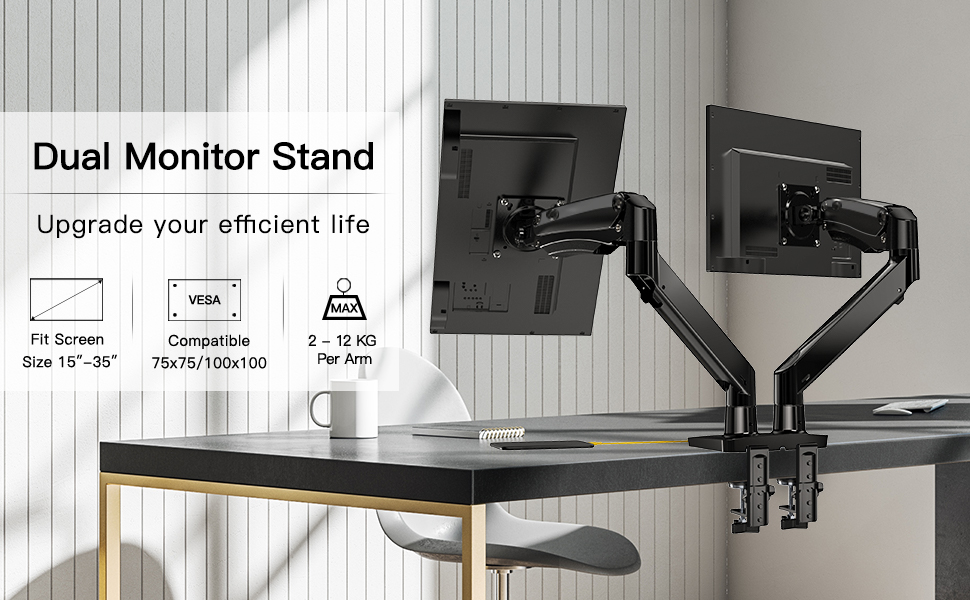
HUANUO Dual Monitor Stand for 15-35 inch Ultrawide Screens, Gas Spring Monitor Arm with USB Cable, Full Motion Monitor Mount Weight up to 12KG

Dual Monitor Stand with Multi-use USB Connectors
This dual monitor arm has 2 universal USB ports, which is more convenient to charge your electric devices without additional adapter.
Sturdy & Stable Dual Monitor Mount
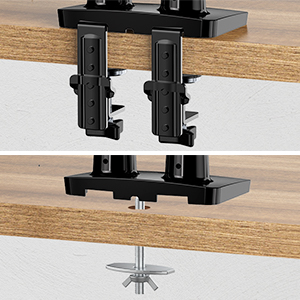
The solid construction, enlarged base and double clamp design increase the stability of the dual monitor mount. It supports both clamp and grommet installations. The C-clamp works for desk thickness is max.8.89 cm while the grommet base works for desk thickness up to 9.94 cm. Choose the proper one for your needs.
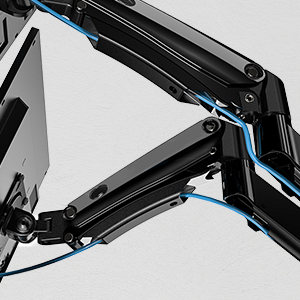
Cable Management
HNDS12 dual monitor mount includes the cable management function which effectively manages your cables and route them down the arm and behind the desk , solving your cable clutter and keeping a tidy and clean workstation.
 |  |  | 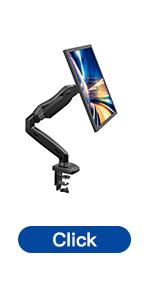 | 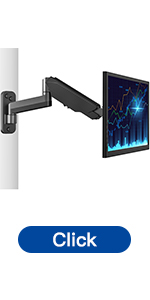 | 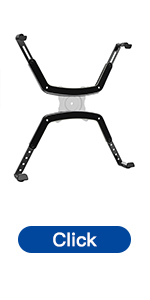 | |
|---|---|---|---|---|---|---|
| Fit Screen | 13″ – 32″ | 13″ – 27″ | 13″ – 35″ | 13″ – 30″ | 13″ – 42″ | 17″-27″ |
| Material | 2-9 KG | 2-6.5 KG | 2-12 KG | 2-6.5 KG | 2-8 KG | 6.5 KG |
| VESA | 75×75 / 100x100mm | 75×75 / 100x100mm | 75×75 / 100x100mm | 75×75 / 100x100mm | 75×75/100×100/200*200/200*100mm | 75x75mm |
| Screen Rotation | 360° | 360° | 360° | 360° | 360° | / |
| Screen Swivel | 180° | 180° | 180° | 180° | 180° | / |
| Screen Tilt | +45°/-45° | +35°/-50° | +85°/-30° | +35°/-50° | +45°/-45° | / |
| Max Height | 43cm | 40cm | 52cm | 40cm | / | 42.6cm |
| Max Extension | 53cm | 47cm | 55cm | 47cm | 46.5cm | / |
| Mounting Options | C Clamp / Grommet Mounting | C Clamp / Grommet Mounting | C Clamp / Grommet Mounting | C Clamp / Grommet Mounting | Wall Mount | / |
| Hardware for installation | ✓ | ✓ | ✓ | ✓ | ✓ | ✓ |
| Dimensions: | 43.5 x 30.3 x 14.9 cm; 7.47 Kilograms |
| Model: | HNDS12-E |
| Manufacture: | HUANUO |
| Dimensions: | 43.5 x 30.3 x 14.9 cm; 7.47 Kilograms |
| Origin: | China |
Perfect for large screens
Strudy and easy to use. Keeps desk tidy with wires all in the right place!
Decent quality dual mou
Used for over a month now, no issues pretty sturdy, I didn’t bother using the usb cables as it seems pointless. Only issue I had or wasn’t very clear with instructions is the height adjustment, you have to push down hard on the arm to see that screw and to loosen up.
As some people have said you’ll need to have room at back of desk to get full use of arms.
Fantastic
So I thought this was going to be a difficult set up, my desk has a large back piece but I was able to use the cable hole to secure easily. 10 minutes to set up. Fantastic produc
Excellent quality, very easy to adjus
Holds two Philips ultrawide monitors well. Excellent inbuilt cable manageme
Sturdy product, hows my UWHD monitors easily
Very sturdy, holds both my MSI ultra wide monitors without any sagging. Easy to manage cables behind (although I did a lazy man’s job). Can’t fault it at all great product especially at the price. Bought it when it was 20% off.
Very strong
My son was desperate for two monitors to complete his gaming station! He saved up for the 2nd monitor and arm and they were installed today (15.1.23). Took both myself and my husband to set up, mainly due to the gas cylinders and having to hold the monitors in place to assess where to drill hole (in desk).
We couldn’t quite figure out where the Allen key went to amend the pressure!! But you have to really squeeze down on the gas handle to access the holeonce we figured that then all fine!
We also can’t get the usb hubs to work but my son doesn’t require them so haven’t looked into it too much.
In the end it looks fabulous and son is v happy!
Used it to mount my 34-inch Huwaei Mateview GT Ultrawide and my 27-inch Dell curved monitors.
Works perfectly, could clearly handle more weight. I was expecting a solution that works so well to have cost upwards of 150. Brilliant!
Brilliant monitor mount well worth the money
Fantastic product fully adjustable with ease just waiting for 2nd monitor to be delivered now
Limited height options so not suitable for all
Very nice product, but there is a limit to the height you can go so may not suit all users.
Well-built and easy to assemble/install
Quick to build and mounts simply to a desk of any thickness with a clamp. Arms both move smoothly once installed and adjusting the height is also very easy.
Excellent and sturdy
Very nice and quality product. Easy to assemble and takes less time. One minor issue I noticed that if your two monitors are close to each other the mount might extend beyond the rear of the table – but I guess this would be with most of the other mounts in the market.
Very solid
I use this with 2 x 27-inch monitors, it’s a bit overkill for me and is really for bigger screens. It’s not that easy to put together but is very solid and sturdy when assembled.
easy and quick to adjust, perfect for two 24inch scree
simple to adjust, lots of flexibility about how to move the screens indipendently
2 Months in and still very stable with 27"/24"
I waited for a 2 months to check for dropping issues etc but it’s held with no lessening of tension etc. Using dell 27″ on one and 24″ on the other. Both tensions required were solvable with adjustment.
My desk is 2.5cm thick wood and a little surprisingly with the overlap on top of 12 cm this is held firmly even whilst shifting it about. The torsion gets distributed very well.
By very gentle adjusting the tension. The upward force you feel at an angle seems stronger than is, I went down way lower initially because I thought it’d launch my monitors.
Make sure you push the arm horiz to access the tensioner with the akey.
The fasteners radius slight exceeds the space remaining to the under-inside of the desk rim which is a little tricky to tighten.
Great price and very useful, looks good too.
It holds up a 34 inch and a 24
After a bit of work, I finally managed to mount both my monitors on this stand. It holds plenty of weight (1 x 34inch and 1 x 24 inch).
To be able to get the 34 inch monitor in the middle, I had to move the centre post all the way to ine side and fully extend the arm.
It’s impressive that after a few weeks, there has been no sag at all.
The mounting system is solid and unlike my old stand, it doesn’t feel like it will detach from the desk.
There are two USB 3.0 extension cables which need to be installed prior to mounting. It would have been nice if these were daisy chained and a bit higher off the desk as this limits what can be plugged in them.
All the tools are included and you can adjust the strength/stiffness of the arm with the allen key.
Overall, I am pleased with the purchase.
Works well and easy to install
Easy to install and works well for both monitors I have setup with it.
Impressive
Easy to assemble, multiple options and super sturdy. Holds two 27″ at any positions and distance, no problems.
It’s easy to adjust pressure, so the monitor stays in place, and lock movements, so the arms don’t swing after finding the perfect placement.
Haa freed a lot of space from my standing desk.
Great product and high quality. Worth the money.
Very study, easy to adjust and looks good. Build quality is high and holds 2x 24″ monitors with ease and theres plenty of room for adjustment both horizontally and vertically.
However, the provided USB cables do not work, no power or data transfer. They can be easily replaced with other cables however it’s hastle as the stand is already assembled and mounted to the desk.
USB 3 ports are extension cables fitted manually, base has holes for them.
My only issue is the USB 3 ports are not built in, they’re just extension cables you put in during construction, so you dont gain any extra USB 3 ports like it appears, Overall very happy with the purchase. May end up getting another when I have the monitors to mount on them.
Better than expected
What a game changer! I mostly work from home and wanted to free up desk space. (Various boxes and stands for existing monitors) The screens are closer to me ( so I can sit with better posture) and I have room for my laptop, papers and all manor of other things on the desk.
The instructions were reasonably simple to follow, the stand is rock solid once the gas has been adjusted for screen weight and I’m really impressed with the quality. I mounted it on a glass desk with a couple of wooden blocks to increase the depth and distribute the load across a wider area.
Powerful monitor stand saves lots of desk space
This is a strong monitor stand that comes with two high quality usb 3 extension leads that you can run to a computer to provide two usb ports on the stand base. This could be used for a Windows Hello fingerprint reader. The cables are long enough to reach to the top of a PC from a standing desk
Monitor positioning is superb apart from vertical tilting. Despite tightening the end of the monitor arm I can’t get it to stay in any position with the bottom of the screen tilted towards me.
27" curved monitor attached
Was not sure if arms would hold two 27″ curved monitors, but they do really well, nice addition with the USB ports at the base. Really impressed with design.
1A Mopped
Hlt meinen Laptop und einen 28er Monitor wie nix. Wrde auch doppelt so viel tragen, da gibt eher die Tischplatte auf, als das Ding. Strong buy.
Height & Tilt adjustable
Good price for an entry level to arm monitor mounts. Had no issue installing it on my desk, the instructions are not as clear as ikea but were hard to go wrong with. All allan keys included, need phillips screwdriver.
Note: Once you have it set up, the rotation, distance, tilt are easy to move but the height is a bit tricky.
For the tilt : Slowly adjust the screw until you can tilt the screen whenever you want. A little to much and your monitor will tilt all the way down, too tight and you can no longer tilt the monitor.
The height is difficult to get right. My advice is to place both arms on the rubber grip on top of the arm just behind the monitor attachment and slowly press down with all your weight. It’s really tough to get moving! Once you have it open, the allan key hole is visible. Decrease the weight by a lot, until the arm no longer floats away to the default position.
Details:
– Monitors: (1) Left: ASUS VG1A 27 inch 2k 170hz and (2) Right: ASUS VA127 27 inch 144hz.
– Table: IKEA Office Chair (MALM 140cm x 65cm)
First I was quite afraid due to famous “Chinese” quality, but decided to pull the trigger and I’m absolutely impressed.
Unboxing: Everything organized, properly packed so it doesn’t have any scratches and no parts missing. It comes with all the screws and keys to assemble.
Structure: It’s insane. Rock solid. It’s a very dense black painted metal that after assembled gives you piece of mind that your monitors will be safe and properly hold. It’s sturdy as hell.
Assemble: Easy and quite straight forward. No issues at all, but the adjustment can be tricky because the height adjustment screw is hidden. I’ll share more in the “adjustment” part. The product comes with all screws and keys to assemble.
Manual: Could be better, but gives you everything that needs to assemble it correctly.
Adjustment: Everything is easy and straightforward to use, but the height adjustment is tricky. I saw in someone in the review section mentioning that didn’t found the monitors height adjustment and returned the product. But THERE IS A HEIGHT Adjustment. You just need to push hard the second arm (the superior portion of the arm that attaches the monitor) and it will revel the hex screw to use the Hex Key(“Allen Key”). See picture attached.
Pros: I’m genuinely impressed. I strongly recommend the purchase but pay attention to the cons below.
Cons: I suggest to use in long tables (in terms of depth), so you have enough space between the table and the wall. Due to the superior arms (the ones that attaches to the monitors) being long, when you try to adjust the monitors in a way that the monitors are beside each other (see my setup in the picture) the monitors stay in a position very close to user. Make sure it suits your needs and, to compensate, you can pull the table forward.
Extremely impressed!
Details:
– Monitors: (1) Left: ASUS VG1A 27 inch 2k 170hz and (2) Right: ASUS VA127 27 inch 144hz.
– Table: IKEA Office Chair (MALM 140cm x 65cm)
First I was quite afraid due to famous “Chinese” quality, but decided to pull the trigger. And it absolutely impressed.
Unboxing: Everything organised, properly packed so it doesn’t have any scratches and no parts missing. It comes with all the screws and keys to assemble.
Structure: Its insane. Rock solid. It’s a very dense black painted metal that after assembled gives you piece of mind that your monitores will be safe and properly hold. It’s sturdy as hell.
Assemble: Easy and quite straight forward. No issues at all, but the adjustment can be tricky because the height adjustment screw is hidden. I’ll share more in the “adjustment” part. Comes with all screws and keys to assemble.
Manual: Could be better, but gives you everything that needs to assemble in the correct way.
Adjustment: Everything is easy and straightforward to use, but the height adjustment is tricky. I’ve even saw in Amazon someone mentioning that didn’t found and returned the product. But TES THERE IS A HEIGHT Adjustment. You just need to push hard the second arm (the superior one that attachments the monitor) and it will revel the hex screw to use the Allen key (hex key) – see picture attached.
Pros: um genuinely impressed with the above mentioned parts. I strongly recommend the purchase but pay attention to the cons below.
Cons: I suggest to use in long (in terms of depth) tables of if you have enough space between the table and the wall. Due to the superior arms (the ones that attaches to the monitors) being a little long, when you try to adjust in a way the monitors are just beside each other (see my setup in the picture) the monitor stay uma. Position very closely the user.
Richtig gu
Ich habe einige huano Halterungen ausprobiert, bis ich die passende gefunden habe.
Diese ist absolut super, weil die arme ausreichend lang sind.
Resistenza garantita
Il prodotto davvero robusto. ho montato su due monitor un 34pollici e un 32 senza fare una piega. molto bello.
Produkt wie beschrieben, einfach SUPER!
Kann ich weiter Empfehlen. Produkt ist wie beschrieben einwandfrei. Es hlt was es verspricht.
Nutze ein 34″ mit einem 27″ Monitor. Da bis 12 kg pro Arm Tragekraft vorhanden ist, keine Probleme.
Brauchte nur fr den 27″ ein wenig Spannung von der Gasdruckfeder nehmen, da er sonst durch sein geringes Gewicht nach oben ging. (Drittes Bild zeigt die versteckte Stellschraube)
Was andere schreiben wegen der Stellschraube, bitte die Anleitung lesen und verstehen, dann klappt das auch xD
This dual monitor arm is truly HEAVY DUTY, well designed and represents fantastic value for money.
I am using it to support two Dell 27″ 4K monitors and it does so with ease, showing no signs of stress/struggling at all.
The stand sports a mostly metal construction with a double width base for extra support, especially if using the twin C clamps. The adjustability, height and reach of the arms is excellent, they can go high, low, sideways, which way, any way, tilt, rotate you name it.:
Tension adjustment is easy via the usual bolts and supplied hex keys and once your monitors are in place it can be tightened up as to not move by accident.
Two front accessible USB extension ports were easy to fit as well, a nice feature. Integrated cable management space exists in both the arms which was also fully removable to make for easily cable routing.
I really can’t believe how good of a product this is for the under 65 I paid for it.
Absolutely destroys the ‘T’ shaped double monitor arms you usually see.
Clear instructions as well, only thing you’ll need that’s not included is a Philips screwdriver.
Without a doubt the best quality stand available for the money. I can’t understand some of the negative reviews I have read about this. If you can’t work out how this works or how to assemble it, then you’re missing some of your own screws!
ot suitable for ultrawide monitors
Looks like a really good product but didn’t go with my Philips 346b1c monitor. I have tried to tighten its monitor plate a lot, but the stand is not able to hold the monitor upright.
Does what it says
Very simple to assemble, supporting both my 34″ curved monitors with ease.
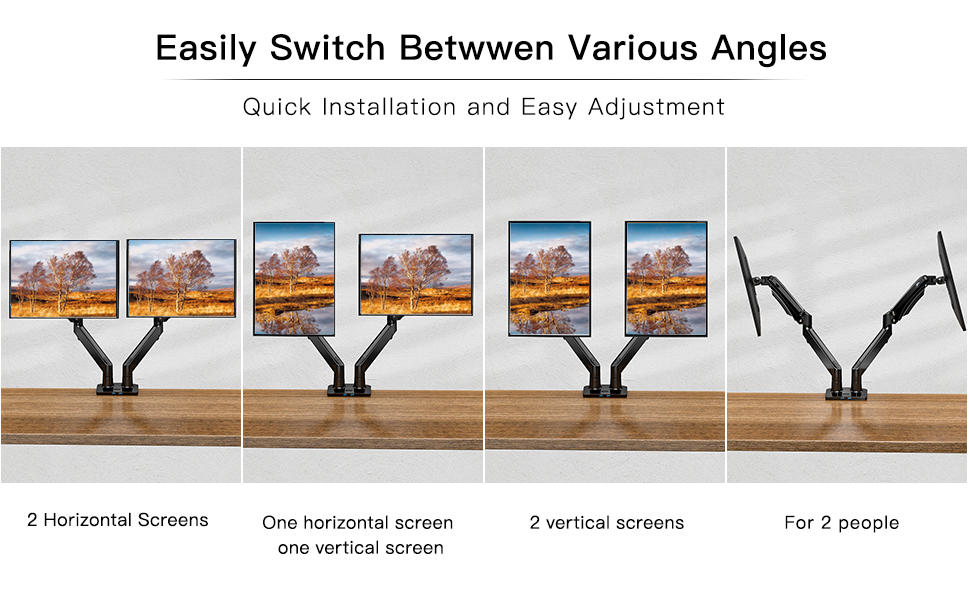
I like that I can move the position of the monitors easily. Suits my working from home well – I can have the screens next to each other when working on large projects, or move them further apart if I just need to keep an eye on something whilst concentrating on something on another screen.
Great dual monitor arm for a decent price. Some reviewers are complaining about confusing instructions but for me it was pretty straight forward. Also modifying the tension of the arm is just rotating the screw left or right until you monitor stays in place. Please don't be fooled by the "False advertising" review by "SPH" about the tension screw missing, you just need to follow the instructions that are literally mentioned on the top of the screw and move the arm downwards to reveal the tension screw.
Great dual monitor arm for a decent price. Some reviewers are complaining about confusing instructions but for me it was pretty straight forward. Also modifying the tension of the arm is just rotating the screw left or right until you monitor stays in place. Please don’t be fooled by the “False advertising” review by “SPH” about the tension screw missing, you just need to follow the instructions that are literally mentioned on the top of the screw and move the arm downwards to reveal the tension screw.
Für 2x 27 Zoll sehr gut geeigne
Meine beiden 27 Zoll Monitore wiegen jeweils 4.5-5.5 kg. Die Arme haben keinerlei Probleme diese zu tragen, jedoch musste ich bei einem Monitor die Schraube an der Halteplatte des Monitors sehr fest anziehen damit dieser nicht immer wieder nach vorne kippt. Fr meine Monitore sehr gut geeignet bei schwereren Monitoren mit ungleichem Schwerpunkt wahrscheinlich Probleme diese in der Neigung festzustellen.