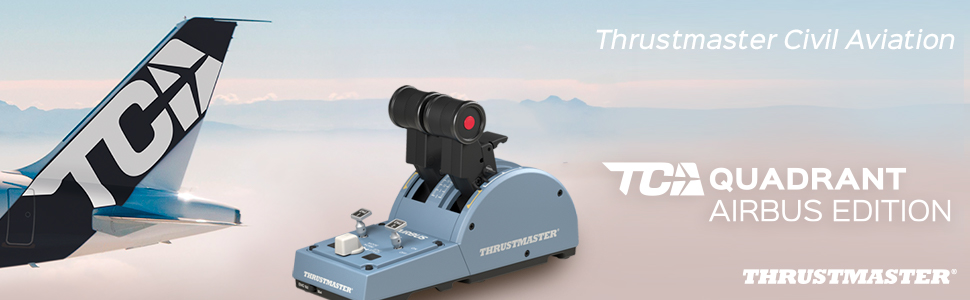
Thrustmaster TCA Quadrant Airbus Edition: Ergonomic Replica of the Airbus Throttle Quadrant – Compatible with PC
| | | |
|---|---|---|
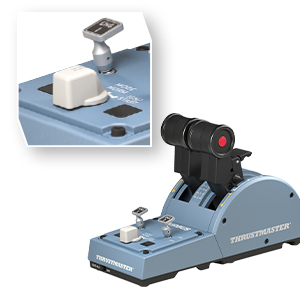
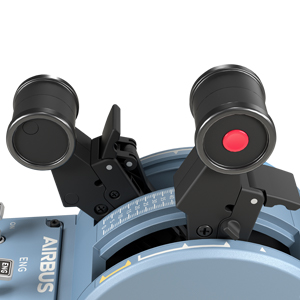
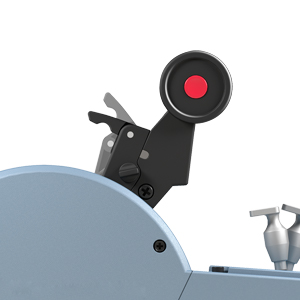
ICONIC AIRBUS CONTROLSThe TCA Quadrant Airbus Edition features 8 ergonomic physical action buttons (plus 8 virtual buttons on the thrust levers, for a total of 16), which are replicas of Airbus airliner controls (A320neo type). Feel realistic sensations when using the throttle quadrant’s buttons, detents and other controls — just like a real aircraft captain | DUAL THRUST LEVERSThe TCA Quadrant Airbus Edition features two separate thrust levers, inspired by their real counterparts found on Airbus airliners. For even more realistic use with four-engine aircraft (Airbus A380 type), two throttle quadrants can be linked together (additional throttle quadrant sold separately), giving you access to four thrust levers instead of two! | UNIVERSAL THRUST REVERSERThe TCA Quadrant Airbus Edition features a built-in thrust reverser mechanism, which is fully functional on airliners, light aircraft and transport aircraft. |
| | | |
|---|---|---|
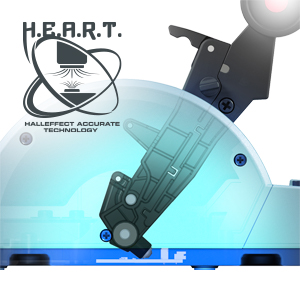
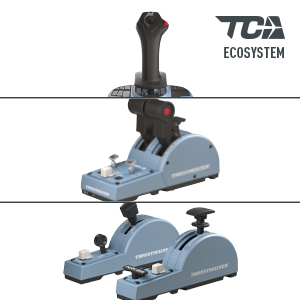
MAGNETIC TECHNOLOGYThe contactless H.E.A.R.T (HallEffect AccuRate Technology) system, with no potentiometers, gives the throttle quadrant an unlimited lifespan and ensures optimal precision during flight sessions. | PILOT ANY TYPE OF AIRCRAFTThe stepped mode is inspired by its counterpart found on Airbus airliners, with iconic detents. Mechanical selectors let you disable the detents and thrust reversers (to switch to linear axis mode), for flexible piloting of any type of aircraft. | AIRBUS TCA AVIATION ECOSYSTEMThe Airbus TCA (Thrustmaster Civil Aviation) ecosystem offers many optional add-ons, to enhance your immersion in games. Check out the TCA Sidestick Airbus Edition, TCA Quadrant Add-On Airbus Edition, TM Flying Clamp and the famous TFRP rudder system (all sold separately) for breathtaking flying sessions. |
COMPATIBLE WITH T.A.R.G.E.T SOFTWARE (INCLUDED)
T.A.R.G.E.T (Thrustmaster Advanced pRogramming Graphical EdiTor) is a software suite that lets you test, configure and program Thrustmaster controllers.
T.A.R.G.E.T includes built-in presets for well-known games (both recent and older titles), for every compatible Thrustmaster accessory.
Add or create new presets — without any limits!
| Dimensions: | 290 x 140 x 200 cm; 530 Grams |
| Model: | 2960840 |
| Origin: | China |
Great for added realism
This set is great to get the added realism when flying Airbus aircraft in MSFS. Sidestick is responsive and suitably sensitive. The throttle is a gamechanger, with a guarded reverse, and detents that feel like the real thing. The throttle engine controls are also great for that added simplicity on start-up.
There are lots of extra buttons on the sidestick and 2 extra ones on the throttle that you can also assign which is handy for customizing everything.
Having been a user of Thrustmasters Warthog HOTAS for 5 years, i can say this lives up to those standards, even if its not of quite the same heavy metal build quality.
Makes the SIM experience much more immersive
While obviously trying to fly a plane using a keyboard isn’t much fun, you might wonder whether purchasing just the sidestick would be enough. Having acquired the various TCA components over time I can say that you really do want to have all three. The throttle quadrant is a vast improvement over the little slider on the main side stick and then having proper control of flaps and spoilers with this add-on is a significant improvement. This is perhaps more so with flaps, which otherwise have to be extended rather awkwardly via buttons on the sidestick, whereas having spoiler control is more of a luxury than a “must have” but all together this makes the experience much closer to flying in a fixed base sim. Given that the total cost of the hardware is about the same as a couple of hours in the sim, I think this is well worth it.
Pretty good
A bit light and ‘toy-like’ but that’s ok. Sometimes I can’t set the thrust to an accurate position at low levels, but it’s not a big deal.
Easy to setup
Great quality, easy set up, all controls worked perfect even on a boeing plane with different set up.
Thrustmaster TCA Officer Pack Airbus Editio
Its better than what I expected. Its works great with Arma 3 and other flight simulator games. There is no pre-mapping, so you would after configured the buttons yourself to what you want and once you’ve don’t that it’s all good, play until you heart content. Both the stick and the thruster works very well. Great price and I would recommend getting.
Flight sim
I bought throttle quadrant to complete my flight sim setup and i don’t regret it they are incredible smooth with and without the predetermined power settings and the reverser has a good range of motion and has a nice and handy full motion lock. If you don’t understand anything I just said whatch a YouTube video
Present for family
Purchased as a present for family member who has really enjoyed the product for use with his compute
Makes flight sim experience more enjoyable
This is a great edition to your flight sim controls especially if you fly any twin engine jet or prop aircraft. Adds realism to the experience. Good quality and from thrust master it is a build quality that should last ages.
joystick makes landing on MSFS2020 authentic
if you are into aviation and play alot of XWINGS DCS world or MSFS2020 the sidestick is comfortable to use and smooth.
throttle quadrant starts out a little sensitive in MSFS2020 but can easily be adjusted. awesome for the Airbus A320NEO/A310
when flying the Boeing 747 the throttle quadrant will divide itself to allow control over all 4 engines
Brilliant totally recommended
Lovely piece of kit, joystick and throttle works amazing, I have been using it on MFS, absolutey no problems with sensitivity as some people had, I guess it depends on preference. Out of all the ones I looked at, I totally recommend this one!
Excellent, only one flaw
The sidestick and quadrant are excellent, they feel a good weight, the quadrant could have a bit more weight to the base but is just fine. All works very nicely. My only criticism is that the throttle range prior to the first detent is very small, which makes it hard not to spoil up the engines excessively when taxiing, but really very minor effect on enjoyment.
5.0 out of 5 stars Perfec
Bought for my son who uses it with Microsoft flight simulator. He has had no issues with it.
A good quality, handy throttle with some nice Airbus touches – works great on X-Plane 11 with my ToLiss A319/A321, and can be configured with any other aircraft in the X-Plane controller settings.
I’m aware it works with FS2020 also, although I haven’t used it much on that sim.
The thrust detents work great, although the manual thrust ‘gate’ is a fair bit smaller than on the real thing – although the quadrant on the whole is probably just over half the size, so this is to be expected.
My only minor criticism, is the resistance still feels a little too low, meaning the motion of the throttles is a little bit too loose, but still doesn’t feel flimsy or poorly built (remember this isn’t a professional 1:1 replica piece of hardware!).
Overall good value, for those looking for a handy throttle quadrant, which works especially nicely flying your chosen Airbus!
Met my expectations 100%
I bought this having looked at all the options in the price range and decided on this because of the Airbus branding. Don’t be put off by it thinking it’s style over substance, it isn’t and the product met my expectations 100%
Pros:
-Buttons feel quality
-Moving the stick is smooth and feels good with excellent return to centre system
-Set up was easy with windows recognising it and programing controls was easy (I use FSX)
-Although plastic it is of sturdy quality
Cons-
-Throttle is a nice feature but small and hard to use
Met my expectations 100%
I bought this having looked at all the options in the price range and decided on this because of the Airbus branding. Don’t be put off by it thinking it’s style over substance, it isn’t and the product met my expectations 100%
Pros:
-Buttons feel quality
-Moving the stick is smooth and feels good with excellent return to centre system
-Set up was easy with windows recognising it and programing controls was easy (I use FSX)
-Although plastic it is of sturdy quality
Cons-
-Throttle is a nice feature but small and hard to use
Great but probably quadra
Had this for a few month now and its working great, don’t know if its my quadrant unit but my thrust detents wont work properly no more and the left one does weird stuff. Other than that its grea
A must have for msfs2020 if you fly the airbus
Works perfectly out of the box. Adds to the immersion when flying the Airbus A320. Sturdy equipment from Thrustmaster as always. Perfect.
Flight Stick Which can be used Left Handed
I was using a Saitek-Logitech X52 Pro set up with MSFS2020, but although this has over 30 configurable, buttons, sliders, and knobs, it can only be used right-handed, and I am left handed.
So I replaced this with this Thrustmaster Flight Stick which has 16 or 17 configurable buttons and can be set for LH use.
The Thrustmaster was immediately recognised by MSFS2020, and basic configurations were preset. The actual joystick has a very smooth precise action, which made flying the sim’s planes easier.
In a previous review a customer complained of the poor detente on the throttle slider (activation for button 17). I too had this problem. I solved it by removing the unit’s baseplate and slightly loosening the screws securing the throttle slider. There is now a clear, positive detente on the slider, but, of course, opening the the unit invalidates any warranty, so this is a risk.
Fits the bill perfectly!
Being an enthusiastic flight simmer and retired Aeronautical Engineer I really appreciate the quality of this produc
Fits the bill perfectly!
Being an enthusiastic flight simmer and retired Aeronautical Engineer I really appreciate the quality of this produc
AS GOOD AS NEW
This product is so overpriced but spotted a used AS good as new offer for just 88, the product really is AS good as new and was well worth the purchase to upgrade my throttle quadrant.
Great accurate stick
This stick is really comfortable, very accurate. I love the ability to change hand orientation.
A couple of things I would change; the throttle control is clearly an afterthought, no ability to reverse thrust. And the base could be a little heavier as achieving full deflection causes the stick to lift off the desk. Both these issues have solutions. Buy the throttle quadrant and screw the stick down via the threaded holes on the base. All in all, for the price, 100% recommend.
Excellent joystick for the price
This is a really good joystick, it has a smooth and firm action in all 3 axes with a medium strength spring. I am using it with X-Plane 11 with the B737-800 and had no issues installing and configuring it.
The only small downside as others have said is that the throttle slider came installed upside down on my unit, it was sticking out below the front of the unit at minimum throttle. Also the detent arm for reverse was not even touching the cut-outs intended for it so it had no feel at all. I fixed both these issues myself with little effort.
You can lift off the black plastic throttle button by carefully and slowly rocking it up and down as you lift. Then remove the screw holding the plastic detent arm and lift it off. Cut a couple of thin strips of electrical tape and place directly underneath where the arm sits, as close to the screw as possible. Replace the arm, press it down on the tape and tighten the screw. The arm ends should now sit about 2mm higher than before. Add another layer of tape if needed.
There is a very good guide on Reddit to do this, just google “Detent Fix for Thrustmaster Airbus Stick”.
I’m not going to knock off a star for this problem even though this should have been done correctly at the factory as it was a very easy fix and I otherwise love this joystick. Hope the above is helpful to someone.
Just wow
This product is awesome really changes the feel of flight simulation it takes a little tinkering to get it working with MSFS but really awesome
Value for money
I ordered this to dip my toe into Microsoft’s Flight Simulator (combined with VR). At the price point its a quality piece of kit and feels pretty solid with good buttons and a responsive stick with no dead zone. The throttle slider lets it down, it slides up and down smoothly enough and does the job but the plastic slider twists from side to side (almost feels loose) and the supposed detent to allow for reverse thrust is none existent, you just can’t feel it All that said I’m really enjoying using it and have no regrets buying it. I think to improve on this stick you would have to spend considerably more money.
Great quality, really impressed
It has a nice, solid feel to it. Really impressed, especially for the price. The throttle is not the best design, but I have a separate throttle so not worried.
Great quality, really impressed
It has a nice, solid feel to it. Really impressed, especially for the price. The throttle is not the best design, but I have a separate throttle so not worried.
I bought this for my son – who is rightly or wrongly following his dad’s footsteps into commercial aviation – as a Christmas present. It’s early days yet, but as his school has an A320 sim, and it’s training aircraft are all glass cockpit DA40/42’s, I thought this might be the most appropriate controller for his PC.
The Captain pack comes with the joystick itself, the thrust levers, and the flap/speedbrake attachments.
The joystick is very similar to the real thing, with a few extra buttons here and there, which you could assign within your sim of choice to various functions. One of the things I really like, is the ability to switch over the control from left-handed operation to right, and vice versa. With the autopilot disconnect switch and A.N.other (that doesn’t exist in real life) being swappable.
This is a major plus point, as not only does it allow you to fly an Airbus style aircraft from either seat, with the controls correctly laid out, but, in the case of my lad, he’ll do his initial training in the DA40 from the left seat, so being able to ‘fly’ with his left hand and operate the throttle and other controls with his right – later switching seats as he progresses to the end of the course. And this pack allows him to switch over ‘seamlessly’.
The joystick itself, and the whole pack, is made from plastic, but generally feels substantial enough to put up with the rigours of simming. If you don’t have rudder pedals, the joystick has a twist function to allow some form of rudder control. This can be locked out with a switch underneath the base of the unit.
The thrust levers are set up for Airbus flight straight out of the box, with ‘detents’ for CLB/MCT/TOGA almost like the real thing. The ‘detents’ can be removed, again, by accessing the underside of the unit. Reverse lock switches are in place, though the ‘lift’ to go through the gate actually into reverse isn’t there. Likewise the engine switches are straight forward switches, whereas in real life, they have a ‘lift’ over the gate to activate. A shame this wasn’t incorporated, but not a deal breaker.
Just below the engine switches are the two fire indicators – only they’re not – they’ve been replaced by push button switches – which I think is a good compromise, it ‘looks’ the part, while adding some extra functionality, as again, these can be programmed/allocated to your liking.
And in-between the ‘fire indicators’ is the engine crank/start-ign rotary selector – all present and correct, though again, there is no ‘lift’ required to activate it (you’ll see a common theme here)!
Either side of the throttle quadrant, are the speedbrake, gear, and autobrake controls to the left, and flap, rudder trim, and park brake to the right.
Starting with the flap selector, it looks like a scaled down version of the real thing (the whole of the thrust lever assembly is scaled down to around 1/2 real size (ish – it’s been a few years since I flew Airbus). But, as with all other controls some of the real life features are missing – in this case, the lever that you have to pull up to release and move the selector from detent to detent is physically in place, but it doesn’t move, or serve any purpose other than ‘looking the part’. The detents themselves are all there for Flap positions 1, 2 & 3, so again, a decent compromise.
Below the flap lever is the rudder trim, along with the rudder trim reset button, and below that still is the park brake – again a simple switch, which should have a lift gate to prevent accidental movement – but doesn’t. Both of these controls are on the real aircraft, though they’re not positioned where they are here – but we can easily forgive that, as at least they have been included – though it is a shame that they used a generic rotary switch for the rudder trim (the same as the engine start selector) instead of something that looks like the real thing. At least the park brake is an accurate, but smaller, copy of the real thing.
The speedbrake then is basically a repeat of the flap lever; I can see why they’ve done this, as it makes things a lot cheaper to mass-produce, but does mean it’s not quite accurate. It looks right, but has no ‘push’ to release function, nor does it have a ‘pull’ to arm function. Again, it’s an acceptable compromise to keep costs down I suppose. Where it does differ from the real thing, which could have been easily avoided, were the number of detents, which the real thing doesn’t have – in real life, there is a ‘soft’ stop at the halfway mark to stop you inadvertently demanding more than half speedbrake (there are limitation on it’s use – though generally the aircraft won’t deploy more than you’re allowed, it will ‘complain’ with a warning that you’re trying to deploy too much). The detents can be removed entirely with adjustment from underneath, but there’s no facility to just have a single detent at the halfway point.
Just below the speedbrake is the gear lever. A much smaller copy of the real thing, and again, for sake of something to include, it’s not in the correct place, but happy to have it. You know what I’m going to say by now – again there’s no ‘lift’ protection, which is there in real life.
And finally, the Autobrake selector. On the single-aisle Airbus, this is a combination of three lit push buttons, to select, Low, Med, or Max. I have to assume that this is a copy of the autobrake switch on the 350/380 series aircraft (maybe the 330, but I don’t know). It has a few more selections available, including BTV, which is Brake To Vacate – something not available on single aisle Airbus – we don’t even have it on the 787. Again, the switch isn’t protected by a lift, or push, function as it would be in real life – just a plain rotary switch.
Connecting up to a PC requires just a single USB connection, as the units all link together before running a single cable to the computer. Run the Thrustmaster setup, and then it’s automictically recognised and configured for you, with most major controls being correctly assigned (this was using MS Flight Sim 2020).
All in all, for a couple of hundred quid, if you’re serious about your simming, it’s probably one of the best value packs out there. While it’s definitely Airbus centric, it can certainly be used for other types too, and there are plenty of spare buttons on the joystick base to assign other major functions.
It loses a star simply because of the compromises that TM have chosen to make in the name of cost savings and convenience – namely the lack of any ‘lift’ protection function on any switch or lever which would have them in real life. I can accept it overall though – too many people out there wouldn’t know about said protections and TM would most likely have a a lot of returns from people then forcing, and breaking, switches – and likely blaming the product!
So am I being mean in dropping the star? Probably! If you think so, feel free to take my 4 star review as a 5 star review – just accept that it’s almost like the real thing – but not quite! 😉
Brilliant add-o
Easy to install onto the other Airbus Quadrant. Well worth the money if you are thinking about purchasing it!
5.0 out of 5 stars Amazing
Built very well and works amazingly with all my flight simulators!
Take command of the Airbus in MSFS
With twin notched throttles, spoilers and flaps at your fingertips, as well as engine starters, landing gear, hand brake, rudder trim and assorted configurable buttons. This is a great piece of kit. Of course it’s plastic and smaller than the real thing but it’s reassuringly heavy and a delight to use.
Good for the price
Very good item but could have done with a bit more instruction as to what the controls do.
Excellent Produc
Quality product that you would expect from Thrustmaster. I found that the setup can be a little finicky in MFS2020 but once you figure out which buttons correspond to ‘x’ number it becomes a lot easier to adjust as you need.
The spoilers, throttles and flaps/slats levers are shaped as their real counterparts and all have detents which make an audible ‘click’ when you reach said detent which makes everything a hell of a lot easier as you don’t have to look over to check you have the correct lever in the correct position as you can feel/hear them. You can also remove the detents by unscrewing a panel on the base of the quadrant and rotating it 180 degrees which I did for the spoilers to make it feel more authentic.
The only con for me is that the wire leading from the sidestick and from the throttle quad (2 separate wires) are shorter than most meaning I had to rearrange my gaming layout to be able to plug them into my PC. If you’re using a desk this wont be a problem but if you’re like me and play in your living room you may struggle slightly.
Grea
Great item but did return as cheaper to buy the captain pack I stead of all the extra addons separately
Great joystick
My expectations were not very high for this product. I was surprised how good it actually was. I had been trying to fly in MFS 2020 with an xbox controller connected to my PC. The xbox controller is near useless for flight control and this joystick is 10 times better. However its going to be a long haul finding out which button does what. I ended up saving an image of the button assignments to my tablet so I could view it while flying. A good feature for some people is that you can make the joystick left handed. Buy one, I doubt you’ll be dissapointed.
Good stick, but pricey for what it really is
This is a nice flight stick with a lovely feel to the movement. The interchangable buttons are handy, as its always nice to have a few spares in case of issues. However the plastics used are “tacky & low quality” for the base cover. Feels like a 10 childs toy level of quality. The stick itself has better quality but the trigger button is also cheap feeling and a bit loose, so expect it to break if you use it vigrously. The adverstised “reverse thruster” is useless, as its too fiddly to use due to no detenting for the zero throttle point. The base plate buttons are also cheap and tacky with a loose finish. The tacticle response is terrible, as the clickplate underneath is not lined up properly resulting in failed presses due to buttons clashing and sticking in the housing.
What is good is that its cheaper than the normal “un branded” version for some unknown reason and its a nice slate blue colour. Honestly expected better quality as this price point, as its a replacement for a 10 year old Logitech Extreme 3d Pro. Was going to buy another 3d Pro and changed my mind for this one as the logitech 3d Pro was out of stock at the time. This is more precise and smoother to use but the logitech does still feel more robust than this TCA sidestick.
So TLDR = Should be priced cheaper / decent enough quality overall / 4 out 5 – good but not great
Personal note; If you are on a budget, just get a logitech 3d pro instead of this. You can get it for almost 1/2 the price and it even if it wont last as long, or be as precise, it’s still a good stick for its price range. If you are not on a budget, skip this completely and go for a real stick from a professional sim vendor.
Can’t really recommend this tbh.
Great addition to MS Flight Simulator, nice finish
I bought the Thrustmaster TCA to go with Microsoft Flight Simulator and it really makes a huge difference, just playing with the joystick is not very difficult but doesn’t feel real, with this addition it feels way better. The colors, the switches, look like a real cockpit and I know what I’m talking about, I’ve been in flight simulators and cockpits from A320, A330, A340 and A350, it has the Airbus feeling. Doesn’t feel flimsy or fragile, and it’s a good value.
Very Hefty, very well made.
What can I say. This baby is all I can want and more. Love is a joystick. Quality build. Works well with Microsoft flight simulator 2020. Will eventually cost me much more as I add on more pieces but what they hey, that’s the price I’m willing to pay.
Just wanted to add that the first one sent seemed to be lost in shipment and when I contacted the company they immediately sent me a replacement no questions asked at no additional charge. And this is not an inexpensive item. Later on, when the first one showed up I contacted them and they sent me a prepaid label and I returned it. No hassles at all no bullxxxx about paying for a new one in advance. To me this is the mark of a quality company that cares about their customers.
Good flights
Love Flight Simulation and bought this one to enjoy it more, and definitely it was a good choice. The Joystick is very precise and with a lot of options and buttons. The throttle is very good with the reverse option that is perfect. Not 5 stars because the throttle is not very precise and sometimes not easy to control the correct amount when on non auto pilot planes but it’s was a very good buy.
Great item
What a fantastic bit of kit, operation so smooth and precise makes it a pleasure to use.
Good stick response, tiny throttle axis
Reasonable build quality, was expecting better for the money but suppose it does the job. Using with MS Flight Simulator, plug and play, good response and twist rudder is handy, throttle axis range is super small and so sensitive to any movement. Would buy the separate throttle quadrant but it is daftly expensive for what it is.
Quality assured.
Quality piece of kit. For any Flight simulator fan. Well built and easy to set up. Ive bern pkayong on it fot approximately 40 hours now and its so easy and comfortable to use.
They controls are quite chunky so leave plenty of space on your desk. Awesome piece of kit.
Great joystick
Great improvement over my last joystick with very smooth input, great for flying sims. Msfs2020 recognises it straight away even mapping out the controls for you. The ability to change buttons on the top making it easy for right handed and left handed people alike to use this joystick. Also plenty of choice with add ons that work well with this product. All in all well worth the money.
Everything so much smoothe
Everything so much smoother with this joystick compared to others that I have used
Everything so much smoothe
Everything so much smoother with this joystick compared to others that I have used
So what can you say about a joystick??? I was quite excited about trying this stick after my previous Thrustmaster T.Flight broke…..those potentiometers don’t last forever. This stick however uses a totally different system for sensing movement which is so much better. As a heavy X-Plane user I was hoping the control of the A319/A321 would improve ever so slightly. Here’s my opinion…
— Installation on Windows 10 —
Install the drivers as it makes switching between mode1/2throttle easier.
Don’t install the SMART software unless you really need it.
— Pitch/roll/yaw axis —
Much better than the potentiometer models
There is plenty of travel in all directions
Yaw can be locked if you have pedals
— Buttons —
Loads of buttons and all work well although you sometimes need to be very positive and press in the centre of the buttons located on the base.
— Left / Right handed switching —
This is easy to switch. Personally I prefer right handed mode.
A small screwdriver is needed to swap the buttons. Remember to switch the button underneath the base to left or right
— Throttle —
Where do I start. Thrustmaster have tried to make this “clever” and failed miserably. There are 2 modes. Mode1 is a standard throttle so the bottom stop is idle and the top stop is full throttle. Mode2 is designed for aircraft with reversers and moves the idle position about 5mm forward of the bottom stop as well as adding an additional button to the bottom position. The idea is that you map “toggle reversers” to this extra button. So you reduce the throttle to idle passing over the threshold, then move the slider to the bottom on touchdown to trigger the reversers, then slide all the way forward for full throttle reverse……then to idle, then to the bottom to turn off the reversers….then back to idle. This seems like such a great idea but it’s actually rubbish for one simple reason. Thrustmaster didn’t engineer the physical idle detent point correctly so you can’t actually feel the stop point. You can see in the picture the recess for the detent, and also the piece of plastic which is supposed to provide resistance at the idle point. It just doesn’t work as it needs to be sprung. What ends up happening is you’re constantly trying to work out if you’re are at idle, or if you’ve set the reversers off. I went back to mode1 and assigned the reversers to a button and have no issues. The throttle range and sensitivity in mode1 is excellent.
In summary, a great controller with a terrible (mode2) throttle implementation.
Nice representaion of the Airbus Trottle Quadra
Nice representaion of the Airbus Trottle Quadrant, fairly good quality and looks the part, along side the Airbus TCA Sidestick.
All you need
purchased as an upgrade to very old Thrustmaster (still in good working order). Enjoying this new one – all expectations met.
My 14yr old loves i
My son is into flying and we got this for his computer so he can use his computer like a flight simulator. He loves it.
Had since Sept 2020, Much better than the T.16000
No issues with the stick yet, can’t believe there are bad reviews because people struggled to get a stick during a global flight peripheral shortage caused by MSFS2020.
Joystick feels great to hold, even during longer sessions. Feels more precise than the T.16000 and I’ve had no Z-axis issues like the predecessor. I cannot fault this stick for the price. Like how you can customise which buttons are on the side.
Would appreciate a combat version of this with more buttons and maybe a second hat switch.
Great choice, but has its flaws.
Smart looking joystick. Works a treat on the pc.
Pros…
Smooth movement.
Plenty of axis and buttons.
Cons…
The front trigger button is flimsy.
The throttle is odd, the travel goes past the joystick body.
The buttons are not numbered, so it is very difficult to know which one to press.
Feels premium for the price
Really happy with the stick and throttle quadrant. Both feel really nice to use and have a lot of customisation options.
Out of the box the throttle is very sensitive, but can easily be amended in FS2020.
I’ll be trying to get the add-ons for the throttle next.
Very Impressive, Turned Me Into A First Officer Instantly
This is a superb quality piece of control equipment, downloaded the Thrustmaster drivers, checked for a firmware update, mine was up-to-date. Plugged in both usb cables into my pc, windows found both joystick and quadrant no problem.
Fired up MSFS 2020 and there they were, both in controls, I didn’t have to change any of the buttons, no remapping, it was all there ready to use.
Loaded up a airbus A320neo , taking off from Manchester to Heathrow and used the startup etc checklist, all the buttons work and I actually felt like I was in the cockpit in charge of this airliner. Very immersive and for the money its a steal. I thought my Logitech 3DEXTREME PRO joystick was good but this is another level. It’s great quality, well built and has transformed this flight sim for me. The joystick feels great in the hand and when you move it the movements are velvety smooth and exact.
Fantastic piece of kit. Thanks Thrustmaster.
Nice action and quality.
This is a very nice stick. Used with MS Flight Sim ( no set up required ) and Star Wars knights of the republic ( in game set up a must ). Very responsive and doesn’t feel like it is going to break when thrown from side to side. Lovely yaw control that can be used while banking ( if you have enough air speed ).
I wish the buttons were numbered as they are confusing especially when setting up for a non- flight sim application. My son didn’t like the throttle position, but don’t blame Thrust master, that is Airbuss’s layout and I am fine with it.
Bit pricey,but all joysticks are in short supply and it was money well spent.
Superb add-on for Airbus Simulation.
Great piece of kit. Realistic, well thought out and designed. An excellent smaller replica of the real-life unit. Lots of detail, sturdy, and the adjustable friction on the throttle levers give them a nice realistic feel. Highly Recommended.
ice feel
use it as a second stick for Star citizen , its firm responsive and most importantly left hand capable as i fly mouse and stick
good amount of buttons and easy to set up..
probably wouldnt use it as primary stick though , but does very well for my needs and affordable
Transforms Microsoft Flight Simulato
This transformed the Microsoft Flight Simulator. Really pleased – well made and very accurate.
Incredible
I found it easy to set up and the response is very good
**EDIT** If you experience the problem I have described below, adjust the “Sensitivity” settings in Options>Controls>TCA Quadrant in MSFS… It’s literally a game changer!! Having done so, this now works perfectly…
Such a shame… This product looks good, but isn’t very usable… The throttle has 4 notches, each at equal 25% indents along the axis… The problem is 0-88% of thrust is controlled between 0 and the first notch… First to second is 88-97% of thrust and final notch is 97-100%… It makes it extremely difficult to control with such little travel on the axis for so much of the first part of the throttle… If that makes sense… I’m not a pilot (nor a gamer), but you’d have thought Thrustmaster would have made a “replica” an actual replica… I purchased it for Microsoft Flight Sim and you can clearly see in the game it’s not!
5.0 out of 5 stars Perfect Airbus throttle
Works perfectly with FSLabs A319-321, Aerosoft A318-321 & A330, Toliss A321 and FF A350
Does exactly what it says on the tin!!
I am really glad that I bought the Thrustmaster Airbus sidestick.
Straight out of the box, it was easy to set up and has proved very reliable. It feels right right and it makes flying the aircraft accurate and easy.
I would recommend this side stick to anybody.
Superb feel in MSFS2020
Didn’t want to upgrade my old logitech joystick as it had been reliable forr year’s.
Then the twist action Died……
Decided to go for the thrustmaster but unsure how it would perform.
It has exceeded all my expectations and feel’s good, responds well and is very accurate.
Others mention the slider accelerator is not very responsive, I found it spot on, easy to control the acceleration.
Wish I had one sooner.
Great with MS Flight Simulator 2020 versio
MS Flight Simulator 2020 recognises this joystick and supports its many buttons “out of the box”. Customisation is also possible, but is not required to get started. The joystick itself seems well made and operates very smoothly offering good progressive control. This is a great improvement over trying to use an Xbox game controller.
Good value
Its very well made heavy too hold needs a little setting up over all nice purchase and looking at adding too the set up with the se
Good value
Its very well made heavy too hold needs a little setting up over all nice purchase and looking at adding too the set up with the se
Great but need to get the separate throttle
Very smooth but the tiny little built on throttle is complete trash. It wobbles from side to side and the reverse detent is practically indiscernible. Everything about this stick is quality apart from the rubbish throttle.
Mostly Good
Generally, the joystick works well, but the usb plug is of poor quality, and sometimes disconnects. The controls were designed to control an airliner, of course, and are therefore less than ideally arranged for a computer game.
Worth the wai
On xplane 11 it seemed to only need minor tweaking. On MSFS 2020 though it required a touch of trial and error. Excellent build quality.
Good quality flight stick
I’ve been using this for a few days now for flight sim 2020. I like the quality of the plastic and it looks quite nice. It does the job well. A bit more than the average joystick price I guess but I just bought it because the others were out of stock. I am happy with the purchase.
Amazing!
Excellent value for money! I had seen lots of positive reviews on this amazing product, and I can confirm all good points made by thousands of other flight Sim enthusiasts. Great, great product, I literally love it!
Amazing!
Excellent value for money! I had seen lots of positive reviews on this amazing product, and I can confirm all good points made by thousands of other flight Sim enthusiasts. Great, great product, I literally love it!
Nice
Nice quality and feels solid. Very easy to set up and use.
Better than expected
Apart from a few initial set up issues – so glad i bought this and cant wait for the other addons to be available
Cannot complai
This joystick does exactly as it says on the box. It has smart aesthetics owing to the airbus it is modelled from and has amazing build quality, I could hope for a more pronounced and stiffer throttle slider and the detents for reverse thrust are easily gone unnoticed. Better than many other joysticks I have owned for a similar price.
As PC joysticks seemed to have been sold out everywhere for the last few months, for my daily fix of MS FS2020 I’d been making do with my 10 year old Speedlink Black Widow flight stick. It was clunky, with one of the springs broken and made an already complex simulation more tricky than it should have been.
So, when I saw this Thrustmaster TCA joystick was finally back in stock, at a sensible price, I snapped it up straight away.
It’s simple plug-and-play and MS FS2020 detected it and mapped the controls immediately.
There are 16 programmable buttons, which is sufficient for the majority of commonly used FS 2020 controls.
The mapped default controls all feel very intuitive and the default degree of sensitivity for the main flight controls and throttle is spot-on and shouldn’t require any tweaking.
The difference between my old joystick and this was remarkable!
Had the Warthog HOTAS been in stock, I would probably have bought that instead. Despite this being of plastic construction, it feels fairly robust and has certainly met my expectations. At a 6th of the price of the Warthog, it has saved me a fair chunk of money too.
Excellent product that I can recommend most highly.
Quality one
After a half a year delay finally I can put my hand one of these. It’s available in Thrustmaster’s shop for days now continuously, don’t feed the scalpers!
The side stick is just one of the best what I ever used, smooth and stable, but we’ve seen this one already, this is just a slight redesign.
About he quadrant: had to change the resistance, the 50% how it comes just way too loose, it didn’t hold at all, fell back to idle by gravity, have no clue how much, but I guess I tightened almost completely and now it’s fine. After a bit of tweaking in the sim (dead zone, sensitivity) I gave it a proper go, but realized the MSFS is still causing some problems as I had to unassign the buttons from 3 to 6, otherwise the knobs turn only in decimals (repetitively pressed button bug). Also if you don’t have the quadrant add on, you need to do the same with other axis as it was extending the flaps every single time when I checked the menu (ESC) in the sim. Back to the quadrant: The levers’ idle are not matching, the right one don’t go down to the same place compared to the left one, the difference is 2% in the sim’s options. I read articles about wobble buttons (mainly “ENG”), but luckily I didn’t see any of this, all good, reverser works like a charm either. Once it’s work seamless with the MSFS it’s a must if you like airliners over GA.
Now I just have to wait again, until I have the quadrant, will drop a review as well..
Excellent can't complain.
Easy to set up, Great value considering Most joysticks are very expensive and most are not available just waiting on the throttle to become available…
Excellent can't complain.
Easy to set up, Great value considering Most joysticks are very expensive and most are not available just waiting on the throttle to become available…
Excellent Produc
Superb product, well designed, excellent value. Easy to set up,
realism effect using controls is very realistic.
Excellent Produc
Superb product, well designed, excellent value. Easy to set up,
realism effect using controls is very realistic.