XP-PEN Deco Pro Professional Graphics Drawing Tablet With 8192 Levels Pen Pressure Battery-Free Pen 8 Shortcut Keys Support Windows & Mac (Small)
2019 Red Dot Design Award Winner and the 2018 Good Design Award Winner – XP-PEN Deco Pro. Do you prepare to be amazed and delighted by its innovative design and exceptional performance?
Kind Reminder:
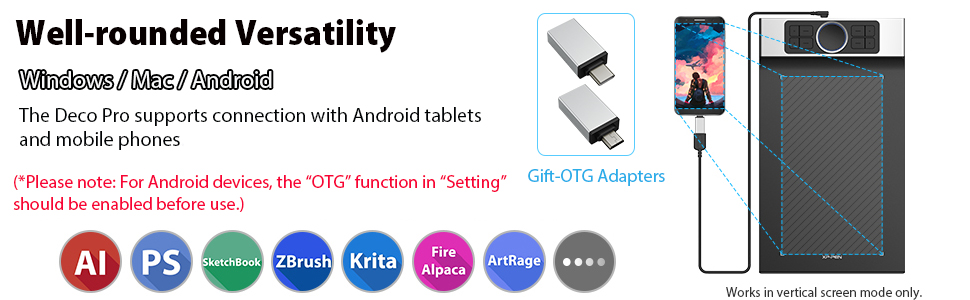
1. With the tablet connected to your Android phone or tablet, please make sure it works in vertical screen mode.
2. Not all Android devices can support the XP-Pen tablet. We are currently of the following Android Phones/Tablets that cannot work properly with our tablets:
Nexus 6 /Google
Galaxy S6 /Samsung
Galaxy S7 edge /Samsung
Galaxy S7 /Samsung
Galaxy Tab S2 /Samsung
Galaxy S8 /Samsung
Galaxy Note 4 / Samsung USB micro-B
Galaxy Note 8 / Samsung USB Type-C
Galaxy Note 9 / Samsung USB Type-C
3. When the battery of your Android phone or tablet is running low, your tablet may not work properly. Please ensure your Android device has enough power to run normally.
4. When your Android phone or tablet enters standby mode, you cannot use the pen to control the cursor to wake it up. To restore functionality, please unplug and then re-plug the USB cable.
More Details about XP-PEN Deco Pro Medium
| | | | |
|---|---|---|---|
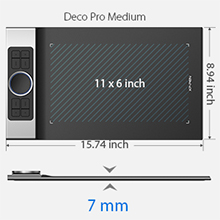
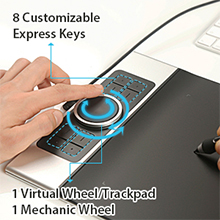
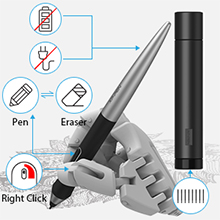
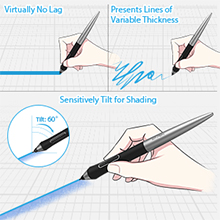
Compact Size – Perfect for on-the-go useThe Deco Pro Medium features an 11 x 6 inch working area, giving you a bigger canvas for your creations. Made with an aluminum casing, Deco Pro Small is smoother to use and sleeker in appearance. 7mm thickness allows you to take it with the carrying bag to anywhere you want. | 8 Shortcut Keys & Double Wheel Design – Improved for unparalleled efficiencyThe new interface combines a mechanical and virtual wheel that makes it possible to perform multiple actions with one hand and helps eliminate distractions and interruptions from your work flow and creative process. Features 8 customizable shortcuts at your fingertips to allow easy and convenient operation. | Latest PA1 Battery-free Stylus – No charge any moreBattery free passive stylus requires no charging at all for continuous digital creation. Don’t need to worry about the potential battery leakage and run-out anymore. One-click toggle for convenience and efficiency. The button on the stylus allows you to switch between write/erase immediately. | Powerful Configuration – Enjoy extreme drawing experience266 RPS Report Rate: instant response to pen movements is ensured without lagging of lines. 8192 Levels Pressure Sensitivity: allows you to operate on your device for more precise and accurate lines of any strength based on the pressure you apply to the pen. ±60 degrees brush tilt: delivers smoother and more natural transitions between lines and strokes while also giving you the ability to add shading to your creation. |

Bundle Software for Deco Pro Series!
Enrich your experience and improve your creation skills, XP-PEN provides you with free software for different purposes.
- Explain Everything
- ArtRage 6
- openCanvas
How to obtain your software?
Step 1: Create or log into your XP-PEN account.
Step 2: Certify your purchase’s serial number.
Step 3: Select a software option, find the activation key of the software and visit the corresponding page to install it.
The XP-Pen Deco Pro Series is compatible with Windows 7/8/10, Linux (Detailed versions, please refer to the Compatibility Guide above), Mac OS X 10.10 and above, Android 6.0 and above.
It works with most graphics software including Photoshop, SAI, Painter, Illustrator, Clip Studio, and more.
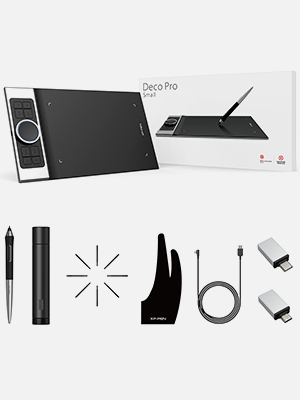
- Package included:
- 1x Deco Pro Medium Tablet
- 1x Battery-Free Stylus, 1x Pen Holder, 8x Replacement Pen Nibs
- 1x USB-C to USB Cable, 1x USB to USB-C adapter, 1x USB to micro USB adapter
- 1x Drawing Glove
- 1x Quick Guide
 |  |  |  | 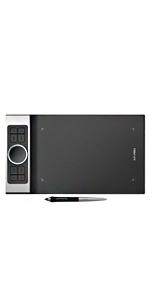 | |
|---|---|---|---|---|---|
| Work Area | 10″ x 6.25″ | 10″ x 5.63″ | 10″ x 5.62″ | 9″ x5″ | 11″ x 6″ |
| Thickness | 8mm | 9mm | 8mm | 7mm | 7mm |
| Shortcut Keys | 8 | 6 | 6 | 8 | 8 |
| Roller Wheel | X | ✓ | ✓ | ✓ | ✓ |
| Tilt | X | X | X | ✓ | ✓ |
| Stylus | 1 x P03 Passive Pen | 1 x P06 Passive Pen | 1 x P05 Passive Pen | 1 x PA1 Passive Pen | 1 x PA1 Passive Pen |
| Wireless | X | X | ✓ | X | X |
| Connection | USB-C cable | USB-C cable | USB-C cable | USB-C cable | USB-C cable |
| System | Windows 10/8/7(32/64bit), Linux (Detailed versions), Mac OS X version 10.10 or later | Windows 10/8/7(32/64bit), Linux (Detailed versions), Mac OS X version 10.10 or later | Windows 10/8/7(32/64bit), Linux (Detailed versions), Mac OS X version 10.10 or later | Windows 7/8/10, Linux (Detailed versions), Mac OS X 10.10 and above, Android 6.0 and above | Windows 7/8/10, Linux (Detailed versions), Mac OS X 10.10 and above, Android 6.0 and above |
| Dimensions: | 30 x 23 x 1.5 cm; 1.48 Kilograms |
| Model: | EU DECO PRO |
| Manufacture: | XP-PEN |
Bel outil
Bon achat impeccable rien a dire sinon que les pointes sont fragiles donc manier avec dlicatesse en faisant attention de ne pas faire basculer le style
Bel outil
Bon achat impeccable rien a dire sinon que les pointes sont fragiles donc manier avec dlicatesse en faisant attention de ne pas faire basculer le style
La mia prima tavoletta grafica!
Essendo la prima che utilizzo non ho altri metri di paragone.
Sicuramente ci va presa la mano e non ha un manuale di istruzioni completo (ma possibile recuperarlo sul sito del produttore) tuttavia con la giusta pratica penso che sia un ottimo strumento per chi vuole disegnare, colorare, ritoccare immagini al pc o anche solo per chi vuole uno strumento diverso dal mouse per scrivere o prendere appunti!
La mia prima tavoletta grafica!
Essendo la prima che utilizzo non ho altri metri di paragone.
Sicuramente ci va presa la mano e non ha un manuale di istruzioni completo (ma possibile recuperarlo sul sito del produttore) tuttavia con la giusta pratica penso che sia un ottimo strumento per chi vuole disegnare, colorare, ritoccare immagini al pc o anche solo per chi vuole uno strumento diverso dal mouse per scrivere o prendere appunti!
La mia prima tavoletta grafica!
Essendo la prima che utilizzo non ho altri metri di paragone.
Sicuramente ci va presa la mano e non ha un manuale di istruzioni completo (ma possibile recuperarlo sul sito del produttore) tuttavia con la giusta pratica penso che sia un ottimo strumento per chi vuole disegnare, colorare, ritoccare immagini al pc o anche solo per chi vuole uno strumento diverso dal mouse per scrivere o prendere appunti!
Fantastic - so why 4 stars?
This is a brilliant well built product with programmable keys, two physical dials and a lovely responsive pen.
There are lots of people that use it for drawing and design but I actually use it for music and studio work. It is great to be able to edit using this system rather than a mouse.
The first unit arrived with a faulty dial unfortunately. However, I spoke to XP themselves and they sorted the situation out very efficiently – great customer service.
So why only 4 stars:
The software is not great. Not only is it ‘unfriendly’ to use, the profiles keep self deleting or don’t load up when you move from one software to another.
Also the pen button cannot be given a different function for each programme which is surely a really simple thing to implement.
This is a fantastic product and great customer service – improve the software and I would give it 6 stars!
Scarsa documentazione su programmi ed applicazioni
Bisogna farci la mano, ma dopo un po’ diventa abbastanza intuitiva. La documentazione a corredo scarna, ma su internet si trovano facilmente applicazioni e tutorial.
Scarsa documentazione su programmi ed applicazioni
Bisogna farci la mano, ma dopo un po’ diventa abbastanza intuitiva. La documentazione a corredo scarna, ma su internet si trovano facilmente applicazioni e tutorial.
Scarsa documentazione su programmi ed applicazioni
Bisogna farci la mano, ma dopo un po’ diventa abbastanza intuitiva. La documentazione a corredo scarna, ma su internet si trovano facilmente applicazioni e tutorial.
Phenomenal
I bought the XP-PEN Deco Pro Professional after HOURS of browsing through as many other graphics tablets in the same price range as I could find, both on Amazon and off.
The deal breaker that made me buy this one was the reviews from people who use graphics tablets for work rather than hobbyists. Claims from these people were made that THIS is the tablet that they’d been waiting for someone to produce.
I can’t say much more beyond the fact that it’s truly an epic piece of technology. It does everything that it claims to. The buttons are very intuitive and extremely useful. It’s super accurate when drawing, writing or even just using it as a mouse.
If like me you’ve been struggling to find the right graphics tablet for you, buy this one. You will not regret it.
Top kwaliteit tablet.
Tablet aangeschaft voor gebruik bij een Lenovo chromebook. Tablet is van topkwaliteit. Helaas zijn de instellingen onder chrome niet toegankelijk. Werking is helemaal afhankelijk van het gebruikte programma. Gewoon proberen. Sommige progs werken prima. Anderen slecht. Ligt dus niet aan de tablet. Hopen dat Chrome meer gaat ondersteunen, en vooral de instellingen toegankelijk maakt.
Maar de tablet is van topkwaliteit. Pen is wat “bulky”, maar door de rubber grip goed hanteerbaar. Hoeken werkgebied zijn verlicht. Navigatie ring werkt grandioos. Gehele onderzijde is van alumimium. Het werkvlak is iets geruwd, waardoor een gevoel van papier wordt gesimuleerd. De grootte (small version) is ruim voldoende. Past mooi in een 15.7″ laptoptas. Pen zit opgeborgen in een schokbestendige koker. Alles voelt kwalitatief erg goed, ook de kunststof onderdelen.
Conclusie: top aankoop, zeker gezien de prijs.
Top kwaliteit tablet.
Tablet aangeschaft voor gebruik bij een Lenovo chromebook. Tablet is van topkwaliteit. Helaas zijn de instellingen onder chrome niet toegankelijk. Werking is helemaal afhankelijk van het gebruikte programma. Gewoon proberen. Sommige progs werken prima. Anderen slecht. Ligt dus niet aan de tablet. Hopen dat Chrome meer gaat ondersteunen, en vooral de instellingen toegankelijk maakt.
Maar de tablet is van topkwaliteit. Pen is wat “bulky”, maar door de rubber grip goed hanteerbaar. Hoeken werkgebied zijn verlicht. Navigatie ring werkt grandioos. Gehele onderzijde is van alumimium. Het werkvlak is iets geruwd, waardoor een gevoel van papier wordt gesimuleerd. De grootte (small version) is ruim voldoende. Past mooi in een 15.7″ laptoptas. Pen zit opgeborgen in een schokbestendige koker. Alles voelt kwalitatief erg goed, ook de kunststof onderdelen.
Conclusie: top aankoop, zeker gezien de prijs.
Super Grafiktable
das o.g. Grafiktablett ist sehr angenehm handhabbar, bietet eine groe Schreibflche und das Schreiben ist noch besser als direkt auf Papier. Die zustzliche SW vergrert enorm den Anwendungsbereich, von einfacher Schreibtafel bis zu knstlerische Leinwand. Kann dieses Grafiktablett wrmstens weiterempfehlen.
Super Grafiktable
das o.g. Grafiktablett ist sehr angenehm handhabbar, bietet eine groe Schreibflche und das Schreiben ist noch besser als direkt auf Papier. Die zustzliche SW vergrert enorm den Anwendungsbereich, von einfacher Schreibtafel bis zu knstlerische Leinwand. Kann dieses Grafiktablett wrmstens weiterempfehlen.
Super Grafiktable
das o.g. Grafiktablett ist sehr angenehm handhabbar, bietet eine groe Schreibflche und das Schreiben ist noch besser als direkt auf Papier. Die zustzliche SW vergrert enorm den Anwendungsbereich, von einfacher Schreibtafel bis zu knstlerische Leinwand. Kann dieses Grafiktablett wrmstens weiterempfehlen.
ok aber nicht unbedingt wie beschriebe
Meine Kinder haben sich dieses Teil gewnscht. Sie dachten man konnte darauf zeichnen wie in der Werbung. So war es nicht. Das Brett ist prinzipiell ein maus zum Zeichnen.
ok aber nicht unbedingt wie beschriebe
Meine Kinder haben sich dieses Teil gewnscht. Sie dachten man konnte darauf zeichnen wie in der Werbung. So war es nicht. Das Brett ist prinzipiell ein maus zum Zeichnen.
Prodotto Molto buono
Si tratta di una tavoletta grafica di buona qualit, precisa e fatti da materiali resistenti. Unica pecca secondo me sono i tasti sulla penna che si rischiano di premere troppo spesso, ma per fortuna sia i tasti della penna che quelli della tavoletta sono programmabili con l’apposito programma, perci il problema si risolve facilmente
Prodotto Molto buono
Si tratta di una tavoletta grafica di buona qualit, precisa e fatti da materiali resistenti. Unica pecca secondo me sono i tasti sulla penna che si rischiano di premere troppo spesso, ma per fortuna sia i tasti della penna che quelli della tavoletta sono programmabili con l’apposito programma, perci il problema si risolve facilmente
Prodotto Molto buono
Si tratta di una tavoletta grafica di buona qualit, precisa e fatti da materiali resistenti. Unica pecca secondo me sono i tasti sulla penna che si rischiano di premere troppo spesso, ma per fortuna sia i tasti della penna che quelli della tavoletta sono programmabili con l’apposito programma, perci il problema si risolve facilmente
Prodotto Molto buono
Si tratta di una tavoletta grafica di buona qualit, precisa e fatti da materiali resistenti. Unica pecca secondo me sono i tasti sulla penna che si rischiano di premere troppo spesso, ma per fortuna sia i tasti della penna che quelli della tavoletta sono programmabili con l’apposito programma, perci il problema si risolve facilmente
Prodotto Molto buono
Si tratta di una tavoletta grafica di buona qualit, precisa e fatti da materiali resistenti. Unica pecca secondo me sono i tasti sulla penna che si rischiano di premere troppo spesso, ma per fortuna sia i tasti della penna che quelli della tavoletta sono programmabili con l’apposito programma, perci il problema si risolve facilmente
Great value graphic table
Bought this for my art mad daughter & it was a huge hit. I’d done a lot of research before purchase & this was the top tablet in my price range. Instructions are sparse so we did spend some time working it out but there really are tonnes of helpful videos – all you have to do is Google the make & model. Once up and running with her preferred software it was amazing to see how quickly she was able to get amazing results having never used one before. We’ve been really impressed, the build quality is great, it’s light but not flimsy, the pen is great – it’s nice to hold. The sensitivity of it is really impressive & allows for great effects. It’s also a really good size. It seems to tick all the boxes. It was my 13year olds favourite Christmas present by far.
I am slightly miffed that the tablet is reduced considerably (40) just a week after I bought it! However, I guess my productivity has grown since I received the item and I’ve used it all week. It replaces on old Wacom Intuous 3, which was the best when I bought it many years ago. But sadly it was becoming a bit sensitive to WIndows 10, and needed a lot of babying to keep it working properly, and with some software it would not work properly at all. SO this was an upgrade, and it is lovely. I like teh XPen’s slim profile; it tucks under my laptop stand when not in use. I chose a wired tablet over the wireless versions because there is alway some lag on my laptop, and I wanted to minimise that. I use it with Affinity Designer, and Photoplus as well as other specialist textile software. It isn’t brilliant at segueing across to Word or non-graphics software, but it does work OK in them, just a bit of a lag. I chose this model for the double dial – as I use a specialist trackball for zooming and scrolling on textile software system alongside a tablet, and find it so easy to manouevre around the screen working in that way. I wish this dial allowed you to scroll all over, like the track ball, but I will get used to it I guess. The pen is a little lighter than the Wacom one. I’m not sure why it has 8 spare tips – that worried me slightly that they are not long lived? My Wacom one survived for years and years of use. Maybe it depends on how heavy handed you are with the pressure? The surface is quite rough, but this makes a good feel when drawing and aids accuracy for me. The software seems OK, lots of adjustments and options. I would like to be able to have different settings for different programmes though, like on the Wacom.
It came with 3 x usb connectors for phones ( not that I will ever use it on a phone), and long lead and a glove, which I really like to use – I think the rougher surface needs this, otherwise your hand sticks a bit.
I’d recommend this tablet, especially at the offer price (grinding of teeth).
Excelente relación calidad precio
Una tableta perfecta para retoque, creo q a la altura de otras marcas que valen dos o tres veces ms con las mismas caractersticas, la recomiendo.
Excelente relación calidad precio
Una tableta perfecta para retoque, creo q a la altura de otras marcas que valen dos o tres veces ms con las mismas caractersticas, la recomiendo.
Nearly there...
This is a good tablet. Sensitive and with tilt feature it makes drawing and painting a joy. So why only three stars? The settings program is the let down. You’ve got a wheel there which it would make sense to use to rotate your page – but you can’t set it to work with artrage 6 or krita 4. I reached out to the developers of these programs and they couldn’t help either, so it’s not just that I’m missing something obvious. The settings program is just a bit under developed to cope with the apps you’re likely to use it with. Fix this glitch and it will be a five out of five.
De primeras quera la mdium. Menos mal que no lo hice. Esta ya me parece bastante grande. Muy precisa y configurable.
la calidad
la estoy probando y de momento me parece bastante buena no soy un experto pero se ve que marcha bien la e pedido porque me gusta aprender y referente al pedido muy bien me a llegado antes de lo previsto en el cual lo valoro mucho la calidad precio a mi me parece buena para la tableta que es
I think this is very good
I have hesitated to write a review for this as I am far from an expert on graphics pads and have very little experience for comparison. However, based on it working very nicely for me, not having has any problems and its value for money I think it definitely deserves 4 stars.
The pad has a number of controls that can be configured and different configuration presets can be setup and selected when needed, e.g. one for Photo editor, another for Graphic Design etc. It is easy enough to select a configuration, but it seems the selection reverts the default setting on closing or minimising the control window, so I have to leave it open in the background – not a big issue be enough to limit my score to 4 stars. (If any can point out it is me doing something wrong, I’d be happy to have your advice)
Primo Acquisto
In attesa di provarla domani, posso affermare che la confezione giunta integra e ben protetta. Il contenuto era quello descritto e al primo sguardo si capisce che si ha un buon prodotto. Piacevole feedback bel tocco delle superfici, ring fluido. Manca solo la prova pratica per essere la prima tavoletta che compro
Excellent value
Pros: Excellent build quality, pleasant tablet surface, great feature set (particularly enjoy using the wheel), excellent price point, was able to make it work with all software I tried. Cons: whilst they are robust, I would have preferred an easier click to the side buttons.
very good quality and value
plugged in, downloaded software and using in lightroom straight away
Ik gebruik al jaren de Wacom Intuos Pro medium en ben hier heel tevreden van. Voor de laptop wilde ik een kleinere versie en heb gekozen om deze XP-Pen pro small als alternatief. Het grappige is dat het tekenoppervlak de XP-Pen small even groot is als de Wacom Intuos Pro medium. Wat me opvalt is dat het tablet heel professioneel oogt en heel goed is afgewerkt! Als voelt heel degelijk aan. De pen ligt goed in de hand maar het uiteinde van de pen heeft geen “erase” functie wat ik toch niet gebruik.
Het oppervlak is in vergelijking met de Wacom ruwer. Tijdens het tekenen schuurt de pen een beetje maar persoonlijk stoort het met niet. Wat vooral goed doordacht is bij de XP-pen is het wiel + touch oppervlak binnenin . Dit werkt fantastisch! Zie filmpje. De buitenste ring heb ik ingesteld als zoom functie en door met de vinger naar links of rechts te draaien op het zwarte gedeelte vergroot of verklein ik de brush grootte. Een andere leuke shortcut dat je kan toewijzen is B/E. Je kan dus door op dezelfde toets te klikken switchen tussen Brush en erase.
De software werkt goed maar is niet op wacom niveau. De functies knopjes op de pen zijn voor alle applicaties gelijk. Dus als je de rechtse muisknop toewijst is dit van toepassing voor alle software. Maar voor de rest kan je vrijwel alles goed instellen. Wat ook niet kan is b.v. een combinatie van rechtse muisknop en CTRL toets. Wel CTRL in combinatie met E. Op zich is dit niet direct een probleem.
Wat me echter wel een beetje zorgen baart is de samenwerking met Photoshop. Drukgevoeligheid gaat meestal gepaard met de Windows INK functie. In capture one werkt dit feilloos. In Photoshop werkt dit ook maar dan treedt er een enorme vertraging op wanneer je aan het brushen bent. Pas als je Windows INK in de XP-Pen software deaktiveert werkt het perfect maar dien je dus de wintab functie te gebruiken. (google naar PSUserconfig.txt)
# Use WinTab
UseSystemStylus 0
Net hier is Photoshop in hun laatste versie 21.2.2 de software aan het aanpassen. In hoeverre de wintab nog ondersteunt gaat worden blijft een vraagteken.
Momenteel gebruik ik enkel nog de XP-pen. Het gebruiksgemak van het wiel is een tweede natuur geworden. Ook snel de functie van het wiel kunnen wijzigen is een enorm voordeel. (kan ook op de wacom). Persoonlijk geniet de XP-Pen momenteel mijn voorkeur maar kan uiteraard niet inschatten hoe het tablet zal presteren binnen enkele jaren. Ik hoop dat XP-Pen de software blijft updaten en positieve zin.
De XP-Pen small kost 1/3 van de wacom intuos pro medium. Voor mij is het een aanrader.
Ik gebruik al jaren de Wacom Intuos Pro medium en ben hier heel tevreden van. Voor de laptop wilde ik een kleinere versie en heb gekozen om deze XP-Pen pro small als alternatief. Het grappige is dat het tekenoppervlak de XP-Pen small even groot is als de Wacom Intuos Pro medium. Wat me opvalt is dat het tablet heel professioneel oogt en heel goed is afgewerkt! Als voelt heel degelijk aan. De pen ligt goed in de hand maar het uiteinde van de pen heeft geen “erase” functie wat ik toch niet gebruik.
Het oppervlak is in vergelijking met de Wacom ruwer. Tijdens het tekenen schuurt de pen een beetje maar persoonlijk stoort het met niet. Wat vooral goed doordacht is bij de XP-pen is het wiel + touch oppervlak binnenin . Dit werkt fantastisch! Zie filmpje. De buitenste ring heb ik ingesteld als zoom functie en door met de vinger naar links of rechts te draaien op het zwarte gedeelte vergroot of verklein ik de brush grootte. Een andere leuke shortcut dat je kan toewijzen is B/E. Je kan dus door op dezelfde toets te klikken switchen tussen Brush en erase.
De software werkt goed maar is niet op wacom niveau. De functies knopjes op de pen zijn voor alle applicaties gelijk. Dus als je de rechtse muisknop toewijst is dit van toepassing voor alle software. Maar voor de rest kan je vrijwel alles goed instellen. Wat ook niet kan is b.v. een combinatie van rechtse muisknop en CTRL toets. Wel CTRL in combinatie met E. Op zich is dit niet direct een probleem.
Wat me echter wel een beetje zorgen baart is de samenwerking met Photoshop. Drukgevoeligheid gaat meestal gepaard met de Windows INK functie. In capture one werkt dit feilloos. In Photoshop werkt dit ook maar dan treedt er een enorme vertraging op wanneer je aan het brushen bent. Pas als je Windows INK in de XP-Pen software deaktiveert werkt het perfect maar dien je dus de wintab functie te gebruiken. (google naar PSUserconfig.txt)
# Use WinTab
UseSystemStylus 0
Net hier is Photoshop in hun laatste versie 21.2.2 de software aan het aanpassen. In hoeverre de wintab nog ondersteunt gaat worden blijft een vraagteken.
Momenteel gebruik ik enkel nog de XP-pen. Het gebruiksgemak van het wiel is een tweede natuur geworden. Ook snel de functie van het wiel kunnen wijzigen is een enorm voordeel. (kan ook op de wacom). Persoonlijk geniet de XP-Pen momenteel mijn voorkeur maar kan uiteraard niet inschatten hoe het tablet zal presteren binnen enkele jaren. Ik hoop dat XP-Pen de software blijft updaten en positieve zin.
De XP-Pen small kost 1/3 van de wacom intuos pro medium. Voor mij is het een aanrader.
Super Gerä
Hier stimmt so gut wie alles^^ Verarbeitung ist sehr gut, die Materialien sind hochwertig (Aluminiumrckseite). Die Tasten sind nach Bedarf belegbar, Das Rad auch. Die Arbeitsflche hat genau die richtige Gre (nicht zu gro war mir aus Platzgrnden wichtig).
Der Stift liegt sehr gut in der hand und alle Eingaben werden punktgenau und ohne Verzgerung erkannt.
Sehr toll fand ich auch, dass man beim Kauf von XP-Pen noch einen Key fr ein Grafikprogramm dazubekommt.
Klare Kaufempfehlung.
Super Gerä
Hier stimmt so gut wie alles^^ Verarbeitung ist sehr gut, die Materialien sind hochwertig (Aluminiumrckseite). Die Tasten sind nach Bedarf belegbar, Das Rad auch. Die Arbeitsflche hat genau die richtige Gre (nicht zu gro war mir aus Platzgrnden wichtig).
Der Stift liegt sehr gut in der hand und alle Eingaben werden punktgenau und ohne Verzgerung erkannt.
Sehr toll fand ich auch, dass man beim Kauf von XP-Pen noch einen Key fr ein Grafikprogramm dazubekommt.
Klare Kaufempfehlung.
ant photographe amateur .
je viens de me lancer dans la retouche photo et la souris je trouve que c’est d’une ergonomie affreuse , je regardais les tests et celle ci revenais rgulirement .
produit bien finie , qualit au top , la sensation que c’est un produit milieu de gamme est l .
la possibilit de pourvoir l’utiliser mme pour les gauchers est vraiment un plus
ant photographe amateur .
je viens de me lancer dans la retouche photo et la souris je trouve que c’est d’une ergonomie affreuse , je regardais les tests et celle ci revenais rgulirement .
produit bien finie , qualit au top , la sensation que c’est un produit milieu de gamme est l .
la possibilit de pourvoir l’utiliser mme pour les gauchers est vraiment un plus
ant photographe amateur .
je viens de me lancer dans la retouche photo et la souris je trouve que c’est d’une ergonomie affreuse , je regardais les tests et celle ci revenais rgulirement .
produit bien finie , qualit au top , la sensation que c’est un produit milieu de gamme est l .
la possibilit de pourvoir l’utiliser mme pour les gauchers est vraiment un plus
ant photographe amateur .
je viens de me lancer dans la retouche photo et la souris je trouve que c’est d’une ergonomie affreuse , je regardais les tests et celle ci revenais rgulirement .
produit bien finie , qualit au top , la sensation que c’est un produit milieu de gamme est l .
la possibilit de pourvoir l’utiliser mme pour les gauchers est vraiment un plus
la mia prima tavoletta grafica… Ero indecisa tra il leader Wacom e questa ma la qualit prezzo di Xp pen mi ha convinto ad acquistare questa. Fa il suo dovere, reattiva, esteticamente molto bella, leggerissima e davvero sottile. Comoda anche la penna e portapennino. La uso per lavoro, principalmente Photoshop e illustrator e mi ci trovo molto bene!
la mia prima tavoletta grafica… Ero indecisa tra il leader Wacom e questa ma la qualit prezzo di Xp pen mi ha convinto ad acquistare questa. Fa il suo dovere, reattiva, esteticamente molto bella, leggerissima e davvero sottile. Comoda anche la penna e portapennino. La uso per lavoro, principalmente Photoshop e illustrator e mi ci trovo molto bene!
la mia prima tavoletta grafica… Ero indecisa tra il leader Wacom e questa ma la qualit prezzo di Xp pen mi ha convinto ad acquistare questa. Fa il suo dovere, reattiva, esteticamente molto bella, leggerissima e davvero sottile. Comoda anche la penna e portapennino. La uso per lavoro, principalmente Photoshop e illustrator e mi ci trovo molto bene!
la mia prima tavoletta grafica… Ero indecisa tra il leader Wacom e questa ma la qualit prezzo di Xp pen mi ha convinto ad acquistare questa. Fa il suo dovere, reattiva, esteticamente molto bella, leggerissima e davvero sottile. Comoda anche la penna e portapennino. La uso per lavoro, principalmente Photoshop e illustrator e mi ci trovo molto bene!
Great!
Purchased as a gift – the recipient is very happy with it!
Definitely buy this !
Definitely recommend this it’s very good quality and very easy to use . I use it for photo shop .
Super Preis—Leistungs- Verhältnis.
Ist ein Geschenk gewesen fr meinen Sohn und bisher sind noch keine Klagen gekommen und was er damit zeichnet ist echt toll. Es ist nicht nur fr Profis sondern auch gut fr Anfnger geeignet. Die Verarbeitung ist hochwertig und gut.
Super Preis—Leistungs- Verhältnis.
Ist ein Geschenk gewesen fr meinen Sohn und bisher sind noch keine Klagen gekommen und was er damit zeichnet ist echt toll. Es ist nicht nur fr Profis sondern auch gut fr Anfnger geeignet. Die Verarbeitung ist hochwertig und gut.
I can't believe I ever used a mouse
Firstly: quick delivery, no damage to the box.
Secondly: I cannot believe I ever used a mouse to make digital art. This is SO much better. Like, light years ahead of where I was at. I can now sell my art because it has taken such an enormous leap in quality. I highly recommend getting this pen. I did quite some research and found that the deco pro was the most affordable better pen: it has pressure sensitivity and this is necessary, without that I don’t think you would get as much out of it, especially your line work would suffer, but also blending colours and so on.
One of the best things I have ever bought.
I’m a professional designer and used Wacom tablets for many years but became disappointed in their attitude and steep prices, I took a chance on the XP-Pen Pro tablet after reading some positive reviews here and elsewhere.
After a month of daily use I can honestly say it’s a worthy alternative. Well designed with a good solid feel – it has an aluminium chassis and the four programmable button and wheel feel very positive. I’ve programmed the inner and outer wheel for zoom and trackpad – very useful in Photoshop.
The pen is quite light but very comfortable to use. It has a programmable toogle switch that I’ve set for left-click, right-click.
The Pen Tablet (Mac) software will be familiar to Wacom users and offers the high degree of personalisation. I’m left handed and easyily set the tablet orientation to 180 degrees with the pressure set to slightly harder than the default. Photoshop brushes work perfectly with XP-Pen with both size and paint reacting immediately to pen pressure changes.
The drawing surface is matt black with a very slightly rough texture. That took a little while to get used to but I like it. There are some that criticise that it’s not wireless but that really isn’t an issue for me; there’s no lag in pen reponse and it’s not a device that I’d carry around.
Conclusion: Well designed, good solid construction, very good driver software. Great price for such a well thought out piece of kit – you won’t be disappointed.
Devo dire che per il prezzo la DECO PRO veramente buona e anche durevole (scrivo la recensione dopo mesi di uso quotidiano).
Pregi:
– Costa pochissimo
– Ha molte funzioni (tasti ghiere)
– Assistenza veramente buona. nonostante non abbiano risolto il mio problema devo dire che non ho mai visto l’avere una persona disponibile e dedicata come con Xp-Pen (rispondevano dalla Cina in piena pandemia)
– Penna comoda e leggera
– Tasti personalizzabili per applicazioni una nature a dir poco fantastica, peccato limitata a 5 applicazioni.
Difetti
– Ghiera e zona touch non completamente controllabile su certe funzioni e con qualche difetto. Stesso difetto anche per alcune funzioni dei tasti penna. Dipende tutto da cosa si vuole impostare ma sta di fatto che quello che Wacom Senza problemi e in modo fluido la Deco PRO o lo fa male o non lo fa.
– Con mac sente poco “gli angoli” dell’Expos (funzione che non tutti usano ma io molto).
– La posizione dei tasti
– Aggiornamento software abbastanza scarso.
Giudizio finale
Dipende.
Per l’uso che ne faccio io (molti software per la grafica, molta gestione OS e uso intenso) si pu dire che l’intenzione c’ ma il prodotto non all’altezza del nome “PRO”. Se avessi potuto testarla credo che avrei cercato alternative o avrei preso la solita costosissima Wacom.
Per il disegno professionale non saprei dire ma se siete alla ricerca di una tavoletta onesta e piena di funzioni un prodotto molto molto valido a un prezzo veramente ridotto.
Devo dire che per il prezzo la DECO PRO veramente buona e anche durevole (scrivo la recensione dopo mesi di uso quotidiano).
Pregi:
– Costa pochissimo
– Ha molte funzioni (tasti ghiere)
– Assistenza veramente buona. nonostante non abbiano risolto il mio problema devo dire che non ho mai visto l’avere una persona disponibile e dedicata come con Xp-Pen (rispondevano dalla Cina in piena pandemia)
– Penna comoda e leggera
– Tasti personalizzabili per applicazioni una nature a dir poco fantastica, peccato limitata a 5 applicazioni.
Difetti
– Ghiera e zona touch non completamente controllabile su certe funzioni e con qualche difetto. Stesso difetto anche per alcune funzioni dei tasti penna. Dipende tutto da cosa si vuole impostare ma sta di fatto che quello che Wacom Senza problemi e in modo fluido la Deco PRO o lo fa male o non lo fa.
– Con mac sente poco “gli angoli” dell’Expos (funzione che non tutti usano ma io molto).
– La posizione dei tasti
– Aggiornamento software abbastanza scarso.
Giudizio finale
Dipende.
Per l’uso che ne faccio io (molti software per la grafica, molta gestione OS e uso intenso) si pu dire che l’intenzione c’ ma il prodotto non all’altezza del nome “PRO”. Se avessi potuto testarla credo che avrei cercato alternative o avrei preso la solita costosissima Wacom.
Per il disegno professionale non saprei dire ma se siete alla ricerca di una tavoletta onesta e piena di funzioni un prodotto molto molto valido a un prezzo veramente ridotto.
Fantastic product for on line teaching.
Accurate pen. Looks good and worked straight out of the box.
Genial! Empfehlenswert!SEHR!!
inklusive kostenlosen Down. eines 60 Zeichenprograms!! Guter Stift, Zeichenhandschuh und man untersttzt eine geile Sache!
Genial! Empfehlenswert!SEHR!!
inklusive kostenlosen Down. eines 60 Zeichenprograms!! Guter Stift, Zeichenhandschuh und man untersttzt eine geile Sache!
Genial! Empfehlenswert!SEHR!!
inklusive kostenlosen Down. eines 60 Zeichenprograms!! Guter Stift, Zeichenhandschuh und man untersttzt eine geile Sache!
Good featured graphics table
I wanted something not too advanced or expensive to try and this item fitted the bill well. Does take time to get used to after using a mouse, and not looking down at what you are ‘drawing’ is rather odd, but it does allow a more natural way of drawing with practice.
Para un principiante esta bastante bien configurada
Esta bastante bien la tablet, pero los vendedores me dijeron que la base es de aluminio, que no es verdad, es de plstico color aluminio
Para un principiante esta bastante bien configurada
Esta bastante bien la tablet, pero los vendedores me dijeron que la base es de aluminio, que no es verdad, es de plstico color aluminio
It works on Catalina OSX 10.15.5
Bought this XP-Pen to replace a Wacom Intuos Pro I’d bought 24 hrs before from another supplier.
The Wacom was seen by the OSX Catalina but installing the Wacom drivers was a nightmare. It just would not happen.
I spent so much time on trying to get the Wacom to work it was unbelievable.
The XP-Pen was simply easy in comparison and it works across two screens with no problem.
I haven’t found how to get it to start on boot-up yet but Iv’e only had it less than an hour.
Highly recommended and I couldn’t be more pleased.
Au lieu d’acheter un cran 3000 j’ai achet cette grande tablette avec un cran 4k LG (carte graphique RTX) et le rsultat est bleffant ! la qualit de ce produit est top ! depuis 6 mois je m’en rgale ! je prendrais la version compact 🙂
Au lieu d’acheter un cran 3000 j’ai achet cette grande tablette avec un cran 4k LG (carte graphique RTX) et le rsultat est bleffant ! la qualit de ce produit est top ! depuis 6 mois je m’en rgale ! je prendrais la version compact 🙂
Au lieu d’acheter un cran 3000 j’ai achet cette grande tablette avec un cran 4k LG (carte graphique RTX) et le rsultat est bleffant ! la qualit de ce produit est top ! depuis 6 mois je m’en rgale ! je prendrais la version compact 🙂
I haven’t owned a graphics tablet before but this purchase was definitely worth it! I spent a lot of time looking into various tablets and came across the XP-PEN brand. I knew I wanted a larger tablet for larger drawing and the layout of the buttons and scroller was a bonus for me.
I use this tablet with Adobe Creative cloud, mainly using adobe illustrator to start.
It is super easy to set up if you carefully follow the instructions, they also have lots of information on their website you can check out. Also if you register your tablet they give you a choice to download creative software for free!
You can also change the settings of the tablet and the functionality of the buttons, but I would recommend exporting your favourite settings- if you make a change in the settings you cannot figure out how to reverse, you can simply import the settings back.
I would say the tablet is fairly large, much larger than other tablets I looked at. If you want a larger tablet with larger drawing space, then this is for you but if you want something smaller, have a look at the smaller version of this tablet (I purchased the medium, there is a small version available that would be perfect).
The pen comes with multiple tips to exchange once worn down which I think is excellent as I never noticed this with other brands!
Overall extremely happy with my first graphics tablet purchase, definitely worth the money!
Ok
Ottimo rapporto qualit prezzo anche se meglio una con lo schermo integrato
It works
Exactly what was needed, windows 10 automatically downloaded the drivers needed and it works perfectly with blender gimp and CAD the buttons are easy to setup and the dial thing is a nice touch
I bought this after using a small Wacom as I wanted a bigger area to draw on – it is a much better size and less expensive. I did find that some of the options for the buttons on the pen/tablet aren’t as easy to set up as the Wacom stylus, and sometimes there’s a lag, but that doesn’t happen too often.
Overall I’m really happy with it.
Ottimo prodotto
Essendo la mia prima tavoletta grafica, non posso fare paragoni, tuttavia posso affermare che abbastanza facile da installare e utilizzare.
Personalmente, l’ho comprata principalmente per fare sculpting 3D con Blender, e funziona alla grande.
ottima anche per il disegno, sembra quasi di disegnare su carta.
Acquisto consigliato!
Ottimo prodotto
Essendo la mia prima tavoletta grafica, non posso fare paragoni, tuttavia posso affermare che abbastanza facile da installare e utilizzare.
Personalmente, l’ho comprata principalmente per fare sculpting 3D con Blender, e funziona alla grande.
ottima anche per il disegno, sembra quasi di disegnare su carta.
Acquisto consigliato!
Ottimo prodotto
Essendo la mia prima tavoletta grafica, non posso fare paragoni, tuttavia posso affermare che abbastanza facile da installare e utilizzare.
Personalmente, l’ho comprata principalmente per fare sculpting 3D con Blender, e funziona alla grande.
ottima anche per il disegno, sembra quasi di disegnare su carta.
Acquisto consigliato!
good produc
happy with the performance. bought it for a child and he is happy.
Love the look and feel of this Tablet. Got rid of my old Wacom tablet and researched well and came across this amazing piece of tech. Arrived as promised and on time. Very Well packed in a solid good looking box to protect the tablet and bits. As shown in the pictures the unpacking and the location of the tablet near my iMac 27″. This tablet is so good looking it is a Sin. Very well built and quality oozes with the tablet and pen and pen holder and even the USB lead is of very good quality. It is a bit of a bind trying to set it up, probably me rather than the tablet, but eventually getting there. It very easy to use once software installed and pen set up. It is 200% better than my old Wacom. It is a thing of beauty. Just can’t stop looking at it and using it. The wheel is so smooth and the express keys are very useful indeed. The pen is fully adjustable to suit your taste. I just can’t imagine ever stop using this tablet. It’s only early days but going from strength to strength. If anyone is hesitant, don’t be go ahead and get it , you will not regret it. Works well with my iMac on Catalina 10.15 and Affinity photo-software. There is free art software when you register the product. Being a photographer rather than artist, it is great to use as well as on the photo software. This tablet is not small as you can see near my 27″ iMac, it is perfect for me. Thanks XP-PEN and Amazon for timely delivery and an amazing product. Just love it. Very highly recommended indeed.
buona qualità
la tavoletta grafica molto bella e di qualit, molto soddisfatto.
buona qualità
la tavoletta grafica molto bella e di qualit, molto soddisfatto.
As a teacher, I purchased this to make my teaching easier for myself and my students. Very easy to set up and very easy to use.
What it is like for drawing a masterpiece, I do not know. Art is not my subject. But for teaching maths it is a perfect piece of kit.
xp-pen deco pro
Only had it for about a week but I am really pleased with itched a Wacom before this and this is definitely a better tablet, easy to use and set up,I am using an iMac running catalina with no problems.If you are thinking of buying a tablet get this one it is worth the extra money.
Tavola grafica
Tutto veramente corrispondente alle descrizioni e alle mie aspettative, tempistiche di spedizione rispettate
Tavola grafica
Tutto veramente corrispondente alle descrizioni e alle mie aspettative, tempistiche di spedizione rispettate
Works very well on a Macbook pro 2018 with Catalina. Had some trouble setting it up as the setup instructions were completely different to how I eventually figured out how to do it, the top listed driver on the support page did not appear to be for this model tablet either, so uninstalled that and used the driver listed under it which worked fine. Setup of buttons and the dial is easy. the pen is very responsive. For the price this a a brilliant bit of kit.
Super produi
Trs bon produit, adapt pour une utilisation pro. Vraiment trs esthtique sur un bureau.
Seul petit bmol, manque un lment pour ranger ou tenir le stylet quand on l’utilise pas.
super rapide et conforme
satisfait du produit par contre pendant la livraison le carton d’emballage a t ouvert et visit mais pas vol
super rapide et conforme
satisfait du produit par contre pendant la livraison le carton d’emballage a t ouvert et visit mais pas vol
I’m new to graphic design, and very much an amateur, but I decided to look for a product like this. Having looked online at reviews, and waiting for Amazon’s Black Friday sale, I decided this was the one for me.
The install was very simple. My Windows 10 device detected it and installed the drivers speedily. The rest of the install went without a hitch.
I’m using this Affinity Designer and so far I’m enjoying using the product. The results seem excellent so far.
Easy to use and set up
This is my second graphics tablet.
Very easy to use. Good length on the USB cable and I did not realise how useful the dial would be until I started to use it.
Changes work flow so much and very useful
Worth for the price
Nice quality and ready to use right upon plug it i
Absolutely fantastic tablet. I was sceptical as I have been let down by non-Wacom tablets before, but this is perfect. The quality is obvious straight out of the box and it delivers once its plugged in. The buttons, trackpad and dial work flawlessly in Photoshop, the pen accuracy is exceptional. I cannot recommend this enough. Wish I had bought one sooner!
I’ve been using this since Sept 2019 almost continuously and am very happy with my purchase.
It has great resolution, tilt detection and is relatively easy to set up. It works with every software package I use, Photoshop, Affinity Photo and Artrage etc.
The quality of the build is second to none. With a 8x configurable buttons/dials you can set it up just how you like it.
A tip: once you have it configured how you want it save your config settings, they will be lost if you apply a driver update. If you save them you can restore your preferred settings once the new software/driver is installed. I learnt this the hard way!
The tablet area is huge however it’s therefore not easy to carry around with you. Not impossible, but you’d need a large bag and my worry would be it could easily get damaged in transit. If you are looking for portablity choose the smaller version.
I didn’t buy it for portability however so am very happy with it.
The settings can be fiddly to get right. I like the pen to be very sensitive so light touches make light marks. It took me a bit of time and experimentation to set the sensitivity and pressure just right.
On occasion the tablet has got out of synch with my monitor setup. To remedy I have unplugged it from my laptop and plugged back in again, and/or unplugged one of the monitors and plugged back in again and all has been good.
Overall a very high quality device at a very reasonable price.
(recensione fatta coi driver di settembre 2019, OS Windows 10)
Uso la tavoletta grafica principalmente come periferica di puntamento (quando ho il portatile collegato al monitor esterno), per scrivere appunti, e pi raramente per disegnare.
Prima di questa usavo una Wacom Intuos Draw e una Intuos S con connettivit Bluetooth, ho deciso di cambiare dopo l’ennesimo blocco del driver Wacom, un problema che ho da anni su due pc diversi e su entrambe le tavolette, non succede cos spesso ma la via pi comoda per uscirne riavviare il pc quindi parecchio fastidioso, e inoltre sperando di liberarmi di un altro bug che ho sempre avuto sulle Wacom: disegnando linee vicine in rapida successione spesso le estremit di queste linee vengono collegate, mi succede su tutti i programmi di disegno ed particolarmente frequente mentre scrivo appunti, dovevo tenere una mano costantemente su ctrl+z per annullare i tratti che presentavano questo problema.
Ho risolto entrambi i problemi con questa Xp-Pen Deco Pro, che si presenta ben costruita, solida, la penna decisamente pi grossa rispetto a quelle delle Intuos entry level, penso sia ispirata alla penna delle Wacom serie pro.
Ho impiegato un po’ di tempo ad abituarmi, soprattutto a scrivere, ma poi nessun problema, la sensibilit alla pressione mi sembra buona, pi controllabile rispetto alle mie Intuos, l’unica critica che mi sento di muovere riguarda la punta che mi sembra avere pi gioco laterale, nulla di grave, ma scrivendo caratteri di piccole dimensioni un po’ si nota che meno ferma.
Bene la presenza della USB C lato tavoletta, soprattutto perch possibile ruotare la tavoletta di zero, 90, 180 e 270 gradi (nessun problema quindi per i mancini), e la reversibilit dell’USB C consente di avere il cavo sempre rivolto nella direzione ottimale.
possibile assegnare una funzionalit specifica per ogni programma agli 8 tasti, alla rotella e al touchpad, mentre la funzione dei tasti della penna assegnabile globalmente, cos come la attivazione/disattivazione di Windows Ink che non impostabile programma per programma, questa era la cosa che pi mi preoccupava di questa tavoletta perch Windows Ink mi ha sempre dato problemi, in particolare volendo usare la penna come periferica di puntamento, quindi lo disattivavo su tutti i programmi eccetto Krita, il programma di disegno che uso, dove era necessario per avere la sensibilit alla pressione.
I problemi con Windows Ink si sono confermati anche con questa tavoletta, ad esempio:
* Spesso l’interfaccia di Vivaldi, il browser che uso, non registra pi i click, in passato avevo un problema simile su Firefox, che per non ho provato con la Xp Pen
* Assegnando il tasto destro ad un tastino della penna non funziona su Chrome e i browser basati su Chromium che ho provato come Opera e Vivaldi
* Passando da un programma all’altro la rotella impostata con funzione scroll a volte smette di funzionare, per “riagganciarla” al programma in uso devo cliccare col tastino impostato come destro
* Solito comportamento atroce dei programmi Microsoft che danno per scontato che quando l’utente usa la penna vuole disegnare, magari ha un po’ di senso su dispositivi tipo Surface mentre usando la tavoletta con monitor esterno fastidioso, ad esempio Windows Photos, aprendo una foto, va automaticamente in modalit di editing e non consente pi di scorrerle
Fortunatamente con questa tavoletta Krita funziona anche senza Windows Ink, rileva sia la pressione che l’inclinazione, quindi ho potuto disabilitarlo globalmente, e tutti i problemi sono scomparsi.
Un’altra cosa che inizialmente mi mancava rispetto alla Wacom era la possibilit di fare scroll dei contenuti premendo un tasto della penna e trascinandola, sulla Deco ho assegnato un tastino della penna a emulare il tasto centrale del mouse, non fa lo scrolling su tutte le app, ma funziona su Krita e il browser, in ogni caso di solito faccio lo scroll con la rotella, che merita una menzione d’onore, usarla quasi un esperienza onanistica tanto scorrevole, molto comodo anche il mini touchpad, possibile usarlo per controllare il puntatore oppure stile rotella, per inviare una combinazione di tasti o comando.
In conclusione, dopo il periodo iniziale di adattamento e personalizzazione, sono decisamente soddisfatto dell’acquisto, la ricomprerei sicuramente
Aggiornamento: a una decina di mesi dall’acquisto tolgo una stella perch mi sembra abbia qualche problema di affidabilit, per un certo periodo ogni tanto la penna registrava pressione anche quando non toccava la superficie, abbastanza irritante, veniva registrato come un click tenuto premuto e finivo col trascinare per lo schermo file e elementi dell’interfaccia grafica a seconda di cosa capitava a tiro sotto il puntatore quando accadeva il problema, dovevo sbattere la penna di lato per farlo passare, ora non accade pi ma in compenso ogni tanto impazzisce la rotella, invece di scorrere nella direzione voluta continua a fibrillare, un problema pu sempre capitare, due diversi lasciano pensare a una qualit costruttiva scarsa, forse dovuta anche al fatto di averla comprata appena uscita. Inoltre il supporto linux piuttosto carente, esiste un driver ma nel complesso quando sono su linux uso la vecchia wacom che ha un supporto migliore e integrato
(recensione fatta coi driver di settembre 2019, OS Windows 10)
Uso la tavoletta grafica principalmente come periferica di puntamento (quando ho il portatile collegato al monitor esterno), per scrivere appunti, e pi raramente per disegnare.
Prima di questa usavo una Wacom Intuos Draw e una Intuos S con connettivit Bluetooth, ho deciso di cambiare dopo l’ennesimo blocco del driver Wacom, un problema che ho da anni su due pc diversi e su entrambe le tavolette, non succede cos spesso ma la via pi comoda per uscirne riavviare il pc quindi parecchio fastidioso, e inoltre sperando di liberarmi di un altro bug che ho sempre avuto sulle Wacom: disegnando linee vicine in rapida successione spesso le estremit di queste linee vengono collegate, mi succede su tutti i programmi di disegno ed particolarmente frequente mentre scrivo appunti, dovevo tenere una mano costantemente su ctrl+z per annullare i tratti che presentavano questo problema.
Ho risolto entrambi i problemi con questa Xp-Pen Deco Pro, che si presenta ben costruita, solida, la penna decisamente pi grossa rispetto a quelle delle Intuos entry level, penso sia ispirata alla penna delle Wacom serie pro.
Ho impiegato un po’ di tempo ad abituarmi, soprattutto a scrivere, ma poi nessun problema, la sensibilit alla pressione mi sembra buona, pi controllabile rispetto alle mie Intuos, l’unica critica che mi sento di muovere riguarda la punta che mi sembra avere pi gioco laterale, nulla di grave, ma scrivendo caratteri di piccole dimensioni un po’ si nota che meno ferma.
Bene la presenza della USB C lato tavoletta, soprattutto perch possibile ruotare la tavoletta di zero, 90, 180 e 270 gradi (nessun problema quindi per i mancini), e la reversibilit dell’USB C consente di avere il cavo sempre rivolto nella direzione ottimale.
possibile assegnare una funzionalit specifica per ogni programma agli 8 tasti, alla rotella e al touchpad, mentre la funzione dei tasti della penna assegnabile globalmente, cos come la attivazione/disattivazione di Windows Ink che non impostabile programma per programma, questa era la cosa che pi mi preoccupava di questa tavoletta perch Windows Ink mi ha sempre dato problemi, in particolare volendo usare la penna come periferica di puntamento, quindi lo disattivavo su tutti i programmi eccetto Krita, il programma di disegno che uso, dove era necessario per avere la sensibilit alla pressione.
I problemi con Windows Ink si sono confermati anche con questa tavoletta, ad esempio:
* Spesso l’interfaccia di Vivaldi, il browser che uso, non registra pi i click, in passato avevo un problema simile su Firefox, che per non ho provato con la Xp Pen
* Assegnando il tasto destro ad un tastino della penna non funziona su Chrome e i browser basati su Chromium che ho provato come Opera e Vivaldi
* Passando da un programma all’altro la rotella impostata con funzione scroll a volte smette di funzionare, per “riagganciarla” al programma in uso devo cliccare col tastino impostato come destro
* Solito comportamento atroce dei programmi Microsoft che danno per scontato che quando l’utente usa la penna vuole disegnare, magari ha un po’ di senso su dispositivi tipo Surface mentre usando la tavoletta con monitor esterno fastidioso, ad esempio Windows Photos, aprendo una foto, va automaticamente in modalit di editing e non consente pi di scorrerle
Fortunatamente con questa tavoletta Krita funziona anche senza Windows Ink, rileva sia la pressione che l’inclinazione, quindi ho potuto disabilitarlo globalmente, e tutti i problemi sono scomparsi.
Un’altra cosa che inizialmente mi mancava rispetto alla Wacom era la possibilit di fare scroll dei contenuti premendo un tasto della penna e trascinandola, sulla Deco ho assegnato un tastino della penna a emulare il tasto centrale del mouse, non fa lo scrolling su tutte le app, ma funziona su Krita e il browser, in ogni caso di solito faccio lo scroll con la rotella, che merita una menzione d’onore, usarla quasi un esperienza onanistica tanto scorrevole, molto comodo anche il mini touchpad, possibile usarlo per controllare il puntatore oppure stile rotella, per inviare una combinazione di tasti o comando.
In conclusione, dopo il periodo iniziale di adattamento e personalizzazione, sono decisamente soddisfatto dell’acquisto, la ricomprerei sicuramente
Aggiornamento: a una decina di mesi dall’acquisto tolgo una stella perch mi sembra abbia qualche problema di affidabilit, per un certo periodo ogni tanto la penna registrava pressione anche quando non toccava la superficie, abbastanza irritante, veniva registrato come un click tenuto premuto e finivo col trascinare per lo schermo file e elementi dell’interfaccia grafica a seconda di cosa capitava a tiro sotto il puntatore quando accadeva il problema, dovevo sbattere la penna di lato per farlo passare, ora non accade pi ma in compenso ogni tanto impazzisce la rotella, invece di scorrere nella direzione voluta continua a fibrillare, un problema pu sempre capitare, due diversi lasciano pensare a una qualit costruttiva scarsa, forse dovuta anche al fatto di averla comprata appena uscita. Inoltre il supporto linux piuttosto carente, esiste un driver ma nel complesso quando sono su linux uso la vecchia wacom che ha un supporto migliore e integrato
Delighted with the product and service
After reading the reviews and watching u tube demos I decided to take the plunge and purchase the XP-pen Deco Pro Professional Graphics Drawing Tablet. This was to replace a wacom tablet that had given up on me after over 10yyrs. I use the tablet to create digital artwork with Corel Painter. I must say after downloading the new tablet driver etc this medium size tablet tick’s all the boxes , the zoom wheel is partially useful One happy Customer.
Le premier exemplaire tait dfectueux (molette), mais aprs change tout fonctionne parfaitement. Bonnes finitions, prcision au top et roulette et boutons trs pratiques. Bien mieux que ma vieille Wacom bamboo pen & touch.
Le premier exemplaire tait dfectueux (molette), mais aprs change tout fonctionne parfaitement. Bonnes finitions, prcision au top et roulette et boutons trs pratiques. Bien mieux que ma vieille Wacom bamboo pen & touch.
Absolutely brilliant responsive piece of kit for the price I’m so impressed
OTTIMO PRODOTTO
Eccellente sotto ogni punto di vista! l’inclinazione della penna per me fondamentale come gli 8 tasti programmabili, la funzione doppia rotella di una utilit incredibile! spero in una durata che rispecchi le ottime impressioni avute fino ad ora ma da felice possessore della star 6 sempre xp pen direi che non dovrebbero esserci problemi, complimenti per l’ottima tavoletta che un’ottima lezione alle pi blasonate e molto pi costose concorrenti.
OTTIMO PRODOTTO
Eccellente sotto ogni punto di vista! l’inclinazione della penna per me fondamentale come gli 8 tasti programmabili, la funzione doppia rotella di una utilit incredibile! spero in una durata che rispecchi le ottime impressioni avute fino ad ora ma da felice possessore della star 6 sempre xp pen direi che non dovrebbero esserci problemi, complimenti per l’ottima tavoletta che un’ottima lezione alle pi blasonate e molto pi costose concorrenti.
OTTIMO PRODOTTO
Eccellente sotto ogni punto di vista! l’inclinazione della penna per me fondamentale come gli 8 tasti programmabili, la funzione doppia rotella di una utilit incredibile! spero in una durata che rispecchi le ottime impressioni avute fino ad ora ma da felice possessore della star 6 sempre xp pen direi che non dovrebbero esserci problemi, complimenti per l’ottima tavoletta che un’ottima lezione alle pi blasonate e molto pi costose concorrenti.
OTTIMO PRODOTTO
Eccellente sotto ogni punto di vista! l’inclinazione della penna per me fondamentale come gli 8 tasti programmabili, la funzione doppia rotella di una utilit incredibile! spero in una durata che rispecchi le ottime impressioni avute fino ad ora ma da felice possessore della star 6 sempre xp pen direi che non dovrebbero esserci problemi, complimenti per l’ottima tavoletta che un’ottima lezione alle pi blasonate e molto pi costose concorrenti.
I heard of this new model pro drawing tablet in a review video on a well regarded YouTube channel. They loved it so much, basically it was the perfect non-display tablet. That got me real interested, so much so I invested in buying it!!
The build quality is superb – light and streamlined but solidly made – the underside and left panel are brushed metal, just lovely to look at and touch. Two discrete rubber strips make sure this tablet rests solid and doesn’t move when drawing.
The pen – the pen is just so perfect to hold, it is completely free of battery (no more charging) and feels so light but balanced. It has two programmable buttons (I always set one to “undo”) which are well placed and easy to access when drawing. It comes with a robust cylindrical pen carrier – which I thought initially was too big but it gives me full confidence when travelling- the carrier lid forms the perfect pen holder when it’s not in use.
Even when using Wacom tablets I’ve been frustrated by line “hooks” – annoying artifacts in strokes which you didnt intend … I have not experienced this at all with this tablet- which is huge plus!
The tablet wheel is just stunning – and I confess I’ve not decided whether to program for zoom or brush size.
There is real quality in the lighting – four corner indicators and wheel. I find them quite comforting.
The drawing surface just accepts the pen so beautifully – the pen moves freely but there is that little “bite” of resistance which replicates the surface of a satisfying quality paper grain.
The only thing I miss from a Wacom is the easy application specific profiles – being able to set up different hot-keys profiles for say Adobe Photoshop and Adobe Illustrator, bit I believe that is a software driver feature that XP Pen could develop to extend the near perfect functionality of this hardware?
The drawing glove it comes with is the nicest I’ve ever used, a touch of quality that a manufacturer could overlook or skimp on, but XP Pen did not!
This is a truly beautiful and superb to use product, and I believe any artist would be totally delighted with it. I’m still exploring it, but I find it just so responsive and a joy to use.
This “medium model” has ample/ generous drawing space, yet the unit is easy to take with me on my travels.
I am 100% thrilled and happy having purchased this quality digital art product. I believe this device is a game changer for me and other budding digital creatives who have a lower budget but who still dont want to be limited by lower quality, less responsive devices.
I believe I’ve yet only scratched the surface of what this tablet is capable of – I’m sure it will help me grow professionally!
I am very impressed with the design and quality of the tablet, the material is solid doesn’t feel like it was cheaply made. The trackpad has a smooth paper feel that feels just right. It has an easy to install drivers for different types of OS (including Linux). I chose XP-PEN as they have good customer service (fun fact: they are a Japanese brand, I mistaked them for a Chinese brand). This is also my first graphic tablet as I am just getting into digital art.