Thrustmaster TFRP – T. Flight Rudder Pedals (T.A.R.G.E.T Software, PC)

| | | |
|---|---|---|
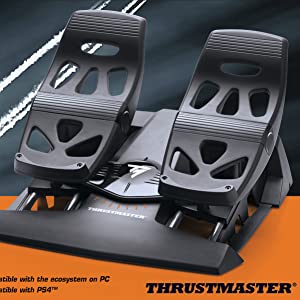
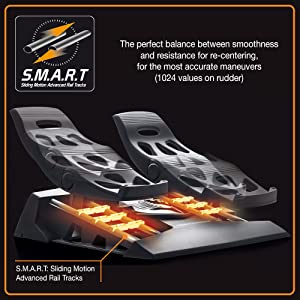
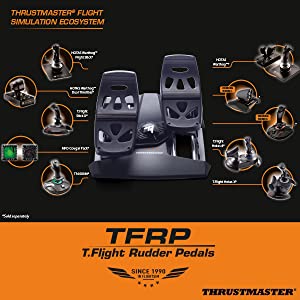
The Thrustmaster TFRP (T.Flight Rudder Pedals)First rudder ever to feature the S.M.A.R.T (Sliding Motion Advanced Rail Track) slide rails system! Capitalizes on the brand’s 25 years of expertise and leadership. Is the device most highly requested by members of the flight sim community. | S.M.A.R.T (Sliding Motion Advanced Rail Track): A technological bonus4 slide rails crafted of industrial-grade aluminum for perfectly smooth sliding motion. Self-centering rudder axis: The perfect balance between smoothness and resistance for re-centering, for the most accurate maneuvers (1024 values on rudder). Long range of travel on rudder axis for precise maneuvers. | Thrustmaster Flight Simulation EcosystemThe Thrustmaster TFRP adds an innovative new product to Thrustmaster’s wide range of joysticks and other related flight-themed controllers, for a real ecosystem-based approach. |
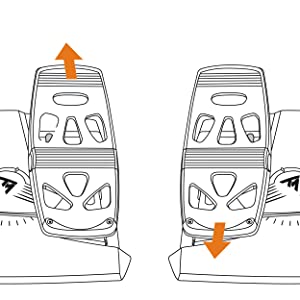
Two differential brake pedals for optimized flying
Large differential brake pedals: 10 inches/25 centimeters (12/45 shoe size).
Rounded central pivot with central grip, on the differential brake’s axis.
Pivot angle with a 15° range of travel: on an incline for deliberate activation, avoiding inadvertent activation when using the rudder.
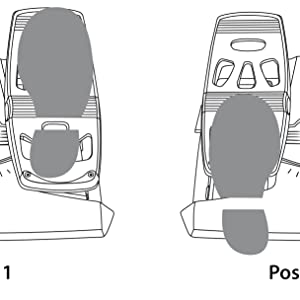
Sturdiness and Precision
Versatile ergonomic design suitable for all types of flight (aerial combat, space adventure, civil flight, etc.). With the heel-rest removed, you can control the rudder using the ball of your foot, with your heel on the floor. With the heel-rest in place, you can rest 100% of your foot on the pedal.
| | | |
|---|---|---|
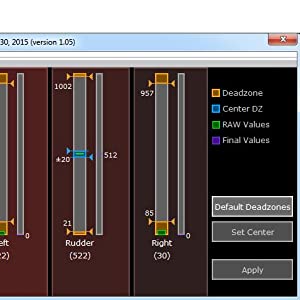
USB and/or proprietary RJ12 connectivityOn PC (Windows 10/8/7/Vista), works with all joysticks on the market thanks to Thrustmaster’s drivers. On PC, compatible with all games supporting multi-USB and rudders. On PC and on PS4, works with and connects directly to the Thrustmaster T.Flight Hotas 4 joystick**. ** Official PlayStation4 joystick, also compatible with PC (sold separately) | Advanced calibration software: adjust dead zonesAdjust the dead zones at the beginning and end of the range of travel on the rudder axis, and on the 2 differential brake axes. Adjust the central dead zone on the rudder axis. | T.A.R.G.E.T advanced programming software on PC for Programming the axes of rudders and differential brakesThe USB rudder can be combined with Thrustmaster HOTAS WARTHOG, T16000Mand the MFD Cougar Pack so that they are recognized as a single USB device. Access advanced profiles created by the Thrustmaster community. |
| Dimensions: | 349 x 314 x 200 cm; 1 Kilograms |
| Model: | 2960764 |
| Origin: | China |
Great kit for the price
I’ve been using Hotas 1 on Xbox MSFS and I’ve had no issues. Easy to use and program and no issues with control.
I’ve flown various aircraft and all performed well with Thrustmasters Hotas 1
Sturdy pedals, reasoanble value, has some flaws.
This was a replacment for my Saitek Proflight pedals that I had for about 7 years.
Its definetly a lot more sturdy and has more metal than the Saiteks and I can feel a lot more resistence as well, the pedals are also a bit more “normal” sized so my size 9 feet can touch the toe brakes without having to shuffle my feet.
The downside to these over the Saiteks is that the pedals are MUCH closer to gether and you dont really get the same degree of leverage/control over the yaw axis and I’ve had to greatly turn down the sensitivity in-game, it’s also not as comfortable as your feet have to be together when you’re using it.
5.0 out of 5 stars Great entry level rudder control.
Resistance springs could be a little stronger, other than that then superb for the price point.
This is the risk you're faced with...
This will be one of my shorter reviews, as there honestly isn’t much to be said here. The build quality is even better than that of the throttle/joystick combo this is meant to augment, which stands to reason as it has to support the same feet that supports my 105Kg body on a daily basis. What I mean by “This is the risk you’re faced with” is that once you get the Captain’s Kit, you WILL inevitably get this too, so you might as well budget for it. Can the Captain’s Kit be used without the pedals? Certainly, and to great enjoyment. But let’s be real here, people – we wouldn’t eat HALF the candy bar, would we? 🙂
Good beginners redder pedals
After using this product for 4 months I have found no problems with the product since first using it.
It is easy to setup and intergrade into an existing system.
I love this product but wish the price was a bit less for what it is.
If I was to purchase a new set of flight sim rudder pedals i would look at spending a bit more and get something more advanced.
Overall I found them to be a good beginners set of rudder redder pedals, depending on what you want to do.
Great product.
If you want to advance to the next level I give my recommendation to the T. Flight Rudder Pedals.
Coming in around 90 you can’t go wrong.
Just like the real thing, heel and toe, Using the heel to control the rudder, whilst the toe operates the brakes, the Left does the left brake, the Right does the right brake, and both operate both brakes.
Having over 10hr flight time in a real Cessna 152H this product has brought me closer to the world of flight simulation.
The only thing I need to further this is purchasing a ButtKicker attached to the back of my chair, to simulate the wind punching you in the back.
Anyhoo it’s easy to set up and you don’t have to purchase the Thrustmaster Range as it comes with an RJ45 to USB adapter. Just need to set up the Brake range to my liking.
4.5/5
The counter acting rudder action is nice with smooth movement. Toe brakes work independently. Installed and running in 5 minutes with very little fuss. Comes with USB adaptor if you don’t have TM controller to plug it into. Only downside is it could use a bit more grip underneath as it has a tendency to slide/move slightly under heavy brake use and I have it in a carpe
Brillia
Upgraded to this HOTAS from a previous much simpler HOTAS, Glad i made the switch. There are 12 buttons on the stick base alone, which gives you many options. Stick feels good in the hand, the only issue i have is a lack of a 2 stage trigger. As for the throttle, it is quite large but most of the buttons are easily reachable, plus the smooth surface means you can just slide your hand up smoothly.
Overall, I do not know if i would recommend this stick to a beginner, the amount of buttons, whilst very nice and good to have, can be a bit intimidating, or even overwhelming, But its a very good system overall.
Great joystick
Works great, just make sure u download latest drivers and software from website.
Simply Superb
Fantastic addition for my MSFS. Easy to setup and a good range of options to customise it. Very good quality. I’ve used it with other Simulators other than MSFS and works a treat.
Worth the money
Not cheap - but good
Work well with Condor Gliding SIm. Rudder control is critical for a glider so adds degree of realism. Easy to set up and work perfectly. Well made and sturdy. Not cheap but worth it.
Precio muy recomendable.
Precio muy interesante para la calidad de este producto. Su funcionamiento es extraordinario.
Preis-Leistungs Verhältnis geht in Ordnung
Die Pedals funktionieren, wurden sofort erkannt und der Flugluimulator von Microsoft hat auch die entsprechenden Voreinstellungen. Was mit nicht so gefllt ist:
– Sie ruckeln etwas, da ntzt auch kein Fett.
– Die Pedale stehen zu nah bei einander, das macht das fliegen recht anstrengend
– Wenn man sie direkt an die Wand stellt, kann man nicht mehr richtig bremsen, d.h. man muss noch einen Abstandshalter dazwischen klemme
Preis-Leistungs Verhältnis geht in Ordnung
Die Pedals funktionieren, wurden sofort erkannt und der Flugluimulator von Microsoft hat auch die entsprechenden Voreinstellungen. Was mit nicht so gefllt ist:
– Sie ruckeln etwas, da ntzt auch kein Fett.
– Die Pedale stehen zu nah bei einander, das macht das fliegen recht anstrengend
– Wenn man sie direkt an die Wand stellt, kann man nicht mehr richtig bremsen, d.h. man muss noch einen Abstandshalter dazwischen klemme
It is a good low budget Rudder Pedal, but, I wish it was more smooth to maneuver ( maybe because it is still new), it is not as smooth as I wish to fine control the Airplane., and I have still to use the joystick when micro movement is needed.
It is a good low budget Rudder Pedal, but, I wish it was more smooth to maneuver ( maybe because it is still new), it is not as smooth as I wish to fine control the Airplane., and I have still to use the joystick when micro movement is needed.
Happy with these
The professional rudder pedals for home simulator cost a lot. But these are definitely required for anyone looking to get into siming. Especially tail dragger aircraft.
It is a good low budget Rudder Pedal, but, I wish it was more smooth to maneuver ( maybe because it is still new), it is not as smooth as I wish to fine control the Airplane., and I have still to use the joystick when micro movement is needed.
It is a good low budget Rudder Pedal, but, I wish it was more smooth to maneuver ( maybe because it is still new), it is not as smooth as I wish to fine control the Airplane., and I have still to use the joystick when micro movement is needed.
Parfai
Bon pdalier exactement ce que je cherchais. Attention de bien initialiser se pdalier dans Flight simulator sinon il a tendance s’emballer.
ottima pedaliera aggiunge realtà al volo
la pedaliera funziona perfettamente solo utilizzando l’adattatore rj12 fornito nella confezione non funziona inserito nella presa del tca quadra
well made and stable
has a good weight which reduces movement on the desk. So far zero creep when zeroed as well. easy to setup in my game, all the buttons are simple to assign as well. You can program all manner of things with it but so far no need for me to do that.; have recommended to friends as well.
Gutes Produkt zum Fairen Preis
Habe mir diese Pedale als Ersatz fr die Z-Achse am Joystick gekauft.
Das aufstellen und einrichten am PC geht erwartungsgem einfach ber die Bhne, am PC angeschlossen wird das Gert sofort erkannt und verfgt ber zwei Achsen. Der Widerstand beim bewegen der Achsen ist gut und die Pedalgre/Fuauflageflche ist auch in Ordnung (Schuhgre 47) der Abstand der Pedale zueinander lsst sich soweit ich wei nicht einstellen ist aber angenehm gro. Das Gert wird auch in jeder Software/Spiel erkannt und funktioniert tadellos.
Soweit gutes Produkt zum fairen Preis.
Gutes Produkt zum Fairen Preis
Habe mir diese Pedale als Ersatz fr die Z-Achse am Joystick gekauft.
Das aufstellen und einrichten am PC geht erwartungsgem einfach ber die Bhne, am PC angeschlossen wird das Gert sofort erkannt und verfgt ber zwei Achsen. Der Widerstand beim bewegen der Achsen ist gut und die Pedalgre/Fuauflageflche ist auch in Ordnung (Schuhgre 47) der Abstand der Pedale zueinander lsst sich soweit ich wei nicht einstellen ist aber angenehm gro. Das Gert wird auch in jeder Software/Spiel erkannt und funktioniert tadellos.
Soweit gutes Produkt zum fairen Preis.
Sehr gute Ruder Pedale
Es macht sehr viel Spa damit Flight Simulator zu spielen. Qualitativ sehr hochwertig. Nur die Antirutsch Polster knnten besser sei
quality ambidextrous joystick
I bought this to replace a matcatz stick that was getting beyond its best. I chose thrustmaster based upon previous experience. The stick is easy to use – plenty of buttons and the stick movement is smooth. I did choose this stick because I am very much left handed, only to find that on converting it to left hand mode (which is quite easy) I am now so conditioned in using a right-handed joystick that using it in left hand mode was nigh on impossible – so back to right hand moce it has been. Good quality – recommended.
Nice solid feel
What I needed and available when hard to find elsewhere
Dece
Good product just a shame the hotas flight stick sucks which makes this product useless if the joystick doesn’t work
Two of these for Elite Dangerous work grea
Having upgraded from a 20 year old MS Sidewinder Precision 2, these are amazing.
I specifically got two of these to play Elite Dangerous. This is a fairly common HOSAS set up for this game and I even think the orange hints were designed to match Elite’s orange HUD.
By having tap/hold macros and setting one key on each stick to become [Shift] after 0.5s I can 3 different actions per button (for example, I have one button that’s engine boost on tap, supercruise on hold for 0.5s and combined with shift on the other stick it functions as system jump. So even with the fairly limited buttons I can play the entire game while never removing my hands from the sticks.
Build quality seems good, I’m not sure what the point of the LED in the base is, I’d rather just have the stick and save a little cost.
I’ve now got about 100 hours of use in-game with them and they are performing excellently. I am slightly concerned about people complaining about broken Z axis on here but I haven’t had any issues yet.
Presque parfait si l'utilisateur est bricoleu
Utilis pour le simulateur de vol Microsoft Flight Simulator 2020.
Plusieurs points :
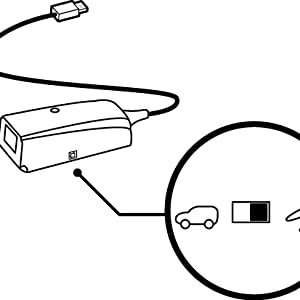
1) attention au tout petit interrupteur sur le connecteur qui fait l’interface entre le RJ11 du pdalier et l’USB: il faut bien le positionner sur l’icne “avion” et non “voiture” pour que a marche bien
2) Une trappe dessous est prvue, il est beaucoup plus agrable, si on veut reprer facilement et sans rflchir la position neutre, de remplacer via cette trappe le tout petit ressort d’origine; on peut sans problme mettre autre un ressort trouvable en rayon dans de grosses enseignes de bricolage (pour ma part j’ai trouv a chez “arthur l’enchanteur et il a fallu modifier un peu la taille du ressort avec des outils) mais puisque moins de 3 euros (et 3 minutes) de brico y suffisent, a vaut le coup.
J’aurais mis 5 toiles si je n’avais pas d trouver tout seul la solution ce problme de pdale trop molle et de position neutre trop floue, alors que la solution pour le rsoudre m’a cot 2,70
Presque parfait si l'utilisateur est bricoleu
Utilis pour le simulateur de vol Microsoft Flight Simulator 2020.
Plusieurs points :
1) attention au tout petit interrupteur sur le connecteur qui fait l’interface entre le RJ11 du pdalier et l’USB: il faut bien le positionner sur l’icne “avion” et non “voiture” pour que a marche bien
2) Une trappe dessous est prvue, il est beaucoup plus agrable, si on veut reprer facilement et sans rflchir la position neutre, de remplacer via cette trappe le tout petit ressort d’origine; on peut sans problme mettre autre un ressort trouvable en rayon dans de grosses enseignes de bricolage (pour ma part j’ai trouv a chez “arthur l’enchanteur et il a fallu modifier un peu la taille du ressort avec des outils) mais puisque moins de 3 euros (et 3 minutes) de brico y suffisent, a vaut le coup.
J’aurais mis 5 toiles si je n’avais pas d trouver tout seul la solution ce problme de pdale trop molle et de position neutre trop floue, alors que la solution pour le rsoudre m’a cot 2,70
Very happy with this stick from point of purchase
Love the sheer amount of hat switches this thing has, 4 switch types, and 1 analogue multi-dir.. very nice indeed!
Stick is very solid to the feel and the primary front facing firebutton is way less flimsy than i thought it was going to be.. its very comfortable and doesn’t dig into your fingers like the cheaper HOTAS-X tflight.
Overall the stick as i currently have it is very precise, and i can make micro adjustments more precisely than the one this stick replaced too.. so its good if you are jus wanting to trim off a little on your axis
Loads of buttons on the stick and if you configure a button as a shift function you can double up too! So no complaints there at all!
What don’t i like so much?
Ok the throttle control itself i like, but I have to say i would have liked a forward/reverse thrust control with a noticable notch in the middle for centreing.. i’ve worked around this but still, it would have been nice to have that.
I look after my equipment and can see many years (hopefully) of use from this stick.
I recommend!
Satisfai
Parfait…malgr qu’il soit vendu pour Playstation il fonctionne parfaitement pour mon hotas x box.
Arrived a day earlier than expected...
Arrived a day earlier than expected, but still had to wait about 7 days from ordering ( came from France to UK – kept in touch with seller who was extremely helpful – thank you ). Unboxed and connected joystick and throttle to a 4 USB 3rd gen ‘gang’, bought separately but advertised to go with this package on Amazon at the bottom of the seller’s advert for an extra cost, the rudder pedal’s RJ12 connector fits into the throttle body, which has it’s own USB connector ( all 3rd gen ). Read the leaflets ( 1 for each controller – joystick – throttle – rudder / pedals ), went to Thrustmaster’s website and downloaded manuals and drivers and calibration software easily – couldn’t wait so took a Cessna 172P training aircraft for a little ‘taxi’ on the tarmac ( I’m really new to Flightgear 2021 ), and all was well except for the rudder / pedals – found another driver ‘all-in’ software pack on the Thrustmaster website and downloaded that too. So far all is well and looking forward to learning to fly ! ( The last time I looked the package was 20 cheaper – during the Covid pandemic prices went up – everyone sheltering from Covid wanted to learn to fly so prices went up as the bundle became scarce I believe – so should be a little cheaper now. If you get this bundle YouTube has plenty of videos reviewing the bundle – and I can’t argue with anything I came across so far – Happy Days !! Overall, pleased with the experience and taking to the skies soon hopefully ! Simulator bought for this was Flightgear 2021 – 6 disk pack – World scenery – Over 50 aircrafts including a helicopter or two – Tutorial disk with vocal instructions – Many World airports. Patience is the key to learning to fly with Flightgear – A flight simulator many flight trainees use on PC which is more real World experience including air traffic controller vocals – more a starter to real flying than a game for shooting things so beware. Can be intensive, but, if you want to get very close to the real thing Flightgear’s right up your alley for this bundle. Finally, Flightgear does use up quite a heavy amount of PC resources, so consider something more like a good flying game if all you want to use this bundle for is to just get into the skies and shoot down an enemy with this flight controller kit. Flightgear uses openGL settings and a graphics card similar to Nvidia GeForce 1050 Ti GTX which is what I have, and a CPU starting around 3300- 3600 MHz. Find out all you can before buying a flight sim to use with this kit. All in all pleased. 4 Stars for now simply because there is better out there but is so much more expensive. This a great ‘middle of the road’ piece of kit. ( This meets my budget, and first-time learning to fly experience with Flightgear 2021 ! ) Good luck ! UPDATE: Having tried to get the Thrusmaster T16000m fcs running with Flightgear, I’ve since had to get a Thrustmaster T.RJ12 USB ADAPTER for the pedal’s T.RJ12 connector, which doesn’t register in Flightgear if plugged into the throttle female T.RJ12 connector, and a USB 3.0 HUB to accommodate 3 USB 3.0 connectors, ( 1 for the joystick, and throttle and pedals ). You will also have to at some point learn .XML or HTML language for the odd programming and script writing to be able to change some settings ! Having said all of that…I wanted Flightgear for the helicopter tutorials and I’m going to stubbornly continue my quest ! p.s. If you prefer to get a Microsoft Flight Sim’ be very well aware of what you will need, and whether the version you get for this Thrustmaster package has been discontinued. And if you think it’s all hard work, I’ve seen some cracking flight simulator rigs that have taken over the lives and provide a lot of entertainment for some !! A labour of love ! Good luck !
For Casual use it is perfec
I don’t consider myself a hardcore player of flight sims and flight combat sims but I do find them very fun to play so I got the HOTAS for a better experience.
It is very worth it, you will not go back to a controller or a KB-M set up anytime soon if you get it.
Sehr feinfühlige Steuerung
verbessert das Fliegen im Vergleich zum Joystick mit Z-Achse ganz erheblich!
Hard to get hold of but worth i
For my husband’s birthday I wanted to get him the one thing he really wanted but with Brexit I’d almost given up these are great best he’s owned and were very rare to get hold of at the original price too thank you!
Pas fou..
Je l’utilise pour Xplane et Msfs2020 ! Content au dbut j’ai t un peu du par la suite .en effet au fur et mesure il perd de prcision et oblig forcer pour tourner et donne des saccades au lieu de fluidit. Je regrette j’aurai d attendre le retour du palonnier logitech
Pas fou..
Je l’utilise pour Xplane et Msfs2020 ! Content au dbut j’ai t un peu du par la suite .en effet au fur et mesure il perd de prcision et oblig forcer pour tourner et donne des saccades au lieu de fluidit. Je regrette j’aurai d attendre le retour du palonnier logitech
Pedaliera simulatore di volo
Prodotto molto valido e consegna in anticipo rispetto a quella stimata.
Grazie
hrustmaster TFRP flight pedals
hey are more comfortable than my old set and seem to work better in my flight sims. All axis are accurate and response is ideal. I found setting them up in win 10 pro first, then installing Thrustmaster drivers worked better for me
Work Great!
Ok, these are one of the two affordable rudder pedal sets available on the market so you’re not exactly blessed with choice. These are plastic with metal sliders but they do feel fairly solid and I don’t feel like I’m in danger of breaking them unless I do something daft. They’re plug and play and I had no issue with the PC (Windows 10) detecting them. The only downside I would say is that the pedals are quite close together and they could really do with being another six inches further apart.
I must admit, I wasn’t too happy forking over the money for these but I’ve wanted a set of rudder pedals ever since I first played FSX over a decade ago. With a bit of luck they will last as long as some of my other controllers and will end up being a good investment.