WORX WR130E S300 Landroid Robotic Mower 300m²


A robot mower with power to share
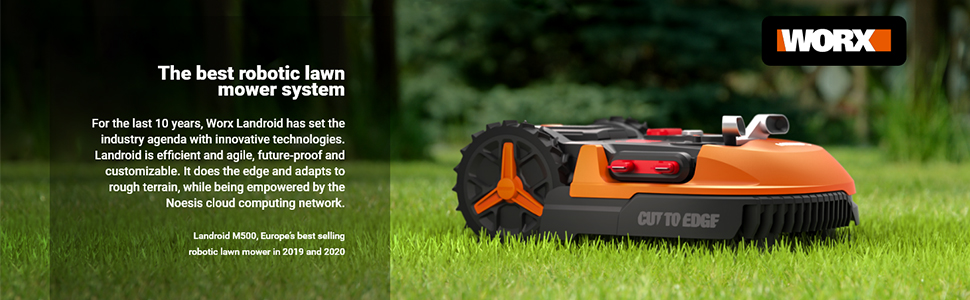
Landroid is powered by the same long-lasting, high performance PowerShare battery that equips all Worx cordless tools.
Agile and efficient
Complex lawns mastered
Worx Landroid always finds its way through narrow passages without needing a guide wire. The AIA patented intelligent navigation technology makes Landroid finish the job much quicker than other robot mowers operating with random paths.
- Always finds its way through narrow passages.
- Finish the job much quicker than other robot mowers operating with random paths.
| | | | |
|---|---|---|---|
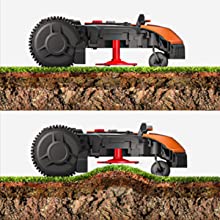
Edge cutTypical robotic lawnmowers leave an approximately 20cm wide strip of uncut grass along the perimeter of the lawn. Landroid’s cutting disk is positioned as close as possible to the edge*, so as to leave behind none or very little uncut grass. * available on select models | The intelligent robotic grass care systemWith algorithms developed by top grass scientists, Landroid adapts to the ever-changing conditions that influence grass growth, such as temperature, sun radiation, rainfall and nutrition. These factors are applied to the specificity of your grass species and soil composition. | Uneven made evenLandroid’s new self-leveling cutting deck* automatically adjusts the blade’s height to match the natural unevenness found in most lawns. Not only does this prevent the blade disc from scalping your turf, but it also prevents the blades from hitting fallen branches. * available on select models | Future-proof your investmentRobot mowers don’t come cheap. But, instead of having to fork out on a new model every few years, we’ve got a smarter solution. Just like your smartphone, new software is seamlessly delivered to your Landroid via automatic over-the-air updates. So it’s bye-bye to spending, and hello to sustainable living. |




Make Landroid your Landroid
The only modular robot grass cutter system
Customisation makes Landroid truly unique. All Landroid robot grass cutters are designed to be adapted to your individual needs through the use of four modular options.
| | | | |
|---|---|---|---|
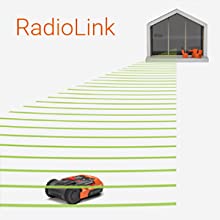
The gift of sightGone are the days when robotic lawn mowers would rebound off trees and onto other obstacles. Landroid’s Anti Collision System (ACS) module option features ultrasonic obstacle recognition to dodge tree trunks, furniture and objects left on the lawn with ease. | Simplify installation and reworksNew trampoline? Freshly planted flower bed? This would require you to surround the new features with wire connected to the powered perimeter cable. With the Off-Limits module option on board, just drop the invisible fence around your lawn’s existing and future features. | Boundless connectivityLandroid relies on cloud computing to get weather information and software updates, but home Wi-Fi networks normally only cover a fraction of the garden area. The RadioLink module option establishes a peer-to-peer dedicated radio connection between your Wi-Fi router and the robot, and stretches as far as 500m metres. | Protect your investment from theftPut any security concerns to rest with the Find My Landroid module option. It allows you stop the Landroid from operating, and even track it down if someone decides to nab it from your garden. An additional perk, the module connects Landroid to the internet even if you lack Wi-Fi. |



| Weight: | 15.2 kg |
| Size: | WR130E 300m2 |
| Dimensions: | 63 x 51 x 28 cm; 15.18 Kilograms |
| Model: | WR130E |
| Part: | WR130E |
| Colour: | Orange |
| Pack Quantity: | 1 |
| Batteries Required: | Yes |
| Batteries Included: | Lithium Ion |
| Manufacture: | WORX |
| Colour: | Orange |
| Quantity: | 1 |
| Size: | WR130E 300m2 |
It will not be used until next April.
It appears to be good value and competitive with rivals. I have had very good service from Worx equipment dating back over 10 years without problem. I was drawn especially to the long warranty on the motor and the ability to update the software. The installation, Bluetooth set-up and manual operation all went as per the instructions. A trial run drew attention to some minor adjustments needed to the boundary wire to ensure the drive wheels kept out of the borders.
Unfortunately it will not see serious use until the grass starts to grow again, but I’m looking forward with confidence to it being a good buy!
It will not be used until next April.
It appears to be good value and competitive with rivals. I have had very good service from Worx equipment dating back over 10 years without problem. I was drawn especially to the long warranty on the motor and the ability to update the software. The installation, Bluetooth set-up and manual operation all went as per the instructions. A trial run drew attention to some minor adjustments needed to the boundary wire to ensure the drive wheels kept out of the borders.
Unfortunately it will not see serious use until the grass starts to grow again, but I’m looking forward with confidence to it being a good buy!
Does everything it says on the ti
Excellent grass cutting robot – replaced my ride-on. Much, much easier than I thought – it does everything automatically. Highly recommended!
Its a lawn mowe
It just works. But you wont realise how much it is doing unless you have something to gauge it by. I wanted the ‘edge’ feature so although I have a small garden (74m sq) I went for the 500 model. Unless you have a bowling green of a lawn, I would get extra pegs for the cable. You will find that the cable will sometimes lift in places and it will need pegging down, although this is a now and again not every day.
The lawn always looks good, I will still have to walk around the very edge with a strimmer, but this is a 5 min job every couple of months not me having to mow the lawn every week. Also, I now longer have to deal with clippings, so no trips to the tip or paying for the garden waste bin.
The connection to the WIFI is a pain in the butt. Once you have it working, it just works, but expect to mess around with router and settings a bit unless you have a dedicate 2.4ghz band. (I have new bt fibre hub and I had to turn of 5ghz and do some port forwarding until it connected).
The wife is very happy with the grass, I have more spare time and I would buy again if needed. brilliant piece of kit, wish I had bought long ago.
Its a lawn mowe
It just works. But you wont realise how much it is doing unless you have something to gauge it by. I wanted the ‘edge’ feature so although I have a small garden (74m sq) I went for the 500 model. Unless you have a bowling green of a lawn, I would get extra pegs for the cable. You will find that the cable will sometimes lift in places and it will need pegging down, although this is a now and again not every day.
The lawn always looks good, I will still have to walk around the very edge with a strimmer, but this is a 5 min job every couple of months not me having to mow the lawn every week. Also, I now longer have to deal with clippings, so no trips to the tip or paying for the garden waste bin.
The connection to the WIFI is a pain in the butt. Once you have it working, it just works, but expect to mess around with router and settings a bit unless you have a dedicate 2.4ghz band. (I have new bt fibre hub and I had to turn of 5ghz and do some port forwarding until it connected).
The wife is very happy with the grass, I have more spare time and I would buy again if needed. brilliant piece of kit, wish I had bought long ago.
Works well
Initially there is some setting up to do but after a week or two and some YouTube videos it can basically be left alone to cut the grass. Very pleased with i
Works well
Initially there is some setting up to do but after a week or two and some YouTube videos it can basically be left alone to cut the grass. Very pleased with i
Just love this
I did a lot of research before buying this and I am really happy with it. It copes with my bumpy lawn and does a great job. I followed advice of other reviews to make sure the wire is just under the surface by scoring a channel. Lawn is looking really good already.
Tricky to set up but a great machine
Once up and working, this lawnmower is amazing. However it is tricky to get set up and sync to WiFi. It’s takes time and you really have to read the instructions. I found out that the firmware on the lawnmower wasn’t upto date so I couldn’t get it to work or sync with WiFi. As it was a weekend tech support didn’t respond straight away. When you have put aside a full day to get it all working, that’s an issue. However, I went on reddit forum and put a post in the the landriod sub reddit and someone said check the firm ware. So after checking it, I found out that it was out of date and not the latest version, so it wouldn’t sync with the app. I got a USB downloaded the new firmware onto it, then at the back of the machine there is a USB slot, I plugged it in and followed the instructions online on how to ingrate the firmware…..and it worked, the robot lawnmower syned over WiFi and it started to cut the grass. Then I could add a schedule for cutting on the app and just leave it to cut for 1 hour every day. Its not a simple plug and play machine, but if you are prepared to to a few hours getting it set up, then it’s amazing. To control your lawn mower from your smart phone is a game changer and I no longer have to mow my lawn. I would say if you aren’t tech savvie and not confident with smart phones or upgrading software on things, then this could stump you out. But if you are confident with tech it’s not an issue. I bought this on a 25% off sale.
Tricky to set up but a great machine
Once up and working, this lawnmower is amazing. However it is tricky to get set up and sync to WiFi. It’s takes time and you really have to read the instructions. I found out that the firmware on the lawnmower wasn’t upto date so I couldn’t get it to work or sync with WiFi. As it was a weekend tech support didn’t respond straight away. When you have put aside a full day to get it all working, that’s an issue. However, I went on reddit forum and put a post in the the landriod sub reddit and someone said check the firm ware. So after checking it, I found out that it was out of date and not the latest version, so it wouldn’t sync with the app. I got a USB downloaded the new firmware onto it, then at the back of the machine there is a USB slot, I plugged it in and followed the instructions online on how to ingrate the firmware…..and it worked, the robot lawnmower syned over WiFi and it started to cut the grass. Then I could add a schedule for cutting on the app and just leave it to cut for 1 hour every day. Its not a simple plug and play machine, but if you are prepared to to a few hours getting it set up, then it’s amazing. To control your lawn mower from your smart phone is a game changer and I no longer have to mow my lawn. I would say if you aren’t tech savvie and not confident with smart phones or upgrading software on things, then this could stump you out. But if you are confident with tech it’s not an issue. I bought this on a 25% off sale.
Once setup it works grea
A bit annoying trying to connect to WiFi but once up and running it works fine
Simply amazing!
Awesome little product and worth every penny! It’s does take a little time to set up but once that is complete all you do is sit back and relax. I haven’t cut my lawn since purchasing and the grass looks amazing, well maintained, luscious and green. Would highly recommend!
Simply amazing!
Awesome little product and worth every penny! It’s does take a little time to set up but once that is complete all you do is sit back and relax. I haven’t cut my lawn since purchasing and the grass looks amazing, well maintained, luscious and green. Would highly recommend!
Just gets on and gets the job done very well.
I love it. However, it does get stuck from time to time at certain points on the boundary wire so some adjusting is necessary. My only criticism is the fact you are provided with a measure from the boundary wire to the edge of the grass and it will indeed cut right up to the edge. I don’t understand then why the robot needs extra width to follow the wire back to the base to charge. This means the right rear wheel runs on your flower border and can get stuck. Result, I had to move the wire in a bit meaning it now doesn’t cut right up to the edge. Perhaps the software gurus at Worx can look into this?
If this is an example of AI, the human race has nothing to fear.
I’d packed this up once to return to amazon but relented and tried one more time to see if it would work. I did speak to customer services, technical but found them to be pretty clueless. The guy was going to speak with his supervisor about my issues and call me back, but he never did.
I eventually got it to recognise the two distinct areas of lawn, i.e. front garden and rear garden. It doesn’t, as they claim, appear to learn the area. Instead I just set it off and hope it eventually covers all the area, which it sort of does, leaving just the odd patch, uncut.
It’s very quiet in operation and, when it does cover the whole area, does a nice job. Although you do need to trim around the edges where it can’t reach.
So far, I’m glad I persevered and kept the thing especially when I see my neighbours with their conventional lawnmowers. I can cut the grass while I put my feet up 🙂
If this is an example of AI, the human race has nothing to fear.
I’d packed this up once to return to amazon but relented and tried one more time to see if it would work. I did speak to customer services, technical but found them to be pretty clueless. The guy was going to speak with his supervisor about my issues and call me back, but he never did.
I eventually got it to recognise the two distinct areas of lawn, i.e. front garden and rear garden. It doesn’t, as they claim, appear to learn the area. Instead I just set it off and hope it eventually covers all the area, which it sort of does, leaving just the odd patch, uncut.
It’s very quiet in operation and, when it does cover the whole area, does a nice job. Although you do need to trim around the edges where it can’t reach.
So far, I’m glad I persevered and kept the thing especially when I see my neighbours with their conventional lawnmowers. I can cut the grass while I put my feet up 🙂
Ride on Mower versus Robot Mower.
So we have a large paddock / field that is on a bit of a slope plus it is very uneven. For the last 10 years we have been using a ride on mower, which generally takes about 1.5 hours to cut once a fortnight. Over the fortnight the grass grows (obviously) and can get a bit long, so we are governed by the weather.
However, problems with the ride on mower and health problems with a gardening contractor meant that the grass was getting too long and the field unusable. As we have a robot mower on a small lawn near the house, we looked at getting one for the field.
With rough measurements we worked out the lawn size so had to go for one that cut 2,000 square metres.
After a week, the results were fantastic.
So now the maintenance of the paddock is greener. No fossil fuels, just plugged in to the green electricity supply.
Warning:
The transformer for this mower is not waterproof (unlike other robot mowers). Due to the distance from our house to the Landroid station we had to purchase a waterproof box to house the transformer.
Setting Up:
Someone suggested connecting a small wire on the charging base to complete a circuit whilst you charge. That is not necessary.
We placed the charging station on a patio table as close to the Wi-Fi router as we could. Put the Landroid on the charging station and it charged OK.
Make sure that the Landroid is near to the Wi-Fi so that you can connect and download the Firmware update.
Wifi:
The Landroid uses Wi-Fi and the internet. This is used to allow you to monitor the Landroid. It will also report back to the App if there are problems. Unfortunately, our Wi-Fi does not cover the area to be cut. To get around this we also purchased the add on Find My Landroid. This uses mobile phone access to report back status and receive commands. It also acts as a burglar alarm.
Insurance:
It is difficult to get insurance on Robot Mowers. To be covered by insurance they must be kept in a locked shed. Hhhhhhmmmmmm. Find my Landroid is a sort of insurance policy. You can always trace it and set up a geo-fence. If it goes outside the area then it raises the alarm.
Steep slope slopes:
We did have one problem with a step slope that the Landroid has to navigate to get home. In damp conditions the Landroid got itself stuck. The work around was to be a special artificial grass for robot mowers (which did not seem to be available on Amazon). Search “hybrid grass square”.
We also set up a track by spacing U shaped pegs (example Landscape Staples, U Shaped Nail Pins | Galvanised Steel | Ideal for Weed Control Membrane, Netting ) . This creates something that the wheels can latch on to. Actually a lot cheaper than the grass.
Lovely Law
Good bit of kit, the manual could be better and more information in it would be helpful.
Works well - but no Wi-Fi/Bluetooth/App
I was skeptical whether it would work or not. But it does and the grass looks pretty good so far.
I laid the boundary cable just under the grass with a lawn edger. Took half a day but was easier in the rain.
Had to make one small adjustment where it fell into the bedding as the cable was too close but otherwise it works well.
The Wi-Fi does not work and I’ve followed all the online guidance I.e. direct to router (adjusting all the settings possible), USB key direct to lawnmower, mobile hotspot – and it still doesn’t work. That means the App has no value either. To add to frustration the supplemental Radiolink is out of stock across the whole country. Hence 1 star off.
excellent little lawnmowe
I found it easy to set up once the boundary wire was sorted, have to say it is very quest and does the job well, being disabled I cannot cut the grass my self and found it hard to get someone to cut it for me, this has solved the problem.
very impressed with it so fa
Takes effort to set up, worth it in the end
I think hardest bit was linking to internet. I did it more by trial and error than by the instructions.
It’s been a while since I did it, but I think you need to download the app 1 st before you get started on WI-FI linking.
Perimeter setting is very easy, just time consuming. Make sure you leave extra loops of wire at various intervals in case you expand your lawn.
My lawn is only 70m, it’s divided by a continuous concrete path, so I cut a groove with angle grinder for the perimeter wire at either end so mower will cross it. This is something I’d not even thought about and it’s lucky I have one, otherwise I don’t know what I’d have done.
Also make sure that all your lawn obstacles that will be permanent are where you want them to be. I was planning on moving the washing line pole, but I’ve not left enough slack in perimeter to do so. The quickest thing to do is cut the wire, move pole, and re join it with spare wire once the object is moved.
I’m not going to bother, to much effort!
Also you may need more pegs I ran out and I only have a small lawn. This was because its uneven and I was paranoid that the mower would cut the perimeter wire, It did!!! So make sure the wire is well laid close to ground.
Also I made a cover for it by bending some of cut of re-bar, works a treat, best of all its free.
Usually we are not avid review writers, but in this particular case we have decided to write a review for the Landroid WR130E which we recently acquired. The buying and delivery process was not to bad. One day later then expected but that can happen. After having read some very ‘destructive’ reviews, we were a bit nervous about the whole setting up and installation processes. Adding the fact that our lawn is far from being as flat as a snooker table, we had some concerns about it. Luckily all the instruction manuals and other information is readily available on the internet, so we could prepare ourselves for the task of planning the installation and laying out the boundary wire around the lawn. One statement in the instructions by Worx, proved to be correct and very valuable: “every minute spent in planning, saves you ten minutes in the execution”. This is probably where most of the negative reviews originate: no thorough reading of the instructions and a poor planning. It is not difficult to get it up and running correctly, as long as you understand the possibilities and impossibilities of a robotic lawnmower, which are explained perfectly clear in all the information provided by Worx. Simply stated: if you are able to order one, you should be able to install it as well, as long as you take the time to read and understand all the information (a classic case of RTFM!). Our Landroid is now in full operation since seven days, without any hitch or any moment that it got it self stuck. We are very happy!
I got two units of the WR155E L2000 to cover a large and complex garden. Because of the number of garden features like ponds and flower beds of varying sizes, I also added the ACS and Off-Limit modules in the hope that they would make the mower “smarter”. In my experience, the core unit worked reasonably well, but my two added module made the mower dumber (more below). I have also had to order the ACS module from the Worx official site instead of from Amazon due to stock issues, and sadly the Worx site has been a customer service nightmare.
The initial boundary wire setup took days, and the adjustments have since taken weeks and are still ongoing. If you have a complex garden like mine, you will need plenty of extra boundary wires to mark the long perimeter plus the perimeters of each garden feature. First thing to know is that the boundary wire works just as a long antenna, so you don’t need to buy them from Worx — any cheap unshielded wire from the local hardware store would work. In the manual it says that the length limit of the boundary wire is only 450m, but you can go theoretically go higher if you use wires with larger diameters and therefore lower resistance. In my case I used 1.5mm wires and easily went above 600m without issues.
Now, the mower would struggle with tall grass and uneven grounds. A small rabbit hole would often be enough to get the mower stuck, so expect to spend time keeping the ground even for the mower to function properly. On balance, however, the mower does save one time and keep the lawn in a better shape.
Now onto the modules — while I liked the idea of a modular design, and that the module hardware seems to be well-built, the software works so poorly that I would not recommend getting either the ACS or the Off-Limit module.
The ACS has two major problems:
1. it assumes every obstacle is a pole, so it could avoid a tree but would drive straight into a wall.
2. it avoids tall grass! This second problem means that during the period of rapid growth, sometimes the grass would grow enough between mowing sessions (remember that the mower doesn’t cover the whole lawn every time, and also cannot mow in the rain, so sometimes the same patch would not be mowed for days) such that the mower would start avoiding it.
Overall the mower works better without ACS.
If the ACS is less than helpful, the Off-Limit module is positively damaging:
1. The top problem is that it doesn’t always work. Sometimes the mower wouldn’t recognise the module and would behave as if the module isn’t installed, and other times the mower would recognise the module and still mow through the magnetic strips, destroying whatever the Off-Limit strips are meant to protect.
2. The other major problem is that even when the Off-Limit module functions, it always turns 180 degrees around when it hits a magnetic strip, instead of applying the randomised turn algorithm. That effectively leaves the area around any Off-Limit strip less mowed statistically, a problem that is further exacerbated if the strip is used near a hard-to-reach area.
So as some other reviews have pointed out, it is better to either rely on the boundary antenna wires or simple wooden planks, as they are both more reliable and do not screw up the mow algorithm. Another point I want to mention is that the manual says that the magnetic strips must form a loop, but that is just nonsense for anyone who understands physics (the weaker magnetic fields at the ends don’t justify the instruction either, especially when it is possible to cut a longer strip to farther remove the ends or just double up the strip). I cannot help but feel that the modules are developed to a far lower quality than the core unit.
There is, however, one useful undocumented function for the Off-Limit module — if you have an island larger than 6m x 6m, it is possible to add a short magnetic strip across the island boundary wire to break the loop, allowing the mower to not get stuck in the loop while trying to follow the boundary wire back home. It’s ironic that the only valuable use of the Off-Limit model is expressly forbidden by the manual instructions.
I hope that Worx would provide a firmware update that makes the modules more useful. A simple change to reuse the good random turn algorithm for both when the ACS detects an obstacle and when running into a Off-Limit magnetic strip would be enough to make the modules more useful than they are today. Until then, I would recommend the core unit but not the additional modules.
Easy to set up.
I like this product. It’s even cheaper than a dog in lock-down and almost as much fun. It mows nicely effectively and on-time. It operates well from my phone as well. Sometimes I just make it mow for the hell of it (lock-down madness I suppose). Why 4 stars rather than 5? It does dig up areas where the ground is uneven and so leaves some ruts on some of my trickier corners. Of course, I wish it didn’t do that. Actually, it’s super. I’ll give it 5 stars.
Easy to set up.
I like this product. It’s even cheaper than a dog in lock-down and almost as much fun. It mows nicely effectively and on-time. It operates well from my phone as well. Sometimes I just make it mow for the hell of it (lock-down madness I suppose). Why 4 stars rather than 5? It does dig up areas where the ground is uneven and so leaves some ruts on some of my trickier corners. Of course, I wish it didn’t do that. Actually, it’s super. I’ll give it 5 stars.
Great device
Took 2 days to run the boundary wire, big garden so this was expected. Has performed flawlessly cuts grass every day, does a boundary run twice a week and goes home when it rains (often). Was a little sceptical but it is a great little lawnmower, and very quiet too.
Once set up it’s great !
Have now had my Landroid running for 6 weeks and it is really good. As others have said spend a little time thinking about the setup and spend the time getting the boundary wire right ( required a few tweaks, but nothing major) and this will be time well spent. One tip on installing the boundary wire, every now and then (7/10m) peg some spare wire (30/60cm) just in case you need to make adjustments later – if the wire is close together the Landroid ‘sees’ it as one wire. No more grass clippings, so there’s plenty of room in the green bins !
Very impressed.
The first questions I wanted the answers to were:
1, What’s the difference between the models when they all look like the same size unit cutting anything between 300 and 1500m2?
2, Can you increase the cutting area of the cheapest model by upgrading the battery?
And the answers are:
1, Not much it seems, the bigger models have a 4ah vs 2ah battery and come with more wire and pegs but that seems to be it in terms of capacity although a couple have extra features such as edge cutting and floating cutting decks
2, Yes. The eagle eyed amongst you might spot that the spec for the charger on the smaller model is 500ma va 1500ma on the bigger ones which suggests its going to take longer to charge a bigger battery. In fact, they all come with the 1500ma charger which charges the 4ah battery in under 3 hours and the additional weight over the main wheels probably improves traction a bit.
So, I bought a 4ah battery for 35 and 200m of wire for 62 (from this very boutique) and I’m now using the Landroid S 300 to cut 505m2.
Overall I found the installation much more straightforward than some of the reviews suggest, and was gearing up for a week or troubleshooting but in fact was up and running the next day. My tips are:
1, Use the Landroid app to calculate your area and lawn perimeter- not essential as the 200m roll of wire is best value but useful to confirm that you’re beating the system by far exceeding the stated capability of the S300.
2, Mow your lawn- sounds a bit odd but the Landroid is designed to continually maintain grass at a set length not do a weekly cut so will struggle taking off anything more than a couple of mm. Also, cutting it enables you to get the wire closer to the ground as well as clearing twigs and other debris if you have trees.
3, After choosing your base location, peg out your wire allowing a bit of slack and pegging every 1.5-2m not the 80cm recommended.
4, Take the blades off the mower, set it at the maximum height and let it follow the wire. I wanted to ensure it was as close to the edge as possible and was able to adjust the path where necessary without risking damage to the blades or wire.
5, Perimeter set, I then let Ted do his thing for a couple of hours and was expecting to have to fill and level the many ruts and undulations in my lawn as he struggled and got stuck but no, like small child taking unexpectedly quickly to riding a bike Ted was off and motored up and over them with no problems while I stood at a distance like the parent of said child, watching and feeling both happy and unneeded.
6, Don’t worry about trees or other fixed obstructions, I’ve got 4 trees and a wooden combined swing and slide frame with 6 legs, Ted bumps into them gently, has a re-think then heads off in another direction. That said, if you prefer just use your extra wire to extend the perimeter to get your Landroid to avoid them.
7, While Ted was exploring the garden I pulled in the slack wire and I buried (I used a flat bladed spade but a lawn edger will do) in the areas where people walk or where its visible, at the back and far sides I fixed it on the ground with the supplied pegs, make sure you keep the wire tight. I used a big square woodworking mallet and where there were small lumps and bumps I gave the path of the wire a hammering just to make it flatten primarily to save on the pegs because they’re plastic , the wire has tough insulation so can’t be damaged by this but you might need to re-tension it. Where there were big dips I added extra pegs where needed.
And that was about it, its early days but Ted is set to auto schedule and just does his thing following about 4 hours effort by me over a couple of days. I plan to add my 200m2 front lawn and can see no reason why Ted won’t be able to cope with it. All I need to do now is get him to sort out the drainage in the lower field.
I wish I'd bought one years ago
After comparing reviews on several models and brands, selected this worx model. I have a good size garden that takes on average 2 hours per week to keep well maintained. From the simple set of about an hour the mower got to work. It took about 4 days before the grass height was even and the results just got better. I used to get strips on the lawn with my conventional mower but I dont miss this as the lawn is now always looking good and I dont have to spend hours cutting and even more time taking clipping gas to the recycle centre. I would describe the grass cut a looking like a rug but in a good way. You still have to strim the edges by the fences and the inside corners as the cut to edge doesn’t reach but this takes literally minutes, I’ve bought a very light battery strimmer for this so it’s just a slow walk around with no effort. I am delighted with the Worx and could not recommend it more highly, why did it take me so long to get one.
Worth the money 👍🏻 👍🏻
I love it!
Easy to set up and after a few tweaks with the boundary wire you have nothing more to do other to watch your little robot cut your lawn.
If you like a perfectly cut lawn look (without lines) then this is the machine for you. All you have to do is strim a few hard to get to areas, the rest of the time you just sit back…. nice
Brilliant Mower not so great instructions
This is an excellent robotic lawn mower and we have not been disappointed. The physical set up is straight forward and just takes some time and care. What is then a bit puzzling is getting the thing to do it’s stuff via the app. Set to auto it languished in the garden not moving for days on end. I can easily tell it to mow but it is supposed to think for itself and do it. It does occasionally tootle out and mow for about an hour. The. It parks its self for a few days. Clearly a setting not right. And this is the only issue I have with Worx not the mower. Do some descent instructions and a cheats guid to setting up on auto please!I have emailed them. They emailed back saying wrong department (instead of just forwarding it to the right one!). So when told it is a joy to watch the lawn being mowed whilst I am doing something else. I just wish the how to use instructions had have been better. I would still but it again though as the mower copes really well with our slopes and undulations cutting right up to the edge. So good mower not so good instructions but you can figure most of it out yourself – apart from auto!
Brilliant Mower not so great instructions
This is an excellent robotic lawn mower and we have not been disappointed. The physical set up is straight forward and just takes some time and care. What is then a bit puzzling is getting the thing to do it’s stuff via the app. Set to auto it languished in the garden not moving for days on end. I can easily tell it to mow but it is supposed to think for itself and do it. It does occasionally tootle out and mow for about an hour. The. It parks its self for a few days. Clearly a setting not right. And this is the only issue I have with Worx not the mower. Do some descent instructions and a cheats guid to setting up on auto please!I have emailed them. They emailed back saying wrong department (instead of just forwarding it to the right one!). So when told it is a joy to watch the lawn being mowed whilst I am doing something else. I just wish the how to use instructions had have been better. I would still but it again though as the mower copes really well with our slopes and undulations cutting right up to the edge. So good mower not so good instructions but you can figure most of it out yourself – apart from auto!
Love this little guy!!!
Reading all the reviews on this has helped me take the plunge. What a great addition to the garden yes the boundary wire takes a while to do but once this is done leave your landroid to it.
Easy to Install. I followed instructions, videos and detailed Amazon reviews and the Boundary wire was spot on. Mowing was trouble free. I built my own Roof from a spare piece of Acrylic sheet and some metal building straps. Perfect as it means I can look through this and see the LED display on the Mower when it is charging.
After some rain one of the wire pegs must have risen slightly as the cable was cut by the mower. I had enough wire to replay the entire boundary so I did it all again from scratch following the previous wire but burying it. I used an edge cutter but a spade would suffice. This solution is better but the mower got stuck on an uneven bit of lawn, so I have levelled this to avoid the mower getting stuck and generating lifting errors.
Since then it has worked perfectly and I no longer have to mow the lawn other than strim the edges every so often.
Great purchase. Thoroughly recommend.
**** UPDATE 12 NOV 2020 ****
Winter has arrived so I have turned off the Charging Station (why waste power) and put my mower into my heated workshop to hibernate. I am still pleased I made this purchase. I will probably place my mower on the charging station every month just to top up the battery until Spring arrives. Not having to mow the garden or empty the grass clippings has made a huge difference from a time perspective.
Good value
Easy to setup and operate. My first one died after 5 days when trying to update the firmware to the latest version. Worx helpline just repeat what was in the manual, which was impossible because the machine was completely dead. I rang amazon and right away they told me to return it. Which I did, and was refunded immediately. I then purchase a second one which is now working well with the latest firmware.
What a cracking piece of kit!
After much consideration, I finally decided to purchase the Worx WR 130 E S, which ideally suited my needs for my small, odd shaped, fairly bumpy lawn area. I did consider the edge trimming model but that was 250 more so decided that for just a bit of strimming at the edges, the smaller model would be fine.
Installation, following the Worx instructions, was quite straightforward, although I was a little concerned that you just laid the wire into the grass, but carried out the procedure as described in the instructions. I decided that it would be ideal to dig in, in places where footfall over to the grass may cause problems of tripping on the wire. I am retired and getting on in years so installation was a slower process than would normally be, but I completed the complete installation in an afternoon.
Running the mower for the first time was straightforward, although linking up to the Wi-Fi was a little problematic, even though I had a very strong signal at the charging point. The message came up on the mower readout that the connection was successful but the phone would not link up. So I consequently started the mower manually and away it went.
Later that day I tried connecting with the phone and, this time, connection was successful.
As instructions said it would be best not to dig initially on see that the mower was going exactly where you want it proved to be good. I found that their distance of 26 cm was a little bit wide and after fine-tuning found that 18 to 19 cm from the Borders was just right.
We do have problems with foxes in our area and they had tended to dig up and chew the wire in places which had to be repaired, but after fine-tuning I decided I would dig the wiring a centimetre or two into the soil, just pressing the spade blade in to the soil a fraction, wagging it side to side, then pushing the wire in and closing the gap.
I did have a problem when I was notified that firmware update was needed. I downloaded the update onto USB stick and followed the instructions, only to find that the mower went completely dead and would not restart. I tried reinstalling again and again, but still to no avail. I contacted Worx via email to which they responded very quickly (within an hour or so), explaining that they had come across this problem a few times before and attached the software required to reset the mower and install an updated firmware. Installing the new firmware went reasonably well although it didn’t follow exactly the procedure the instructions said, starting the mower manually and away it went. Since then I’ve had no problems whatsoever.
I must say that my lawn has never looked so good. I’ve now had the mower for a couple of months and I can, at will, change the settings, times, mowing, etc any time I want from my phone.
And a great bonus is, that if foxes decide to transcend the lawn, I just call Robert up and tell him to get mowing – they soon clear off! So mower that acts as a Fox deterrent. FANTASTIC!
To say that I’m pleased with this fantastic little machine is just an understatement. I encourage anyone thinking of buying one that this is the make to get.
What a cracking piece of kit!
After much consideration, I finally decided to purchase the Worx WR 130 E S, which ideally suited my needs for my small, odd shaped, fairly bumpy lawn area. I did consider the edge trimming model but that was 250 more so decided that for just a bit of strimming at the edges, the smaller model would be fine.
Installation, following the Worx instructions, was quite straightforward, although I was a little concerned that you just laid the wire into the grass, but carried out the procedure as described in the instructions. I decided that it would be ideal to dig in, in places where footfall over to the grass may cause problems of tripping on the wire. I am retired and getting on in years so installation was a slower process than would normally be, but I completed the complete installation in an afternoon.
Running the mower for the first time was straightforward, although linking up to the Wi-Fi was a little problematic, even though I had a very strong signal at the charging point. The message came up on the mower readout that the connection was successful but the phone would not link up. So I consequently started the mower manually and away it went.
Later that day I tried connecting with the phone and, this time, connection was successful.
As instructions said it would be best not to dig initially on see that the mower was going exactly where you want it proved to be good. I found that their distance of 26 cm was a little bit wide and after fine-tuning found that 18 to 19 cm from the Borders was just right.
We do have problems with foxes in our area and they had tended to dig up and chew the wire in places which had to be repaired, but after fine-tuning I decided I would dig the wiring a centimetre or two into the soil, just pressing the spade blade in to the soil a fraction, wagging it side to side, then pushing the wire in and closing the gap.
I did have a problem when I was notified that firmware update was needed. I downloaded the update onto USB stick and followed the instructions, only to find that the mower went completely dead and would not restart. I tried reinstalling again and again, but still to no avail. I contacted Worx via email to which they responded very quickly (within an hour or so), explaining that they had come across this problem a few times before and attached the software required to reset the mower and install an updated firmware. Installing the new firmware went reasonably well although it didn’t follow exactly the procedure the instructions said, starting the mower manually and away it went. Since then I’ve had no problems whatsoever.
I must say that my lawn has never looked so good. I’ve now had the mower for a couple of months and I can, at will, change the settings, times, mowing, etc any time I want from my phone.
And a great bonus is, that if foxes decide to transcend the lawn, I just call Robert up and tell him to get mowing – they soon clear off! So mower that acts as a Fox deterrent. FANTASTIC!
To say that I’m pleased with this fantastic little machine is just an understatement. I encourage anyone thinking of buying one that this is the make to get.
Quiet and effective, short grass up to the edge. Invest time in laying the wire and sit back.
Simple and no bother, no clippings to add to the already full composter. It does eat the wire if you’re not careful, bury it once you are sure about where it should go. Allow half a day to properly lay the wire, it will save hours of looking for breaks if you don’t. Won’t be going back to a ‘pusher’.
Quiet and effective, short grass up to the edge. Invest time in laying the wire and sit back.
Simple and no bother, no clippings to add to the already full composter. It does eat the wire if you’re not careful, bury it once you are sure about where it should go. Allow half a day to properly lay the wire, it will save hours of looking for breaks if you don’t. Won’t be going back to a ‘pusher’.
I purchased the L1000 from a well know diy store because it was 35% off! Huge saving! (Bought it this year because of the price!) And after a week I’ve fallen in love with it!
Recognise now, it isn’t a 5 minute setup and it works. If you think this then reset your expectations now. Its not even a set it up in a day and it works. Think about getting a pet, you have to spend time to settle it in and train it. Then it will be comfortable and do things which make you happy; but equally you need to invest time to make it happy.
So there’s some key things to consider…
Phase 1 lay the boundary wire.
I have a garden which is 40m x 12m so it is large. It took a couple of hours to lay the boundary wire.
There are some good tips and tricks videos on this. (American and German)
My advice is as follows
Plan, and check the plan before you start.
Start with the base make sure it is level
Going around the boundary, make sure the area for the boundary is level and without pot holes (I’ll come to this later)
After setup I found a good video which gave a great tip which is good for larger spaces.
1. Use a garden spray marker to mark the line (useful but not essential)
2. Use an edge trimer turned on its side to make a trench for the cable so it is very slightly buried
Phase 2 test the boundary
Because the mower is now ready to go. Get it to run the boundary line.
Now what you may spot is places the mower struggles with. Either fill the holes with a little topsoil so it is level OR move the boundary wire slightly.
I had to do this quite a bit. Also note this may need to be done over several days once things are running.
Phase 3 sit back and relax as you cut the grass.
Grab a beer or wine or gin or whatever, and enjoy it as you cut the grass from your sun lounger!!!
Your first cut you will be mesmerised and nervous about what will happen… a bit like when you let your cat or dog out the first time. A little apprehension and a lot of happiness! (and that’s the end of the pet analogy!)
Phase 4 fix the problems
Actually you need to watch it well keep checking it for the first week.
Why??? Because sometimes it gets stuck.
This isn’t a fault with the mower, it is a reaction to how it deals with problems! I have a divot in the ground near the end (return to home) of the boundary wire. If I hit this divot at the wrong angle, the hunt for the boundary wire causes it to go too far away and it then looses itself and reports a fault. BUT once the divot was filled, it never had this problem. (note hitting a divot elsewhere didn’t produce the problem and it found the boundary wire, it was just because it couldn’t do the hunt for wire in the short distance back to the home base)
There are other little problems you will spot and the mower’s logic doesn’t always deal with it the best, so rather than let the mower deal with problems in your garden, just fix the underlying problem which is usually a dip or a bump or being too close to a fixed object.
General comments
After 12 days, (12 charging cycles) it has travelled 44Km and been cutting for 41 hours.
Each day it works for about 3.5 hours.
Ive set the mower to cut every day in the time window of 6 hours ie cut till you get a flat battery.
So I didn’t think it was doing much, especially in this heat. BUT when I compared to the grass in an excluded area, I can see there has been about 4 inches of growth elsewhere. So the mower takes a tiny amount off every day and you don’t notice it. This is much better for the grass. Remember because it cuts each day, keep the grass cut high! Don’t think like a normal mower where you cut once a week and take loads off let the grass be a little longer but it will maintain that same height. Longer blades of grass means more photosynthesis, means more healthier grass. Trust me this will be better!
Do you need all the other attachments??? Well this is about choice.
I think some modules are useful I have wifi which covers my garden, but many people don’t if you want to use the app, you need wifi or the radio link box.
The two interesting ones are
Off limits virtual fence this allows you to put down a magnetic strip (this isn’t clear in the documentation) which creates a boundary around objects in the middle of the garden, or temporary things. Personally I have a different solution which requires some electrical knowledge and an understanding of how the boundary wire works! There is a video on this topic which you can look at if you are interested. BUT this is idiot proof and quick and simple just expensive!
ACS (anti collision system) this is an ultra sonic detector (common in robots) that detects something in its path. And so it will redirect itself to go around the object. I might get this next season as it means items such as footballs left on the grass can be avoided and I can then be super lazy and not clear the garden at night!
Oh just because it cuts the grass, doesn’t mean you don’t need to do anything!
You still need to trim edges as it may not be cutting right to the boundary if you have uneven ground, or obstacles for it to go around.
AND you need to clean it once every two week (I suggest) and check the blades are still sharp. They will blunt if you cut in the wet; and it will get grubby!!!
Summary
Love it. It does what it said on the tin. Its not perfect, but then again I didn’t expect it to be. BUT with a little patience and consideration, it does what it should and cuts the grass for you.
Invest the time up front, don’t complain when it goes wrong, but try to work out the problem with the boundary and ground its only dealing with what its being ask to cut and so you can iron out those problems with a little thinking.
Keep watching it to understand what is happening I’ve gone from multiple problems per cut to multiple days without a problem; each time I have a problem I remove it and its no longer an issue. By the end of the month I should be cutting without an issue any more.
Oh and I didn’t say its really quiet, I mean you don’t hear it level of quiet! I have it start at 0700 but I would be happy to have it cut in the early hours. You just don’t hear it unless its beside you.
I would recommend this to people who don’t have the time or inclination to cut the lawn it’s a great timesaver BUT if they want stripes in the ground; sorry that’s a manual job with a mower.
I have a 500sq.ft garden & the mower does a pretty good job of keeping it looking trim. The “cut to edge” feature works ok on path edges but not borders as it still can’t get close enough without the wheel falling over the edge.
Compared to my previous robot (a Flymo) it gets stuck more often (mostly around the dry dusty edges or if it runs over a pine cone) but at least it tells you when it’s stuck. Or it’s supposed to… And that is the biggest problem I’ve come across so far. The internet connection software and App are unreliable and badly written. It loses connection with the cloud for long periods of time and doesn’t remember anything that happens to it while it’s disconnected. So you get some alerts & not others and the activity log is incomplete. Oh and ignore the marketing hype about cloud-controlled amount of cutting – it only works properly if you set it up & optimise it manually. Which works well from the app as long as the machine is actually connected at the time!
I have a 500sq.ft garden & the mower does a pretty good job of keeping it looking trim. The “cut to edge” feature works ok on path edges but not borders as it still can’t get close enough without the wheel falling over the edge.
Compared to my previous robot (a Flymo) it gets stuck more often (mostly around the dry dusty edges or if it runs over a pine cone) but at least it tells you when it’s stuck. Or it’s supposed to… And that is the biggest problem I’ve come across so far. The internet connection software and App are unreliable and badly written. It loses connection with the cloud for long periods of time and doesn’t remember anything that happens to it while it’s disconnected. So you get some alerts & not others and the activity log is incomplete. Oh and ignore the marketing hype about cloud-controlled amount of cutting – it only works properly if you set it up & optimise it manually. Which works well from the app as long as the machine is actually connected at the time!
Bought this to replace the Yardforce Amiro 400i
This was bought to replace an Yardforce Amiro 400i, I’m so happy I’ve changed as this lawnmower is a completely different beast altogether. Firstly nothing stops it cutting your lawn. The wire is dead easy to lay. The app just works. All of these things failed the Yardforce unit.
Great for mowing if you're lazy person 😁
Got 450m2 lawn which drives me crazy when doesn’t look good. Had basic Husqvarna model (1200 paunds 2019 model) that supposed to be for garden up to 600m2, but never managed to do the whole lawn equally. After an year of using Husqvarna saw an YouTube video of Worx and decided to try it. So far (almost two months of use) I’m very happy with. No uncut patches and and lawn looks beautiful. WiFi connection is very useful for me. Cut to age function is also a plus. The only cons for now is that if you stop it or it blocks while mowing you need to take it back to the charging station to restart (or at least haven’t find a way to do it without take it back to the station). Definitely will recommend. Especially for the price.
Great for mowing if you're lazy person 😁
Got 450m2 lawn which drives me crazy when doesn’t look good. Had basic Husqvarna model (1200 paunds 2019 model) that supposed to be for garden up to 600m2, but never managed to do the whole lawn equally. After an year of using Husqvarna saw an YouTube video of Worx and decided to try it. So far (almost two months of use) I’m very happy with. No uncut patches and and lawn looks beautiful. WiFi connection is very useful for me. Cut to age function is also a plus. The only cons for now is that if you stop it or it blocks while mowing you need to take it back to the charging station to restart (or at least haven’t find a way to do it without take it back to the station). Definitely will recommend. Especially for the price.
7 Thumbs up
Excellent product – real time saver and does a superb job
👍 gone is the weekly chore ☀️
Great the romba for the garden. Love it! The setup is straightforward and there are several YouTube videos. Edges need a little aftercare. The protective garage is overpriced ( is an extra) . Should have build my own ! Performance is great and is competitive with others on the market.
A good Mowe
This is my second robot lawn mower, my first was the Bosch indego 800. Both these machines are great and do a fantastic job. WR 142E is a bit more advanced that is why i changed from Bosch, edge cutting, app control and a other add on makes it more advanced. The only CON is that to add on all the bits that do not come as standard is another 500 plus which is insane.
Excellent robo
Great little robot to have in the garden
Once setup it works a dream doing the grass although I have only had in use a few times
Why would you get a robotic lawn mower – doesn’t that make you lazy? I don’t think so – I’m not lazy by nature, so whilst this does its thing I can be doing other things, and during busy weeks, or time spent with family it’s nice to know that the lawn is one less thing to fit in between that schedule
I love this bot – it takes some work to get set up; laying the wire was whole days job on what is a complex large lawn (a square small lawn will be quick and easy IMO). You wire it up to a base, and off he goes – every day for 1.5 hours randomly cutting the grass. It’s quite a thing to watch!
For the first week, I had some concerns. I didn’t like the random nature of bot thinking that it may cause abnormal patterns on the grass, and to me, it seemed to be an uneconomical way of doing things. However, it is so light and the cut is so regular that no patterns are visible after the first week. I also think the irregular patterns enables the grass to be cut better. A couple of weeks and I was thrilled
In what is an irregular-shaped lawn I had to do some zoning. Some more info for this would be appreciated, but was fairly simple to set up and works efficiently with the bot concentrating on larger areas more than the smaller areas, and can confirm that it is happy with a large lawn despite the irregular shape
It does get stuck – more so on the first couple of weeks and I needed to tweak the wire in places. Besides that once a week I may need to free it from a corner or dislodge a twig from its wheels – for this reason I prefer it to be running when I am here, and see this as a required job for any mower bot, as it’s impossible to know what it will encounter. However, saying that it handles really well on an incline and does free itself on boggy ground.
I didn’t opt for the anti-collision attachment but have found it is not required for my lawn as the bumper detects my trees and the bird table – it does give them a good bump though, so any non-static objects on the lawn and you may want to look into that anti-collision attachment
So I am thrilled. I do have one niggle – this thing is pretty stupid when it wants to go home. To explain; the perimeter wire acts a guide, so the bot will find the wire and follow it to home. This is fine, but as it goes clockwise every time, it can sometimes seem very silly. For example, if it finds the wire only 1m from home, it will then go the opposite way all the way around the garden and then dock home – on my garden that is 150m it looks rather silly to see him going the long way round. However, it doesn’t run it’s blades when doing so and monitoring the battery, it doesn’t seem to drain, so whilst it looks silly it doesn’t affect its performance
Couldn’t recommend highly enough!
Risk your judgme
As described box a bit tatty ,the goods inside appeared never have been out,not had chance too test it yet.however good value for the money.
Love it, great app support. A word of caution when laying the boundary wire close to a driveway or border which is not level or nearly level with the lawn, you need the full 23cm distance otherwise the landroid can fall off the edge, however the machine does tell you its fallen off via the app 🙂 One area where the instructions are absent if how to connect it to Alexa
Works great. Almost all good.
For my birthday I bought no more grass cutting. Set up is a necessary evil so no complaints there. Our lawn is looking good.
One warning, it’s quite theraputy watching it mow, so you may lose an afternoon watching it.
Also, add on items (like find my landroid) seem expensive. Maybe just me.
So… After a year of ownership, I noticed my lawn was much healthier than before. This has not saved me around 1000 in replacing my old tired lawn. It sometimes goes astray (my fault not it’s) but it is truly grand. I get on with other chores knowing my grass is sorted. Really great.
Works great. Almost all good.
For my birthday I bought no more grass cutting. Set up is a necessary evil so no complaints there. Our lawn is looking good.
One warning, it’s quite theraputy watching it mow, so you may lose an afternoon watching it.
Also, add on items (like find my landroid) seem expensive. Maybe just me.
So… After a year of ownership, I noticed my lawn was much healthier than before. This has not saved me around 1000 in replacing my old tired lawn. It sometimes goes astray (my fault not it’s) but it is truly grand. I get on with other chores knowing my grass is sorted. Really great.
This is probably echoing a few other reviews, but the key to this product is patience during set up. Our garden isn’t huge, probably just under 200 sq m, and we were fortunate we could run 1/2 the length of wire between the grass and the patio slabs which saved a lot of time, the other half I had to cut into the grass at an angle with a spade, push the wire in then cover it with the soil i’d just moved.
Two things – first attempt just peg the wire out above the grass and set the mower to the highest cut (50mm) then place the mower near the base station but pointing away from it to the left, send it home and it will follow the wire the long way back so you can test your pegging distance is ok. You’ll probably need to make some adjustments for ditches, obstacles etc but once it can go back and dock you’re probably about halfway there. The other is the placement of the base station – it was important for us that it was tucked away and couldn’t be seen easily – we had one place where we could put it which was on the paving slabs but there wasn’t enough room to put a metre straight either side of the base (as is recommended). Fortunately the wire going in is fine, the one coming out comes out about 40/50cm before it immediately comes back on itself and into the garden. This works ok – the mower spends a minute realising there’s nowhere for it to go before it eventually turns the right way and off it goes.
I’ll be honest, i nearly sent this back as my first attempt (4 hours) wasn’t great. I gave it another go and it took me another 4/5 hours and got it all working. Just be prepared for it to take a day or two depending on how complicated your lawn is. The app is excellent, we get decent wifi coverage in the garden so it’s easy to keep an eye on it, it hasn’t had a problem yet (about 4/5 hours mowing so far). The app will give you an estimated mowing time (eg: start at 9am and mow for 40 mins) based on the value you put in as lawn size (or you can walk around it with the app and it’ll try and work it out). Personally i thought that was a bit low so for now i’ve set it to 2 hours each day, which i’ll reduce until i can see the difference.
In short, a great product but you need to be patient – whether you need one is another matter. Personally i don’t like seeing the grass grow longer and knowing i have to waste time cutting it at the weekend etc. We don’t have it cutting the front but if that’s something you need i think you need a 1 metre wide passage but check out some of the other reviews from people who have done that.
This is probably echoing a few other reviews, but the key to this product is patience during set up. Our garden isn’t huge, probably just under 200 sq m, and we were fortunate we could run 1/2 the length of wire between the grass and the patio slabs which saved a lot of time, the other half I had to cut into the grass at an angle with a spade, push the wire in then cover it with the soil i’d just moved.
Two things – first attempt just peg the wire out above the grass and set the mower to the highest cut (50mm) then place the mower near the base station but pointing away from it to the left, send it home and it will follow the wire the long way back so you can test your pegging distance is ok. You’ll probably need to make some adjustments for ditches, obstacles etc but once it can go back and dock you’re probably about halfway there. The other is the placement of the base station – it was important for us that it was tucked away and couldn’t be seen easily – we had one place where we could put it which was on the paving slabs but there wasn’t enough room to put a metre straight either side of the base (as is recommended). Fortunately the wire going in is fine, the one coming out comes out about 40/50cm before it immediately comes back on itself and into the garden. This works ok – the mower spends a minute realising there’s nowhere for it to go before it eventually turns the right way and off it goes.
I’ll be honest, i nearly sent this back as my first attempt (4 hours) wasn’t great. I gave it another go and it took me another 4/5 hours and got it all working. Just be prepared for it to take a day or two depending on how complicated your lawn is. The app is excellent, we get decent wifi coverage in the garden so it’s easy to keep an eye on it, it hasn’t had a problem yet (about 4/5 hours mowing so far). The app will give you an estimated mowing time (eg: start at 9am and mow for 40 mins) based on the value you put in as lawn size (or you can walk around it with the app and it’ll try and work it out). Personally i thought that was a bit low so for now i’ve set it to 2 hours each day, which i’ll reduce until i can see the difference.
In short, a great product but you need to be patient – whether you need one is another matter. Personally i don’t like seeing the grass grow longer and knowing i have to waste time cutting it at the weekend etc. We don’t have it cutting the front but if that’s something you need i think you need a 1 metre wide passage but check out some of the other reviews from people who have done that.
Had a Robomow for 3 years and loved it moved house bigger garden needed to upgrade.
However everything about the Landroid WR153E is better. The app connects over wifi rather than bluetooth so you can get a live update whilst at work and you can control it from work or your house from the app. You can program the Landroid with more detail like rain delays, garden size and frequency.
The Landroid itself is lighter which is important as the Robomow would get on wet grass as it was over 13kg the equivalent Robomow for this size garden is 22kg the Landroid is only 10kg. The blades are miles cheaper and don’t disintegrate plastic toys left in the garden as they fold in on resistance. Also bought the ACS for extra safety which works really well. Also another big plus when the battery reaches end of life i can use it on my other Worx Tools which need less power and buy a new one for 50 Robomow batteries cost 100’s and need to be dealer fitted for you warranty i loved the Robomow but this is far more advanced and over 500 less for the equivalent model.
Had a Robomow for 3 years and loved it moved house bigger garden needed to upgrade.
However everything about the Landroid WR153E is better. The app connects over wifi rather than bluetooth so you can get a live update whilst at work and you can control it from work or your house from the app. You can program the Landroid with more detail like rain delays, garden size and frequency.
The Landroid itself is lighter which is important as the Robomow would get on wet grass as it was over 13kg the equivalent Robomow for this size garden is 22kg the Landroid is only 10kg. The blades are miles cheaper and don’t disintegrate plastic toys left in the garden as they fold in on resistance. Also bought the ACS for extra safety which works really well. Also another big plus when the battery reaches end of life i can use it on my other Worx Tools which need less power and buy a new one for 50 Robomow batteries cost 100’s and need to be dealer fitted for you warranty i loved the Robomow but this is far more advanced and over 500 less for the equivalent model.
This has taken away 99% of the work of cutting the lawn. All i have to It cuts the grass around the very edge which now takes minutes.
If you have a fast growing lawn that you have to cut every 7-14 days and it takes you an hour or more and dont like the task, this is for you!
It even has multiple zone support so I can take it out of the back and put it on the front lawn, press go and away it goes cutting until the batty dies then you just put it back on the dock. Brilliant!
This has taken away 99% of the work of cutting the lawn. All i have to It cuts the grass around the very edge which now takes minutes.
If you have a fast growing lawn that you have to cut every 7-14 days and it takes you an hour or more and dont like the task, this is for you!
It even has multiple zone support so I can take it out of the back and put it on the front lawn, press go and away it goes cutting until the batty dies then you just put it back on the dock. Brilliant!
I absolutely love this mower, it is totally mesmerising. What a time saver. Love it.
Having never used a robotic lawnmower, I wasn’t sure what to expect when I opened the box. My first impression was the size of the thing, it’s not a small item by any means, though it is comparable to a standard mower, albeit chunkier and without handles. Unsurprisingly, it is pretty heavy, not so much that it’s too heavy to lift, but certainly it feels like a solid item. Inside the box, alongside the mower, you’ll find a battery, charger, charging station, perimeter cable and various other fixtures and tools to set the mower up.
Essentially the mower will follow a random path over your lawn, within an area denoted by a guide wire, occasionally returning to its homebase to recharge.
Setting up isn’t straightforward however, to begin with there is only a short, pictorial quick start guide in the box and the PDF, available online isn’t pretty short too. There are two main considerations: siting the base station and placing the guide wire. On the first point, you will need to take a few things into consideration, you need an external power point to begin with, something the majority of us won’t have and then you will need to site the station in a level, shaded place that is conveniently close to the lawn. This may work well in a more modern build, but ours is a very old place and as such finding a suitable place was difficult. As for the second point, fitting the guide wire is pretty simple, just really time consuming and involves a lot of trial and error. The wire needs to be flush with the ground, otherwise you run the risk of the cable being snagged by the mower, which has happened once to us.
Worx say that this is to be used only on lawns that are fairly level – less than 30 degrees incline – and are well established. Ours meets these criteria, though it is slightly sunken and is bordered by a dwarf wall. This wall has proven a little difficult for the mower, as the radius of some of the curves is too tight for it to turn and it has occasionally got caught on top of the wall.
When it works it does so very, very well; it’s like having a goat, continually nibbling away at the grass, so that it never gets long at all. Now, our lawn isn’t particularly large and I’d say that this mower is, perhaps, a bit of overkill, given that it is intended for lawns up to 700 square metres.
In summary, you’ll need to have a fairly even, large lawn, that isn’t bounded by any sort of barrier and is within easy access of an external power source in a shaded, level location. You’l need to give up a whole day to set the thing up, but that’s one day’s effort for never having to mow the lawn again (or until the mower breaks down). If you have a small, irregular lawn and you can’t get a permanent power source outside in a suitable position, then this isn’t for you.
Ok, let’s get one thing straight, I hate gardening, mowing watering pruning. all of it. So when I saw this little robotic mower it almost seemed too good to be true, and despite being thankful for all the reviews written so far, I still felt like I was taking a gamble by deciding to purchase such an expensive gadget.
I’m so glad I did!
It works perfectly. It’s really, really good. Smart as well, rain sensors, upgradable extra modules, intuitive smartphone app, pin code and anti-theft lock options to mention but a few. It’s also whisper quiet. My lawn’s less than ten feet from my bedroom and I can barely hear it with the windows wide open.
The only significant downside is that it does take a lot of work to install correctly – and if you want to take full advantage of this machine, at the serious geek level, then wi-fi coverage of your lawn will be required, well. at least to the charging station anyway.
But, before you go out and grab one for yourself right now, there are a few considerations to mull over first. Namely choosing which model will best suit your requirements/meet your expectations, and also a clear understanding of exactly what’s involved in setting up these Worx Landroids correctly – as cutting corners on the latter, no pun intended, will surely end in disappointment. So if the extent of works described in the procedure below seem a little too onerous for your tastes, then I’d suggest not buying one of these machines.
Before going into further detail regarding the setup side of things, it’s worth mentioning that whilst the WR130 s300 model will cut the lawn perimeter, being guided by the supplied guide wire (more on this later). The WR130 doesn’t have the ‘cut to edge’ function of the WR142e model. So if your garden is bordered by flagstones, bricks or any surface at the same height of your lawn, and is under 300 sq/m, then don’t bother with the much more expensive WR142e model and save yourself 300 as this far cheaper model will straddle the lawn and any adjacent same-height surface thus cutting the entire lawn border just fine.
If, however, your garden has walled perimeters, raised beds, or sunken beds of a dissimilar height to the lawn (i.e. more than 15mm), then the offset mowing deck of the WR142e, and its cut to edge function, is something you may want to consider opting for as the WR130e won’t cut closer than circa 50mm to any vertical or sunken lawn border.
Trying to get around this by setting the WR130’s guide wires closer to the edge than is recommended simply won’t work. If a close cut to the edge is of paramount importance, then you’ll have to shell out the extra cash for the WR142e
Now to the setup; it’s really important to take the time to do this bit properly as anything short of a precise installation will end in a repeatedly stuck mower, cut wires, or a very expensive orange football and lots of expletives.
First step, select suitable charging base location:
Install the charging station on flat and level ground, ideally in a place where you can easily supply power to the station (the lead’s quite long so you’ll have some flexibility in this), using the coarse lawn screw supplied to pin it down. It may seem ungainly at first, but bear in mind that the grass will grow through the grid of the charging base and eventually completely hide it from view.
Second step: marking out the perimeter.
This is important, if the distances set at this stage are incorrect, then things go wrong. I used a line marker spray to set out where I intended to lay the wires, but you could also temporarily and loosely peg out the wire on the lawn’s surface before to ensure you’re happy with this configuration before committing to a permanent installation as described in the next step. As a basic rule of thumb, you need to set the wire 260mm away from a raised or sunken border, and 100mm away from any border/edge level with your lawn.
For internal ninety degree angles, either make the wire follow a gentle curve with a minimum radius of 300mm, or turn it into two forty-five degree angles with a minimum length between each other of 300mm. External ninety degree angles are clearly illustrated in the book, but only necessary for a perimeter cut. In my case, I opted for a 300mm curve instead.
It’s worth pointing out that on the internal ninety degree corners, there’s always going to be a little tuft of grass at the apex which won’t be cut, no matter how diligently you set the wires.
Third step, securing the perimeter wires:
the instructions suggest clipping it on the lawn surface every 800mm with the pins provided – save yourself the heartache at this point and take the more difficult but ultimately worthwhile option of burying them – as well as pinning them. It doesn’t need to be much, just use a spade to open a slit in the lawn, push the wire down by 10mm or so, pin it every 800mm, and at the start, apex and end of any curve.
Fourth step; connection of perimeter wires, operatio,n and a well-earned gin & tonic:
I won’t go into too much detail here as the app is pretty much self-explanatory and related instructions unambiguous.
One final word of warning: when selecting the mowing height on the rotary dial, it’s the number that’s nearest to the ground which indicates the setting selected. I made the mistake of accidentally lowering the mower deck to 20mm instead of 50mm – and came back a few moments later to find some very interesting patterns in the lawn. Fortunately any evidence of my stupidity has long since grown out.
In conclusion, if you’re prepared to work hard in the short term, then these machines are a great way to be lazy in the long term.
Set-up is easy. Spend time to do it accurately. Then just let the machine take the strain.
Quite brilliant! Does what is says on the tin. Buy with confidence. Well engineered, capable software and logic. You may need to help with the edges from time to time depending on your layout.
Set-up is easy. Spend time to do it accurately. Then just let the machine take the strain.
Quite brilliant! Does what is says on the tin. Buy with confidence. Well engineered, capable software and logic. You may need to help with the edges from time to time depending on your layout.
I have been thinking about buying a robot mower for some time. Eventually I chose this one because:
(1) It has fairly good reviews, although they are all from people who have been given free machines to review.
(2) It claims to be able to handle 1,500 square meters of grass.
(3) The battery is easy to replace and is said to be readily available.
(4) It wasn’t cheap and you (often) get what you pay for.
(5) It can be programmed and controlled from an app on your ‘phone. (More on this later).
The thing arrived quickly from Amazon Prime, as stuff always does, and in the box I found: the mower, the psu, battery, charging station, 200 meters of wire, plastic pegs and various bits of hardware.
The documentation ran to:
(1) A pictorial Get Started guide
(2) Safety Rules / CE declaration / Warranty declaration / Helpline
(3) Safety instruction / Charging Procedure / CE declaration
As others have indicated, the documentation is woefully inadequate, you really do need to get the installation and user manuals from the internet and print them out (skipping the colourful outer pages).
Here was the first glitch. Every machine has two names. Mine is the L1500 but there is no manual for the L1500, I needed the manuals for the WR153E. Come on chaps, make your minds up, give the thing one name and stick to it.
Setting up the base is fairly simple: put the PSU in an outhouse or shed, it has to be within about 5 feet of a power socket, and the low-voltage cable then runs outside to the base: it’s about 30 feet long. If you are drilling a hole for the wire, it needs to be about one inch in diameter to accept the low-voltage connector.
The wire is a pain to install. I think this is common to all of these units. Being 200 lb of muscle and testosterone, I decided to push the pegs in by hand (I live in Lancashire, the ground is nearly always soft). Halfway round my garden, on my hands and knees, I wondered why my thumb was so sore. Learn from my mistake and use a mallet.
It is surprising how undulant apparently flat ground can be. It is important to make sure that the wire is closely pressed to ground everywhere, because when the robot trundles around the perimeter, it seems to want to have the guide wire at its centre. There is a real risk of the mower cutting the wire and grinding to a halt. The different manuals give mildly conflicting advice on the spacing of the pegs 700 to 800 mm seems about right.
Now, a circle with a circumference of 200 m will encapsulate an area of over 3,000 square meters. A square 50 x 50 m would have an area of 2,500 sq. meters. I thought that my 200 meter roll of wire would be plenty – but it isn’t. My garden is a very odd shape and the loops that one invaginates from the main circuit to isolate flower beds, ponds and the like use up a fair length of wire. I’ve managed to get about half of the back lawn wired up and have ordered another 150 m of wire and some waterproof connectors: I’ll have all the joy of “extending your system” to contend with later in the week. Can I extend the perimeter to 350m or 400m ? Again, there is conflicting advice.
The app was a sad disappointment. I downloaded it from Google Play (I’m on Android) and took the mower to the end of the lawn with good WiFi coverage. Eventually, it managed to take a picture of the QR code on the mower and then talked me through setting the mower’s WiFi up. The mower said that it had all been hunky dory. The app disagreed and said that the mower couldn’t connect. After a couple of tries, the app started telling me that my “SIM number” was invalid – even when I typed it in manually (And, is that leading 2019 part of the serial number? Are the spaces supposed to put in or left out? Who knows).
The app suggested that I could find the serial number on the “Quick Start Guide”. There is no such document. There is a “Get started” leaflet – but my serial number was on the back of the Safety instruction / Charging Procedure / CE declaration. Anyway, the app shows no indication of having registered my mower; it refuses to connect to it, and so far, I do not have a way of programming the device from my telephone. Not at all impressive.
The machine seems to be made in China for a German company. One should not indulge in cheap stereotypes, but I can quite imagine one group saying: “Put the optimistic numbers in – they sound better, we’ll sell more” and the other group saying: “We shall quote the proven specifications”. It would account for just about every technical detail having two different answers.
My advice to the distributors would be to unify the documentation, include it in the box, eliminate the contradictions, get the app working properly.
The machine itself seems to be doing well enough: my lawn is not a bowling green and the mower does seem to able to go round it without (so far) getting stuck. I’m expecting to have to buy quite a lot of sand when it starts to explore the more irregular terrain that I have.
The charging base makes me a little uneasy. Two spring-loaded metal plates stick out and the mower simply bumps in to them when it wants a charge. The instructions say it’s not to be used or charged in the wet… but there is no cover over the base and this is Lancashire. I shouldn’t be surprised if corrosion sets in to the charging connexions and smearing them with petroleum gel is going to stop them from working entirely. I think an induction system would have been better, but no-one asked me at the design stage.
Overall:
Good in parts.
The app doesn’t work.
The documentation needs to be fixed.
I’ll need to make a roof for the charging base.
I’ll edit this review at a later date with long-term results .
First Update: While I was typing this, the little orange robot has been trundling about, mowing grass. I went out to follow it around and see what it was up to. It’s quite an endearing thing, but incredibly stupid. It got to the point of having a low battery and said that it was going home. It got home, but only one of its connectors connected (I think that the base has to be very flat and very level with an easy approach: I have some levelling to do) – did the robot go back and try again? No. It decided to look for the base station by going the long way round, and of course it didn’t have enough energy left to travel 200 yards so it stopped and had to be carried back. I hope that the AI behind driverless cars is more sophisticated than this!
Second up-date 02/07/2019
The thing remains endearing and I’ve finally ironed out some of the glitches: I’ve increased my rating to four stars.
The manufacturer did respond quickly when I asked them about the WiFi issues. The advice that they offered was already in the manual and didn’t address the problem, but they do seem to be communicative and appear to want to be helpful, that has to be a Good Thing. Eventually I carried the mower and my Android tablet to another wireless access point. After half a dozen tries the app connected to the mower and I could programme its schedule. That’s a lot better than trying to use the little LCD screen and push buttons on the robot.
Curiously, I couldn’t get notifications or otherwise connect to the machine through the access point that covers (most of) the lawn at first. Then it started working for no obvious reason and I got a message to say that it was stuck. It was a good 20 yards from the house, so it must have been communicating through the access point that didn’t work for it originally. I don’t understand, but it is working and it seems to be in range over about half of the lawn. Good enough.
The mower does not like long grass or old grass clippings at all so I gave the lawn another “final” cut with the lawn tractor, rather shorter than I’d normally cut it, and went over it with a sweeper attachment. That has helped. There’s still a lot of trial-and-error: the mower gets stuck several times a day and when it does I have to work out why and then try to make that particular spot of ground Landroid-friendly. Fortunately I have some time off at the moment so it isn’t a huge problem. I only hope that I can get it running reliably by the time that I go back to work.
My extra wire, to extend its range over the rest of the grass, hasn’t arrived yet but I think that I’d better get the system running as it is and then extend it. There are enough glitches to contend with already. I have levelled the ground where the base sits and now the Landroid can (sometimes) find its base and recharge. It remains, however, unalterably stupid. Today it said that it was “going home”, it found the base, came to rest with its connectors touching the terminals of the recharging point, sat there for five seconds and then set off again “going home” with only 8% battery charge. Perhaps Worx will address this with a firmware update at some point?
So far, I’m pleased with it. If you have a large area of not-well manicured grass, as is my case, then I think that you find it is a a lot of effort to set up. I also hope that once the system is working properly it really will be reliable enough to run completely autonomously. I have some doubts. Still, it is undeniably more fun than running mindlessly up and down on a lawn tractor all day.
06/07/2019 – One Week In.
It is growing on me. I think my liking has risen to 4.5 stars out of 5. Now that I’ve ironed out some of the wrinkles it can go for a whole day without problems, dock at night and set off again in the morning without human intervention.
I’ve extended my wire and now it encompasses an area of about 1,500 square meters. Perhaps I should have bought the 2000 model, anyway: I now need to save up for (or try to build) another robot for the rest of the grass. I wish I could work out exactly how the RF guidance system works.
Here are a couple of problems that I’ve had and how I fixed them:
Firstly, an error that will not clear with “Reset – OK” probably means that the mower has detected a sequence that could mean it is being stolen and has gone into locked mode. To clear the error, take the machine to a spot which is (1) in WiFi range and (2) within the wire perimeter. Use the app to switch off lock mode, then the errors will clear as normal. When all is running smoothly, re-enable lock mode (again, using the app) as an anti-theft deterrent. The mower seems to be highly suspicious about being turned upside-down, especially if it detects that it’s outside of its RF loop.
Secondly: the manuals warn about earth-leak of the RF signal through faulty insulation. The system seems to be incredibly susceptible to moisture in its connectors. The solution is to dry the connexion, make sure that it is secure, then pot it up in a little plastic box packed with general purpose silicone goo. It’s an annoying fault because the wire still has continuity and so the base-station shows green on its LED, suggesting that all is well. If you have a “no wire” fault and yet the green light is lit, moisture in a connexion is probably to blame. Conversely, “no wire” and a red light suggests a break in the loop.
Thirdly: being somewhat impetuous, I didn’t pay close attention to the direction of the wire around excluded areas. This can give rise to an intermittent fault where the robot seems to run well but then stalls next to the excluded area, indicating that it is outside its mowing area. I think it means that it’s detected the perimeter wire, turned, and then met the inner loop with the RF signal travelling in the wrong direction. It thinks that something impossible has happened and stops. This is easily corrected by reversing the connexions to the aberrant loop. It also gave me a chance to research the susceptibility of wire joints to moisture (see above).
My advice to anyone thinking of getting one of these machines would be to do it but plan to set it up when you have at least a week off to find all of the problems in your set-up and correct them. It is not a one-day project. Be prepared, too, to have to buy extra things like sand, more wire, suitable connectors, more pegs, silicone and little plastic boxes. Sitting outside with a good book and a cold beer, while the little mower trundles up and down your lawn, I think you’ll agree that is worth all of the grief. Good luck.
06/08/2019
Another month on and no major problems. The mower gets stuck once a week: I’m still ironing out difficult-to-navigate areas, otherwise it simply gets on with the job. I have to say that in the twenty-odd years that I’ve lived here, the back lawn has never looked so good. As the memory of all the set-up difficulties fades, I’m tempted to uprate it to 5 stars. Certainly one of my better purchases.
24/06/2020 It’s been running for nearly a year now.
The app gives one the opportunity of naming the mower. “Hector” seemed appropriate (although he cannot quite manage an hectare) and now that I’ve named the thing, of course, I’ve grown even more fond of it and very forgiving.
I was wrong about the stainless steel charging connectors. They do work pretty well and show only minimal corrosion. I am building myself another robot to mow the dark side of the garden and I’m *not* going for induction charging, despite what I said last year.
The firmware has been updated. Hector is now more intelligent (well, less stupid) about getting himself unstuck and he cuts closer to the edge than he did before. This is good, in that the lawn edges are now more neat; bad because he now slides down steep banks that previously he avoided. More spade work and wire-moving is needed.
I’m still very pleased with Hector. I repeat that my lawn has never looked so well. But do, for heaven’s sake, go into this with your eyes open. You are buying into a project, not a one-off solution.
Good luck
– and thank you, to the kind people who left comments.
Although setting up the boundary wire takes a little time once done you connect the mower to the internet and set up via the app and you just forget about the mower moving the boundary wire if it gets stuck
Great buy for a lazy dad who can’t be bothered to mow his lawn as my lawn now looks like a bowling gree
My wife and I had a bit of a disagreement about this robot mower to be honest. I felt strongly that it was a retrograde step compared to my old faithful robot, ‘Isaac,’ but my wife having nursed it to life over a few weeks feels the complete opposite.
Let me explain.
If you look around, you will see that there are two main types of robot lawnmower under various names and with minor cosmetic differences. The older type has the bigger wheels at the front whilst the newer type has reversed this with the bigger driving wheels at the back and the small bogey wheel to the front.
This is an important choice for two reasons. One good and one bad for both designs.
Now, I have an old Flymo mower that I bought four years ago — also Husquavarna brand — with the big wheels at the front, so I can make a reasonable comparison. This design means that the mower is ‘dragged’ along and thus lawn imperfections are easier to travel over which, of course isn’t a problem if your lawn is perfectly flat, but mine isn’t thanks to the mining efforts of Mr. Mole and his chums. I have cleared the dastardly beasts and done my best to level the lawn, but there are still areas where the ground is less than ideal although, not terrible. With the old mower, this isn’t too much of an issue as it pulls itself over the uneven bit without too much of a problem.
That’s not the case with the new style mower. The rear wheels push the mower and because the bogey wheel is at the front — and is quite small — if it hits a divot or uneven patch, the wheel drops and then gets pushed down into the dip, stopping the robot. Now, there is a program that is designed to pull itself back out and this does work most of the time but not always.
So, from the point of view of ability to deal with a less than perfectly flat lawn, the new version with the small wheel at the front is less good than the old version.
But.and this is where my wife has stood up for Hal 9000 — is that once you have dealt with the worst offending problem areas the mower is better at cutting grass it seems, despite having the same kinds of blades that all these types use. It certainly can get close to the edge and this is where the design choice for reversing the position of the wheels comes in. It’s more manoeuvrable. Bit like a shopping trolley, having the control at the back allows near right angled turns, thus this mower can follow a border much more closely than the previous model. This is used to its advantage because when it returns to base to recharge, it follows the perimeter wire thus dealing with the edge better than the ‘big wheels at the front’ type robot.
There is also another difference over the previous model in that there is no ‘return to base wire’ which had to be laid out towards the middle of the lawn. Not that it makes a huge difference, but it’s there.
So, having got the design changes out of the way we can talk about the rest of the mower.
Number one on the list of ‘Good things,’ is the use of a standard battery for tools. Well, Worx tools anyway. It’s a simple job of opening the back of the mower to take out and change the battery if you need too which, is far simpler than my old Flymo which has an integrated battery pack. That being said, it’s still going strong after four years so not as big a downside as it might seem. The one thing I do notice is that this Worx robot using the exchangeable battery pack does seem to need far more regular charging up than my old Flymo. I assume the cells are a little smaller as they are designed for hand power tools.
The cutting disc — fitted with the very sharp disposable blades — is offset so that when doing the perimeter, it can get nice and close to the edge. This is a good thing, although it does not negate the need to occasionally take an old-fashioned grass cutter out and go around the edge to neaten it up. The offset perimeter wire naturally means there is a strip that does not get cut which can easily be done in one pass with a ‘normal’ mower.
Speaking of blades, these can be cheaply bought on Amazon from 3rd party suppliers. I’ve used original and the non-original and there is no difference apart from your wallet being better off.
The depth of cut can easily be adjusted by means of a large dial on the top of the mower. I’ve got mine set to ‘Somme’ mode so that it clears the craters made by the small furry destroyer of lawns. You can set it low as you need to deal with a billiard table smooth lawn if you have one. I might just have a small cry to myself at this point. If anyone out there is of a ‘certain’ age they may recall the superb Jasper Carrot ‘Mole’ skit. Believe me, it’s true.
There is an inevitable app which is used for setting up the mower which, thankfully my wife downloaded and used to set up the mower. I have almost become allergic to apps given that nearly every item you buy has an app to go with it. My old mower does not have one and it worked fine just out of the box and I’ve never changed anything. The next bit is from my wife who did the setting up and is far calmer than I am.
The app is easy to find and install from the Play Store but as I’m using an Android plat-form I can’t comment on the Apple availability. I assume it’s there and just as good.
There is a QR code for linking the machine but, my Sony phone is never too keen on doing this, so the easy alternative is to enter the serial number located under the lift-up cover.
Once connected the menu is straight forward and logical and makes setting up the schedule far easier than trying to do it on the machine itself.
There are various configurations regarding the days to run, hours each day, which days to do the edges and whether to cut in the rain. I think the default is for it not to go out in the rain but, we live in England and if it didn’t go out in the rain, it would never cut the grass. It rained solidly yesterday, and he happily continued cutting the grass all day – a huge advantage over a conventional mower.
The app will also warn you of various problems. For instance, in my garden due to the lumpy edge thanks to Mr. Mole occasionally the mower will go ‘off piste’ – slightly over the guide wires – and need to be rescued. Sadly, the app doesn’t do this, and a physical rescue is needed. We also had in the very first few days, a warning ‘Wire missing.’ This was because the wire was still a little proud from the ground (and on a little bit of an incline) and the mower had sliced through it. It was quickly remedied using one of the cable connectors and he was off on his merry way again.
Some other things. You need to put a perimeter wire around the lawn and for this you have two options. Surface mount or bury. Frankly I surface mounted mine as I know from the other part of the garden where Isaac runs after a year or so the natural movement of soil will draw down/bury the cable. After three years it’s about 50mm below the surface. The only thing you need to be careful of is to make sure the wire is well pinned to the ground so that the blades won’t hit it when doing the perimeter run. These blades are more than sharp enough to cut the wire causing instant stoppage.
And that reminds me. Get some wire joiners as well. As careful as you are even if you bury the wire, there is always the chance of a wire break. In my case it’s the mole man digging around who has twice cut through it.
The build quality of the robot is pretty good. Nice tough plastics and if my other version is anything to go by should last a good few years as long as it’s not abused.
They are safe. As soon as you move, lift or disturb it the unit shuts down. This in theory makes sure that pets or children cannot be hurt by the blades. That being said, it’s a last line of defence and if you do have small crawling children around then I’d always turn it off when they are playing on the lawn.
Conclusion
Get one. Get this or any other type — they are all very similar and based upon the same model I suspect. Just be aware that your lawn needs to be fairly flat and lump/hole free for proper operation. Just look carefully at the overall design so that you understand which brand marketing version you are considering and then buy the cheapest.
After doing much research on-line we bought the WORX Robot Mower having seen it on a TV ad. I must say, we are not disappointed. It took about 2hrs to install including linking the Robot to the App which is fantastic. The quick start A3 guide was really useful and gives you all the information to lay the boundary wire and docking station. On the first time out the Robot goes round the boundary wire and we had to make a few small adjustments so it did not nudge the edge of the patio, but apart from that all was good. The App was also easy to download and connecting it to the Robot was easy and since then we have not touched the Robot as all the changes we have made have been done via the App. The automatic schedule set by the App we have extended to cut a little longer each day and you can even tell it to cut the edge by selecting this by day. One thing we will say, is that by the end of the 1st week all the lawn will be cut and then going forward it looks great all the time as ours does. The only thing we have done is trim about 4cm of grass along the patio edge. This has been a great purchase and a massive time saver as according to the App we have 647m2 of grass we now do not have to cut!!!
The Landroid mower comes in a single, large box. The packaging materials are all environmentally friendly (except for one sheet of bubble wrap and two foam pieces on the wheels). It’s really easy to see what is in the box and check it off against the quick start guide.
Basic set up of the mower is very simple:
– Find location for the base station within reach of a power socket. The power cable is
– Attach one end of the guide wire to the base unit, then peg it all around the perimeter of the area to be mowed. Make sure the wire is flat to the grass, especially over dips in the ground, otherwise the mower will cut through it! Cut the wire to length then attach the cut end to the base unit.
– Place the mower on the base unit and power up. Select the size of the area to be mowed and let the mower work out its own mowing schedule.
– Sit back and watch as the Landroid mows a random route around your garden.
I found that problems arose when the lawn is not smooth. We have a visiting badger who likes to dig holes in the grass. The mower’s front wheel frequently got stuck in these. Despite manoeuvring, the Landroid could not recover and had to end that mowing session.
If you have WiFi coverage in your garden, then there is a phone app that allows you to control your Landroid. The functionality is fairly limited (start mowing / pause) but you can also obtain notifications when it starts and if it gets stuck for any reason.
In summary, the price tag is high but for a larger than average garden would save a significant amount of time and effort once set up on a smooth, hole free lawn.
I did a lot of research before forking out – this is a big expense for a non-essential item. in fact I’ve got the M500 but I wanted to write a review to help others considering a landroid.
Two key things mattered to me: ability to cut close to the edge and ability to be lifted up and put on an isolated piece of lawn as i have more than one. The landroid M500 and models upwards deliver on both – if you go for the m300 you’ll only get cutting to the edge of your lawn if it is surrounded by paving slabs flush with the level of the lawn that allow the mower to straddle a good 6-8 inches. My lawn is surrounded by flush 4 inch brick so i needed the edge feature of the M500. it works very well – although sharp internal corners are the one bit that will need periodic trimming.
This brings me on to the best feature – which is not even mentioned in the instruction manual! You can lift the landroid up and move it to an isolated lawn so it can do multiple lawns. The two catches are that you will need to lift it up manually to move it (unless there is a metre-wide channel to drive itself there – in which case it’s not isolated anyway) and you will need to move it back when it’s run out of battery so it can go and charge.
The only thing to make this possible is you need to run the continuous perimeter wire round both lawns. you can achieve this by having a section between the lawns where the perimeter wires (out and back) are run together – see picture. One thing to note – if you do this it is essential that the direction of the current in the perimeter wire is the same for the second lawn as it is for the first lawn – so the landroid can follow the direction of the wire and travel anti clockwise when cutting the edge.
I’m so pleased i took a chance on this being possible as I have three isolated lawns and the main benefit of having the automatic mower is that i don’t need to mow any of them myself now.
The app is very good and allows complete control – you can check up on it from anywhere. it’s also got a handy lawn size calculating using gps and your phone’s camera to measure the area of the lawn using the perimeter of your lawn if it is an irregular shape and then sets an automatic schedule for the time of operation that you can manually adjust for the days and times you want it to cut.
Mowers that say that they cut in the wet are actually telling you they don’t have function to not cut in the wet. it is a bad idea to cut wet grass as it does the grass no good so this rain sensor is excellent.
There are parts of my lawn that I’m going to need to fill in some holes dug by foxes as it struggles a bit with these but nothing that a bit of soil and a spade can’t sort. It’s very inventive when it gets stuck and does a good job of wriggling out if it gets struck. The main issue is that if the hole persists the landroid will end up digging up around it if it is continually getting stuck and backing itself out.
The landroid is a hard working little machine and the lawn looks very smart. I’m looking forward to an easy summer of having the best continuously neat looking lawn I’ve ever had!
I did a lot of research before forking out – this is a big expense for a non-essential item. in fact I’ve got the M500 but I wanted to write a review to help others considering a landroid.
Two key things mattered to me: ability to cut close to the edge and ability to be lifted up and put on an isolated piece of lawn as i have more than one. The landroid M500 and models upwards deliver on both – if you go for the m300 you’ll only get cutting to the edge of your lawn if it is surrounded by paving slabs flush with the level of the lawn that allow the mower to straddle a good 6-8 inches. My lawn is surrounded by flush 4 inch brick so i needed the edge feature of the M500. it works very well – although sharp internal corners are the one bit that will need periodic trimming.
This brings me on to the best feature – which is not even mentioned in the instruction manual! You can lift the landroid up and move it to an isolated lawn so it can do multiple lawns. The two catches are that you will need to lift it up manually to move it (unless there is a metre-wide channel to drive itself there – in which case it’s not isolated anyway) and you will need to move it back when it’s run out of battery so it can go and charge.
The only thing to make this possible is you need to run the continuous perimeter wire round both lawns. you can achieve this by having a section between the lawns where the perimeter wires (out and back) are run together – see picture. One thing to note – if you do this it is essential that the direction of the current in the perimeter wire is the same for the second lawn as it is for the first lawn – so the landroid can follow the direction of the wire and travel anti clockwise when cutting the edge.
I’m so pleased i took a chance on this being possible as I have three isolated lawns and the main benefit of having the automatic mower is that i don’t need to mow any of them myself now.
The app is very good and allows complete control – you can check up on it from anywhere. it’s also got a handy lawn size calculating using gps and your phone’s camera to measure the area of the lawn using the perimeter of your lawn if it is an irregular shape and then sets an automatic schedule for the time of operation that you can manually adjust for the days and times you want it to cut.
Mowers that say that they cut in the wet are actually telling you they don’t have function to not cut in the wet. it is a bad idea to cut wet grass as it does the grass no good so this rain sensor is excellent.
There are parts of my lawn that I’m going to need to fill in some holes dug by foxes as it struggles a bit with these but nothing that a bit of soil and a spade can’t sort. It’s very inventive when it gets stuck and does a good job of wriggling out if it gets struck. The main issue is that if the hole persists the landroid will end up digging up around it if it is continually getting stuck and backing itself out.
The landroid is a hard working little machine and the lawn looks very smart. I’m looking forward to an easy summer of having the best continuously neat looking lawn I’ve ever had!
I quite like domestic robots. For several years I imported Roomba’s from the US before they were available in the UK and have several different robotic vacuums and a floor mopper. I have not had the opportunity to take a look at a robotic lawnmower however. I do have the incentive though that I absolutely hate mowing the lawn!
This is an impressive whole lawn robotic mower which, as a new model I will be testing extensively. The unit has a very high build quality as you’d expect with such a costly item. In the pack you get the substantive mower itself, a discrete charging base, the removable battery, the transformer and a good length of low power cable to reach the mower charger, wire to mark out the lawn boundaries, and pegs to hold the wire in place and secure the charging unit. There’s also some lightweight instructions and safety warnings. I really would prefer to have a paper copy of instructions. Instead the manufacturer directs you to a website to get the full instructions. Usefully there’s also an online video which details the installation process but at the moment the instructions are not available in the form of a printable booklet and other text-based support is limited. This is a product just on the cusp of release which partly excuses this significant issue!
Installation has proceeded as expected. The largest amount of time is devoted to laying out, and lightly burying the cable marking out the edge of the lawn and any flowerbeds, and a pond, to keep the lawnmower within a defined area. This is a once-only effort though and I suspect the cable could be used for pretty much any robotic lawnmower which uses a cable to restrict its operating area. I’d really advise burying the cable to prevent it being cut when the mower is in use. A little additional effort should ensure smooth operating. You need to select a sensible place for the charging station although the design of the station, with a open-grate base, means that over time the base will be covered with grass and only the charging ‘prong’ evident. This is massive change to the substantial and slightly unsightly base stations that tend to be available from other manufacturers.
There are a few strategic issues you need to consider. The manufacturer suggests that the mower can only cope with slopes up to 35 degrees. Actually I’m pretty impressed with that and have nothing like that sort of slope in my garden. When laying out the wire cabling to delimit the area the mower covers I really would make use of the rule and triangular template that from part of cardboard upper box of the mower. Using the rule means that the wire will consistently be a set distance within the lawn and cut to edge technology which features in this model should result in a perfectly cut lawn with no straggly grass at the end of the lawn. The tools also help avoid creating narrow corridors of lawn to be cut which might result in the mower being trapped and needing to be manually retrieved and placed on the charger. Correct installation of the kit will almost certainly require an outside plug. The unit is meant to be frequently active and leaving it without power for most of the time will prevent this. Finally, you’ll need wifi coverage in your garden to get anything approaching the most out of the robot. If you don’t you could play around with wifi extenders or, alternately and rather elegantly, WORX sell a plus in module with a mobile phone card which should mean you have internet linkage to the mower all of the time. This is at additional cost though.
For me a key element, and something which differentiates older robotic mowers compared to new ones, is the associated app. At a basic level you can set the times in between which you want the mower to operate, how long mowing is delayed if rain is detected, and get statistics on the mower. Of course you can also start, pause, and cancel mowing all without needing to go anywhere near to the mower. I suspect that you can do this from anywhere in the world, but have yet to check this! The mower has access to useful cloud computing data via the internet so it will know the weather – most importantly the ambient temperature which helps predict the rate of grass growth. There’s the potential to link to a range of smart home technology devices – so it might be possible in the future that if the mower detects itself being moved home security cameras are turned on. I need to check whether IFTTT works with WORX. What is certainly possible are mower firmware updates via the app. All of this means that you don’t need to interact with the small display and keypad on the top of the mower, unless you want to of course. The WORX Landroid app is available for both iOS and Android and for the iOS version at least you can have a play with the app before even buying a mower as it has a guest demo mode.
In terms of the practical operation of the mower, it’s a little like a Roomba before it started to use LiDAR technology. So, the robot moves around the lawn in a random pattern, eventually covering the whole lawn. The model I’m reviewing has a smaller battery than the top of the range Landroid, and has a battery life of around 70 minutes. This is the lowest operating time of any of the current range of WORX machines. This doesn’t matter very much though as until the robot has finished mowing it will return to the charging base, recharge, and carry on – not something early Roomba’s did. This is helped a bit as the cutting circle is 23cm rather than 18cm on the smaller machines. So for each pass over the lawn a larger area is cut. The mower is also a bit like early Roomba’s where you set up virtual walls to stop the vacuum leaving specified areas of a room, exiting the front door and reeking havoc in the night street. For the Landroid the equivalent of the virtual wall is the wire buried under the lawn. And in my tests to date the mower does not cross the wire. It’s worth noting that if the boundary wire is not connected or powered, the mower simply will not operate.
So, the mower uses somewhat basic technology in determining the pattern of mowing. There’s no GPS in place here to precisely locate the mower and direct where it goes. However, GPS based on the US system, simply does not provide the accuracy to mow a lawn. At best it will predict location to the nearest metre or so. That may change as new satellite systems become available but the technology is simply not viable at present. So you need to relax and watch the mower randomly cover the lawn.
Further updates, and a few issues with the mower to follow. This is a firm four star product though.
I picked this mower up at the launch in a retailer. Very simple to install and set up, perfect for my small garden and now runs about cutting my lawn 24/7. I like the options of building up the mower with additional accessories to make it more clever, will have to save up for those.
This was my first encounter with a robotic lawn mower and has proved to be quite an adventure. I suppose I had hoped just to take it out of the box, command it to mow the lawn, and go away to make a cup of tea. No such luck. Set up and installation is a faff; but it is such fun watching it mow that I forgave it everything.
The sturdy box contains the mower, a charging base, a battery pack, a coil of wire, lots of black pegs, a couple of wire connectors, and a bag of spare blades and screws. There is also a ruler and a measuring triangle that you have to cut out of the box; it took me a while to discover them.
What about documentation? There is a getting started leaflet but it is entirely inadequate. I headed to the Worx site to download the installation manual and the owner’s manual. I tried to read the manual on a laptop but on a sunny day outside it was too awkward and hard to read. So I ended up printing the manual; if you do this, I suggest missing out the first and last pages which have large areas of solid colour that will waste lots of ink.
Worx should include a printed manual in the package.
Reading the installation manual it was soon apparent that this mower is not suitable for every kind of house and garden. For example, we have two disconnected lawns. You can only install the mower for one lawn, so mowing our small front lawn will remain a manual operation.
There is more. You are meant to install the charging base on or adjacent to your lawn, in a dry and shady spot, and within reach of an exterior mains socket; a tall order for many of us. Your lawn should also not have any slope greater than 35%. It must be clear of rocks and gravel, and the more features it has, like flower beds, trees or ponds, the more work it will be to set up.
You also need wifi on the lawn. Luckily our wifi access point just about covers it. Without wifi throughout the lawn it will still work to some extent, but you might want the optional extra radio unit which overcomes the problem.
I fitted the base as best I could, with the mains cable going through a conservatory window. Not suitable for a permanent installation, but OK for a try out. You peg the base down with some pegs and an allen key. Plug it in and set the mower to charge.
Next, you have to install a boundary wire. The mower will only go within the boundary. The wire has to be carefully positioned a set distance from the edge of the lawn, and with extra attention paid to corners and obstacles (hence the ruler and triangle). You also need to keep the wire tight to the ground (or buried) to avoid it being cut by the mower. It is very low voltage so nothing will blow up, but then you will need to reconnect it.
We only have a small lawn but laying the boundary wire took a couple of hours. You can see the wire in the picture. It is unobtrusive but could be a problem with pets or young children. It can be buried which is probably a very good idea, but more work.
This done, we set the mower to test the installation by going round the boundary and back to its charging station. It worked. So we kicked off a mow, with the cutter set to the highest level.
The mow worked too, though it took a couple of hours. The long mowing time does not really matter as you do not have to be there. If it runs out of charge, it will go back to the charging station, recharge, and resume later. Same deal with rain, though more on this later. It mows randomly, supposedly to get a nice even appearance, but should cover the entire lawn.
There is an app. You register your mower and then you can use the app to check status, set scheduled mows and more. It is quite a nice app though perplexing in places. I tried to set a manual schedule but have not got it to work yet. I did successfully upgrade the firmware though. It has fun little animations of the mower at work, and also tells you the weather.
There is an issue with lawn edges. It does not do edges every mow, but only when set to do so via the schedule. Plus, it looks like edge cutting is not a feature of our WR130E but requires the WR141E or WR144E. So we have shaggy edges which will need manual attention. Potential buyers note.
The actual cut though, edges aside, is rather good. The mower is designed to mow frequently and to leave fine cuttings on the lawn. No need to gather the grass cuttings.
If you fancy some more add-ons, there is one for voice control and another for “find my Landroid” — a security feature which is useful since the idea is that you keep the Landroid outside all season, an anti-collision system with sensors, and a “digital fence” that seems to be a simpler alternative to the boundary wire for avoiding garden features.
Conclusion? Well, it is a lot of work but also a lot of fun and quite effective. There are some hard questions though. Rain is one. The documentation is really not clear about how dry your charging station needs to be. It says dry, but the illustration just shows a site near the wall of a house. I feel that you should probably mount a canopy of some kind over the charging station. Alternatively you can take it inside when not in use but that is not very good, since it involves removing pegs and leaves you with loose boundary wires, as well as defeating the idea of the regular automatic scheduled mow.
The inability to cut to the edge is a limitation. I suggest buying at least the M500 (WR141E) for this feature alone. It is not that much more.
I am still quite impressed. Setting this thing up is not trivial and there are serious limitations; yet it is also obvious that it does a good job and that the limitations will lessen as the technology improves. Currently I’d recommend it only if you are an enthusiast, or if you are sure that you have the right kind of lawn and facilities to justify the effort and expense of a proper robotic mower setup. I also think that in a few years most of us will mow our lawns with robots; the question is whether now is the moment to buy in.