Doro 780X Unlocked 4G Dual SIM Easy Mobile Phone for Elderly with Simplified Keypad, GPS Localisation and Charging Cradle Included [UK and Irish Version] (White/Black)

DORO 780X
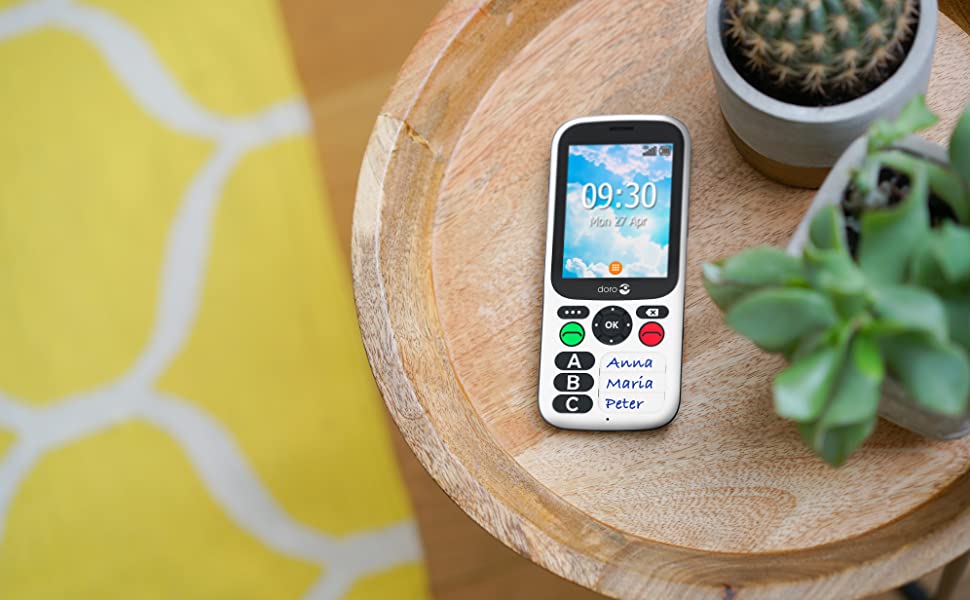
The splash-resistant, easy-to-use Doro 780X makes staying safe a whole lot simpler. Three large keys, with name labels, put the people you rely on in easy reach, without having to navigate menus or browse through a phonebook. It also has excellent safety functions such as a safety timer and a Response button for sending an alarm with GPS positionning if you need help.
SIMPLIFIED KEYPAD
Designed having senior people in mind, the Doro 780X has a simplified keypad to dial up to 3 contacts that you rely on. The user can receive, but not send, SMS and the sender will get a ‘message opened’ receipt when the Doro user reads it. The keypad is composed of 3 main keys – which once programmed will correspond to a contact person whose name can be written next to each button to avoid any confusion, Accept Call and End Call keys, a left, right, up and down selection buttons, Delete and OK keys.
Handset size (mm): 138x60x13
Handset weight including batteries (g): 117
Box contains:
- Doro 780X
- Charging Cradle
- AC Mains Adapter and Micro USB Cable
- Quick Start Guide
| | | | |
|---|---|---|---|
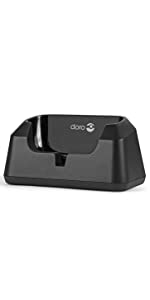
BATTERYThis mobile phone for the elderly comes with a UK mains plug and a docking station to charge the device. Thanks to the desktop charging cradle you will always know where your Doro 780X is and that it has charge. The cradle is perfect for anyone with limited hand mobility or those who are partially sighted, as you won’t need to insert the micro USB connector into the port on the side of your mobile phone to charge it anymore. | HD VOICE AND HACThis mobile phone for seniors is Hearing Aid Compatible so you will get loud and clear sound whilst wearing your hearing device and thanks to the HD Voice technology it has never been so easy to hear and to be heard.
| ICE (IN CASE OF EMERGENCY)Add an ICE contact to improve your own safety. First responders can access stored medical information from the user’s phone easily using the ICE function. All fields are optional, but you would be able to provide next of kin details, condition, allergies, blood type, vaccinations, medications and other very important information which might be crucial to know in the event of an accident or trauma. | RESPONSE BY DOROThe Response button features on the back of the Doro 780X and when pressed will simultaneously alert an unlimited number of ‘Responders’ that are set up in the pre-installed app. Responders are alerted on their smartphone (free app to download) that the Doro user requires assistance and are shown their location. Within the Response by Doro app, users are also able to help manage settings such as screen brightness or call volume on the Doro phone. |

| | | | |
|---|---|---|---|
SAFETY TIMERThe safety timer function becomes very useful when you are performing a task which may be risky for your safety and which may unable you to call for help. To avoid this, set the safety timer to ON by pressing the key on the side of the phone and follow the instructions. Do the task (i.e. take a shower) and deactivate once complete. If the alarm hasn’t been deactivated within the set time then the assistance sequence will start. You can decide the time period, up to a maximum of 120 minutes. | SPLASHPROOFThis device is resistant to water splashes and is protected from a limited dust ingress. Classification: IP54. | CALL BLOCKINGThe call blocking feature allows you to prevent specific numbers from calling or texting you. This option is very useful especially if you often receive spam calls or messages. You can add numbers to your Blacklist directly from your call log, just press Block number. | GPSAfter downloading and setting up the Response by Doro app, you can instantly see the Doro user’s position. If the Doro 780X is on and connected to the internet (via WiFi or mobile data), it will update the position instantly; if it is not connected, it will show the last known position with the time. Note! Both the Doro 780X user and ‘Responders’ need to set up a Response by Doro account to use this service, with the Doro user granting permission to share their location with their connected Responders. |


SPECIFICATIONS
| Internal Storage | 4GB+512MB |
| Big display text | Display modes optimised for visually impaired users |
| Display size (H x W mm) | 43.2*57.6 |
| Resolution (H x W pixels) | 320x240QVGA |
| Speaker phone volume settings | 15 |
| AC Adapter spec V/mA | 5V 550mA |
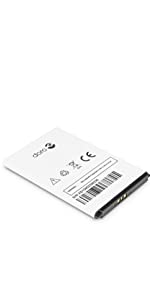
| Battery included (type) | 1600mAh Li-ion |
| 3G (Bands) | UMTS Band 1 (2100) & 8 (900), B2 (1900) |
| 3G data rate | HSPA+ |
| Bluetooth version | 4.2 |
| Chipset | MT6731V/ZA |
| LTE (4G) | Cat 4 VoLTE, Band 1, 3, 7, 8, 20 |
| Memory card type | Micro SD card |
| SIM card type | Micro-SIM (3FF) |
| Wi-Fi | Yes |
| SAR head, body, limbs | 0.785, 1.503, 2.651 |
 |  | |
|---|---|---|
| Compatible with | ✓ | ✓ |
| Dimensions: | 6 x 1.3 x 13.8 cm; 300 Grams |
| Manufacture: | Doro |
| Origin: | China |
| Reference: | 7966 |
Good for elderly
Simple and Good for elderly, just the quick dial options, should be 5 people maybe not ; , and no other dial out options even if signed i
Simple phone.
Bought for elderly mum with poor vision and complete fear of mobile phones.
We kept this phone very simple, we have not actioned GPS function or any of the other features requiring internet access.
We use only as a simple phone. Although it is tricky to add the three mobile numbers into the address book, I got there in the end…more luck than judgement though!!
Now mum just presses A,B or C to call one of us which she manages well.
Easy to use.
Probably needs to be set up by the person not using it!
Simple to use
My 99 year old dad has now been using this phone for several days. Even with mild dementia and poor hearing he is able to operate the phone, both to make calls and receive calls. So far I am very pleased with this purchase. The sound is high quality and loud enough. On the downside, I agree with other reviewers that setting the phone up for use is very frustrating and difficult. Nothing is intuitive so be prepared to spend several hours using trial and error to work out how to make adjustments. Similarly the on screen menus could be so much better. There is an extensive manual. This helps a little but you still have to work out what the buttons do. Setting up the Response App on another device allows remote control of the phone but unfortunately all you can do is adjust volume and brightness. Overall, so far I am happy with my purchase but be prepared for lots of frustration and several hours setting it up before you give it to your elderly relative.
A bit tricky
This item should have been used for a dementia patient, but he managed to turn off the speaker and we can’t rectify this
Easy to use once set up
Not easy setting up the phone but once set up my old folks love it.
Easy to use
Bought this for my mother who has vascular dementia, very easy to use
Perfect for emergencies.
We ordered this for my elderly grandfather during his final months with cardiac failure, in the event he needed to wake one of us through the night with chest pain.
3 numbers are all that was needed, his 3 main carers and the 999 service.
The reason I mention the above is simple. It goes to show how easy this phone is to use for someone with either memory issues, or in a hurry. 2 buttons are all that need pressing.
I will admit setup needs to be done by someone more tech savvy and you MUST USE THE INSTRUCTIONS!! However this makes it foolproof. It can’t be messed with or have any settings changed by accident, unless you know how to get into the settings menu.
Overall, this thing can save a life. It’s perfect for panic alarms, slips and falls.
Eay to use
This phone was bought for an 88 year old relative who is partially sighted. It is so easy for her to use. Simply the best Phone in the circumstances
Some quirks
Great little phone pretty easy to use but it has some quirks but gives the elderly the security of a mobile
Easy to use
I got this an as emergency phone for a relative with dementia. The only disappointing thing was that you can only enter three numbers and names to the phone book, so as I didn’t have a spare slot for my brother’s number it doesn’t display his name when he rings the phone – and our relative only answers calls where he recognises the name.
Difficult to set up
Fine once set up but really quite difficult especially for elderly.grandson set it up in the end.
A real godsend
I was looking for a mobile for my 95 year old mum that she could actually use. She is disabled and has failing sight and a normal mobile ended up far too “complicated” for her with her FaceTiming and calling people she didn’t even know by mistake lol! This phone she keeps by her bed and if she needs us she simply pushes two buttons – she loves it! It has therefore given us peace of mind that she can reach us any time (she has a Phone Guardian with lifeline in her living room – excellent too)
Exactly what is needed for our family and a cheap 5 a month SIM for unlimited minutes makes this a perfect buy. Would not be without i
Ideal for dementia
Arrived quickly. Quite complicated to set up fully, but once done , is excellent. Simple and safe.
Easy to use for elderly and visually impaired users
I’ve just changed my mum’s old Doro 780 for this new one as it is WiFi enabled.
Excellent, easy to use phone, my only criticism is that it sometimes locks and mum can’t find the ‘unlock’ key easily (she is registered blind)
Good phone for the money
Bought for a elderly person who has difficulty using a normal fone ,they find it easy to use and a b c buttons is good ideal jst one button to press to make a call
Good, but could be bette
I bought this phone for my disabled wife who is in hospital. The phone generally is good, as the three configured phone numbers are all she needs. The setup is a bit fiddly and the graphics/menu look like something from a 70’s pac man game. It could do with a more modern user interface . One drawback we find is the lack of a mute option. Doro support could only recommend reducing the volume to minimum, but this is too fiddly for my wife as it uses small buttons.
Doro 780x Unlocked 4G Dual SIM easy mobile
This was purchased for an elderly person with mild Dementia. My son set it up and it has been a great success and gives peace of mind to his carers and family.
Good little phone.
This is a very good, simple small mobile for an elderly person who doesn’t need anything complicated. Three personally labelled speed dials make it very easy for people to dial most needed and used numbers. Great little docking station to recharge with an emergency dial button on the back that can be programmed. Only issue we have experienced is the accidental pressing of the emergency button on the rear of the phone when docking the phone hence the 4 stars. However once mastered there have been no more accidental calls
To sum up this phone is fairly simple to use for the user but it’s not idiot proof for example the user could make errors that may result in them accidentally calling the emergency services. However I would say that this phone is a fantastic concept and is a great idea for someone with mild dementia symptoms or similar and gives the family peace of mind when the user is out and about with the ability to see where they are.
The biggest problem is that the set-up of this phone is extremely complicated and is best done by a young technology savvy person who has a lot of patience it took me a whole evening to set up the phone
It’s also worth noting that the phone can only call 3 people there is no phonebook of contacts and whilst It can receive text messages it cannot send them the idea being to keep the phone as simple as possible.
At present this is the only cellular phone that has been designed for a user with dementia, it’s great concept but it definitely needs some work and more development. For the time being the phone will do the job if you can get past the setup process.
I would argue that the build quality of the phone feels cheap when compared to the build quality of other phones of its price range, it looks and feels similar to some of the budget priced phones from the same manufacturer; however this must be weighed up with the manufacturers claim that it is built to be shockproof and apparently has the claimed advantage of being able to resist both being dropped and bring deliberately thrown, I have not put this to the test but it is easy to imagine that a smartphone type build and screen could more easily break.
Mobile phone
Really good. Bought it for my mam who is 84. She finds it much easie
This product was bought for my elderly father in law who has Parkinson’s and dementia who has coordination problems.
He is finding it very easy to use and the way it sits in a charging cradle stops the need to fiddle with tiny plugs.
Excellent only criticism is it could be a bit bigge
I bought this for a family member who lives by herself and is developing dementia. She’s fine with landline phones (pick up the receiver and dial the number) but she couldn’t understand even “basic” and “simple” mobiles, where you dial the number and then press a button, and have to deal with the screen blanking and navigating menus, plus remembering to plug it in to charge, etc. She needed something for when the landline phone goes down, where you can make phone calls by pushing one button, or two at the most. This phone is expensive, but it’s the only one that fitted the bill. Press two buttons to call, one button to signal an emergency – that’s it.
It was quite a lot of work to get it set up initially. There are a lot of different settings, and the process of setting up “responders” (who are notified when the emergency button is pushed) is complicated and is best done when you have both this phone, and your own smartphone, together. But now it’s there in her house, she keeps it in the charging cradle, and I can log on to the My Doro web site and check remotely where the phone is and whether it’s charged.
Note that it takes a micro size SIM, not nano sized SIM like most phones these days.
My father has severe dementia and is in a care home, but he kept calling 999 from his phone asking to be rescued as he was being held prisoner – obviously not the case. The care home had to take his phone away as he was calling multiple times a day. This was a huge problem as he could not call us when he felt like a chat and we noticed a huge difference in him. This phone does have some big failings – primarily the massive headache to program the 3 numbers. It’s not dementia proof, he has managed to wipe all the numbers, it speaks Russian on a regular basis and the gun license policeman who phoned him by accident received 6 calls demanding that he come and get him. I can’t control it from the app to the extent I thought – so standing in the rain on the care home doorstep to reprogram the numbers has become a weekly event. I had to re-do the instructions a couple of times as he can out smart the phone. However, the phone call to say “nothing’s happened today” makes it all worthwhile.