HUION Kamvas 13 Graphics Drawing Tablet 13.3 Inch Monitor with 1920 x 1080 Full HD Display 120% sRGB Gamut Compatible with Android/Windows/Mac-Midnight Gree
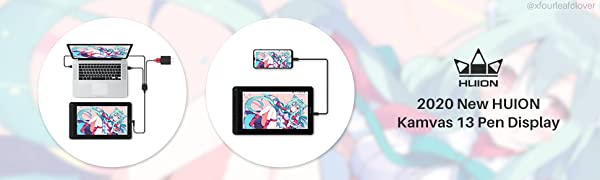
Huion Kamvas 13 which is easy to connect for outdoor drawing, online teaching, distance learning or web conferencing and so on. Kamvas 13 is the first pen display that supports connectivity with Android device via a full-featured Type-C cable. Users can express their ideas on Kamvas 13 whenever and wherever they want.
Important Notices:
1. Kindly note that Kamvas 13 is NOT a standalone product. It needs to be connected to a computer/laptop to work.
2. Connection Tips:
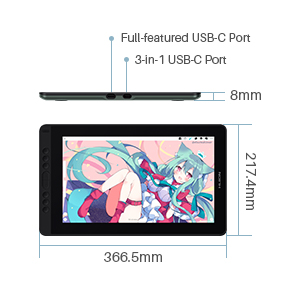
The Kamvas 13 is coming with 2 UB-C ports, which support both 3-in-1 USB-C connection(HDMI Signal) and full-featured Type-C connection (DP Signal).
Only Huion full-featured cable could work for Kamvas 13.
1) For the 3-in-1 USB-C cable,
your computer needs to have HDMI and USB ports available for the connection, if not, you need an adapter to convert for the connection. Please be assured the USB cable & HDMI cable securely plug into your computer.
No need for power adapter any more. The 3in1 cable supports 5V 2A charger, Any universal mobile charger can be used for power supply.
2) For the full-featured Type-C cable,
It is not included in the package content. It need to be ordered separately. If you need it, please ask us for further information.
supports Type-C to Type-C connection to power Kamvas 13. No need to have HDMI port or HDMI adapter.
3) Connection with Android devices,
Full-featured Type-C cable is needed if you want to connect Kamvas 13 with Android devices.
Extra power supply is needed under connectivity with Android device.
Android devices should support desktop operating system for PC mode or DEX mode.
List of Compatible Android Devices:
Samsung Galaxy Note 8/9/10/10+, Samsung Galaxy S8/8+/9/9+/10/10+, Samsung Tab S4/S5e/S6, Huawei P20/P30, Huaweri Mate Serials
3. Driver Installation Tips:
Huion driver will be regularly updated, so please go to Huion official web to download the newest driver, and install it on your computer.
Before installation, please uninstall Other Brand’s Driver and reboot your computer. And please close all drawing program when installing the driver.
For Mac Mojave (10.14) Users, please Add the “TabletDriverAgent†into the whitelist first after installing the driver on your computer.
Please be sure that Huion driver is compatible with the newest Mac OS 10.15 Catalina.
4. Huion PenTech 3.0
adpots Capacitive Pressure Sensor and stable pen nibs to provide real pen-writing feeling.
5. Huion Tech Support
If you have any problems, please check the Quick Guide and search Huion online to find a way for further assistance, we are always ready to help you!
| | | |
|---|---|---|
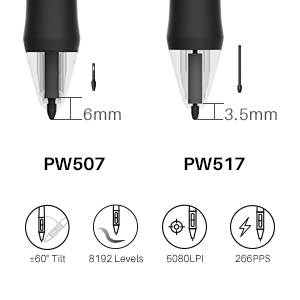
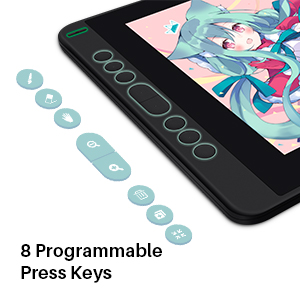
Light enough for better convenience.Kamvas 13 is equipped with 13.3 Inch working area which allows you to release your imagination. Kamvas 13 is 11.8mm ultra slim and weighs only 980g, which makes it an easy-to-carry pen display for outdoor drawing. The Kamvas 13 boasts 2 USB-C ports,which support both 3-in-1 USB-C connection(HDMI Signal) and full-featured Type-C connection(DP Signal). You can easily connect Kamvas 13 with any device that supports USB-C interface via a full-featured Type-C cable, which can be used for transmitting data, power and video signal (Kind Reminder: Full-featured Type-C cable requires purchased separately). | PenTech 3.0 Battery-Free Pen PW517Kamvas 13 is equipped with the latest digital pen-PW517. It adopts the Huion PenTech 3.0, which enables pressure applied to be captured sensitively and lines input to be rendered in a more organic way. Battery-free pen PW517 is optimized with a highly-sensitive and stable pen nib to ensure a more lifelike drawing experience as you’re using a regular ball point pen. 8192 levels of pressure sensitivity permits your creation more accurate and vivid. 60 degrees of tilt function allows your every lines and strokes more smooth and natural. 266PPS report rate enables you to capture and bring the ideas in your mind alive the moment inspiration hits. The pixel-level pen resolution 5080LPI ensures smooth and constant lines, making delicate details a reality. | 8 Express KeysKamvas 13 features 8 customized shortcut keys to bring more user-defined options at your fingertips, optimizing your workflow and improving efficiency. Meanwhile, the Kamvas13 is ergonomically designed to support right/left-hand mode to facilitate your operation. |
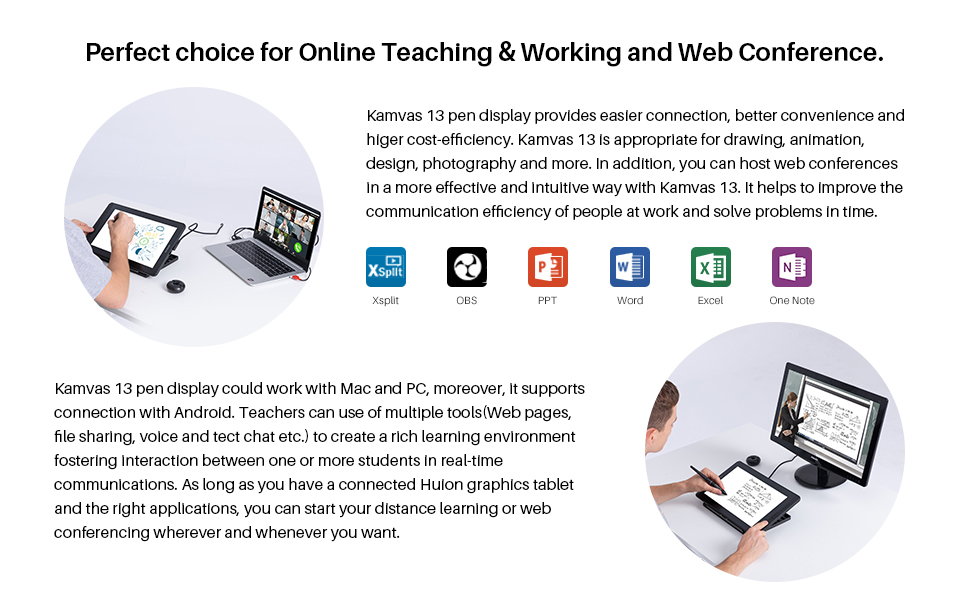
Join Online Teaching&Working and Web Conference
Huion tablets are well compatible with office software like Microsoft office Word, Excel, Power Point. Use Kamvas 13 to visually present your thoughts and notes. It is ideal for online teaching, remote work, web conference, presentation and so on. It can contribute to enhancing the efficiency of distance learning or Working.
| | | |
|---|---|---|
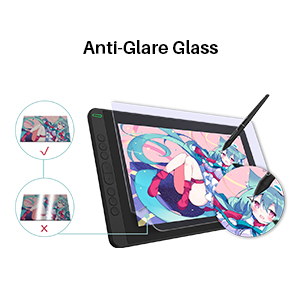
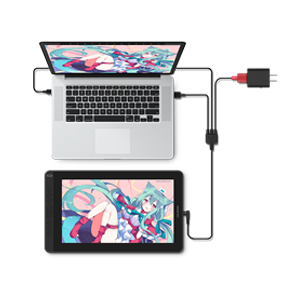
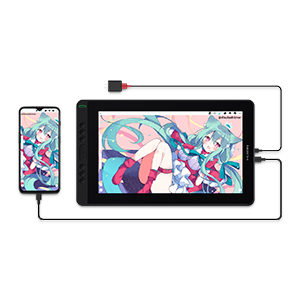
Full lamination, minimum parallax.The 120% sRGB wide color gamut presents 16.7 million colors vividly. Thanks to the wide color gamut, Kamvas 13 graphics drawing monitor has an outstanding color display effect and can greatly reduce the color difference. 1920×1080 HD drawing monitor to lively display every details, anti-glare glass panel to keep your screen clear even bright light, 178°wide viewing angle ensure the image quality. The full-laminated technique combines glass seamlessly with the screen to minimize the parallax. | Connect with PC/laptopBesides a Type-C to HDMI connection, Kamvas 13 also supports a Type-C to Type-C connection. Users can connect laptop that supports Type-C input to Kamvas 13 easily without using a Type-C to HDMI adapter. Kind Reminder: 1) The Type-C cable of Kamvas 13 must use Huion’s Type-C cable. 2) The Type-C cable of Kamvas 13 needs to be purchased separately. The low power consumption design enables Kamvas 13 to be powered by a laptop directly. To power on the pen display, users only need to connect Kamvas 13 to a laptop that runs on 5 volts or above via a USB cable. | Connect with Android DeviceKamvas 13 is the first pen display that supports connectivity with Android device via a full-featured Type-C cable. Users can express their ideas on Kamvas 13 whenever and wherever they want. You can start your creation on Kamvas 13 anytime, anywhere. |
| | | |
|---|---|---|
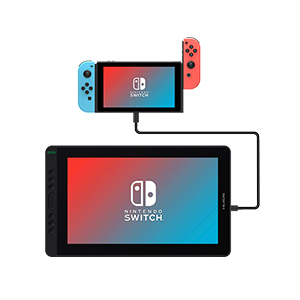
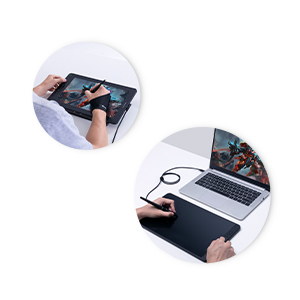
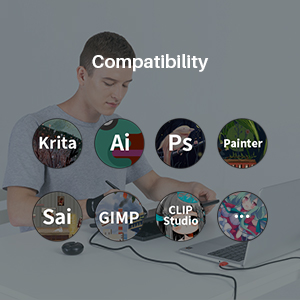
Have fun with SwitchBesides PC, laptop and Android devices, Kamvas 13 also supports connectivity with Switch via a full-featured Type-C cable. Just enjoy playing the Switch game on the 13.3 inch screen as you wish. | Pen Display or Pen Tablet?Kamvas 13 can be switched easily between two modes, Pen Display and Pen Tablet. Pen Tablet mode will be activated when the screen of Kamvas 13 is off, which not only helps to save power, but also offers another way for users to express their creativity. | Great partner with strong compatibility.Kamvas 13 is compatible with Windows7 or later, macOS 10.12 or later and Android devices, you could draw with Kamvas 13 in any creative software including Illustrator, Photoshop, Painter, SAI, Krita, Mediband and so on. |
Package Content
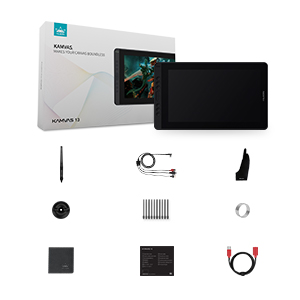
Kamvas 13 Pen Display(Midnight Green)
Battery-free Pen PW517
in-1 Cable
USB Extension Cable
Pen Holder PH05
Pen Nib Clip
Pen Nibs x 10
Glove
Cleaning Cloth
Quick Start Guide
| Dimensions: | 36.7 x 21.8 x 1.2 cm; 980 Grams |
| Manufacture: | Huion Animation Technology Ltd. |
| Reference: | LPEU-Kamvas 13-Green |
Easy to use but hard to adjus
The set up for cable was super easy, adjusting the buttons was also easy. Big enough to fit your workspace and works well with drawing programs. All I all it is a good tablet for beginners and professional artists. Only down sides were the three in one cable but was manageable once I got it figured out.
Great, but beware!
I bought this tablet because, unlike others, you could plug it on your phone, HOWEVER, your phone needs to have the option of being put on desktop mode and unfortunately none of my devices have that option, it needs to be some specific phones and usually quite expensive. I have it plugged in to my laptop which originally is what I wanted to avoid, but it is a wonderful tablet. I am using it with the Krita app on my laptop and it’s great. I would say, if you want it for computer/laptop, it’s brilliant, but if you want it to plug on your phone check on the Huion website that it’s compatible first, plus you also would need to buy a double USB C!
Problemas con el cableado y drives con malware.
En general funciona muy bien.
Pero tiene fallos importantes.
La zona de trabajo real es un poco pequea (tamao comic book). Para su precio esta bien.
El cable de alimentacin se conecta por USB; lo que es un problema para los porttiles /lap-tops con pocos puertos.
Si se quiere alimentar directamente del enchufe hay que comprar un cable aparte. Y no es nada barato.
El vdeo es por HDMI. As que tengo que desconectar mi 2 monitor para poder utilizar la tableta. Imposible utilizar el segundo monitor y la tableta grfica al mismo tiempo. Slo con el monitor del porttil.
Los drivers se descargan desde la pgina del fabricante. Al pasarles un antivirus la ltima versin (la 1.5) muestra 3 malwares diferentes. Es mejor descargarse la versin anterior; la 1.4
Sin drivers tambin funciona. NO es necesario descargar nada.
Amazing when using via PC connection, too much effort and fidelly for Android
I love drawing on this tablet, it’s so much better than using a regular tablet due to the canvas size and pen functionalities.
Only sad thing is that connecting to an android is very temperamental. You have to used huion’s usb c cable and its not the greatest fit with devices, I brought an Samsung s21 but felt I had to really force the wire in which could damage the phone long term.
I would definitely recommend for PC use as it’s great.
Great affordable drawing monito
My old drawing monitor broke so I needed a new one for my college work. This drawing monitor is great for starting out as it’s easy to set up.
A comfortable size: large enough for drawing and small enough for carrying to school. A great screen with a good enough brightness, very responsive and fully laminated. If you would like to connect via usb c, Huion’s own usb c cable is quite expensive. And buying a third party cable isn’t as simple as you might expect. I have several, and none will fit in the narrow cutout in the casing surrounding the usb c-port. Time will tell, but so far a purchase I fullheartedly can recommend.
A comfortable size: large enough for drawing and small enough for carrying to school. A great screen with a good enough brightness, very responsive and fully laminated. If you would like to connect via usb c, Huion’s own usb c cable is quite expensive. And buying a third party cable isn’t as simple as you might expect. I have several, and none will fit in the narrow cutout in the casing surrounding the usb c-port. Time will tell, but so far a purchase I fullheartedly can recommend.
Top product 5 star, worth the price
After previously trying a screen less tablet and not getting on with it i decided to spend the extra and get this with a screen, which does everything and more than expected, there is no delay and works perfect for photoshop. Would definitely recommend. 5 STAR
Ottimo prodotto
Prodotto versatile… ottimo design e materiali… in quanto alle funzionalit, mi si aperto un mondo.. l penna precisa e si riescono a prendere appunti o note con la stess velocit di un comune pezzo di carta .. unica nota : come Giustamente specificato, il cavo usb type c to usb type c non compreso ..
Occorre comprare almeno un cavo versione 3.1 e, soprattutto, stare attenti che la ‘testa’ del cavo sia pi piccola possibile per entrare nello slot del pen tablet.
Senno occorre comprare l’originale huion , ma molto costoso rispetto un competitor usb 3.1 o 3.2
Works grea
it took some time setting up but is great afterwards
Gutes Produk
Ich hatte kein Problem gehabt mit diesem Grafiktablet zu arbeiten, es war jedoch ein Fehlkauf. Ich habe nach dem KAMVAS 16 gesucht und mir wurde dieses Tablet vorgeschlagen, als es ankam dachte ich mir das sieht nicht nach 16 Zoll aus…
Persnlich sind mir 13 Zoll zu klein fr ein Displaytablet, jedoch gut fr Leute die kein Platz haben, damit Mobil/Reisen arbeiten wollen oder sich das Grere nicht leisten knnen. Falls man aber nur von Zuhause arbeiten tut, wrde ich auf jeden Fall zu einem Greren Bildschirm greifen.
HUION hat sich mit seinen Produkten inzwischen sehr gebessert und ich find man hat keinen Grund mehr ber das Doppelte fr ein Cintiq auszugeben.
Ease of use and very accurate
Once you’ve sorted things out and got this set up, everything is so easy there on in. I’ve had a Huion tablet before, but I didn’t realize that it would be this good. It’s very accurate and is a dream to use. The pen was easy enough to get used to and setting your short cut with the buttons might take a couple of attempts for you to find which short cuts you’re best suited to. All in all, a great buy and value for money.
Ottima Tavoletta
Facile da installare su windows, semplice da configurare software intuitivo, la pellicola ruvida favorisce una esperienza realistica, la penna anche se un p grande riesce a dare la giusta comodit .
Perfetta
La ricomprerei altre 100 volte. Assolutamente consigliata.
Nessun problema con i driver o con i programmi, buone impostazioni e buon feeling della penna sullo schermo. Unica pecca trovare accessori compatibili con un marchio meno conosciuto delle ufficiali e famosissime wacom, ma davvero consigliatissima
Karton beschädigt aber Grafiktablett läuft einwandfrei bin bis jetzt sehr zufrieden!
Gestern kam das G-Tablett bei mir an, und ich, bemerkte leider das der karton, whrend des Transports anscheinend des fteren fallen gelassen wurde, Bilder hab ich mit angehngt. Aber ich habe das G-Tablett den ganzen Tag benutzt, um zu schauen ob was nicht funktioniert, Bildschirm war einwandfrei, die Tasten gehen alle, wie ihr auf Video eventuell erkennen knnt, hab ich bisschen was skizziert und muss sagen bin froh das alles super luft, auch nachdem es fter am Karton beschdigt wurde.
Mein Fazit: Das G-Tablett luft sehr schnell, ich benutze Clip Studio Paint Pro, und es reagiert schnell mit dem pen, es zeichnet dort wo ich auch grad wirklich arbeite und habe keine Verzgerung feststellen knnen. Die Tasten wie oben beschrieben laufen super, reagieren wie sie es sollen, hab allerdings andere commands hinzugefgt. Kann es jedem nur empfehlen der wie ich zum digitalen zeichnen bergehen will, bin auch noch ein Anfnger und das ist mein erstes Tablett, habe mich auch erst durchgerungen aber bin zu Frieden, ich hoffe ich kann euch bissl mit helfen fr eure Entscheidung.
Lg
Funktioniert hervorragend
Setup war ein wenig frustrierend. Die mitgelieferte Software wollte das Tablet nicht erkennen, aber nach mehrmaligen installieren und de-installieren hat es dann doch funktioniert.
Ich verwende es zur Zeit mit Krita und habe bisher nicht klagen knnen.
HUION 2020 Kamvas 13 perfetto
Ho aspettato dopo natale per fare un commento perch era un regalo di natale per mia figlia.
Comunque l’ho provato personalmente su pc Windows 10 e con photoshop e funziona perfettamente la penna risponde molto bene con la tavoletta grafica solo un po di ritardo quando lo si usa per fare delle bozze ma minima la cosa, installando il driver e il software della tavoletta si puo cambiare l’ordine dei tasti posti sulla sinistra.
Non credevo che un prodotto quasi hai livelli delle tavolette grafiche professionali.
L’unica pecca: non tutti i dispositivi mobili sono compatibili, mia figlia ha un oppo A5 e guardando nel sito della Huion ce un elenco di quale dispositivi mobili sono compatibili
Tavoletta grafica imbattibile.....
Assolutamente soddisfatto dell’acquisto. La tavoletta funziona perfettamente (come da aspettative) e il suo rapporto qualit – prezzo imbattibile. L’unico appunto la mancanza del cavo usb-c to usb-c per collegare laptop e smartphone. Va acquistato separatamente e costa un botto.
Spedizione con Amazon velocissima.
Love i
One of the best things iv ever got for myself and I dont evan have the pen drive because my laptop is not working properly love how u can use it on your phone it is a little bit large thow
Perfetto!
Acquistata con poco pi di 200, la adoro. Tutt’altra cosa rispetto alle tavolette senza schermo (ne avevo una e non mi ci trovavo proprio). Non ho avuto alcun problema nell’installare i driver, stato semplicissimo.
Ottimo prodotto, ottimo rapporto qualità-prezzo
Recentemente ho dovuto fare un reso su un’altra tavoletta grafica di un altro marchio, sia perch non ero rimasto soddisfatto, ma anche per problemi tecnici e di assistenza.
Acquistando una tavoletta Huion ho potuto capire quanto sia buono il rapporto qualit-prezzo.
Sto veramente apprezzando la qualit dei materiali, della penna e dello schermo.
Sono molto contento perch dall’esperienza del reso precedente (sulla tavoletta dell’altro marchio) ero rimasto veramente scoraggiato.
Definitivamente consiglio l’acquisto di Huion e non di altri marchi (naturalmente diversi da Wacom).
Volevo provare un marchio diverso da Wacom, e visto che la mia Cintiq 13hd inizia a sentire il peso dell’usura ho preso la palla al balzo per provare la Huion Kamvas 13 (2020).
Seguo con interesse il lavoro di molte case produttrici di tavolette grafiche e Huion ha fatto dei grandissimi passi in avanti in poco tempo, e credo che i migliori risultati li stia ottenendo proprio con la Kamvas 13 pro, la 13 del 2020 e quella da 22 pollici.
Il prodotto appare come una cugina della 13HD di Wacom in una versione “entry-level”: per dimensioni, tipo di schermo (laminato, parallasse al minimo, Full HD, texture lievemente ruvida per un miglior attrito), 8 tasti laterali personalizzabili. I materiali sono solidi per quanto si senta subito il feeling plasticoso, soprattutto per i tastini laterali e parte della penna (che trovo comunque comoda e non pi alimentata a batteria) ma sono i compromessi per portarsi a casa un device da 250/260 euro.
La tavoletta stata molto facile da installare (nessuno problema coi driver) e qui parlo di una cosa particolarmente positiva: ho connesso la tavoletta usando solo il cavo hdmi e usb, senza usare alimentazione elettrica, il che rende il prodotto facilmente trasportabile (sia per peso che dimensioni) se affiancata ad un buon portatile. La tavola pu essere connessa anche attraverso cavo type-c a patto che compriate quello del produttore (ho provato con uno alternativo e non entrava nel foro).
Unica nota “negativa” per cos dire che la tavoletta non provvista di stand, ed una cosa imprescindibile per chi ci lavora per parecchie ore come il sottoscritto.
Inoltre riprendendo in mano la 13HD WACOM, proprio per fare un confronto pi preciso, ammetto che si avverte subito la differenza di materiali, solidit e quel plus ultra riguardo la tecnologia e accuratezza del tratto (non che la Kamvas abbia problemi, che ci sono piccoli cose che si notano se si ha avuto anche altri dispositivi sotto mano).
In definitiva: consiglio l’acquisto della Kamvas 13 (pro o 2020), Huion pu davvero iniziare (credo e spero) ad intaccare il monopolio di Wacom (che diciamoci la verit, nonostante la qualit ti fa pagare anche l’aria della confezione dei propri prodotti a parte, in stile Apple) fermo restando che per materiali, senso di solidit, accuratezza del tratto (sulla penna c’ un po’ da lavorare soprattutto se si sta esercitando poca pressione) mi da l’idea di una tavoletta semi-professionale, una entry level per chi sta iniziando o vuole fare un salto di qualit rispetto ad una tavoletta da piano, ma che ha un rapporto qualit/prezzo davvero importante*.
*queste le mie sensazioni a caldo cercando di portare a termini lavori nello stesso modo in cui avrei fatto con l’altro tablet, purtroppo solo la prova del tempo potrebbe dire qualcosa riguardo la durabilit a lungo termine.
Better than before!
Love this version, much better than the previous version which I had to replace a lot due to errors, this version is far superior and feels amazing to draw on with the laminated scree
Great drawing tablet, easy to use
Brought this for my son’s birthday, he loves it and has spent lots of time drawing with it.
un ottima tavoletta per chi ancora non un prefessionista (ma nemmeno neofita) del disegno/pittura digitale. Io lo utilizzo con Photoshop e a parte alcuni bug nel selezionare il colore, premendo alt, non ho riscontrato problemi. Penso dispenda dai driver. In ogni caso un ottima tavoletta, penna super, schermo laminato di ottima superficie, piccola e portatile, ben fatta. Per il prezzo prestazioni la consiglierei a un pubblico amatoriale/studente ma anche per piccoli lavori di professionisti del Digital Painting. Per il momento sono contenta.
Drawing tablet for a
My son is so happy I got him this for his birthday he’s taking art for gcse.
I been after a screen tablet for a while. This is amazing, and good value for money. I begurdge paying wacom prices and was recommended this. Easy to set up and use. Plus the colour of the tablet it’s self is beautiful.
Very fast and accurate, I love it. I would love it more if I had more documentation to explain everything except the very basics.
La Huion Kamvas 13 ultima uscita (2020) davvero strepitosa. Ho usato precedentemente la versione 2019 (kamvas 13 Pro) e non c’ paragone. Ho notato una differenza notevole nello schermo che ora regala davvero la sensazione di disegnare su carta. Ottimo acquisto.