LINKUP – Ultra PCIe 4.0 X16 Riser Cable [RTX3090 RX6900XT x570 B550 Z690 Tested] Shielded Extreme High-Speed Vertical Mount Gaming PCI Express Gen4┃Straight Socket {25cm} 3.0 Gen3 & TT Compatible
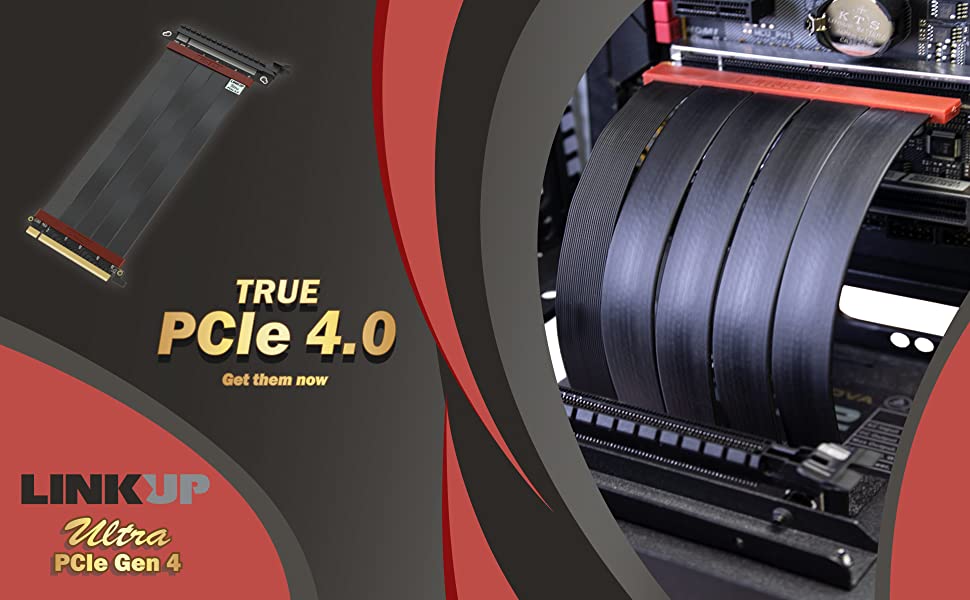
Perfect Your Build with True 4.0 Performance
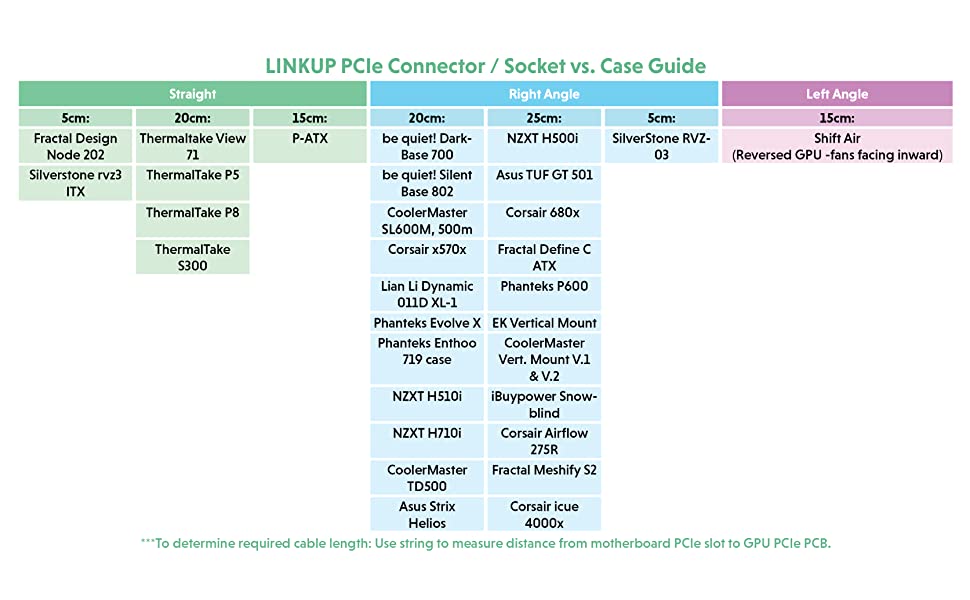
Easy troubleshooting steps to resolve issues:
Step 1: Update BIOS on both Motherboard and GPU
Update to the newest firmware / BIOS / software for the motherboard and GPU. The newest update can be obtained ‘s website.
Step 2: Set BIOS to optimal default
Overclocking is the main reason for the system to become unstable in Gen 4 setting. Reset BIOS to optimal default may resolve the issue and allow the system to run under Gen 4 without issue.
Step 3: Try to boot without the riser cable
Make sure the system can boot properly without the riser cable.
Step 4: Clean the connector contacts on the riser cable and GPU
Cleaning the connector contact (Gold Fingers) on both GPU and riser cable with rubbing alcohol to remove possible particle build-up.
Step 5: Ensure the cable is fully and securely inserted into the socket
Please make sure the male connector (Gold Fingers) is fully inserted into the motherboard’s PCIe socket. Our riser has a very short pin designed to provide better insertion loss. The pins may not be in full contact with the PCIe socket pins resulting in signal lanes drop from x16 to x8, or worse at x4 speed. Make sure you choose the right length cables. Too long or too short may both result in performance loss.
Step 6: Try a different PCI-e slot (Always choose the PCIe slot closest to the CPU)
If the motherboard has multiple Gen 4 PCIe slots, try to install the cable on a different slot.
Step 7: I have done all of the above and I’m still having trouble with the riser cable
PCI-E specifications do not regulate the use of a riser cable. As a result, Gen 4 motherboards are designed to connect the GPU directly. Hence leave a limited headroom for the use of a riser cable, and the use of a riser cable may fail when the insertion loss is over the limits due to poor components used in motherboards. Not all motherboards and GPUs are manufactured to the same quality, some have higher headroom than the other.
In these rare cases, the easiest ways to resolve the problem are:
- Exchange another riser cable to try. (If shorter length works, always choose a shorter length)
- Exchange another motherboard of the same brand.
- Exchange motherboard for a different brand. (99% of the customers have completely resolved the issue at this point)
- If none of these works, please get in touch with us directly and provide us with your system information (model/make of MB, CPU, GPU, PC case). We are happy to provide a solution.
*Please do not allow cable to directly touch the backplate of GPU which may generate temperatures higher than the riser cables’ maximum operating temperature of 75 degrees celsius. If direct contact is unavoidable, applying thermal tape is strongly recommended
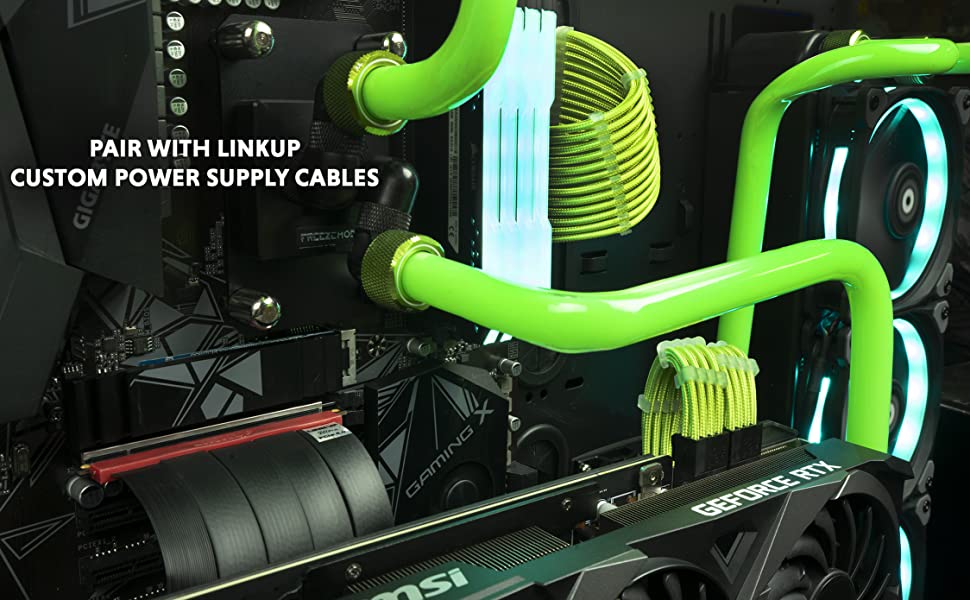
Plan for the Perfect Build
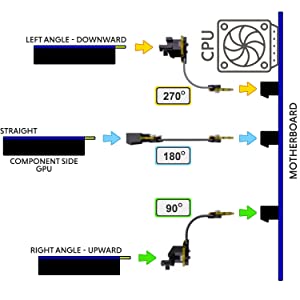
LINKUP PCIe Riser Cables are designed for various configurations:
- 270 ° “Left Angle – Downward” cables allow for the graphics card to extend down from the riser cable PCIe interface if the cable is kept straight.
- 180 ° “Straight” cables allow for the graphics card to extend straight out from the motherboard and riser cable PCIe interface if the cable is kept straight.
- 90 ° “Right Angle – Upward” cables allow for graphics cards to extend up from the riser cable PCIe interface if the cable is kept straight.
These angles and orientations are based on a standard vertically mounted motherboard configuration. The “component side” of the graphics card is usually the side most desired for GPU viewing.
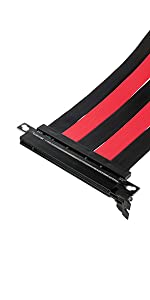 | 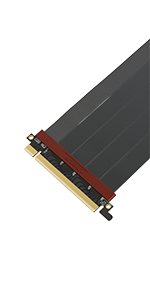 | 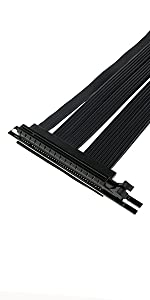 | 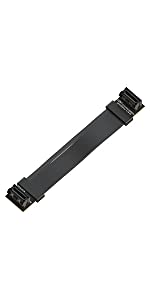 |  | |
|---|---|---|---|---|---|
| PCIE 4.0 Verified | x | PCIE 4.0 Verified | x | x | PSU Cable Extension |
| Cable Angle | Straight | Straight, Right, Left or Reverse Angles | Right Angle 90 Degrees | x | x |
| Maximum Cable Length | Up to 200cm | Up to 50cm | Up to 400cm in PCIe 3.0 Configuration | Up to 60cm | 30cm and 50cm |
| Weight: | 140 g |
| Dimensions: | 21.6 x 14.2 x 3.8 cm; 140 Grams |
| Brand: | LINKUP |
| Model: | PCIE4EXT11SS-025 |
| Colour: | *Ultra PCIE 4.0 Straight |
| Batteries Included: | No |
| Manufacture: | LINKUP Technology Inc. |
| Colour: | *Ultra PCIE 4.0 Straight |
Works as advertised
Worked instantly on a PCI Express 4.0 MB, with a RTX 3090 GPU. No message, no error. The PC didn’t realize the GPU is not in the same location 😉
It helped me mount 2 x GPU RTX 3090 in one case, otherwise I had major problems with the cooling.
è il solo 4.0 sul mercato
l’unico rizer 4.0 sul mercato, roba da monopolio! cmq funziona bene, in GPUz vede il PCIe 4.0 16x con resizable bar attivato!
In gioco nn ho visto nessuna differenza con il 3.0 marca lian li.. Questo acquisto mi ha permesso di recuperare il rizer 3.0 e metterlo nell’HTPC, in modo da avere anche il secondo PC con la GPU vrticale, una gtx 1650 Msi
Funziona benissimo con Zotac RTX 3070 Twin Edge Oc con +150 sul clock e +1000 sulle memorie! Il resto della configurazione :
Ryzen 5 3600 Oc 4.45Ghz Vcore 1.250 Temp 70 gradi in bench
Tuf B550m-Plus WiFi con cavi sleeve bianchi
32Gb 4×8 XPG Spectrix RGB
Zotac 3070 Twin edge Oc su rizer PCIe 4.0 +150 Clock +1000 Memorie
Dischi: NVMe 256Gb Trascend (SO),NVMe 1Tb SP (giochi), SSD 500Gb CrucialMX-500 (documenti),
Seagate Barracuda 1Tb (archivio, 2Tb esterno 2.5, 1Tb esterno 3.5
AIO Gammax V2 RGB 240mm
PSU Cooler Master MWE 750 Bronze
Case Noua Vision Z3
10 ventole 120mm RGB
3 ventole 80mm sui dischi
Hub ventole, RGB USB
Monitor Omen X35, 2k 100Hz 35 pollici
Casse Trust 2.1
Mouse e tastiera RGB
06-2021 hier bei amazon-Deutschland via “LINKUP Technology Inc”, fr 80,96 gekauft.
Habe es in der 20 cm sowie rechtwinkelig gekauft.
Ich hatte in einem alten System mal ein Marken-Riser-Kabel mit PCIe 3.0, aus optischen Grnden verbaut.
Nun steht demnchst der Einbau einer Customwasserkhlung an und auch hier wieder aus optischen Grnden, musste ein Riser-Kabel fr das Hockkante-Mounting, her.
Meine Herausforderung war ein Riserkabel zu finden welches PCIe 4.0 x16 bringt.
Und genau bei diesem Kabel hier gehen auch im Netz die Meinungen sehr auseinander, sodass ich glaube ggf. Montagsmodelle unterwegs zu sein, aber auch viele Nutzer die sich vl nicht auskennen und direkt losbeschweren.
Auch ist es logisch, je lnger ein Kabel, desto..naja…kann auf dem Weg fr Daten …blubb, usw.
Meine Meinung.
In folgende Specs ist nun das Riserkabel ( 20 cm; rechtinkelig ) verbaut:
Asus Crosshair VIII Dark Hero zu nVidia RTX 3090 (MSi Gaming x Trio).
Nice to know, Festplatten sind zur u.a. Hauptnutzung an PCIe 4.0 angebunden.
AMD Ryzen 9 5950x 64 GB RAM.
Resizebal Bar ist ber das derzeit neuestes BIOS (3601) ebenfalls aktiviert.
Ich hatte vorher wie nachher bei 3D Mark PCIe-Test einen Durchsatz von 26,30 GB/s.
Das gesamte System ist weder bertaktet noch sonst irgendwelchen Spielereien ausgesetzt und brachte daher im 3D Mark 18.520 Punkte (vorher wie nachher….mit nicht erwhnenswerten Punkteunterschieden).
CPU-Z wie auch im Bios wird x16 native angegeben (vorher wie nachher).
Bei GPU-Z wird whrend und auch im Anschluss des Rendertests “PCIe x16 4.0 @ x 16 4.0” angezeigt. (Das Fragezeichen hinter der Zeile bei dem beigefgten Bild steht fr die Erklrung des Rendertests;)
Alles in Allem funktionieren die angegebenen Leistungen dieses Kabels bei mir.
Sternabzug:
3 von 5 bei Qualitt/Haltbarkeit, aufgrund der “ausenherum-Verarbeitungsqualitt”. Die untere Platine auf der der GPU-Anschluss sitzt, neigt sehr schnell zum Durchdrcken bzw. biegen im rechten unteren Bereich richtung Clipser/Anschluss/Sicherung der GPU.. Also Vorsicht bei der Montage.
Auch das andere Ende, welches im Mainboard steckt, kann und ist mir passierrt (=VGA-Fehler beim Hoch fahren), rutscht gerne bei leichtem Kontakt an der Gehuserckseitigen Seite (die ohne Clipser), wieder heraus. Nicht von alleine, jedoch bei ungewolltem Kontakt.
Hier hatte ich schon deutlich hochwertiger verarbeitete Riserkabel von anderen Herstellern in der Hand.
Die Pins, wie auch die Kabel selbst und die Kabel an Bauteilen-montage ist mehr als ausreichend und gut zusammengesetzt.
Preis-Leistungsverhltnis, ebenfalls 3 von 5 Sternen.
Fr einen stolzen Preis von 80 + erhlt man hier NUR das Kabel mit seinen Transportschutz-Plaste-Abdeckungen und einen auf englisch geschriebenen kleinen Hinweiszettel.
Es liegen KEINE Schrauben, geschweige den Abstandshalterungen mit bei. Was auch im Verkaufstext nicht erwhnt wird. Aber bei den obig genannten kleinen Abstrichen und mit dieser Tatsache……na ja.
Ich wollte die Abstandsschrauben vom Case (Asus Helios), verwenden, doch diese sind viel zu kurz. Auch extre hinzugekaufte waren zu kurz bzw. hatten ein kleineres Gewinde.
Somit wird die GPU von zwei Schrauben am Gehuse in der vertikalen und …man mag es kaum glauben aber passt von der Hhe perfekt!, von LE..*darf ich das hier berhaupt schreiben*^^…also von Klemmbausteinen gehalten….*grbel*…nenn L..Klemmbausteine-PC….
Alles in Allem wrde ich 3 von 5 Sternen geben ABER aufgrunddessen das ich endlich ein FUNKTIONIERENDES PCIe 4.0 x16 Riser-Kabel verbauen konnte = 4 Sterne von mir.
06-2021 hier bei amazon-Deutschland via “LINKUP Technology Inc”, fr 80,96 gekauft.
Habe es in der 20 cm sowie rechtwinkelig gekauft.
Ich hatte in einem alten System mal ein Marken-Riser-Kabel mit PCIe 3.0, aus optischen Grnden verbaut.
Nun steht demnchst der Einbau einer Customwasserkhlung an und auch hier wieder aus optischen Grnden, musste ein Riser-Kabel fr das Hockkante-Mounting, her.
Meine Herausforderung war ein Riserkabel zu finden welches PCIe 4.0 x16 bringt.
Und genau bei diesem Kabel hier gehen auch im Netz die Meinungen sehr auseinander, sodass ich glaube ggf. Montagsmodelle unterwegs zu sein, aber auch viele Nutzer die sich vl nicht auskennen und direkt losbeschweren.
Auch ist es logisch, je lnger ein Kabel, desto..naja…kann auf dem Weg fr Daten …blubb, usw.
Meine Meinung.
In folgende Specs ist nun das Riserkabel ( 20 cm; rechtinkelig ) verbaut:
Asus Crosshair VIII Dark Hero zu nVidia RTX 3090 (MSi Gaming x Trio).
Nice to know, Festplatten sind zur u.a. Hauptnutzung an PCIe 4.0 angebunden.
AMD Ryzen 9 5950x 64 GB RAM.
Resizebal Bar ist ber das derzeit neuestes BIOS (3601) ebenfalls aktiviert.
Ich hatte vorher wie nachher bei 3D Mark PCIe-Test einen Durchsatz von 26,30 GB/s.
Das gesamte System ist weder bertaktet noch sonst irgendwelchen Spielereien ausgesetzt und brachte daher im 3D Mark 18.520 Punkte (vorher wie nachher….mit nicht erwhnenswerten Punkteunterschieden).
CPU-Z wie auch im Bios wird x16 native angegeben (vorher wie nachher).
Bei GPU-Z wird whrend und auch im Anschluss des Rendertests “PCIe x16 4.0 @ x 16 4.0” angezeigt. (Das Fragezeichen hinter der Zeile bei dem beigefgten Bild steht fr die Erklrung des Rendertests;)
Alles in Allem funktionieren die angegebenen Leistungen dieses Kabels bei mir.
Sternabzug:
3 von 5 bei Qualitt/Haltbarkeit, aufgrund der “ausenherum-Verarbeitungsqualitt”. Die untere Platine auf der der GPU-Anschluss sitzt, neigt sehr schnell zum Durchdrcken bzw. biegen im rechten unteren Bereich richtung Clipser/Anschluss/Sicherung der GPU.. Also Vorsicht bei der Montage.
Auch das andere Ende, welches im Mainboard steckt, kann und ist mir passierrt (=VGA-Fehler beim Hoch fahren), rutscht gerne bei leichtem Kontakt an der Gehuserckseitigen Seite (die ohne Clipser), wieder heraus. Nicht von alleine, jedoch bei ungewolltem Kontakt.
Hier hatte ich schon deutlich hochwertiger verarbeitete Riserkabel von anderen Herstellern in der Hand.
Die Pins, wie auch die Kabel selbst und die Kabel an Bauteilen-montage ist mehr als ausreichend und gut zusammengesetzt.
Preis-Leistungsverhltnis, ebenfalls 3 von 5 Sternen.
Fr einen stolzen Preis von 80 + erhlt man hier NUR das Kabel mit seinen Transportschutz-Plaste-Abdeckungen und einen auf englisch geschriebenen kleinen Hinweiszettel.
Es liegen KEINE Schrauben, geschweige den Abstandshalterungen mit bei. Was auch im Verkaufstext nicht erwhnt wird. Aber bei den obig genannten kleinen Abstrichen und mit dieser Tatsache……na ja.
Ich wollte die Abstandsschrauben vom Case (Asus Helios), verwenden, doch diese sind viel zu kurz. Auch extre hinzugekaufte waren zu kurz bzw. hatten ein kleineres Gewinde.
Somit wird die GPU von zwei Schrauben am Gehuse in der vertikalen und …man mag es kaum glauben aber passt von der Hhe perfekt!, von LE..*darf ich das hier berhaupt schreiben*^^…also von Klemmbausteinen gehalten….*grbel*…nenn L..Klemmbausteine-PC….
Alles in Allem wrde ich 3 von 5 Sternen geben ABER aufgrunddessen das ich endlich ein FUNKTIONIERENDES PCIe 4.0 x16 Riser-Kabel verbauen konnte = 4 Sterne von mir.
Haven't tested yet but it should be good. High power and consistent cable!
Haven’t tested yet but it should be good. High power and consistent cable!
Funktioniert einwandfrei mit Lian Li Dynamic XL und Asus Prime X570 Pro
Das Kabel funktioniert auf Anhieb mit einer RTX 3080 ti, Asus Prime X570 Pro und Lian Li Dynamic XL. Wertige Verarbeitung, gute, stabile Datenbertragung. Absolut zufriedenstellend!
Works
It works with 6800XT, B550 and 5900X.
Cons for me:
– Does not fit to Cooler Master VERTICAL GPU HOLDER KIT VER.2!!! Screw holes do not match. Without modifying riser pcb or vertical mount it can only be mounted with 1 screw. So before buy make sure it fits to your mount. (screw holes will match, but then the pcie slot itself is not in line with GPU, mismatch around 2-3mm)
– with that price it should have pcie slot with metal shielding.
Other than that it works 🙂
Works perfectly in the Phanteks Shift 2 Ai
Same size as the original cable in the Shift 2 Air but a tiny bit longer. (Which is good)
Zero crashes on B550.
Works on PCI-E 4.0 x16 and SAM.
Fast shipping.
10/10
Works perfectly
This works perfectly with my 3090 and x570 motherboard. So happy.
Gutes Qualität für eine fairen Preis
Das Kabel macht eine sehr guten und Wertungen Eindruck. Ich habe es mir fr die vertikale Montage meiner GPU gekauft, allerdings ist es leider etwas zu kurz und selbst in der richtigen Lnge wre eine Installation unmglich, da beide Enden flach sind. Fr meinen Einsatzzwecke bruchte ich daher ein lngeres Kabel, das auf einer Seite im 90 Grad Winkel gestaltet ist.
Versand war wie gewohnt super. Gibt jedoch nur” 4 Sterne, da die Verpackung der Kabel schon deutlich mitgenommen aussah.
If your looking for a riser that will work reliably with a pcie 4.0 card this is the one
This riser costs more than some of the other ones for a reason, it just works. After messing around with a couple of other risers, this one works without problems.
The only issue I encountered was fixed by reseating the cable in the motherboard and video card.
Caro pero de calidad inigualable
Es el nico Riser que da seal 4.0 de PCIe. La calidad de los materiales se nota de inmediato.
5900x and 3080
Needed gen 4 for my cpu and gpu as mounting gpu vertical
Works as intended
Giving 5 stars because it works perfectly. The only thing( which is of course my fault) if you are buying it to upgrade from the riser of phanteks for the vertical mount buy the 15 cm version as i got the 20 cm linkup thinking that the phanteks is 22cm( as they say in specs) in fact phanteks one is 17cm. Great produc
Works as intended
Giving 5 stars because it works perfectly. The only thing( which is of course my fault) if you are buying it to upgrade from the riser of phanteks for the vertical mount buy the 15 cm version as i got the 20 cm linkup thinking that the phanteks is 22cm( as they say in specs) in fact phanteks one is 17cm. Great produc
It work's great for my 16x gen4 card and my z590 motherboard also works okay with a phanteks evolv x case. The pcb could be a little stronger it feels flimsy so don't put much pressure take your time and it should work perfectly.
It work’s great for my 16x gen4 card and my z590 motherboard also works okay with a phanteks evolv x case. The pcb could be a little stronger it feels flimsy so don’t put much pressure take your time and it should work perfectly.
It's 4.0!!! Considering 5.0 is already being produced I'd say The future is now. These are perfect for new installs where dry/bench test isn't an option. Also, *for me*, it's worth not having to build teardown and build again. I used 2 of them in my rig "Big Evil" (accompanied photo).
It’s 4.0!!! Considering 5.0 is already being produced I’d say The future is now. These are perfect for new installs where dry/bench test isn’t an option. Also, *for me*, it’s worth not having to build teardown and build again. I used 2 of them in my rig “Big Evil” (accompanied photo).
Works for 3070
Most people are looking at this because it’s one of the only PCIE 4.0 cables. Works perfectly so far.
Works on
MSI B550M PRO-VDH WIFI
MSI 3070 Gaming Trio
It can bend a little for bigger cards if you need to use risers.
Ein Riser ohne Leistungsverluste
Die Qualitt ist hervorragend. Montiert hat der riser nur einen Punkt weniger in Benchmark, was auf keinen Leistungsverlust zurckzufhren ist. Meine RTX 3070 wurde damit angeschlossen. Leider musste ich es aber zurck geben, da die vertikale Aufstellung meiner Grafikkarte so gut wie keine Luft mehr gegeben hat.
4.0 working perfect for my 3090. Great quality. Def would buy again.
4.0 working perfect for my 3090. Great quality. Def would buy again.
A must for new generation GPUs
The point of using PCI 4.0 riser with PCI 4.0 GPUs is not transfer speed, it’s compatibility, so you won’t have to take your PC apart after BIOS update or to awkwardly assemble it outside the case just to get to the BIOS in case your CPU doesn’t have a dedicated graphics card to do it (and you need to get to the BIOS to downgrade to PCI 3.0 on the GPU to have any image output whatsoever).
The connectors are a bit bulky, but overall a pretty good riser with quality ribbon cables.
RTX 3090 funcionando al 100%
Su precio es algo elevado pero de todos los cables que he probado es el nico que funciona correctamente.
Por mejorar algo, el color rojo podan cambiarlo por un negro ms discreto.
Working !!!
Working perfectly with my 5700xt I don’t see any drop in fps or 1-2 fps
Ist sein Geld we
Ich fand ber 60 fr ein 10 cm “Kabel” schon echt teuer – aber ich muss sagen dass es den Preis wert ist.
Unter X570 mit Ryzen 9 5950X und RTX 3090 wie gewnscht PCIe x16 4.0.
Performance ist ausgezeichnet. Habe in 3DMark Port Royal mit dem Riser und stock Bios ber 15000 Punkte geschafft.
Wird wie gewnscht als PCIe x16 4.0 erkannt.
Works well just expensive for what it is
It works better than h1 cable, as i get no more random freeze ups with my asus tuf 3080, its just expensive for what it is, you cant secure mount it in the h1 but because its so flexible theres not to much stress on the cable.
4/5 just because of the price point of this cable… this is the only cable that will work with the h1 they say their shorter one is compatible its not!! I tried and had to refund i
Good quality
I have been using 2 of these to run 3090s in nvlink for bandwidth heavy workloads and they havent failed on me yet (had them for a few months now) they are pretty durable as i frequently take my GPUs out for cleaning and the riser assembly has held up really well given how many times i have taken the cards out and put them in.
No problems, works great. Mistakenly bought a riser cable that only works with PCIE 3.0 before, so very nice to now have a working cable!
No problems, works great. Mistakenly bought a riser cable that only works with PCIE 3.0 before, so very nice to now have a working cable!
Good quality
I have been using 2 of these to run 3090s in nvlink for bandwidth heavy workloads and they havent failed on me yet (had them for a few months now) they are pretty durable as i frequently take my GPUs out for cleaning and the riser assembly has held up really well given how many times i have taken the cards out and put them in.
Great product! Very pleased to use this on my Red Devil 6900XT Ultimate! Pushes FPS from Legendary to Godlike! Using this on my Lian Li O11 mini edition! Just a FYI to those are getting it for O11 mini, make sure to get 15cm! 20cm has a lot of slack just wanna let anyone know! But I’m happy with what I purchased!
Great product! Very pleased to use this on my Red Devil 6900XT Ultimate! Pushes FPS from Legendary to Godlike! Using this on my Lian Li O11 mini edition! Just a FYI to those are getting it for O11 mini, make sure to get 15cm! 20cm has a lot of slack just wanna let anyone know! But I’m happy with what I purchased!
First off: it does in-fact offer PCIe 4.0 speeds with no drop outs or black screen on my x570 MSI Tomahawk + Ryzen 5 5600x. Using 3DMark PCIe test I saw 26.4GB/s in the mobo slot and the riser gave me 26.4GB/s. No loss, all good so far.
PS. on x570 LEAVE THE PCIe BIOS OPTION ON “AUTO”
Ok so the less pleasant side. I paid for a 20cm riser and in total the riser is 25cm. The measurement you see on the product page is for THE BLACK CABLE LENGTH ONLY not including the PCIe slots on each end. (I ordered the 90degree ended riser so it’s even longer for the straight end ones)
It’s actually a good thing since you lose some length having to bend the cable down and around but if you are building a system that requires a specific length and too long is a bad thing then be careful.
Add 5cm to the size you see before you buy one to save the headache.
10cm riser is actually 15cm
15cm riser is actually 20cm
20cm riser is actually 25cm
25cm riser is actually 30cm
30cm riser is actually 35cm
Other then that, this is a good product. I was skeptical but it does work well and gives me my gen 4 bandwidth I’d get directly from the mobo slot.
First off: it does in-fact offer PCIe 4.0 speeds with no drop outs or black screen on my x570 MSI Tomahawk + Ryzen 5 5600x. Using 3DMark PCIe test I saw 26.4GB/s in the mobo slot and the riser gave me 26.4GB/s. No loss, all good so far.
PS. on x570 LEAVE THE PCIe BIOS OPTION ON “AUTO”
Ok so the less pleasant side. I paid for a 20cm riser and in total the riser is 25cm. The measurement you see on the product page is for THE BLACK CABLE LENGTH ONLY not including the PCIe slots on each end. (I ordered the 90degree ended riser so it’s even longer for the straight end ones)
It’s actually a good thing since you lose some length having to bend the cable down and around but if you are building a system that requires a specific length and too long is a bad thing then be careful.
Add 5cm to the size you see before you buy one to save the headache.
10cm riser is actually 15cm
15cm riser is actually 20cm
20cm riser is actually 25cm
25cm riser is actually 30cm
30cm riser is actually 35cm
Other then that, this is a good product. I was skeptical but it does work well and gives me my gen 4 bandwidth I’d get directly from the mobo slot.
I have been trying to run my 6800xt wc with the 3.0 extension with the LianLi XL and could never get it to work right. Had many freezes, blue screens, driver shut down and so on. I bought this to try out and it works perfect on 4.0 pci. Not one freeze or driver reset. Very happy with this purchase.
I have been trying to run my 6800xt wc with the 3.0 extension with the LianLi XL and could never get it to work right. Had many freezes, blue screens, driver shut down and so on. I bought this to try out and it works perfect on 4.0 pci. Not one freeze or driver reset. Very happy with this purchase.
I used this to connect my rtx 3090 while it is vertically mounted and so far I have had no issues! It came quick and feels well made. The only complaint is I wish they would slim down the red plastic bands that I assume are for support. Overall, I am very satisfied.
I used this to connect my rtx 3090 while it is vertically mounted and so far I have had no issues! It came quick and feels well made. The only complaint is I wish they would slim down the red plastic bands that I assume are for support. Overall, I am very satisfied.
Luft bei mir ohne nderung am Bios.
Das Kabel zwischen MB und GPU gehngt.
Laut 3DMark PCI Express Test keine merklichen Einbuen.
–
MB = Gigabyte X570 Aorus Master rev 1.1 ( Bios F33i )
GPU = Powercolor RX 6900 XT Red Devil
CPU = Ryzen 7 5800X
Perfetto!
Usato in abbinamento ad un bracket edzy-fab su una 3090, nessuna perdita di performance ed impatto visivo ottimo!
Had tried a few risers before and none had worked. This was gonna be my last try and I am so glad it works on my TUF Gaming RTX 3070 and MSI Tomahawk X570. GPU-Z is showing that it runs at x16 4.0 as well.
Had tried a few risers before and none had worked. This was gonna be my last try and I am so glad it works on my TUF Gaming RTX 3070 and MSI Tomahawk X570. GPU-Z is showing that it runs at x16 4.0 as well.
Top kabel wenn der preis nicht so hoch wäre.. Edit: naja
Kabel funktioniert wie angegeben mit PCI-E 4.0! Inzwischen seit ber zwei Monaten… Der preis ist zwar recht ordentlich fr ein riser kabel aber wer pcie4 haben mchte dem bleibt nichts anderes brig als dieses Kabel zu kaufen
Edit: nach 3 Monaten hat das kabel seinen dienst versagt und ich musste es leider zurck schicke
Frankly the price is way too high for what you get. But, it functions as described at full 16 GT/s speed and without any stability issues on my Gigabyte Vision OC RTX 3070.
Frankly the price is way too high for what you get. But, it functions as described at full 16 GT/s speed and without any stability issues on my Gigabyte Vision OC RTX 3070.
Initially sceptile but does what it say's on the tin.
Using (250mm version) with a ASUS 3090 water cooled on a ASUS x570 E Gaming without any issue in a Corsair Obsidian 500D, should have opted for the 150mm version but that’s my fault as should have measured otherwise extremely happy.
Initially sceptile but does what it say's on the tin.
Using (250mm version) with a ASUS 3090 water cooled on a ASUS x570 E Gaming without any issue in a Corsair Obsidian 500D, should have opted for the 150mm version but that’s my fault as should have measured otherwise extremely happy.
Angeschlossen, im UEFI auf PCI-E 4.0 gesellt und anschlieend getestet mit
– 3D Mark
– CS:GO (nicht unterschtzen)
– Quake Champions
– Call of Duty
und alles luft perfekt und ich verspre keine Einbuen an FPS oder dergleichen.
Ich habe bei meinem Vorgnger-System welches lediglich “nur” PCI-E 3.0 hatte und einen I7 6800K mit 5 Riserkabeln die blichen Probleme. Jetzt bei meinem neuen System dachte ich… Probier’s einfach mal mit PCI-E 4.0 jetzt nochmal… und siehe da… rennt! 🙂
Works for my EVGA 3070. Throughput just as fast as if it’s connected directly to the motherboard.
Works for my EVGA 3070. Throughput just as fast as if it’s connected directly to the motherboard.
Angeschlossen, im UEFI auf PCI-E 4.0 gesellt und anschlieend getestet mit
– 3D Mark
– CS:GO (nicht unterschtzen)
– Quake Champions
– Call of Duty
und alles luft perfekt und ich verspre keine Einbuen an FPS oder dergleichen.
Ich habe bei meinem Vorgnger-System welches lediglich “nur” PCI-E 3.0 hatte und einen I7 6800K mit 5 Riserkabeln die blichen Probleme. Jetzt bei meinem neuen System dachte ich… Probier’s einfach mal mit PCI-E 4.0 jetzt nochmal… und siehe da… rennt! 🙂
J’ai achet ce riser pour remplacer celui d’origine de mon support vertical cooler master V2 afin de pouvoir grer le PCI-e 4.0 de ma carte mre ASUS Z590 E gaming WiFi couple un processeur Intel i9 11900K et une rtx 3080 Gigabyte gaming OC. Avec le riser d’origine du support, en PCI-e 4.0 j’avais des chutes de fps dans les jeux, normal car il n’tait pas certifi PCI-e 4.0 mais juste 3.0.
Une fois le riser d’origine remplac par celui-ci, tout fonctionne trs bien, plus de chute de fps, le top!
Prvoir une longueur du riser un peu plus courte car pour ma part, 20cm aurait largement suffit.
Funktioniert tut was es soll, kostest allerdings.
Funktioniert mit meiner Asus RX 6900XT LC seit zwei Monaten einwandfrei.
Ich wrde mir bei dem Preis allerdings wnschen das ein Satz Distanz schrauben und Mutter dabei sind.
Ich musste fr mein Fractal define 7 durch wiederholtes messen mit Distanz Adapter und Scheiben aus dem eigenen Sortiment den Einbau durchfhren.
Klar ist das define 7 auch nicht auf der compatibility List, aber das Spektrum zu erweitern knnte so einfach sein.
Preis ist denke ich daher der Menge an Konkurrenz geschuldet (Material und Herstellung rechtfertigen dies sicher nicht) den es gibt schlicht keine anderen PCIe4.0 Kabel.
200mm(160-180 would be bit more ideal) is a tad long for most vertical mount setups, be very careful when installing not to bend too much or knock out whatever you have plugged in on the bottom of the board. For the price, it would be nice if slot was reinforced with metal.
200mm(160-180 would be bit more ideal) is a tad long for most vertical mount setups, be very careful when installing not to bend too much or knock out whatever you have plugged in on the bottom of the board. For the price, it would be nice if slot was reinforced with metal.
Riser LINKUP PCIE 4.0
Bonjour,
Configuration :
Carte mre : Asus Rog Strix X570-E Gaming
Carte graphique : Gigabyte RTX 3080 EAGLE OC 10G
Boitier : NZXT h710i.
J’avais un riser Thermaltake en PCIE 3.0. La carte graphique montrait le bureau de windows mais n’tait plus dtecte par les drivers Nvidia.
J’ai reu ce riser dans le temps prvu. Je l’ai install ds sa rception et il fonctionne parfaitement sur ma configuration.
Vous pouvez l’acheter les yeux ferm.
Bonne journe tous.
Works perfectly with my 3090. I didn’t need a cable this long though. Worth noting that the cable doesn’t bend that easily near the ends because of the red trim. Still works alright with a CoolerMaster V2 vertical bracke
No performance hit and perfect fit. 20cm with NZXT H710i.
No performance hit and perfect fit. 20cm with NZXT H710i.
Funcionamiento perfecto con RTX 3090
Funciona perfecto, dando el mismo rendimiento que el puerto PCIe 4.0 directamente. Probado con una RTX 3090 a mximo rendimiento.
La nica pega que le puedo poner es que el color de los plsticos sea de ese color rojo y que no sean negros, algo que hace que desentone con el resto de componentes.
Lo recomiendo.
I was having issues booting my PC using a Phanteks premium riser cable, I could force PCIe Gen3 and it would work most of the time but occasionally would still refuse to boot.
After swapping to this cable, I can now boot up in PCIe Gen4 mode and without any issue at all. I have also ran a lot of stress tests in 3DMark without any crashes. 3DMark PCI Feature Test also confirms this delivers the full Gen4 bandwidth as advertised.
In short, if you have a Gen4 GPU and Motherboard, I would reccomend this.
My hardware:
CPU: AMD 3900X
Motherboard: Asus X570-PRO Prime
GPU: Gigabyte RTX3080 Gaming OC
RAM: 3200Mhz Patriot Viper (2x26gb)
I was having issues booting my PC using a Phanteks premium riser cable, I could force PCIe Gen3 and it would work most of the time but occasionally would still refuse to boot.
After swapping to this cable, I can now boot up in PCIe Gen4 mode and without any issue at all. I have also ran a lot of stress tests in 3DMark without any crashes. 3DMark PCI Feature Test also confirms this delivers the full Gen4 bandwidth as advertised.
In short, if you have a Gen4 GPU and Motherboard, I would reccomend this.
My hardware:
CPU: AMD 3900X
Motherboard: Asus X570-PRO Prime
GPU: Gigabyte RTX3080 Gaming OC
RAM: 3200Mhz Patriot Viper (2x26gb)
Vertical mount for MSI RTX 3090 X570 board with Ryzen 5950x
Wow what a riser cable
It worked right out of the box simple plug and play no need to go onto bios
Didn’t lose any Performance or FPS
MSI rtx 3090 paired with crosshair viii hero X570 board and Ryzen 5950x
No issues so far, gaming performance the same if not better
Not cheap but well worth i
Does what it’s supposed to. 20cm right angle in a pc-o11 dynamic.
Does what it’s supposed to. 20cm right angle in a pc-o11 dynamic.
Vertical mount for MSI RTX 3090 X570 board with Ryzen 5950x
Wow what a riser cable
It worked right out of the box simple plug and play no need to go onto bios
Didn’t lose any Performance or FPS
MSI rtx 3090 paired with crosshair viii hero X570 board and Ryzen 5950x
No issues so far, gaming performance the same if not better
Not cheap but well worth i
Tut was es soll nach Reinigung
Es gibt einen Stern abgezogen, da im weiblichen Teil etwas Schmutz war.
Damit ging 3.0, aber nicht 4.0
Nachdem das entfernt war ging 4.0 ohne Probleme.
Works beautifully, all 16 lanes at PCIE 4.0 speed. No hassle with BIOS or anything, it’s plug and play. The 5cm right angle fits perfectly on the NR200.
Works as intended. 15cm version fits perfectly in the Lian Li 011 Dynamic case. You would still need the Lian Li vertical GPU mount brackets to install it.
Works as intended. 15cm version fits perfectly in the Lian Li 011 Dynamic case. You would still need the Lian Li vertical GPU mount brackets to install it.
Reliable PCIE4 Riser Cable
This seemed to be the only PCIE4 riser cable I could find. I’m pleased to say it works brilliantly with PCIE4 with no stability issues experienced since purchasing a few months ago. BIOS also correctly reports card running in PCIE4 mode.
Very happy.
Reliable PCIE4 Riser Cable
This seemed to be the only PCIE4 riser cable I could find. I’m pleased to say it works brilliantly with PCIE4 with no stability issues experienced since purchasing a few months ago. BIOS also correctly reports card running in PCIE4 mode.
Very happy.
Funktioniert einwandfrei und stabil
Ich benutze das Riser-Kabel in meinem PC mit einem ASUS ROG STRIX X570-E Mainboard und einer EVGA RTX 3070 Grafikkarte.
Da die PCIe 4.0 Spec wohl keine Riser-Kabel vorsieht und es gemischte Meinungen zu dem Produkt gab, war ich skeptisch ob das so funktionieren wird.
Das Riser Kabel funktioniert allerdings einwandfrei und absolut stabil.
This cable is the perfect solution for those having problems with their new PCIe 4.0 video cards on PCIe 4.0 motherboards. Instead of forcing your motherboard to use PCIe 3.0 as a workaround, simply swap your riser cable with this one.
Très bon cable de très bonne qualité ! Fonctionne #1
Utiliser pour ma evga rtx 3090 ftw3 ultra , donc j’ai acheter ce cable pcie 4.0 et a fonctionn a 100% , sans aucun problme!
Ryzen 5800x mb tuf x570 plus case lian li dinamyc 011 supporto verticale cooler master.
nel mio caso mi era stato suggerito di prendere il cavo da 25cm, assolutamente insensato, ho preso poi il 20cm, che gi troppo. con la mia configurazione suggerisco max 15cm.
lo sto usando da 2 gg con una 3080 rtx, e gpuz mi da pcie4x16, non ho avuto problmi fino ad ora.
ho dovuto modificare il supporto verticale cooler master aggiungendo un foro altrimenti non era possibile installarci il riser linkup.
Gioco a cod, e vari titoli per ora tutto ok.
PS
sul forum linkup ho letto che da problemi su schede pi piccole di atx (mini itx…)
Ryzen 5800x mb tuf x570 plus case lian li dinamyc 011 supporto verticale cooler master.
nel mio caso mi era stato suggerito di prendere il cavo da 25cm, assolutamente insensato, ho preso poi il 20cm, che gi troppo. con la mia configurazione suggerisco max 15cm.
lo sto usando da 2 gg con una 3080 rtx, e gpuz mi da pcie4x16, non ho avuto problmi fino ad ora.
ho dovuto modificare il supporto verticale cooler master aggiungendo un foro altrimenti non era possibile installarci il riser linkup.
Gioco a cod, e vari titoli per ora tutto ok.
PS
sul forum linkup ho letto che da problemi su schede pi piccole di atx (mini itx…)
Works perfectly with my MSI 3070 Trio - PCIe 4.0 no problem!
Works perfectly with my MSI 3070 Trio – PCIe 4.0 no problem!
it works
it works how long will it work i have no idea. One of the main reasons i am wrighting this review is so others who use a silverstone ml08 case can use this pcie cable in said case. i might have written a review already stating that it does not fit, as you can see in the pics i was wrong. It looks like a quailty cable.
it works
it works how long will it work i have no idea. One of the main reasons i am wrighting this review is so others who use a silverstone ml08 case can use this pcie cable in said case. i might have written a review already stating that it does not fit, as you can see in the pics i was wrong. It looks like a quailty cable.
Funktioniert!
Vor allem, es funktioniert mit 3090 !
Mach aber ohne Grafikkartenhalterung keinen Sinn.
Habe Halterungen selber gebaut und top Ergebnisse.
Great PCI-e GEN 4.0 riser cable..
I had no problems with this riser cable on:-
Asus ROG STRIX X570-i Gaming motherboard,
Sapphire NITRO+ X5700XT graphics card.
Also tested with a Gigabyte RTX3080 graphics card.
All worked fine ‘out-of-the-box’ so to speak – worked fine with the BIOS PCI-e default set to AUTO (GEN 4.0).
Great PCI-e GEN 4.0 riser cable..
I had no problems with this riser cable on:-
Asus ROG STRIX X570-i Gaming motherboard,
Sapphire NITRO+ X5700XT graphics card.
Also tested with a Gigabyte RTX3080 graphics card.
All worked fine ‘out-of-the-box’ so to speak – worked fine with the BIOS PCI-e default set to AUTO (GEN 4.0).
This PCIe replacement cable works perfectly but do take note they mentioned that the screw holes don’t line up so I just use 3m double-sided tape (industrial grade), two small strips on both ends, and it works just fine.
Sidenote: I’m not gonna wait for NZXT’s plastic screws or their PCIe riser replacement, the H1 case will be the first and last case I will buy from the company, disappointing they took this long to highlight the fire hazard issue.
Trés bonne nappe de qualité
Cette nappe va trs bien avec ma 3080 et j’ai utilis le kit de support cooler master qui est malheureusement livre avec un pci3.0
Mais attention pourquoi 4 toiles car les soudures du slot pci sont apparent et manque un isolant j’y es mis un scotch double face car il tombe proche de la partie mtallique du kit de fixation verticale
Cable does the job perfectly on a rtx3090. No complaints if not I would wish it would be longer.
Cable does the job perfectly on a rtx3090. No complaints if not I would wish it would be longer.
Great product, well packaged and most importantly - my riser can now operate on Gen 4 with my RTX 3090 and MSI Meg Ace x570 motherboard.
Great product, well packaged and most importantly – my riser can now operate on Gen 4 with my RTX 3090 and MSI Meg Ace x570 motherboard.
Actually works as advertised
I must admit, I was sceptical like many people after seeing how standard PCIe 3.0 risers fail to work with the new PCIe 4.0 standard, but to my great surprise and delight it actually works perfectly. I have an RTX 3090 and a Ryzen 9 5950X, running on an Asus ROG STRIX X570-E Gaming motherboard and GPU-z is reporting that it is running in PCIe 4.0 mode and so far I’ve had no issues whatsoever. Yes it is expensive, but signal integrity in PCIe 4.0 has very slim tolerances so high quality materials must be used to preserve that integrity.
Actually works as advertised
I must admit, I was sceptical like many people after seeing how standard PCIe 3.0 risers fail to work with the new PCIe 4.0 standard, but to my great surprise and delight it actually works perfectly. I have an RTX 3090 and a Ryzen 9 5950X, running on an Asus ROG STRIX X570-E Gaming motherboard and GPU-z is reporting that it is running in PCIe 4.0 mode and so far I’ve had no issues whatsoever. Yes it is expensive, but signal integrity in PCIe 4.0 has very slim tolerances so high quality materials must be used to preserve that integrity.
[DE]Erfüllt seinen Zweck! - [EN]Job done!
[DE] Neuer Rechner, neues Glck.
System Kurzfassung:
Gehuse – CoolerMaster SL600m (Kamineffekt)
VGA – Raden RX 6800 XT
MB – MSI X570 Unify
Nachdem ich den Kamineffekt des CoolerMaster SL600m optimal nutzen wollte musste die Grafikkarte natrlich vertikal verbaut werden. Die allgemeinen Rezessionen ber Riserkabel waren allesamt niederschmetternd und ich war mir nicht sicher ob ich es wirklich wagen sollte soviel Geld fr ein Kabel auszugeben. Ein Freund hatte mir dieses hier empfohlen, natrlich eines der teureren Modelle…danke Freund :).
Zuerst hatte ich das System ohne Riserkabel aufgesetzt um mit 3DMark etc einige Benchmarks zu fahren. Das war fr mich wichtig um zu sehen ob es einen Qualitsverlust geben wrde wenn ich das Riserkabel zwischen Grafikkarte und Mainboard hnge.
Die Benchmarktests nach dem Einbau waren identisch. Mit der Radeon Software noch ein wenig UV + OC eingestellt und 3D Mark zeigt mir einen “graphics score” von 19.000 Punkten an.
Fazit: Top Produkt, kein Qualittsverlust gegenber direkten Einbau. Der 90 Winkel erleichtert den Einbau enorm. Der Einzige Abzug ist wegen dem Preis. 70 fr ein Kabel ist ein Ansage. Aber ich bereue den Kauf (bis jetzt) nicht!
[EN]New PC setup
System short version:
Case – CoolerMaster SL600m (chminey effect)
VGA – Raden RX 6800 XT
MB – MSI X570 Unify
Since I wanted to make great use of the CoolerMaster SL600m and the chimney effect, the install of the graphics card had to be vertical. After going through some really bad reviews about Riser cables, I was scared to really buy one. A friend of mine recommended this one, well very expensice one, thanks friend :).
First I’ve build up the PC from scratch without the Risercable to get some infos from benchmark apps like 3DMark. Reason was to see if there is any loss of quality after I install the Riser cable.
Benchmark tests after I installed the Riser cable were absolutely identical. After I adjusted some UV+OC settings in the Radeon Software the “graphics score” in 3DMark showed 19.000 points.
Conclusion: Top product, no loss of quality compared to direct VGA installation. 90 bracket helps a lot while installing the cable. Just the price is the reason to not give 5 stars. So far I don’t have any regrets buying this Riser cable..I hope it stays that way
Parfait cette Riser rgl mon problem de Riser sur ma config.
Avec Mon boitier Cooler Master C700P une riser de livrer elle fonctionnais trs bien avec Mon ancienne carte mre encore en PCIe2 + ma RTX3080.
Aprs avoir fini mon upgrade X570 + Ryzer 5800X impossible de faire dmarr la config Erreur “CMOS VGA 94”.
Aprs dbug j’ai trouv que la carte mre dtecter automatique que ma carte est un PCIe Gen 4 Mais le cable Riser d’origine tait seulement PCIe Gen3.
Petite astuce branch la CG sur le dernier port PCIe (PCIe_3 x4) aller dans le Bios et forcer le Gen 3 sur les PCIe_2 et _1. a dpanne en attendant de recevoir a nouvelle Riser.
Depuis la Rception de ma “LINKUP – Ultra PCIe 4.0 X16 Cble Riser” tous fonctionne j’ai pu repass dans le Bios en PCIe Gen4 . apres plusieurs heure de Benchmark rien signaler.
Mais attention bien prendre la version “ULTRA” ce n’est pas trs claire mais il y a aussi une version “Extrme” qui est bien moins performante elle est not juste compatible PCie Gen4/3 et pas certifier PCIe Gen4.
Works perfect with pci 4 on Aorus x570 xtreme and Aorus rx 6800
Works perfect with pci 4 on Aorus x570 xtreme and Aorus rx 6800
Bought this item, incredible shipping times blew me away, product as described works perfect with my MSI X570 and 6900XT
Bought this item, incredible shipping times blew me away, product as described works perfect with my MSI X570 and 6900XT
PCIE 4 funktionie
Ein robustes Kabel, welches eine echte PCIE 4.0-Anbindung liefert. Es gibt viele verschiedene Lngen. Ich verwende die 15 cm-Variante mit 90-Winkel fr das vertikale Einbauset meines LianLi O11 Dynamic-XL-Gehuses mit einer RTX3090 und AMD-X570-Chipsatz. Prima, aber sehr teuer.
Funktioniert Tadellos mit meiner 3080
Hatte massive Probleme mit meinem mitgelieferten 3.0 Riser in einem Mount Kit. Erst der Wechsel zu diesem Risers hat Abhilfe geschaffen.
Cables works perfectly. No issues combining with my Phanteks bracket.
Cables works perfectly. No issues combining with my Phanteks bracket.
Funciona al 100%
Ped el cable de 15cm el cual queda perfecto en mi torre. Funciona al 100%, sin ningn problema de rendimiento ni estabilidad en el sistema. Se ve de buena calidad y robusto. Una pasada. 10/10
Pci 4.0 läuft mit Radeon RX6800 OC Editio
Ich musste nach einen Systemwechsel (upgrade) mein Vertikal Mount Kabel erneuern da dieses nur mit Pci 3.0 ausgestattest war.
Kabel passt mit Winkel Rechts optimal in 15cm. Benchmark Test zeigten auch sofort eine deutliche Verbesserung des gesamten Systems.
bin im Benchmark von 69096Pkt auf 70632PK
Kinda pricey but only working PCIe 4.0 riser. some complained that it was only seeing X8 instead of 16X. Make sure it's connected securely. Also a reboot after install may be needed. Mine reported at PCIe 4.0 full bandwidth. It works.
Kinda pricey but only working PCIe 4.0 riser. some complained that it was only seeing X8 instead of 16X. Make sure it’s connected securely. Also a reboot after install may be needed. Mine reported at PCIe 4.0 full bandwidth. It works.
Im zweiten Anlauf....perfek
Das Produkt war im ersten Anlauf leider defekt… Rcksendung, zweiter riser macht was er soll… auf einem regulren atx board in einem midi Tower reicht das 15cm kabel locker aus… theoretisch auch 10cm… wobei das beim Einbau fummelig werden kann durch die Gre der 4.0 RTX Karte
Ottimo
Ottimo prodotto, fa il suo dovere, ben costruito e confezionato.
Muy buen producto
Buena calidad, en los benchmarks me da el mismo rendimiento con riser que sin el.
Es mas flexible que en otras marcas y se agradece.
De momento tras 1 mes de uso, no he tenido ningun problema con rtx 3060 Ti
Had a phanteks premium riser that would black screen in PCIE 4.0 and even Gen 3 mode for some reason, installed the 20cm Linkup PCIE 4.0 riser which is more than long enough for the Phanteks Evolv X case. I have an Asus 3090 Strix OC installed into an Asus ROG Crosshair VIII Formula X570 motherboard and everything booted up immediately. Gaming so far is 100% issue free, everything seems to be working fine and no strange issues yet. It’s a pricey adapter but it works and the build quality is pretty nice.
Had a phanteks premium riser that would black screen in PCIE 4.0 and even Gen 3 mode for some reason, installed the 20cm Linkup PCIE 4.0 riser which is more than long enough for the Phanteks Evolv X case. I have an Asus 3090 Strix OC installed into an Asus ROG Crosshair VIII Formula X570 motherboard and everything booted up immediately. Gaming so far is 100% issue free, everything seems to be working fine and no strange issues yet. It’s a pricey adapter but it works and the build quality is pretty nice.
Pcie4 speed tested fine on x570 master board and rtx3080
This worked fine with my RTX3080 with pcie4 selected or not in bios. It gives full pcie speed. Yes it costs a lot but it does what it states. Mine took a while to arrive but its on prime now so should be good to arrive fas
Pcie4 speed tested fine on x570 master board and rtx3080
This worked fine with my RTX3080 with pcie4 selected or not in bios. It gives full pcie speed. Yes it costs a lot but it does what it states. Mine took a while to arrive but its on prime now so should be good to arrive fas
Installation couldn't have been simpler, the flexibility of the cable and separation into multiple bundles makes the impact on cooling lower, and it just works. PCIe 4.0 x16 at 16 GT/s detected and 3d games run smoothly at 60+ FPS with no crashing or instability.
Installation couldn’t have been simpler, the flexibility of the cable and separation into multiple bundles makes the impact on cooling lower, and it just works. PCIe 4.0 x16 at 16 GT/s detected and 3d games run smoothly at 60+ FPS with no crashing or instability.
I bought the long 30 cm, which i was bit nervous about performance lost if used as PCIE gen 4, but 0 performance lost comparing direct graphic to motherboard connection, working perfectly, even i have high end graphic rtx 3080 which is power modded, watercooled and overclocked to max, motherboard Gigabyte x570 Aorus master, and amd 5900x cpu. thank you Linkup.
I bought the long 30 cm, which i was bit nervous about performance lost if used as PCIE gen 4, but 0 performance lost comparing direct graphic to motherboard connection, working perfectly, even i have high end graphic rtx 3080 which is power modded, watercooled and overclocked to max, motherboard Gigabyte x570 Aorus master, and amd 5900x cpu. thank you Linkup.
Funciona perfecto con la 3080
Mi anterior riser no funcionaba bien con la 3080, daba muy bajos fps en todos los juegos y no iba bien. Con este funciona perfecto.
Mi placa es de intel con pcie 3.0 y pensaba que este riser pcie4 no me hara falta, pero al final ha sido necesario.
Works for a 3080 with a ASUS 570x motherboard. Plug and play.
Works for a 3080 with a ASUS 570x motherboard. Plug and play.
a standup cable...
it works. have not tested with a pcie 4 graphics card (my motherboard does not have pcie 4).
you might say that i bought this cable for vanity purposes (maybe ironic, if you judge the photos)
when dealing with high speed signals, get the cable with the best design… this cable might be overkill for pcie 3 but when dealing with high speed signals a well designed cable for extended bandwidth, proper termination, shielding etc is not a bad thing, IMO.
yes, i think should be half price, and i could have bought the pcie 3.0 cable at that price, but i thought it was too short. it probably would have fit, but with this cable my system has more “airspace”.
Nachdem ich vor rund einem Jahr weniger gute Erfahrungen mit einem LINKUP PCIe 3.0 Riser gemacht hatte war ich hin- und hergerissen, ob ich dieses Experiment wiederholen sollte, noch dazu mit gesteigerter Schwierigkeit durch PCIe 4.0.
Glcklicherweise habe ich mich dafr entschieden.
Meine 5700XT auf einem X570 Aorus Pro luft einwandfrei, ohne Geschwindigkeitseinbuen, mit PCIe 4.0×16.
Instabilitten im Betrieb gibt es auch keine, somit Daumen hoch fr das Kabel!