Thrustmaster T16000M FCS Hotas – Joystick and Throttle, T.A.R.G.E.T Software, PC

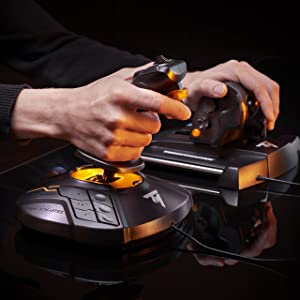
HOTAS (Hands On Throttle And Stick) control of all cockpit elements.
Thrustmaster has devoted its 25 years of expertise in flight sim controllers to meet the growing demand from flight simmers in general – and space simmers in particular – who have requested a mid-range HOTAS joystick.
The T.16000M FCS HOTAS has been designed for advanced fliers looking for comprehensive, realistic controls as an alternative to using a mouse and keyboard.
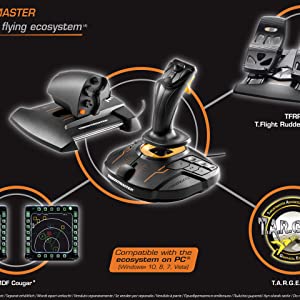
It is composed of the T.16000M FCS (Flight Control System) flight stick and the TWCS (Thrustmaster Weapon Control System) throttle. The T.16000M FCS HOTAS is compatible with PC via USB in Windows 10, 8, 7 and Vista (32-bit and 64-bit).
| | | |
|---|---|---|
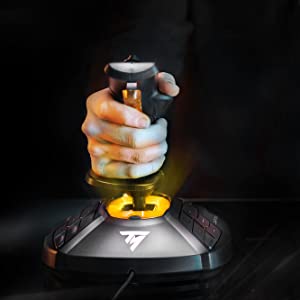
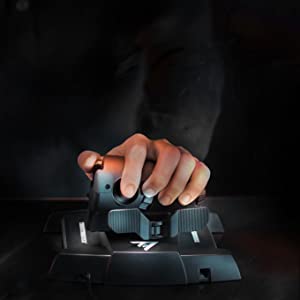
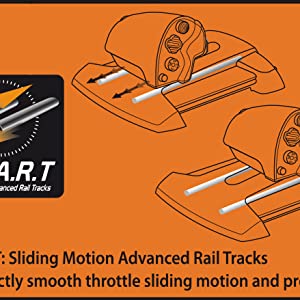
T.16000M FCSIn order to deliver exclusive high-precision performance, pitch and roll on the T.16000M FCS flight stick employ H.E.A.R.T HallEffect AccuRate Technology (U.S. patent US08471815) for 16-bit resolution (i.e. 16000 x 16000 values) – the same pinpoint accuracy delivered by the extremely high-end HOTAS Warthog joystick, allowing gamers to engage their enemies with surgical precision. The helical spring (0.1” / 2.8 mm in diameter) inside the stick provides firm, linear and smooth tension. The T.16000M FCS features 4 independent axes, including twist rudder (controlled by rotating the stick), 16 action buttons with “braille”-style physical button identification, one 8-way Point of View (PoV) hat switch and an ergonomic trigger. Its striking orange accents and backlighting bring gamers’ immersion to a whole new level. | TWCS ThrottleTWCS (Thrustmaster Weapon Control System) throttle: use your left hand to increase your combat speed and manage your spaceship or jet fighter. The TWCS throttle’s lower positioning compared to quadrant-based systems provides unrivalled comfort. To give simmers complete control, the TWCS throttle includes 14 buttons and one 8-way-PoV hat switch that are added to those of the joystick. In total, this provides gamers with 5 axes, 30 buttons and two 8-way PoVs – plus 3 extra axes via the optional TFRP rudder*. The TWCS throttle features 5axes and a rear RJ12 connector offering 3 additional axes via the external optional TFRP rudder* from Thrustmaster’s flight product ecosystem. *Sold separately. | S.M.A.R.T (Sliding Motion Advanced Rail Tracks) technologyA unique system of slide rails for perfectly smooth throttle sliding motion – precise and comfortable, with 3.2 inch/80 mm range of travel for precise maneuvers. The tightening screw allows users to adjust the throttle’s friction level to suit their own personal taste. |
| | | |
|---|---|---|
Thrustmaster advanced flying ecosystemThese products are part of a range of flight simulation peripherals that can be used in conjunction with one another: a complete ecosystem featuring the FCS flight stick, TWCS throttle, TFRP rudder pedals* and MFD* (Multi-Functional Display) cockpit panels. These elements are also compatible with the T.A.R.G.E.T advanced programming software. * Sold separately. | T.A.R.G.E.T advanced programming software on PC: program up to 256 buttons in the flying ecosystemThrustmaster Advanced pRogramming Graphical EdiTor software: combine with other Thrustmaster devices (so that they are recognized as a single USB device), and load or create specific mapping profiles for each game. Tailor your own profiles to enhance most Thrustmaster flight controllers, and share them with the Thrustmaster community. | Ergonomic design for optimum comfort and precisionThanks to its design and ergonomics, the T.16000M FSC HOTAS provides players with multiple recognizable features, allowing them to become more effective and accurate when in flight. This enhanced access to flight controls proves even more essential when players are fully immersed in the exceptional flight experience delivered by VR-compatible games. The T.16000M FCS HOTAS is the most natural and intuitive way to sit in a cockpit with one’s hands on the throttle and stick. |

| Dimensions: | 27 x 23 x 27 cm; 2.1 Kilograms |
| Model: | 2960778 |
| Origin: | China |
Okay… these are just okay….. for the money they are okay. I have had Logitech’s and they broke over time…. bought these as a fast replacement…..hmmmm they are lightweight but strong enough…. not much of a center detent which is a good thing if you like to fly heli’s…. but for sure they snag and judder… they seem to be easing up with daily use…. but had then for a few months now and still find them not having a very smooth input….pretty vital on heli’s…. not so mych for planes.
For the money though…. not so bad.
Great all-around stick
Bought for use with flight simulation software mainly P3D. I have it set up in left hand mode and it works great, the joystick is sturdy and has many buttons and a wide axis of movement. Easy to set up and use, saw it recommended online in a few places, a definite upgrade from my old logitech joystick and not as expensive as the warthog.
Perfect for Elite Dangerious
It was either this or the Logitech equivalent. The logitech one has build quality issues which the Thrustmaster certainly does not have.
Anyway my review. Stunning I play Elite Dangerious and the stick and throttle was made for this game.
Throttle.
Precise easy to setup and it has a little joystick on the back of it, when bound to thruster control just works like a dream. Also the little joystick can be pushed in and acts as a button. Handly for landing gear.
Combat – noting gets a shot in, the accurate thruster controls enable you to get in behind your foe and stay there.
In short just buy this it makes you better at the game and enhances the flying experience.
Perfect for Elite Dangerious
It was either this or the Logitech equivalent. The logitech one has build quality issues which the Thrustmaster certainly does not have.
Anyway my review. Stunning I play Elite Dangerious and the stick and throttle was made for this game.
Throttle.
Precise easy to setup and it has a little joystick on the back of it, when bound to thruster control just works like a dream. Also the little joystick can be pushed in and acts as a button. Handly for landing gear.
Combat – noting gets a shot in, the accurate thruster controls enable you to get in behind your foe and stay there.
In short just buy this it makes you better at the game and enhances the flying experience.
Best entry level joystick
Sticks are very easy to setup and use although the associated software itself (T.A.R.G.E.T) could do with some minor improvements for when you need to use the sticks in a more specialised way. I personally use them for playing Elite Dangerous and Star Citizen for which they are extremely suited for. They feel very ergonomic in the hand although depending on the set up of your desk and position of your computer relative to your play srea you may find the USB cables to be a little short.which is an issue I currently have with the left stick but this can be solved with a good quality extension cable.
I would definitely recommend these as a cost effective entry point to dual stick play or joysticks in general when purchasing the single unit or HOTAS version. I have not yet purchased the pedals but definitely plan on doing so and would recommend it to anyone looming to enhance their experience with these sticks just thst little bit more.
Best entry level joystick
Sticks are very easy to setup and use although the associated software itself (T.A.R.G.E.T) could do with some minor improvements for when you need to use the sticks in a more specialised way. I personally use them for playing Elite Dangerous and Star Citizen for which they are extremely suited for. They feel very ergonomic in the hand although depending on the set up of your desk and position of your computer relative to your play srea you may find the USB cables to be a little short.which is an issue I currently have with the left stick but this can be solved with a good quality extension cable.
I would definitely recommend these as a cost effective entry point to dual stick play or joysticks in general when purchasing the single unit or HOTAS version. I have not yet purchased the pedals but definitely plan on doing so and would recommend it to anyone looming to enhance their experience with these sticks just thst little bit more.
Good but flawed
This was bought to replace my T.Flight HOTAS X that had started to feel a little tired. I plumped for this one based on the throttle unit with its multiple hats, and because it was seemingly designed with Elite:Dangerous in mind.
Initial impressions are good – there’s plenty of controls within finger reach and the precision of the joystick is superb. I was (and still am) in two minds about the on-rails throttle. It’s probably a matter of personal preference, but I dislike the need to move your arm more fully to adjust the throttle, when more-traditional pivoting types can be done more lazily. There’s also no obvious centre notch for sims with a reverse throttle, so either you need to map a ‘toggle reverse’ button or just deal with it. However with some practice it is possible to be more accurate with this style, or at least in principle. In practice it’s tricky to move the throttle in small, precise amounts thanks to the type of grease used inside. I’ve since opened it up and replaced it with some damping grease and it’s made the whole thing feel a lot higher-end – better tactile feel and far more accurate. The other thing with the throttle is the whole thing felt a little too fat for my hands – if it was slimmed down slightly it would make reaching all the inputs easier.
The throttle provides numerous inputs too, including three hats by the thumb, an analogue stick under a finger, a flappy paddle and about five digital buttons. That’s plenty to play with, but the layout could be better. The analogue stick in particular feels entirely in the wrong place under the left forefinger, where I never feel like I have the tight control I’d like. I wish it was one of the ones accessible using the thumb, where it would be easier to move accurately and would make more sense when mapping controls onto it.
The stick is very accurate as I’ve mentioned, but lacking in convenient inputs. Given the wealth of hats on the throttle I’m surprised there’s only the one on the stick – I would like to see at least an analogue one in thumb’s reach. There are twelve additional buttons on the base of the unit, but those are only suitable for functions where you have the time to take your hands off one of the units. Still, with a bit of thought I managed to map pretty much the entire E:D control scheme onto the HOTAS by using a couple of buttons as shift keys, effectively letting me put multiple functions onto each input.
Overall it’s a decent set – a bit lightweight in use and ergonomically the cheaper HOTAS X felt better in the hands, but you can’t argue with the accuracy of the sensors, and the throttle especially gives lots of flexibility. It’s a good purchase but make sure it suits you before buying it, as this sort of product can be highly subjective.
Good but flawed
This was bought to replace my T.Flight HOTAS X that had started to feel a little tired. I plumped for this one based on the throttle unit with its multiple hats, and because it was seemingly designed with Elite:Dangerous in mind.
Initial impressions are good – there’s plenty of controls within finger reach and the precision of the joystick is superb. I was (and still am) in two minds about the on-rails throttle. It’s probably a matter of personal preference, but I dislike the need to move your arm more fully to adjust the throttle, when more-traditional pivoting types can be done more lazily. There’s also no obvious centre notch for sims with a reverse throttle, so either you need to map a ‘toggle reverse’ button or just deal with it. However with some practice it is possible to be more accurate with this style, or at least in principle. In practice it’s tricky to move the throttle in small, precise amounts thanks to the type of grease used inside. I’ve since opened it up and replaced it with some damping grease and it’s made the whole thing feel a lot higher-end – better tactile feel and far more accurate. The other thing with the throttle is the whole thing felt a little too fat for my hands – if it was slimmed down slightly it would make reaching all the inputs easier.
The throttle provides numerous inputs too, including three hats by the thumb, an analogue stick under a finger, a flappy paddle and about five digital buttons. That’s plenty to play with, but the layout could be better. The analogue stick in particular feels entirely in the wrong place under the left forefinger, where I never feel like I have the tight control I’d like. I wish it was one of the ones accessible using the thumb, where it would be easier to move accurately and would make more sense when mapping controls onto it.
The stick is very accurate as I’ve mentioned, but lacking in convenient inputs. Given the wealth of hats on the throttle I’m surprised there’s only the one on the stick – I would like to see at least an analogue one in thumb’s reach. There are twelve additional buttons on the base of the unit, but those are only suitable for functions where you have the time to take your hands off one of the units. Still, with a bit of thought I managed to map pretty much the entire E:D control scheme onto the HOTAS by using a couple of buttons as shift keys, effectively letting me put multiple functions onto each input.
Overall it’s a decent set – a bit lightweight in use and ergonomically the cheaper HOTAS X felt better in the hands, but you can’t argue with the accuracy of the sensors, and the throttle especially gives lots of flexibility. It’s a good purchase but make sure it suits you before buying it, as this sort of product can be highly subjective.
Good build, yes its made from plastic, but well constructed. Can slip on the floor a bit, but it is not a show stopper. If you have large feet (13UK) they fit, for even better comfort you can remove the back stop and just rest the balls of your feet on the paddles, comes with an Allen key.
The controls are sensitive and will require in game adjustments (DCS World) and sometimes it’s a little tricky finding the centre spot. Practice does make it easier, been using them now for 46 hours flight time. I would recommend.
These pedals are sturdy, relatively compact, and provide a good level of realism. Great for flight sims and upper air flying, lower air circuits and of course taxiing on the ground. Added fun and realism, also aircraft precision flying when mastered.
They grip the floor well, theyve moved a little on a plastic – under chair – mat I have (floor/carpet protector), but not much.
For me using FSX SE and Windows 10, these were plug and play – easy.
Great quality, proportional control, great value and really good fun.
Great HOTAS
First off I’ve previously had the X52 HOTAS. That has a superior joystick with two hats and several buttons in easy reach. Sadly that unit didn’t have the best quality Throttle it should have been so I’ve had to upgrade and decided to go for the T-1600M.
Getting used to the layout of the throttle unit didn’t take long at all – the rudder like paddle switch is also very interesting and at one point I was using it as a gear changer before I obtained the G29 steering wheel. Because the throttle is on a slider with ample space in front of it, placement on a computer desk is absolutely fine for both – ideally depending on your desk you may want to keep them in reach as you lean back slightly, however functionally the Throttle nor the Joystick didn’t disappoint.
The Joystick base has twelve buttons on the base. I don’t know why or how useful they are especially in the heat of a dogfight situation, you really don’t want to take your hand off the stick and depending what’s mapped to the throttle that too may be inconvenient. I guess if you aren’t in keyboard or MFD panel range then they are optional plan B button layouts. I wouldn’t like to try to find them if I were to be wearing a VR headset.
If this throttle was compatible with the X52 Stick it would be an amazing set up.
Great HOTAS
First off I’ve previously had the X52 HOTAS. That has a superior joystick with two hats and several buttons in easy reach. Sadly that unit didn’t have the best quality Throttle it should have been so I’ve had to upgrade and decided to go for the T-1600M.
Getting used to the layout of the throttle unit didn’t take long at all – the rudder like paddle switch is also very interesting and at one point I was using it as a gear changer before I obtained the G29 steering wheel. Because the throttle is on a slider with ample space in front of it, placement on a computer desk is absolutely fine for both – ideally depending on your desk you may want to keep them in reach as you lean back slightly, however functionally the Throttle nor the Joystick didn’t disappoint.
The Joystick base has twelve buttons on the base. I don’t know why or how useful they are especially in the heat of a dogfight situation, you really don’t want to take your hand off the stick and depending what’s mapped to the throttle that too may be inconvenient. I guess if you aren’t in keyboard or MFD panel range then they are optional plan B button layouts. I wouldn’t like to try to find them if I were to be wearing a VR headset.
If this throttle was compatible with the X52 Stick it would be an amazing set up.
Throttle control
Does all that’s required – extra control buttons and throttle at a reasonable price. Have given 4 stars as the throttle did become a bit ‘sticky’ and wasn’t so smoothe after a few weeks. As per recommended by others applied Nyogel 767A lubricant to ‘rails’ and all working smoothly now!
Thrustmaster T.16000M
Very well made, the hall effect tech is brilliant, and in most flight sims i have only had to set the dead zone to be a few pixels maximum.
Easy to customise for each plane or sim, very good value for money.
Being left handed, it also helps massively being able to use it in this mode.
Thrustmaster T.16000M
Very well made, the hall effect tech is brilliant, and in most flight sims i have only had to set the dead zone to be a few pixels maximum.
Easy to customise for each plane or sim, very good value for money.
Being left handed, it also helps massively being able to use it in this mode.
Great For Elite Dangerous (ED)
ED is a complicated game! this takes so much of the complexity out of it however; a complicated game needs a complicated device. It has taken me some time to work through the ED settings and get this device set up as I want was well worth the time spent. The build of this device is good and sturdy.
Great For Elite Dangerous (ED)
ED is a complicated game! this takes so much of the complexity out of it however; a complicated game needs a complicated device. It has taken me some time to work through the ED settings and get this device set up as I want was well worth the time spent. The build of this device is good and sturdy.
Good product.
To be fair, in use I would rate it 5 star in its price class. However, the stick died when 13 months old due to, allegedly, a small piece worth less than 10p. The excellent Thrustmaster support team replaced it without question but be warned, it is lengthy and complex to do and took around 3 weeks. Could be a long time to a ardent gamer!
Good product.
To be fair, in use I would rate it 5 star in its price class. However, the stick died when 13 months old due to, allegedly, a small piece worth less than 10p. The excellent Thrustmaster support team replaced it without question but be warned, it is lengthy and complex to do and took around 3 weeks. Could be a long time to a ardent gamer!
Purchased fore Elite Dangerous
Wasn’t disappointed. Very nice throttle and joystick set. Lots of mappable buttons and a nice slick ‘feel’ to both joystick and throttle. A welcome upgrade from my old, – but still very capable – Thrustmaster T.Flight Hotas X.
Purchased fore Elite Dangerous
Wasn’t disappointed. Very nice throttle and joystick set. Lots of mappable buttons and a nice slick ‘feel’ to both joystick and throttle. A welcome upgrade from my old, – but still very capable – Thrustmaster T.Flight Hotas X.
Great for newbies
I’m new to flight simulators, and wanted a product that would enhance my experience without being too pricey. This seemed a good balance. The product feels weighty and well built, and I’ve really benefited from controlling the aircraft in this fashion. I’m using it with Xplane 11 and it just works, with plenty of options to map buttons etc. I can recommend this product heartily, although bare in mind I’m just a newbie and cannot comment on what else is out there.
Great for newbies
I’m new to flight simulators, and wanted a product that would enhance my experience without being too pricey. This seemed a good balance. The product feels weighty and well built, and I’ve really benefited from controlling the aircraft in this fashion. I’m using it with Xplane 11 and it just works, with plenty of options to map buttons etc. I can recommend this product heartily, although bare in mind I’m just a newbie and cannot comment on what else is out there.
Great value
I honestly did not expect much from this throttle. However I’ve been really pleasantly impressed with it for both DCS and Xplane11. I’ve used it on both PC and MAC both without trouble. I haven’t needed the Thrustmaster T.A.R.G.E.T. software at all but it’s good to know you can extend the capability with that. I was looking to Pay a LOT more for a higher-end throttle, but I’m glad I went this direction for now.
Very nice
Very nice items, the Target software is little complicated to use especially for beginners, but it’s not a dealbreaker. The lower button array is not as ergonomic as I’d like, a couple more hat switches on top would have been more preferable. The Throttle is perfect, including it’s different shaped 4 way buttons, allowing you to reach and use the correct one without having to look. The Throttles resistance is adjustable using a ‘hidden’ screw underneath. I hear a lot of users lubricating or returning the device without checking for this adjustment. On the whole both devices are perfect for my needs.
overall set up
ot bad, for a FIRST time using flight pedals, in sim flying. mostly heavy duty plastic apart from pedal rails. no replacement spring. and the spring inside. not strong enough to “pull pedals back into rest position” apart from that. not bad. perfect for a new player to flight sims. overall 4 out of five. calibration. easy. just follows directions to Thrust master website for the firmware.
Lefty bit first, yes I’m left handed and so is my spouse, so most joysticks are right handed, so I originally got one of these to go with the FCS for Elite Dangerous. That was better, I swapped it to left handed, but now the FCS buttons are just odd, buy another TM16000M – good much better. Rotations on the left hand stick, translations on the right hand stick and with the TARGET software make the right triggers a shift up and shift down. Now have stupid numbers of buttons on the base (none of which I use as I use Voice Attack/HCS Voice Packs). But these also allow me to shift the hat buttons other top buttons and so panels of the left (never use ’em) and targeting on the right.
This works perfectly and so when I got Elite for my spouse, this was first on the list.
As to the joysticks themselves, very smooth, could do with a centre click on the base throttles (extra throttle on right, zoom of left) but just allocated a dead zone in TARGET. Bttons could be better dientified – I stuck rubbler/fluff pads on so I can tell without removing the Oculus. Screwed them down to boards, so moving isn’t an issue and the buttons are OK without being exceptional the sticks themselves feel like they have steel shafts nice and solid.
I did look at the Warthog but it’s right handed, this just works better for me. Bottom line, overall bought four joysticks in total, make of that what I think of them.
Lefty bit first, yes I’m left handed and so is my spouse, so most joysticks are right handed, so I originally got one of these to go with the FCS for Elite Dangerous. That was better, I swapped it to left handed, but now the FCS buttons are just odd, buy another TM16000M – good much better. Rotations on the left hand stick, translations on the right hand stick and with the TARGET software make the right triggers a shift up and shift down. Now have stupid numbers of buttons on the base (none of which I use as I use Voice Attack/HCS Voice Packs). But these also allow me to shift the hat buttons other top buttons and so panels of the left (never use ’em) and targeting on the right.
This works perfectly and so when I got Elite for my spouse, this was first on the list.
As to the joysticks themselves, very smooth, could do with a centre click on the base throttles (extra throttle on right, zoom of left) but just allocated a dead zone in TARGET. Bttons could be better dientified – I stuck rubbler/fluff pads on so I can tell without removing the Oculus. Screwed them down to boards, so moving isn’t an issue and the buttons are OK without being exceptional the sticks themselves feel like they have steel shafts nice and solid.
I did look at the Warthog but it’s right handed, this just works better for me. Bottom line, overall bought four joysticks in total, make of that what I think of them.
A whole new level of immersion for flight/space Sims.
I bought this primarily for Elite Dangerous.
I enjoyed the game very much with just mouse and keyboard but this thing has changed the enjoyment level for the better x100.
I tried a cheaper flight stick to get an idea of the controls And it was good but the real experience was clearly in a HOTAS such as this.
It’s a great product for the price since they can go much higher(see the Warthog for example). Loads of mappable buttons , nice smooth motion of the stick with just enough resistance and articulation. Plug in and play right from the box.
If you are thinking of getting a first HOTAS, you cant go wrong with this for a first buy.
A whole new level of immersion for flight/space Sims.
I bought this primarily for Elite Dangerous.
I enjoyed the game very much with just mouse and keyboard but this thing has changed the enjoyment level for the better x100.
I tried a cheaper flight stick to get an idea of the controls And it was good but the real experience was clearly in a HOTAS such as this.
It’s a great product for the price since they can go much higher(see the Warthog for example). Loads of mappable buttons , nice smooth motion of the stick with just enough resistance and articulation. Plug in and play right from the box.
If you are thinking of getting a first HOTAS, you cant go wrong with this for a first buy.
A great mid-range joystick
I bought this joystick to replace my 20-year-old Logic3 one, which had become unusable through over-sensitivity and faulty sensors. I’d read that this Thrustmaster FCS joystick used magnets for much more precise control input and that it was ideally suited for the accurate demands of flight simulators. I have no regrets in buying this model for the extra 25 or so as it is an excellent stick! I’d recommend this joystick to anyone who is serious enough about flight simming, but who still is on a reasonable budget and cannot justify buying a yoke or top-end stick. The response and fine accuracy of this stick takes both my civil and fighter flight experience to a whole new level of satisfaction. The increased financial outlay over most basic/standard joysticks is worth it!
These are one of the least expensive set of pedals you can get, but far from the worst. They are almost completely made out of plastic as you might expect but they are more robust than they initially appear. As long as you don’t use them while wearing walking boots they should be fine.
The Pros: Good value for money compared to others on the market. They have toe brakes and the pedals slide smoothly. They worked straight out of the box I just plugged them in and calibrate them in the game itself with no need to download and install drivers (I use Windows 10 and the game was X-Plane 11).
The Cons: The cable from the pedals is quite short so your PC needs to be on, or next to, the desk/chair you are going to use them from. The two pedals are set quite close together and may be a little uncomfortable if you keep your feet on them all the time. There is no means of adjusting any of the tension in the pedals and may be a bit stiff for children under about 7 or so.
I am more than happy with this product and think if you want a pair of pedals for a flight simulator these are the ones you should go for, unless you want pay out 200+ .
These are one of the least expensive set of pedals you can get, but far from the worst. They are almost completely made out of plastic as you might expect but they are more robust than they initially appear. As long as you don’t use them while wearing walking boots they should be fine.
The Pros: Good value for money compared to others on the market. They have toe brakes and the pedals slide smoothly. They worked straight out of the box I just plugged them in and calibrate them in the game itself with no need to download and install drivers (I use Windows 10 and the game was X-Plane 11).
The Cons: The cable from the pedals is quite short so your PC needs to be on, or next to, the desk/chair you are going to use them from. The two pedals are set quite close together and may be a little uncomfortable if you keep your feet on them all the time. There is no means of adjusting any of the tension in the pedals and may be a bit stiff for children under about 7 or so.
I am more than happy with this product and think if you want a pair of pedals for a flight simulator these are the ones you should go for, unless you want pay out 200+ .
These are one of the least expensive set of pedals you can get, but far from the worst. They are almost completely made out of plastic as you might expect but they are more robust than they initially appear. As long as you don’t use them while wearing walking boots they should be fine.
The Pros: Good value for money compared to others on the market. They have toe brakes and the pedals slide smoothly. They worked straight out of the box I just plugged them in and calibrate them in the game itself with no need to download and install drivers (I use Windows 10 and the game was X-Plane 11).
The Cons: The cable from the pedals is quite short so your PC needs to be on, or next to, the desk/chair you are going to use them from. The two pedals are set quite close together and may be a little uncomfortable if you keep your feet on them all the time. There is no means of adjusting any of the tension in the pedals and may be a bit stiff for children under about 7 or so.
I am more than happy with this product and think if you want a pair of pedals for a flight simulator these are the ones you should go for, unless you want pay out 200+ .
A great mid-range joystick
I bought this joystick to replace my 20-year-old Logic3 one, which had become unusable through over-sensitivity and faulty sensors. I’d read that this Thrustmaster FCS joystick used magnets for much more precise control input and that it was ideally suited for the accurate demands of flight simulators. I have no regrets in buying this model for the extra 25 or so as it is an excellent stick! I’d recommend this joystick to anyone who is serious enough about flight simming, but who still is on a reasonable budget and cannot justify buying a yoke or top-end stick. The response and fine accuracy of this stick takes both my civil and fighter flight experience to a whole new level of satisfaction. The increased financial outlay over most basic/standard joysticks is worth it!
Affordable good performance
The T.16000 sits nicely in the range between the T.Flight and Warthog. Two sticks make for precision manoeuvring and feels entirely natural in a space sim.
They’re well-made, comfortable and have magnetic sensors for *reliability. Base buttons feature concave or braille surfaces, useful for playing in VR. Orange lighting complements Elite Dangerous’s colour scheme.
Each stick can be made either left or right-handed so if you don’t get on with them you can always use one for another setup. (Two right hands anyone? xD)
Thrustmster’s TARGET software makes them immensely customizable and there are several downloadable presets for games like Star Citizen and Elite Dangerous (more would be welcome).
I’d prefer a bit more weight to the base but there are mounting holes underneath.
All in all good value for money considering the price of some sticks.
*After some time the z-axis (twist) of both sticks exhibited erratic behaviour. Apparently an ordinary potentiometer is used for this axis and is prone to causing trouble. (Shaving a little off the casing can fix it.)
Affordable good performance
The T.16000 sits nicely in the range between the T.Flight and Warthog. Two sticks make for precision manoeuvring and feels entirely natural in a space sim.
They’re well-made, comfortable and have magnetic sensors for *reliability. Base buttons feature concave or braille surfaces, useful for playing in VR. Orange lighting complements Elite Dangerous’s colour scheme.
Each stick can be made either left or right-handed so if you don’t get on with them you can always use one for another setup. (Two right hands anyone? xD)
Thrustmster’s TARGET software makes them immensely customizable and there are several downloadable presets for games like Star Citizen and Elite Dangerous (more would be welcome).
I’d prefer a bit more weight to the base but there are mounting holes underneath.
All in all good value for money considering the price of some sticks.
*After some time the z-axis (twist) of both sticks exhibited erratic behaviour. Apparently an ordinary potentiometer is used for this axis and is prone to causing trouble. (Shaving a little off the casing can fix it.)
Really good produc
It is a really good joystick for the price. I used it for X-Plane 11 and FSX and it works perfectly. At rest, no displacement was shown so it was perfectly calibrated. There are a decent amount of buttons as well on the left and right side. The throttle is really well made but however sometimes, it is really easy to move the throttle while holding the stick, but that is a user issue.
The only issue is that to switch between left hand right hand options requires me to unglue the RH flap and glue the LH one.
Really good produc
It is a really good joystick for the price. I used it for X-Plane 11 and FSX and it works perfectly. At rest, no displacement was shown so it was perfectly calibrated. There are a decent amount of buttons as well on the left and right side. The throttle is really well made but however sometimes, it is really easy to move the throttle while holding the stick, but that is a user issue.
The only issue is that to switch between left hand right hand options requires me to unglue the RH flap and glue the LH one.
DCS
Great HOTAS when combined with their rudder peddles.
I mainly use for DCS Huey and F18, and there are enough buttons to map everything.
The buttons on the main joystick are weirdly place but I map them to flaps, gear, and other extras.
The stick feels nice, and the throttle is great on the rails, I would recommend decrease the tension out of the box
Great overall
DCS
Great HOTAS when combined with their rudder peddles.
I mainly use for DCS Huey and F18, and there are enough buttons to map everything.
The buttons on the main joystick are weirdly place but I map them to flaps, gear, and other extras.
The stick feels nice, and the throttle is great on the rails, I would recommend decrease the tension out of the box
Great overall
Great stick for the price, base buttons a shame though.
Fantastic stick let down by the buttons on the base. Please note this is only when used as part of a HOTAS setup, you don’t have the spare hand to press the buttons on the base, so you fumble around for them in Elite:Dangerous. Strongly suggest map all functions from the stick base to the Cougar MFD panel or similar.
Great stick for the price, base buttons a shame though.
Fantastic stick let down by the buttons on the base. Please note this is only when used as part of a HOTAS setup, you don’t have the spare hand to press the buttons on the base, so you fumble around for them in Elite:Dangerous. Strongly suggest map all functions from the stick base to the Cougar MFD panel or similar.
Feels like you are in control.
I have been researching HOTAS controls for some time and realise there is a big difference in the price and finished article. My purchase was for the two controls. I am using it for ELite Dangerous, which I have been playing for almost a year now and have felt that I needed something extra to help me during an interdiction. Although I spent some time in setting up the binds – it was recognised immediately by ED – the additional links to the keyboard controls was not straightforward, but that has nothing to do the HOTAS controls. I now have 42 controls at my fingertips to fly my ship with ease. Playing Elite Dangerous has suddenly become more enjoyable and I’m delighted with my purchase. I would certainly recommend this setup.
Feels like you are in control.
I have been researching HOTAS controls for some time and realise there is a big difference in the price and finished article. My purchase was for the two controls. I am using it for ELite Dangerous, which I have been playing for almost a year now and have felt that I needed something extra to help me during an interdiction. Although I spent some time in setting up the binds – it was recognised immediately by ED – the additional links to the keyboard controls was not straightforward, but that has nothing to do the HOTAS controls. I now have 42 controls at my fingertips to fly my ship with ease. Playing Elite Dangerous has suddenly become more enjoyable and I’m delighted with my purchase. I would certainly recommend this setup.
Good weight. Doesn’t squirm around on the desk. Once you’ve set it up with the Oculus, it really brings Elite: Dangerous to life. Same with FSX. But the big thing is desk stability, doesn’t tip over with sudden movements. Loads of buttons. Bit too expensive, but joysticks have essentially disappeared, and finding a left-handed on for a dual stick setup proved less easy than I expected. I thought this was the best of the bunch, and so far, seems better than adequate.
I was bit dubious when it arrived because the ball at the base seemed damp when it arrived, but a quick google showed it was silicon lubricant.
Easy to use and Works Flawlessly
Great Joystick For the price. I bought this Primarily for the left or right hand configuration for a Dual Stick setup for Space Sims and it works flawlessly. The twist feature works excellent and very easy to use instead of pedals in Flight sims. My only gripes are that the Hat switch feels a bit too cheap and it could use a bit more weight in the Base, also the orange led’s in the base turn on and off depending if the joystick was used in the last couple seconds which gets annoying after a while. Other than that the rubberized sides are a nice touch, and its quite reasonably priced considering its versatility.
Easy to use and Works Flawlessly
Great Joystick For the price. I bought this Primarily for the left or right hand configuration for a Dual Stick setup for Space Sims and it works flawlessly. The twist feature works excellent and very easy to use instead of pedals in Flight sims. My only gripes are that the Hat switch feels a bit too cheap and it could use a bit more weight in the Base, also the orange led’s in the base turn on and off depending if the joystick was used in the last couple seconds which gets annoying after a while. Other than that the rubberized sides are a nice touch, and its quite reasonably priced considering its versatility.
Superb stick for the price
Bought this for Elite: Dangerous on the PC. I play in VR and my old stick lacked the right amount of buttons to make it easy to play without scrabbling for the keyboard.
My only niggle was I’m left-handed and, although the stick can be set up to play that way, the throttle can’t. So… I learned to fly right handed and, ,after a few weeks, it’s second nature. For the price I’d recommend this HoTaS to everyone looking for a budget solution.
Superb stick for the price
Bought this for Elite: Dangerous on the PC. I play in VR and my old stick lacked the right amount of buttons to make it easy to play without scrabbling for the keyboard.
My only niggle was I’m left-handed and, although the stick can be set up to play that way, the throttle can’t. So… I learned to fly right handed and, ,after a few weeks, it’s second nature. For the price I’d recommend this HoTaS to everyone looking for a budget solution.
Use this for playing Elite Dangerous and it works a treat. Loads of buttons more than enough for what I need. Good sturdy design, looks and feels like it could take some serious abuse.
One down side was the stiff throttle which seems to be a common issue. Push the throttle all the way forward, turn the throttle base over and you will see a screw in the base. Simply loosen that off and you get a more smoother action. I also took it apart and put new grease on the runners.
Use this for playing Elite Dangerous and it works a treat. Loads of buttons more than enough for what I need. Good sturdy design, looks and feels like it could take some serious abuse.
One down side was the stiff throttle which seems to be a common issue. Push the throttle all the way forward, turn the throttle base over and you will see a screw in the base. Simply loosen that off and you get a more smoother action. I also took it apart and put new grease on the runners.
Sturdy, plenty of buttons, seems perfect as a joystick - apart from the yellow!
Feels right in every way. Time will tell how sturdy it truly is, and how well it maintains what it is on delivery, but so far so good. Not a huge fan at all of the yellow/orange styling and lighting on this. Really isn’t great. But against that, this has more buttons to map than you really would ever need unless using it completely on its own. Would recommend if you can live with the colour contrast.
Sturdy, plenty of buttons, seems perfect as a joystick - apart from the yellow!
Feels right in every way. Time will tell how sturdy it truly is, and how well it maintains what it is on delivery, but so far so good. Not a huge fan at all of the yellow/orange styling and lighting on this. Really isn’t great. But against that, this has more buttons to map than you really would ever need unless using it completely on its own. Would recommend if you can live with the colour contrast.
Excellent joystick for lefties
Excellent joystick. I’m left handed and this stick is easy to swap between left and right setups. Plenty of buttons too, which is important if, like me, you want to use it in VR. I use it to play Elite Dangerous on the Oculus Rift and as long as you also have a throttle system too there are enough buttons to map everything needed. I’ve had this for about 6 months now and it works perfectly.
Excellent joystick for lefties
Excellent joystick. I’m left handed and this stick is easy to swap between left and right setups. Plenty of buttons too, which is important if, like me, you want to use it in VR. I use it to play Elite Dangerous on the Oculus Rift and as long as you also have a throttle system too there are enough buttons to map everything needed. I’ve had this for about 6 months now and it works perfectly.
Very pleased.
Bought this to compliment an HTC Vive vr headset for flying in Elite Dangerous and DCS World (Huey). Stick works beautifully. My only gripe was the throttle which juddered slightly and did not have a smooth back and forward motion. Annoying when you are trying to make minor flight adjustments. A quick search on the internet and found a perfect solution. Unscrewing the base, there are two rails that guide the throttle. These have light grease on which is not really adequate. I applied a light film of silicone grease to the rails, reassembled and now it glides back and forth seamlessly and smoothly. I don’t regret buying these for a moment.
Very pleased.
Bought this to compliment an HTC Vive vr headset for flying in Elite Dangerous and DCS World (Huey). Stick works beautifully. My only gripe was the throttle which juddered slightly and did not have a smooth back and forward motion. Annoying when you are trying to make minor flight adjustments. A quick search on the internet and found a perfect solution. Unscrewing the base, there are two rails that guide the throttle. These have light grease on which is not really adequate. I applied a light film of silicone grease to the rails, reassembled and now it glides back and forth seamlessly and smoothly. I don’t regret buying these for a moment.
Picked up T16000m hotas Upgraded from Logitech Extreme 3d pro found the movement on the T16000 to be way smoother and precise with way more travel which really helped, in fairness to the Logitech it has lasted me years, but with this new setup I find that I crash / loose control way less and landing is actually fun and controllable I mainly play DCS World, on windows 10, Feb 2018 and all works sweet . A nice feature of the throttle is small joystick that can be used with your index finger this is cool for radar target acquisition .. I have also tried elite dangerous and this joystick on throttle is so cool as it can be used to control up/down/left/right thrusters 🙂
I was worried for lack of buttons on joystick as I seen from reviews that this was main issue but what I have discovered is Logically you can just create a modifier Key to create more options example is I have small button on throttle nearest to my pinky finger set as modifier key so when I press this I have now a second option for those vital keys on top of joystick .
Picked up T16000m hotas Upgraded from Logitech Extreme 3d pro found the movement on the T16000 to be way smoother and precise with way more travel which really helped, in fairness to the Logitech it has lasted me years, but with this new setup I find that I crash / loose control way less and landing is actually fun and controllable I mainly play DCS World, on windows 10, Feb 2018 and all works sweet . A nice feature of the throttle is small joystick that can be used with your index finger this is cool for radar target acquisition .. I have also tried elite dangerous and this joystick on throttle is so cool as it can be used to control up/down/left/right thrusters 🙂
I was worried for lack of buttons on joystick as I seen from reviews that this was main issue but what I have discovered is Logically you can just create a modifier Key to create more options example is I have small button on throttle nearest to my pinky finger set as modifier key so when I press this I have now a second option for those vital keys on top of joystick .
and to say I'm well pleased is an understatement such a great product just plug ...
I’ve been looking to update my trusty hotas x because I needed more buttons I looked at so many different reviews of many hotas systems and this stood out compared to the rest ….. I did look at the thrustmaster warthog but price was a factor I could get all three stick,throttle,pedals for nearly half the price so I took the chance , and to say I’m well pleased is an understatement such a great product just plug and play with all the buttons I need I would highly recommend this for anyone serious about there flight or space sims this is a MUST!!!!!
and to say I'm well pleased is an understatement such a great product just plug ...
I’ve been looking to update my trusty hotas x because I needed more buttons I looked at so many different reviews of many hotas systems and this stood out compared to the rest ….. I did look at the thrustmaster warthog but price was a factor I could get all three stick,throttle,pedals for nearly half the price so I took the chance , and to say I’m well pleased is an understatement such a great product just plug and play with all the buttons I need I would highly recommend this for anyone serious about there flight or space sims this is a MUST!!!!!
A must have stick for Elite Dangerous
Amazing HOTAS for the price and a must for any Elite Dangerous players. The throttle is nice and smooth and just the right hight with plenty of buttons and switches to map ( Elite will recognise this stick and everything will be pre-mapped) if your throttle does feel a little tight just flip it over and there is a little Phillips screw you turn to the left and it relieves the tension which makes it super smooth. The base of stick and throttle are pretty heavy so there’s no movement and there is a screw to make it possible to screw to your desk. If your a lefty there is a hand rest that comes with it to attach and make the stick left handed. Everything comes assembled so no messing around just download the drivers and software and off you go.
A must have stick for Elite Dangerous
Amazing HOTAS for the price and a must for any Elite Dangerous players. The throttle is nice and smooth and just the right hight with plenty of buttons and switches to map ( Elite will recognise this stick and everything will be pre-mapped) if your throttle does feel a little tight just flip it over and there is a little Phillips screw you turn to the left and it relieves the tension which makes it super smooth. The base of stick and throttle are pretty heavy so there’s no movement and there is a screw to make it possible to screw to your desk. If your a lefty there is a hand rest that comes with it to attach and make the stick left handed. Everything comes assembled so no messing around just download the drivers and software and off you go.
I got for Elite Dangerous and it worked nicely out of the box, plenty of keys for all your binds. I specially liked that the throttle has a rail with a good range of movement.
Tip: Find the hole underneath the throttle, it will expose a screw when you set the throttle to full, use this screw to adgjust the internal brake of the throttle if you find it too stiff or too soft. It was too stiff when it came from factory and it was also lacking a bit of lube.
If you need to do maintenance and add lube, use silicone lube only, oil based lubes could damage the plastic.
Excellent piece of ki
Excellent piece of kit.
Discovering how to use the software to bind the controls to the game took about half an hour.
Suggest you search the net for ‘profiles’ that work with your game and tutorials on how to set it up. (Pay especial attention to ‘curves’.)
Yup it's good.
I only use it with Elite Dangerous and I think it’s great. It’s added a whole new dimension to playing this game and I cant imagine using a controller again for this type of game.
Solid build quality and precision control... it's also flipping comfortable
I’ll cut straight to the chase, this is a fantastic Hotas for the money. Good quality, great feeling action on all components, precise, comfortable and simplistic.
I purchased this stick as a replacement for my aging (but still functional) Thrustmaster T.Flight, and because the Saitek Rhino that was the original replacement had a mind of it’s own. This is a very nice bit of kit, and for half the price of the Saitek it’s very good value as well. The stick itself is very sensitive requiring the slightest of pressure to start registering the input. It uses the same 16bit resolution thingy that’s in the top end warthog, and it shows. Also it centers perfectly requiring no dead zone setup. The buttons all feel nice and solid and the stick is perfect for smaller hands.
On the throttle side of things, again lots of nice functionality, the rudder paddles are brilliant and offer lots of control when mapped to an axis, I use them for lateral thrusters in Elite Dangerous. There is also a very nice thumb stick on the back of the throttle, which has a nice big range of movement allowing for precise movements. The throttle itself feels a bit plasticy but has a nice shape, and moves on rails rather than having the typical pivot setup. It’s action is silky smooth and the tension can be adjusted if you want more resistance.
Both sitck and throttle are nicely weighted so shouldn’t move around too much, but you also have the option to screw them to a solid base. I mainly use this stick in VR, and it provides all of the controls I need in a package that allows me to access everything quickly by touch alone. When I was using the Rhino in VR, I found locating controls a little clumsy as there are so many fiddly toggles and hats (which are great if you can see).
I’d defiantly recommend this stick if you’re in the market for a good Hotas at around 100.
I’ll cut straight to the chase, this is a fantastic Hotas for the money. Good quality, great feeling action on all components, precise, comfortable and simplistic.
I purchased this stick as a replacement for my aging (but still functional) Thrustmaster T.Flight, and because the Saitek Rhino that was the original replacement had a mind of it’s own. This is a very nice bit of kit, and for half the price of the Saitek it’s very good value as well. The stick itself is very sensitive requiring the slightest of pressure to start registering the input. It uses the same 16bit resolution thingy that’s in the top end warthog, and it shows. Also it centers perfectly requiring no dead zone setup. The buttons all feel nice and solid and the stick is perfect for smaller hands.
On the throttle side of things, again lots of nice functionality, the rudder paddles are brilliant and offer lots of control when mapped to an axis, I use them for lateral thrusters in Elite Dangerous. There is also a very nice thumb stick on the back of the throttle, which has a nice big range of movement allowing for precise movements. The throttle itself feels a bit plasticy but has a nice shape, and moves on rails rather than having the typical pivot setup. It’s action is silky smooth and the tension can be adjusted if you want more resistance.
Both sitck and throttle are nicely weighted so shouldn’t move around too much, but you also have the option to screw them to a solid base. I mainly use this stick in VR, and it provides all of the controls I need in a package that allows me to access everything quickly by touch alone. When I was using the Rhino in VR, I found locating controls a little clumsy as there are so many fiddly toggles and hats (which are great if you can see).
I’d defiantly recommend this stick if you’re in the market for a good Hotas at around 100.
Value, lots of it.
5 stars from me, mostly because at this price, it is hard to find something that can give me the precise adjustments that this stick allows.
I have the old green one and then I bought this as a dual stick setup. I mean it does feel a little cheap but that’s because it is.
It’s still very sturdy and my first one has lasted 3 years of at least moderate abuse and is still going strong with a small dead zone applied that is.
If you are on a budget then this is the stick to choose.
Best hotas for the money
I bought this throttle and joystick combo primarily to play elite dangerous. The throttle is silky smooth in use and the joystick has just enough resistance without ever becoming hard work. If there are any improvements I would like to see, a half-way decent on the throttle would be the main one as that would allow me to use the full range of the throttle for both forward and reverse.
I have previously owned various hotas from the saitek/mad cats range including ones more expensive than this thrustmaster one. They have always left me disappointed; buttons stop working … recalibration needed before every gaming session amongst other issues. So far the thrustmaster has not shown any signs of components wearing out nor have I ever had to recalibrate it.
Best hotas for the money
I bought this throttle and joystick combo primarily to play elite dangerous. The throttle is silky smooth in use and the joystick has just enough resistance without ever becoming hard work. If there are any improvements I would like to see, a half-way decent on the throttle would be the main one as that would allow me to use the full range of the throttle for both forward and reverse.
I have previously owned various hotas from the saitek/mad cats range including ones more expensive than this thrustmaster one. They have always left me disappointed; buttons stop working … recalibration needed before every gaming session amongst other issues. So far the thrustmaster has not shown any signs of components wearing out nor have I ever had to recalibrate it.
Best Mid-Tier H.O.T.A.S. Setup On The Market RIGHT NOW.
This stick and throttle is possibly my most favorite gaming purchase of 2017, and that is saying ALOT considering this year I have purchased a 1080Ti, PS4 Pro, and a slew of games!
The quality of this setup at the 95 I paid for it is unmatched. I can’t say enough good things about this setup. The feel and accuracy of the stick and throttle exceeds what I was expecting. Thrustmaster products have yet to let me down, so I will continue to buy them.
What is with orange in gaming products this year? Seriously? That is the only not-so negative or con I can almost come up with about this product. The other only slight con about the stick is the single stage trigger, but I can easily forgive and live without it when the rest of this combo works so well.
There is not much else to tell you but, BUY IT. NOW! If you are looking to upgrade from a simpler setup to something affordable and much more capable, this is THE best option right now. A definite buy.
Best Mid-Tier H.O.T.A.S. Setup On The Market RIGHT NOW.
This stick and throttle is possibly my most favorite gaming purchase of 2017, and that is saying ALOT considering this year I have purchased a 1080Ti, PS4 Pro, and a slew of games!
The quality of this setup at the 95 I paid for it is unmatched. I can’t say enough good things about this setup. The feel and accuracy of the stick and throttle exceeds what I was expecting. Thrustmaster products have yet to let me down, so I will continue to buy them.
What is with orange in gaming products this year? Seriously? That is the only not-so negative or con I can almost come up with about this product. The other only slight con about the stick is the single stage trigger, but I can easily forgive and live without it when the rest of this combo works so well.
There is not much else to tell you but, BUY IT. NOW! If you are looking to upgrade from a simpler setup to something affordable and much more capable, this is THE best option right now. A definite buy.
Otherwise superb and great value.
I debated this hotas for a long time due to mixed reviews across the web. This was an upgrade to a well served thrust master which lacked sufficient buttons.
The stick is well built and, in the sort time I’ve used it, performs well. Loads of buttons, POV hats and analogue axis.
Initial set up requires the installation of 2 separate drivers, 1 for throttle, 1 for stick. Once done its plug and go.
2 criticisms;
1. Throttle is on a flat plane mounted on metal rails. This feels odd after using a pivot throttle and the movement is juddery making precision difficult.
2. Throttle has no detent for reverse/reverse thrust/ etc.
Otherwise superb and great value.
Reasonable value if it lasts.
Loads of buttons, hat switches and axis. Build quality is acceptable for the price. Throttle is very skippy and I would have thought it would have maybe have had a bit of lubricant added to prevent this. Worth it if you need the extra buttons and stuff but I think it is quite expensive for what it is. If it lasts a couple of years, I will view it as reasonable value.
Very cool joystick.
This is an excellent quality but still relatively budget joystick for SIM flight. My previous one was cheaper but honestly this is worth the extra. Super accurate, multiple configurable buttons, and of course a quality brand behind it.
Reasonable value if it lasts.
Loads of buttons, hat switches and axis. Build quality is acceptable for the price. Throttle is very skippy and I would have thought it would have maybe have had a bit of lubricant added to prevent this. Worth it if you need the extra buttons and stuff but I think it is quite expensive for what it is. If it lasts a couple of years, I will view it as reasonable value.
Both the joystick and the throttle are great and have lots of buttons. The joystick allows for very smooth motions, but might need lubrication in the long run. The only drawback is that the joystick doesn’t have enough readily-accessible buttons. The base has lots of buttons, but you wouldn’t want to keep reaching for them and let go of the joystick in the middle of a dog fight. Probably a few more well-placed and easy to reach buttons would have made the joy stick a lot better.
Both the joystick and the throttle are great and have lots of buttons. The joystick allows for very smooth motions, but might need lubrication in the long run. The only drawback is that the joystick doesn’t have enough readily-accessible buttons. The base has lots of buttons, but you wouldn’t want to keep reaching for them and let go of the joystick in the middle of a dog fight. Probably a few more well-placed and easy to reach buttons would have made the joy stick a lot better.
Love this
What an awesome piece of kit at at great price
I bought his to play War Thunder on a PS4 it takes a while to configure but has increased my enjoyment 10-fold sadly not my flying ability but that’s on me p.s. You still need to have a PlayStation controller connected for this to work
Love this
What an awesome piece of kit at at great price
I bought his to play War Thunder on a PS4 it takes a while to configure but has increased my enjoyment 10-fold sadly not my flying ability but that’s on me p.s. You still need to have a PlayStation controller connected for this to work
I purchsed this after recomendations from the Elite Dangerous forums for use with ED and the Oculus Rift.
All I can say is it’s a brilliant HOTAS setup and perfect for ED. With VR it has transfored a game into a simulator.
Configuration is a little length, took me about two hours, but that is due to the game interface rather than the HOTAS.
Once setup the controls are intuitive and work really well. Remember you can reuse functions depending on the mode
you are in. This acts as a force mutiplier when configuring the HOTAS.
Perfect for Elite Dangerous transforming a game into a simulation.
I purchsed this after recomendations from the Elite Dangerous forums for use with ED and the Oculus Rift.
All I can say is it’s a brilliant HOTAS setup and perfect for ED. With VR it has transfored a game into a simulator.
Configuration is a little length, took me about two hours, but that is due to the game interface rather than the HOTAS.
Once setup the controls are intuitive and work really well. Remember you can reuse functions depending on the mode
you are in. This acts as a force mutiplier when configuring the HOTAS.
Perfect for Elite Dangerous transforming a game into a simulation.
If you were thinking of getting a Thrustmaster T-Flight Hotas X, get this one instead, so worth the extra quids. Much smoother and quieter joystick action and the throttle control is a lovely slide, rather than a lever action. I’m not totally convinced by the need for 2 x 4 position switches on the throttle, I would have personally preferred some more single or two-position switches instead, but there are enough buttons to map a ton of stuff to them in a flexible way.
This isn’t a top-end yoke, not even a top-end flight stick, but it is a very decent ‘budget’ option. I’m a casual flight simmer so don’t want to fork out hundreds on my hardware, but I’m very glad I upgraded to this from the T-Flight, wish I’d just bought this to start with.
Pretty great all round, joystick accuracy is really great and all sliders are smooth. I’ve been using it with FSX before getting Elite Dangerous I’ll only list a few negatives as the rest of the function has been perfect.
– The rudder lever on the throttle requires some force to get to 100% on the left side. Not really an issue practically but it seems kinda strange.
– The dial is too easy to move during normal operation. Using this as mixture I have accidently cut the engine by trying to operate the throttle/rudder.
– Buttons on throttle are not convenient for HOTAS but they’re okay for things like parking brakes/pushback etc.
– (Very minor) Orange side button on throttle is slightly wobbly but doesn’t affect the use at all.
These are all minor points and I would definitely recommend the HOTAS as a great value, highly accurate setup. You won’t find a cheaper priced HOTAS that performs better than this.
very nice joystick if you can get past the lighting coming ...
very nice joystick if you can get past the lighting coming on every time you move the stick (I have covered it with black insulating tape)
joystick is very responsive and has just the right amount of tension for me.
build quality is good enough for a stick that only costs 45 quid.
Brilliant!!!
I got this for Elite Dangerous. I have been using an Xbox controller. This has completely changed my gaming experience. Using the default game set up has worked fine for me. Love the look and feel of this set. More than enough buttons and hat switches for those who want to build a perfect user profile. I would defo purchase another.
The Pedals are great for precise movement in whatever type of game you are looking to play, I use this mostly in ARMA 3 and Star Citizen, and I can tell you it will make flying more precise, safe and fun! My only 2 issues with it would be the distance you have to sit back, its brilliant at an extended leg distance but the closer you get to your sitting position the harder it is to press and slide the pedals accurately. The other issue being my pedals seem to “turn off” when I shutdown the PC so I have to plug them back in again for my PC to pick them up even after a driver install.
From someone who has been involved in flight simulation for over 15 years, this is my review of this product. All the reviews I have read, state that the pedals are too close together. This is in my experienced opinion rubbish. Let me please explain why. If you drive a manual car, the Brake pedal and clutch pedal are about 5.5 cm apart, and we all manage just fine. Using the clutch and brake at the same time is an important part of driving. These rudder pedals are not too close together at all, in fact the distance between them is perfect. It seems that when some reviewer states something, everybody jumps onto the band wagon and just follows the last review. So to conclude, the feel of these pedals is precise, and very smooth, the distance between them is fine. The value is outstanding. In my humble opinion do not listen to the negative reviews.
Great HOTAS se
Solid set with a very good attention to details. Works great, looks very very well. If you like games like flying simulators, this is a thing for you. On top of all the pricing is quite fair, which does not apply to other similar products.
Damn good stuff, great value and fun to use. I am using this controller in X-Plane 11, it does the job with aplomb! Some users may take a little time to get used to the strong spring tension of the joy stick. There is no tendency for the joy stick to have a sticky action during movement. I have found that there is some tendency toward some stickiness with the throttle however, I did knock a drink over and into the works! There is a screw which allows the friction to be adjusted for throttle movement. The HOTAS is pretty rugged and the joy stick surprisingly heavy for it’s design. There is very little tendency for the HOTAS to side around the table.
Nice mid ranged joystick
I’ve been using a cyborg gold joystick for over 10 years, this review is based on my comparison to that.
Pros:
Easy to change to left handed and back if needed. Only 2 screws to do so.
The joystick movement has a fair amount of resistance but it does scream quality.
No dead zone, it centres perfect every time.
Smooth movement, you feel in control with even the smallest of movements.
Fairly heavy, so stays well planted on the desk. Worst case, there are two screw points underneath if you need them.
Easy setup.
Cons:
The buttons feel soft, not a very positive click
The sick is a little oversized IMO. I’m a medium to large glove size and i feel my hands are on the small side for this stick. It’s not unusable, just doesn’t feel quite right.
When you move the stick the base lights up. After 3 seconds of being 100% centred, the light goes out, but comes back on when moved again. I’m finding this distracting. Great for checking if the stick is working correctly but with no option to turn this light off, i had to drop a star from my rating. There are videos online that show you how and which wire to cut to stop this but that will invalidate your warranty. I will cut mine as soon as the warranty has ended.
Only thing i haven’t mentioned so far is the slide throttle. Shame it’s not a rotational throttle like on my cyborg gold, but for a slide throttle, it does its job and feels fine.
My reason for getting this one is that it is the only quality left handed joystick on the market at the moment IMO
Review for the
Thrustmaster T.16000M FCS Hotas
Excellent throttle unit and good joystick. Setting up the software, which needs to be downloaded, was a bit of a fuss compared to most other sticks (like the Thrustmaster HOTAS X which is just plug’n’play). But there are plenty of adjustment options in the program, if you need to deal with any key conflicts, repeat speeds, etc that you may get in a particular game.
On the throttle, your index finger is on another analogue joystick. This can be used like a 4-way switch like the other HAT switches, or as a proportional joystick – excellent for vertical/sideways thrust controls in Elite Dangerous!
The main joystick has excellent sensitivity, but I miss having some more buttons on top to be controlled with my thumb.
The throttle unit can be bought separately and (they say) used along side any joystick. If you’ve thinking of buying just the throttle unit to go with, say the Thrustmaster HOTAS, it’s worth noting that the joystick in this set has much better stick movement sensitivity.
After a week of use I am happy to report this is easily the best HOTAS I have come across especially at this price point. The actual stick has no deadzone. At all but more importantly corrects itself to center no matter how agressive you are in dogfights etc. In regard to the throttle I really do like this non-reutrn style and the granular control it brings. To describe the feedback it feels like its on a couple of rail sliders but they make no noise or generate any friction. The only minor issue I had was the POV analouge on the Throttle needed a large deadzone of around 10% setting. As landing in Elite Dangerous was niegh on impossible as the ship would not stop moving. Again minor and very easily rectified.
By far the best value for money HOTAS out there.
After a week of use I am happy to report this is easily the best HOTAS I have come across especially at this price point. The actual stick has no deadzone. At all but more importantly corrects itself to center no matter how agressive you are in dogfights etc. In regard to the throttle I really do like this non-reutrn style and the granular control it brings. To describe the feedback it feels like its on a couple of rail sliders but they make no noise or generate any friction. The only minor issue I had was the POV analouge on the Throttle needed a large deadzone of around 10% setting. As landing in Elite Dangerous was niegh on impossible as the ship would not stop moving. Again minor and very easily rectified.
By far the best value for money HOTAS out there.
Solid feeling good performance but needs some tweaking to suit a large hands and fee
Not had it very long, but it feels solid. The sensitivity and deadzones are really good. A bit more mass in the base of the flight stick would be nice (or I suppose softer spring) as its possible to shift and tip the base around a bit. Would also be nice to have a little springloaded click on the throttle travel for normal throttle vs afterburners or forward vs reverse thrust.
Only other complaint from me is that its designed for people with much smaller hands and feet than mine. It suits most people just fine out the box I don’t doubt as I am XL or larger gloves, and UK size 14 (I think) feet. I’ve modded mine to make it work for me – some cloth backed duck tape between the removable thumb rest (its removeable for amidexterous use) covered in sugru to pad it out. And the heel rest on the pedals unscrews easily so I just took it off and it works fine without for me.
Great, but not quite perfect.
I bought one of these (the kids bought me) for Christmas as an upgrade to a T-FlightX Hotas solely to play Elite Dangerous.
If you have played Elite Dangerous you will know how many commands you have and how many buttons that needs, this combo covers it all easily. I find I hardly use any of the buttons on the joystick base, but with all the combinations available via the throttle and the main stick buttons you have plenty.
In terms of build and quality, it is still fairly light weight and plasticy, and I found both parts tended to move on the desktop if you are a little enthusiastic with the controls. Also the rubber feet on my joystick were not balanced and it rocked back and forward. Both issues were fixed with some non-slip rubber mat cut to shape for both parts.
The stick itself is SO much better than the T-FlightX, the resistance is great, and the control is far smother and more precise, plus is has an orange light! The base buttons are pretty redundant as you cant press them with your hands on the stick and throttle, useful for things you only use when not flying. The throttle feels cheaper than the stick in my opinion, the plastic paddles on the back feel rather flimsy, but it works very well. I had to undo the screw that controls the friction of the slider almost all the way to get it to move nice and smoothly.
The level of control with using analog inputs is excellent, even with the mini joystick thingy.
Overall its a huge step up from the budget T-FlightX hotas, but you would hope so for nearly 3 times the price. Am I glad ‘the kids’ bought it for me for Christmas? Yes.
Another fantastic product in the budget price range from thrustmaster. The buttons are mostly solid with exception of 3 rubber dome buttons that are a let down but acceptable. The analouge joystick proves to be a reliable input method particularly in space sims however I must complain about its placement. I would much rather prefer if the ministick was placed on the thumb a bit like CH pro throttle (which I own). Furthermore the dial has a lot of resistance which was uncomfortable to use with pinkie but hopefully it is moddable and already after use I see the resistance settling down. As for the precision of the axis; it is incredible, thrustmaster doesn’t compromise when it comes to quality electronics and I believe the z axis has 15 bit resolution (that is 32768 data points). All the other axis are 10 bit which is more than enough. The T.A.R.G.E.T software is very sophisticated and although a little unintuitive at first it can be very powerful in the hands of someone willing to write their own code. One cool possibility is to use the ministick as a hat switch if the game doesn’t support analouge values yet you need extra buttons.
I will keep this short – I am a long time Flight Simmer and BiPlane Pilot
I bought this to use with my Thrusmaster Warthog Hotas Stick and Throttle and the DCS World Flight Sim.
These are excellent great feel and accurate, very smooth motion.and travel with good quality feel to the unit.
Flying with these make It quite simple to control swing on takeoff even without rudder trim dialed in on the P-51 and also makes it natural to sideslip and use crosswind crab and wing down techniques during approaches.
Cons: bit too easy to find that your inadvertently applying rudder a stronger center intent feel would maybe help feel the natural center while you are busy, typically during landing and pattern work but in a short amount of time you soon get used to it.