XP-PEN Deco 02 Graphics Drawing Tablet With Hexagonal Design Stylus & 6 Shortcut Keys 8192 Levels Pressure
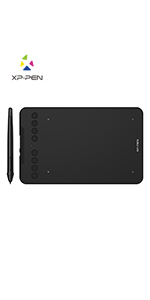
XP-PEN Deco 02 Graphic Tablet !
Taking Your Creativity Further and Spark Your Art Inspiration!
Specification:
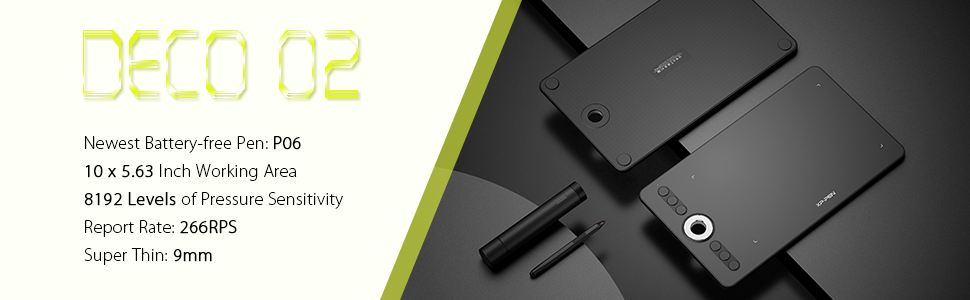
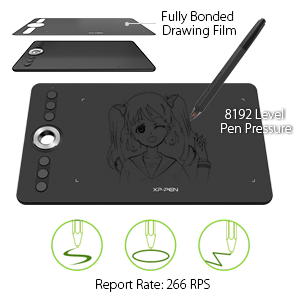
- Pressure Sensitivity: 8192 Levels
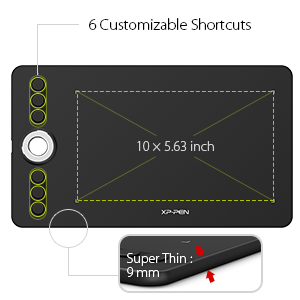
- Active Area:10″x 5.63″
- Resolution: 5080 LPI (Lines Per Inch)
- Reading Height: 10mm
- Report Rate: Max. 266 RPS
- Shortcut Keys: 6 customizable Shortcut Keys
- Roller wheel: 1
- Accuracy: ±0.01 Inch
- Power Voltage: 5V
- Compatibility: Windows 10/8/7(32/64bit), Linux (Detailed versions), Mac OS X version 10.10 or later
Package Included:
- 1x Deco 02 Tablet
- 1x P06 Battery-Free Stylus
- 1x New Pen Holder
- 8x Replacement Pen Nibs
- 1x USB Cable
- 1x Drawing Glove
- 1x Quick Guide
| | | |
|---|---|---|
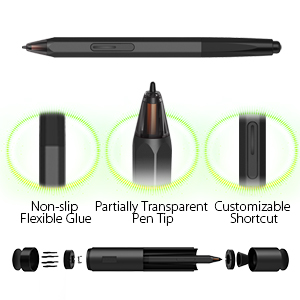
Advanced P06 Passive Pen
| Take your artwork to the next
| Portable Designed
|
A Touch of Personality
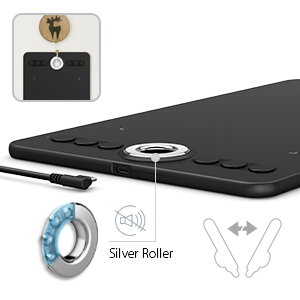
- A sleek newly designed silver roller with hollow mirror plating conveniently placed in the lateral center of the tablet making the roller easily accessible for left and right handed users. The Roller Wheel is designed to streamline your workflow and operate non intrusively through it’s silent dial roll.
- Deco 02 graphic tablet also suitable for both right and left hand users, now you can enjoy drawing with left hand or right hand mode through easy access.
Versatility and Compatibility
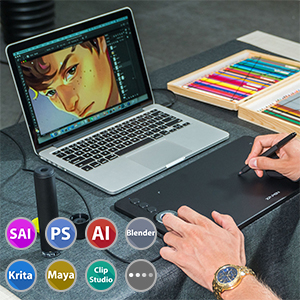
- XP-Pen Deco 02 supports Windows 10/8/7(32/64bit), Linux (Detailed versions, please refer to the Compatibility Guide above), Mac OS X version 10.10 or later. Also compatible with many drawing software such as Photoshop, SAI, Painter, Illustrator, Clip Studio, and more. Compatibility is always being steadily improved through driver updates.
- Deco 02 is applicable to drawing, illustrative, image editing, sketching, handwriting recognition, online education and other usages.
Bundle Software for Deco 02!
Enrich your experience and improve your creation skills, XP-PEN provides you with free software for different purposes.
- Explain Everything
- ArtRage Lite
How to obtain your software?
Step 1: Create or log into your XP-PEN account.
Step 2: Certify your purchase’s serial number.
Step 3: Select a software option, find the activation key of the software and visit the corresponding page to install it.
 |  |  |  |  |  | |
|---|---|---|---|---|---|---|
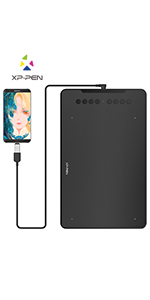
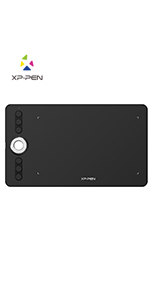
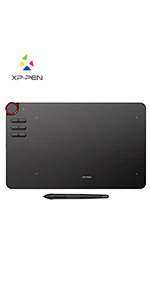
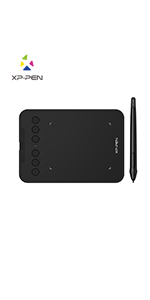
| Work Area | 10″ x 6.25″ | 10″ x 6.25″ | 10″ x 5.63″ | 10″ x 5.62″ | 7″ x 4.37″ | 4″ x 3″ |
| Net Weight | 570g | 570g | 600g | 580g | 307g | 155g |
| Shortcut Keys | 8 | 8 | 6 | 6 | 8 | 6 |
| Roller Wheel | X | X | ✓ | ✓ | X | X |
| Stylus | P03 Battery-free Stylus | P05 Battery-free Stylus | P06 Battery-free Stylus | P05 Battery-free Stylus | P05D Battery-free Stylus | P05D Battery-free Stylus |
| Pen Pressure | 8,192 Levels | 8,192 Levels | 8,192 Levels | 8,192 Levels | 8,192 Levels | 8,192 Levels |
| Tilt | X | 60 degrees | X | X | 60 degrees | X |
| Wireless | X | X | X | ✓ | X | X |
| Connection | USB-C | USB-C | USB-C | USB-C/Wireless | USB-C | USB-C |
| System | Windows 10/8/7, Linux (Detailed versions), Mac OS X 10.10 and above | Windows 7/8/10, Linux (Detailed versions), Mac OS X 10.10 and above, Android 6.0 and above, and Chrome OS 88.0.4324.109 | Windows 10/8/7, Linux (Detailed versions), Mac OS X 10.10 and above | Windows 10/8/7, Linux (Detailed versions), Mac OS X 10.10 and above | Windows 7/8/10, Linux (Detailed versions), Mac OS X 10.10 and above, Android 6.0 and above, and Chrome OS 88.0.4324.109 | Windows 7/8/10, Linux (Detailed versions), Mac OS X 10.10 and above, Android 6.0 and above |
| Dimensions: | 38 x 22 x 1 cm; 600 Grams |
| Manufacture: | XP Pen |
| Reference: | EUDECO02 |
Tolles Instrument, macht Spaß und spart Zeit bei Homeoffice und Gestaltung.
Tolles Instrument, macht Spa und spart Zeit bei Homeoffice und Gestaltung.
Ok
Achat effectu pour mon neveu, apparemment satisfait de son produit.
Agréable, fluide, impeccable
Propre, correct, fidle la description, fluide, mode d’emploi plutt clair. Je l’ai achet pour une utilisation dans le graphisme. Boutons agrables au touchs.
Oltre le aspettative.
Non avendo mai avuto a che fare con questo tipo di prodotto, mi sono fidato delle recensioni e dall’ottimo rapporto caratteristicheprezzo. Spedizione come consuetudine, velocissima. Appena arrivata, installata quasi immediatamente e senza alcun minimo problema. Il pc l’ha riconosciuta immediatamente. A corredo si trova un astuccio dove all’interno ci sono altre punte di ricambio e un semi guanto da indossare preferibilmente durante l’uso. Ottimo prodotto oltre le aspettative come qualita’ e facilita’ d’uso. Soddisfattissimo, la consiglio assolutamente.
Perfecta
Es mi primera tableta grfica y la verdad no esperaba nada muuuy bueno por el precio, pero qued impresionada, funciona genial, yo lo utilizo para editar fotos y montajes en photoshop y me encanta, ya olvide como se usa el rato
Como le cambio la punta al lápiz?
La tableta est muy bien, pero no explica como cambiar la punta al lpiz y me gustara saber como se hace por favor.
How to fix the pen software not working in Photoshop for the XP-PEN Deco 02
Excellent tablet at an excellent price. Ideal size for my taste. Now when I downloaded the recommended software on the official website, the tablet wouldn’t draw properly in photoshop, inconsistent sensitivity and glitching pen strokes and such. It was fine in other programs like Sai, but not my main program. The fix turned out to be deleting the recommended software and downloading the OLDER original version of the software (before the updated version was posted) which is also available on the site. Don’t use the newest version of the software unless you don’t draw in photoshop. Use the old one. Took me days to find out. You’re welcome!
Tavoletta molto buona e con tante opzioni
Tavoletta con un eccezionale rapporto qualit prezzo, tante opzioni e molto reattiva, perfettamente funzionante con l’ultimo aggiornamento Big Sur, in confronto alla Wacom ha tante funzioni ma paga un po’ nella qualit dei materiali, ma qui stiamo parlando di un prezzo diverso. Consiglio una pellicola protettiva per proteggere la superficia
Manca la pellicola protettiva
Guardando gli unboxing su Youtube dovrebbe esserci una plastica adesiva di protezione da applicare , non c’! Ricevuta celermente, ottimo. Non l’ho ancora potuta testare ma tenendola in mano di buona fattura.
Très bie
Au top mon fils de 14 ans est ravi et facile faire
Funciona perfectamente.
La recomiendo bastante en principio ningn problema importante, funciona bien y es muy prctica, si queris comprar una no te gues por un precio ms barato, te ahorras tonteras si compras una como esta.
Compra confiável, entrega antes do prazo.
A mesa de excelente qualidade e muito eficiente, prtica.
Satisfeito com a compra.
buon entry-level
Buon prodotto per cominciare. Ci che mi ha pi infastidito il ritardo tra il tocco e la risposta, ma credo dipenda anche dal PC e dal SW utilizzato.
High quality drawing tablet, great price
Bought this for sketching and graphics work on a MacBook Pro and it performs extremely well, particularly given the price. The pen is sensitive and the whole thing feels high quality. The zoom wheel is very handy.
It is lightweight and would be easily portable, but given that it’s pretty much the same size as the laptop, you do need some space to be able to use the two together.
It worked with graphics software out of the box, but if you want to configure the buttons you have to use their utility, which is pretty basic but works I suppose.
PERFECTA. 100% RECOMENDABLE.
5 estrellas porque es perfecta. Puedes configurar tanto el tamao de pantalla que quieres que abarque la “tableta”, como la parte de la tableta que quieres que sea efectiva (en el caso de que sea grande todo el rea de trabajo de la tableta, puedes hacer que solo sea efectiva la parte que sea ms cmoda para t). La rueda es magnfica, super sensible. Y los botones muy cmodos y configurables. Yo la uso en programas de adobe, y puedes configurar la tableta xa cada aplicacin.
La nica pega, es el botn del lapicero, “cuesta encontrarlo” cuando ests dibujando/procesando, quizs debera estar ms cerca de la punta, pero bueno, se compensa con lo ergonmico que es el lapicero. Muy cmodo de utilizar y muy preciso. Viene con 8puntas extra.
Sencillamente PERFECTA.
Buena relación calidad/precio
El paquete lleg en el tiempo indicado, muy bien empaquetado y sin ningn percance. La presentacin del producto es muy buena, muy fcil la instalacin por medio de la descarga del programa desde la web. La configuracin es muy sencilla y la calidad a la presin la esperada para una tableta no profesional y de sus caractersticas, pero muy buena la impresin que deja. Si se sabe utilizar, es una buena herramienta.
Ottimo prodotto consigliato
Ho preso questa tavoletta ed la mia prima, nn ho trovato nessun problema a collegarla a pc, ora dovr solo imparare ad usarla, ottimo il rapporto qualit prezzo.
Pour une première...
Dbutant, elle ragit trs bien, un bmol pour la configuration des boutons raccourcis, trs prcise, change la vie…
Très bonne tablette
Aprs de longues recherche afin de m’acheter ma premire tablette, j’ai dcid de prendre cette deco 2.
Elle fait trs bien son travail, trs prcise, on peut faire de trs jolies choses avec.
Je la trouve facile utiliser et programmer. Je suis trs satisfaite de mon achat!
La bote comprend le cble Usb-C-, le gant, le stylet ainsi que le pot stylet et des mines de rechange.
Le seul petit dfaut que je lui trouve est qu’elle se raye trs vite, dommage que la marque ne vende pas un film de protection…
Calidad-precio inmejorable.
Llego a tiempo, tableta fe gran calidad, facil instalacin genial. Muy buenos materiales, calidad precio la mejor q vas a encontrar. Nivel de 140 150eu en wacom.
Ottimo prodotto ottimo prezzo
L’ho presa in offerta e non conoscevo il prodotto. Avevo bisogno di una tavoletta grafica x didattica a distanza. Sono stata piacevolmente sorpresa. Ottimo prodotto
Fantastic tablet!
Love this tablet. Installation was a little tricky and longwinded but all set now. The pen pressure sensitivity wasn’t working at all at first but restarting my laptop fixed that. Had to get one with a zoom wheel and not fussed about it not being wireless, and on a budget, this is ideal.
Pratique et facile d'utilisatio
Trs bon produit et facile d’utilisation ma fille est ravie de faire de beaux dessins sur l’ordinateu
Very good with some minor problems
I’m not a professional, I just enjoy using this for making simple art and drawing. Having said that, I think this is a very good product.
It’s very pleasant to use, it’s very smooth, just like pen and paper but with all the benefits of using a software added to it! All the application I’ve tried it with had full support and the buttons for shortcuts are quite handy. It’s absolutely what I was looking for and would recommend it.
Two minor defects are the button on the pen which is very easy to push by mistake and the quality of the translation. For me the drivers automatically selected the system language which in my case isn’t English, but it’s very hard to figure out what to do because the options and buttons are incomprehensible. It might take some trial and error to set everything up as you want it.
Fantastic value for great performance and quality
I could not be happier with this tablet and the company who makes/sells it. In terms of value for money this has to be one of the very best out there with performance, features and build quality way above it’s price point.
It arrives in attractive packaging and inside you find the tablet, a white box and a plastic tube that holds the pen inside with a screw top on each end. Unscrewing one side of the tube accesses the pen which also acts as a stand when using the pen and the other side is where your 8 replacement nibs are held. Inside the white box is a drawing glove, instructions and a rubber stop that goes inside the wheel on the tablet.
The pen is fantastic to use, it feels great in the hand, easy to grip and a good weight, it is tracked perfectly and the pressure is nice and smooth. The eraser works well and is a nice bonus to have, the only negative is that it has only one button on the side which is flush with the pen and a little hard to use.
Everything can be customised in the driver software, the pressure curve, maximum and minimum level of pressure, function of the pen button, function of the 6 hotkeys, function of the wheel (which can be set to do multiple things by setting one of the hot keys to cycle through the wheel functions, so now with a press of a button my wheel can be used to zoom, change brush size and rotate canvas). All of the express keys and wheel can be set for each program you use as well. You can also set the active area, the screen to use, absolute and relative mode, and even if you want on screen hints for the express keys.
The glove fits nicely and works well and the rubber bung for the wheel makes it easier to grip but isn’t needed if you don’t like the bright green colour (I use mine without it but it may be helpful for some and a great addition).
But one of the best things is the company itself, I had top customer service from them in replacing a faulty pen I had, which arrived no quibble in 2 days! Great communication.
This was actually a gift for my brother but after using it and talking to XP-PEN customer service I will be buying a tablet from them for myself when I next replace my current one.
As a long time, 20+ years, user of Wacom tablets I was understandably a little apprehensive about purchasing this make. However, having watched a few reviews, I thought that I would take a chance and I am very glad I did. The build quality is excellent, as is the feel of the pen and drawing surface. The assignable controls, including the ring, are easily configured and very useful when drawing, and the product overall gives a feel of being of a high standard, so much so I’m left wondering how Wacom justify their prices! Had I the money I’d be considering one of their models with the inbuilt screen, if they’re as good as the Deco 2 they’re great value.
It's pretty good BUT...
Okay, I’ll start by saying the features of everything.
Starting from what’s in the package
. The tablet
. One pen with not battery
. Waranty policy
. Guid for use
. One anti-fouling glove ( average size )
. Type-c cable, pretty big
. One cylinder containing pen and nibs
So, starting from the tablet, it’s not too heavy nor too light. The surface is pretty smooth and the active area compared to the size of the whole tablet, is pretty decent.
Active area is also pretty comfortable size-wise.
Buttons seem solid enough without sticking out too much out of the tablet.
Wheel can have 5 uses at the same time, changing between all 5 of them with one shortcut button.
Pen is not too heavy and not too light either. I find it the weight ideal. The button as many have said is hard to press and only has one button which for me was a huge bummer bc it basically makes it useless.
The eraser button on the other side of the pen doesn’t have a good pen pressure detection. If you press it too lightly, it doesn’t almost anything and if you press it normal or hard it erases everything.
The pen pressure on the actual pen nibs, is amazing and very stable. I find that the pen actually has all the 8000 levels that it claims to have and even tho those are a lot, they are not hard to handle. So pen pressure works like a charm
Cable is okay, pretty big, can be put by both sides so that’s a pretty big plus.
Glove is average, so for most girls it would be a bit big and for most guys it would probably be just a bit small. My hand is pretty average, so it fits almost well.
I have one con that I havent talked about and will describe it below
Pros:
. Pen pressure, it’s amazing, very smooth, I love it.
. Pen doesn’t need to charge, doesn’t have battery
. Type-c usb
. Pretty easy to install the drivers
. Nice size of tablet not too big not too small
. Weight of the pen is good
. Contains anti fouling glove
. Doens’t lag at all (almost see below)
Cons:
. What I didn’t mention as far as now is. I noticed it lags when you try to hover the pen over the edges of the active area. It’s not anything too big or annoying, but it’s very noticable and it may get in the way if you only use the pen and not the mouse at all.
. The pen eraser, bc it doenst have a good pressure detection, so much that first I thought it didnt have pressure levels at all.
. Pen has only one button, and that makes it pretty useless, and it’s hard to find when you don’t look at it
Warning! It’s best to uninstall other tablet’s drivers first or else it won’t work corecctly
Overall I’m pretty satisfied with the product but I gotta say I got dissapointed by some things. Nothing that I can’t get used to tho!
Il est beau et petit, mais il reste à tester !!!
Je l’ai dball et dj mon premier regard est son design qui est trs propre et classe, mais il est de petite taille faut l’admettre. Pratique quand on a un petit espace de travail. Le premier dfaut que j’ai trouv, c’est au niveau de la roulette qui est trs sensible, si ma tablette est face moi et que j’cris au clavier, a fait des zoom x 500 ds le moins contact sur la roulette. Peut-tre paramtre
I bought this for drawing design sketches and 3D modelling on my computer and have been impressed so far. I found that I adjusted to drawing on it faster than I expected and it has been easy to use.
Pros:
– The whole item feels very high quality and the packaging is excellent.
– Pressure sensitivity is great and being able to adjust the pressure curve in software is a must-have feature on a graphics tablet.
– Pen is light and comfortable to hold
– No batteries required
– Scroll wheel is a useful feature
– Macro Keys
– Good size
– Nice surface quality
– Comes with a sturdy pen holder and extra nibs
– Comes with a detachable usb-c cable
– You can assign a macro key to switch what the scroll wheel adjusts
Cons:
– My biggest complaint is that the button on the pen (right click) sits flush with the pen and I can’t find it without looking at the pen. It really slows down your workflow when you go for right click and have to pause and find it on the pen. You can get around this and assign one of the keys to right click but this seems like a design flaw and holds it back from being a 5* product in my opinion.
– The driver software interferes with my PC shutting down until I force shutdown for some reason.
– Pen holder is a tall cylinder and so it rolls around your desk unless you leave it standing up which looks odd. Why not make it the same shape as the pen so it can lay flat?
Achet mi-2018 la tablette est toujours fonctionnelle, absolument aucun soucis signaler pour une utilisation quasi quotidienne.
La roulette est le vraie PLUS de ce modle, elle peut rpondre diffrentes fonctions d’un seul click: le gain de temps est incroyable, c’est un vrai plaisir de dessiner dessus.
Le seul dfaut que je lui trouve est videmment le bouton sur le stylet, qui comme vous l’avez srement lu a du plus d’un utilisateur: il ne “sort” pas du tout du corps du stylet il est donc impossible de le trouver au toucher. Je ne m’en sers tout simplement jamais, son design le rendant frustrant utiliser.
Un dfaut que je tenais souligner mais qui ne change pas la note de 5/5 au vu du nombre de boutons programmables disponibles sur la tablette et le rapport qualit/prix.
Conforme à mes attentes
Pour une utilisation personnelle sur Photoshop. Pour une premire tablette, trs bonne prise en main, la tablette fait plus grande que ce que j’avais imagin. Elle est livre avec des pointes de rechange et socle pour le stylet ainsi qu’un gant. La tablette tait trs bien emballe et elle est arrive dans les temps.
Works Well and has Very Useful Features
The product was quite easy to install and get running, though a bit more detail in the manual would be helpful in working out how to set the functions of the keys and wheel to one’s ideal uses. I really like the hexagonal pen and find the button on it easy to use, unlike some other reviewers, to me it is good because with it being flush to the case it is much harder to accidentally operate it!
It seems more precise than my old Wacom unit and so far has operated without any problem, unlike the previous brand I tried and sent back as it would not work correctly. The keys allow often used keyboard controls to be conveniently actuated and the wheel is a real bonus for zooming in or out or changing the brush size for example. So at this early stage I would heartily recommend the XP-PEN DECO 02.
There is a protective transparent sheet which fits over the pad surface, which is not mentioned anywhere in the manual but which seems a useful addition.
The item feels solid and well made and the pen holder tube which doubles as a pen rest when the lid is removed , and contains spare tips in an end section has a quality feel to it as well. Very good value for money I feel.
perfect for retouching photos and drawing
he XP-PEN Deco 02 is definitely better than the wacom bamboo that I had before. the working surface is bigger, there is a stand for the pen and replacement nibs. I can draw easily on affinity designer and retouching photos is done with ease.
it took 5 minutes to set up the tablet ( I downloaded the driver from the website).
C’est ma premire tablette graphique et je ne suis vraiment pas du de mon achat, l’installation est facile, le mode gaucher pratique et la molette vraiment trs pratique, je m’en sert pour le zoom / rotation de la feuille et taille du pinceau, un bouton configur permet de slectionner le mode souhait.
J’utilise Skeetbook (c) gratuit qui fonctionne trs bien avec cette tablette il faut cocher dans les paramtres de la tablette “Windows Inks” pour que stylet rponde la pression. Attention la gomme n’est pas compatible avec skeetbook (dommage) mais c’est prcis dans les caractristiques sur le site fabricant.
Le stylet est plutt confortable, le bouton inutile pour moi et pas trs accessible de toute faon, je le trouve un peu lger mais ce n’est pas vraiment gnant a l’usage.
Je recommande vraiment… un petite image que j’ai ralis avec la tablette pour le amateur 🙂
Thierry
I like the Deco 2 but my software is sticky. I've just done an update in the main review.
The product is great it does what it says on the box. The problem is Paint Shop, it’s very sticky especially in Windows10… 7 is slightly better (Don’t know how it performs on the Apple Mac?) I have a high pefomace gaming machine I assemled myself with a generation 8 coffee lake processor (overclockable) with an nVidia 1080 ti GPU but Paint Shop Ultra seems to be the problem. I haven’t tried it in Adobe Photo Shop yet… I will get back on that. I find that my very old Paint Shop 7 and 8 by Jasic software work smoother. The pad is nice and big with plenty of room to manoeuvre. Update…I am just finding my way around the Deco 2 and I have found that using this in a slightly lower resolution works better I was going into extreem res and colours but overall l find the Deco 2 is the best thing possible without having a special artists touch screen monitor. With Windows it works better with painter 3 than paintshop pro if I could afford it I would update painter 3. Thanks for this product XP-Pen it is great. Downside is that It will never make me as good as Claude Monet. Update… I have purchised CLIP STUDIO PAINT PRO art programme and it is better than the mainstreem paint and photo programmes it works great with this pad on a Windows PC.
To start off with, I would like to mention that my last two previous tablets were both Wacom Intuos tablets, a more expensive and well know brand. This was my first time trying out a different kind of tablet.
While I expected the tablet would work decently, I was not expecting much for the cheaper price but the Deco 02 as surpassed all my expectations. I adore this tablet. I take it almost everywhere with me, which is easy seeing as it is so light and easy to transport, and use it all the time.
I have been using the tablet for over a month now and it has shown no issues. Any driver problems, which were a regular occurrence with my old tablets, have not happened at all with this one and it remains slick, responsive no matter how long I use it for. It was easy to install and ran smoothly from the get go. It was delivered quickly and within the estimated delivery time, and the tablet came with various useful extras, including an artist’s glove and a cylinder compartment for storing the pen as well as it’s extra nibs.
The Deco 02 is able for both right and left handed use, has a work space of 10 x 5.63 inches and a pen pressure level of 8192. The tablet has been used in a variety of programs, Adobe Photoshop and Animate, Clip Studio Paint, Toon Boom Harmony, even just for using an internet browser and it works flawlessly in all of them, no compatibility issues at all.
I do have issue with the tablet’s pen, however. The pen itself is fine, incredibly light and comfortable to hold, but its the button on the side of the pen that I have issue with. It has been designed so that it is flat against the surface of the pen, rather than extruding out, but this makes it really difficult to press. It can be a real pain to have to stop constantly to search for the button in order to press it, something that would take less than a second if it was make more obvious against the pen’s surface. It’s such a tiny detail but I feel it makes a world of difference.
Overall, I feel like this is a perfect tablet for beginners, being really simple and easy to set up and use while not being as expensive as others. The only issue I have had with it so far is with the pen’s button and other than that, I am extremely happy with the product and plan on using it for a very long time.
I’ve been using my new tablet for a bit under a month and a half now – about 5 weeks all together.
I bought it because I do 3D graphic work, and graphic design which gets very hard to do using a mouse with a “single pressure” mouse button. My previous tablet was smaller than this one and I kept hitting the borders far too much. (relative pen movement!)
The physical aspects of the tablet are good – it’s very sturdy.
The internals of the tablet must have a metal frame, because even holding it in my left hand and drawing with my right was easy to do, and it didn’t bend nor flex – or even squeak a little. Though it’s best to use a tablet on a flat worktop rather than in your hands.
On the reverse side there’s 4 wide circular feet that stop the tablet slipping on your desk.
The buttons need a light finger touch to click, but give a good “clicky feedback” when pressed. Importantly they don’t fail to make contact once you’ve felt them “click”, which can be very frustrating and something I keep a purposeful eye out for. I wondered if it was because they were new – but after 6 weeks of use, they still work entirely well.
If you’ve not come across this before – it’s when a button fails to trigger when you press it till it clicks – until you press a little bit harder. The worst case is where it ruins the creative flow – say when you switch from flood fill to draw using a button, only to find you’ve just filled the entire sky because the button wasn’t detected!
The wheel is an interesting and modern addition to the tablet.
It works on its own – and the chrome is grippy enough that it doesn’t slip. It’s my preffered way of using it.
If you want even grippier material – the tablet comes with a green rubber “puck” that pushes gently into the hole of the wheel.
With or without the puck, the wheel behaves the same.
It has a smooth friction feel to it – like spinning the volume control on a HiFi. It doesn’t spin around like a loose toy wheel on a truck. It doesn’t “click” as you spin it, it’s a smooth rotation.
It can be used to replace two buttons on the keyboard – one for rotating left, and one for rotating right.
So for instance you can use it to zoom a canvas, or rotate an object around an axis in 3D. While setting it up, I found I could scroll a web-page with it! It behaved very much like a mouse-wheel! (without the click-click-click)
The wheel is covered on the underside of the tablet though the hole goes right through. It means you won’t find the spinner sticking if you put the tablet on a couch armrest.
The tablet has a USB C plug situated just to the side of the spinner. These plugs can connect either way around, so the USB 90 degree angled cable can still be pointed downwards (towards or away from you) if you swap hands and rotate the tablet around.
You get a slippy spandex type of glove to stop your hand from catching on the smooth tablet surface – I found I haven’t needed it. If you’re hands are not super dry or a bit oily, the glove will stop it stuttering over the surface.
The tablet during use is fantastic.
The “report rate” is 266 – which means the tablet lets Windows know where the pen is 266 times a second. That’s a position update every 3.76 milliseconds! I was NOT able to notice any kind of delay with such a short latency.
It felt I was drawing on the screen.
The pen of the tablet is very well designed and light in use. It’s very grippy on the fingers (as they mentioned in the product details). I’ve never had my fingers slip down the pen and need me to correct the positioning of my hand. Which they have done with other tablets I’ve used.
It’s a very light pen, which you may need to get use to if you’ve used pens in the past with batteries in them.
Having no batteries means you never get caught out! If you use it with your laptop on the go – if your laptop has power so to does your pen!
The clearance distance of the pen is about 3 centimeters – which is excellent.
It means you can take the pen 3 cm up from the tablet while still being able to control your cursor. Not so important for absolute cursor positioning – because the cursor will re-adjust on the screen when you place the pen back down. But VITAL for relative cursor mode. When you’re not making pencil marks, you have a good distance away from the tablet before the pen loses contact – and stops moving on the screen. A pen with less clearance is annoying to use, you stop writing and lift the pen, and your cursor vanishes! You end up battling with the device playing “hover pen” a millimeter away from the tablet trying not to draw but keeping it close. Not so with this pen. GOOD.
The pen tip can “feel” 8192 levels of pressure.
I’ve found this is far more than I need, and for my uses just half that is needed for drawing, sketching, and molding.
The extra sensitivity is NOT wasted though – using the configuration software I set it up that 4000 “pressure” (half force on the pen tip) is set at maximum. It’s like going from a 2H pencil to 2B.
It meant I was able to draw a heavy mark with much less pressure than I would otherwise need, AND not lose accuracy on pressure readings because I still had 4000 pressure levels! As an extra bonus – the pen nibs also last longer.
If you want that huge range of 0 to 8192 pressure levels, you don’t need to tweak anything to start with because that’s how it’s set up.
I had a problem with the eraser in Photoshop to begin with. I found it went from “No erasing” to “Full erasing” with barely a touch. It wasn’t the pens fault though! I looked later in the “Erase tool” settings in Photoshop, and they were all incorrectly set. So a little tip – the “eraser end” of the pen uses the “Erase tool” settings of Photoshop. It doesn’t just change the ink color of the pen tip, or use a unique “eraser tool” for tablets.
The eraser tool works well, and its pressure control is accurate. To use it you just flip your pen around.
There’s one button on the side of the pen – it’s default is to “Right click” – in Photoshop this will bring up the “Pen settings” local menu.
There’s 6 replacement pen tips in the pen caddy – which will last you months, if not years – depending on the frequency you use the tablet, and the maximum pressure you use to draw. There’s a little metal disc inside the caddy that you use to press the pen’s tip against to pull out an old warn tip before you insert a new one.
There’s YouTube videos showing you just how to do this if you google XP-Pen tip replacement video.
I didn’t have any setup issues in Windows 10.
Once I plugged it in, Windows detected it, and after a few seconds it reported it was installed.
The software that comes with the tablet is accessible in your system tray. Normally you’d see this in the lower right of your screen.
It comes with all the usual tablet controls:
1: Relative/Absolute positioning. (relative is like a mouse behaves – if you pick the pen off the tablet and put it down again, the cursor carries on from where it was at. Absolute is where the pen position ON the tablet is where it appears on the screen, so if you pick it up on the lower left of the tablet, and place the pen on the top right, your screen cursor will ALSO jump to the top right.)
2: Pen pressure – This is great! You have a “line chart” that you can adjust. For me I had a very steep line hitting the top power half way across the chart. This is the equivalent of maxing out the “software cursor pressure” at half-pressure of the physical pen. It’s a great finger fatigue tip!
There’s a little bar that shows you how hard you’re pressing. If a program isn’t detecting your pen presses, you can use this panel to check the tablet/pen is working, and then blame the other program (I’ve yet to have my tablet glitch). This is VITAL when looking for tec-support, as a particular software glitch isn’t something XP-Pen can solve, and you’d waste time contacting the wrong people.
3: Area of screen – You can set what part of the screen the tablet is for, and which monitor if you have more than one.
4: Action buttons / Roller wheel – These can be configured to be any keyboard keys, and also with a system key, such as Alt, or Ctrl. You can assign different programs different key assignments. (YAY!) The wheel also inputs as key presses. (As does a mouse wheel internally). So anything you can do by the keyboard, you can assign the wheel or buttons to do.
Cons:
I’m really having a problem thinking of any.
It tracks the pen accurately, the software works without crashing, the pen pressure is consistent. The cable doesn’t fall out, nor wiggle. The response time between the pen moving and the screen is less than 4 milliseconds (instant).
The tablet is not flimsy.
Oh – the pen feels a bit “cheap” for a tablet. But that’s only because it’s lightweight because there’s no battery! I’ve not damaged it in a month and a half use. It’s still going strong. If anything a lightweight pen is better! Less strain on the hand.
And do I really want a weight “lie” of some chunk of metal inside the pen to weigh it down?
No! It’s the same weight as a “real world pencil” like a Derwent Pro pencil. So once I got use to it, it was like using a real pencil and not a tablet (battery filled heavy) pencil.
If you were to get a cheap tablet you end up fighting with it. You are struggling to use a glitchy pen on a scratchy PC tablet that’s moving a cursor on the screen a fraction later.
Not this tablet! It’s a joy to use. It gets out of the way while I’m drawing. After a minute or two I’m using a pencil connected to the screen – I do my art, and my tools help me. They’re not hindering.
The performance at this price level is excellent.
I haven’t used a graphic pad tablet for a little while since I upgraded to a screen tablet, but I really needed a tablet that was portable enough to carry around with my laptop to all sorts of locations, and I wanted to try a brand other than Wacom as my last graphic tablet broke after 2 years, and I stumbled across this brand and wanted to try them out.
I can say with enthusiasm that I absolutely LOVE this tablet. In ergonomic terms it is extremely cleverly designed. It’s extremely thin as a tablet, and very lightweight so it could be slipped easily into a laptop bag or a briefcase. There is also a hole through the scrolling wheel that allows you to hang up the tablet on a hook.
The pen also comes in a wonderfully designed travel capsule that contains the pen safely, the pen nibs and also converts into a pen holder; I’ve never seen a design like this before and it’s honestly so refreshing and clever.
In terms of usage, the driver is extremely simple to setup and use, it’s not too complicated to be off-putting but also not so simple that it limits what you can do. The 6 hotkeys on the side of the tablet can be configured to just about any keyboard shortcut, photoshop command, windows command and even to switch between screens. The scrolling wheel can also be changed from zooming, to volume, to brush size etc etc so it really can be customised so extensively to your optimal user experience.
One thing to note is that this model doesn’t have a wireless option, but if you want this feature, the Deco 03 model has a wireless option, so consider looking at that if that’s a key feature you need.
Overall I’m beyond impressed with this tablet, and I really hope more people are encouraged to buy this tablet as it really is such a good model, and I will be using this heavily during my travels!
Great piece of kit and value for money
Arrived on time, works with Adobe Photoshop Elements 18 and Illustrator without any issues. A must if you do a lot of graphics, so much more intuitive than a mouse for graphics input. Highly recommended and thats from a 71 year old grandad!
I’d never heard of XP-Pen before buying this product. I’ve used a lot of tablets from different brands before picking this one up and honestly a lot of the design elements appear, at face value, bizarre. So much so that I had to try it.
I’m genuinely very impressed with the result. I can’t speak for the lifespan of this tablet but so far I’m incredibly happy with it.
The packaging is sleek and quirky, which you want in a product over $100, and a lot of the features seem stylish in person. It has nice little quality touches – such as a nice opening lid and the fact that the cables are reusable velcro (not wire and plastic) ties, that make it feel like a quality product. The only fault I could find with the packaging is that they don’t give you the direct download link to the correct driver but instead a link to their general downloads web page. You need the most recent Deco driver and it isn’t hard to find or install, just a little confusing if you’ve never had to do it before. Aside from that I really love it!
The tablet itself is very light in weight for the size and, even though it’s a little smaller than my current tablet, I haven’t felt too bereft of workable area when using it. If a large drawing area is important to you that is something to consider. As for the buttons on the tablet – they work fine but are pretty standard if a little noisier than I expected.
It’s the metal roller wheel (the hole in the tablet) that steals the show. This can be used to scroll web pages, change volume and zoom in and out of drawing software very intuitively. It feels responsive and satisfying and I can see myself using it a lot, which is surprising because when I ordered it I couldn’t really imagine what it would be useful for. They do have these in more expensive brand tablets that I’ve used in the past so I was surprised to see it in a tablet going for half the price. Because it physically spins this one is really satisfying to work with, plus it looks cool. Definitely the selling point of this tablet.
The pen itself is also really great. Lots of other tablets come with either a strap to hold your pen or an ink well. The Deco 02 comes with a full pen tube, I think for travel purposes? To stop you from losing it? I thought the pen container was going to be the most intriguing part, but actually I’m really impressed with the pen itself. Xp-pen advertise that their pen is hexagonal and feels like a real pencil – which is true. This tablet pen is the size of and feels like holding a normal pencil. It’s tiny. I genuinely don’t know how they did it. Additionally, it has an eraser on the end so while drawing you just flip it and erase, another feature I’ve seen in pricier tablets. The pen pressure is an upgrade for me and I haven’t noticed any lagging or glitching at the edges of the tablet when drawing.
One thing to note is that, because it’s literally the size of a pencil, the right-click button on the side of the pen is built into it, rather than being a raised button. If you’re new to using it (or have really large fingers) this means it might be hard to find and click. But I really like it, it’s the coolest pen I’ve ever used in a tablet.
Another thing to note is that when plugging the cable in you have to push it in until it clicks. I spent 20 minutes thinking I had a connectivity error when really I just hadn’t plugged the cable in correctly. It feels a little terrifying to shove cables into your nice brand new tablet but that’s how it works.
Overall, I’m really impressed with this tablet. I had genuinely no idea what to expect and I’m pleasantly surprised. I was lucky enough to get money off on this tablet as it was on sale, and if you’ve never used a graphics tablet before it’s full price it can seem a little steep. But if you want a tablet with these kind of features, like the roller wheel and pen, I know I could be paying twice the price for them.
This does come at the cost of workable space, especially if you like a large canvas to draw on. But for me personally, who doesn’t have a fixed desk and moves around a lot, this tablet is a good middle ground. Lightweight and small enough to have on my lap if needed, but not cramped for my hand.
Very happy!
The XP-Pen Deco 02 is a great upgrade from the wacom drawing tablet I have now. From the packaging to the overall performance of it, it is amazing. It’s much larger and has a sleek design so it’s not all over the place.
The packaging is very nice and simple and not overflowing with confusing cords. It has all the information booklets. Also including the tablet, a green plug, a pen that comes in a case with extra nibs, and a glove to prevent smudging.
As a digital artist, the express keys are key in my art. They are all customizable to fit your experience. They work really well and even have an option for left handed and right handed people. The wheel is very smooth and it is nice to have the little green plug that can be used for easier turns to it.
The pen is very nice and thin and comes in a nice little case for it. The case also has hidden features of an eight nib holder, and the lid can become a stand to hold the pen when not using it. It comes in a hexagonal shape and has a nice grip. It also has and extra feature of an eraser at the end. It has an additional button in the middle that you can customize. It is a little hard to find it when working, but it is also good that I’m not pressing it when I don’t need it like my other pen.
The glove is a nice added on feature that I love very much. It covers the last two fingers and prevents your hand from smudging the tablet and screen.
When setting up the Deco 02 it was pretty easy. In the included booklets it has all the information you need to set it up. When plugging it in it works straight away, you just can’t use the express keys. During the set up you can customize the express keys, and the pen. You can also choose whether it will be for left handed or right handed people. You can also choose the pressure sensitivity. So far the Deco 02 has worked with both FireAlpaca and MedibangPaint Pro.
Overall this is a great tablet and I would highly recommend!
I have ordered my purchase on Amazon and I was really amazed at how fast I received this item. The packaging was well protected and nothing was damaged. Besides the device itself, a pen, a glove, warranty card, cable to connect to the laptop and user instruction were included in my parcel.
As I am a left-handed person, I was astonished that drawing tablet got the option for both right and left-handed users. The tool is excellent for amateur and professional designers. It is a friendly user, simple and easy to deal with.
It was much quicker to design my project with this tablet than a computer mouse. I could draw small details without any effort.
Honestly, I recommend it to everyone. I am loving it. Cannot wait to use it at University. 🙂
Great tablet, and mostly works in Linux too!
I currently use a Wacom Bamboo Touch, but was looking for something just a little bit bigger, and a bit more modern looking. I went with the XP-PEN Deco 02 as I liked the idea of the wheel, and the price was good.
I’m a long time Linux user, so I wasn’t sure if the Deco 02 would work with Linux, but it MOSTLY does. OK, the wheel doesn’t work (currently) in Linux, but the professional look of the tablet, and the design of the pen, more than makes up for it. Let’s face it, you buy a graphics tablet for the pressure sensitivity. As long as that works I’m good. I always use the keyboard for shortcuts anyway.
The tablet is nice and thin with the wheel middle left which has three shortcut buttons above it, and three below it. Supplied is a lime green rubber ‘plug’ which fits into the hole in the wheel giving you a knob to turn for whatever you assign to the wheel.
The pen is shaped more like a traditional hexagonal pencil (which I REALLY like), battery-free and made of a nice firm rubber with plenty of grip to it. It has a nib already fitted, an eraser on the other end, and a customisable button in the middle of the pen. It comes in a nice hard storage tube which feels like it’s made of metal. One end unscrews to take the pen in/out of the storage tube, and the other end of the tube unscrews to give you access to the eight spare nibs. If you use a tablet as much as I do then you always need spare nibs.
A nice touch is that the tablet comes with a drawing glove. It’s essentially a glove that covers the last two fingers of your hand to stop your hand smearing the tablet (or screen as you’d see in some devices).
Pressure sensitivity (in Linux anyway) can be adjusted in your chosen software. I mostly use MyPaint and it has a line graph in settings to adjust pressure sensitivity.
This tablet is definitely worth the money. Even with the wheel not working in Linux it still elbows out my (now old) Wacom Bamboo Touch. It can take a while to adjust your drawing to the many levels of pressure sensitivity this tablet has, but once you have the right settings in your software it’s a joy to use.
NOTE: I’ve asked XP-PEN and they’re currently working on a Linux driver (currently in beta and downloadable from their site) which we can but hope will make the wheel work in Linux. If, for whatever reason, your distro doesn’t detect the Deco 02, you can try installing the DIGImend drivers to see if that helps.
Neat, portable and amazing features.
I’m so impressed with this light and portable drawing tablet which took no longer than 5 mins to set up. I have only had this a short while yet and already I am in love with its amazing features. There are so many things I love about this tablet: a wireless hassle free pen, 6 handy shortcut buttons, the zoom feature, the drawing space, the variety of line thicknesses … This is a must for any artist, designer or someone who just loves drawing, you can really draw seamlessly and with accuracy and with speed if you wish to. I’m looking forward to exploring what else it can do !!
Je suis mitig sur cette tablette, je ne savais pas trop quoi m’attendre, n’en ayant jamais eu avant, voil maintenant 2 semaines que je la manipule, au dbut j’etais surpris quant la taille de la bote d’emballage, je la voyais un poil plus grande.. (vous avez la comparaison avec un Blu-ray en photo).
Attention bien vous laver 2x les mains quand vous l’utiliser sinon vous aurez des traces de doigts/gras partout.. c’est assez frustrant si vous aimez que votre matriel reste propre !
Le paramtrage est assez simple sauf si vous possdez un mac et un Windows, vous aurez des difficults avoir les mmes touches d’enregistres.
En revanche la tablette ne marque pas, j’ai beau jouer avec le niveau de pression je n’ai aucune rayure !
Je trouve la molette super pratique mme si le zoom se fait diffremment sur Mac (plus prcis) que sur Windows ! Les touches sont hyper pratiques, le stylet et sa pression fonctionne vraiment bien, la gomme est un dtail (je ne l’utilise pas).
J’aurais aim que la surface de dessin soit un peu plus grande mais cela reste personnel !
Globalement je ne regrette pas plus que a mon achat mme si elle a quelques dfauts !
A great all round tablet that's Mac compatible
If you’re looking for a great all round tablet thats mac compatible, works across multiple screens and has some nice cool features and – this could be the one!
The Deco 2 arrived quickly and was nice packaged. It comes in a nice green presentation box with everything protected in film. The tablet itself is a nice size measuring around 36cm wide by 21 cm deep.
In the box comes the tablet, usb cable, instructions book, warranty cards, pen, spare nibs and a protective pen carry case and even a two fingered artist anti-fouling glove!
I had a minor setup issue with the driver which I resolved (see TIP below) and have now been using the tablet for over a week without any issues in both Photoshop and Illustrator apps on my Mac.
TIP: I rang into a small problem installing the driver which you have to download from the XP Pen website, the driver installed correctly on my Mac, however, when I went to the system preferences panels to configure the tablet and pen there was nothing there? The printed quick guide that comes with the tablet does not explain all the install steps correctly for a Mac, so to solve this problem make sure you first download the Fully manual for the Deco2 which is available on the XP Pen website, this contains more details. In the full manual, it explains more clearly that the drivers are actually stored in the Application Folder > PenTablet > PenTabletSetting – here you can set up all the cool features such as Pen sensitivity, Express Keys, the tablet area, left/right handed use and monitor(s) area, one this was resolved everything else was a breeze.
The tablet also contains 6-easy to configure quick keys on the tablet, so through the PenTabletSettings you can configure these as you wish, or alternately turn them off. There is also a really cool lime green rotate dial which can be configured in numerous ways. The default is to scroll up/down but it can be configured for example to Zoom in/out in photoshop, increase brush size, volume up/down or anything else you want which is really cool!
The other thing I really like is the protective tube the pens stored in , its really solid, one end contains the spare nibs and the other end screws off and can be used to keep the pen in as a holder.
I travel a lot and need a tablet I can take on the go and fit in my laptop bag without being too cumbersome. The Deco 2 tablet is exactly the same width as my 15″ Mac book Pro which is really neat perfect for carrying and easy to drop into my laptop bag.
Overall, I’m really impressed with this and would strongly recommend.
Impressive for the money
The Deco drawing tablet is the latest in the XP-Pen range. There are three versions and they all have slight differences, for example Deco 1 has the largest drawing area: 10 by 6.25 inches and eight express keys, Deco 3 has a wireless or cable option and roller wheel on one corner, Deco 2 has a drawing area of 10 by 5.63 inches and roller wheel centred on one side.
I use a Deco 2 for my photo retouching and graphic design work and the tablet does everything I need. First though I would like to compliment the company for their excellent packaging. It’s a nicely designed box and inside everything is individually wrapped. The pen is in a black padded tube (useful if you need to take the tablet and pen somewhere) one end unscrews to be used as a desk pen holder and unscrew the other end to reveal eight spare nibs though not included is one of those little metal clippers to remove a damaged nib.
I had no problems downloading the drivers from the support section of the XP-Pen website. Having connected the tablet to my pc with the supplied cable (and it’s impressively long, which in my case was very useful because I use a tower pc under my desk) open the web page and select the correct tablet from the list, open the zip file and the rest is straightforward. A symbol for the pen/tablet appears in the task bar, open this to change any of the pen’s defaults. With previous tablets its not been obvious how to change from right-hand use to left-hand, now it’s easy, there are two radio buttons to click. The work area can be changed to whatever part of your pc screen you want, the six express keys can be designated, pen pressure adjusted and the pen has a toggle button with two additional key options.
The pen is the only part I’m having to get used to. My previous pens have all been round barrelled which makes the toggle button easy to find, this one is six sided and button is no higher than the side it’s on so it’s not obvious to the touch if my finger is on it, I would have preferred a slightly raised one (I’m wondering if a tiny blob of super glue, to create a slight bump, will solve the problem and easily indicate which side the button is on). The tablet has a lovely donut style chromed roller wheel (I use it to enlarge or reduce images) and the package includes a lime coloured plug that fits in and hides the wheel, I prefer not to use it. The Deco 03 has red roller wheel on the top left-hand corner.
I think this is an impressive tablet for the money and works fine with my slightly older version of Photoshop and design software package. Check out the Deco 02 tech specs on the XP-Pen website.