Yale EF-KP Easy Fit Alarm Remote Keypad, White, DIY Friendly, Accessory for SR & EF Alarms

Key Features
| | | |
|---|---|---|
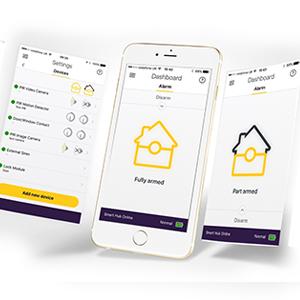
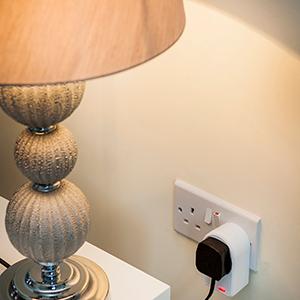
Control via Your SmartphoneUse your smartphone to arm, disarm, configure and control your Smart Home Alarm system anytime, anywhere. | Remote ViewingReceive picture alerts and notifications from the PIR Image Camera if the alarm is triggered. | Extending your systemExpand your Smart Home alarm with additional accessories, including a power switch to turn home appliances on and off remotely (i.e. a lamp or radio) and a PIR image camera to view images from inside your home. |

Key Features
| | | |
|---|---|---|
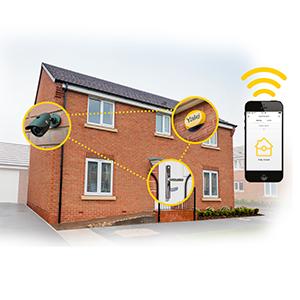
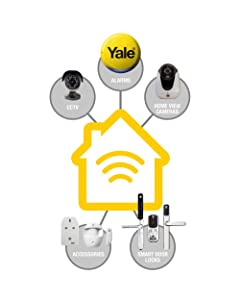
Get connectedThe Smart Home Alarm range connects to other Yale security products such as CCTV and Home View Cameras. It can also connect to your Yale Smart Door Lock when the appropriate module is fitted. Control all your devices in one place with the Yale Home App. | No monthlyDirect alerts and self-monitoring mean that there are no monthly fees to pay. | DIY FriendlyYale’s Smart Home Alarms come with wireless components already linked to the Smart Hub, which makes installing your alarm quick and easy. |


Yale Connected
Secure, monitor and control your home with a range of smart security devices from Yale. Whether it’s a Smart Door Lock, an Alarm or CCTV system, Yale Smart Living products put you in control of your home security.
Control Your Alarm When You’re Not at Home
You can now arm, disarm and view the status of your alarm via your smartphone, so there’s no need to worry if you forget to set your alarm.
For the ultimate peace of mind, The Yale Home app will notify you if any changes are made to your system, or if the alarm sounds when activity is detected. When using a PIR Image Camera, you can also view activity inside your home.
Available Accessories
- PIR Motion Detector.
- Pet Friendly PIR Motion Detector.
- Door/ Window Contact.
- Key Fob
- Key Pad
- Smoke Detector.
- PIR Image Camera.
- Power Switch.
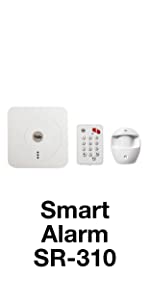 | 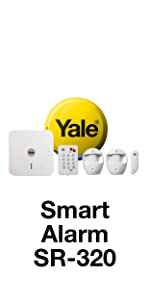 | 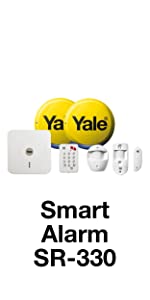 | 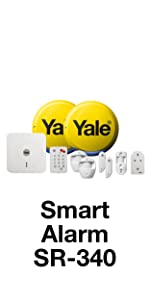 | |
|---|---|---|---|---|
| Control via Smartphone | ✓ | ✓ | ✓ | ✓ |
| Pre-linked | ✓ | ✓ | ✓ | ✓ |
| Smart Hub | ✓ | ✓ | ✓ | ✓ |
| PIR Motion Detector | ✓ | ✓ | ✓ | ✓ |
| Door/ Window Contact | ✓ | ✓ | ✓ | |
| Live Siren | ✓ | ✓ | ✓ | |
| Dummy Siren | ✓ | ✓ | ||
| PIR Image Camera | ✓ | ✓ | ||
| Power Switch | ✓ |
| Weight: | 10 g |
| Dimensions: | 13.2 x 6.6 x 4.2 cm; 10 Grams |
| Model: | EF-KP |
| Part: | YEFKP |
| Colour: | White |
| Pack Quantity: | 1 |
| Batteries Required: | No |
| Batteries Included: | Alkaline |
| Manufacture: | Yale |
| Colour: | White |
| Quantity: | 1 |
Does the job
Easy to install, would be better if backlit, looks a little cheap.
Nice easy fit. So small you don't notice i
Easy to fit when extending the system.
I realised if my key fob was damaged or battery ran out I’d be unable to turn off alarm. So bought this and a spare key fib.
See Yale website or YouTube
As a replacement or additional accessory the instructions are not correct in order to sync to existing system.
Lätt att installera, liten och smidig
Vldigt snabb leverans. Liten, smidig och extremt enkel att installera. Tog cirka 5 minuter att installera. Enbart att initiera, sedan stta den p sklge.
Good but poor instructions
Great product. Had to go online to check how to pair unfortunately. The instructions are not great!
Bought as an additional keypad..
Had to reset the unit because I could arm the alarm after installing the keypad, but couldn’t disarm it
This may happen if you set it up wrongly. As the pad works with different alarms from yale..
The codes and key combination can be found on Yale website..
All sorted now and works as expected..
Excellent product replacement for Yale alarm
Perfect replacement for damaged keypad. Easy to pair with existing alarm system A++
set up is not straight-forward!
I have two of these and the first one was easy to installed (following a reviewer’s advice). This one was not so easy as the preset code was not what it was supposed to be, so I wonder if I received a returned item? It would set the alarm but it would not disarm. With the main alarm manual and some research I had to reset the keypad and thankfully, it worked! Once working, it works like a dream.
Good.....once you manage to set them up!
Like a number of people on here, I had difficulties getting mine set up. I bought two in addition to the one that came with my Yale alarm kit. Initially I was able to pair both, but I could only enable the alarm with them, I was unable to disable. I tried removing them from the system, resetting them, but they then wouldn’t even enable the alarm when paired.
I contacted Yale’s support and got a call back for help. They advised me to remove the keypads from the app, reset the keypads and then add them back in again. This is what they told me to do, which worked on both keypads;
1 Remove the keypads from the Yale Smart Alarm app
2 Unscrew the keypad and remove the cover.
3 Remove the round battery inside.
4 Whilst holding down number 3 on the keypad, push the battery back in, then reattach the front to the back and tighten the screw.
5 On the keypad press the following;
– Press panic button A
– 0000 (ie zero four times)
– Panic button A
– 7
– Disarm button twice
This should remove it from your system.
6 – you can then go into the Yale app and add the alarm device and put it into learning mode
7 – press and hold for a few seconds buttons 8 & 9 on the keypad together. The app should then find them and ask for the device name.
If any of this doesn’t work, leave it a few minutes, then go through the resetting and re-adding again.
Hope this helps someone!
easy to fi
it is very easy to sync with my base station, I now can arm/disarm upstairs without carrying the alarm key around with me
Exactly as advertised
This was to add an extra to an alarm system – very easy to install (if you follow instructions closely) – only drawback is that there is no way to see the alarm status (armed/disarmed) when someone else with access may have set the system
Does what it’s supposed to do
Its a must have if you want to keep the main unit hidden (which makes sense to me)
I would keep original booklet that came with the main alarm system as this does not come with much instructions and says refer to main bookle
Works as advertised
Replacement part as these are not built to replace battery, always break. Works well. No faults
Not compatible
This was not compatible with my alarm system but had no problems returning it and getting a refund. Nice looking (better than the one that is compatible with my system).
Good product once set up
Tricky to programme in, had 2 send 1 back but replacement is sound, good product once you have got it set up,I have one downstairs and this one on upstairs landing, makes life easier,all around happy, oh and replacement was sent with no drama so 4 stars for all around service
Great addition which works flawlessly
Ordered and installed for two months now and so far so good.
Pairing was not straightforward however reading the original instruction booklet it was painless.
Couldn't connect with starts kit..looks fault ..no beeping sound
I had to return it no beep sound and couldn’t connect with starts ki
Must have additio
Easy to pair with the system, easy to use. One-button part-arm is great, last thing at night.
Very useful
I used this with my Yale Smart Home alarm system and it’s been pretty good.
Using the app, it was “learnt” by my alarm easily.
To arm or partial arm is just 1 button away- so place it above kids height.
To unlock, press unlock and type the code in (that you choose using the app) – it’s straight forward and easy.
Cons: alarm won’t arm from keypad if a door is open.
At night you cannot see the buttons, my old alarm had led buttons and it’s a noticeable drawback.
Despite these flaws, this is still the main way I use my alarm – much easier than getting my phone out and using the app.
Useful addition....
Good addition to the Alarm. Used as a keypad in garage so that when Garage is opened before house is disarmed, this pad can be used to prevent alarm firing.
If only going in Garage and then leaving, can re-arm from here too.
Pleased with this
Four Stars
convenient to place near door entry rather than having to get in the house to the main control box
I bought this for the EF Telecommunicating Kit and it works well. As noted by other reviewers the instructions are terrible, so when you first set it up you will probably find that you can set the alarm ok, but you won’t be able to unset it with the keypad. This is because the keypad pin has a factory default pin of 0000. The control centre doesn’t pass it’s pin to the keypad so treat the pin here as a completely separate device. So you will need to change the pin on the keypad itself… I found these instructions on a forum which worked for me:
1 Press the ‘A’ key followed by factory default
keypad code ‘0000’.
2 The LED will now flash slowly indicating it is in test
(programming) mode.
3 Press the ‘A’ key followed by the ‘7’ key to set the
keypad into PIN code mode.
4 Press the ‘B’ key and enter new four digit keypad
code followed by the Arm key.
5 Quit test mode by pressing the disarm key twice.
The keypad code and mode setting has been
completed.
* The keypad code is not used by the system, only
the keypad itself. You should not have to use this
code again so make a note of it and keep it in a
safe, secure place.
Great extra to add to any take system
Great extra to add to any take system. With this keypad at the bottom of my stairs I’m able to hide the main unit and its cables in the cupboard.
Must have accessory for Yale EF & SR Alarms
This keypad is just what was needed for easily arming and dis-arming our alarm system and can be hidden but within easy reach to use the panic button if required. A welcome addition to our Yale security.
Four Stars
Electrician found it easy to pair to the system and we found it easy to use
My Yale EF kit can hide away out of sight – this does all the work.
Very simple adhesive gets this on the wall. Super easy to pair it with the main unit.
Lock button sets the alarm on. Unlock button + 4 digit code unlocks the alarm. There’s also a partial lock (for when you’ve gone to bed).
WORST SETUP INSTRUCTIONS KNOWN TO MAN !!! NOT GOOD ENOUGH YALE.
I have a degree in Computer Science – honestly, and when you have three different sets of instructions, all saying something different, and none of them work, you have to go to google to sort it. Not good enough !
The real instructions are;
1. Go to your main control panel, and add a device
2. Press 8 + 9 together on the remote key pad (this tells it to talk to the main control panel)
3. Press OK on the main control panel to add the device (give it a name if you want)
4. Press Panic button A on the remote key pad
5. Press 0000 on the remote key pad (this is the default passcode that comes with the remote keypad)
6. Press 7 on the remote key pad
7. Press disarm twice
The instructions that come with the remote keypad say press 8+9 to code it. The back of the remote key pad itself say press 8 to code it, and the main instructions that come with the main alarm, say press 7 to code it …. only one of these was only partially correct,, and miss out steps 1 to 3 above !!
Nightmare to setup, but now all working.
Thanks
Chris
Four Stars
Just what’s needed in the porch rather than some big ugly control uni
Handy ki
Easy to program and handy to have as an additional keypad.
It’s worked well in the time we’ve fitted it.
Don't know why I didn't buy one earlier.
Don’t know why I didn’t buy one earlier. Makes life so much easier.
Keypad
Easy to fit instructions included perfect size to hide away out of sigh
Good neat unit that does the job!
Works perfectly as described but syncing with my current system wasnt all too clear. make sure you have the instructions to hand when setting it up. It’s small and unobtrusive, much better than having the big keypard by the door. It also removes the possibility of an intruder pulling the power out of your main alarm box […]
Yale Easy Alarm Keypad
Easy to install and program once you read the instructions
Good addition to the Yale easy fit system.
Easy to sync with the alarm. Easy to use, with good wireless coverage. Would buy again.
Great addition to my home alarm system
I wanted another keypad upstairs so that I could set my alarm to go to bed. It was easy to add to my current alarm system and has worked fine since.
So easy to add to my EF Yale Alarm
So easy to add to my EF Yale Alarm. Much easier to set and turn off the alarm, which my BF kept setting off on the keypad. Perfect for larger fingers and reassuring to have buttons you actually press as opposed to the flat touchpad.
Easy to install and pair with the main alarm. Very pleased.
Does what it says. Bought as I can set ...
Does what it says. Bought as I can set and unset alarm from upstairs. Must buy. Can be wall mounted or use portable. Has panic alarm but haven’t used that feature yet. Hoping not to either lol
Five Stars
Arrived fast but later discovered not compatible with the system I bought so sent back.
Five Stars
A good add on to my existing system when used upstairs
Superb...
Haven’t actually used it yet but as with all Yale products……..superb.
Good but overpriced
This is a lot smaller than it looks in the pictures, only about 5 inches by 3. It works very well and is dead handy if your control unit can’t be placed near to your front or back door. I do feel it’s overpriced though.
Five Stars
Ideal second ketpad great for fitment upstairs and if you wish to disarm to let the dogs out .
Easy to connect and use. Shame the keypad does not beep or notify you if the alarm is armed or not.
a must have for any yale allarm...
Exelent build quality easy to sinck and extremely important to have in the kit to make it actually burglary proof…with this no one can finde the hidden head unit and no one can tamper with the main unit a must have.
Really easy to mount at the back door, took 2 mins to program onto the alarm and takes the panic out of legging it to the front door panel when letting the dog out of the back when I have forgotten to turn it off.
Does what it is supposed to do. On first ...
Does what it is supposed to do.
On first ordering this I also ordered three window contacts. I received instead four window contacts and no keypad. A short conversation resolved the mistake and I had the missing keypad within 48 hours and the fourth contact free as compensation.
Great alarm system. Fitted it myself. Easy to set up & operate. Took about 3hrs. More parts can be added later.
Value for for money, good product as described, easy to assemble, doing what it says on the description, recommand to anyone who are looking to buy.
Value for for money, good product as described, easy to assemble, doing what it says on the description, recommand to anyone who are looking to buy.
A nice addition to the main Control Panel of the Yale EF-Kit2. However, do make sure you follow the instructions carefully with regard to Keypad Initialisation.