USB C Docking Station Dual Monitor HDMI for Dell HP,
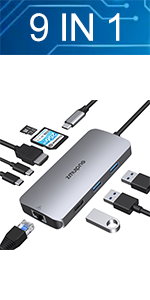
USB C Docking Station Dual Monitor HDMI for Dell HP, Thunderbolt 3/4 Dock USB C Hub Multiport Adapter Triple Monitor to 2 HDMI 4K,Ethernet,VGA,USB 3.1/2.0, 100W PD for Lenovo,Surface,MacBook Laptops
USB C Power Charging Port
Max Power Input Up to 100W
Allows you to charging your type c devices at power up to 100W, no need to worry about power storage while connecting multiple peripherals.
Notice: USB C PD Charging doesn’t works for laptop own a AC charging adapter, those laptop (Dell/HP/ThinkPad…) do not allow 3rd party charger to charge their laptop in other ways.
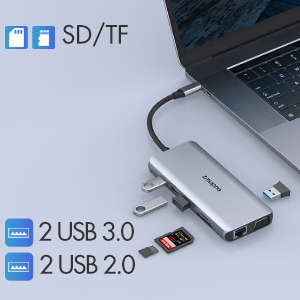
4 USB Ports & SD/TF Slots
2 USB 3.0 Ports & 2 USB 2.0 Ports
This MacBook pro usb adapter comes with 3 usb 3.0 and 2 usb 2.0 ports,which allows your to connect usb keyboard, mouse, usb driver, usb hard disks to your laptop with high speed.
SD & Micro SD Slots – 104Mb/s
Transfer hundreds photos in seconds – Max transfer data speed up t 104Mb/s and SD & TF support work simultaneously.
USB C to Gigabit Ethernet & 3.5mm Jack
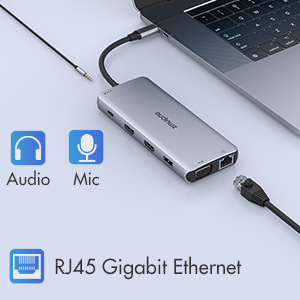
Max support Gigabit Lan
Enjoy the ultra-fast gigabit ethernet speeds and the reliability of a wired connection directly to make your work more effective.Worryfree about wifi’s instability and interference from USB 3.0
3.5 mm Audio and Microphone
This usb c dock have a 3.5mm jack for you to put in your wired headset or microphone, so that you can enjoy music without disturbing others.
Common FAQ for 12 IN 1 USB C Laptop Docking Stion
| Q1: | Does this usb c docking station compatible with my laptop? |
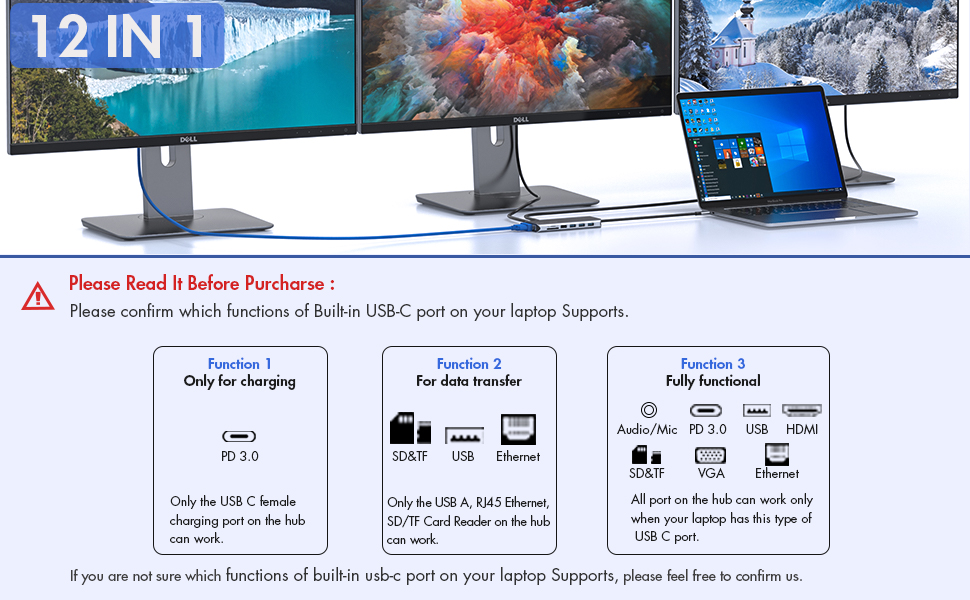
| A: | Please check which Functions supports by your Laptop’s built-in USB C port first, only if your laptop’s built-in USB C port is fully funcitonal port which support Data transfer & Video Display & PD charging, you can use the full functions of our docking station. |
| Below types of USB C port are Fully Funcitonal Port:Thunderbolt 3,The USB Type C 3.1/3.2 Gen 2 with Power Delivery & DisplayPort | |
| Q2: | Why there is no pictures of the external monitors when I connect the monitors via the HDMI or VGA port of this docking station? |
| A: | 1. Please check which function supports by your laptop’s built-in USB C Port, if the type of the built-in USB C port of your laptop isn’t the fully funcitonal port, then the HDMI,VGA, 3.5mm Jack of the hub doen’t work for your laptop. 2. Check your HDMI cable. 3. Plugin the Laptop’s power adapter to the USB-C PD port before connecting external hard drives or multiple devices to the hub. |
| Q3: | Why can’t my Mac latop extend the display screen to the monitors? |
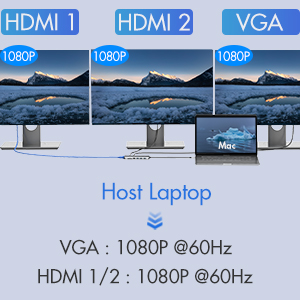
| A: | For Mac OS, due to apple system restrictions the docking station could only support to extend one monitor, the other monitors could only copy the monitor you extend. |
| Q4: | Why I can’t charge my Dell/HP Laptop with the usb c charging port of this usb c docking staion? |
| A | The first USB C charging port of this docking station is not suitable for laptops(like Dell/HP/ThinkPad…)with AC charging adapters,since they don’t allow third-party chargers to charge them in other ways. |
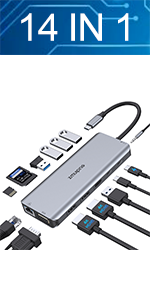 | 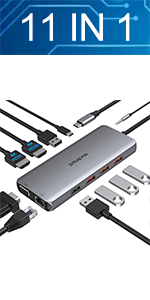 | 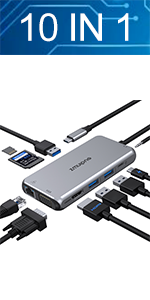 |  | |
|---|---|---|---|---|
| Feature | 14 IN 1 | 11 IN 1 | 10 IN 1 | 9 IN 1 |
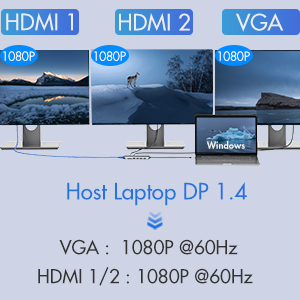
| HDMI | 2* HDMI – Triple Display for Windows Laptop -Max resolution up to 4K@60hz | 2* HDMI – Triple Display for Windows Laptop -Max resolution up to 4K@60hz | 1* HDMI – Max resolution up to 4K@30hz | 1* HDMI – Max resolution up to 4K@30hz |
| VGA | 1*VGA -Max resolution up to 1080P@60HZ | 1*VGA -Max resolution up to 1080P | 1*VGA -Max resolution up to 1080P@60HZ | |
| Ethernet | 1*Ethernet-1000Mb/s Lan | 1*Ethernet-1000Mb/s Lan | 1*Ethernet-1000Mb/s Lan | 1*Ethernet-1000Mb/s Lan |
| USB Port | 3 *USB3.0 Ports & 2*USB 2.0 Ports | 3*USB3.1&2*USB2.0 Ports | 2*USB3.0 Ports & 1*USB 2.0 Ports | 2 *USB3.0 Ports & 1*USB 2.0 Ports |
| USB C Port | 1* USB C Data Transfer Port-Max speed up to 5Gbps & 1* USB C Charging Port-Max 100W Charging | 1* USB C Charging Port-Max 100W Charging | 1* USB C Charging Port-Max 100W Charging | 1* USB C Data Transfer Port-Max speed up to 5Gbps |
| SD Card Slot | Max speed up to 104Mb/s | Max speed up to 104Mb/s | Max speed up to 104Mb/s | |
| Micro SD Card Slot | Max speed up to 104Mb/s | Max speed up to 104Mb/s | Max speed up to 104Mb/s | Max speed up to 104Mb/s |
| 3.5mm Port | 1*3.5mm Audio & Microphone | 1*3.5mm Audio & Microphone | 1*3.5mm Audio & Microphone |
| Dimensions: | 16 x 9 x 2 cm; 140 Grams |
| Model: | ZM1833-UK |
| Manufacture: | ZMUIPNG |
| Dimensions: | 16 x 9 x 2 cm; 140 Grams |
| Origin: | China |
WFH it’s important to be able to plug everything in at the same time, and having a locked work laptop, it’s important docking station drivers are already loaded! So, this little device does what it promises an works great! Doesn’t even need it’s own power supply !
Nice finish that matches macbook
Usb pass thru is great for video and audio. Ad card reader is fas
I use this to connect different laptops to my keyboard, mouse, screens and other devices. One of those laptops, a budget model, doesn’t connect the screens as it is USB 3.1 only, and only with a USB C to USB A adapter. The other, more expensive models work perfectly, as they are USB 3.2. I’m very pleased with this, replacing an old, now defunct docking station that was much larger. I did contact support to find out why the one laptop behaved currently to the others, and got very good, clear advice from the seller.
The new Dell laptop computers do not have a lot of ports to connect extra items after your docking port is filled. This allowed me to connect other items easily when needed. The only problem I have is the usb3 connector wire is not that long (6 inches) and I was hoping for something longer. All in all, a good product so far.
The new Dell laptop computers do not have a lot of ports to connect extra items after your docking port is filled. This allowed me to connect other items easily when needed. The only problem I have is the usb3 connector wire is not that long (6 inches) and I was hoping for something longer. All in all, a good product so far.
It works for us with mouse, keyboard, ethernet and 2 HDMI monitors.
We use it with a Microsoft Surface tablet.
Very happy with the product.
Works well for me on Dell XPS 17
Perfect! as described. I am using this for the Dell XPS 17 9710, and i can confirm it works for me.
This device was perfect for connecting two Dell monitors to my laptop with extra ports for charging my phone, headset etc. It was super easy to connect and is working well with no issues.
Works multiple USB hard drives simultaneously with power supply and HDMI output display. No problem with it at all
I use this product with my Apple Mac Aie iPad. The device is super lightweight, portable and works brilliantly
Quality produc
This is well made and works well. The casing is metal and matches my Dell XPS perfectly.
I’m using the docking station for 2x HDMI monitors and 3x USB devices. Works great……has improved my productivity as I can work with 3 screens (2 on the docking station and one on my laptop). Great buy, very pleased.
Excellent quality
I needed to connect my MacBook to a monitor which works great.
Recommend? Yes certainly, price and delivery were fantastic.
Excellent Adapter, used to connect Android Phone to HDMI Projector, works brilliantly, exactly what I needed.
This is my time using a docking station, well built, solid, worked out of the box, plugged it in and worked straight away.
I would recommend!
This is my time using a docking station, well built, solid, worked out of the box, plugged it in and worked straight away.
I would recommend!
Good
Now I know how to use it i love it I can do all my work on my I pad
Brilliant piece if kit, the price is really good and the build quality is fantastic, it does not feel cheap.
I am using it with my macbook air 2020 and works perfectly
I bought this as an alternative to a Dell own brand multi-port adpator and it works brilliantly at around a third of the price. I use it primarily to connect my Dell laptop (XPS 13) to an external Dell monitor (31.5″ curved), as well as a few peripherals. The new Dell laptops only come with 2 USB C ports so you really need some form of external device to deal with other non-wireless devices such as standard USB 3.0 sticks, SD cards, ethernet cables, or non-wireless printers/scanners. You can also run your C connector power cable through this adaptor which is very handy. A great device for these circumstances.
Perfect solutio
Good value, works with my Apple MacBook Air. Happy customer!
Here’s what I have connected to my Lenovo X1 Carbon which is a “business” laptop:
2 x HDMI monitors
1 x USB webcam
1 x USB Logitech controller for wireless keyboard and mouse
1 x USB-C power adaptor
This is a great option to just plug your laptop in and everything works. This has more connections and is lower cost than a branded docking station !
These devices work best on laptops configured to use USB-C in this way. My personal laptop (lenovo idea pad 14) doesn’t work – or at least it wasn’t plug & play. Maybe I just need to configure some settings
Here’s what I have connected to my Lenovo X1 Carbon which is a “business” laptop:
2 x HDMI monitors
1 x USB webcam
1 x USB Logitech controller for wireless keyboard and mouse
1 x USB-C power adaptor
This is a great option to just plug your laptop in and everything works. This has more connections and is lower cost than a branded docking station !
These devices work best on laptops configured to use USB-C in this way. My personal laptop (lenovo idea pad 14) doesn’t work – or at least it wasn’t plug & play. Maybe I just need to configure some settings
Here’s what I have connected to my Lenovo X1 Carbon which is a “business” laptop:
2 x HDMI monitors
1 x USB webcam
1 x USB Logitech controller for wireless keyboard and mouse
1 x USB-C power adaptor
This is a great option to just plug your laptop in and everything works. This has more connections and is lower cost than a branded docking station !
These devices work best on laptops configured to use USB-C in this way. My personal laptop (lenovo idea pad 14) doesn’t work – or at least it wasn’t plug & play. Maybe I just need to configure some settings
Here’s what I have connected to my Lenovo X1 Carbon which is a “business” laptop:
2 x HDMI monitors
1 x USB webcam
1 x USB Logitech controller for wireless keyboard and mouse
1 x USB-C power adaptor
This is a great option to just plug your laptop in and everything works. This has more connections and is lower cost than a branded docking station !
These devices work best on laptops configured to use USB-C in this way. My personal laptop (lenovo idea pad 14) doesn’t work – or at least it wasn’t plug & play. Maybe I just need to configure some settings
Brilliant customer service
I bought this hub in 2020 and the Ethernet port on it failed last week. Amazing customer service by ZMUIPNG who replaced it for me immediately. Can’t say better than that.
I use the hub with a MacBook Pro, for a camera, microphone, VGA port screen & the back up drive when using. Works well. I have a 3rd screen running from my Macs other USB C port..
Brilliant product, everything you need.
The adapter is fab. Slick design, quickly compatible with my device and stores away neatly in my laptop case side pocket. I use it on my MacBook Air. Would 100% definitely recommend.
Perfect choice
I bought this for a Mac book air and it works a treat! The response is super fast and I’ve had no issue connecting it. Genuinely a plug and play! Definitely a worthy purchase!
Good adapto
USB-C adaptor works well with my Dell Precision 5560 laptop. Enabling me to set up extended display across 2 monitors, as well as a network cable and multiple usb devices.
I use this to connect my Work Lenovo T470 to my HDMI monitors at work and also the Bluetooth Dongles for my wireless keyboard and mouse.
Works well with the laptop and is a neat and compact device. Would recommend it.
Edited: Now use this with my work Windows Surface Pro connected to a KVM switch so can swop between home PC and work laptop at the press of a button. Still recommend this
Bought for home working and does a great job.
Lenovo ThinkPad connected to wired keyboard, mouse, webcam, ethernet and 2×27″ monitors.
Works well with some issues
Ordered this hub for my work laptop HP Zenbook 14. I use with with two HDMI 24” monitors and one VGA 14”. Have to plug one of the HDMI monitor directly into my computer to have the 3 monitors at the same time.
I also used it with my home laptop (ASUS UX430) and it works well also.
Only downside I see is the lenght of the cable. It is too short for my need when everything is plugged in the hub. I use almost all ports (USB for a webcam, wireless mouse, wireless keyboard, external microphone-speaker, 2 HMDI monitors and ethernet cable). It works but depending where is the USB-C input on your computer, it might nos sit flat on your desk.
Edit : after using it for many months, it works well for video and port output. Ethernet port does not work for me. Did not tried charging through it either. Cable is definitively too short and is a limitation.
Perfect for my Macbook Pro
I use this for my Macbook pro.
My MacBook only has USB-C sockets, so having a monitor (HDMI) and external mouse/keyboard/webcam (USB) was difficult without this device. I had 4 wires with adapters plugged in.
Now everything is plugged into this 1 hub and it’s perfect! Much tidier and no need for adapters
Seems a v good piece of kit to have
1. I am using it to connect an additional monitor to my laptop
2. It works fine.
3. I hope to use it for other configurations in future – seems potentially v useful.
Charge and use ports at the same time.
Great quality and finish, lightweight plus well packaged. I use this on my MacBook which only has one usb C port so very useful to be able to charge and use other items via the usb and sd card slots at the same time.
Good value for the money.
Was looking for an adapter for my MacBook so I wouldn’t have to faff about buying them all individually. This does the trick spot on! Worth the investment. My MacBook seems to be alright with it, it let me screen share through a HDMI cable to my telly – no faffing with settings or anything! Spot on product.
Is it compatible with ur device
I use this product on my I pad Air4 because I only have one port a usb-c I bought it to connect an old dvd apple drive it powers up & ejects discs but I think the DVD player is faulty but works with my camera on my bike good product.
I was a little concerned about the compatibility with my new M1 Max MacBook Pro, but plugged this in and it worked fine. As expected, OSX does not support both HDMI for different displays. I’m using it for 1xHDMI, 1xUSB2.0 and 1xGb Ethernet. With the latest OSX, the Gb Ethernet now runs on the USB3.0 bus, so gets 5Gb/s performance, confirmed by testing at 1Gb/s connection.
I was a little concerned about the compatibility with my new M1 Max MacBook Pro, but plugged this in and it worked fine. As expected, OSX does not support both HDMI for different displays. I’m using it for 1xHDMI, 1xUSB2.0 and 1xGb Ethernet. With the latest OSX, the Gb Ethernet now runs on the USB3.0 bus, so gets 5Gb/s performance, confirmed by testing at 1Gb/s connection.
I was a little concerned about the compatibility with my new M1 Max MacBook Pro, but plugged this in and it worked fine. As expected, OSX does not support both HDMI for different displays. I’m using it for 1xHDMI, 1xUSB2.0 and 1xGb Ethernet. With the latest OSX, the Gb Ethernet now runs on the USB3.0 bus, so gets 5Gb/s performance, confirmed by testing at 1Gb/s connection.
I was a little concerned about the compatibility with my new M1 Max MacBook Pro, but plugged this in and it worked fine. As expected, OSX does not support both HDMI for different displays. I’m using it for 1xHDMI, 1xUSB2.0 and 1xGb Ethernet. With the latest OSX, the Gb Ethernet now runs on the USB3.0 bus, so gets 5Gb/s performance, confirmed by testing at 1Gb/s connection.
I have purchased a new Dell XPS 17 laptop, and it only has USB Type ports. I have a scanner, cameras, printers with several older types of USB. I would also like to connect to a television with HDMI. This device solves all of those problems.
I have bought a second device to see if it can add more functionality to a new Samsung Android phone which only has a USB Type C port.
Excellent Value
Perfect device and excellent value for money, used with My Samsung
Does the job
Needed a spare dongle for working from home on two screens with an M1 MacBook Pro.
Got this Docker to extend my DELL Latitude 5520 Laptop while working at home and it all works perfectly, Compared to the price of a DELL Docker (150+) this is a barging at 50…. I now have 3 Monitors set up (including the Laptop)… Highly recommend…
The Docker worked out of the box with HDMI*2, USB Mouse/Keyboard and 3.5mm Headphone/Mic and is powered from the original Laptop Power Supply. You then simply plug the power cable from the Docker into the Laptop, make sure your Laptop USB-C connection is Thunderbolt though….
The only down side for me was I needed to position the Docker and the cable wasn’t long enough, so had to get an extension USB-C cable (Docker — Laptop), which was the UGREEN USB C Extension Cable Type C Male to Female… I think you need to get the right extension because they can be different but, the UGREEN is working fine for me…
Got this Docker to extend my DELL Latitude 5520 Laptop while working at home and it all works perfectly, Compared to the price of a DELL Docker (150+) this is a barging at 50…. I now have 3 Monitors set up (including the Laptop)… Highly recommend…
The Docker worked out of the box with HDMI*2, USB Mouse/Keyboard and 3.5mm Headphone/Mic and is powered from the original Laptop Power Supply. You then simply plug the power cable from the Docker into the Laptop, make sure your Laptop USB-C connection is Thunderbolt though….
The only down side for me was I needed to position the Docker and the cable wasn’t long enough, so had to get an extension USB-C cable (Docker — Laptop), which was the UGREEN USB C Extension Cable Type C Male to Female… I think you need to get the right extension because they can be different but, the UGREEN is working fine for me…
Got this Docker to extend my DELL Latitude 5520 Laptop while working at home and it all works perfectly, Compared to the price of a DELL Docker (150+) this is a barging at 50…. I now have 3 Monitors set up (including the Laptop)… Highly recommend…
The Docker worked out of the box with HDMI*2, USB Mouse/Keyboard and 3.5mm Headphone/Mic and is powered from the original Laptop Power Supply. You then simply plug the power cable from the Docker into the Laptop, make sure your Laptop USB-C connection is Thunderbolt though….
The only down side for me was I needed to position the Docker and the cable wasn’t long enough, so had to get an extension USB-C cable (Docker — Laptop), which was the UGREEN USB C Extension Cable Type C Male to Female… I think you need to get the right extension because they can be different but, the UGREEN is working fine for me…
As seen in pic, it works as expected. I have WiFi but it is not stable, so bought this for my Mac. It does get a little hot but not burning hot like other connectors. Have used charging, USB , HDMI port so part, no issues. Good thing about this connector is the port description on each port, so you know which port it is (USB3.0, USB2.0, SD etc). So far so good. Yet to test other ports and see how long it will last.
I bought this device in the hopes that I could utilise it so I could have my laptop display over 2 Monitor screen as well as the laptop. It performs perfectly if you laptop has the capability to make use of HDMI to split both screen you have two connection but for those that don’t you also have old VGA. The device provides extra USB connections which is a godsend for being able to move the devices to the back of the desk rather than smothering the laptop.
This particular docking station connects via a UBS – C connecter so just double check that you can utilise that connection prior to Purchase. I would highly recommend this device.
Excellent docking station for my MacBook - works well
Simple to use, plug and play. Connect my monitors and external devices no problems.
I bought this device in the hopes that I could utilise it so I could have my laptop display over 2 Monitor screen as well as the laptop. It performs perfectly if you laptop has the capability to make use of HDMI to split both screen you have two connection but for those that don’t you also have old VGA. The device provides extra USB connections which is a godsend for being able to move the devices to the back of the desk rather than smothering the laptop.
This particular docking station connects via a UBS – C connecter so just double check that you can utilise that connection prior to Purchase. I would highly recommend this device.
I bought this device in the hopes that I could utilise it so I could have my laptop display over 2 Monitor screen as well as the laptop. It performs perfectly if you laptop has the capability to make use of HDMI to split both screen you have two connection but for those that don’t you also have old VGA. The device provides extra USB connections which is a godsend for being able to move the devices to the back of the desk rather than smothering the laptop.
This particular docking station connects via a UBS – C connecter so just double check that you can utilise that connection prior to Purchase. I would highly recommend this device.
I bought this device in the hopes that I could utilise it so I could have my laptop display over 2 Monitor screen as well as the laptop. It performs perfectly if you laptop has the capability to make use of HDMI to split both screen you have two connection but for those that don’t you also have old VGA. The device provides extra USB connections which is a godsend for being able to move the devices to the back of the desk rather than smothering the laptop.
This particular docking station connects via a UBS – C connecter so just double check that you can utilise that connection prior to Purchase. I would highly recommend this device.
I bought this device in the hopes that I could utilise it so I could have my laptop display over 2 Monitor screen as well as the laptop. It performs perfectly if you laptop has the capability to make use of HDMI to split both screen you have two connection but for those that don’t you also have old VGA. The device provides extra USB connections which is a godsend for being able to move the devices to the back of the desk rather than smothering the laptop.
This particular docking station connects via a UBS – C connecter so just double check that you can utilise that connection prior to Purchase. I would highly recommend this device.
I bought this device in the hopes that I could utilise it so I could have my laptop display over 2 Monitor screen as well as the laptop. It performs perfectly if you laptop has the capability to make use of HDMI to split both screen you have two connection but for those that don’t you also have old VGA. The device provides extra USB connections which is a godsend for being able to move the devices to the back of the desk rather than smothering the laptop.
This particular docking station connects via a UBS – C connecter so just double check that you can utilise that connection prior to Purchase. I would highly recommend this device.
This USB C laptop docking station is a compact, cost effective expansion interface to modern laptops with USB C interface port. In this case the the laptop is a HP Spectre x360 Convertible 13-aw0xxx. Great little machine and the docking station provides all the additional physical connectivity you would typically use. Basically a great idea well executed with a superb product competitively priced. Many thanks.
This USB C laptop docking station is a compact, cost effective expansion interface to modern laptops with USB C interface port. In this case the the laptop is a HP Spectre x360 Convertible 13-aw0xxx. Great little machine and the docking station provides all the additional physical connectivity you would typically use. Basically a great idea well executed with a superb product competitively priced. Many thanks.
Good
Good USB C extension, certainly a must have since the laptop now come with less and less ports.
If the cable get a bit longer, that would be even better.
Does what it should.
Does what it says and operates effectively. I use the adapter with an Acer swift and it works as it should.
I wanted to connect two monitors, Ethernet, HDMI leads, a keyboard and mouse to a laptop I was using for some contract work. So I took a gamble on this neat dock. No complaints and money well spent out of my own pocket purely for making the job easier. Hopefully I’ll be able to use again on other laptops in the future.
I wanted to connect two monitors, Ethernet, HDMI leads, a keyboard and mouse to a laptop I was using for some contract work. So I took a gamble on this neat dock. No complaints and money well spent out of my own pocket purely for making the job easier. Hopefully I’ll be able to use again on other laptops in the future.
Nice little pice of kit.
Used to connect 2 monitors(both hdmi), gigabit ethernet, webcam (usb), earplugs, keyboard and external hard drive to my laptop. All work fine and is quite unbelievable all those stuff goes trough an usbc!
I got now all 3 monitors (laptop too) working fine (extended), really easy to install. Only one note, one of my existing monitor is QHD and the other is FHD, the device itself downgrade the QHD to FHD, not really a problem for me but I can’t find a way around it.
Other thing I would say the device itself become really hot (I got it on a cold surface to help) not sure this will help lifespan.
Nice little pice of kit.
Used to connect 2 monitors(both hdmi), gigabit ethernet, webcam (usb), earplugs, keyboard and external hard drive to my laptop. All work fine and is quite unbelievable all those stuff goes trough an usbc!
I got now all 3 monitors (laptop too) working fine (extended), really easy to install. Only one note, one of my existing monitor is QHD and the other is FHD, the device itself downgrade the QHD to FHD, not really a problem for me but I can’t find a way around it.
Other thing I would say the device itself become really hot (I got it on a cold surface to help) not sure this will help lifespan.
Good value and surprisingly small unit with many ports
I have a monitor, mouse, Elite X2 and charger plugged in and it works great. Really small compact unit too
Great Value
Docking station works well, I’ve had no issues so far.
The only downside of this dock is that the usb ports do not boot up with my computer so I have to unplug and replug in the dock each time I start the pc in order for the ports to be recognised but for the cost of the dock I am ok with this trade off
In the broadest terms it does exactly what it says it does and for a great deal less than a lot of other hubs on the market. It’s a ‘Plug & Play’ piece of equipment which even the most least tech savvy person should be able to handle. However, and there is a ‘but’, it or I should say mine gets very warm/hot. Even to the point I will unplug each day just because it would concern me leaving it plugged in. I do power down my laptop etc, but I just have a nagging concern with the temperature it gets to. So, if you do buy this item be aware where you sit it and how you leave it.
In the broadest terms it does exactly what it says it does and for a great deal less than a lot of other hubs on the market. It’s a ‘Plug & Play’ piece of equipment which even the most least tech savvy person should be able to handle. However, and there is a ‘but’, it or I should say mine gets very warm/hot. Even to the point I will unplug each day just because it would concern me leaving it plugged in. I do power down my laptop etc, but I just have a nagging concern with the temperature it gets to. So, if you do buy this item be aware where you sit it and how you leave it.
In the broadest terms it does exactly what it says it does and for a great deal less than a lot of other hubs on the market. It’s a ‘Plug & Play’ piece of equipment which even the most least tech savvy person should be able to handle. However, and there is a ‘but’, it or I should say mine gets very warm/hot. Even to the point I will unplug each day just because it would concern me leaving it plugged in. I do power down my laptop etc, but I just have a nagging concern with the temperature it gets to. So, if you do buy this item be aware where you sit it and how you leave it.
In the broadest terms it does exactly what it says it does and for a great deal less than a lot of other hubs on the market. It’s a ‘Plug & Play’ piece of equipment which even the most least tech savvy person should be able to handle. However, and there is a ‘but’, it or I should say mine gets very warm/hot. Even to the point I will unplug each day just because it would concern me leaving it plugged in. I do power down my laptop etc, but I just have a nagging concern with the temperature it gets to. So, if you do buy this item be aware where you sit it and how you leave it.
Quality produc
Use this to create a desktop for my MacBook Pro 2017. Use the 2 HDMIs for 2 monitors and 3 of the USBs and all work flawlessly. My laptop is always closed as I use an external keyboard and mouse. Best dock I’ve found for the value!
Works Perfect!
I use this on a Dell Latitude 3400, and it works perfectly. I use the laptops own power cable but everything else just works. Fantastic value as other products cost a lot more. I have now purchased 2 of these 1 for home office and work office.
2x HDMI incompatibility
It transpire that My HP Elite X2 cannot support 2 HDMI ports. To use two screens I have had to use one VGA cable and one HDMI to allow different images to be extended from my laptop and thereby make use of three different images.
After a few weeks of use this docking station does exactly as advertised. Initially when I bought a new laptop with minimal external ports I was concerned about connection of keyboard, monitor and other peripherals. However, I should not have been as this docking station allows connection to everything I need when at home and one simple plug to to disconnect when I want to take the laptop with me. Great.
After a few weeks of use this docking station does exactly as advertised. Initially when I bought a new laptop with minimal external ports I was concerned about connection of keyboard, monitor and other peripherals. However, I should not have been as this docking station allows connection to everything I need when at home and one simple plug to to disconnect when I want to take the laptop with me. Great.
Very happy with the docking station, easy to set up, all equipment works perfectly. Now have a dual HDMI screen set up to work from home.
Prefect for my HP Spectre
This is perfect for keeping my desk tidy whilst allowing me to keep my monitor and devices connected. Works perfectly with my HP Spectre including using it’s power supply.
Perfec
It’s perfect, I can use another adapter which works very well. Haven’t used for HDD / SSD so I need to check on that. Quick response times however one downside. When I plug a USB C to HDMI into the USB C slot it sparks and shutdown the adapter? Don’t know why this is however apart from that it is fine.
80% recommend
I had an old Dell Port Replicator which I was unable to use due to a new laptop that did not have the requisite connections on the bottom, so I needed to look at a new USB hub instead.
I think it is important to define how my set up is to allow others to understand what is possible.
1) As I am connected by a Wifi network, I have not had the opportunity to test the ethernet connection but this would normally be a binary situation, it will either work or it doesn’t.
2) I have 2 HDMI external screens as well as the laptop itself. Running on Windows 10, the visuals are clear and crisp. Dragging windows between all of the screens is very responsive. Both external screens are being driven at 1920×1080, 60hz, 8 bit colour.
3) I have not tested the VGA connection as the external screens are both HDMI.
4) Also connected all of the time are a USB webcam, a separate USB headset for Teams/Zoom, a USB tongle forr wireless keyboard/mouse and a phone charger USB lead.
5) I have also had external hard disks plugged in via the USB 3.0 ports and speed seems consistent with USB 3.0.
6) I have not tested the 3.5mm Audio/Microphone as I have the separate USB headset.
Setting up the hub was very easy – plug the cable into the USB Type-C port and then plug in the HDMI/USB cables – very plug and play which is what it is supposed to be with USB.
The hub itself is small enough to carry around in a bag to allow use in an external office (assuming we actually travel at some stage in the future). The range of ports and the way it works makes this a good value proposition for me (and I would say others that have the same sort of set up). Everything that I have tried works perfectly.
Others have said that the unit seems to run hot but I personally have not found this – the unit is on all day and I have no issues picking it up. It maybe that other usage where copying a lot of data to external hard drive over an extended period of time could lead to higher temperatures but I would guess that this would not be happening all of the time.
I would recommend this hub if your usage case is similar to mine. It has a lot of connectivity and you can easily pay a lot more money for less ports!
I had an old Dell Port Replicator which I was unable to use due to a new laptop that did not have the requisite connections on the bottom, so I needed to look at a new USB hub instead.
I think it is important to define how my set up is to allow others to understand what is possible.
1) As I am connected by a Wifi network, I have not had the opportunity to test the ethernet connection but this would normally be a binary situation, it will either work or it doesn’t.
2) I have 2 HDMI external screens as well as the laptop itself. Running on Windows 10, the visuals are clear and crisp. Dragging windows between all of the screens is very responsive. Both external screens are being driven at 1920×1080, 60hz, 8 bit colour.
3) I have not tested the VGA connection as the external screens are both HDMI.
4) Also connected all of the time are a USB webcam, a separate USB headset for Teams/Zoom, a USB tongle forr wireless keyboard/mouse and a phone charger USB lead.
5) I have also had external hard disks plugged in via the USB 3.0 ports and speed seems consistent with USB 3.0.
6) I have not tested the 3.5mm Audio/Microphone as I have the separate USB headset.
Setting up the hub was very easy – plug the cable into the USB Type-C port and then plug in the HDMI/USB cables – very plug and play which is what it is supposed to be with USB.
The hub itself is small enough to carry around in a bag to allow use in an external office (assuming we actually travel at some stage in the future). The range of ports and the way it works makes this a good value proposition for me (and I would say others that have the same sort of set up). Everything that I have tried works perfectly.
Others have said that the unit seems to run hot but I personally have not found this – the unit is on all day and I have no issues picking it up. It maybe that other usage where copying a lot of data to external hard drive over an extended period of time could lead to higher temperatures but I would guess that this would not be happening all of the time.
I would recommend this hub if your usage case is similar to mine. It has a lot of connectivity and you can easily pay a lot more money for less ports!
Excelle
Needed a docking station to 2 monitors with no software installation. This worked perfectly – just make sure you have a 65W plug adapter for your computer – we found with a weaker charger (maybe 1.5w?) this didn’t work properly.
Works well with Mac pro!
I was initially skeptical about the size but it seemed to fit in well with my macbook pro
Great hub
This is great for my work station. Our company recently replaced our laptops and the new laptops have minimal USB ports and make it difficult to use 2 additional monitors. This allows me to connect my monitors with no fuss along with all my other peripherals. It could do with a usb c port to allow me to charge my phone from the hub.
Doesn't overheat, not as compact.
I have had the product for a few days now. I have had it continuously running an external monitor, mouse and external drive or charger attached to it and it hasn’t overheated (yet anyway). My previous USB C hub continuously overheated, so I was delighted that after a couple days this has not overheated yet.
My one, and only complaint so far, is that it is not as tightly compact as others, which use both ports on the computers (Apple MacBooks), causing it to take up more space.
Needed a USB-C hub with VGA output to run 2 external monitors from a laptop (HP Probook 640 G4), one via HDMI and the second via VGA. Perfectly sharp 1080p image on both monitors as well as on the laptop on the rare occasion I need 3 displays. You can actually connect a third external display and have your desktop extended over 4 screens. This functionality is for Windows only – a Mac will extend to an external monitor but all 3 external monitors will show the same view. Genuinely plug-and-play; the only set up required was to select extended desktop in Windows display settings. Make sure the USB-C port on your laptop has the little “Dp” DisplayPort symbol next to it. Pretty impressed.
Needed a USB-C hub with VGA output to run 2 external monitors from a laptop (HP Probook 640 G4), one via HDMI and the second via VGA. Perfectly sharp 1080p image on both monitors as well as on the laptop on the rare occasion I need 3 displays. You can actually connect a third external display and have your desktop extended over 4 screens. This functionality is for Windows only – a Mac will extend to an external monitor but all 3 external monitors will show the same view. Genuinely plug-and-play; the only set up required was to select extended desktop in Windows display settings. Make sure the USB-C port on your laptop has the little “Dp” DisplayPort symbol next to it. Pretty impressed.
Needed a USB-C hub with VGA output to run 2 external monitors from a laptop (HP Probook 640 G4), one via HDMI and the second via VGA. Perfectly sharp 1080p image on both monitors as well as on the laptop on the rare occasion I need 3 displays. You can actually connect a third external display and have your desktop extended over 4 screens. This functionality is for Windows only – a Mac will extend to an external monitor but all 3 external monitors will show the same view. Genuinely plug-and-play; the only set up required was to select extended desktop in Windows display settings. Make sure the USB-C port on your laptop has the little “Dp” DisplayPort symbol next to it. Pretty impressed.
Needed a USB-C hub with VGA output to run 2 external monitors from a laptop (HP Probook 640 G4), one via HDMI and the second via VGA. Perfectly sharp 1080p image on both monitors as well as on the laptop on the rare occasion I need 3 displays. You can actually connect a third external display and have your desktop extended over 4 screens. This functionality is for Windows only – a Mac will extend to an external monitor but all 3 external monitors will show the same view. Genuinely plug-and-play; the only set up required was to select extended desktop in Windows display settings. Make sure the USB-C port on your laptop has the little “Dp” DisplayPort symbol next to it. Pretty impressed.
Dose the job
Works great The only thing I would suggest to the maker is to make the USPC cable from the device to the laptop a bit longer apart from that great item
The device is used to link my computer with a larger screen and to also allow usage of more ports for a mouse etc if needed. So I happy with the item
I use this to connect my laptop to two external monitors, ethenet, psu and four USB devices. It enables fast disconnect of a single USBC plug when I have to take my laptop away and provides full functionality, including three extended displays, when connected.
I use this to connect my laptop to two external monitors, ethenet, psu and four USB devices. It enables fast disconnect of a single USBC plug when I have to take my laptop away and provides full functionality, including three extended displays, when connected.
I use a Dell XPS 13″ with 2 Dell 27″ monitors easy plug and play using 2 HDMI cables. Also has a VGA and USB ports. Works really well for extending your laptop screen and 2 additional monitors.
Compact with lots of ports
Really great to have 2 HDMI ports and 4 USB. Wasn’t expecting to use the VGA port, but I ended up needing it to use with an older monitor. This thing saved my life.
Hugely recommended.
All the USB C adapter you will need
Great purchase, great quality and build. Works as expected with my Huawei matebook 13.
Super quality and fas
Works great with my laptop. I haven’t needed to use all ports yet but so far no complaints. Brillia
I have been using this with my iPad Pro for a over a week now. It is good and the connection to the internet is improved as I can connect the Ethernet cable.
The ability to add two hdmi cables is good and the head phone jack so handy especially when working on product work.
The main use is the ability to charge other devices and plug direct power through it.
One downside is the limited cable it doesn’t allow much room for flexibility.
Otherwise Definitely recommend it. It can handle a lot.
Using with surface go 2 to extend to monitor with hdmi and connect usb A device. Works well everything connects up and is all recognise by the pc. Also using with Samsung s20 fe to get dex mode on same monitor. Phone recognises the hdmi and loads dex straight away. Adaptor it’s self is smaller and more portable than I thought. Would be nice is the attached cable was maybe 3 or 4 cm longer but only because the port on the surface is on the side of the screen not the keyboard like most laptops
Works with my dell laptop
This cable does not seem to do a full 100w passthrough – however it does charge my power hungry Dell 5550 at a reasonable speed. All the ports work and it doesn’t get hot, despite having a 100W adapter plugged in to it.
Good but needs a longer lead
Good compact product that can add lots of other devices to your surface go. Only downside is the lead is a tad short so when plugged into surface go it hangs mid air rather than being able to lay flat on a desk with other devices plugged in.
Does what it says on the ti
Overall a great product. I use every port on this adapter daily other than the VGA and the 3.5mm jack port. I only encountered one issue – when using a wireless keyboard and mouse they lose signal even when they are very close to the device. Not a deal breaker as I had wired devices however I am unsure if this is an issue down to me or the product. Overall – very happy.
Does what it says but gets very hot and drains laptop battery.
Perhaps I was being naive, but I didn’t expect it to drain a switched off HP Spectre battery overnight and get very hot. I suppose I had assumed when the laptop is off the power to the usb c sockets is off. Perhaps there is something on the spectre that can turn the power off when fully shut down.
Contacted seller to be told this is ok and I should disconnect the hub when not in use.
Mike