Epson EcoTank ET-2810 Print/Scan/Copy Wi-Fi Ink Tank
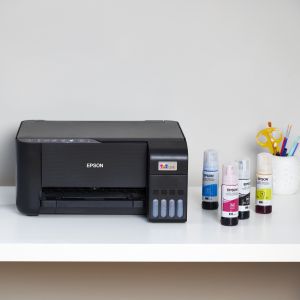
Epson EcoTank ET-2810 Print/Scan/Copy Wi-Fi Ink Tank Printer, With Up To 3 Years Worth Of Ink Included
Packed with features
Print, copy and scan quickly and efficiently. This compact printer features a 100-sheet rear paper tray, borderless photo printing (up to 10x15cm) and print speeds of up to 10 pages per minute5 so you can speed through a variety of tasks with ease giving you more time to relax.
Modern flexibility
A printer for the modern user, this EcoTank allows you to print, scan, and more directly from your phone or tablet using the Epson Smart Panel app3. What’s more, with full Wi-Fi and Wi-Fi Direct connectivity, integrating this printer with your existing home set-up will be a breeze!
Heat-Free Technology
With our forward-thinking Micro Piezo Heat-Free Technology you can enjoy the benefits of greatly reduced energy consumption and less need for replacement parts. Unlike other printers, the printhead also comes pre-installed so setting up your printer is hassle-free.
Average cost per page saving and average number of inkjet cartridges required to print the same number of pages as EcoTank “102” and “104”ink bottles. Comparison between average yield (A4 prints of ISO/IEC 24711) of EcoTank “102” and “104” bottles and the genuine consumables used within the 50 best-selling inkjet cartridge printers (according to GfK Inkjet Printing Devices and Inkjet Printing Cartridges Point of Sale panel market data for Germany, France, UK, Spain and Italy Apr-19 – Mar 2020).
Quoted yields are extrapolated based on Epson original methodology from the print simulation of Test Patterns provided in ISO/IEC 24712 or 29103. Quoted yields are NOT based on ISO/IEC 24711 or 29102.Based on print volume of 100 pages per month and the lowest yield produced from the first set of inks.
Quoted yields may vary depending on the images that you are printing, the paper type that you are using, the frequency of your prints and environmental conditions such as temperature. During the initial printer setup, a certain amount of ink is used to fill the print head’s nozzles, therefore the yield of the initial bundled set will be lower.
| Weight: | 3.9 kg |
| Dimensions: | 34.7 x 37.5 x 17.9 cm; 3.9 Kilograms |
| Brand: | Epson |
| Model: | C11CJ67401 |
| Colour: | Black |
| Batteries Included: | No |
| Manufacture: | Epson |
| Dimensions: | 34.7 x 37.5 x 17.9 cm; 3.9 Kilograms |
Economical
This type of printer is far more economical as you get a lot more copies from the ink tanks. The setting up is also very easy using the Epson installation instructions. Well worth the money.
Double sided printing is not automatic.
I knew that when I boought it, but I have seen so many people commenting on it I thoguht it worth a mention.
Other than that, like it a lot. Print quality is too feint in draft, but fine when increased. Ink lasting really well, which is why I bought a tank printer.
The best printer ever in my life
I used different brands of printers, I have to say this one is the best, normally I like to review products or services, cos in this way I can help others who have a similar situation, The Epson printer I have been used for a year, printed over few hundred pages, the black ink still has 20%, others colors ink nearly 90% before I use d canon brand, I have to buy lots ink which more expensive than machine,I highly recommend this one for sure.
Epson printe
Lots of ink which is brilliant but I have had problems with the type of paper that it likes. Printed 25 copies and then decided that it didn’t like the paper anymore. The quality of the print depends on the quality of the paper that you use and I have found it to be a bit temperamental.
Ink really does las
It is very economical amd thats what we needed, mostly printing estimates and invoices. Photographs arent great but if youre looking for an economical every day oronter, you could do much worse
Ok so setting this up was truly a royal pain in the backside. I have never had to speak to Epson about setting a printer up before. So my expectations weren’t good. Once it was set up, the quality of the prints and ease of use make the printer completely worth the hassle I had (still not figured if it was a WiFi problem or not that day). I was dubious about eco tank printers as there is so much variety, especially in price. So went for a more low key printer in the 2810. It is a seriously good printer, and the photo options allow for an extra high quality print (using the app obviously).
Would thoroughly recommend it despite the setup issues I had.
Long winded to install
Like the size as it fits in a cupboard. I find the lack of instructions incredibly annoying – just finding out how to scan took half an hour. None of it is intuitive. Nowhere could I find a key to the functionality of the icons on the top of the machine. I’m sure I will get there in the end, but I liked my old simple one better (no longer made of course!)
Epson ET-2810 Ecotank Printe
I love this printer and the fact you can see the ink levels on front of the printer is brilliant. I have printed a picture on photographic paper. Very good but takes ages for that type of printing. Normal every day printing is extremely quick. It is so much better than my old printer which needed cartridges that only lasted a short while and had become extremely expensive.
The Epson EcoTank ET-2810 has revolutionized my approach to sublimation printing. This printer’s refillable ink tank system not only saves money but also supports high-quality, continuous printing, crucial for sublimation projects. The vibrancy and clarity of the prints are exceptional, bringing life to everything from custom apparel to unique home decor items.
Wireless and mobile printing capabilities, courtesy of its Wi-Fi and the Epson Smart Panel app, are incredibly convenient. I can print directly from my phone or tablet, which is a huge time-saver. The app also enables easy monitoring and troubleshooting, which is invaluable for maintaining workflow efficiency.
The EcoTank ET-2810’s compact design is another plus, fitting neatly into my workspace without clutter. And with its heat-free technology, I am impressed by its low energy consumption and reduced environmental impact. This is especially important for those of us conscious about our carbon footprint.
For anyone diving into the world of sublimation printing, whether as a hobby or small business, the Epson EcoTank ET-2810 stands out as a reliable, cost-effective, and high-quality option. It offers a perfect blend of functionality, efficiency, and excellent print quality, making it an essential tool for creative printing endeavors.
This is an excellent printer but is not the easiest to use when printing with IPad or iPhone. The air print option doesn’t work in the normal way so you have to open the options icon (arrow in a square) next to :Print’ and then select ‘Print with Epson’ This assumes you have already installed the Epson Smart Panel to enable wifi connection.
Mail printing with registratio
Hello.
I requested help and thought there was maybe something wrong with printer or perhaps I was doing something wrong?
Anyway I managed to get print job done by checking Epson connect usage in various ways.
I then managed to use Mail print which was my objective yesterday. I’m hopeful that the printer doesn’t actually have a fault.
So I’ll keep learning here and don’t intend sending the printer for repair at this stage as I think it was more my lack of knowledge in using printer.
Thanks for the advice and if necessary I may use in future.
For now I think it’s ok without repair.
it took me quite a bit of time to install on XP
but you can do it faster by using the Wizard way and not the Disc installed way.
On the android app and not on home Network
You may need to find it on WIFI and do not put in the Password (in the Printer. If you have put the password, deleted the password only)
need internet to install as it needs to find some things.
I did not print a test page but I printed Some vouchers. I did print 1 Colour Draft, 1 Normal Colour as it did not save my setting and 2 Black and white Draft and it is now saved at this Setting.
I turned Fast to slower Quite Setting.
I printed out Gift vouchers.
I am not sure if the Barcode (grey) works on the Print out but on my other Laser Printer it works.
Scanning documents there is no function on the Computer app, The Android App has. The Printer has a button
I have not use this option.
There is a option to use Colours to make black by clicking on the box setup before printing.
If feel thin when I was taking it out the box in one place.
Overall I like it at this mome
Check what it will do before buying
The print quality is excellent and the ink lifetime is a great bonus. But. .
It does not do double sided, my fault for not checking. The app makes you scan each page as a separate file, my previous HP would allow me to put multiple pages In a single doc
So check what you really need. I didn’t.
Nice little printe
Was a bit worried reading other people’s reviews regarding installation troubles. Installation and connection via Android App worked flawlessly though. Less than 30 minutes after opening the box the printer spat out its first pages. Everyone in the family really happy with it.
Good printe
It was so easy to set up. First I brought a canon printer after three days and several phone calls I still had no luck, so I sent it back and ordered this Epsom. I set it up in no time at all, and so far it is working brilliantly.
Setting up the Epson EcoTank ET-2810 was a breeze, thanks to the user-friendly app that guided me through the process with step-by-step instructions. The app’s intuitive interface ensured that even someone like me, who might not be tech-savvy, could effortlessly connect the printer to my network and get it ready for action.
Installing the ink was equally hassle-free, and the app provided clear instructions on how to do it without any mess. The convenience of having a well-designed companion app truly enhanced the overall setup experience.
Using the printer became even more seamless with the app at my fingertips. The step-by-step guidance and easy navigation made tasks like selecting print options or monitoring ink levels straightforward. It’s the kind of user-friendly technology that simplifies the entire printing process.
Print quality remained consistently excellent across various paper types, and I appreciated the convenience of adjusting settings directly from the app. The app’s integration with the printer truly elevated the user experience.
With all these factors considered, including the invaluable assistance from the app, the Epson EcoTank ET-2810 has proven to be an outstanding investment. It’s a reliable, easy-to-use printer that not only delivers on quality but also makes the entire printing journey a stress-free delight. I highly recommend it to anyone in search of a printer that combines user-friendly technology with exceptional performance.
good value
I dont do a lot of printing. But this is the best one i’ve ever owned. very easy to set up. unlike printers i’ve had in the past. good quality and cheap ink too!
The most noticeable thing when packing the machine was how thin and flimsy the plastic that it is manufactured from, hopefully this won’t matter too much as the only bits needed to open regularly should be the scanner lid and the tank refill. Installation was fairly painless, the ink refilling system is easy – open the bottle, flip back the tank lid and the bottle slots in and takes about 45 seconds to fill the tank using about 3/4 of the supplied ink for each, lift the bottle and the flow stops automatically. The initial set up used about a of the black ink and slightly less of the colours, hopefully this is purely to charge the printheads. I would recommend using the smartphone app as it uses bluetooth to initially connect, guiding you through the ink charging process, which took about 20 minutes, make sure the smartphone is sitting on the scanner to get a good connection. I was going to use USB for the initial setup but using WPS buttons worked first time. Note that you need to make sure the ink charging completes before trying to set up the wireless connection. There are buttons on the machine to do basic B&W and colour copying, everything else is done using the app or software supplied on a CD (May be an issue if you don’t have a CD drive but the software can be downloaded). Older versions of EpsonScan do not work with this machine, and the newer scan software is not quite as flexible but they do the job. To connect to a Mac you need to download and install the drivers from the Epson website, again the process was fairly painless. Initial test prints & copies seemed ok, I didn’t intend it as a photo printer but as a general document printer/copier first impressions seem fine. Hopefully the savings in ink costs will be the redeeming factor in the machine.
The printer gives detailed start up instructions and then tells you: you need the product password to finalise the setup- the password being inside or underneath the printer- – the later – too late if you’ve put the ink in, and did I struggle, fortunately in Amazon reviews, a very kind person put detailed information on how to find the password and complete setup another way, what a faff, it took a while but it was worth it, the printer works from all our devices from all over the house, much better than our old Epson did, not needed to refill the ink yet, very pleased, I would have given a 5 if it wasn’t for the password issue- we never did find where they hid ours.
And a huge thank you to that person to took the time to write down how to sort the password:-)
Used to use a HP Officejet printer because I always wanted duplex scanning however the HP instant ink program was just not working for me especially since I have kids as well who like to print off activities.
After looking at several printers I decided to give Epsom ink tanks a go as I figured it should save me money.
This doesn’t have duplex scanning but it does have duplex printing. I figured I will just use my mobile and an app to do duplex scanning.
It is great that’s it’s quite compact and it does the job I need it for. I find that the colour is not as tight as other printers but again it’s just for churning out kids print jobs and lots of black and white printing.
Wish the paper tray was a cassette type rather than the top feeder.
Already printed over 100 sheets so savings have started 🙂
The reason I bought this Model is because I’ve read some very positive reviews. Also I needed a new printer because my old HP Photosmart C 4280 which I had for eighteen years stopped working after I had my PC repaired. The old hard drive crashed and a new had to be installed telling me the driver was no longer available for my old printer.
The one thing I really like about this printer is the ink tank system which is much cleaner than cartridges and more economical as cartridge are so costly. Printing word documents is very clear, accurate and to scale. Where this printer really excels is printing Avery labels of 65 or 21 per A4 sheet. They exactly to scale and spot on with the correct word settings in the print area of each one on the sheet. The reason for this is because the sheet of labels does not go round a roller which sometimes gets them out of alignment and sometimes causes paper jams. This a big bonus because paper jams are a nightmare.
With regard scanning and to printing photographs and colour documents the colours and resolution are not 100 % accurate. Maybe I have not quite got the printer settings right. Apart from that, I am truly happy with this printer. Photographs on my PC directly from my digital camera that are not scans print perfectly which I am pleased to say.
Replaced my Epson cartridge printer because although it was cheap the cartridges were not. Here’s the answer, tanks! Easy to fill and a lot cheaper than the equivalent ink volume in cartridges. Should last me one year. Many other useful features and Epson technology support is great with regular software updates.
positives – Printer was easy to set up, clever non-messy ink refill system. Print quality good.
Negatives – it is not easy to see the ink tank levels in anything less than full bright direct light. The monitor on the computer for ink levels is hidden in Epson Status Monitor 3, a button in the Properties page on the pop-up status button. Not obvious.
As others have said this printer is not straightforward to set up and takes some Googling to resolve.
And even downloading other Epson apps to get it connected to WiFi and even then it is flaky.
Having owned many Epson printers this seems stupid to make setting up a printer this challenging.
In fact this is replacing my old Epson printer.
I like my old printer so much that I did not even look at other manufacturers when seeking a replacement.
But when you eventually do set it up you realise that the references to mobile in the description on the website does not mean AirPrint.
What this means that if you are choosing to print a document from an iPhone or iPad then you can’t just go to the menu and choose print.
What you have to do is use the Epson app then find documents to print and then print.
This is crazy and inconvenient taking a tried and tested system and messing with it.
If there is a mantra that Epson should have it would be “How can I make it easier for my customers to do business with me?”
If they want to know the answers then it will be::
What are the least steps does it take to successfully set it up?
How well does our app work to do this? (Be honest with yourselves)
Don’t create a Smart Printer.
What we want is a printer that is smart.
Get the printer working well first then add the extra magic.
Come on Epson you can do better.
The set up takes a bit longer than normal but once the ink bottles have been filled it’s fairly quick.
Overall v pleased and happy I won’t have to buy any more HP cartridges every 11 minutes.
My only slight criticism is the paper sits at 45 degrees in a feeder at the back rather than horizontally inside the printer. Even the instructions say ‘if you leave (the paper) in the printer the paper may curl or the print quality may decline’.
A small price to pay for not having to buy HP cartridges again.
Good large ink tanks if you do a lot of printing. Reasonable print speed, even on power point slides. Occasionally get paper jam for no apparent reason, normally on second page of a document.
We already had an eco tank that had impressed us and decided to buy a second one for another room and, this time, in white. It’s smaller than our other one but just as good. Very neat and tidy and easy to use. It folds up tidily when the trays and feeder are tucked away and looks smart. We know from our other one, that this will be economical to use so we’re very happy. The wireless set up was simple, too. A great little printer that’s coped with everything we’ve chucked at it.
Great value for money.
The overall look of the product is very nice. Its my first time using ink tanks, so easy and satisfying to dispense. You can make sure now that you’re getting the ink you have paid for. The printer is versatile with many functions. Epson is a great company with reliable products.
Now that I’ve got it working, hopefully all will be ok. It prints fine and we’ve tested the copier function, everything seems good.
Took ages to work out how to set up though.
The epson app guided me through all the main setup of how to install the ink etc, all very easy…. but when it came to connecting the printer to the wifi…. the app just kept saying the wifi password was not recognised. Very bad experience.
For anyone that has this problem, this is what you need to do….
Press and hold the button that looks like a little “i”, it’s the 2nd button across. The printer should then print a few pages with all the network information.
From here, you need to look for the wifi direct ip address ssid and password.
Next, press and hold the first 2 buttons, one looks like the wifi button and then the same “i” button you just pressed… hold them until the wifi leds start alternating…. this is to turn on wifi direct, I think so anyway…. if this doesn’t work, download the OTHER epson app, I think it’s called iprint? This will also guide you how to connect using wifi direct.
On your phone, goto your wifi settings and connect to the printers wifi direct ssid, using the password from the printout.
It’ll probably say connected but “internet may not be available”, it’s fine, don’t worry about that.
Now you should be able to go to the web browser on your phone and goto the ip address from the printout. Failing this, within one of the epson apps there’s an “advance settings” option which will take you there.
Once on that page, you need to sign in as admin (again using same password from the printout), then goto the network settings tab…. from here you can select your normal wifi ssid and type in the wifi password…. this time it should be accepted and the wifi connection will be saved to the printer…. then you can exit all of this, and forget the wifi direct connection on your phone so that your phone has internet again.
Now go back to the epson smart panel app, and choose to add a printer that’s already connected to wifi… it should now find the printer and it will now work in the app.
You may also need to download the epson print enabler, and add the printer to your available printers the first time you print something.
Doing all this, I can now print from my phone, control copies and scans using the app, and update the printers firmware.
I don’t really know WHY the wifi password was not being accepted directly from the epson smart panel app…. it’s difficult to know what it was doing as it doesn’t have any option to select the ssid, it just picks a wifi network and asks for a password….so I can only guess that it was trying to connect to a neighbor’s wifi or something?
Other than this mess of a setup system…I was also knocked back a bit by the ink initialization…. it took a while, and at the end of it the ink levels had all dropped by about a quarter…..I have no idea where that ink went, or if this is normal behaviour…. but it was a bit alarming seeing a quarter of your ink vanish before you’ve printed a single page.
Hopefully, now it’s all set up, the rest of the ink will last.
The quality of the prints were fine, no issues there.
It’s a tad annoying having to empty the paper from the back when you’re done, but not the end of the world.
Installing the ink was actually really easy, and you can’t get them in the wrong slots because the bottles have specifically shaped nozzles for each tank. The bottles also seem like they’re going to be much cheaper than all the carts we used to buy for the old hp printer….. which stopped printing all together, even with brand new carts.
Overall, seems like a decent quality printer and copier, should be easy to use now that it’s set up…. it’s just a shame that the app has such poor design in terms of network setup….I was very close to giving up and sending it back…. luckily I persisted with the OTHER epson iprint app and found the web setup page (it’s similar to a router setup page if you’ve ever used one)…..I can see most users NOT going through all that just to get it connected….. but for those of you that really want to give this ink tank style printer a try, hopefully my steps above will help get you connected! Should save money and frustration in the long run….. now that it’s finally set up.
Brilliant printer, great print quality and super economical on ink we are a family.of six and use the printer alot and we used to have a colour laser printer but the toner is so expensive we changed to this and I can’t fault it. We all use it wirelessly from our PCs and our iPad’s and phones works really well. We bought the printer with extra ink but haven’t used the first lot yet. !
Arrived as promised.
Bought to replace an earlier tank that died from reaching its built in end of life total.
Do like the no fuss no mess filling system and the automatic print on both sides of sheet. Great for doing news letters as can go and make a cuppa while it gets on with the job!
Easy setup printer if using the app. Used for a week with zero issues. Only reason a four out of five is that the previous 2750 model has better print resolutio
I bought this printer to replace an older, cheaper product which kept running out of ink cartridges. I liked the idea of the ink tanks.
I struggled a little with the initial set up but when I brought the printer closer to my router, it all connected up to the Wi-Fi much easier. It’s now set up a few meters away from the Wi-Fi and works perfectly.
The Epson App is easy to locate on the Apple App Store and pair with the device. The print quality is very good producing both black and white and colour documents. I’ve recently been away on holiday and had to print off numerous documents. The ink levels hardly seem to have dropped at all. With my old printer, cartridges would have needed to be replaced with that amount of printing! I really like how you can see at a glance, how full the ink tanks are.
I haven’t managed to connect to my Chromebook via Wi-Fi yet, but that’s down to my lack of IT skills. It works perfectly with a printer cable I bought separately for a few pounds.
I’m really pleased with this device and would recommend.
Purchased last year 2022, it says up to 3 years worth of ink. mmmmm, I have only printed black and white not that many times and colour printing has already run and only printer twice outs. 1year 3months its ready run out of link.
It also stopped taking the ink, first I thought it was the ink issue, but the issue was with ink tank. I was able to return it, as it was still in warranty but now it’s been returned from repairs without my printer cable. Honestly, you cannot make this up. It’s very frustrating, losing my time, getting on with my work without my printer.
This Epson EcoTank printer (ET-2810) was a distressed purchase after Canon sent my old printer a “firmware Update” which killed it. Why I installed a firmware update for a printer, I will never know. Anyway, in protest, I defected to Epson.
There were several reasons I chose this printer:
1) Eco Tank seems to be the way forward, huge ink capacity and no cartridges, therefore cheaper to run and better for the environment with far less waste.
2) Epson were running a 25 cashback offer at the time, which equated to a further 15% off the purchase price.
3) Recent reviews were favourable, most of them giving upvotes for print quality and value for money.
4) it comes with 4 full bottles of CMYK ink, 65ml in each – which Epson claim is equivalent to 72 ink cartridges… Strewth!
I’ve had this printer for a couple of weeks now, and I do like it a lot. However, the menu system is entirely app-based, not via any screen on the printer (it does not have a menu screen!) and installation of the menus on my PC was a little laborious. The corresponding app on my Samsung Galaxy was equally slow in installing, but once completed, both appear to be working OK.
By the way, if you own an iPhone or Mac, don’t expect the native IOS AirPrint to work. It won’t. You HAVE to install Epson Smart Panel for iPhone and also the same for the Mac. AirPrint does NOT work.
In operation, the printer is faster than the previous printer, and the text it produces is very crisp, almost laser-like in print quality. I have used the scanner a couple of times, the menu system on the app for the PC takes some getting used to, and some of the settings are a chore to find and adjust, but the results are OK. Not the best scanner in the world, but good enough for documents.
The footprint of the ET-2810 is a little smaller than the Canon MG7550 but you need a little space at the rear to allow the paper loading tray to sit at the correct angle (I have my printer hidden in a cupboard which keeps the dust off) and I just flick the cupboard door open when I use the printer.
From what I can tell, the amount of ink this printer uses will make it very economical to run, and the 65ml bottles of original Epson ink bottles are available for under 10 each at the time I write this.
In all, a good printer and good value for money.
***6 Month Update***
After 6 months of very regular use, this little printer has not yet required a top-up of ink, in fact it is still 80% full approximately. There have been no paper jams, no need to unclog inkjet nozzles, and no mis-prints. I estimate I may need to add ink in about a year’s time. Absolutely brilliant.
********************************
***12 MONTH UPDATE***
Still going strong, I have recently printed some colour images using some very high quality photo paper, and the results are very pleasing. Colours are vibrant, and the images look sharp and well-defined. It does, however, take ages to print a full A4 – sized image, but I’m in no hurry.
I did a nozzle check very recently to make sure all was well, and I was relieved to see no cleaning was required.
To help the printer, I have avoided the use of cheaper copier paper, as it tends to give slightly smeary text, and the paper can dust up a bit which is not good. Xerox or HP paper seems to work very well indeed.
STILL HAPPY!
—————————–
I set up printer ET-2850 this morning. These are my initial comments, I will update after printing more than the test pages.
Reviews –
This printer had very good reviews and it took a long time for me to choose this one (ET-2850). Whilst reading the reviews I noticed most of the reviews were for a different Epson printer. The actual printer being reviewed is shown in very small letters so be sure you are reading a review for ET-2850.
There were many reviews about the size of the LED screen. The screen is small but I am not having trouble reading it. It would definitely be a challenge for some especially if the environment isn’t well lit.
What’s in the box –
The item listing indicates the box contains a ‘printer’. Unless I missed it, the listing did NOT say there are 4 small ink bottles within the box. For that reason, I ordered ink which cost an additional 37. After ‘charging’ the ink and printing 3 test pages the ink levels have dropped slightly. The label atop the printer (see photo) indicates 14,000 Black and 5,200 colour which is a lot of printing in my view. Did I need the additional ink? Not sure yet but be aware of that nuance.
Set up –
This took a while (about an hour) to set up because the instructions don’t advise that you’ll need to use both your smart phone and the LED screen on the printer. Have them both ready. Whilst initialising the ink, it locked up 2 times but that’s because I didn’t know to use the LED screen. Once I figured that out, it was quite easy.
I’ll update soon about the print quality, etc, but so far so good.
UPDATE July 2022
The printer does a good job with documents but I’m having trouble with photos. The first photo printed in 1.5 minutes in best’ quality which is quite slow. I changed the setting to’ normal’ and it prints much faster but every photos has a gray tone which has gotten worse with each one I print.
I’m going to brighten the exposure in PS just to get this project done but I’m not happy with the quality of printed casual family photos. Let’s hope this is an easy fix
I don’t know if this is an issue with eco printing, this printer (ET2850), or just a setting problem but I’m disappointed just now.
FINAL UPDATE
I have now tried all the options for printing photos and it’s still disappointing. If you need good quality printed pictures, this is not the printer for you. I take a lot of pride in my images and. My 40 Argos printer did a better job with photos than this eco printer. It’s great for documents and I’m happy to save all those wasteful cartridges, but if I need pictures I’ll need to order prints online.
The end.
LAST UPDATE July 2023
I do not like this printer. Every other month there’s a communications error which prevents printing anything. Photos are awful. Unless you’re printing black and white, keeping researching. Really want to support refillable cartridges but maybe you need to spend more than a few hundred quid. The end. Back to spending another hour trying to sort this out.
Epson EcoTank ET-2850 Print/Scan/Copy Wi-Fi Printer, Black
Excellent value, love the idea of the Eco tank and much more economical and cheaper to re-fill. The software to print photos is a bit more complicated then the lasts Epson printer I had. But them my other printer was over 10 years old. Otherwise a great printer.
I Love This Printer 🌈
I was a little nervous about the filling on the ink tanks. I’m pretty clumsy at times. Trust me you can’t go wrong each colour ink tank features a shaped key. The correct colour ink bottle has the same key, therefore you can’t put the wrong colour in the wrong tank. Also until the two keys align the ink won’t start flowing, this means you really can’t spill any!.
The best part is the genuine Epson ink bottles are so reasonably priced. I appreciate the printer costs more at first, but you will save in the long run.
Cheap to ru
Bought to replace previous Canon printer with small ink cartridges. The Ecotank idea is good and works well and should be very much cheaper to run, meaning I can now afford to buy original Epson ink instead of compatibles. Picked this particular ecotank model because it can do duplex printing and card stock. Print quality good enough, speed average, average running noise and scanning interface OK. The setup took longer than expected, partly because the printer refused to accept my wi-fi password (which contained a space – all my other devices had no problem with it), so I had to change the wi-fi password while halfway through the printer installation. Loading the ink from bottles was straightforward. Setup using the EPSON smartphone app was fine if a bit long-winded. But overall, now it is installed, happy with this printer and it does what I bought it fo
Ecellent item
Better to have the screen on this model to enable settings control without use of app on phone. Loading the software from disc to PC gave more functionality from the PC.
A compact and functional device. Double side printing excellent. Ink Tanks splendid.
Large ink reservoir- tiny control scree
I bought this printer as I am the secretary for a local charity and I was looking for a more economical way of printing bulk copies. It certainly does that. Back to back very successfully. I wasn’t really bothered with colour, just as well, it is a bit insipid. (Could be the paper) Easily the worst feature is the miniscule control screen. It virtually is guess work as to which button to press. Overall, a month in and very happy with the printing.
An excellent all-round printe
I bought this printer to replace an earlier Epson printer. Works exactly as it’s meant to. Only criticism is that it doesn’t have a paper tray and therefore it needs to be fed paper each time it prints.
Nice, quiet and quick.
Switched back to inkjet from laser recently and always liked Epson and when I saw this new inktank range it looked interesting. Not had it long so can’t give 5 stars, but so far so good. Fairly quiet and quick even with photo quality. And the quality so far has not disappointed.
Very impressed
After reading some of the reviews (after placing the order) I was a little worried that I might have made the wrong decision.
Setting up the printer was a bit of a nightmare, but I found a few handy step by step videos on YouTube, as the set up guide included with the printer was awful.
Really happy with the print quality, does the job for printing out documents.
I made the error of ordering printer ink, as the description said “without ink” – however there was a full set of ink included in the printer (but I’ll have spare ink for when it needs re-filling in several months time)
Worth upgrade
After using epson for some time had old printer for around 6 years and one day it wouldn’t turn on. Looking around at new one. Yeah at first it’s expensive but the bottles of ink included are decent enough like having around 50 of each colour in your printer so should last awhile. Really easy to set up all my pcs found it straight away once initial setup on phone was done. Prints sofar are amazing even photos
Excellent printe
We were undecided whether to buy this or a cheaper printer as it did seem a little expensive for what we needed. However after struggling for years with a HP printer that failed to recognise any cartridge we put in it, we decided to bite the bullet and go for the Epson. So pleased we did. It’s very easy to set up, it connected easily with our laptop, poured the ink in the tank and off we went. We’ve done quite a bit of printing on it now, I would say we’d have used at least one cartridge and the ink levels have barely dropped, and the print quality is easily as good as our old HP printer. So although the initial outlay is a bit expensive you will save on the cost of buying cartridges.
Excellent Printer with Cheap Ink
The printer arrived on time and packaged well. Easy install and printed straight away after connection to computer. Amazed how much ink was supplied and no more need for expensive inkjet cartridges for my HP printer. Copy, scanner and all work easily. Would recommend.
Great printer.
The printer was easy to set up, although I am still learning some of the more technical aspects of the printer. I have only been using the printer for a couple of weeks and I am very pleased with the results so far.
The printer was reasonably straight forward to set up. The Technology using a mobile phone was great.
Printer sat well on our desk and there was room for the back printer tray extender with paper to stay out.
A lot of reviews concentrated on the ink costs – we shall see. Certainly you can see the ink levels much easier.
Setting up.-The small instruction leaflets were confusing. They want to save paper! Before connecting to the computer the printer communicated with Epson and worked. But then came the problem – how to connect computer to printer. They supply a software disk, but not all computers have a disk drive! Back to the internet for help! There is so many web sights! Epson help was no good, as it kept going around in circles. After 2hours the Acer computer suddenly connected itself to the printer!!
Printer gives good clear and quick prints. Screen at the front is small but readable. Noisy operation, but All now working well.
No more cartridges!
Printer is great, the ink lasts a very long time, we have printer quite and bit and the ink levels have not gone down much at all, you can see the level in the tank, quality is good, glad i am not using cartridges anymore! You may pay more for the printer but its worth it!
Bought 24 hours ago. Set up was pretty straightforward. One or two ambiguous statements or details missing, but easily attended to. Quality of printing, copying and scanning satisfactory, and instructions for all three easy to follow. Took about 90 minutes to set up from scratch. Yes, the print cartridges are expensive – we’ll see how long each one lasts. That all sounds good except for one thing, which will only be relevant to a small % of purchasers, but it’s surprising it’s not mentioned in the product description online, though it is in the technical manual supplied with the machine. The product should not be nearer than 22cm (why precisely that?) to someone with a cardiac pacemaker – like me. Fine when in it’s in use, I can keep myself sufficiently distant, but not fine when setting it up when it is necessary to work close to the machine.
Prints on both sides manually
Holds more paper than I thought, set at high quality ink print, so remember to move it back to standard quality which is absolutely fine, yes I agree screen is pain after using bigger ones but you soon get used to it, I found any paper goes through fine, easy to set up, I didn’t use the funny square from phone I inserted CD as I’m old! And followed instructions!
Very pleased as I also like stand alone printer and printing from phone. All in all excellent printer and price. Bought from curry’s with inks 279.99
Don’t pay the extra £50.00
The printer is great but buying from Amazon was a mistake I paid the extra 50-00 for free ink but can’t access it . I’ve call Epson and they will not register it must be by internet bad set up by epso
A fabulous Printer with a great initial deal
I have for years used a monotone (Black and White) Laserwriter printer.
In May 2020 I bit the bullet and purchased this item worrying that it was going to be expensive to run and the inkl would cost a ‘fortune’
I therefore looked and there was an offer of free ink replacements for 2 years !
I’ve had the printer for 10 months now and I am still to use any of the replacement ink.
I did order some as it looked like the Black was running low (the other colours C,M and Y are over 60% full still)
I was recommended this printer a while ago and it truly is well worth the money and a good purchase.
The only limitation is it is manual duplex so if there was a duplex version, that would be the icing on the cake !
Would recommend!!!
Print quality is amazing ink lasts forever 1800+ pages before I topped it up. The only thing that is negative is occasionally you have to clean the print head or you get lines of missing ink on the page (common problem with any ink jet from any manufacturer) brilliant machine all in all
This is not a bad printer. General print on normal paper is good.
It feels a bit plastic when you un pack it.
The setup is not as easy as other printers I have used. You really do need the auto pair button on you wireless access point. The paper loading area is okay but you cant just chuck paper in it. Not a show stopper.
Does come with enough ink to fill it up to the top. Looking at the amount of ink it holds it should last most folks a fair amount of time.
You have to register the device and then register again for the two year free ink service.
When installed on your PC it looks to pop up the odd add now and again. I think I have stopped this.
Think it’s worth the price tag it does do what it should, Oh and its not the quietest printer in the world.
Absolutely brillia
I can’t believe how good this printer is. It’s so easy on ink (and I print a lot) the print/copy quality is fantastic. It did take a while to get all the settings to suit myself, but will a little patience and time I have it set exactly to my ‘taste’.
I just bought it last month just 3weeks ago it was good printing but after the black ink finished it started blinking and stop working now its not working,i sent it to repair but today 26 May i received it back as they returned it find out only the printer inside the box no wire to plug no manual no inks that we sent them all now its useless how we gonna use it ?!
Sold By: Amazon EU S.a.r.L.
I bought new plug so we ca use again and its working ok again,good that i bought the unlimited ink that can i request when its finished.
I’ve saved loads!
Brought to cope with all school work and business demands. Running prize is brilliant wasn’t overwhelmed by the print quality but overall a fab bit of equipment. Easy to install cheap to ru
Great printe
Was a mission connecting it to wifi. And yes I’ve had a epson printer before and it’s the same prosess but for some strange reson this was a ball ache… buts once up and running it’s a joy to have and hopefully should last epson printer do take a beating and a half. But 2 be on the safe side u can all ways take garntree out as it’s only 15 for 2 years after that even if the printer does its paid for it self and I am sure by then bigger and better things would be ou