Amazon Basics Dual Side-by-Side Monitor Display Mounting Arm
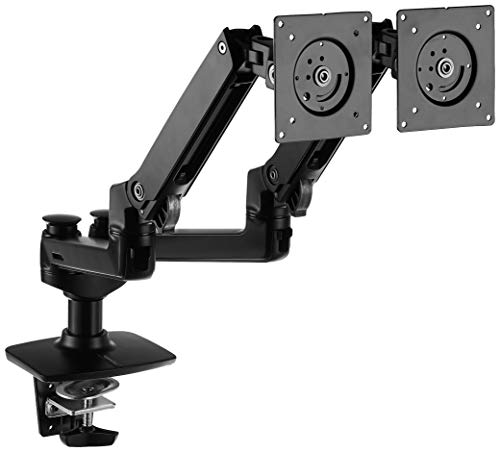
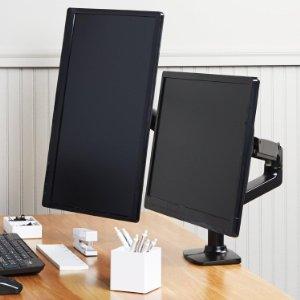
Amazon Basics Dual Side-by-Side Monitor Display Mounting Arm with Adjustable Height, 360-degree rotation, Adjustable Screen Tilt and Cable Organize
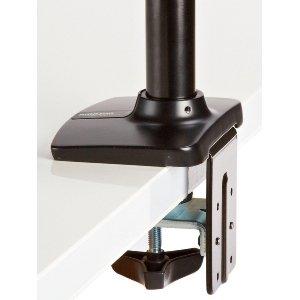
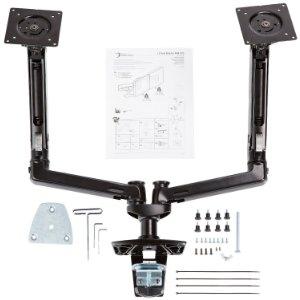
In The Box
– Upper Arm (2 arms)
– Lower Arm
– Base
– Grommet Bracket
– Bracket Cover (2 pieces)
– Wing Nut
– 10mm Knobs to attach monitor arms to your monitor (8 pieces)
– 10mm screw (4)
– 6mm screw
– 4mm Allen Wrench
– 2.5 mm Allen Wrench
– Cable ties (4 pieces)
– Instruction Manual
| Dimensions: | 65.02 x 17.53 x 41.15 cm; 6.12 Kilograms |
| Model: | K001395 |
| Manufacture: | Amazon Basics |
| Dimensions: | 65.02 x 17.53 x 41.15 cm; 6.12 Kilograms |
So this is going to seem kind of stupid but my fix for the stuck plate facing upward was physical leverage. I had already tried mounting the monitor as some had suggested but it still wouldn’t turn. I had also tried turning it free hand with no luck. Anyway, only when I braced it – see vid – would it turn. Now works great. Maybe mine was never really broken, but give this a shot before you return.
Good arm, hard to assemble
The arm itself is great. But it can be hard to assemble it without prior experience. I have not expected that I need to apply so much pressure on the arms to rotate them near the monitor, I thought I will break it or something. The manual could have been better.
I had been looking for a monitor arm for my Asus pg348q which was on a massive and heavy stand. I checked out a couple of reviews who said it was great so I jumped in and purchased one. I have to say it’s excellent I am very happy with it. Once setup the balance is perfect I can move my screen around with 1 finger but there is lag or drooping or movement of any kind when I stop pushing the monitor is held perfectly still. This has feed up my desk massively as I can push my monitor back to the wall freeing up space. A+++
Comfy and practical
The only thing that i did not like is the metal holes gave me the feeling of weakness and was hopping to see thicker walls of the neck parts. But i have to say the they both now are caring my monitors as the image. So i thing no concern so far.
At the end i like the way of working. The package comes with all necessary equipment to install. The functionality is good and nice to be force adjusted.
EDIT BELOW – chaning 3 star to 5
I purchased this for my 32 inch LG 32GK650FB monitor which weighs 18.3 pounds according to the specs (maybe lighter without the original stand). This mount is rated for 32″ and 25 pounds, but it will not hold my monitor off the desktop. Anytime you raise the monitor up, it sinks right back down to the lowest height. Going back to amazon for another mount, slightly more expensive that supposedly holds up to 30 lbs. We’ll see how that one works out.
Otherwise, this is well built and sturdy. It is just not quite as good as they think it is apparently.
EDIT – Well, after trying another mount which did not suit my needs, I decided to give this one another try (another unit). To be honest, I am not sure the first one was defective as I did not fully understand the tension screws. The manual is horribly lacking in detailed information. I thought one of the tensions screws as for the joint it was next to… As it turns out, via an internal rod/mechanism the tension is applied for the other end of the same arm which solved the problem of the sinking monitor.
This arm is well built and VERY solid. It you find yours is not staying in place, search here for help from others and you might find the solution. The manual is not much help in figuring out what might be wrong.
It's a black Ergotro
I’ve bought Ergotron mounts before this, so can say for definite that this is a re-branded Ergotron. This means you’re getting a quality product.
My only real criticism is that the grip on the desk is more like a pinch. If you can get some wood or steel to pop underneath the desk, you’ll find less bounce (from the desk flexing) and more security, especially with heavier monitors at greater reaches. Re-enforcing is pretty much essential if using a cardboard surface like Ikea LINNMON. I was hoping the clamp would be more substantial than on the single-monitor versions, but it’s not.
Something most users don’t seem to know is if you think it’s too stiff or too loose (not holding up a screen), you can adjust the tension on most articulations really easily.
I’ve got this in a dual monitor setup with a 27″ 4k monitor and an old Dell 30″ monster. I was worried initially that it might not support the dell as it’s well over the stated weight limit – but it handles it with no problems whatsoever.
Big wins:
* Mostly easy maneuverability
* Less clutter on desk / more space
Downsides:
* Really does need quite a bit of space at the back
* Tilt forward / back is surprisingly stiff – my new 4k creaks a bit when doing it.
I was hoping that the wide split needed by both a 27″ and 30″ would mean I wouldn’t need that much space behind my desk. However with only about 4″ behind my desk, the closest I can get the monitors is a 3″ gap between them. Still happy, but not ideal. If you really want an ideal setup, two separate monitor arms might be better I think – then even with limited space behind you could swing the arm all the way to one side.
This took the monitors off of my desk and made them much more flexible in their use. I sometimes like portrait mode on one monitor, but not all of the time. This is a solidly built unit which is worth the price, especially if you are in a profession which involves a lot of screen time.
This took the monitors off of my desk and made them much more flexible in their use. I sometimes like portrait mode on one monitor, but not all of the time. This is a solidly built unit which is worth the price, especially if you are in a profession which involves a lot of screen time.
Robust and versitile
This thing is rock solid. It’s super easy to install and feels extremely sturdy. The quality of the construction on this piece is high, none of the parts feel cheap. I have two monitors attached to it, one a 27″ that I’ve positioned in portrait orientation and the other a 32″ that I’ve position in regular landscape. It holds them both firmly in place while still allowing for easy adjustment of height and positioning on the fly – and I found I didn’t need to tighten or loosen any of the components, it just kinda worked out of the box.
Built like a tank!
I got it because was the one with the biggest weight limit on the description.
And it can hold the Dell AW3418DW like it was nothing (ultrawide 34 inches).
It is not a 5 starts because the cable management is not the best, most of monitor stands the cables are hidden, in this one you use some cable ties to keep them with the structure.
It hold my monitor well and saves space
I bought this because my monitors default stand took up a fair bit of space on my desk, I ordered this in hopes of increasing the free space on my desk.
The stand had saved space on my desk and holds my monitor well (I was initially worried it might not have been able to) this is the monitor I use [ https://www.amazon.co.uk/dp/B017U8Z61W ]
Edit: A small part of me was worried that the mount might not be able to hold my monitor stably and keep it up as long as it has managed to, but it holds it exceptionally well and based on how its fared so far I have no worries about it. I would definitely recommend this.
Volltreffer, gute Halterung zum guten Preis
Meine beiden 27 Zoll Monitore mchten schweben!
Aber von Anfang an:
Die Halterung kam gut verpackt in einem stabilen Karton an. Die Teile waren zustzlich in Polstermaterial eingepackt. Die Halterung machte beim Auspacken einen hochwertigen Eindruck. Der Aufbau war selbsterklrend, auch wenn eine Anleitung beiliegt, war dieses fr mich nicht notwenig.
Die Befestigung am Tisch kann durch die klassische Klemmfunktion oder ber eine Bohrung in der Tischplatte erfolgen.
Justiert werden die Arme mit Inbusschrauben, die Kabelfhrung ist sehr einfach gehalten, aber zweckdienlich.
Der Halterung liegen viele Schrauben und Distanzplttchen bei, um die Monitore verschiedener Hersteller anbringen zu knnen.
Beide Arme halten die Monitore, ohne nachzugeben, in der gewnschten Position. Das Verstellen geht gut, aber ein wenig Kraft ist schon notwenig. (leicht und gut haltend widerspricht sich auch)
Vorteil dieser Halterung ist ganz klar, dass die Monitore weniger Platz auf dem Schreibtisch einnehmen. Unter den Monitoren ergibt sich pltzlich viel mehr Raum.
Fazit: Gute und gnstige Halterung, die einen sehr hochwertigen Eindruck macht.
Ottimo strumento
stato un po’ difficile da montare perch le parti pi piccole sono davvero precise e se non entrano fin dall’inizio per il verso giusto si incastrano e non scorrono (colpa mia che non me ne sono accorto subito :S).
A parte questo un ottimo supporto, una volta posizionati i monitor non si muovono, ma comunque facile all’occorrenza spostarli.
PROS: Great quality! Additionally, the specs state that it can only accommodate dual screens “27 inches or smaller”, but I have two 34 inch monitors (Dell UltraSharp U3415W 34-Inch Curved LED-Lit Monitor) and it still works great! Just be sure to check the weight of each monitor. My monitors are under the 20 pound per arm limit (each of my monitors weighs less than 18.6 pounds per monitor).
CONS: Like others, the height of the stock 3.5inch vertical pipe was not high enough. After EXTENSIVE searching (Ace Hardware, Lowes, Home Depot, plumbing supply stores, etc.), I found a machinist that created one for me.
SOLUTION TO ABOVE CONS (i.e., HEIGHT):
The stock pipe threading is metric, which makes it impossible to find at your local hardware store, so having the machinist customize one for me was necessary. As you can see, I now have the perfect height for my monitors so my laptop is not blocking either screen. If you need a replacement/extension pipe created for you, the machinist was kind enough to allow me to share his business contact information for inquiries. Contact Specialty Machine & Repair LLC in Salem, VA. [email protected]
The bracket arm was easy to install and is very sturdy, I use it with a 27inch 7.2Kg touchscreen and when typing on the screen there is hardly any monitor movement even when the arm is fully extended. I have set the 2 tension adjusting screws about halfway thus I presume the arm would handle much heavier monitors. Positioning the monitor is effortless and the monitor nearly always stays wherever you position it, I say nearly always as my monitor doesn’t stay in portrait , this is due to my vesa fixings being near the top of my monitor and thus when I turn the monitor to portrait the vesa fixings are to one side and the monitor drops one side in this portrait position, not an issue for me but I presume if the vesa fixings are central then this wouldn’t be an issue. Also not every monitor position is achievable, positions are dependant on the positions of the lower and upper arms, for example I can have my monitor flat High up but as I drop the upper arm I have to tilt the screen slightly, this isn’t a complaint just an observation – as the multi positions achieved with this arm far exceeds expectations, I now enjoy using the touchscreen monitor both seated and standing up. Another nice thing about this arm is just being able to push the monitor right back, lift up the arm and just enjoy the desk space I forgot I had, enjoy!
Fantastic item for the very good price
After few months of using it I can easily say this is perfect.
The arms are working smooth and easy (you can move it by 1 hand).
I am very happy I bought it and hope to use it for years 🙂
——————————————————————— (above review from 2018)
Hi ALL Again – 3 Years Later.
The dual-arms for my screens are working great. moving them every day and they are still tight as they were 3 years ago when i bought the item. VERY VERY big thanks for it. Love it and it’s very useful.
Nach 2 Jahren Nutzung nichts zu beanstande
Ich habe die Halterung fr 2 Monitore vor 2 Jahren gekauft und konnte bis jetzt nichts negatives feststellen.
Ich hatte befrchtet, dass nach einiger Zeit die Halterungen durch das Gewicht der 27 Zoll Monitore nach unten gezogen werden, trotz zu meiner Verwunderung blieb alles wo es sein soll 🙂
Und trotzdem lassen sich die Monitore flieend in Ihrer Hhe und Tiefe verstellen.
Die Qualitt ist hervorragend.
Hasta ahora, de mis mejores compras.
Amo poder mover mis monitores por todos lados como si estuviera en la matrix.
Me acomoda muchisimo para trabajar ya que puedo tener monitores en posicion vertical en segundos. Puedo reubicarlos al instante en angulo, altura, posicion, etc.
Uso tres monitores y el peso nunca es problema, el brazo se ajusta manualmente al peso ideal y jamas vuelve a fallar.
Recomendado al 100000%
Vollkommen zufriede
Ich habe diese Monitorarme nun ca 1,5 Monate in Verwendung und bin mit diesem Produkt vollkommen zufrieden. Die Monitorarme sind einfach aufzubauen, robust und verstellen sich nicht von selbst. Die Position der Monitore kann man gut seinen Bedrfnissen anpassen. Meiner Meinung nach ist die Qualitt der Monitorarme gut genug um den Preis zu rechtfertigen.
Much heavier than I expected, the box arrived with an Ergotron shipping label, so it’s essentially the same thing they make, at half the price. Inside everything was encased in a two piece high density foam clam shell and individually in protective plastic bags. You get a 2.5mm and a 4mm hex tool. I should note here that the 4mm key is nice, it has a T handle, instead of the usual L shape. It is not quality material and will wear out fast, but save it for future uses if you can. It is a shame that it is a 4mm, and not the more common “Ikea” 5mm. You will have to furnish a Phillips screwdriver yourself.
The instruction booklet could choke a bull, the actual instructions number only a few pages, but come in 20 different languages. The instructions are reasonably clear, if redundant in many parts, but also manage to be ambiguous, such as referring to orientation of some components as “up”, where it is not clear at all what “up” means. Visual inspection makes the orientation of the base plate obvious, so the screws fit properly.
I decided to attach the mount using the grommet method, as I have a thick table top and this will provide more stability; also, the table does not have a wide enough edge lip for the clamp. Drilling is my only option, a 3/8 drill bit gets the job done. As the bottom plate that goes on the bolt from under the desk is secured with a wing nut, you can use any plate with a 3/8 hole you have handy, if you think the one provided is too flimsy.
The final assembly was very easy. Just secure the base, put the bottom arms on, secure the top arms to the monitor, and mount everything in place. It would be ideal if the VESA plates were “quick release” style, but this is not too hard, and you only have to do it once. Plus, the thumb screws make it painless.
Positioning the arms is relatively easy, they can be quite stiff, but the tension adjustments let you put everything in place then tighten it up. The cable management is alright. For the top arms, run the cables under and secure with the provided zip ties, the bottom arms have a removable panel on the underside with room for cables. A tensioned squeeze-type release keeps it in place, I don’t think it will be falling out on its own. As an easter egg, there are two 2.5mm tension adjustment screws in the back of the base swivel, which are very tightly secured in place and prevent the entire assembly from rotating around. Not a useful feature for most people I imagine.
The whole setup feels very solid, and the visible part on the desk is sleek with only a small Amazon Basics logo in view.
Keep in mind that depending on how big your monitors are and how you need them positioned, you may need space behind the desk, if your desk is right up against the wall, due to how the swivel arms work. Try to “dry run” your setup before drilling holes to see how much space you require (this probably needs two people). You may have to attach the mount further away from the back of the desk. Measure twice, cut once.
Also, if you are mounting two identical monitors at the same height, you don’t require lots of positional flexibility, and you’re not constantly adjusting the angles, then maybe going for a “pole-style” monitor mount will be a better option, such as the basic Arctic Z1/Z2, which I have for my work laptop. It is simpler, much cheaper, guaranteed to never sag, and probably won’t need any, or as much, space behind the desk for the folded arms.
Long term edit (6+ months): The mount is as solid as the day I installed it. The arms aren’t sagging one bit, I really tightened the up/down adjustment, but left the horizontal swivel a bit loose. The nut securing the bottom plate did come a bit loose and I had to tighten it, but that’s probably because all the stuff I have sitting on my desk that’s vibrating away (fans and hard drives). It would not be a bad idea to use a little bit of Threadtite on the bolt thread.
Solid design, easy to adjus
I’ve had this stand for over a year now and I love it.
On one side I mounted a 42″ monitor and although it feels a little “bouncy” and adjustment range is limited due to the size, it works just fine in combination with the 27″ monitor on the other arm.
Moving and adjusting is very easy. Spring tension can be adjusted to give a nice counterweight effect.
Update: After having the problem described below, I resorted to buying the Ergotron version of this same product, hoping for better luck. What I ordered was the ERG45245026 – Ergotron Inc LX Dual Side-by-Side Arm for WorkFit-D Sit-Stand Desk. It really is the same product and I had the same problem. So I made use of Ergotron’s chat support and got a solution. Here’s the product: ERG45245026 – Ergotron Inc LX Dual Side-by-Side Arm for WorkFit-D Sit-Stand Desk .
The chat rep told me to simply hold the base with my feet and then rotate the mounting plate (without the monitor attached.) That worked! So I could have kept this AmazonBasics version if I had known the trick.
So now I’ve changed my review here from one star to four stars. It’s not five stars because I couldn’t figure out how to fix the position of the monitor plate and did return it. I only found out how to fix the problem after I bought the pricier Ergotron. However, I am confident this is a great product, now that I know what happened.
Here’s my original one-star review:
I returned the first one with a defect, and got a second defective one. Apparently, there’s a quality control issue here. I really want this product, but I struck out twice. The problem is the same as that of all the one-star reviews: the plate that holds the monitor doesn’t turn at all, leaving the monitor facing the ceiling.
Also I was not able to install the product on the edge of the desk because the desk has a modesty panel which makes the edge too shallow. I actually was able to avoid the more complicated method and simply inserted the base into the hole in the desktop and screwed the bottom back on by crawling beneath the desk.
Amazon basics does it agai
This product was recommended by many people. I was looking for a dual-monitor clamp stand that could support both my 24″ and 34″ monitors. There’s no wobble and with the right adjustments, it looks great.
The only con is that the caps provided to cover the lower arms holes are impossible to put it. But it’s not worth a star.
I’ve been using this for well over a year now and it has been one of the best purchases for my studio I’ve made in a long time. I did a lot of research as my particular situation was quite particular. I needed a stand that could position the monitor about 6 inches forward and several inches lower than the desk mounting point. This did the trick perfectly!
It has a really smooth and sturdy motion, a really pleasingly high quality build and plenty of range in all directions.
It was the first ‘amazon basics’ product I’d heard of, let alone bought, so I was a little sceptical. But it’s anything but ‘basic’, and highly recommended!
Affordable monitor stand, very adjustable, I have my Alienware 34″ ultrawide mounted on this and it works great, I went from a dual arm holding 2x24s to this and I’ve been using arm mounts for close to 12 years. The build quality on this is the same as the arm I got a few years ago for much much more.
There’s no denying that this isn’t a cheap piece of kit compared to other stands out there, but you get what you pay for and this stand is easily holding a pair of 27 inch monitors for me (A Dell UltraSharp and a Samsung). Probably the weakest part of the setup is actually my desk which I’m hoping is strong enough to take the strain as it’s not an especially good one. However, the stand is doing a god job of holding the monitors pretty close to the same height as one another which is no mean feat seeing as Samsung, in their wisdom, decided to put the mount almost at the top of the monitor whereas Dell went for the more conventional middle of the unit.
One thing to note though is that if your desk is against a wall this will give you problems: The arms need room to hang over the back of your desk to get your monitors in the right position if you have larger monitors. If this is you (and I found this) then you might be better buying two individual stands as the arms can then be arrange in a more compact manner. It does cost a little more, but I do wish I had done this now.
Still, that should not detract from what is a really well made piece of kit and cheaper than the premium brands, despite being very similar to them. Just think about how the arms will fit in your space (see photos – excuse messy desk).
Es un buen producto, hecho con buenos materiales que se ve que durar muchos aos. Pero antes de comprarlo debes de verificar que tu escritorio sea slido y robusto para usarlo. En cuanto se lo puse al mo se empez a deformar cercas de la base ya con los 2 monitores de 24″ montados. Tuve que regresarlo y pedir los individuales que van contra la pared.
Solid monitor stand, doesn't rock. There are a variety of possible positions but I'm finding it hard to position twin 24" monitors close to each other without requiring room behind the desk which is something to bear in mind for the space conscious. In the end, I had to have one monitor in portrait mode which is not ideal. In a way, I wish the arms were a different length to accommodate my monitors. In any case I have reclaimed a good amount of desk space with these stands and am generally happy with the purchase.
Solid monitor stand, doesn’t rock. There are a variety of possible positions but I’m finding it hard to position twin 24″ monitors close to each other without requiring room behind the desk which is something to bear in mind for the space conscious. In the end, I had to have one monitor in portrait mode which is not ideal. In a way, I wish the arms were a different length to accommodate my monitors. In any case I have reclaimed a good amount of desk space with these stands and am generally happy with the purchase.
Very strong and great design, EXCEPT the arms are kinda short for my monitor size, i have two 24" monitors and they overlap when i put them side to side - i had to turn one of them to portrait for it to fit well, not a big deal cause i don't really require two landscape monitors, and now my desktop looks more unique cause of the portrait monitor haha.
Very strong and great design, EXCEPT the arms are kinda short for my monitor size, i have two 24″ monitors and they overlap when i put them side to side – i had to turn one of them to portrait for it to fit well, not a big deal cause i don’t really require two landscape monitors, and now my desktop looks more unique cause of the portrait monitor haha.
Ich bin mit der Monitorhalterung wirklich sehr zufrieden. Das einzige, was ich gerne noch haben wrde, wre eine hhere Monitorneigung. Momentan habe ich es so, wie in dem Bild unten. Das stellt mich aber nicht zufrieden. Ich wrde es gerne auf Augenhhe haben und das ist es bei meiner Krpergrsse leider in der jetzigen Einstellung nicht mglich.
Parfait.
Superbe finition. Tres tres solide. Porte sans soucis mes deux ecrans 27”. Je recommande, cela fait gagner de la place, permet de ranger les cables, permet de mieux organiser son bureau etc. Tres bien fait et tres facile a monter.
perfetto
ho acquistato il braccio singolo per il mio monitor 24 pollici della Asus e devo dire di essere piuttosto soddisfatto.
Ho letto in giro che su questo tipo di prodotti, in genere, dopo un mesetto si potevano avere abbassamenti di altezza con i bracci, e per questo ho atteso un po di tempo prima di fare questa recensione. Questo prodotto LO CONSIGLIO a mani basse! Non avrei mai pensato fosse cos valido.
Muy Bueno.
Lo instal en mi escritorio y es bastante bueno el rango de movimiento para posicionar el monitor, fue muy fcil la instalacin y se siente bastante firme. Mi idea inicial al comprarlo fue tener la flexibilidad de usarlo en mi escritorio ya sea sentado o de pie, al final el rango de altura fue muy poca como para trabajar de pie, pero an as me lo quede porque me convenci la flexibilidad para mover el monitor.
Great packaging, appears really well made.I’m just waiting for my VESA adapters. I wish it also came in other colours but black is fine. I have two small quibbles. I think there is a design flaw in the screw/baseplate for the through the desk “plate mount.” The screws are not flush with the base plate which I expect would rub the surface of a desk possibly damaging it. I hope this is something Amazon changes. As a workaround i added a piece or cardboard as a protective pad. The other small quibble is the size of the instructions – the manual is 1/4 inch thick. Amazon could have saved a bunch of trees and just added a link to the online PDF!
Surprised by the resul
Excellent in most regards,
Installing it was incredibly easy, these are robust and well made.
The only thing you need to know is that you’ll need space BEHIND the desk if you want your screens to be in the back (since the arms need to fold backward)
Recomendado
Excelente producto, bastante slido y ofrece gran movilidad. Tengo un monitor de 32″ y otro de 24″ y ambos los soporta sin ningn problema, despus de un mes de uso lo recomiendo ampliamente.
Ho acquistato il doppio braccio per sorreggere un monitor da 27″ che pesa 7,7 kg, e un secondo monitor da 21″, pi leggero.
L’oggetto principalmente in metallo, con qualche parte in plastica.
L’installazione stata molto semplice, e consiste principalmente nelle seguenti operazioni: fissare la base al bordo del tavolo mediante una morsa, poi inserire sulla base i due bracci intermedi (che vanno incastrati su un apposito perno), infine il braccio terminale va prima agganciato al monitor, e poi al braccio intermedio, ancora mediante l’incastro su un perno.
Il supporto da agganciare al tavolo ha tre gommini che svolgono la doppia funzione di bloccare lo scivolamento ed evitare di graffiare la superficie. La morsa che stringe il piano dal basso si pu adattare a ripiani di spessori molto diversi, quindi oserei dire che va bene per qualunque scrivania. Sono forniti accessori anche per inserire la base su un foro lontano dal bordo.
I bracci terminali sono dotati di molle nascoste, la cui azione pu essere regolata con brugole fornite nella confezione, in modo da trovare la tensione giusta per evitare che il braccio scenda sotto il peso del monitor e contemporaneamente agevolare il movimento.
I monitor si fissano perfettamente al braccio con l’attacco Vesa.
Dopo qualche giorno di prova, mi posso dire pienamente soddisfatto.
Habe die Halterung in den Marketplace Deals mitgenommen. Wurde wohl schonmal montiert und anscheinend war der vorherige Besitzer nicht zufrieden. Trotz diverser fehlender Teile (Inbusschlssel, Dbel) gebe ich volle 5 Sterne.
Im Gegensatz zu einem Vorredner funktioniert bei mir die Halterung perfekt mit einem Asus PG348Q Monitor. Monitor wird vernnftig in der gewnschten Hhe gehalten und gefhlt ist die Stellschraube fr die Federeinstellung noch nicht auf Anschlag hoch gedreht. Der Monitor wiegt ohne Standfuss auch nur 7.7kg und liegt im angegebenen Gewichtsbereich.
Optisch orientiert sich das Modell von Amazon komplett an der Ergotron LX Wandhalterung und mich wrde es nicht wundern, wenn es ein und das selbe Modell ist in anderer Farbe und Branding.
Verarbeitung ist einwandfrei, Einstellmglichkeiten riesig (Drehen 360, Schwenken vor zurck usw), Aufbau und Montage ebenso, Strkeeinstellungen logisch erklrt und machbar.
Ich hab ewig nach einer guten Wandhalterung fr meinen Monitor gesucht mit Hhenverstellung und Schwenkbereich. Preislich liegt diese Halterung unter der “wahrscheinlich” fast baugleichen Ergotron LX mit knapp 130 und bietet genau das gleiche. Daher klare Kaufempfehlung, vor allem fr fast schon lausige 63 in den 20% Marketplace Deals vor kurzem!
Everything I Wanted and Imagined - But be sure your monitor has 100x100mm VESA holes.
CAUTION! Be sure your VESA holes are (a) 100x100mm, and (b) have at least 1/4″ flat space around them.
I had quite an adventure getting this monitor arm to work with my monitor – I wound up having to buy a new monitor for several reasons, one of which was to get the 100x100mm VESA holes.
However, once I got it hooked up to the right monitor, this thing ROCKS! It is everything I wanted and envisioned.
I wound up with an ASUS 24″ LCD monitor, and the default tension settings on the monitor arm are perfect for this monitor. I can very easily swing the monitor around, draw it closer, push it away, tilt it up and down (this needs two hands), and generally get my monitor to exactly where I want it to be.
ADVISORY: If you’re going to be moving your monitor on this arm through a wide range of motion, you might consider buying a longer signal cable and power cord. I used my old monitor’s VGA cable, and that worked perfectly, but I can see where I might need a longer one if I need to move the arm to certain positions.
MINI-GRIPE: Included with the arm were two zip ties to secure the cables to the upper monitor arm. Neither one was long enough to go all the way around that joint and the cables and then lock onto itself. I had to use my own zip ties, and chain three of them together (they were not that long to start).
But with those cautions, I would heartily and strongly recommend this monitor arm to anyone who needs to move their monitor through a range of positions.
Fast perfek
Also erst einmal: das ist ein super Produkt! Ich benutze die Halterung mit zwei Iiyama ProLite B2783QSU (27 Zoll) an einem hhenverstellbaren Schreibtisch (da ich mir vor dem Kauf sorgen gemacht habe, ob die Halterung dafr geeignet ist: es handelt sich um einen Schreibtisch aus der BEKANT-Reihe eines greren nordischen Mbelhauses) und bin grundstzlich sehr zufrieden.
Der Aufbau ist gut erklrt und recht schnell durchgefhrt. Die Monitore halten bis jetzt (seit ca. 1 Monat) ohne an Hhe zu verlieren o.. Sie sind recht einfach zu bewegen und eigentlich genau das was ich gesucht habe.
Es gibt nur 2 kleinere Kritikpunkte weshalb ich keine 5 Sterne vergebe:
– die Kabelfhrung knnte besser sein
– die Monitore lassen sich im Sitzen nicht wieder in die hchste Position stellen (vielleicht habe ich aber auch nur noch nicht die passende Einstellung dazu gefunden, aber ich bekomme die Monitore nur wieder in die hchste Position, wenn ich den Arm direkt anhebe)
Aber es ist echt super, wie viel Platz wieder auf dem Schreibtisch ist, seitdem die Monitore nicht mehr direkt darauf stehen. Ich kann die Halterung also trotzdem praktisch uneingeschrnkt empfehlen. Vielleicht bringt Amazon ja noch mal eine “v 2” raus in der die Kabelfhrung und Positionierung leicht berarbeitet wird, damit es gar keine Kritikpunkte mehr gibt. Aber auch mit diesen kleinen Mankos ist es ein super Produkt.
Totalmente recomendado
Montaje sencillo, piezas de calidad, buena relacin calidad/precio, buena sujecin a la mesa. Ahorro de espacio til en la mesa ya que al no tener el soporte y poder mover los monitores te deja la mena libre para otras tareas. Compra recomendada.
Excellent quality and a very robust and sturdy mou
I have used this to mount a 27″ Dell monitor to the wall in our home office.
It comes with huge anchor bolts, and so is unlikely to come loose if fitted to a solid wall or into a stud.
The mount itself is quite heavy, which give a good impression that it is up to the job of handling heavy monitors, whilst providing a sturdy platform and a good range of adjustability to move your screen position once mounted to the wall.
Has some simple cable management features which is always a priority for me as I can’t stand to see cables dangling from behind my screens.
Overall, very pleased and I would not hesitate to highly recommend this mount.
I love this mount… My work station feels so much better…
I mounted a 34″ on one arm and a 24″ on the other. Then bought the AmazonBasics Single Monitor Display Mounting Arm to mount a 24″ monitor on the other side of the 34″. What a great work space I have now.
Note: I also purchased three Ergotron 45-289-026 LX Extension for LX Arm (Polished Aluminum)… one for each arm. This made it possible to mount the stands anywhere on the table, and adjust each monitor into perfect position.
It is so easy to move the monitors around… one finger move… Once the valve screws are set right the monitors just stay firmly where they are.
I have an Ikea desk that these are mounted to. When you bang the table, there is a slight vibration passed to monitors, but regular typing on keyboard does not transfer.
Highly recommended and the price is great.
schön lange gesucht einfach topp
Die Einstellung ist ein bisschen schwierig wenn man nicht etwas geschickter ist, aber das Resultat vllig berzeugend.
Die Position wird immer wieder gendert was den Arm weder ermden lsst, noch verliert er dabei von selbst an hhe, was bei anderen eher selbstverstndlich ist. Tatschlich lsst sich der TV ohne weiteres Einhndig verstellen, was mich oft dazu verleitet den Bildschirm oft neu auszurichten statt meine Sitzposition zu verndern oder auch mal schnell zu verdrehen um meine freunde was zu zeigen.
einfach nur top 🙂 und die Kappel Fhrung ist auch top gemacht einfach nur wau.
Very good for what it is.
Blinding set of arms and very easy to install. Work a treat in the studio set and no compromise has been made on the quality. Early days yet but very impressed so far. Got two 21 inches on each arm and they work fine.
Ich war erst skeptisch und unsicher, ob es wirklich so stabil und flexibel ist, wie es angepriesen wird.
Auch bei der Befestigungsmethode sah es nicht so aus, als knne man es direkt auf dem Tisch befestigen, sondern nur am Tischrand.
Da ich mir aber einen eigenen PC Bereich “gezimmert” hatte, bei dem die Platte bndig mit der Wand schliet, brauchte ich eine Halterung, die nicht nur am Rande fest gemacht werden kann.
Ich wurde nicht enttuscht, im Gegenteil, ich liebe dieses Gert.
Endlich kann ich beide Monitore nach Belieben drehen, schieben, kippen und in der Hhe verstellen, je nachdem, was ich gerade machen mchte und bentige.
Die Arme sind sehr stabil und haben eine integrierte Kabelfhrung im jeweils unteren Teil und im oberen Teil zwei Halterungsnasen, in die man den, mittels Kabelbinder, gebundenen Strang einhngen kann.
Es werden Standard-Kabelbinder mitgeliefert, es knnen aber auch wiederverwendbare Klettbinder verwendet werden, die breiter sind. (hier muss man einfach etwas probieren.
In den unteren Armen ist die Kabelfhrung intern, da dort kein Zylinder verbaut werden musste, der die vertikale Einstellung sicherstellt.
Die jeweils unteren horizontalen Gelenke sind Rohrsteckverbindungen, die mittels des Gewichtes in Position gehalten werden; gegen das vertikale herausgleiten beim Verstellen sind diese mit entsprechenden Kappen gesichert.
Die vertikale Einstellmglichkeit wird mittels pneumatischer Zylinder gewhrleistet, welcher sich jedoch einstellen lsst und die Spannung erhht werden kann.
Alles in allem ein sehr gutes Produkt, was fr vielseitig genutzte Schreibtische sehr praktisch ist und durch die diversen Einstellungen auch entsprechend viele Mglichkeiten in der Nutzung 2er Monitore bieten kann.
Pretty good for the price
Pretty good for the price – Relatively easy to assemble and in my setup holds a 27” and a 17” touch screen monitor without issue.
Good tilt and pivot action as well as being able to adjust on the fly without use of allen keys
Buen brazo y era más o menos lo que esperaba
El tema es que tengo dos monitores, uno de 24 ” y otro de 29”. Con el de 29 no tiene mucha fuerza pero lo aguanta y con el otro sin problema.
El precio es un poco excesivo pero era el que necesitaba para los dos monitores que tengo.
Muy buena calidad
Calidad de construccin muy buena. Muy fcil de instalar.
Slo tiene un punto dbil: la elevacin no es muy grande. En mi caso, con 2 monitores de 27 “necesito trabajar en pie y estos soportes no elevan los monitores lo suficiente.
En cualquier caso, recomiendo la compra sin ninguna duda.
Es lo que buscaba, estabilidad y seguridad para mis equipos, merece la pena.
En la caja pona que vena de la fbrica de ergotron en china, as que no me extraa que sean idnticos salvo en el color.
Utilizo un brazo con una tableta grfica de 22″ y en el otro una base con un porttil de 15’6″ y tengo que decir que la estabilidad a la hora de escribir y de dibujar es estupenda, que era lo que ms me importaba, no estar botando. En ese aspecto perfecto.
Lo nico que no me gusta es que no es tan gil a la hora de moverlo como imaginaba y que necesitas espacio detrs de la mesa (20, 30cm) para algunas posiciones. Pero supongo que es el sistema ms ptimo.
Muy contento con la compra, ahora puedo usar la tableta grfica para dibujar y despus usarla como monitor. Y poner el porttil al alcance de la mano siempre.
Excelle
On est trs loin de la camelotte bas prix qui se trouve un peu partout ailleurs sur le net.
Trs solide, pas de plastique, ne bouge pas, je recommande vivement.
Vale lo que cuesta
Lo instalas y te olvidas. Robustez y sencillez a la hora de instalarlo. Ideal para los que necesitamos una solucin eficaz que no nos haga perder el tiempo y nos permita despreocuparnos por completo del sistema de sujecin de los monitores.
Amazon Basics Wall mount LCD Arm VS ERGOTRON LX Mount.
This wall mount is great for value. Do not be off put being an amazon basics item. I have a multi art purpose digital work station where i have included a HP monitor along with a WACOM 24 HD Cintiq on a Ergotron LX Desk Mount LCD Arm (Wall mount) which I have bought previous. In order to upgrade the existing 360 degree monitor stand this was as a better option for durability rather than a fixed position monitor stand.
If you need the extra durability and play for use of a cintiq screen, The Ergontron seems to have a much sturdier design for safety and that it won’t fall off the wall and damage the monitor, whilst the Amazon Basics one is perfect for simple monitor use and to change position on your work station, but seems probably in hindsight not best used for a cintiq because of the upgraded strength mount of the ergotron.
I’m a bit gutted to say, but the amazon product is modular like the ergontron and cheaper than, but it is better quality than the Ergotron. Not only do they appear to be similar products- THEY ARE ABSOLUTELY IDENTICAL except finish. You can actually use the ergontron extension arm ( https://www.amazon.co.uk/gp/product/B006PYHYXG/ref=oh_aui_search_detailpage?ie=UTF8&psc=1 ) on the amazon basics mount to extend!!! Even the cable hideaway plastic strip/clips are exactly the same.
So all in all not suited for heavy durability for the big cintiqs, identical to the Ergontron products (except the mount fittings to the wall -amazon has less holes to mount to the wall surface), MODULAR like the ergotron mounts, BETTER quality than the ergotron for not only finish and no sharp aluminium cast edging (yes ergontron soft wires and a mettalic sharp mount do not mix and shred your cables inside of the arms).
Once again, in all great produc. Only wish is that amazon would sell some shorter arm extensions or extra arm extensions like ergotron do to create slightly more modular knuckle play.
Massiv, wertig, flexibel --> gutes Produk
Nicht der Billigheimer unter den Monitorhaltern, aber definitiv seinen Preis wert! Massives Teil, wertig und extrem flexibel. Bei einer Hhennderung bleibt der Bildschirm immer gleich ausgerichtet. Die Widerstnde lsen sich einstellen und dem Gewicht des Monitors anpassen. Aufbau geht auch ratzfatz.
Einziger “Kritikpunkt”: Ich nutze meine Monitore auch manchmal hochkant. Hier htte ich mir gewnscht, dass die 360-Drehung auch einen Widerstand htte und individuell einstellbar ist. Hochkant kann man die Monitore aber nur fest arretieren. Damit kann ich aber leben.
Very nice , holds two 24′ wide screen monitors. I just got a sit stand desk and the monitors were to low. I removed the 3 inch neck pipe and replaced it with an 8 inch neck pipe (You can get at ACE), now I can get my monitors 12+ inches off the desk surface. Works perfect.
Top
Sehr gute Verstellbarkeit, sei es zu den Seiten oder aber nach oben und unten.
Meine beiden 27 Zoller werden problemlos gehalten und lassen sich herrvoragend, jederzeit verstellen
Am Anfang sind die Halterungen sehr fest gedreht, nach etwas anlsen, mit den beigelegten 6Kantern, sind diese aber auch sehr gut Beweglich
It's pretty great, definitely worth the money
It’s pretty great, definitely worth the money. But with two (kinda) drawbacks.
You need to mind the clearance behind them, on my setup I had to move my table about 20-30cm from the wall to not scratch the wall.
When disassembling them it was nearly impossible for me to undo the clip/plug that holds the stands in. There are plugs you put on to attach the arms to the base, but the only way to undo them is to reach your finger into a tiny hole and unclip the plugs. I read and followed the manual on how to do it.
But, because of the way it’s set up I had no leverage and spent a good 10 minutes trying. Fingers were hurting and close to bleeding when I finally managed it.
If the plugs were rotated 180 degrees it wouldn’t be an issue, because then I’d have had the leverage to push it with my finger.
Muy bueno!
De los mejoresbrazos de montaje que hay. Un buen acabado, robusto, y muy ergonmico, sobretodo al prescindir de una barra central altisima como en la mayora lo puedes poner cerca d euna ventana sin hacer que no puedas abrirla, dado que el soporte bifurcado es bastante bajo
First off, this seems to be a slightly stripped down version of an Ergotron mount (doesn’t have the shiny stuff, instead matte black all around).
Second, I use this with a 34″ Dell U3415W (roughly 20 lbs) and there is still adjustment room left in the gas spring.
———- Possible downsides are these:
– Possibly not enough room for cables in the lower portion of the cable channeling. I run DisplayPort, HDMI, dual USB 3, power, and speakers (somewhat atypical as I’m using it as a ghetto rigged KVM). Had to velcro strap in the clips closest to the base to keep it from falling out. But I’ve never needed to touch it since then, so I can’t really take anything off for that.
– Orientation lock screw doesn’t actually completely lock it, you still have a few degrees of rotation. However, this turns out to be useful for compensating for any slop in the joints on the arm segments, so I expect that’s intended.
———- Upsides are:
Everything else.
I put it in place a couple months ago and adjusted it to my liking and it has stayed exactly there. It does its job without bothering me in any way and this is with regularly moving the monitor between lazy mode and focused mode in my chair and moving it a couple feet out and turning 90 degrees to face my bed.
On the subject of adjustment, you can tweak the tension of every joint to your liking. You don’t need to, but you can make it extremely smooth with a little time.
I consider that fulfilling the primary job of the mount quite well and at a very decent price with no significant compromises.
Sturdy and easy to use
I’m really pleased with this wall-mounted arm. I’m actually only using half of it (there is an optional extra extension piece that turned out not to be necessary for me). I have a 24″ BenQ widescreen monitor supported with ease, anchored in the wall to my study. The arm is very sturdy. Moving the monitor around is easy, and installation only took ten minutes. Word of advice – you will need a 10mm masonry bit, and a 13mm socket wrench. It took me a while to work out where to place the bracket, but in the end I figured out that the middle of the bracket needs to be approximately level with the base of where you want the monitor to rest.
Definitely recommended.
C’est un clone de l’Ergotron LX
22 ” pouces et 19″ monts sans problme en attendant deux 27″
Trs bon matriel solide et montage facile. Le systme de passe cble est le seul point faible car un peu dlicat mettre en uvre mais rien de bien mchant et c’est le mme systme que sur les Ergotron qui valent environ 100e de plus.
Le rglage des crans la vole est un rgal mme en mode portrait.
On peu verrouiller toutes les positions si besoins.
Matriel tagu AMAZON expdi par DHL reu trs rapidement. Le colis est trs bien emball (carton trs solide et mousse de protection dans tout le carton et entre les diffrentes pice. J’ai pas souvent vu cela. Notice claire.
Je suis vraiment trs satisfait de mon acha
Una maravilla
He comprado estos brazos para usarlos en casa, es la mejor que he hecho para una tener una oficina cmoda donde trabajar en el saln. En mi puesto de trabajo ya tena unos brazos similares y no dejaba de decirme que tendra que comprarlos para mi uso particular. Ahora que los tengo me maldigo por haber retrasado tanto tiempo la compra. Son muy fciles de montar, las instrucciones lo dejan todo muy claro y de todas maneras no hace falta ser ingeniero aeroespacial para montarlos. Muy cmodos, tengo montados 2 pantallas de Dell de 24″ y van perfectos.
Niquel
Un peu cher au premier abord, mais une fois qu’il est mis en place, le support est flexible, solide, supporte bien les crans. Bonne fabrication, trs simple monter.
Rien dire.
Install pour 4 ecrans : 2x supports double, tout va bien ! Chaque ecran peut etre deplac pour tre remis sa place. Simple et efficace.
After initially searching the internet for a couple of hours to find a suitable monitor arm for my Predator x34 monitor, which weighs in at around 10kg without the monitor stand I decided to risk this option.
My main concern was the weight of my monitor vs the max load for this arm and after setting it up and mounting the monitor to the arm I must admit I was relieved to see it hold the monitor just fine.
It has very good flexibility and allows me to even position the arm fully extended without any bending or drooping.
My one suggestion for better peace of mind would be to have a slightly wider clamp / base to connect to the desk as it does seem like a lot of force being applied to a small area but as I mentioned so far no issues. I’m writing this review a few weeks after installing it too so it’s been tested.
I can add a video / photos of this arm with my X34 if anyone thinks it would be helpful for them to make a decision whether or not to get it.
Soy ilustrador, trabajo con dos monitores, y encima soy adicto a los videojuegos. Esta herramienta me ha solucionado la vida, facilisima de montar y con un amplio abanico de posibilidades. Es cierto que NO puede poner un monitor encima del otro.
Perfecto apra tener los monitores uno al lado del otro, o como en mi caso, moverlos a primer/segundo plano segn los vayas necesitando. Yo tengo enganchados un monitor de 27″ y una Huion de 21″ y ningun problema.
La base engancha de manera muy solida, y los brazos soportan perfefctamente el peso de ambas pantallas. Moverlos es tan sencillo como tirar, empujar, girar (tambien rota la pantalla lo que quieras, aunque puedes fijarlo con un tornillo para que no rote). Olvidate de anclajes o pinzas para asegurar la posicion, lleva un buen sistema, y gracias al peso dle monitor, donde lo coloques t, ahi se queda.
Una compra recomendada si buscas tener dos monitores con amplitud de movimiento y la mesa mucho mas liberada.
El material es de muy buena calidad y el montaje muy muy sencillo, sobran las instrucciones. Tanto el embalaje como el envio muy correctos.
Great monitor arm
Great monitor arm, very easy to setup and helped me clear a fair amount of desk space. The desk mount (clamp) is very solid, and I have no concern about it coming loose. Easy to move arms though the vertical tilt is a little bit still, but I’m gonna put that down to my second monitor being a bit flimsy as with my Dell U2515H it’s not a problem! The cable tidy solution is okay, the top part using cable ties is a little annoying, but nothing terrible. I’ve found the bottom cover alone to be enough so it’s not a real issue, just a niggle.
Overall very happy, and for the price compared to an Ergotron (appears to be the only comparable arm), very very happy. AmazonBasics always seems to satisfy my requirements and I would happily recommend this!
Gute Halterung zu fairem Preis
Die Halterung ist sehr massiv und lsst sich einfach zusammenbauen. Das Handbuch dazu gibt es zwar in vielen Sprachen, aber die deutsche bersetzung sollte man doch noch einmal berarbeiten.
Dafr gibt es einen halben Stern Abzug.
Das Gelenk mit dem sich der Monitor neigen lsst lsst sich mit einer Inbus-Schraube hrter oder weicher stellen, ich kann dabei jedoch keinen Unterschied spren, das Gelenk bleibt sehr schwer zu bewegen. Wenn man den Monitor nur mal um die vertikale Achse schwenken mchte ist das kein Problem, hat man jedoch vor den Monitor fter mal von der senkrechten in eine eher flachere Position zu drehen weil man Bilder bearbeiten mchte oder so kann das schon ein bisschen nervig sein. Dafr auch nochmal einen halben Stern Abzug.
Das ganze kommt in einem groen Karton mit sehr dicker Polsterung, also da kann nichts kaputt gehen.
Man hat die Wahl seinen Monitor mit Inbus-Schrauben oder mit Handschrauben an der Halterung zu befestigen.
Excellent produc
I had been searching for a dual monitor display for several months and pondered over this Amazon Basic model, took the plunge, glad I did, it looks very robust and solid, I’ve hooked up two iiyama monitors and it holds them really well
I use one for gaming and the other for my Roland Keyboard, can now follow the notes using Synthesia
The height of the product is really good, was very surprised
Excellent monitor arm! Holds my very heavy 34 inch ultrawide (LG 34UM95) with no issues and a smaller 24 inch monitor along side it. It’s one of those gadgets that once you have, you have no idea how you managed without. I’m constantly adjusting my monitor on my sit/stand desk to be more ergonomic. It would be great if the monitor could be moved slightly higher, but that’s being picky and I might add an inch of wood under the desk mount to solve that. Very impressed for the price!
WOW - Really impressed with these monitor arms - Quality!!
This product is absolutely incredible.
Very easy set up and installation and it is absolutely quality. Very well made.
I thought Amazon Basics products were “Cheap” how wrong I was, I am really impressed the build of this.
I was unsure of monitor arms, but it has created so much space on my desk, it gives me the flexibility to control where I want to position my screens, any height, width or angle.
I have read some bad reviews about other monitor arms about the build quality, buy with confidence here.
Thank you Amazon!
Sehr praktisch, hält siche
Ich habe damit 2×22 Zoll groe Samsung Monitore am Schreibtisch befestigt – hlt bombenfest und ist wirklich sehr praktisch. Ausserdem lsst sich der Schreibtisch so einfacher abwischen, ohne Fummelei zwischen den einzelnen Monitor-Fen 🙂
Der beste Monitorstnder, den ich je gehabt habe.
Lange habe ich nach einem Monitorarm gesucht, mit dem man den Monitor auch weit genug nach hinten verschieben kann, wenn der Schreibtisch ein wenig kurz geraten ist.
Mein Spezial-Schreibtisch ist relativ kurz, mit den bisherigen Monitorarmen oder dem Monitor-eigenen Stnder war der Abstand Augen <-> Bildschirm immer zu wenig. 60-65cm sollte es schon sein. Problem war, dass man mit den meisten Armen den Bildschirm nicht wirklich hinter die Armbefestigung bewegen kann, auch nicht, wenn man ihn seitlich befestigt, weil die Arme zu sehr in einer Ebene sind und ein relativ groer Monitor (24″) immer an irgendeinen Teil des Armes stt, bevor man ihn in die Lage bugsieren kann, in der man ihn haben mchte.
Die amazon Basics Halterung (Ergotron LX) ist durch die perfekte Lnge der beiden Armteile und des Hhenunterschiedes der beiden so gut wie jede Position machbar.
Ich knnte damit den Bildschirm theoretisch sogar hinter das Schreibtischende positionieren.
Auch den zweiten Bildschirm kann man absolut “passgenau” an den ersten anschlieen.
Gerade das Fehlen der bei anderen Monitorarmen meist blichen 30-40cm hohen “Sule”, an der man die Arme ansonsten anbringen muss und darber hhenverstellt, ist mit entscheidend, da diese Sule oft im Weg ist. Der Grundstnder ist nur so hoch, wie er unbedingt sein muss, darber ist Raum.
Fr mich bleiben keinerlei Wnsche offen.
Positions-Variabilitt, Verarbeitungsgte, edle Optik, unerreicht schnelle und leichte Verstellmglichkeit der Position der Monitore, Einfachheit des Aufbaus.
Besser kann man so einen Artikel nicht konstruieren.
Er ist nicht billig, aber im besten Sinne preiswert: Er ist seinen Preis wert.
Ich bin absolut begeistert, wie man mglicherweise merkt.. 😉
100%ige Empfehlung.
As you are aware, this is the same LX Dual Side-By-Side Arm by Ergotron in an all black finish with only a 1 year warranty.
It was easy to install and I have been using this for five months and am very happy since I need to move my monitors a lot.
It wasn’t clear from the Ergotron website what the highest position of the monitor is, so I’ve included photos of my left monitor (Viewsonic 22″) in the highest position. If you need the monitors higher above the desk, this mount may not work for you.
Approximate measurements with monitor tilted slightly backwards:
-desk to the bottom of the monitor is 10.5 inches
-desk to the top of the monitor is 22.5 inches
-desk to the bottom of the monitor mounting plate on the back is 13.25 inches.
Amazon Basic steht auch hier für gute Qualitä
Ich wollte einen zweiten Bildschirm haben und brauche dafr aber aufgrund von Stellplatzmangel eine Halterung.
Die Halterung fhlt sich sehr wertig an, die Schraube ziehen sehr gut an. Die Tischhalterung ist gut festziehbar.
Wenn einer nun wirklich negatives hren mchte, knnte man eventuell erwhnen, dass die Neigung des Bildschirms am Ende des Arms recht schwergngig ist.
Es ist aber besser schwergngiger und stabil, als das stndig der Bildschirm sich von selbst neigt.
Ich vergebe aber nur vier Sterne, weil ich das Preisleistungsverhltnis Negativ finde.
No he tenido el Ergotron as que no puedo decir si es el mismo o no. Lo que s que dir es que es casi perfecto, y el “casi” es por capricho mo.
Producto muy robusto y fcil de instalar y ajustar. Se puede adaptar a pesos, fuerzas, etc para que no haga movimientos indeseados.
Las pantallas que tengo puestas son una ASUS ROG PG279q de 27 pulgadas y una tele Samsung 24TA350 de 24 pulgadas. Tengo puesta slo 1 extensin en el de 27 y las 2 en el de 24. Por comodidad trabajo y juego en el de 27 y el de 24 es un apoyo extra en momentos de necesitad, por lo que me siento delante del de 27 (por eso quiero menos recorrido) y dejo el de 24 inclinado en el lateral. Con estos dos pequeos bichos el soporte aguanta perfectamente.
Con este producto ganars dos cosas:
1. El poder ajustar como quieras 2 pantallas.
2. Por lo menos yo, le he ganado espacio a la mesa quitando las dos bases de los monitores, sobretodo del que tena inclinado. Puedo depositar papeles debajo de ellos e incluso tirar hacia atrs el teclado para depositarlo debajo del de 27.
Mi pequeo pero es la altura. Me hubiera gustado tener 2 o 3 centmetros ms de altura.
Un comentario extra. La base aguanta todo el peso en la mesa, el que tenga una mesa demasiado delicada, o con una capa de cristal fina por encima, no se yo si comprara este producto.
Espero que esto resuelva las dudas de alguien :).
One of the best purchases I've made in an effort to clean up ...
One of the best purchases I’ve made in an effort to clean up my computer desk. I am a proper computer nerd; my desk has speakers, 2 large monitors, fan controllers, graphics tablet, etc. so space was at a premium. After a lot of research I bought one of these and wow!! It really is as good as the other reviewers say! I’m so glad I didn’t go for the more expensive monitor arms out there.
As far as I can tell, this is essentially a black Ergotron LX with an Amazon basics badge for over 20 less. The dimensions, weight/size limits, everything, except the colour, is exactly the same. On my desk its used next to an Ergotron MX which is a heavy duty arm without a pole mount designed for AIO PCs and larger/heavier/older monitors.
At the time of purchase the Ergotron is available on Amazon for 111.79 and this is 89.99. If you shop around you might find the Ergotron cheaper than on Amazon at a competing retailer, but I’m confident you wont find it cheaper than the AmazonBasics one which makes this a real bargain.
I used this with a HP ZR2440w (24″ 16:10 ~5KG) and I didn’t even have to adjust the tension settings, It was perfect right out of the box which suggests that the default position for the settings is around the middle of the min/max range. Everything is adjustable with the tools provided in the accessories package, so if you find the arm sagging or springing your monitor around there isnt anything to worry about.
Just like its bigger brother (the Ergo MX), the motion is smooth, build quality is excellent, accessories are exactly what’s required to mount this either via a bolt though the desk or the clamp for the edge of the desk. I used the clamp to allow me to adjust it at a later date.
A really nice feature of the VESA plate of these monitor arms is that you can pivot the monitor 90 degrees so that the monitor is Portrait. If you haven’t tried this before, I would highly recommend it for viewing documents and websites.
As this is an Ergo LX, there is a decent amount of additional accessories available such as laptop/tablet brackets, extra sections for longer reach arms (although the colour wont match) and VESA brackets that allow a mini PC or slim client to fit in-between the arm and the monitor.
I have previously used quite a few ‘budget’ monitor arms and have since learned my lesson. They are prone to breaking or not matching up to their specifications. Buy this and avoid any disappointment.
Dece
I don’t adjust the screens as much as I thought I would, I figured I’d be tilting them up and down on a daily basis and I suppose the reason is because the screws need to be tightened on the main arm locking in the vertical position. So its not as manoeuvrable as say a dentist lamp that can be garbed and shaped however you’d like. The movement it has for daily use is rotating sideways and tilting the monitor head and that fine for most adjustments.
Simply, a better computer experience.
The start of a new era of spacious desks for me. Incredible value for money, and very customisable on layout. One of the monitor arm joints however was a fraction too tight for easy adjusting. Some 3 in 1 oil – or WD40 would work too – solved this promptly. No more crooked neck or slouching at the desk.
Exceptionally sturdy and well built, very easy to assemble. Buy with confidence.
Extremely sturdy and well built, great range of movement available and unbelievably easy to install (FAR easier than I was expecting). Includes everything you need to clamp to the edge of a desk or mount through the desk (you only need a tiny 8mm hole drilled)
Holds both my 27inch 4k monitor and a 32inch 4k monitor without issue. There are easy instructions on how to adjust the arms to make the movement suit the monitor you have attached (eg, to make it easier or harder to move, or to stiffen the vertical movement if using a heavier monitor).
Top rate, highly recommended.
Dual monitor suppo
Very sturdy and easy to install. Depending on your desk size and layout – you might need to drill the desk – it needs a fair bit of clearance at the rear if you have a narrow desk. Construction is reassuringly heavy and well finished – except for using cable ties to hold the wires to the top arms – something re-usable (and a little smarter) would have been better – although they are hidden from view. Also the rotation lock is behind the screen so this must be removed if you change your mind – I initially locked but decided the screen wasn’t quite level – so had to remove screen to correct this.
Currently in use with a 25in and a 19in screen – and it would support larger screens easily. Screen position is easily adjusted (resistance can be varied)
Habe mich echt gefragt, warum ich mir so eine Halterung nicht schon viel frher beschafft habe. Kein Kabelsalat mehr, sehr, sehr solide verarbeitet und vorbildlich verpackt (sieht man echt selten). Sehr angenehm, den Monitor auf dem man gerade arbeitet direkt zu sich ziehen zu knnen, whrend die Tischplatte schon frei bleibt fr Keyboard (und in meinem Fall auch MIDI Keyboard). Lsst sich neigen, pivotieren, zu sich ziehen, von sich weg drcken, seitlich neigen und in der Hhe verstellen… bin echt wunschlos glcklich. Bisher noch nie von AmazonBasics produkten enttuscht worden… 🙂
El mejor soporte de pantallas sin ser prohibitivo
Base robusta, material de muy buena calidad, brazos con gran libertad de movimientos (superior a la mayora de la competencia). Tengo una pantalla de 24″ y otra de 25″ acopladas y no se vencen por el peso, una maravilla. El nico pero es el precio, bastante superior al resto. De cualquier modo los recomiendo totalmente, sobre todo si trabajas con ordenadores.
Strong and flexible
Quite easy to set-up, the clamp allows much flexibility about where you set it, strong enough to support my 2 heavy Hyundai screens, cleared a lot of space on my desk… 1 less star because to be perfect it would need the height of the base of the arms to be adjustable and because it’s quite expensive, besides this great !
Fenomenales. Aguantan el peso sin problemas, muy configurables, montaje sencillo y muy verstiles. Yo los uso con un monitor de 24 y otro de 21
OJO. No resulta posible colocar un monitor ENCIMA de otro. Es un dispositivo pensado para que los monitores se coloquen uno al lado del otro, en horizontal o en vertical.
Sehr durchdachter Monitorständer!
Hallo,
dieser Monitorstnder ist einfach bis ins letzte Detail hervorragend.
Es beginnt schon bei der Verpackung, alle Teile sind mit dafr vorgesehen Schaumstoffteile geschtzt.
Alle ntigen Schrauben und Inbusschlssel sind vorhanden, sogar Handschrauben fr die montage der Monitore.
Das Gewicht des Stnders sollte man nicht unterschtzen und manchmal htte ich mir eine 3. Hand gewnscht.
Pro Monitor sind 2 Arme vorgesehen, wobei auch nur ein Arm montiert werden kann (Hauptmonitor 1 Arm, Nebenmonitor 2 Arme).
Durch die sehr gute Verarbeitung kann man mit ruhigen Gewissen sagen das der Stnder mehrere Monitore berlebt.
Und zum Schluss: Es sieht schon verdammt schick aus wenn 2 Monitore in der Luft schweben, man Kleinzeug
darunter stellen kann und das zu einem sehr guten Preis (Blitzangebot).
Super Arm
Ich habe sehr lange berlegt mir diesen doch nicht ganz so gnstigen Arm zu kaufen. Letztendlich bereuche ich es auf keinen Fall. Als Blitzangebot kam es fr 159 und es ist echt sehr stabil und angenehmt.
Ich betreibe einen AOC 27″ Zoll Monitor dran, der 2. Monitor muss noch angeschafft werden 😉
Und ja 27″ Monitore sind berhaupt kein Problem!
Ich kann mit Zeigefinger und Daumen den Monitor in nahezu jede edenkliche Position verschieben, genial!
Die entscheidenden Teile sind alle aus Edelstahl die Abdeckungen natrlich aus Plastik (So sollte es auch sein).
Kabelbinder sind auch dabei!
Zufriede
Hlt sehr stabil, fr mich als Student perfekt! Mein Zimmer ist zudem nicht sehr gro und da muss man eben den wenigen Platz nutzen. Ist das Geld auf jeden Fall nicht, nicht wert 😛
Mit freundlichen Gre
As others have already stated, the build quality on this is superb. The parts that I though would be plastic (e.g. the base ‘cover’) are actually metal, and are finished rather well.
The weight and construction of this inspires confidence that it’s not going to let you down. I have two 28″ Acer monitors attached to this and it works beautifully.
Since the surface I’m using this on isn’t suited to the table clamp provided, I fashioned a large hardwood base out of European Walnut and used the ‘grommet’ style mounting option on that instead. This works well.
The only word of warning I have is regarding the clearance required behind the mount; If you have your table up against a wall (as I do), you may run into issues with the arms not having enough clearance to bend into position. With two 28″ monitors side-by-side, I found there was roughly 17cm of clearance needed behind the mount base (or table edge) to get them to meet in the middle, slightly forward of the mount base. Otherwise the arms hit the wall behind and the monitors cannot not be closed together.
I effectively have my stand mounted backwards to allow a reasonable monitor position. This is temporary until I get a better/proper desk.
If however your desk is fairly deep and you can afford to bring the monitors forward, this won’t pose a problem.
I managed to get the dual monitor model in a Lightning deal for 94.99. The build quality and packaging are both superb. The instructions are clear and concise and it is easy to assemble. I’m using mine a with a 27″ Dell 2713HM monitor as the main display and a 20″ Dell 2007FP to the left side. It took around 20 minutes to properly set the monitors up. Since My desk is hard against a wall I had to offset the base to the left. This allows the right hand arm holding the 27″ monitor to extend almost flat with very little backward protrusion. Initially there wasn’t enough tension in the arms to support the weight of either display. This was easily fixed with the enclosed Allen wrench.
At first I used the enclosed grub screws to lock the displays in a horizontal position. Once I’d set everything up, it turned out the displays were a fraction off level and there was a small amount of rotational play. I took the locking screws out and used the rotation to get the monitors level.
Now that I have been using them for a couple of days I realise how good they are. My monitors are 3″ higher which makes a lot of difference to my posture when working. I have a lot more desk space too with them raised up.
Excellent! Excellent! For all the reasons you’ve read in other reviews… So, I took a gamble and purchased the dual display arm version for my u3415w (34″ monitor) and it paid off–just in case you’re wondering. The size restriction is really about weight but since the 34″ is so big I wasn’t sure if it’ll fit with my Dell 24″ beside it and i just figured at worse I’ll have the 24″ in portrait the whole time. However, after setting it up over the past couple days, I very happy to report it’ll fit both display in landscape perfectly (see pics).
Also, as some have reviewed, I was concerned that the arms would stick out too much behind my desk and not allow me to push my desk close to the wall. If you’re concerned about this, see my picture below because it is possible to do but with the right setup. You may be limited a bit in terms of movement but not by much, at least for me.
Excellent quality and build; Super fast and easy setup; Highly recommend.
Empfehlung 1++ mit Sternchen.
Hallo,
ich habe schon lange mit dem Ergotron LX geliebtugelt. Doch dieser war mir einfach zu treuer. Als ich in Blitzangebote den AmazonBasics entdeckt hatte schlug ich sofort zu. 😉 100 weniger als bei Ergotron ist schon ein Argument.
Ich kann leider keinen Vergleich zu den Ergotron machen, da ich diesen nicht hatte.
Die Verarbeitung ist auf dem ersten Blick super. Der Aufbau ist kinderleicht und auch schnell gemacht. Was ich super finde das auch noch eine Schraubplatte dabei ist falls man den Monitorstnder mit einer Schraube statt einer Zwinge am Tisch befestigen mchte. Von der Einstellung der Monitore sind die Arme sehr leicht zu bewegen.
Alles in Allem ein super Produkt fr einen super Preis.
Gre
M. v. B.
Probably the the best thing I’ve purchased this year (got it on a lightning deal for 107). Took ten minutes to install and gave me the opportunity to finally get around to tidying up the cable jungle under my desk; which is an added bonus.
You can either clamp it to your desk or use the supplied grommet mounting kit. And you will need 20-30cm clearance behind the base or you may find your displays is a bit too close for comfort. If you don’t have the space behind, an extension arm would probably solve that issue. As far as I can tell, this is an Ergotron LX (but half the price) so the extension arms you can buy for that will fit. Not sure you can buy them in black though…
The only snag I had was that one of my displays needs M4 8mm mounting bolts, and the supplied are M4 10mm so I had to pad it out with a few washers.
All required tools are included.
Recommended.
I just installed this dual monitor stand for my two AOC 23″ LED monitors. They weigh approx 8.5 lbs each, very light weight, but then tension for these gas springs were perfect right out of the box. I like the arms on this AmazonBasic Dual Monitor Stand better than all the others I researched, because the first set comes straight forward at about a 15 deg angle, versus most of the other ones at a 50 deg angle. What that essentially means is that I can install this further back on my desk and stretch it far out to reach me (I have a wide home office desk). I originally ordered the Loctek Gas Spring Dual Arm Desk Mounts Fits 10-27″ Monitor up to 22 lbs per Arm (D5DH) to try and save money compared to the Amazon one, but I did not like how they go straight up, you cannot pull it out as far, additionally, I did not know the weight requirements. My monitor was on the minimum size, but even at the lightest setting, the gas springs were still too strong for my monitors, so I had to return them immediately.
All the pivots points all move perfectly smooth and are “tight” meaning I don’t feel any wobble at all while moving the arms around. It was very easy to put together, however, my office desk did not allow me to use the end clamps, so I had to drill a small hole in my desk, but it’s actually very stable. I can always wood fill it if I ever plan on selling my desk.
The only negative so far is probably not this product, but my AOC monitors. They have a weird proprietary “u” stand that connects to its original base. The tilt portion is built into my actual monitor, meaning when I tilt my monitor, it tilts my monitor before it actually tilts the base plate of this monitor stand. The monitors are so light weight that when I move the stand around, I can’t move them by pushing and pulling my monitor, I have to push and pull the actual arms. I do not blame the product, I blame the way the monitor sets in the base. You can see in the pictures.
Otherwise, I highly recommended these dual monitor stands. They are very similar to what I have at work, except those are over $400, you know how companies love to over spend on products!
Brilliant solution to my problem
I’ve recently got varifocal glasses and was having a heck of a time trying to get the computer monitors and the right bit of my glasses lined up!
This stand has solved the problem and means that I can move either or both of my two 22 inch Samsung monitors to the perfect positions without trying to balance them on books, over-tilt them or have my chair too high.
It was much easier to fit than I expected and is a lovely solid (quite heavy) bit of kit that really looks the part when completed and I’m very pleased with the flexibility it offers. I recommend it highly
Great product, perfect for the office.
Incredibly easy to set up, this does the job just as you would expect. I tried this out at my place of work, where I currently have a three monitor setup. I have a 24″ monitor set in the landscape view for CAD work, and two 21″ monitors set in portrait view for my other applications.
So the way I usually have my monitors arranged is to have the 24″ monitor directly in front of me but the viewing angle to my 21″ screens can be a bit of a pain. Depending on what I’m working on I have to move the screens around to avoid getting a sore neck or make it easier for people sat with me to check out what is on the screens. But now I have the ability to quickly move the smaller screens around without any trouble at all, and they take up less desk space since they are ‘floating’ on the support arms.
The only thing to consider is now stable your desk is. Fortunately mine is very solid, and I don’t have a lot of people stomping around which would cause the desk to shake and in turn shake the monitors. This would of course happen even if the screens were sat on the desk, but in my experience having them on the arms with the bracket fixed to the desk can increase the effect of shaking if the desk moves. That might just be me, but it worth thinking about. That’s not a fault of this product at all, in fact it is very solid and well made, I’m very impressed with the build quality.
I think this is excellent, well worth a look for your multi screen setup.
Easy to set up and does the job
This may be an Amazon ‘basic’ but do not let this put you off getting it.
It is well made and solid, its pretty study and heavy. This gives confidence it will not just fall apart. It nicely clamps to the desk and my monitors fitted nicely. I have two different makes and it was nice to get them off the desk and releasing real estate. The great thing is the height is now just right.
If you have two monitors then get one of these. Easy to set up and does the job.
Easy to install and adjust once in place.
This is a pretty good quality monitor(s) holder it is fairly easy to set up. At first the manual looked really thick but it is a multi language format so you just need to read the bit relevant to you.
It was very easy to install because I lucked out and the perfect set up was straight out of the box for me, however it comes with other adapters and extra screws if your desk is thinner than mine was.
The cable tidy system is straight forward but too much of a faff but that was mainly because I had 3m power cables which proved to be to short, I am sure if I had 5m ones it would have worked a treat. But it also has a nice space in the middle where it clamps to the desk so I just ran my power and Hdmi cables there. Because there are two monitors you cant see it unless you look over the top of them anyway.
Saving space hmm that one is subjective I did manage to save a tiny bit of space behind the monitors. But not that much anywhere else.
But remember on these stands it is far easier to get the kind on angle on the monitors as they swivel and tilt much easier. It is also worth mentioning if you have good monitors that have rubbish stands (that lean) then this is one great way to bin those and finally get them where you would like them and even move them on the fly, without them leaning even more afterwards. Plus it looks cool after when they are floating in the air and the stand is now hidden behind each monitor.
The only word of warning is watch out what is behind the stand when you install. I had a shelf behind mine which I very nearly had to remove to get the potion I wanted. Best to start by installing dead centre of the desk and then move left or right as desired. The clamp is fairly easy to untighten and tighten back up to move slowly.
Nice bit of kit.
This is a bit of a beast. I have it set up on a glass corner desk. Posibbly not the best layout but it works. I do suggest a quick RTFM to understand how to tighten it properly and also to try some different setups.
it doesn’t really take up any less space than before but it looks cooler once done. it has a built in cable tidy function but Mr msu found this to be time consuming at not worth the effort. however if you have followed my suggestion to RTFM and know about it in advance I would say it’s not so bad.
Lots of fixtures and fittings included in the giant box.
Amazon basics are he er cheap trash….always good.
I’ve been working with this dual monitor arm for about 2 weeks, now. Overall, I am very impressed with the quality and functionality of this unit. It is holding my twin Dell 22″ monitors with absolutely no issues.
Setup was pretty simple, and I have even re-mounted the arm through the desk, rather than clamped to the side as I had originally set it up. The instructions are pretty clear, and all the hardware was included as expected.
Purely on looks, this arm is a little less-nice than some I have seen, but at under half the price I am not going to complain! Even so, this unit looks pretty good. I like the simple logo Amazon uses for the Basics line. The finish is even and seems to hold up well.
In functionality, the arms didn’t need any tension adjustments for my monitors, but that is available if you have heavier / larger screens. The arms pivot up, down and side to side, as well as raising slightly. Here’s my only (minor) complaint. I would like them to raise up a bit more, so I can use the same workstation as a standing desk.
Because each arm is double-jointed the monitors are pushed out a bit from the wall. This is why I re-mounted the arm. I moved the base out from the wall so the arms could “fold” behind the base and allow the monitors to be a little bit further back. If you have a desk against a wall (or a cube wall) you will likely want to mount through the surface rather than clamping to the edge, too.
The tracks for running the wires are basic, but functional. I was a tiny bit frustrated when running wires as the upper arms have little hooks that hold wire ties. The ties kept falling off the hooks as I was snaking the wires through. I finally got smarter than the device and hooked the ties up AFTER snaking all the wires through them.
I recommend this dual monitor arm; I have not been disappointed with it!