Brother DCP-L2530DW Mono Laser Printer – All-in-One
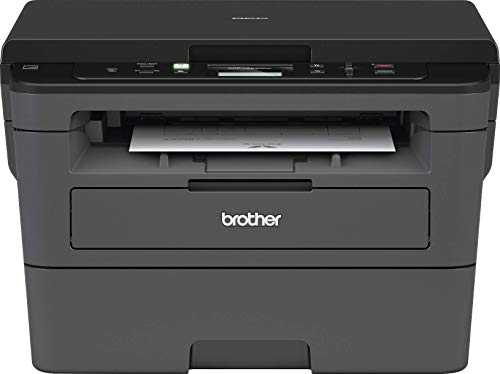
Brother DCP-L2530DW Mono Laser Printer – All-in-One, Wireless/USB 2.0, Printer/Scanner/Copier, 2 Sided Printing, A4 Printer, Small Office/Home Office Printer, Dark Grey/Black
From the brand

Explore our range
| Weight: | 10.3 kg |
| Dimensions: | 15.67 x 16.14 x 10.71 cm; 10.3 Kilograms |
| Brand: | BROTHER |
| Model: | DCP-L2530DW |
| Colour: | Dark Grey/Black |
| Batteries Included: | No |
| Manufacture: | BROTHER |
| Dimensions: | 15.67 x 16.14 x 10.71 cm; 10.3 Kilograms |
Happy
Couldn’t cope anymore with rubbish, cheap printer that never last and cost an arm and a leg on cartridges. So decided to go for this Brother printer. Very happy. Easy to set up. And great quality printing. A proper office at home.
Real nice
2 comments a dream to set up wireless if you have wps button on router, 2nd VERY IMPORTANT, if you are thinking extended warranty has to be taken out when buying printer, can’t buy afterwards as stand alone item
Put so far great printer, for basic laser printer in mono
Easy to setup
Works fast easy to use once the WiFi setup is done it’s all a breeze a nd 0 hastle.
Just be careful when you want to load from the front tray. It’s a sneaky one and will load from the bottom ignoring the command so remove the bottom tray
Awesome......I will never buy another inkjet printer!!!
I bought this for my Mum as her aging ink jet was playing up.
Laser printer with scanner for under 150….I will never buy a multi-function inkjey again!
Also replacement cartridges are cheap as chips.
When my inkjet bites the dust or HP bricks it to stop me refilling or using compatible cartridges I will not pay them a penny more and buy one of these for me as 2 sets of HP black & colour original cartridges is more than what this printer costs!
Found Automatically By Windows 11 Pcs
The printer does what it should, it prints and made itself available automatically. I normally assign certain address ranges to different functions on my network, but I have not yet found a way within the printer software to mage its address. The support software is somewhat lacking. I have not marked Tech support as I did not try accessing them and being blunt the software and manuals are very basic.
This is a great, compact little printer. Easy to set up, print quality is good and it’s pretty quiet for a laser printer. The big selling point for me is that is handles card stock effortlessly. My previous Brother laser printer (HL 1210W) just about handled 80gsm and it was a big no for anything thicker than that, but this bad boy has no problem printing on 300gsm, with no smudges. Overall very happy with my purchase.
Solid laser printer with AirPri
Nice quality prints delivered quickly. The device itself is small enough to hide away in the home office. I have used it with Linux, Mac and from iOS using AirPrint. No complaints.
A Gem of a Printe
I’m very pleased with all aspects of this printer the quietness in operation, print quality, ease of use including the software and the functions all work well like the double sided printing. I would certainly recommend it having used it in my home office environment.
P.s. Bought from Amazon Warehouse – absolute bargain!
Brother DCP-L2530DW - Good monochrome laser printe
Arrived in a timely manner.Bought to replace ink jet colour printers which only seemed to last at best 3 years in our house due to infrequent usage.Happy with this purchase.Very fast printing,double sided printing,decent size paper tray,upto 700 sheet (not tested)capacity for toner cartridge,simple to use and only 1 black ink toner cartridge to worry about.I believe this type of printer doesn’t suffer with issues relating to ink jet heads drying out regularly with infrequent use.Time will tell for longevity.
All of the parts are high quality. The buttons are sturdy and the printer menu is simple and easy to see.
After over 30 years of being an HP customer, HP insistence on knowing your address, email, bank account details so that they could push “Instant Ink” was the final straw for me,.. beware “InstantInk”
We print maybe once a month, and got sick of ink jet cartridges running out,. So after much thought we switched to monochrome laser,. No regrets , very happy with this printer,..
Great looking printer, easy install and hassle free setup. If you, like me were confused by the specs of having wifi but not mentioning USB connection, the printer DOES have USB connection but no USB cable is supplied. Connected wireless via my Mac PC which itself is connected to the hub hard wired. This printer is fast, quiet and prints double sided by default. It has a large paper tray and all enclosed so no dust and dirt to sit on the blank paper and then be ingested through the printer. Lovely smart neat looking and totally recommended.
Excellent product. Simple set up and works perfectly
I bought this as I was sick of HP and their dodgy business practises regarding ink. I read multiple reviews online and on forums talking about how good Brother laser printers are. They were not wrong, the printer just feels quality. The set up was surprisingly easy and this thing prints very nice quality pages. Even the wireless function works easily.
I highly recommend buying this printer if you are looking for one.
Brilliant laser printe
This is a little gem of a laser printer:-) Despite Which? *falsely* claiming that it does NOT support ethernet connection, it has a FULLY FUNCTIONAL USB socket for superb setup and running (took me all of five seconds!). Plug it in and off you go… Driver software easily downloaded and installed from Brother web site.
Best value laser printer on the market!
A very good basic no nonsense laser printe
For various reasons I bought two printers. This and a more expensive HP. The HP I ended up giving away. It worked but is not as good as the Brother.
Suits me
After multiple tech issues with multiple inkjet printers I took a chance on this black & white laser printer, which was easy to set up while watching a YouTube video of someone unboxing & setting it up.
The included cartridge should last for a few hundred pages.
It works fine, seems very reliable and I’m happy with it.
Brother MFC-L2750DW review
I purchased the brother MFC-L2750DW in August-2023.
Day-1 review:
Setup & installation to both my windows laptop & iPhone mobile was easy & straightforward.
I tried the automatic 2 sided scanning & copying, worked very well.
The automatic document feeder has auto duplex from scanning & printing which is great & save me time.
Just what I needed !
A well designed printer. Apparently the deep sleep mode consumes very little power over a year, so I am leaving it switched on. The Wi-Fi capability means I can keep the printer off my desk and it wakes up quite quickly from the deep sleep mode. I found that the printer did not connect to my Wi-Fi at first attempt but I followed the advice of others – unplugged the power cord for a minute and then re-connected. It then worked fine.
I strongly dislike printers.
I don’t mind spending money, I just mind spending it on a printer.
Anyway, all’s well that ended well. After 16 days of excel spreadsheets comparing and contrasting print costs against features, this was top of my list. It’s a personal list – not a universal list. I’m not claiming this is the best printer ever.
This one is made of shonky plastic, like everything is these days, but I like the design in general and the web interface is only marginally rubbish. Also it’s not made by HP, so this product has definitely exceeded my expectations.
I guess most people want a colour inkjet for home use. Or even a colour laser. Or one of those printers with a colour screen that shows you the photo on the USB stick that you are about to print. Or some oversized, [seemingly] underpriced thing with a scanner and FAX FUNCTION whose ink replacement costs make you question your life choices. I am definitely not any of the above people.
I was in the market for the smallest black and white laser printer that would work on my home network, small so it could fit in this little cupboard on a shelf. Preferably with an ethernet interface and not wireless (did I mention, I hate wireless printing, and all the gimmicky consumer wireless printers that have been invented, which infuriate me and make me want to give up on life?)
Although this wasn’t quite as small as my previous printer (Samsung ML1860, sadly no longer available), it does have a network interface making it far more reliable.
In fact, if you are still reading this, you are probably a bit of an IT geek like me, so you will understand I actually bought a network-based USB hub, which allows you to publish USB ports over ethernet, especially for my old small USB printer, so I could print from a virtual machine on my home server. Literally every non-IT person has clicked away from this review now, right? I have to tell you, that idea sounded far better than it turned out to be. I thought – wired printing through USB over ethernet is still more reliable than wireless printing. Alas, not so.
Anyway, that’s mostly irrelevant as this printer has wired ethernet. I no longer swear at the printer, and my wife has said a number of times how happy she is about how easy it is to print. By default I ignore comments like that (made by anyone I hasted to add, not just my wife, I’m not a sexist pig) but on this occasion I do happen to agree.
This thing has Apple print or whatever it’s called – Air Print – which means that after you whack it on your network, it magically appears if you go to print from your iPhone (which you didn’t know you could do, because who does that? But you can.)
I have high hopes for the lifetime of this printer. My last one went for about 12 years. Admittedly in the last 5 years of its life, you had to feed paper in manually one-by-one, if you attempted more (or heaven forbid, use the paper tray), it would jam and you’d need to remove a shelf to get this thing out, onto the table, to take it apart. I will not miss those days. Eventually it just stopped printing and the error light didn’t relate to anything in the troubleshooting section of the manual, so I took that as a cue to thump it really hard in the manual feeder tray before finally succumbing to buying a new one.
Highly recommend. And sorry for spending most of this review talking about my old printer. I think I may have some undiscovered trauma now so I’ll call a therapist, thanks, bye.
Just wanted a simple black and white printer that would just work when I needed it to. Have used deskjet printers in the past but because I don’t print that often the ink would dry up after a couple of months of not using it. Very frustrating when you come to use it. So laser printers are the way to go as they have dry powder toner which doesn’t dry up and clog. This is a simple printer that just works when required. It was really simple to set up, prints wirelessly from Mac, iPhone etc. Really pleased with it. Would recommend a dust cover as it’s going to just sit there until required. There are many cheaper options when replacing the toner cartridge as the Brother one costs a fortune.
I’ve been using this simple black-and-white laser printer for four years, and like it well enough that when it died I bought the same again. That’s the upside. The downside is that it lived only four years; what is it, a Great Dane? This isn’t a good lifespan. But maybe it was the individual machine I also asked around about places to donate the corpse for parts, and it appears you can’t do this. When a printer’s dead, I’m told, you just have to toss it onto the planet’s increasing pile of plastic detritis.
Brilliant printe
Very happy with this and find it a brilliant printer compared to an ink cartridge one that became problematic after a while and expensive to keep buying cartridges. It was recommended that I bought this type of printer and after looking at the choices decided on this as I only wanted a basic one for occasional black and white printing. I was unable to set it up totally and had to get a computer friendly friend to help who sorted it right away.
1200dpi works really well for PCBs
Install the driver from Brother’s website! The default Windows10 driver cannot draw correctly anything but Word-typed text. I was initially appalled at the drawing quality, as even printed text from web-browsers or PDFs was not easily-readable. Lines would be all very jaggy. After installing the driver, I everything is good.
I can now make PCBs with 50-micrometer traces thanks to this amazing printer! This matches professional quality!
I bought this as a replacement for my trusty Brother HL1430 which gave me 21 years of solid service. This fills a similar slot in their range but adds WiFi and automatic double sided printing. I set up the WiFi code using the buttons on the top to navigate the menu with the minimum of fuss and it worked first time and faultlessly since. My laptop connects with ease and my android phone connects via Mopria just as well. The double sided printing works brilliantly once you set the printer properties to do so in the app / program. All in all, I couldn’t be happier. This is an excellent upgrade compared to my old tech printer which I was sad to see go. The new HL-L2350dw has made a great start and I only hope that this lasts as long.
I’ve been using this printer now for over 5 months and overall it’s been a positive experience. Connectivity is very good (I use the ethernet port but wireless and USB also work well). The low yield toner cartridge that came with the printer lasted over 700 pages before I had to replace it. And print quality is excellent after I managed to increase print resolution from the default 600dpi to the max of 1200dpi.
The only problem was the occasional black marks up the left side of the prints. When I changed the toner cartridge I noticed clumps of toner had accumulated at the left edge of the drum. I removed these clumps and it’s been perfect prints (five stars) ever since.
Very, very GOOD.
Easy to setup, easy to use, connect your Wi-Fi after that it’s a breeze, very satisfied with the brother environment/app etc, using the mobile iPrint&Scan app gives access to all the settings on your iPhone or iPad which is all I use the app for as I primarily use air print or windows computer for printing, a little bigger than inkjets but well worth it, it’s so superior to inkjet printers I wish I’d got one earlier, best printer I’ve owned so far. Wish I’d gone the extra mile and purchased the colour.
This is an absolutely fabulous black and white laser printer, copier, scanner. It ticks all the boxes from my requirements.
My requirements were (and all these are met)
* laser printer
* auto duplex printing
* wireless printing/scanning
* scanner functionality
* Linux compatibility
In addition to the above, it gets bonus points for
+ large capacity paper tray
+ ID copy functionality (2 in 1 copy)
+ “Driverless” printing!
+ Easy setup.
+ Flatbed scanner (better than portable document scanners)
+ No silly “ink subscription service”
On the first day, I connected the printer to our wireless router over wifi. It is possible to do so from the printer itself, without having to do a wired connection to the computer. Entering the wifi password takes some time, and after that it connects with zero fuss. Once, it is connected to the wifi, it is discoverable over the wifi network from Linux, , Mac, and Android. It “Just works” for both printing and scanning without the need to download or install any drivers.
On Linux, I needed to ensure that /etc/nsswitch.conf had a “hosts” entry like this, to make it auto-discoverable and truly driverless.
hosts: files mymachines mdns4 mdns4_minimal [NOTFOUND=return] resolve [!UNAVAIL=return] dns mdns4 myhostname
I have not discovered any cons to this printer/scanner. It is compact, the setup is painless, when turned on it connects to the wifi within 10 sec, it works when I need it to work, and printing is quick and easy.
Yes. I only got the printer as space was a issue. I know it had dimensions in the description but you only really know what itll be like when it’s out of the box and insitu.
I researched infrequently used printer and that’s why I settled on laser rather than inkjet (nosels/blockages).
I’ve set it up, typing in the WiFi password on the printer, which didn’t take as long as I thought it would, but still a bit fussy.
Only one wire for power if you have it on WiFi, two if you’re going to connect it to your router.
Prints quality prints, quickly. I haven’t tried to buy new ink and install so ill update when I do.
NOT great at photos but then I knew it wouldn’t before purchase.
Always research. Check out YouTube. They will always have useful into about all products.
I won’t bother with HP who like to astort people with subscriptions and rubbish hardware.
This printer is fantastic, you don’t need to fight with it, brother are a great company I’ve heard story’s of their printers lasting 20 years!
If 99% of what you need to print is text, get brother laser, you won’t regret it.
Don’t be tempted by the cheap 30 printers from the likes of HP. They are horrible I ended up smashing mine as I could not barwbthe fight.
Pay extra and you won’t have “No Brother”
Simply put I say print, brother prints, works fine on all devices, extremely easy to setup.
Ill only get brother printers and Louis rossman on YouTube speaks highly of them so you know they are a good company.
For brother deciding not to rip people of with subscriptions, I’ll only by brother acxeories or paper to support them.
Brother is one company that does not support you will own nothing and be happy.
I just wish my brother would do what he’s told
I’ve had this just a little under a month and it works great. Automatic 2 sided print is a great paper saver too. Prints quickly with not jams from the main feeder. Some issues with jams from the single sheet feeder but that could be because I am trying to feed in labels that are a little thicker than your usual 80gsm copier. It catches as if it will print then says there is a jam, though there isn’t one. I have to take out the full drum unit once or twice for it to reset.
The only reason for the drop to four stars is that, when received, you could clearly see that the box had been opened and re-taped and when I opened it the drum unit was already in, so I think this was a return. It works great so I am happy to keep but it was sold to me as new/unused and should have been a warehouse sale with a slight discount.
I usually find printer installation a real pain! I have an iMac which is a bit particular about which printers it likes to work with!! This was a very quick decision buy to replace my trusty Samsung Express which had finally given up the ghost after a good few years service (I run an online business and use laser printers for labels) and I needed it quickly. I read the reviews on this model which were overall pretty good, so ordered it and when it arrived the next day I began what I thought would be a nightmare to get the printer installed and get it working. I was so wrong!! Installed in a few minutes and worked perfectly straight away. The only tiniest of niggles (and it could be just me who misunderstood) when you download the drivers for the printer there’s not actually a button that states DOWNLOAD and I had to try and work out exactly where to click to download them! But that definitely could have been me (although I did feedback that point to Brother when they asked for feedback on installation) I can’t recommend this printer highly enough, it’s just brilliant!
I took a lot of time doing research on printers and checked all the reviews on Amazon and found by far this had the better of you reviews for a laser printer the only reason why I’m giving it the 4stars. is because after using it, it wouldn’t recognise any other toner cartridges and I tried several toner cartridges, but it kept coming up as low ink so I don’t know if there’s a software error, I brought three or four lots of toner to go in this printer and all of them wouldnt work. 2. this is not automatic double-sided printing. but it is in a sense it’s automatic in the that it takes the page back inside and prints the reverse but it’s not automatic as in you have to set it up manually to make it automatic.
3. the interface there’s only a tiny little window, it is very hard to see the menu. it is not that clear when you’re actually setting it all up .
4. overall it is a fast laser printer and does print good quality and it’s good for the budget .
5. I think the way that they put the power socket bit at the back of the machine rather than on the side of the machine and that makes it quite awkward if you want to put on a Shelf or in a cabinet or something like that and I find that quite awkward because I want to put it on the shelf so it meant they kind of the front of it protrudes because of the the plug where the socket protrudes from the back I think it would have been better if they’ve had that little the plug socket at the side of the machine and your day been a lot better other than that.
6. I like the machine, very quiet printing very quick printing.
7 quite complicated to set up as well in the respect of trying to set the menu up on the printer. just get a disc you put in your PC .
8. don’t print from the from the actual brother options , print from your computer options, because from brother it doesn’t allow you to do double sided printing you have to go through your program like word or Excel whatever it is you’re doing to actually print double-sided printing.
When our Canon died recently I started doing a search of all the printers available. As it was just before Xmas I was hoping to pick up a bargain in the sales. I looked at Canons mainly but most reviews mentioned paper not being detected which was an issue we were always having. We’ve had Epson in the past and they just leak ink everywhere. I also looked at HP but didn’t want to pay for their inks.
I was then watching a YouTube video regarding a craft I am into and it mentioned using a laser printer, so I started looking at what they had to offer. I soon realised they were much more expensive and unless you want to pay out around 300, you will have to go with black and white, but reviews were better.
So that led me to a search of laser printers and to this printer in particular. I decided that we rarely printed anything that had to be in colour and at 99 it was just in the affordable range. (The price went up the following day)
The printer arrived a few days later in a huge box. Thankfully it was about a third packaging.
The quick set up guide is mainly pictures, and not particularly clear pictures. Fortunately, I was able to figure out what was needed and where to put the drum and toner. Someone with very little tech knowledge may need assistance. A teenage relative would probably do, don’t pay out for the proffessional installation.
After having read the reviews I decided to skip the CD option and went straight to wireless set up which was relatively easy once I worked out which buttons to press. I did a few test prints and all is working well.
Today I installed from the disc as this gives you extra features plus allows you to scan from your PC. Again fairly straightforward, and I didn’t need to download drivers even though I am using Windows 10.
The most confusing part was when it was searching for the printer. Rather than coming up with ‘Brother’ it actually had the Node Name of ‘nameiphone8’ – The name was my sister in-laws. It is an unusual name and she and my brother live 100 miles away from us, so no idea why that is. I have no idea what a Node Name is either!
But in all, I give it 4 stars as all seems to be working well and it does what I want it to. I just took off one star for the not so straight forward instructions.