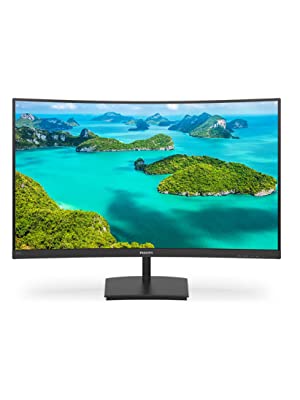
Philips 328E1CA – 32 inch Curved 4K Monitor, 60Hz, 4ms, VA
Philips 328E1CA – 32 inch Curved 4K Monitor, 60Hz, 4ms, VA, Speakers, Flicker Free, Adaptive Sync (3840 x 2160 @ 60 Hz, 250 cd/m², 4 ms, HDMI2.0 / DP1.2)




Less eye fatigue with Flicker-Free technology
Due to the way brightness is controlled on LED-back lit screens, some users experience flicker on their screen which causes eye fatigue. Philips Flicker-Free technology applies a new solution to regulate brightness and reduce flicker for more comfortable viewing.
LowBlue Mode for easy-on-the-eyes productivity
Studies have shown that just as ultra-violet rays can cause eye damage, shortwave-length blue light rays from LED displays can cause eye damage and affect vision over time. Developed for well being, the Philips LowBlue Mode setting uses a smart software technology to reduce harmful shortwave blue light.
SmartContrast for rich black details
SmartContrast is a Philips technology that analyses the contents you are displaying, automatically adjusting colours and controlling back light intensity to dynamically enhance contrast for the best digital images and videos or when playing games where dark hues are displayed. When Economy mode is selected, contrast is adjusted and backlighting fine-tuned for just-right display of everyday office applications and lower power consumption.
Effortlessly smooth action with Adaptive-Sync technology
Gaming shouldn’t be a choice between choppy game play or broken frames. Get fluid, artefact-free performance at virtually any frame rate with Adaptive-Sync technology, smooth quick refresh and ultra-fast response time.
| Weight: | 7.5 kg |
| Dimensions: | 1.11 x 2.79 x 2.06 cm; 7.5 Kilograms |
| Brand: | Philips Monitors |
| Model: | 328E1CA-00 |
| Colour: | Black |
| Batteries Included: | No |
| Manufacture: | Philips |
| Dimensions: | 1.11 x 2.79 x 2.06 cm; 7.5 Kilograms |
Privacy Effect - Very Pleased
Bought for our accounts person. Screen image is not really readable unless in front of the screen. Easy to set and use and eye strain good as eliminated for the operator.
Not compatible with Mac Mini M2
This is a nice monitor, good colours (If you set to RGB colour settings in Mac Mini M2) then the desktop will look great… However, I’m not sure if this a VA type screen issue only but if watching video are opening a large browser window, the screen will flicker and very fine lines will appear (it seems to happen with dark content).
I have used a non 4k monitor with the Mac Mini and all was ok, so I’m trying another make monitor using USB C and another with an IPS screen to see if I can solve the flickering. I have tried Dell 4k and Phillips both have the same issues using HDMI. Thanks to Amazon’s return policy I can hopefully find something that’s compatible.
Very good and immersive love it great price
Picture quality excellent using this ad main monitor working from home highly recommended
Bright clear monito
Works extremely well with MacbookAir in clamshell mode.
Bright clear and responsive, sound OK.
Fantastic monitor at a decent price.
My previous Acer 27″ 1080p monitor was great for what I wanted it for, mostly gaming and video, but I wanted to upgrade. I wanted a larger, curved screen and a much higher resolution. After much research I found that this monitor would suit my needs perfectly and I was right.
The higher resolution is beautiful and the colors are perfect. This monitor has a refresh rate of 75hz which is ideal for most games. For about 30-40 euros more I could have gotten a similar monitor with a refresh rate of 144hz but I think this one is fine and looks amazing.
To top things off the monitor arrived much sooner than I expected and in perfect condition.
Works great for Macs. Picture is good enough for work.
If you want a crystal clear picture where you can see the every hair follicle in Ryan Reynolds beard, then this monitor just isn’t for you.
But if you want a decent quality screen that’s cheap and works great for emails and spreadsheets then this monitor is probably for you. It’s good, does what it claims to and it’s pretty big so I can fit a fair chunk of dull data onto it.
The curve is alright if you look at it straight on, but if you’re giving side eye at your desk mate’s curved screen your eyes might go a bit funny. But all in all, no issues and it looks cool.
And it works for Mac because of the refresh rate. Let’s not go into boring technical details, it just works.
Buy it, plug it in, and you’re good to go. Easy.
Brillia
Excellent monitor. Bought for my son for gaming and its excellent quality for the price.
Quality build and stylis
Very happy with this purchase given the Black Friday sale price. I don’t do gaming so it is ideal for what I need. It was easy to set up and there appear to be enough options there to suit everyone’s preferences. The internal speaker is a bonus as it allowed me to get rid of two old speakers that were taking up room on my desk.
One small gripe that others have mentioned is that the cable from the back of the monitor to the transformer is too short with the result that it hangs slightly above the floor. It just needs another 10-20 cm in length.
Good for Mac and Gaming
I bought this during the Black Friday event. I had been looking for a larger monitor for work and gaming. The 32″ and 4K capability was a massive draw. Allows me to now have multiple windows open on an M1 Mac. Just made some small changes in the mac display options and use an app to snap windows in place. PS5 has also been connected. As a casual gamer, this is an ideal setup for me without breaking the bank and 4K graphics are great. I just made a few changes to the monitor, lowering brightness which was really bright. Then a couple more small tweaks to effectively handle the 4K. A good purchase. Looks smart on desk.
So good........
I bought two.. Amazing quality for 269.. I bought my first for 335 but even then it was awesome
so Im super pleased to get a bargain this time around.
Works well for me
Good quality monitor, as advertised. Bought mostly for day-to-day use with my desktop, so nice to have some basic built-in speakers.
Really nice monito
only reason for the 4 stars is that it turned up in an open box, other than that, I cannot complain, it looks good, is very clear and works well
Excellent picture
Very good sharp picture. I purchased this monitor to connect to an Network Video Recorder. I have four IP CCTV cameras showing on it with absolutely perfect pictures. I purchased a second monitor to connect to a PTZ camera again with a perfect picture . Definitely recommend this monitor.
Perfect addition to home office
I’m so glad I got this screen – super easy to put together and the size makes it really easy on the eyes. Adjusting the brightness and contrast can get the perfect viewing for sunny days. The curved screen is really lovely and perfect for my home working set up
Avery pleasant surprise! I ordered two more!
One for me, two for presents. All my girl friends and girlfriends now have laptops, monitors wired keyboard and mice plus a stand to keep the laptop high enough that they would have to be very creative to spill liquid one it (after one of them inevitably frazzled/shorted half the circuit board). Unrecoverable except the SSD!
Screen is a lovely size, the curve is very nice and the stand is nice and minimalist. It allows the monitor to be moved back quite close to the wall which is good.
However, it doesn’t adjust up and down, so I find it slightly too high with no way to make my chair any higher. You can tilt it forward and backwards a bit though.
It comes with an HDMI cable, but no Display Port or VGA cable which was a bit of a pain if your graphics card doesn’t support HDMI.
I’m sure there’s a correct terms for it, but watching or viewing an image with a solid dark colour on the screen shows up a sort of pixelation rather than nicely blended colour which was a bit disappointing.
Overall though, a good monitor. I’m pleased with it and it’s improved my home office by a huge amount. I don’t use it for gaming, just work and a bit of video and graphic editing.
Brilliant as a second screen for work
This is fab. Big but fab. Used as a second screen and big enough to have a couple of docs open at a decent size together. Very easy to set up, def recommend.
Wonderful ergonomics
The wide screen is great for having two windows side by side and especially good for applications such as looking a family trees, where the width allows you to see more. The picture quality is good, I love this monitor.
This is as good a monitor as Philips produce. I bought it as I have two Philips 4k 28″ monitors already and needed a third for my Macbook.
It has Vesa, which was important (I had ordered a Samsung, very washed out screen and NO Vesa), and is quite light so the desk arm does not struggle.
Despite order tracking said it would takes weeks to come – I tried to cancel when I realised, as it was coming from Spain – it actually came quite quickly. I couldn’t be bothered to return it in the end, as it’s a very competent monitor.
You need to have this monitor at exactly eye-level, otherwise the bottom of the screen seems to fade to grey and so is very unclear when looking down towards the bottom.
Also, because the product is not sold from the UK, it only came with a European 2-pin plug. The kettle-flex type. I don’t like the idea of jamming a pencil in the UK Earth slot and forcing in the two pins, so bear in mind if you don’t have a spare UK lead you’ll need to order one on top of the purchase of the monitor.
I bought 2 for a amazing wrap-around experience
Great monitors but dont expect IPS performance. I quickly got used to the look of them and the curved layout is just wonderful for reducing eyestrain and making long sessions a pleasure. I do graphic design, print, CAD and general computing and find them good for all.
I ordered an “used – looks new” trying to save some money and the environment and got presented with a screen with a full line of dead pixels. Which was very annoying, not even sure who does this quality control of used items here. It was promptly returned.
But the image itself was really good, so I’ve ordered another one (new this time).
Screen is great once powered up and used for Sim Racing, i have no issues with it other than its a little heavier than i’d expect a modern screen to be. One point to note is when i opened the package i had 2 power leads included, one was a european socket which is useless in the UK and the other wasn’t even compatible with the screen so i’m bewildered as to why it was in the package direct from the manufacturer.
I needed a 4K monitor as I’m working with web graphics and needed that resolution to work on some of the files I was using. I also use my computer for gaming so wanted a monitor that could handle that too. Final requirement was that it must have speakers as it’s just awkward having extra external ones. This monitor seemed to tick all the boxes. I was a bit sceptical at first as I’ve seen some bad things written about VA panels (vs IPS) but I wanted a technology that gave vibrant colours and deep blacks. I needn’t have been concerned 🙂 I’ve been extremely pleased with this, very bright, colours are rich and blacks are deep. Much better than my previous IPS panel. The main drawback with VA is reduced viewing angles but with the curved screen this puts you right dead centre on the screen anyway so no problem as a computer monitor. I’ve not noticed any blur on my games either so all-in-all very pleased.
Two things I will say – use a DisplayPort connection rather than HDMI as HDMI doesn’t have the required bandwidth capabilities to run 4K @ the full 60Hz refresh rate (this is a connector limitation not the monitor!). Also, I changed the colour temperature in the settings to 9300K which gave a much better contrast on grey shades than the default setting.
Great value screen - vibrant colours and good brightness
This is a great screen – after nine months of use, I cannot rate it highly enough. Although it is not 4K, the lower quality is not really that noticeable unless you are right up against the screen. The curve is slightly strange when you first use the screen as the edges and corners are not quite where you were expecting them to be, however once you are used to it this works well, particularly if you have limited desk space. The only snag was the screen arrived with a European rather than a UK plug, though Amazon customer service quickly rectified this by allowing me to purchase an adapter and refunding me the cost.
Prodotto molto buono a un ottimo prezzo
Bello, fatto bene, ottimo prezzo.
Certo, grande come un tv ma gli speaker non sono a livello di un tv, e la curvatura dello schermo influisce sull’uniformit di luminosit negli angoli… ma ci sta.
Buen monitor , problemas de fabricació
Correcto, la unidad que prob tena problemas con el rojo, se vea violceo en algunas partes por culpa supongo de las fugas de luz. Pero es un buen monitor si tu unidad funcoiona correctamente.
Brilliant monitor, great resolution and easy to set up.
Brilliant monitor, the colours are bright and vibrant and easy to adjust if needed, although mine was perfectly set up from the start.
Very easy to use, I just plugged mine into a laptop and used as an additional screen which was very easy to set up and use.
The curve of the monitor is great too allowing you to see the screen easily from most angles.
It came with a European plug which wasn’t ideal but I got sent an adapter free of charge.
Refresh rate setting
I was skeptical at first using this as a gaming monitor. BUT go in settings and reset monitor. Set refresh rate to fast not fastest it makes it worse. Do not turn game modes on just have them
Off.
I got this when it became apparent working from home was going to be long term, and I wanted a higher resolution monitor so I could have more of the tools I use to develop software on screen at the same time without clutter and flicking between windows.
Setting up was easy, it just worked out of the box and I was able to get it to the highest resolution possible. I find the picture is clear, the colours are fine and there’s no bleeding around the edges that some people have complained about.
I’ve never used a curved monitor before, and adapted to it pretty well and find it comfortable to use. I find that thanks to the high resolution I spent less time flicking around with windows and can have all the documents and stuff I need on the screen at the same time.
I don’t play games, so have no comment on how it can handle fast moving graphics. There are no USB ports on this (Not an issue for me) .
cet écran est très bie
j’ai rachet le mme une deuxime fois pour avoir deux crans identiques en double cran en remplacement d’un autre 32′ mais qui n’tait pas 4k et tait brillant. Je suis trs content de mon achat (bureautique en 4k x150% essentiellement tltravail)
Toller 4K Bildschirm
Der Bildschirm ist sehr gut.
Ich verwende ihn fr Video-und Bildbearbeitung, sowie Spiele wie No Man’s Sky oder Project cars. Die Anzeige ist mit 60Hz gut genug. Ich bin daher schon begeistert, weil einige sagen, er der Monitor sei zum Spielen nicht geeignet. Wissen sollte man, da das natrlich auch von der Grafikkarte abhngt! Fr heutige Superlaien, die Grafikkarze ist NICHT im Monitor 😉
Zudem sind die eingebauten Lautsprecher ein absolutes Plus.
Ich kann den 4K-Monitor uneingeschrnkt empfehlen, Preis-Leistung ist optimal!
Stiamo parlando di un monitor “general purpose”, se siete fotografi professionisti e avete bisogno di calbrazione colorimetrica precisissima o gamer sfegatati per cui sotto i 200hz non amore…cercate altro. Per tutti gli utilizzi intermedi questo monitor eccezionale. Onestamente ritengo Philips una pessima marca e mi ero ripromesso di non comprare pi niente da questo produttore, di qualsiasi categoria merceologica. Mi sono ricreduto, in questo caso, grazie all’ottima recensione dell’unico sito veramente serio in fatto di monitor (non credo di poter mettere dei link, comunque il sito “pcmonitors”,”.info”). Completamente soddisfatto da tutti i punti di vista (il monitor supporta anche g-sync o Freesync), la qualit dell’immagine e la resa cromatica sono ottime, cos come il look generale del prodotto. Ribadisco il concetto che, in questo caso, il prezzo un elemento decisivo; per una qualit e risoluzione di questo genere dovete spendere almeno il doppio. Highly recommended.
Brilliant monito
I love this. It’s a great size, great value for money. Mine thankfully had no dead pixels and arrived quickly. It is absolutely brilliant – I love the curve (it’s not too much but subtly adds to the experience) and it’s a perfect external monitor.
The only negative is that the ports on the back are in the middle of the screen. This meant that when I was attaching it to a VESA mount that I had to saw of the bottom of the mount in order for the cables to be able to plug into the screen.
I bought this as it was the cheapest 32inch curved display on the market at the time. I wanted something I could use for work in the day and gaming in the evening.
For work, its great. I don’t need any bigger to see all my tasks as it fills my entire visual field. The curvature is nice, it makes me feel more immersed and present, but it doesn’t add to the quality for me.
Picture quality is great, colours are good but not always accurate. Much better than my previous Lenovo T23I
I now game on my laptop monitor instead with 144hz refresh rate. I would 100% recommend *not* getting this for gaming due to the 60hz. Its too jumpy and a bit disorientating with the curvature. I would also say this is too big for gaming, as you cant always see all the screen at once.
Speakers are rubbish so I wouldn’t add that into your decision making – they sound hallow.
Great 4K Monito
I was worried about getting this, but now that I have it I am very happy with it. I needed a new monitor for work since I’ve been using a really old tv, that was very bad for what I was doing. Didn’t support certain resolutions and was very difficult to get it to work with my laptop, also I wanted to mount it on a monitor arm which I couldn’t. Some of the other monitors I was looking at didn’t have good reviews for mounting or didn’t have good menu controls. This ticks all those boxes, it was easy to mount, I used this mount from Amazon – https://www.amazon.co.uk/gp/product/B07QS9RKBQ/ref=ppx_yo_dt_b_asin_title_o03_s03?ie=UTF8&psc=1. the picture quality in terms of pixels is stunning, I am having issue configuring the colour and contrast, but I’m sure I will be able to get that perfected with a bit of tweaking. The speakers on this are decent, I think they are great but it was not a critical feature for me but nice to have. The downside for me was I had to wait for a really long time to get this, almost 2 months.
The color is not quite accurate
The color is not very vivid compare to my macbook retina screen. However, I am using it for coding, so it works fine. However, I guess the quality is not adequate for gaming purpose. The low blue mode is quite good for reading. For those who haven’t use large screen before, it may takes some time to get used to the curved monitor. Overall, it is a bit expensive for the quality.
wall bracket options limited
excellent monitor. However, if intending to using a wall bracket do not buy a wall bracket with multiple fixing options to the monitor as the signal inputs on the rear are very close to the center of the monitor, a small mounting plate is required.
As I am working from home now I wanted a decent but inexpensive monitor. For that it is perfect.
Its nice and big and clear – as I going a bit old man blind and Specsavers is shut its good to see what I am typing again.
However I spent an hour or so trying to work out why I couldn’t get any sound coming out of it, reinstalled drivers, restarted PC, bit of googling etc – then spotted another reviewer confirming it didn’t actually have any. would have been nice but no big deal for me. Its cheap enough so I don’t mind splashing another 30 quid on some monitor speakers.
Great screen, and clear images
Cracking screen.
The resolution is so high that I have had to use scaling for text to read it comfortably, but that helps keep the overall info high on the screen.
Particularly nice when using several windows to view different design elements at the same time.
I am Using with a 4k KVM , and this allows all three of my dev machines to share the resolution, without apparent quality loss.
Should have bought this ages ago….
So with COVID-19, and all this working from home, I needed a bigger monitor, I’m used to 2 monitors in the office. Clearly many people had the same idea.
Anyway this is a fantastic monitor, would recommend, so much desktop to play with, and an excellent design, excellent picture and sound.
It’s such a great product for the price. I mean the thing is huge! It is perfect for Development work, Graphic Design, etc. I am not a gamer, so I wouldn’t know how great the screen performs. I was in-between Samsung and Philipps and I am glad I purchased Philips. It looks and feels super sturdy. The screen borders are super thin, the picture quality super clear. If you use it with a Mac make sure you “Scale” it 😀
The screen is good. Just good. Let me explain.
Pros: Curvature is great, reasonably easy controls, good size, good resolution (4K)
Cons: No audio control on Mac, the stand cannot be adjusted in height and its position is very low, there is a bezel at top, left and right about 1cm big, at 4K it works only at 30Hz.
Don’t use HDMI for best picture quality, use displayport.
I have been using the monitor for several weeks and want to share my impressions about it. First what is good:
Pro:
– Muted elegant design, nothing fancy, just like it should be;
– Good picture. The factory color settings were quite precise. I calibrated the monitor using a colorimeter device and DisplayCAL software. The difference was noticeable, but not any dramatic. With gamma set to 2.2 I see color shades I am unable to see on my other monitors. I can understand that people accustomed to too vibrant, acid colors might consider the monitor colors bleak, but these are real colors;
– VESA mounting. I am using an Ergotron monitor arm with it. For me this was one of the major argument against choosing a Samsung 4K monitor;
– Curved surface;
– Excellent work experience. 4K makes a real difference for a software programmer. I have Firefox and compiler IDE open side-by-side with 3 source code tabs and project overview in the IDE. It is far more comfortable than using 3 conventional monitors;
– Perfect gaming experience. I was unable to notice any artifacts when playing games in ultra high settings. I have GeForce RTX 2080 Ti with G-Sync on;
– Reasonable design of input connectors. I hate when connectors are placed in a niche oriented upside down. Here the connectors are simply on the monitor’s backside. Plugging and unplugging cables is easy without rotating the monitor.
Now the issues:
Contra:
– There is no USB hub, not even USB 2.0;
– The buttons are located on the bottom edge. They are very uncomfortable to press. The problem is that 32″ monitor is really high. When you place it correctly, the gap between the bottom edge and the table surface is less than 10cm. Pressing buttons in this narrow space with the keyboard and mouse sitting before them is quite a problem;
– Automatic input selection. This is the major monitor misfeature in my eyes. The monitor supports three inputs: one display port and two HDMI. I have all connected to three different machines. When rebooting currently selected machine the monitor selects another active input. When the screen is blacked, the monitor selects another input again. None of the monitors I use before did this nonsense. I would be grateful if somebody hinted how to turn this mess off. In the OSD menu I found nothing.
Overall I give the monitor 4 stars.
I’m a software engineer and needed a larger screen area. It works extremely well for that purpose. This is my first curved monitor and I was slightly worried that it would be difficult to get used to, but it wasn’t at all. The curve helps a lot to make a wide screen more usable, so much so that I’m considering getting another one to go alongside it. [Edit: I did, see below.] The resolution is excellent, text is very crisp, and there were no dead pixels.
I’m not doing colour-accurate work, but the custom RGB mode provided sufficient adjustment to match the white balance with my other monitor (it was quite heavy on the green by default). Colours are quite uniform across the screen, and there’s none of the distracting sparkling you can get in bright areas on some monitors. In general it’s very bright, so bright that I have the Brightness control set to minimum. There’s a drop in relative brightness when viewing the left and right side of the screen at an angle, but it’s not too noticeable unless you’re viewing it at more than about 45 degrees. I don’t really do gaming so I don’t have any comments on how well it performs for that, although I suspect you’d want a higher refresh rate for gaming.
I’m currently [when I wrote this] using it over DisplayPort, in a dual-monitor setup with an older Dell monitor. It was not difficult to get it running at 60 Hz at full UHD resolution on Linux, after a bit of faffing with the monitor preferences app. (That app has some usability problems but I don’t attribute those to the monitor.) I ran into a problem that Linux has with DPMI power management on some dual-monitor setups when one or both are connected via HDMI: after the screens have switched off, they switch back on again after a few seconds. This problem doesn’t occur when both monitors are connected via DisplayPort (or when the Philips monitor alone is connected via HDMI).
The OSD buttons are a little bit awkward (they’re mounted on the bottom of the panel). The power LED flashes slowly when the monitor is in power-saving mode; not ideal for a bedroom but I’ll probably just put some black tape over it. These are very minor nits on an overall excellent monitor. I’d say it is one of the best 60Hz UHD curved 31.5″ monitors for the money.
—-
Edit: I’ve now been using the original monitor for about two months and I’m still very happy with it. I decided to get another one to go alongside and that works brilliantly. Again no dead pixels. Both are connected via DisplayPort from a Sapphire Radeon RX580 8GB, and both are running at 60 Hz at full UHD without any apparent problems.
The curve is perfect for a side-by-side dual monitor setup; just right to allow you to get the maximum benefit from the extra screen real estate and not have to view the edges of the screens at too oblique an angle.
Initially there was a worrying flickering of the desktop background when I first connected the second monitor, but I put that down to a temporary software glitch, not the monitors themselves. (I guess 2×3840 desktop width isn’t particularly well-tested in Linux!) Switching to mirroring and then back to dual display caused that problem to go away and I haven’t seen it again.
There seems to be some minor variability in the RGB response between supposedly identical monitors, but again, it was easy to correct for that in the custom RGB mode. The resulting colour match is close enough by eye for me to be happy with it.
The stand doesn’t allow height adjustment and currently there’s a few millimetres difference in height between the two monitors. [Edit: fixed with a stack of paper underneath the stand of the lower one.] (They have standard VESA fittings if you want to replace the stand.)
Overall, using two of these monitors is a very cost-effective and productive option if you need the extra screen area.
Later edit: The dual-monitor setup is still working great 8 months after purchase of the first monitor (7 months after the second). It also works when dual-booting to Windows 10.
Supe
Excellent cran . Les couleurs sont magnifiques et fidles . les finitions sont trs bonnes. J’aime le design incurv . L’cran est tellement lumineux que j’ai du le rduire 20% pour ne pas tre blouie. Bref je recommande
My last monitor was a 24 inch asus monitor that I’ve had for around 5 years then I decided to look for something a bit bigger and this one has ticked all the boxes. The first thing I noticed was the default brightness/contrast settings hurt my eyes as it was way brighter than my old monitor. I eventually settled with brightness set to 25 and contrast set to 55 (both quite low) and a warmish colour temperature (as opposed to the low blue mode). Not much idea how accurate the colours are at this point as I have just tweaked it for eye comfort.
What I like:
Lovely curved screen
Great contrast
Sharp image to my eyes
Lots of scope to adjust image settings
Can be wall/bracket mounted
75hz refresh rate
Has worked well with the games I’ve tried so far no tearing. Motion as good as expected. No noticeable input lag
Standby/adjustment buttons under bottom right corner (not at the back like my previous monitor which was quite awkward).
Bargain
What I dislike:
I bought a displayport cable in the hope freesync would work with my nvidia GPU. It does not appear to work as after I enabled g sync and disabled vsync I noticed screen tearing in games.
Edit: So I looked further into getting freesync working and it turns out the monitor was installed as a generic PNP monitor in device manager. I downloaded the drivers from the Phillips website and it now shows the monitors correct name. Next I downloaded the pendulum gsync demo from Nvidia. With gsync enabled there is now no screen tearing as there was before and motion looks smoother. It’s hard to notice a big difference from regular vsync but this is still proof that something is happening as before updating the monitor driver gsync enabled looked just like vsync disabled.
Lesson learned download manufacturers monitor driver.
So far overall its a great monitor
EDIT: 22/01 2020
I’ve reduced Brightness down to 15 and yes its still plenty bright enough for my eyes.
So my overall experience has been good but the gsync compatibility is not perfect. So the motion definitely looks smoother (as seen in the nvidia pendulum demo) but I am seeing some screen tearing in some games/videos. I can’t quite get to the bottom of the reason for the issue but I suspect it is something to do with the monitors inability to reach the lower frequency’s. For example its good for frame rates between 50 and 75 but struggles to sync with frame rates between 25 and 50.
If I enter the on screen display and go to setup/information I can see it fluctuates between 48 and 75hz so it can’t be syncing at the lower frame rates??
I’d be interested to know if my theory is correct or if anyone else knows anything on the subject.
PCMonitors have done an excellent and very thorough review of this monitor, so I’d suggest you check that out, and overall I would agree with his conclusion. It’s a very nice monitor, and the curve is pleasant, but unfortunately I had to return mine due to severe backlight bleed. This is a problem that plagues many monitors, and obviously varies model to model. If you are able to find one without this issue, I would highly recommend this monitor. For work and gaming, it’s a great all rounder for a great price. Obviously 4K @ 120Hz+ would be nice, but that’s not going to happen at this price point for years!!