Epson EcoTank ET-8550 A3 Print/Scan/Copy Wi-Fi Photo Ink
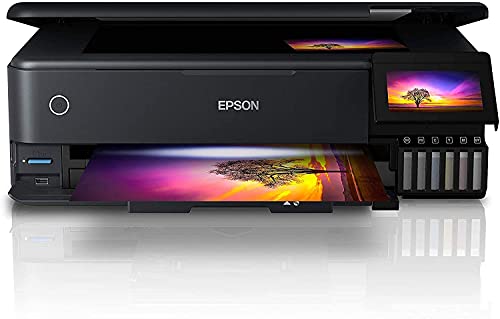
Epson EcoTank ET-8550 A3 Print/Scan/Copy Wi-Fi Photo Ink Tank Printer, With Up To 2 Years Worth Of Ink Included



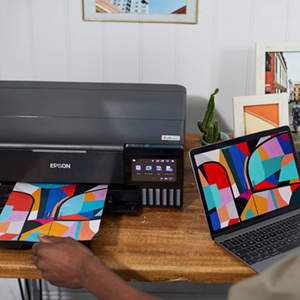

Artistic Media Compatibility
Highly flexible, the ET-8550 not only allows you to print directly onto suitable CDs and DVDs, but you can also store photo size and A4 paper in the front trays ensuring your printer is always loaded and ready to go. The rear tray allows you to print on A3+ paper as well as media such as craft papers and card, whilst the A3+ straight paper feed means you can print on media up to 1.3mm thick and 2m long, giving you the opportunity to be as creative and artistic as you like!
Epson Smart Panel App
The Epson Smart Panel App enables you to control your printer from your smart phone or tablet*. Print photos, copy documents, set up and troubleshoot your printer, and let your creativity flow with a wide range of artistic templates!
Heat-Free Technology
With our forward-thinking Micro Piezo heat-free technology, you can enjoy consistent high-speed printing, with greatly reduced energy consumption and less need for replacement parts.
* Epson Smart Panel and Epson Creative Print require a wireless connection and the Epson printing apps. Epson Email Print, Epson Scan-to-Cloud and Epson Remote Print Driver require an internet connection. For more information, supported languages and devices, visit the manufacturer website.
** Quoted yields are extrapolated based on the ISO/IEC 29103 pattern with Epson’s methodology printing 10x15cm photos, and NOT based on ISO/IEC 29102. Quoted yields may vary depending on the images that you are printing, paper type that you are using, frequency of your prints and environmental conditions such as temperature. During the initial printer setup, a certain amount of ink is used to fill the print head’s nozzles, therefore the yield of the initial bundled set can be lower.
| Weight: | 11.1 kg |
| Dimensions: | 37.9 x 52.3 x 16.9 cm; 11.1 Kilograms |
| Brand: | Epson |
| Model: | C11CJ21401CE |
| Colour: | Black |
| Manufacture: | Epson |
| Dimensions: | 37.9 x 52.3 x 16.9 cm; 11.1 Kilograms |
This is a great printer albeit expensive, but I feel it’s going to be well worth it. Easy to get set up and get the inks added in. Admittedly I am using this converted to a sublimation printer so have put specialised sublimation inks in it. That’s worked really well and i I’m very happy with the print quality. Touchscreen and apps make it really simple to operate.
Bought this as my daughter had recently got married, so plenty of photos to print and A4 did not quite hit the spot. A3 printing is excellent with this printer, the colours are just as you see on screen as long as you allow your photo editor (Photoshop) to manage the printing. Allowing the printer to manage the printing was less vibrant and a bit duller. Can’t praise this printer highly enough.
I needed a new printer, so I spent a lot of time searching on the internet looking and reading many reviews.
After I had finished searching, most of the time I ended up with the same printer.
The Epson ecotank ET-8500.
After setting up my new printer and filling the ink containers, which was easy, I printed my first photo.
WOW!!! brilliant quality. The only downside to this printer is the price, but you get what you pay for.
I bought this to replace my well used Epson ET7750 that had given excellent service and it’s a very impressive printer. Managed to get it at a sale price and seems a quality built item. I sell prints so need it for lots of photos so went for the Epson replacement model. The print quality is exceptional on the ET8550 with the six colour inks. I only had five with the ET7750, although the grey ink does run out quicker than the others. That doesn’t detract away from the fact that the ink lasts ages. If you are into your photography or sell art prints and don’t want to be constantly buying ink then this one’s for you.
Very disappointed with the printer it is only printing A4 size paper and no other size. A 6×4 photo was wasted and the WI FI setup would not work so I have it connected with a USB cable printer to computer. I paid over 500 and I am very disappointed. I have not used it since. I have to cut A4 down to 6×4 size to get printed paper. I use alot of B/W printed sheets of A4 paper I will try that out.
Expensive but excellent quality.
The setup was very simple but the instructions do leave a little to desire. I finally found out how to open the rear card feeder tray via a YouTube video. Complicated, but when you have a versatile printer like this there is a lot to fit into a smallish unit. The print quality is brilliant. I read one review where they said that the colour was not particularly accurate to the source but apart from a very slight drop in saturation being needed it is perfect.
Cheap to run - expensive to buy
After a couple of months, I am very impressed with this printer. It is fast, quiet and full of features. However, it was expensive. You either buy a cheap printer and expensive ink or vice-versa.
The Best Printer that I ever had.
I have been looking at the Printer for sometime and eventually purchased it. I am sorry that I did not do this months ago. I opted for cheaper Printers but then returned to look at ET-5800. I made the move and I am more than pleased with this product. Just absolutely marvellous.
5.0 out of 5 stars best printer eve
his printer is amazing. the quality and ease of use is the best. the ink lasts forever.
5.0 out of 5 stars excellent quality prints
If you are into photography then this one’s for you. Print up to A3+ superb print quality from home use.
Epson ecotank printe
Purchased the Epson ET-8500 printer. This was an excellent choice as this is an amazing printer with all the features that I need and more. This was so easy to set up and easy to use.
Very nice printer. Really impressed. Though don’t expect lazer quality on cheap paper.
Only really annoying feature is that there is no option to have it automatically retract the output tray. This drives me insane as requires a number of button presses to turn printer back on then retract then turn off again. (I think 5 presses). Seems very stupid, but other than that it is fantastic.
After looking at a number of reviews, including Which?, I decided to purchase this printer even though it was more than I really wanted to pay. It was very easy to set up and connect to all my devices, laptop, tablets and smartphones. Filling the ink tanks was also very easy and it should be quite some time before they need refilling. It is relatively quiet and print quality even in draft mode is excellent. I have printed 6 x 4 photographs and again the quality was excellent. The scanner is also very good for documents and photographs alike. All-in-all this is a very good printer.
I was a bit worried at first but soon realised that you need the right paper and then you get lovely prints. It will print on a wide range of stock sizes.
I found it straight-forward to both install the software on my windows laptop from the web and to fill the ink tanks.
Very pleased
Delivered on time. Big Box but not as heavy as expected. Instructions are pretty good, you can follow the Instructions on line if you wish. Setting up was easy and direct, ‘again follow, on line advise’. Brilliant product, colours are deep and crisp. would recommend this product.
Great printer, prints are quality but the actual printer absolutely stinks! Smells like it’s been sat in a mouldy, damp warehouse. It’s so bad it’s even made the paper smell when I’ve been printing off orders, not what customers will want!
Just got this very impressive printer, impressive as was the price but seems a quality built item. Got it for a replacement for my ageing Canon Pixma that had given excellent service. Print lots of photos so went for this expensive replacement. Opened the box this morning and began the set up procedure. Noticed that a software CD is included for Windows but for OS, well just try and muddle through. The set up guide suggested was downloaded to my iPad for advice at hand! Followed all the steps but the printer froze just after I had filled the tanks and it was supposed to take seven minutes to initialise. Went and had my lunch. After an hour is was still initialising. So took the risk to switch it off and start again. This time it went better as I got online to the Epson site and followed the set up procedure there. Eventually it confirmed it was set up. Nothing about wi fi connection. Downloaded the handbook and read that bit not a lot of help. Tried to set up the wifi and the printer apparently connected to my broadband. Nothing on the printer about connecting to my Mac book Pro. So tried the set up on the MacBook. Deleted the old Canon and tried to set up the Epson. Computer didn’t find it at first. Then when selected said can’t connect no driver. “Go to products website for driver” What????? The Epson site is not at all usurer friendly, does not give clear indications as to which of the downloads are appropriate. Downloaded them all in the end and eventually found that the one marked Scan was the one that seemed the most appropriate. Tried to connect to the computer a number of times at their suggestion finally disabled the firewall and then it all worked. By then it was my evening meal time. So eventually time taken from about 10.30am this morning until 5pm this evening. Just hope that all you Windows users out there have a better experience. I’ll try to come back on print quality for photos in the future. Just so worn out now can’t think of experimenting with them now.
Said I’d come bak on the print quality. Exceptional and the software bundle is quite good. (One of the things I downloaded see above). Then thought I’d try scanning. The software was right there in my task bar. Would it work, no of course not. Another hour or so searching the Epson website and finding Scan Smart which is apparently the appropriate software for this printer, not the download marked ‘scan’ that I had downloaded the previous day.
So be prepared for a challenging task if you happen to be an Apple user, seems Epson doesn’t think there are many of us out there. To be fair no it’s working I am very pleased.
I’m not an expert, but compared to previous printers i have had, this one is by far the best, and the Eco tank inks are long overdue, and represent much better value than in the past. I agree that you can print for FUN !.
I like the printer and its printing quality but with this money, I wish it could be a bit faster than this. Printing A3 takes a bit longer and you can not feed multiple papers from the rear feeder.
But my biggest disappointment is its ink tank. When it says 2 years’ worth of ink, I was expecting at least 1000 prints. But I have only printed 25 full-colour A4 and four A3 posters. Some of the ink is almost half empty already. So, you will be lucky if you get 200 full-color prints. Don’t fall for 2 years worth of ink, it might last 2 years only if you make 5 prints per month.
An outstanding Ecotank Printer/Copier/Scanner with massive ink tank capacities (6 tanks using 60 ml out of 70 ml bottles to fill) thus very economical to use. With 10 ml left in the bottles you can top the tanks up when they get to the lowest level allowed but after 90 mixed colour and black and white A4 pages at best quality on 100 gsm inkjet plain paper the ink levels are still full. Important advice for this and all inkjet printers: you MUST leave the unit on constant power (it goes into standby at any time scale from 1 minute to 60 minutes in the settings menu) and in standby uses only 0.8 watts of electricity costing a few pennies a year AND you must also print at least one full colour page every fortnight or the nozzles will dry out and clog, requiring serious repairs. The quality is superb on 100 gsm inkjet paper and on Epson photo paper even more incredible. Using the laptop or base station computer programmes supplied (or downloaded) you can be very creative and also increase the scan resolution up to 1200 dpi which gives an actual 9,924 pixels x 14,027 pixel resolution-way beyond 8K television quality! The single niggle is that the touch screen is not so sensitive and there is no way to increase this through settings. It is a heavy and a hefty machine (see photos) and, as expected of Epson, the construction is of incredible quality. Except for the price (699.00) I would give this a solid 5 stars but it is the price which cuts this review down to 4 stars.
Yeah, it’s damn expensive but you really do get what you pay for.
The quality of the unit is first class. Install instructions are very easy to follow and comprehensive and took about half hour from start to finish.
A full set of inks are supplied and should last hundreds of photos. I had to print about 120 A4 photos for a wedding and this thing did them without any issue.
Print quality is outstanding. Using proper Epsom paper makes a difference and that’s not badly priced on Amazon.
Printing from laptop, iPhones, iPads all no issue with the Epsom app.
I’ve tried many printers and this is the dogs danglers.
Buy one you won’t regret i
Amazing quality A3 printe
Brilliant quality all-in-one scanner and printer. Great for both photos and documents. Touch screen is great. Only fiddly thing is the photo palate and A4 paper tray, but once you figure out how to load it it works great. Really easy to select sizes and paper type and great to have both loaded at once.
Works equally well printing from Mac or iPhone. Really pleased with this purchase. Worth the extra money.
My old printer died.
I bought this Epson Eco Tank Model.
The print quality is extremely good.
The printer does everything for you at the touch of the screen, it’s really user friendly.
I am presently trying to teach it too make my breakfast.
The ink tanks may outlive me before they need refilling.
I purposely do a colour print every week to stop the ink from drying out in the print head etc.
George Watson at 1400, on Thursday the 10/11/22.
Bought to replace a 15 year old all in 1. Its really nice not having to keep a continuous stream of ink carts being delivered to the house, and printing and scanning via the network rather than as a shared device is really handy, but ouch! that price :(. Print and scan quality are not fundamentally better than than 150 15 year old printer it replaced. Really nice bit of kit, but I do weep every time I look at it.
Printed a series of operating manuals with no glitches, two sided with illustrations and photographic images. High resolution photos are reasonable quality if printed on good photographic paper, but some bleed through evident on lower quality papers. Only criticism I can offer.
No visible change in ink levels yet after nearly 500 pages of print, Impressive !
It’s simple to set up just follow the app on a phone. no spills when filling ink tanks. Coded caps on ink bottles makes shure you cannot put the wrong inks in.
Print quality is good out of the box. It frist job was to print 50 order of service. This we used matt 130g paper dubel sided and an 80g paper insert we had no jams or mishap. Printing from Samsung phone is a doddle much better than Canon just select print set paper size hit print and your done
I have done a few photos print using lighroom only had Canon gloss paper to had gave good quality and colour
It’s was paying the extra over the Canon
Will update in due course
Easy to fill and set up and the software works well with windows 10 and 11
Didn’t expect all the provided ink to be required at the start. Can see why they do ship this with a second set although if it lasts as long as expected that may be a fair while. Why only 4 stars. The scannner cover feels really cheap and with no autofeed for at least a4 feels a backwards step. I think the scanner bed is also slightly smaller than I expected so tight on some drawings. The software works really well but less options than my last model. It is smaller though and a lot less obtrusive and the screen paper tray. Workings are very neat.
I decided to upgrade to the Epson ET-8500 from my previous Epson XP printer when I got a new 24-inch iMac. I’m a home user printing photographs and documents but am not a particularly heavy user. Cost wasn’t really a consideration and the Eco Tank system attracted me. What really sold it to me though were the comments from a number of well respected reviewers regarding the print quality of both photos and documents. I was seriously impressed setting up the printer, it has to be the easiest printer I have ever set up. Everything from filling the ink tanks, to setting the wireless connection and downloading the software was extremely straightforward. I would only comment that the Epson website initially identified my operating system as Mac OS Catalina rather than Mac OS Monterey whether this really was an issue I’m not sure but if you are using a Mac and Monterey be sure to change the setting if incorrectly identified and press go. My initial experience with this printer has been extremely positive. The small footprint, build quality and appearance are excellent. I am very pleased with the quality of the output and the low level noise when printing. Epson Smart Panel compatibly is an added bonus.
My excellent Canon Pixma printer died and on principle I wanted to get an ink tank printer to avoid cartridges. The problem was that it seems most of the ink tank printers are far more expensive upfront (cheaper in long run) and sacrifice useful feature or print quality to fit these in (Canon take note!). This Epsom is one of the most expensive, but doesn’t sacrifice on features that I needed (it is also a Which Best Buy for good reason). So I took the plunge as I could spread the cost out over 12 months with Amazon. So far I am very pleased!
This printer was easy to install via the phone app – this is the recommended way and gives clear interactive instructions. Ink tank filling is mess free. After install was completed (~10mins), the PC found it immediately over Wifi. We were printing within 15 minutes.
The most important thing for me is print quality and speed. The quality of photos is excellent on photo paper. The difference to professionally printed photos I can’t find. The quality of documents on plain paper is good, especially given the high speed with which they are printed! The small criticism is that on plain paper this printer could go less heavy on the ink. In particular any absorbent paper will likely see some ink bleed (so consider what you print on). But for home use overall it is excellent.
I can’t yet comment fully on the longevity claims of the ink tanks. But they remain around the full level, despite some high initial use. So looks promising.
In terms of other features Scan / copy quality is great. The printers footprint is surprisingly small (smaller than my Canon). It has 2 paper trays for A4 size and photo paper, 1 CD tray and a rear tray. The touch screen is big and easy to navigate. It has a maintenance tank to collect excess ink rather than leave the printer full of ink from head cleaning (like my Canon). The printer even has its own email address to send it documents to print.
Then there is the mobile phone App this is great also. Easy to use and print from. This also enables some creativity (template ideas etc). The PC software is less refined, but provides the same functionality. Some of the creative functionality is also available on the printer touch screen.
So although this is still on the expensive side I think well worth it. It is high spec and you pay for what you get. Time will tell if it lives as long as my Canon and represents better value. No printer is perfect, but this one gets pretty close!
I eventually managed to get everything up and running though not without issues and I used the Smartphone app. Looks good but doesn’t do all of the job and neglects to tell you to load in the software from the included CD, may seem an obvious thing to do but it is only half a job and should have been rectified and tested.
Initially It printed fine on blank A4 paper for text etc. However, the Photos I am printing were 98% good initially, sadly the 2% ruins them as I am getting a great big splodge of black ink dripping onto the top right corner of the prints rendering them unusable. I have used a number of my top quality Epson Photo paper sheets so far which is annoying in extremis. The small prints are fine but A4 is just a no-no at the moment.
This improved in time as I suspect that the ink dried out, though where it came from is strange. Having let things settle down the A4 photo prints are coming out exceptionally well
The drawers are poorly designed with the output tray sometimes getting stuck and not coming out fully. When it is out you cannot easily top-up the photo paper draw as it blocks it. The machine recognises that the back tray is open and loaded but then won’t take the paper into the machine. However specifying that as the default tray does work so there is something a little screwy happening.
Despite having tried everything and followed the instructions online and from the printer screen it refuses to print Envelopes from MS Word and just tells me to alter the CD/DVD insert but I am NOT doing a CD/DVD
Overall for photo prints it is very good, it just has poor design faults and lacks flexibility or something.
The printer is a good size, slightly smaller than stated in the description. Easy and straightforward to set up, using the app. Cartridge refills are expensive, though each refill should last a considerable while for home use. The refill bottles seem easy to fill, and I like that you can see the ink levels at the front in an easy view screen. The front touch screen is quite intuitive to use.
Very quiet running, quick to use, no cranking and grinding noises like those made by my previous printer. I chose this printer due to it being a Which Magazine best buy, along with many good reviews. It’s smart, and neat looking, and works well.
The paper tray is easy to use, and holds plenty of sheets ready for printing. Scanning and copying are also easy and straightforward to do. We did have a slight problem at one stage with paper refusing to print, but managed to solve it quite easily.
On the downside, this item is expensive though hopefully will last a while. You need to be able to learn and understand various settings when statements are displayed on screen. Also, there was so much plastic packaging within the cardboard box, most of it totally unnecessary and it would be great to reduce some of it.