Epson EcoTank ET-3850 Print/Scan/Copy Wi-Fi Ink Tank
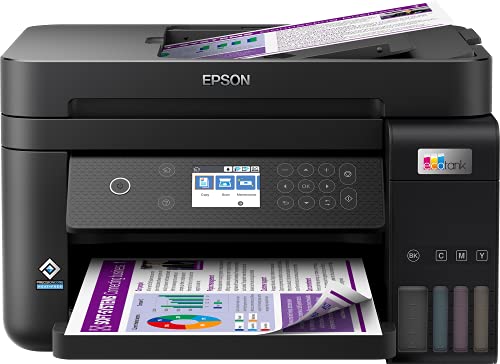
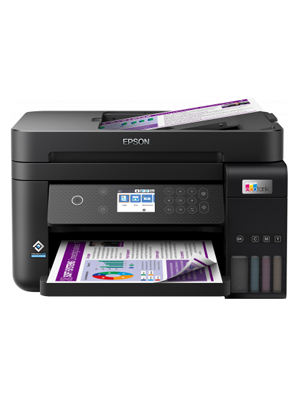
Epson EcoTank ET-3850 Print/Scan/Copy Wi-Fi Ink Tank Printer, With Up To 3 Years Worth Of Ink Included


Packed with features
Print, copy and scan quickly and efficiently. This compact printer features a 6.1cm colour LCD screen, automatic double-sided printing and 30-page document feeder, 250-page front paper tray and print speeds of up to 15.5 pages per minute⁵ so you can speed through a variety of tasks with ease giving you more time to relax.
Modern flexibility
A printer for the modern user, this EcoTank allows you to print, scan, and more directly from your phone or tablet using the Epson Smart Panel ap³. What’s more, with full Wi-Fi, Wi-Fi Direct and Ethernet connectivity, integrating this printer with your existing home or office set-up will be a breeze!
Heat-Free Technology
With our forward-thinking PrecisionCore Heat-Free Technology you can enjoy the benefits of greatly reduced energy consumption and less need for replacement parts. Unlike other printers, the printhead also comes pre-installed so setting up your printer is hassle-free.
¹ Average cost per page saving and average number of inkjet cartridges required to print the same number of pages as EcoTank “102” and “104”ink bottles. Comparison between average yield (A4 prints of ISO/IEC 24711) of EcoTank “102” and “104” bottles and the genuine consumables used within the 50 best-selling inkjet cartridge printers (according to GfK Inkjet Printing Devices and Inkjet Printing Cartridges Point of Sale panel market data for Germany, France, UK, Spain and Italy Apr-19 – Mar 2020).
² Quoted yields are extrapolated based on Epson original methodology from the print simulation of Test Patterns provided in ISO/IEC 24712 or 29103. Quoted yields are NOT based on ISO/IEC 24711 or 29102.
³ Epson Smart Panel and Epson Creative Print require a wireless connection and the Epson printing apps. Epson Email Print, Epson Scan-to-Cloud and Epson Remote Print Driver require an internet connection. For more information, supported languages and devices, please visit the Epson website.
⁴ Based on print volume of 100 pages per month and the lowest yield produced from the first set of inks.
⁵ Determined in accordance with ISO/IEC 24734 showing the average of ESAT from the Office Category Test for default simplex. For more information visit the Epson website.
| Weight: | 6.7 kg |
| Dimensions: | 34.7 x 37.5 x 23.1 cm; 6.7 Kilograms |
| Brand: | Epson |
| Model: | C11CJ61401 |
| Colour: | Black |
| Batteries Included: | No |
| Manufacture: | Epson |
| Dimensions: | 34.7 x 37.5 x 23.1 cm; 6.7 Kilograms |
We bought two of these. One for normal network printing and the other for sublimation. Normal Epsom quality and eco tanks are much easier on the pocket than ink cartridges. Tank is easy to fill and pages per minute at high quality aren’t bad. We have connected via both Wi-Fi and Ethernet. Software utilities re ink quality, etc all work well. Very pleased with our nit insubstantial investment.
Great value printe
Probably the best printer I have ever brought. Love the tank system I have had it in a domestic setting for a few months now and ink levels are still great. Easy filled, easy double sided printing etc etc.
I had the previous model, the ET3750 so when that wore out it was an easy choice to upgrade to the ET3850 – the ink tanks are economical beyond belief compared to printers using ink cartridges, print quality is great even on photo paper, fairly quick print speed (good enough for home office) and my phone/iPad and laptop connect to it without having to download drivers or faff about. Great printer.
Great printe
It is easy to set up, and the print quality is very good. This is the second EcoTank Epson printer since I bought the first generation 5 years ago. I can say every aspect has been improved! I can recommend hit to anybody!
I use a printer for a small business and I used to spend nearly 50 per month in ink on my old Epson. I bought this printer for around 300 a year ago and haven’t had to buy any ink since. When the ink finally runs out the replacements are far cheaper than the old printer so I am very much quids in.
The printer does everything it should, it simple to set up and scanning to my PC also works very well whereas I have had problems in the past with other printers.
There are other EcoTank models to suit your needs and budget and I assume these would similarly tick all the boxes too.
Well I am super impressed with this printer, if you have a smart phone then the setup is a doddle, just follow the steps and Bing! It is done. Print quality is great it is smaller than my previous HP printer which is great, fast printing as well, I couldn’t fault it. Well done Epson.
Update of previous Epsom printe
Bought this to replace previous Epsom WF printer and loving it
Has smaller footprint and the print speed and quality are fantastic. The continuous ink is far cheaper than the previous cartridges – getting more than double the number of prints for a fraction of the cos
Excellent SuperTank Printer from Japanese company Epso
This is the best inkjet printer I have ever owned. I have owned many other brands and this is my first Epson and I can honestly say its the best brand with the best Japanese technology.
The Japanese PrecisionCore ink Printhead technology from Epson is a laser beater and prints in amazing quality. It is heat free and therefore is eco friendly for the environment as it uses far less electricity than your normal heated printheads.
Well done Epson for this amazing printer.
The setup is very easy and can be done all on your smartphone and you will save a lot of money using the EcoTank Ink bottles.
Great Printe
I don’t normally write reviews but having read others regarding this printer I felt I had to correct some issues. Firstly of course, it does come with a paper tray. Secondly the installation took around 20 minutes, not 2 hours as some review mentioned. I have to say the installation on my phone was incredibly easy, they take you slowly step by step through each stage, with easy to understand images. I have never installed something with such clear steps in my life. The bottles of ink feel quite high tech and are impossible to spill as they slot into the printer which automatically stops when it is full. The printer feels solid and I am really happy with my purchase. The screen on the printer is not massive, but it is bigger than my previous printers and even with my eyesight I can see what’s going on. So all in all very happy!
Overall great printer.
Overall it’s a great printer. Best feature is the auto feed when you want to copy. Has made life so much easier.
Only slight issue is the power button doesn’t always switch the printer on. Sometimes it can take 10+ goes to get it to switch on.
My old HP Multi-function printer was ruined during a house move so I was looking for a quality replacement. I have alway bought HP as I like the software and quality of the kit but was fed up with the cost of the ink and print head cleaning. After much research, I saw the Epson ink tank printers scoring highly in a number of independent reviews. It seemed to me that the initial cost of the machine was off-set by the low cost of ink over the long-term.
The features of the ET3850 were exactly what I was looking for; quality printing (including auto-duplex), scanning and wifi printing from mobile devices. It was easy to set up and the ink filling process was easy and spill-free using the foolproof fittings which differed for each colour to avoid mistakes. Connecting it to my wifi network was also easy although it did take a little time to update its firmware early in the process. I have 2 minor niggles when comparing it with the various HP models I’ve owned: 1) the software is not as user friendly or as comprehensive, but it works, 2) pressing the off button does not switch the machine off, you have to then use the menu buttons to change an option and then confirm with the ok button before it switches off. Although some might find this a benefit, I find it annoying that I have to press 3 different buttons to switch it off. On the plus side, as well as good quality printing, the machine seems to be able to print decent quality when started up even when it hasn’t been used for a while. I found that the HPs often required head cleaning and test printing which wasted paper, time and expensive ink! So far, I haven’t had to do this at all. Overall, I think this model is good value when looked at over a two or three year period and hope it last much longer than that. Having owned and used it for a few months now, I would buy it again.
Over the years I’ve had several home printers, normally with ink cartridges. We don’t do a lot of printing and always seemed to be spending more ink cleaning the nozzles than printing. I thought I’d give this printer a try as it doesn’t use cartridges.
My first thought when I took it out of the box was how light and cheap it felt. My previous printers have felt a lot sturdier than this. I downloaded the app to my iPad as that was the recommended way to set the printer up. All went well until the ‘ink initialisation’ phase, when nothing happened. After a couple of retries with the app I gave up and set the printer up manually via the touch screen. This all went well and the printer was connected to WiFi and ready to go fairly quickly.
The printer works well and so far I’ve had no issues either printing or scanning via WiFi. I make sure I always print at least one test page a week, if I’m not using the printer much, and so far only had to run a quick nozzle clean once. One thing to note is that this printer does not have a paper tray, all paper is fed via the rear, this may not be convenient if you print a lot of pages at a time.
The printer is light and the plastic paper trays don’t feel very strong, if you press a button on the front too hard you’re like to push the printer back! As I don’t print much this printer does me fine, I’m not so sure it would if I was a heavy user.
To complicated for me (I’m 66)
I know my way around a pc, laptop and a Mac but this has me thinking, it’s never happy about the paper size I tell it I’m using, apart from that it runs rings round my 15yr old printer (so it should) but it does the same thing to me I do like the function to print from my iPhone onto A4 gloss in super quality from anywhere in the world, not that I want to go anywhere in the present day climate. 5 stars well done EPSON.
I bought this to replace an aging Canon printer which did not incorporate a scanner. I was fed up with purchasing cartridges which needed changing on a frequent basis. First thing to note about this printer is that the setup is a somewhat laborious process, so patience is required. Helpful videos on YouTube make it slightly easier.
Once the setup is completed, getting used to the operating keys takes a while as it is not entirely intuitive. Plus, the printer is expensive to purchase. Okay, that’s all the negatives. Once up and running this is a dream to use in comparison to other printers I have used. It is quiet in operation, works seamlessly with Windows, IOS and Android (I’ve had issues with AirPrint in the past) and doesn’t take ages to fire up like my Canon. The footprint is smaller too. Prints and scans are great quality on cheap A4 paper. I imagine serious photographers will get stunning results on photo quality paper.
So, is it worth the money? Absolutely, even for a casual user like myself. One delighted customer!
Nice printer easy to set up well was for me for what I need if I needed more maybe might have been a little harder, filling ink pots so simple. One fault is the size of the screen very very small and if you want to turn it off press the start button as you would think it turns it off and on but then you have to go to the screen after pressing the off button to press the button on the screen that says off.
This printer is prints good quality photos but I miss that it does not print automaticly – makes me think of my old epson printer that I needed to put printer back to the feeder, but it prints a lot quicker as there is no pause between printing on both sides with auto at high quality booklets or docoments.
Got this as needed a new printer. Wasn’t sure about it due to some reviews that I read, but took the chance and it has been fine. Takes about 20 minutes to set up, 10 minutes to charge the system and then about another 10 minutes to install and print off the calibration sheets and a test sheet. Filling with ink is a doddle, the bottles just sit in the tank fill and fill it up, though it still has a little left after you first fill it, so don’t try and squeeze the last of it out, once the system has charged itself, there is a little bit of room in the tanks, so you pop the bottles back on and he presto, it fills right up again using the little bit that was left in the bottle. Print quality is not bad for a home printer, and it doesn’t have any problems with duplex printing. Over all, I am quite impressed with this printer, and glad that I went for this model.
I only have my printer a couple of weeks but so far I’m happy. I really only need it to print out documents so the quality is fine but it is very noisy. It took a while to set up but I just followed the App and it worked fine. It’s also easy to print from the phone although you also need the app. The scanner is easy to use too.
Epson EcoTank ET-3850
I decided to get the ET-3850. It does automatic 2-sided printing and has the ADF feature (Automatic Document Feeder) for making a hard copy of documents.
Warning to buyers – The ADF can only do a 1-sided hard copy of the documents. But, this is not a deal-breaker for me. I knew this before I bought it.
There is a way to do double-sided copying. You just need to manually run the documents twice through the ADF feeder. This is how I do it:
After the first run of copying, I simply flip the documents (that are to be copied) in the ADF. I then re-feed the recently printed documents in the paper tray. Then, re-run it. Make sure you get the sides right. It will take some trial and error. Yes, it is manual, but an ADF feature in such a compact printer is gold for me and I only need to do a few copies at a time.
ET-3850 Positives –
1. I am satisfied with the ink efficiency so far. I have used the ADF to make about 200 b&w copies. The ink level has marginally dropped.
2. The ADF output is damn good. I am copying handwritten pencil notes. They come out dark as the originals (even when I lower the dark settings a bit).
3. The printer is compact and smaller than my current HP printer with overpriced cartridges.
ET-3850 Negatives –
1. The build quality is not of the highest desire for the price. But, it is sturdy enough and does the job. I just wish it looked a like little bit more posh.