WEEFUN Newest TINA2 S 3D Printer, Ultra Silent Mainboard
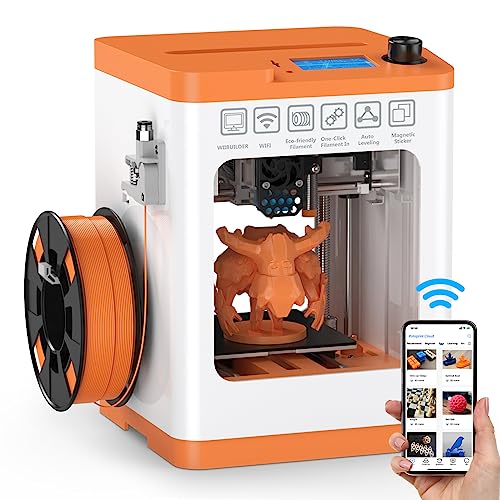
WEEFUN Newest TINA2 S 3D Printer, Ultra Silent Mainboard with WiFi Cloud Printing, Mini Heatable PEI Platform, Auto Bed Leveling DIY 3D Printers with Resume Printing, Fully Open Source
The compact 3d printer is out of the box, safe and easy for pretty much anyone to handle! Even young kids! It’s a surprise gift on a birthday or holiday, for architecture art, school teaching, business sample/gift model making, maker spaces or a shop crafts and toys DIY, etc.






The Best Gift for Halloween, Thanksgiving Day, Christmas





Auto bed leveling Tina2S 3d printer for Beginners, enjoy magical creating fun!
3D printing is a fun way to get your kids interested in STEM concepts from an early age. Kids learn creativity, engineering skills and problem-solving skills. Accessibility for both experienced and amateur 3D printing enthusiasts, young and old hobby crafters alike, to create your excellent project.

Friendly Tips:
- Build Volume: 100 x 105 x 100mm
- For the USB connection to the printer, you should need to CH341 driver, which can find on the SD card we put in.
- For slicing software installation on the macOS computer, you should need to allow the privacy settings on your computer’s software first. The guide video can be found on the WEEFUN Youtube official channel.
- The gap between the nozzle and the build platform is recommended to be the thickness of a sheet of A4 paper.
- For large printing, the included solid glue can be applied to the platform to enhance the adhesion, bed heating to 45°C-60°C.
If you have any questions, please ask us for assistance the first time, we will help you work it out. Thank you for your support!
Great Customer Service
Purchased as a gift at Xmas. After just a couple of weeks there was a fault with the power supply. Within 48 hours it had been replaced! Perfect little printer for a newbie to 3d printing.
Very simple to use
This is my first 3D printer and I had little knowledge of them. This is so simple to setup and use, I was printing within minutes. Great app and loads of cool things to print. Really happy with it.
It was easy to set up and use
This was a Christmas present for my son, he loved it and used it continually throughout the holiday. It is really easy to set and use and the items printed very well. The price is good value for money. Great item, recommended.
Great when it works.
My 11yo loves this 3D printer. It is very good when it works and we’ve printed lots of things but is does need to be supervised as the base of the model doesn’t stick to the printing pad every time and the cog belt has fallen off quite a few times too.
Great beginners printe
It takes a bit of getting used to but I love it, its a very handy little printer for small projects and the one thing I cannot fault is the customer service. They have been amazing at helping me with any issues I’ve had with it. Highly recommend!
Easy to sta
Great fun. Had a few problems with the first couple of builds due to the build moving on the plate. Have messaged the customer service 3 days ago, and still waiting for them to come back to me! I have only made smaller models since which have come out great. Easy to use and already thinking of buying a bigger printer.
Absolutely amazing customer service!
I was having a few problems with the printer. I spoke to a lovely women called Christine and she got back to me straight away.
Sorted my problems out with no problem!
Couldn’t recommend the customer service enough!
Thank you so much Christine!
Perfect printer for beginners
This is a great printer for beginners. Within 10 minutes out the box, you’re printing. I’ve done plenty of prints and have had very little issues. Mine was delivered without the pei print bed but weefun customer support sent out a replacement free of charge. Great customer service. Small print area but perfect for models and small parts. The bed levelling works perfectly and is a major plus for beginners who want results with very little effort. Highly recommend!
Fun, well built and amazing customer service
The printer is great and has sparked an interest in 3d printing I will likely have for years. I have had to contact customer service for a couple of issues and they have been superb and have dealt with minor issues very promptly and politely. Would definitely reccomends this printer and also Weedo/WEEFUN themselves
First time 3d printer user and this printer could not be easier to use . out of the box it could not be more easy to put together, and after 10 mins putting it together, 1 hour 14 mins later first test print from the supplied memory card complete, although I am not sure what I am going to do with a miniture frog.
Yes the print bed is small so your kind of limited on what you can print , but I am fairly sure with the software that comes with the printer bigger items can be printed in parts and glued together . But for printing the 1/24 scale model parts that I want this should be perfect.
As for reliability, I can’t comment as yet as only had the printer less than a day but looks well made so hopefully there will be no issues .
If your looking for a small printer that has some of the functions of high end printers that doesn’t break the bank to purchase and that takes up very little space this seems so far the way to go.
With regards the print quality I can’t really comment as I have nothing to compare it to, but the test prints seem good with the print lines being Bearley visible, with the default print settings.
With regards operating this printer the menu on the built in lcd display is simple to understand and appears to have multiple options for manipulating the print settings.
Over all I am very pleased so far and would say for first time printers this is perfect, and just ordered a 1kg roll of filment to put the printer to a proper test . FYI, you can get a free print file for spool holder extender on line that attaches to the exsisting holder on the side of the printer so it will hold the 1kg rolls of filament. which I have printed with the filament that came with the printer.
Good little printer with issues
Brought this last week and it’s been printing fine no problems. Then yesterday I tried to print something and the head crashed into the bed and has caused damaged? I’ve returned it to Amazon and they have issued a full refund so overall very happy. Will be ordering a replacement soon!
Update
Customer service reached out after leaving my review and offered me a 4 pack of filament to say sorry for the problems I had. Have ordered another tina2 s with the refund I received. Very happy and very good customer service!
The printer itself is pretty good for getting started. It’s a little smaller than I expected it to be, but it works great for the few things I have managed to print.
I got my printer back in may but I’ve come across my first massive problem, my hotend stopped printing out filament, In trying to change it I’ve found it to be super tight and it won’t loosen to be removed. The wrench that came with it has just made an engraving on it from trying to remove it.
Feeling irritated at this as I was in the middle of a project for my friend.
Update:
The seller contacted me and offered a new printer free of charge which was incredibly generous! I received my new printer the other day and it works even better than my original device!
I found the conversation I had with the seller to be super helpful and glad to know I can ask them if I need any help again in the future!
I do highly recommend this printer if it’s just for wee projects or to get you started!
I’m brand new to 3d printing and this printer (Tina2S) turned out to be a good way of getting started. Fairly simple to use (Although I had some assistance from friends) and while not everything I try to print has worked when I’ve had success it’s been great (Like my glow in the dark Tardis). I’ve been slicing (And experimenting with settings) using Cura (Which now has a profile for the Weefun printers) and copying directly onto the microsd card using a cheap adapter. Controls are simple and you can monitor progress via the app if you’re away from the printer. One thing to note. The spool hook on the printer won’t take a 1kg spool so you’ll want to invest in a cheap spool stand if you’re using heavier spools.
So far I haven’t had much luck with more complex models (Like miniatures and snakes) but I’m sure there’s things I can tweak to make them work better. It’s a fun learning experience with a printer that does what it can to make a complex subject a bit easier.
After about 9 prints, a part on the y axis broke. its held by the plastic case and has snapped off after 3 hrs of printing. im attempting to fix it at the moment but i doubt it will work.
Update:
After my review the seller contacted me to offer to send me a new printer, which I accepted. The new printer arrived very quickly and works great. I’ve changed my review score to be reflect the sellers great customer service.
Absolutely gobsmacked with the service and the product. AMAZING
My first one simply didn’t work and I left a fair and honest review (was just disappointed as we were so excited) that was a low score.
Then a customer focused lady, C, contacted me and sent a new one out for a (very) reduced amount. We really wanted it to work so accepted…..and its WONDERFUL..))
My son hasn’t stopped using it..lol..
Just so impressed that a young company would do that and now as long as Weefun make them,we’ll buy them.
Anyway..super easy to use, it really is plug and play as it were. Took 5 mins to start a print on the replacement. The prints take 1-2 hours so we leave it on when out and are very good for the size and price point.
Thank you very very much Christine….
Incredibly E asy to use, customer excellent support!
I’m a technophobe who had no clue where to start with this printer (purchased for our 10 year old son). With a little help from our older child and some amazing customer service from Weedo, we are able to print all sorts, experimenting with different colour filaments also. We recently had a minor issue with a clogged nozzle (I didn’t have a clue!), and one email to Weedo was all it took. They responded with several videos and solutions on how to fix the issue and we were up and running in no time.
Replacement parts are really reasonably priced and Weedo’s video guides are simple to follow.
Any queries I’ve had about anything (simple or otherwise), have been answered quickly and simply.
I cannot fault this printer and I cannot fault this company!
Bought this two days ago and I’m so glad I did. I’ve always wanted to try 3D printing, but always thought it was too expensive and too complicated for me to even bother. But after reading how easy this one is to use, and at such a reasonable cost, I thought I’d give it a whirl.
After taking it out the box all that was required was placing the reel of PLA filament on the side and attaching a tube then feeding the filament in. It is supplied microSD card with all the software on that you just put in the slot and chose one of the sample prints from a list of about 10 different designs. It’s automatically levels itself and the little screen on top tells you all the heating information. Just start the print and off it goes. Simplicity itself.
After trying out a couple of the tester prints I thought I’d try printing a free STL file that I have from the internet. The software you need to use to import this is all on the microSD card and just needs installing on your PC or Mac and again seems easy enough to use. I can see the slicing software is an art by itself, but I think with a few more prints I’ll become more familiar with the apps and deducing where the optimal places going for the supporting structure. I still managed to print it reasonably well with my basic knowledge.
Very happy so far as I haven’t had any misprints yet. Early days, but I’m pleasantly surprised. The quality of the print isn’t bad. Yes, you can see the gradient lines but not as much as I thought you would at this price point. Probably best to go for a bigger model or resin printer if you want finely detailed figures or larger pieces, but this is a great little printer for scenery, bases or school projects, and I t’s fairly quick too. The build plate is small at about 10cm square, but perfect for small projects or multi part builds.
It looks neat and is compact and smart.
Perfect for beginners and children with an interest in technology. Can’t recommend this little printer highly enough. No muss, no fuss.
so after playing around with it for a week or two the heat block has worked it’s way loose and has started dropping the print nozzle lower midway through each print. This has lead to it dragging the nozzle back over what it has already printed ruining every print I’ve attempted for the last 5-6 prints. I’ve returned to back to Amazon for a refund. I will purchase another one as it was great while it lasted and hopefully and I’m hopeful that my next one will not have this problem.
Update:
Weefun actually reached out to me after reading the review below to work through the issues i was having. As it turns out it must have just been bad luck with me receiving a printer that was defective from the start. They actually sent me a replacement, free of charge! The replacement is so much quieter than the original one i had received and seems to be working a lot better.
So, as well as now being impressed with this little printer, the level of service from Weefun is on a whole new level and worth a recommendation on that alone.
At first, it worked straight out of the box. Within minutes you can be printing, so user friendly.
Thats where the good ends unfortunately. After about 6 prints (over 2 weeks), the cooling fan packed in, causing the nozzle to clog. After clearing out the filament from the nozzle and replacing the failed fan, thought it best to replace the nozzle with one of the spares that came in the box. Followed the video which makes it look easy but the nozzle was fused to the hot end and there was no way it was coming off. Purchased a replacement hot end (checked and nozzle and again it looked to be fused to the hot end with no way of removing it with the included toold should it need to be replaced), fitted it, set the z axis, loaded filament and printed off a ‘Benchy’ boat. This turned out fine. Printed another model which also turned out fine. Then, the nozzle started to clog again! Now, i was using AMZ3D PLA 1.75mm 3D Printer Filament with temperature at 200 degrees (as recommended by some 3d printer veterans). Explained in detail what was going on with this printer to some knowledable people, one of whom had also had the exact same problems with this printer.
Long story short, if you are looking to venture into the wonderful hobby of 3d printing, please look elsewhere, there are plenty of options available costing less and more than this but, you will be much better off going with something else, unless you are a tinkerer and enjoy shelling out money every week or so for spare parts to fix things that should never be going wrong as often as they do with this.
IT'S FANTASTIC!
We bought this amazing 3D Printer so our young grandchildren could see and learn from the use of new tech. It produces eye catching models, such as dragons, fish, lambs and unicorns that very ingeniously are made to be flexible and which were loved by the children. A good 3D printer to explore this new technology.
Grandsons first attempts
Grandson loves it . Bought for his Birthday .These are his first projects . A book marker to start with , then a cat and kitten . Last one was image of his dog . He is very pleased with it . Easy to set up . I guess it will be a favourite item for him now .
I’ve been using this for a month and would recommend this for somebody looking for an out of the box, no fuss experience with 3D printing. I’d also recommend the extra cost of the Tina2S over the standard Tina2.
I pulled this out of the box, turned it on, and was away printing something. The default settings in the slicer (I used Cura, and haven’t tried their own slicer) worked very nicely for normal PLA and PLA+. There are some refinements you can make as you become more familiar, but there was nothing desperately needed to get some great models and print in place toys going as a first experience. I did have to go into settings to turn on the heated bed, but that was it. Auto bed levelling takes away a lot of the stress, and the compromise here is a smaller build volume, and slower print speed compared to similar priced Enders.
A complaint I have is that the spool holder only holds 250g spools, and value is found in 1kg spools. The first or second print should either be a spool holder replacement, or an extender.
So far I’ve used PLA and PLA+, and gloss, silk, and sparkle variants and it’s taken everything I’ve thrown at it. The only major issue encountered has been with the odd heating error for the bed or nozzle after I’ve moved the printer. It seems moving it about can cause the cables to come free enough to cause errors, but a quick jiggle and the issue is sorted.
For the price I couldn’t recommend this more for anyone looking to get into 3D printing with a no fuss printer.
This review is for the 2S
I am a self confessed 3D printing addict. My first printer was an Ender 3 around 4 years ago. That has since been modded to within an inch of it’s life. I also own a Prusa MK3s clone which is my workhorse and prints everything I could ever want….so why would I buy a beginner friendly mini 3D printer?
1. Portability – This thing is tiny, I volunteer for a local maker cafe and take this to our meets to print small parts to repair household items (I would love an army of these)
2. Beginner friendly – My kids are showing an interest in their Dad’s wacky 3d printing hobby so this is perfect to teach them the basics in a safe controlled manner.
Overall I love this printer for the following reasons:
1. Plug and play – I went from unboxing to printing the first file from the SD card in 10 minutes and the file printed without issues
2. The heated bed – Amongst “mini” printers this is a stand out feature, yes it’s range is limited but opens up printing with other materials in the future e.g. PETG
3. Auto bed levelling – Like the best feature of my Prusa this has a bed levelling sensor that just works
4. Amazing quality for it’s size – I am getting prints on day 1 in a quality that took weeks or months to get to when I got my first 3D printer. I have not had a failed print yet
5. The firmware (well a community edition) has been open sourced Github weedo3d/TINA2Sfirmware
6. It’s size. I can pack this in my backpack and take it to our repair cafe – a game changer
Cons:
1. Bed size, however I rarely print files bigger than 100x100x100 so it is fine for my needs
2. The included software – I don’t like to install files from SD cards and I am used to PrusaSlicer. Luckily I used the profiles from github – WEEDO3DTECH/PrusaSlicer-Profiles I even managed to tweak them for better speed/quality
3. The filament holder is too small for 1kg spools but half the fun is you can print files to improve that
The only issue is I am not sure my kids will get a look in 😀
Perfec
I purchased this item for me and my Son (7) to get him started on 3d printing for school projects and just fun. Plug and play I would say maybe 20 minutes and we had our first print started it’s very easy to use and easy to store ! Highly recommended for a starter printer or younger kids getting into 3d printing.
Having owned a prusa i3 printer for a number of years- and never been able to get a decent print from it I thought my days of 3d printing were over.
Fast forward a few years when I had a need for something specific to be 3d printed I thought I would have a look at what is out there at the minute. Didn’t want to spend a lot, but equally wanted something I thought might work!
This printer is an absolutley cracking piece of kit. I have ran through the spool of PLA that came with it within a couple of days and only had one failed print which was down to a dodgy stl file.
It is literally plug, play and print. There is enough accuracy for me to use as is but I’m sure it can be dialed down even further. Like the flexible magnetic bed, getting prints off is super easy. Prints nice and quiet, looks cool with the LED lighting and more importantly just works out of the box.
Definitley glad I purchased this- so far so good!
My son bought this with his own money after much research, and he hasn’t been disappointed so far.
It comes out of the box pretty well ready to go. One of the first things he printed was a larger spigot for holding bigger [1kg] spools of filament.
He also printed a test against one he had done at school. And the one printed on the Weefun seemed better that the school printed one!
Since then he has printed a variety of shapes and puzzles, which has certainly expanded my knowledge of 3D printing.
As a parent I see this as the ultimate educational ‘toy’!.
Great as a starter 3d printer but as in title it has a fault.
The filament feed motor starts skipping and filament will not feed.
Seller not responded to multiple emails and unable to contact any other way.
Edit:
Seller now responded, parts being sent and refund offered. Upgraded stars due to their response.
Wet happy
Bought this printer to replace one previously purchased (different model and company) as the quality was poor.
This print is a million times better , we went for the upgraded version so we could print direct from the APP so we could use it straight away.
We haven’t stopped printing since received . Love it!
They say the 3rd time’s the charm, but for us, it seems it was the 4th time. 1st one (WEEFUN Upgraded Tina2) was very noisy but worked fairly well… for about 2 weeks and then it just quit. We returned it and got a different one (Voxelab Aquila C2 FDM 3D Printer). It took my husband nearly 2 frustrating weeks to assemble it and he never could get it to print anything at all. So back it went for the refund and we bought a higher priced one that was pre-assembled and supposed to work straight out of the box (FLASHFORGE Adventurer 3 Lite FDM 3D Printer). It worked for about a week and printed around a half dozen things and the filament feeder quit. My husband tried purging it etc. but no go. So back it went for a refund and we ordered this one (WEEFUN Newest TINA2 S 3D Printer, Ultra Silent Mainboard with WiFi Cloud Printing, Mini 3D Printer Heatable PEI Platform, Auto Bed Leveling DIY 3D Printers with Resume Printing, Fully Open Source). It prints well and is super quiet. We’ve had it a week now and already printed more than with the other 3 combined. It might not be as large as we’d like for some things but seems to be better quality (knock wood and cross fingers).
I am new to 3d printing but wanted a versatile, affordable and decent printer to get started on. This appeared to be perfect for my needs. Upon unboxing I soon got started and had promising initial results. The unit itself comes as pre-assembled, easy to learn and ready to go. I got this to make wargaming miniatures and the associated scenery etc.
I did my research and it appears that this model is capable of doing these things to a reasonable standard. I experimented and every thing I did was a misaligned unusable mess. I contacted the manufacturer and in fairness, they were Brillant. They gave me advice, instruction and guidance to amend my issues. I was reassured that things would work out. Alongside this I also did tons of my own research in the form of experimentation, watching YouTube videos and reading articles.
After several weeks my issues were not resolved. We (me and the manufacturer) concluded that there was a physical issue with my machine. They assured me that we could tweak my machine and get it where it needed to be. In all honesty after weeks of stress and frustration I was burned out. This issue meant I had wasted weeks of my life (I work fulltime to my free time is limited) doing hundreds of tweaks and using lots of material for absolutely nothing.
I bought this machine on the basis that it was ready to go and pre-configured. I did this to avoid all the tweaking of the machine so I could learn the basics as low stress as possible and get printing my miniatures ASAP. Because this was not the case I may as well have gotten a resin printer and started full on.
This is no slight or attack on the manufacturer, they were and are Brillant and come as 100% recommended. Every product line has the odd defective model so this is no attack on them or their quality control. The machine itself is small, reasonably quiet and looks nice. It also appears to be good quality. The package comes with a small amount of the wire. I would highly recommend buying a large spool of the wire ASAP, and get a good quality one. I sent this item back and got a full refund so all ended well for me. My dream of cheap miniatures is over…for now!
Great for beginners
I really don’t think you could make 3D printing simpler.
1) Take it out the box
2) Remove packing from inside printer
3) Attach filament tube
4) Install filament
3) Plug into wall
4) Insert SD card
5) Select your language
6) Print something from the SD card!
The only assembly needed inn attaching one end of the filament tube. Pull the loose end out of the printer and shove it in the feeder. You will need to push the little black “grip ring” that hold the tube, but its simple.
The only slight problem I had was putting the magnetic bed in the wrong way around. One side is 10 cm, the other is 11. if it’s around the wrong way it hits one of the drive bars and spins around a bit. Not a biggy.
Some people say it’s loud, but I don’t think so. a TV will easily drown it out. The LCD screen on top tells you how long the print will take and how long until it’s finished.
Well built, neat and tidy design. The filament feed tube was very well stuck inside the printer body in my case.
The WiFi app is awful when it comes to setup. To make matters worse, one needs to have a Facebook account or WeChat account to use it! That’s a terrible prerequisite for a 3d printer IMHO.
Apart from that it’s a very nice printer for basic prints and to play with. It is relatively slow, so you could be waiting for hours depending on the complexity of the print. But that’s expected really.
Overall I am very pleased with the purchase.
Brilliant for making smallish items. It has a few samples to try out, these work very well. It’s so easy to set up, literally you take it out of the box, remove the cardboard protecting the heating element and nozzle, plug in and feed in the pla. Then press on what you want to print. That’s pretty much it.
The build plate has some type of tape on it to help with adhesion, this seems to be working well, you get a couple of pieces as replacements.
The build plate is magnetic so you can easily remove it from the printer to release your models, it goes back on easily. There’s no faffing about having to level the bed every 2 minutes.
It is only small but it’s very neat and mine is working like a dream. I really like it, it’s perfect if you are just wanting to have a go at 3d printing but don’t want to get bogged down with all of the technical stuff.
The Tina2 is almost the step before most entry level 3D Printers, it’s designed as a first 3D Printer for an adult or child (under supervision) with no experience in the area and the emphases is on compactness, safety and easy of use, it certainly succeeds in these aims but it should be noted that this requires compromises, it’s important to understand what it’s suited for and if it matches your needs I think it’s an excellent little machine that will you’re going to enjoy using and learning from but it’s not suitable for many of the applications a full size machine is capable of and if you buy it not understanding it’s strengths and weaknesses then you will probably be disappointed. It’s a Fused Deposition Modelling or FDM printer (I’ll go more into what this means and how it compares to resin printing section by section as for a machine of this size & build volume this is a significant comparison) that uses standard cheaply and easily available 1.75mm diameter PLA or TPU filaments.
Size wise it’s absolutely tiny, so small it will fit on the print bed of my standard printers, the design is light but sturdy and less ‘industrial’ than most printers which tend to have a lot of extruded aluminium & wiring on show. The footprint is kept even smaller by having it’s little LCD screen and single control dial fitted in the roof of it’s tidy little enclosure and a fold away spool holder on the side. This is easily small enough to fit in the corner of a desk, or on a shelf (although be aware that there needs to be space behind for the print bed to fully retract) and light enough to put up out of the way when not in use. It’s even smaller than a resin printer, with the added benefit of not needing cleaning & curing equipment, which can take up the same space again. You should be aware that it’s quite noisy in use so it’s not going to be suitable for locating in a bedroom for overnight printing.
Being small does have disadvantages in a 3D printer though and this compactness is also the Tina2’s biggest limitation, the build plate is a mere 100mm by 120mm and the maximum height is 100mm, this is a very small build volume, on a par with smaller desktop resin printers, it’s normal for FDM printers to range from the low 200’s up in all three dimensions, this limits you to printing small items or those that can be broken down into many parts then assembled after printing. Miniatures, such as those used for table top gaming for example, models that can be scaled down are, or can be split into parts for printing. Many predesigned models are already split in this way for the convenience of Resin Printer owners. There will be many practical prints and projects that can be done with this printer too, but the small print bed is limiting as it’s too small for even a phone case (unless you come up with a multipart design of course!). However reviewing my earliest projects I found that a lot would fit, a replacement for a broken release lever on my food mixer, a gate hasp, various custom enclosures for break out boards. Cases for Raspberry Pi computers or laptop sized hard drives are within the build volume.
A less obvious issue with the size of the printer is it’s attached spool roll holder which is only big enough for a 1/2Kg spool of filament. While these are easily available and you’re not going to be burning through it as quickly as a larger printer (which might use more than this in a single big print) the 1Kg rolls work out better value and not all colours/types of filament may be available in smaller sizes. There are plenty of designs for spool holders to fit the larger spools and hold them next to a printer, but most of them are going to be too big to print on this printer!
As 3D printers go this is an extremely safe design, the machine is fully enclosed helping to keep small fingers away from moving parts and although it lacks the guard on some other versions of this model (not a bad thing as far as I’m concerned as that would make even the simplest maintenance somewhat akin to a Crystal Maze Challenge!)but the sole heated part, the aptly named hotend is well out of the way & withdraws to the top of the enclosure on completing a print, the flexible build plate removes the necessity to pry parts off a solid bed with a scraper, the cause of many injuries), the use of tape to provide surface adhesion saves needing to use ethyl alcohol or acetone to clean the bed surface and the machine doesn’t support materials such as PLA which can give off really nasty fumes when printing. FDM printing does have risks, primarily hot and moving parts, and the presence of melted plastic which need to be considered if buying a printer for a younger person, but when deciding whether to go for FDM or resin printing it has to be weighed up against the safe handling of resin, which by it’s nature is generally toxic by contact or usually by fume inhalation, more user friendly resins are becoming available but wearing rubber or nitrile gloves, eye protection and a mask is recommended when using resin. Printer filament is pretty benign in comparison or young children should of course be supervised.
From unboxing this has to be the easiest printer I’ve ever used, it comes assembled other than plugging in the external power supply, attaching the Bowden tube (a white PTFE tube running from the hot end to the extruder on the side of the casing, this simply pushes into a coupling) and inserting the SD card. The printer comes with a nice clear manual and a wizard guides you through loading your first filament (a small sample is supplied, I suggest buying more with the printer), then you can select one of the pre loaded models and off you go. And the model prints, no further configuration required, the printer simply prints and a a little while later (depending on which design you chose) you have your model & it’s actually good! If you’re new to 3D printing then the idea that something works being a cause for celebration might seem a little odd, especially since this first print is a design the manufacturer supplied, sliced by them to be perfect for their printer and the filament they also supplied, but the idea that a new 3D printer user can take a printer at this price point out of the box and the first print you ever print will almost certainly work is actually pretty amazing, my first few weeks of 3D printer ownership (about 18 months ago) were an exercise in frustration as I gradually learned how to correctly level the bed and set the exact correct gap between bed & nozzle manually, what types of adhesion aid worked best with what printing materials and a hundred other little tips & tricks, culminating in some big changes to my machine, before I reached the point where I can send a print to my machine & be pretty confident I can safely leave it to do it’s thing and come back to a finished print rather than a pile of plastic vermicelli, this printer is like it out of the box. The main reason for this is that this tiny printer has an automatic levelling probe, it will automatically check the gap between bed and nozzle before each print so the bed height isn’t even adjustable. Secondly, the bed surface is very good for use with the supported filament materials, the print bed comes in three parts, a metal plate on the machine itself, a flexible magnetic pad that sticks to it and a thin self adhesive surface layer stuck semi-permanently to the magnetic pad. this surface layer can be peeled off when it becomes old or damaged and replaced with a new one, a couple of spares are supplied and you can buy more from Weefun (just between the two of us- it’s painters masking tape, a great build surface for PLA & TPU).
The interface is a standard 3D printer ‘Turn-to-choose ,Press to select’ jog wheel and the printer runs a very cut down version of the regular Marlin interface, it’s pretty easy and intuitive, has pre-set wizards for loading and unloading filament and a very useful little feature that tells you how long is left on a print. The only configuration option is that you can set Z-Offset, this is the distance the nozzle is lifted when printing the first layer, it was pretty much right out of the box and while I’ve made a tiny adjustment it was fine as it was. One of my few complaints about the printer is in the interface though, if you want to manually set the hot end temperature, for example when setting the Z-Offset to ensure that there’s no set plastic on the nozzle to put your setting off, the temperature goes up a degree at a time meaning that a 200 degree setting takes a LOT of dialling!
When you want to move on to slicing your own models Weedo have included their own slicer on the SD card that contained the models, Wiibuilder is simple to use with a very simple interface and preconfigured with the settings for Weefun’s printers, as you grow in knowledge & confidence there are advanced options available to give more control over the slicing process but the pre-sets and options on the basic tab are pretty good to get you going and produce reliable results. Inspecting the resultant gcode file shows that slicing is actually performed using the Cura 3 engine, Cura is a pretty good slicer, it’s the one I’m most familiar with myself, but the current version is 5 and it has a lot of improvements since v3, a customised version of v4 is also available from Weefun’s website website if you want to use a more generic and closer to up to date slicer. However Wiibuilder is pretty good for starting out and I have to say that this is one of the easiest slicing/printing experiences you’re likely to have. The basic interface is extremely user friendly and intuitive but the advanced options are reasonably comprehensive should you choose to use them. My main complaint about it is that it doesn’t allow you to save slicer settings for different printing materials, you have PLA and TPU to choose from and that’s it, if you want to fine tune for a specific brand or try a new material you’ll have to modify one of these & then change it back or reset to default afterwards.
Maintenance on the Tina2 is minimal, replacing the bed surface is as simple as peeling off the old one and sticking on the already cut to size replacement, the only adjustment is Z Offset which is done via a wizard and very easy. The printer is supplied with a spare nozzle and when the thermistor or hot end need replacing Weefun sell the hotend as a single part, they have Youtube videos showing how to do these tasks. This is easier than replacing the hot end components individually but more wasteful, with some careful sourcing or a little cut & splicing of wires I’m sure the necessity of swapping out the whole hotend could be avoided.
Of course ease of use is pointless if the results are rubbish and at this price point and without a dedicated parts cooling fan I had my doubts about what the results would be, however my first print, a simple square from the supplied models came out nicely, good sharp corners & smooth sides, however as I’ve previously said you expect good prints from the ones the manufacturer supplies, so instead of printing more of their files I sliced and printed a ‘3DBenchy’a model deliberately designed to highlight problems, and it was pretty good, really pretty good, it’s the white one in the photos, the bow is smooth detail is excellent, there is a tiny bit of distortion on the underside of the arches, but that is literally what they are there to test & it’s really not surprising on a printer without a dedicated parts cooling fan. I’ve attached some other prints including one of a ‘Cute Cthulhu’ printed in TPU, a notoriously difficult material as it has a tendency to block the nozzle, and being flexible can jam the extruder gears or in the bowden tube. No problems at all though as you can see by the attached photo! The Silk Purple filament Benchys have some pretty severe distortion on their funnels, but I think that’s down to having been under a lamp on a very hot day as I tried to capture a time lapse. This printer is capable of really fine detail, I think a big part of this is that the print head is really small and light (as is the print bed compared to other printers) letting the motors accelerate and stop it really quickly and easily.
Quality of filament has made a big difference to output quality with a particular brand name black filament that I’d had sitting around because it gave great results but had poor bed adhesion producing beautifully detailed prints (and sticking well) while cheaper, and in some cases low quality non name brand filaments gave results ranging from excellent to meh.. But all printed which is good and no printer can make great prints with poor filament.
One thing I did want to mention is that at this stage in the development of 3D printers, modifications are quite a big thing in the consumer market with third party companies selling spares and upgrades and more technically able users creating their own modifications, my own pair of bigger machines have been extensively modified to add heated beds, better mainboards, more powerful power supplies and better cooling, the Tina2 isn’t really designed for this, it’s much more a ‘finished product’ where most printers are quite modular and there isn’t really a Tina2 modding community in part because it has been sold as for children, however one Tina2 modder is definitely worth a look if you’re interested in what might be done (be warned that many modifications to a printer will invalidate the warranty and some may be dangerous to the printer or to you, you shouldn’t attempt anything like this unless you know what you are doing)-:http://www.reppersdelight.spacymen.com/index.php/category/Printers/Weedo
I initially tested this printer with PLA which is by far the most popular printing material, and it works very well, results do vary a bit depending on the quality of PLA used, but that can be mitigated to a degree with a little experience by adjusting the slicer settings for the specific brand. The manufacturer also states it can be used with PLA Pro, this is something of a catch all term for any PLA that has had additives used to improve or change it’s characteristics enough that the company wants to market it on this fact, I didn’t have any of Weedo’s PLA Pro but I did have another manufacturer’s MPLA (Modified PLA – another catch all term for the same thing), this didn’t work, it just wouldn’t stick to the bed, a coat of gluestick might have done the job but I’d suggest avoiding any PLA Pro or MPLA that says it needs a heated bed, I’m sure Weedo’s own filament would have been fine. The third material the manufacturer recommends is TPU, as I’ve already mentioned this can be a tricky material to print but the Tina2 handled it very well indeed producing tough prints with good layer adhesion and not jamming. Finally I tested it with PETG, this isn’t a material they say the printer can handle, but it sticks well on tape, doesn’t require a heated bed and it’s popular because it’s strong and has a higher melting point than PLA and consequently stands up better to environments like cars in summer time where PLA can soften. In my initial attempts the printer kept throwing Heating Errors and I discovered that although the slicer will allow you to set a temperature of 245 degrees and the firmware will accept it the head wouldn’t reach it, 240 seems to be the maximum (and be aware that by default the first layer will be printer 15 degrees higher than the temperature you’ve set for the filament, the setting is in “Advanced>Warping Precaution”), dialling the heat down to the lower end of the heat range for my PETG, 230 degrees, I was able to print quite happily in this as well, making the printer even more practical. I have some PLA with carbon fibre on the shelf which I’ll probably give a go with it at some point, however this does have a tendency to wear extruder gears and especially brass nozzles, but I see no reason it shouldn’t print with this or other specialist PLA’s such as wood or copper.
So the big question is, what is this printer actually good for? It’s a capable little printer for printing PLA or TPU but limited by it’s build volume to making small items, however it’s ease of use and low price is undoubtedly attractive. It’s a good first printer, especially for someone young or not overly technical, and it could be a good choice for someone wanting to print models, or miniatures for tabletop gaming, this printer produces good results for an FDM printer, it won’t produce the really fine detail you can achieve with a resin printer (hence they are the favourite of miniature & model makers), however this should be balanced against the running costs being lower, it’s easier and it doesn’t involve messy & potentially hazardous resin or the requirement for eye protection, gloves and a mask. I’m also very tempted to try a smaller nozzle for this application, maybe a 0.2mm, as this will improve the detail it can produce even more. It’s also more than capable of printing small home or project parts, a lot of the items I print would fit on it’s bed or could be broken down into multiple parts to fit, but if you have an eye to larger projects this won’t be suitable.
It’s also a good introduction to 3D printing, particularly for younger people or those who don’t feel confident jumping in the deep end straight away, it really is as user friendly as I’ve found and but the opportunity is there to push yourself a bit further to get even better results and learn most, if not all the principals involved in more advanced 3D printing, be warned though that if you enjoy it and want to develope you are probably going to want to advance to something bigger pretty quickly.
At this price I’d also suggest that if you have an FDM printer and use it a lot this is a possible ‘2nd Printer’, you can set it to printing smaller parts while your main printer is busy on large ones, save power when printing low numbers of small items (the whole printer consumes less power than my bigger printers’ heat beds alone!) and use up the ends of rolls of filament without having to keep swapping them in and out of your main printer(s), this is very much the role I see this playing in my setup going forward and I have no doubt that it will have a useful role to play beside my two fulsized FDM printers and single resin printer.
In conclusion, this is a great little printer, with the emphisis on ‘little’, it produces great results and is a very easy introduction to the world of 3D Printing without spending a fortune, it’s bed size is a major limitation but if you can accept that it will get you up and running quickly and easily.