Acer Chromebook 311 CB311-11H – (MediaTek MT8183, 4GB, 64GB
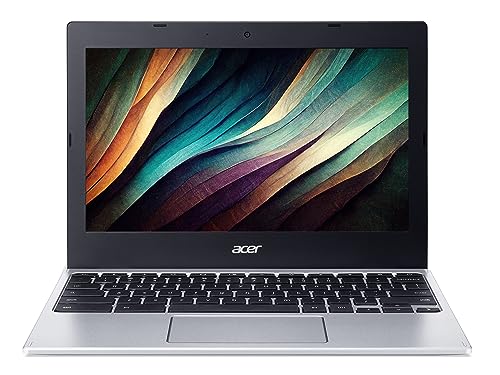
Acer Chromebook 311 CB311-11H – (MediaTek MT8183, 4GB, 64GB eMMC, 11.6 Inch HD Display, Google Chrome OS, Silver)
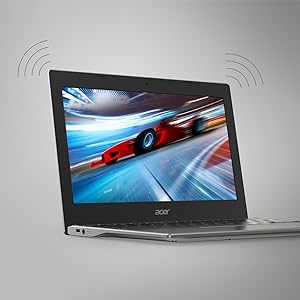
Complete Connectivity
Stay synced and connected. With a fully functional USB-C port and 802.11ac Wi-Fi with Bluetooth 4.2, easily connect to multiple devices at the same time while also making full use of the integrated 720p HDR webcam for crystal clear video calls in Google Hangouts.
Stay Productive
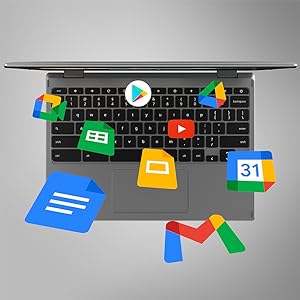
Enjoy all the advantages offered by Chrome OS: quicker boot times, an easy-to-use interface, built-in malware protection, access to millions of Android apps on Google Play and much more.
| Weight: | 1 kg |
| Dimensions: | 29.01 x 20.6 x 1.88 cm; 1 Kilograms |
| Brand: | Acer |
| Model: | NX.AAYEK.002 |
| Colour: | Silver |
| Batteries Included: | Yes |
| Manufacture: | Acer |
| Dimensions: | 29.01 x 20.6 x 1.88 cm; 1 Kilograms |
A good chromebook at a good price with excellent battery life
At the current price of 150 this is a bargain. It’s fast enough as I’m not into gaming. The battery lasts a really long time. They claim 15 hours and it’s not unrealistic. Screen quality is fine for videos and it’s a good size. If you want a laptop for browsing, videos, email, etc. then go for this one.
Nothing to dislike , it’s easily set up and small that you carry in your bag. But hard to get use to a small screen but you get use to it.
Having owned an Acer Chromebook spin 713 for four and a half years until the screen conked I was in the market for another one. Tried and quickly returned an Asus Chromebook plus CX3402CBA. The touchpad was lousy with the right hand side sinking into the depths of the gubbings at the slightest touch. OK it had a backlit keyboard which this Acer doesn’t but hey! just turn the light on baby! Did Shakespeare have a backlit quill? Love the touchpad on this model. An all round quality contraption.
Well,when I ordered this product I think its going to be really small but the thing is I was so amazed when I got my chrome book I m super impressed overall,when you update the version you got everything playstore where you can install everything .Good for work,study,games and just watching movies Netflix may be its amazing ..I am happy highly recommend to everyone with that much price !!
Bought this for my 11-year-old for school and homework. Also just also just generally at home YouTube Minecraft etc . Brilliant little laptop needed charging before I could set it up but that was absolutely fine it’s very fast easy to set up you will need an email address perfect for what I want my son is absolutely ecstatic about this his very first laptop. He says he gives it 100 stars
I had this as a 70th birthday present from my wife. I was so tired of our 2016 windows laptop as it always needed attention. This Chromebook plus literally boots in 10 seconds! It is a bit different to use but I managed to work it out over a few days.
I have a pixel 8 pro mobile and I have linked the Chromebook to it. This has proven to be very useful as messages pop up on the Chromebook and I can reply. Also quite a few of my Android apps can be downloaded onto the Chromebook and work well.
It’s well made and apparently has a military spec. My daughter bought me a wireless mouse and carry case for it.
The screen is much better than the old laptop and the sound from the built-in speakers is surprisingly good.
Replaced my old laptop
Still very new to me so I am still finding my way round. I am yet to find how to transfer my photographs from my phone (android).
Some have transferred automatically.
I am overall very pleased with my chromebook.
I have used Mac books are various type over the last 15 yuears or so. I do have a Windows 11 laptop and my wife uses 4 or 5 Chromebooks. My main reason for laptops these days is for surving the net. Usually Chromebooks have 4g of ram and very little hard drives. This has an i3 procwaaor and 250gig hard drive. As Chrome is a very light operating sysetm this is a fast smooth laptop. I would recommend this computer only if you are aware of the very slight limitations of a Chromebook. I hope this helps someone…
I had an Acer Spin 514 until recently, did not even last 2 years. I found it overpowered for my needs and decided to give this Acer spin 314 a go. First impressions – Out of the box it feels solid, a warmer feel owing to the plastic casing but prefer this one It is strong and does not flex at all. The screen is very good, nice and sharpe with excellent coulours. Not quite as bright but it can be adjusted to very bright. Keyboard is responsive and a pleasure to type on.
I had a few worries about the Celeron N4600 but is is really quick. I play Elvenar, a free game and it handles it like a dream, I cant see any difference speed wise between the 514 and this 314. Perfect for all none demanding tasks and middle of the road games.
The touch pad is large and VERY responsive. Touch screen excellent, can’t fault it.
I’m glad to be back with a laptop with no fans in again. It can get a little warm if I play the game for too long but does not slow down.
My only niggle is the lack of a “C” port on the right side, but the addition of the HDMI port is welcome.
Overall for the price this is a winner. I’m happy again. Goodbye 514. I never mistreated you but you let me down.
I bought this to replace an android tablet that I had been using for a year, but then the touch screen went wrong with it. Amazon stepped in and refunded the cost of the tablet when it was returned and I had initially intended to go and buy an ipad instead. However, the cost of those is eyewatering and I then thought about the Chromebook spin. It can act like a tablet when folded back or a small laptop when in conventional mode. I found this 64GB version as a second hand deal with over 100 off the new price (which was already a special price deal, so in fact this second hand one was something like 150 off the regular new price). It has a few tiny marks on the case and did not come with the manual or in the original box, but the manual can be downloaded as a PDF and the marks are hardly noticeable, so I am more than happy to live with them for the savings. The chromebook has great battery life and for what I use it for, it is ideal. With the Chrome OS that is basically android OS, I managed to install a range of apps that I had used on the android tablet that went wrong. Oddly a couple of apps said they were not compatible, which I don’t understand, since they did not need any particular hardware like GPS. I found alternative apps that worked though, so no biggie. Been using it several weeks now and I am very happy. The screen resolution is perhaps a little bit of a negative point since it is now particularly high. However, for what I need it is fine. At the price I paid, I don’t really think I could have got something better. It certainly feels like a quality product and from a very well known maker. I have had Acer products before and was very happy with them.
Brilliant Chromebook!!
I ordered this Acer Chromebook as my old one was 9yrs old and no longer updated so i couldnt use messenger. This one if fabulous! So fast and easy to use. Does everything i need it too. Very pleased with this. Would highly recommend. It has a 14inch screen and is just lovely.
Lovely looking machine that she’s exactly what I needed it to do. Screen is great, pretty quick, great for browsing and streaming TV and movies. Love the fact you can download apps and link directly to your phone, that’s great.
However, the speakers are dreadful. It’s like someone is talking into a tin can. 10 yards away. And when one of the major advantages of the thing is to watch TV and movies then the speakers are very important. And the speakers on this are so bad I’ve had to Bluetooth my sound bar so I can hear the shows and I’ve never ever had to do that before. They’re beyond awful.
If you can ignore that then it’s a nifty little bit of kit. I’m not slagging it off, but it’s been a huge issue straight from the box
Fabulous chrome book, I chose this one for my emusic library it has a good size screen and sits nicely on my music stand and with a Bluetooth pedal I can easily turn the pages without missing a bea
This is my third Chromebook and I’m delighted with it.
I admit to being one of Google’s biggest fans. It took me a few years before I got my first Chromebook as I was unsure of doing everything online. My first one was a second-hand Lenovo and I still have it. My second was an Acer 314 (predecessor to this one), also second-hand.
Both of them are still as fast as when they were new, but they don’t get updates anymore; that’s why I got this one.
One of the things I particularly like is that I can have several accounts on this one machine. That’s important to me because I run 2 small businesses and I have a separate Google account for each one in addition to my personal one. I can have 2 of them running in the background and one active, so I can get an email on one account and know about it automatically and then just swap accounts to deal with it immediately. Swapping accounts on a PC is very time-consuming and frustrating.
Google products (Docs/Sheets/Calendar etc) are perfect for running a small business and for running your life. You don’t have the immense power of the Microsoft suite, but I don’t need it. I find I can do absolutely everything I need to do with Google suite. It includes things like To Do lists (which synch with your Android phone), reminders etc and the calendar is VERY powerful.
Many of the apps available for your phone are also available for Chromebook. This is incredibly useful for me. I use many of them for my maths tutoring and can share them over Google Meet when I’m tutoring. (Google Meet is a bit clunky compared to Zoom, but it does all the same things and it runs perfectly on a Chromebook.)
As I indicated above, Chromebooks don’t slow down with age. They are completely immune to viruses so you can be sure of your security. I’ve given my old Acer 314 to Mrs Sunshine and she can’t believe how fast it is compared to her ageing Windows 10 laptop … and the Acer is about 7 years old! (My original Chromebook is about 12 years old and works perfectly, but won’t install some modern apps.)
That’s the software taken care of.
The screen (which folds down flat) is quite good enough and displays everything you need with great colour. The keypad is firm and responsive. You can use an extension screen/projector if you need to. (I use an extension screen and it’s incredibly useful, especially when tutoring or using Zoom for meetings.)
It’s maybe a bit lacking in ports having 2 standard USBs and 2 USB-Cs. One thing I’d like that it doesn’t have is space for an SD card. In one of the USB ports I use a 4-port extension which has 2 USB drives, a mouse and an extension camera and everything works perfectly. There is no HDMI port, but you can use one of the USB-C ports instead (with an adaptor).
You can’t hook up a printer directly to any Chromebook, but you can use cloud print.
All-in-all, I would strongly recommend this as a perfectly good workhorse. If you need something for superfast gaming, you might want to look elsewhere, but as an everyday laptop replacement machine for using the Internet, I don’t think you could find better at this modest price.
hought it was a toch screen chromebook but it’s not , just ensure what you order is what you get ~ it did state it was touch screen ~ rather disappointed as it totally different from the touch screen as it was a replacement for the 1 that stopped working
Very thin, great for all aspects of work! Also very light. I’m a gamer but also work from home so this is suitable for every need! Great price! All around go to Chromebook! 🙂
An excellent product. I use it as a secondary laptop around the house, and also when travelling as it’s so light and portable. It works really efficiently and, in my view, it looks good too! I’m not a computer buff but it does everything I need (which is probably a fraction of its capability). Obviously you need to realise that the Chromebook functionality is different to a Windows product but I don’t find it a problem to switch between the two formats. I’d highly recommend i
Having had an Apple iPad for a while, I decided to change to a Chromebook instead. I had done some extensive research into which was the best one out there for the budget I had at the time. This one came in just under 200 which was ideal.
The Acer Chromebook is very easy to set up, the instructions were clear and concise as soon as your turned it on. The screen is sharp and videos watched on YouTube look good. The sound is probably the only let down because it sounds very tinny. But, if you put a good set of headphones in then that should sort that issue out.
It is incredibly lightweight as well. Laptops of old used to leave your legs feeling dead after using them they were that heavy. The battery life is amazing! I only use it in the evenings and It still has plenty of battery charge left after 3 or 4 days. Charging doesn’t take long either, roughly 90 minutes until it’s at 100%. Less if you’re charging with higher battery life left.
When doing your research look at when the automatic updates finish. Thankfully, I will continue to receive updates up until 2026. Which is more than enough for me.
I can highly recommend this Chromebook if you’re on a tight budget. If money is no object then are some really good ones out there to.
Light weight, easy to use (once your Google account is linked) & a really good battery life.
With one USB C port for screen casting / sharing & charging as well as one regular USB port I at first thought this would be an issue but it isn’t at all.
The battery life is around 14 hours & therefore works spot on.
A really handy little device that intergates well not only with all the usual Google stuff (Google docs, Google home (for say a mini nest smart speaker), YouTube music, etc.) but also enabling Linux gives you access to a Linux (Debian) virtual machine along with SSH.
I would recomand this to anyone wanting a Chromebook
I will also point out that this machine will receive updates until June 2028.
Also any Linux file interactions over a Samba connection are sandboxed & therefore files can only open as read only.
I purchased the top of the range of 4 in the knowledge that the spec offered a micro SD slot which I specifially required for the work I do. However, alas, the machine I received did not contain this essential requirement despite it being witten quite clearly in the laptops specifiations. I am sure that Trading Standads would take a very dim view of this. You do not purchase a bottle of milk to find it has no milk in it. I feel Amazon should offer a satisactory explanation for this (it has happened before on earler reviews) or at least offer an ex-gracia refund as a questure of goodwill. Sad!
Since the demise of my last Windows laptop, I’ve done all my computer based tasks on my tablet. But, suddenly needing to write several months worth of documents, the virtual keyboard has shown it’s limitations. Using a Bluetooth keyboard also wasn’t ideal with the small screen, so I decided to jump ship and get my first Chromebook.
There are a few adjustments to make after so many years with Microsoft, but they are easily made and for such a comparatively low price I’m very impressed. Google Drive means my files are available on all my Android tablet, start up takes almost no time, it’s light weight, quiet, with a long battery life.
You’ll notice the screen could be better when streaming videos etc, with the contrast being a little low, but it’s perfectly watchable and sharp & clear when dealing with text.
A Chromebook might not fit all your needs (eg gaming, bespoke software etc) but as a workhorse, it’s ideal.
Excellent lightweight ultra portable Chromebook. I have used Chrome OS before, so I am used to its variances from Windows; but once you have become used to the slightly different keyboard layout and settings, it is ideal for web browsing, office tasks (WP, spreadsheets etc.), multimedia, photos and more.
This machine is very well laid out and easy to use: the keyboard is fast and accurate, and very comfortable even after hours of continuous use; the screen is sharp and easy on the eyes (especially if you use the automatic night-light setting); the processor is a joy – however many windows I have open nothing has made it hesitate for an instant; connecting a printer via wi-fi was a doddle.
There are adequate ports (USB-C, USB-A, 3.5mm headphone/mic combo jack) but of course one can always use a USB-C hub to add ports, including HDMI. Several good ones available here on Amazon for very little money.
Chromebooks are always fast to start up and shut down, but this one seems, subjectively at least, faster than most.
All in all, this is a very well-sorted and attractive machine. I’m very pleased with this purchase – I’m considering buying another for my wife to replace her current Windows laptop.
Haven’t owned a chrome book before, bought this for both work and personal useit’s not a bad size and the battery seems to last ok, screen quality is t too bad either. Only issue I had was getting used to the operating system and dealing with connecting printers via WiFi..Ben though there were no network issues, chromebook had a real hard time detecting my WiFi printer or Hp smart when printing, this took ages to figure out. It isn’t bad but only if your used to using chrome books
My laptop start to lose colours sound ..etc so I urgently needed affordable PC to do urgent work I watched videos on YouTube about Chrombook and found this is doing all I need with affordable cost arrived well packed using easy any problem I search on YouTube there is so many leasons how to use it. Fast to switch on much easier to use than laptop keyboard bit different keys but can do these functions with combination keys safer than laptop because Google updates daily the only disadvantage which is not great deal for what I paid is the updating which is called AUP AUTOMATIC UPDATING POLICY it expires after few years this one exp 2026 so you need to search Google AUP find the model will give you the date not sure what happens after that but even if I have to buy new one it’s not that bad after use of 4 years for 350. I can’t use it on my existing printer not compatible but I am printing from old laptop or mobile phone from cloud so far is good screen and sound good see my videos I attached not all apps works on it so it depends what you need to do watch YouTube about it firs
Laptop is good. Easy to set up and runs like a dream. The battery life is great and the screen is clear, bright and with the touch functionality just excellent to use. The keyboard is also excellent. I cant fault the laptop in tandem with chrome OS. Im really pleased with it. Where my experience sours is in the description and amazons customer service. The product page clearly states the laptop has an micro SD slot, however, the laptop i was sent does not. After contacting amazon i was sent a replacement and assured it would have a micro SD slot. The replacement did not. After another call I decided to keep the original and take a concession on the price. Returning the replacement has been a drawn out affair and to date 2 hermes collections have cancelled on me. None of the hermes pick up shops will accept till the second week in january. Why does amazon use such a naff company like hermes for returns? particulary for more high value items. I dont want to be charged again for the item. It just leaves a bad taste in the mouth from the false advertising to the poor customer service. I will have to contact amazon again and organise another pick up which will probably be cancelled. Anyways my advice would be to buy harware from a store where you can physically look at the item to confirm the actual specs as it seems amazon will allow sellers to simply make stuff up.
Super laptop. Fast. Easy to use. Ideal for on line shopping, banking, e mails etc. Delighted. Also the technician, Steve, that Amazon that Amazon arranged to come and help set it up was very efficient and courteous. Learnt a lot from him. Very helpful. All round am delighted.
Only had this a short while but I love it, I have the non touch screen version, it starts up super quick, the typing is super smooth, I am a fast typer anyway but I do type faster on this. The battery is superb, one charge has already kept me going I am only down to 91% I have stopped using my phone as much, normally when I go to bed my phone battery will be around 30% but I have been turning this on instead & I have been going bed with roughly 80% battery at bedtime! I used to prefer using my phone but I much prefer to use this now. Quick to start up, zips around the internet, nice screen, nice sound I am very happy!
This is a really nice laptop, it’s far less hassle than a windows powered one for most daily tasks like web browsing, streaming and writing the odd letter. It boots fast and the os is very snappy.
The Good:
Fast lean os that doesn’t get in the way or badger you like windows does,
Nice vibrent screen.
Android app compatible.
Can run Linux software with a bit of messing about in the settings.
HDMI out via a cheap USB 3 dongle is superb.
Battery life is over 7 hours.
The not so good:
Switching it on via holding the power button can be confusing as the screen doesn’t power up when you press it like most laptops, you need to hold it in for a bit and there’s no indication it’s powering up until the screen comes on. A few times I have accidentally turned it off again by thinking it didn’t register the button press and pressing it again. A very minor gripe that is nevertheless worth mentioning.
Some android apps are designed for phones and appear as such i.e. a vertical screen with large borders.
The file system sandboxes any files created with android apps and it’s a bit of a chore to delete them as you can’t do it from the file manager and have to poke around in the settings.
So a very nice machine that I have no reservations in recommending.