Pipestation HDMI to DVI Cable 1.8m – DVI to HDMI Cable
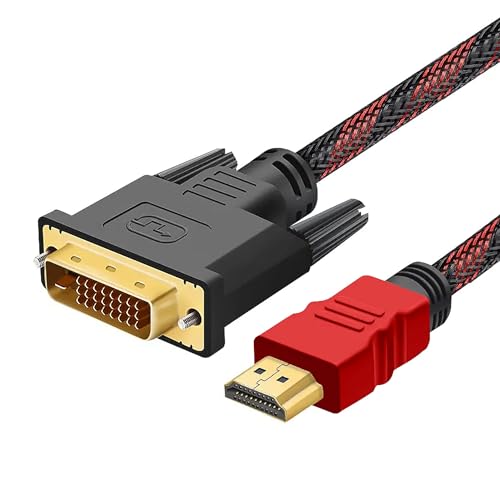
Pipestation HDMI to DVI Cable 1.8m – DVI to HDMI Cable Full 1080p – Bi-Directional DVI-D 24+1 Male to HDMI Male Cable – HDMI to DVI Adapter Cable – DVI to HDMI Adapter Cable Lead Cord HDMI DVI D
Pipestation HDMI to DVI Cable 1.8m
HDMI to DVI-D Cable
The dvi to hdmi adapters cable is ideal for connecting HDMI devices to DVI devices. This can be used with PCs, Laptops, Games Consoles, DVD / Blu-Ray Players, Monitors, TVs and Projectors.
Supports Full 1080p Video Resolutions
Works with all HDTV formats including 1080p Full HD and is backwards compatible with 720p formats.
Strong and Durable Design
The dvi to hdmi cables come with a nylon woven braided net in black and red that is highly durable and more resistant to wear and tear.
What is included
- 1x HDMI to DVI Cable 1.8m
Great HDMI to DVI Cable
My Pipestation HDMI to DVI Cable is great.
– Cable: Braided
– Length: 1.8m
This cable is perfect and connected via HDMI on my desktop PC to my monitor perfectly with no issues.
It is well made and I think the price of 5.99 at the time of reviewing is very reasonable.
Very Highly Recommended
Quality video cable
I have to install and swap around a lot of older PCs and Laptops at my work and invariably the matching PC to monitor cable is nowhere to be found. I like to keep spares in my tool bag to make sure I can connect any combination of video connectors up and so I purchased this cable as it looked of good quality with its gold plated connections and braided cable sheath.
The connectors are robust and the transmission has no interference or crosstalk when run along side other data cables.
Would recommend
Really good, well-made cable
When I opened the packaging, I thought I was faced with an exotic snake – the braided cable is coloured black and red! The length, 1.8m, is just the right length to connect a computer to a monitor, giving that bit of flexibility to move them around.
The connectors are well attached and, under normal use, should last for a good period of time. The connectors make a good connection with no indication of being loose.
It does the job for which it was made so who can ask for more!
Good basic bi-directional HDMI to DVI cable
Review of Pipestation HDMI to DVI Cable 1.8m.
A 1.8mtr long braided cable, quite thick as carrying possibly nineteen inner cables connected between an HDMI -A plug and a 25 pin DVI-D plug.
The DVI connection developed as a digital replacement for VGA but then superseded by HDMI in 2002, the large DVI connection came in at least five different types and was originally developed with the introduction of digital video and LED monitors to allow the conversion of analogue signals to digital and vica versa, this until HDMI appeared on the scene and cathode ray tube monitors disappeared.
As still owning bulky 24″ cathode ray monitors and LED monitors that have DVI connectors this cable to convert HDMI to DVI useful especially as bi-directional, this as some of my old Desktop PC’s have DVI video cards installed.
Not partaking in the throw away market until necessary these large bulky screens still useful for word processing as I am sure many companies will testify, however we all have to upgrade at some point and this HDMI cable provides connection from more modern equipment owned although even HDMI now being overtaken by Type “C” and Displayport connections.
This cable does provide 1080p definition which was near top of the range for most old monitors, it is substantial in build, the DVI connector a screwed connection whilst the HDMI a push in which is ideal for swapping from one laptop to another however this can drop signal occasionally if moved frequently, the cable fitted with chokes either end to stop interference.
An item that may be old technology for some, this cable works as advertised and can still be useful to many, it is however only a basic bi-directional DVI to HDMI cable that seems well manufactured.
1080p confirmed both directions
I’ve had a chance to review a few Pipestation-branded items recently and I have to say I’ve been very impressed with them – especially for the prices. This bi-directional HDMI/DVI cable is no exception.
Obviously this is a pretty niche product in 2024; you’re either connecting an old computer to a modern monitor or a newer computer to an old monitor. I tried both and they both worked really well – full 1080p at 60hz. And that included DVI to HDMI from a PowerMac G4 MDD from 2002! I like to tinker…
While it’s a braided cable – it’s that heavy duty nylon stuff that you could grate cheese with. Not my favourite but it’s unlikely to ever split.
At 5.49 at the time I’m reviewing this it’s a bargain.
A useful cable to make a digital connection to an older monito
Older monitors, tend to have DVI inputs, rather than HDMI. So, an HDMI-to-DVI cable, will allow you to connect from the HDMI port on your device, to the DVI (Digital Visual Interface) port on your monitor. The only thing to bear in mind, is that DVI supports video only and does not relay sound, as it would with an HDMI-to-HDMI connection.
This Pipestation HDMI-to-DVI cable has a plastic braided sheathing, making it slick (aiding easy routing) and hard wearing. It’s also fitted with ferrite beads (for EMI suppression) at both ends. Both plugs have good strain reliefs and come supplied with plastic protectors. The DVI plug is a DVI-D (Dual Link) type, that can be secured in place, using the thumb screws. The HDMI plug feels positive when inserted into an HDMI socket, and the connectors on both plugs are gold plated, so should provide a reliable connection.
Recommended.
Strong, sturdy and bi directional
These things are always breaking or going missing just when we need them, so decided to get this one.
First thing you notice is how strong it is. Very durable. I’m very pleased with this it will do the trick.
Sturdy high quality cable at a low price
It’s not every day that I actually praise a cable, but my word. This cable is strong, sturdy and of such good quality that I was blown away when I unpacked it. My previous (and far more expensive!) cable pales in comparison and looks cheap and flimsy next to it.
This cable fit very snuggly to the DVI monitor and my new PC and so far, the image quality has not suffered. It is roughly the same as the old cable, but I give this one top marks for durability.
It is unusual to find such a sturdy cable which is bi-directional at this low price. I’d say it’s worth it.
Good quality cable that works either way round
This is a very useful HDMI / DVI-D cable, great for connecting projectors and monitors to all kinds of computers.
Firstly it works either way round; you can plug in the HDMI to your computer and the DVI-D to the monitor, or the DVI-D to your graphics card and the HDMI in your monitor. This makes it ideal for me to go with my projector that has both DVI-D and HDMI, so one cable can work with all sorts of computers.
Measuring 1.8m in length and with a red and black braided sheath it appears well made with connectors that fit every device and port I have tried. Even with less common 16:10 and widescreen monitors this cable works well, supporting the intended optimum resolutions without fail. The cable is moderately stiff but that will be down to the stone construction and should make it last.
A bit stiff cable, but good quality for 1080p from computer to TV.
It’s about 78 inches long cord, it’s a bit too stiff, I would much rather prefer a braided cable that is 200″ long to give me more leeway, because my tv is far from the computer. I use DVI-D connection from my old graphics card in a computer built in 2003, which allows me to plug into hdmi on a TV with hdmi ports, so I can get my computer screen on my large TV. As my old graphics card doesn’t have a hdmi port input, but has VGA and DVI-D outputs. The picture quality being 1080p isn’t going to be as good as my actual monitor that displays better brightness, and colours built for computers, but my TV is larger and this is a great way to show presentations from an old computer onto a large TV.
I would say the only issue is the cable length for me and the stiffness quality of the cable, although it’s really good durability, thick but somewhat on the stiff side, difficult to move around, the braided ones that are made of rope and flexible are far superior.
Quality of the connections seem to be good, they are gold plated, it’s what I always prefer in any cable. This is a near perfect dvi-d to hdmi, I think newer graphics cards might have input’s for hdmi onboard, and if that’s the case you would just need a hdmi to hdmi cable, of your desired length to use into your graphics card to get connection to a tv from the computer. Full disclaimer, I’m a bit outdated as I used to build computers back in 1997-2006, but these days I’m sure there are a plethora of other ways to get computer screen on a tv, as technology has far surpassed those days.
The max resolution my tv can handle is 1080p only, so cannot state anything about higher resolutions. For 4k think you need dual link dvi-d to handle a bandwidth of 2160p at 30hz which is 4k 30hz. The documentation of your graphics card can let you know what you need for 4k-8k, it might just be as easy as plugging in a hdmi cable, and the tv would have to also support those resolutions.
really sturdy and durable cable
I’ve just had a tidy up of the home office and was looking to connect the laptop to a monitor that didn’t have a spare HDMI cable, but it did have a DVI port – so this cable was entrusted with the challenge and it came out working a treat.
The connectors are sturdy with a flexible but durable cable
The red HDMI cable I really like because it makes tracking cables a lo easier than either having to label them or guess which monitor it is
Really like i
Connects my DVI monitor to my graphics card just fine
I’ve got three monitors and annoying, one of them lacks HDMI input. I’ve got an annoying hacked together cable nest to connect it, so I was looking for a cable that replaces all that. And this does that just the way I want. I wasn’t able to test this the other way round as I don’t have any DVI outputs on anything.
It’s a nice cable too. It looks pretty good and it’s flexible. Good strong braiding, strain relief at the plugs and solid connections at bot ends. Just what I wanted.
Works as intended connecting my PC to a TV for a clean 1080p 60hz
Nothing mind-blowing just does what you want it to do though I will say I appreciate that it does work in reverse which personally seems a bit strange but having the option is a good thing. The picture quality I get through this cable is just as advertised and so I find it easily recommendable if you find yourself needing an adapter like this as older graphics cards tend to not have hdmi slots, there are also some monitors that have dvi inputs so you can use it for that too. Either way I am happy I acquired this.
good dedicated cable, robust braided plastic exterior, signal is clean. Inflexible cable
PROS
-convenient to have dedicated HDMI to DVI cable (vs going through adaptors, like I’ve been doing)
-extremely robust braided plastic exterior
-signal from my computer to display is clean
-quite good value
CONS
-cable isn’t very flexible
-minimal strain relief
NOTES
-it’s nice that it’s bi-directional, I’m sure that some people will have a need for that (not me)
MY STAR RATINGS:
1* substandard, mostly cons
2** barely acceptable, cons outweigh the pros
3*** meets the basic requirements, cons balance the pros
4**** good product, pros outweigh the cons
5***** exceptional, all (or almost all) pros
Hdmi to DVI works perfectly, not vice versa for me though
Firstly, very well made! Lovely material and feels strong. Going from HDMI out on my laptop to a DVI monitor worked flawlessly with better than average quality, colour monitor profile instantly selected itself under Linux and correct resolution. DVI connection on a PC to an hdmi monitor did not work, haven’t been able to do extensive testing to figure out the issue, if I find out it’s an issue on my side I will update. Other than that very happy with this and if you have a DVI monitor you want to connect a newer computer to this is what you need!