Avigers USB C to Dual HDMI Adapter, 4 in 1 HDMI Splitter
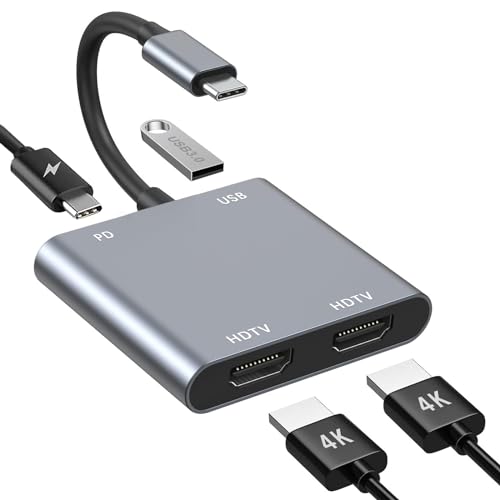
Avigers USB C to Dual HDMI Adapter, 4 in 1 HDMI Splitter for Dual Monitors 4K, USB 3.0, PD 100W, USB Type C to Dual Monitors Adapter Multiport for MacBook Pro/Air, iPad, Surface, Dell, Chromebook
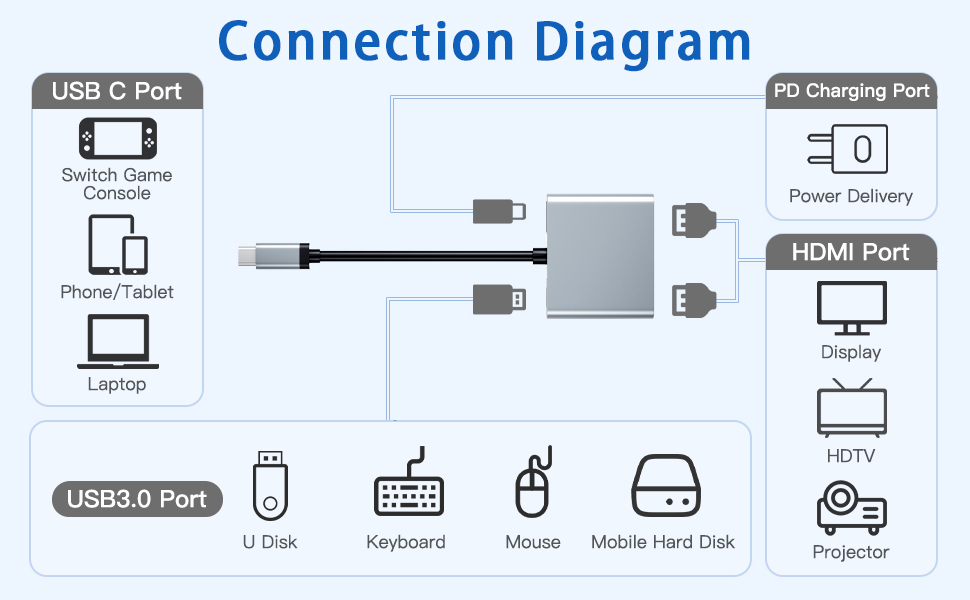
Read before use:
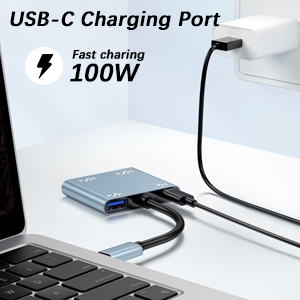
- When connecting the device to the screen for streaming, please connect the power source first. When connecting external devices, charge the laptop with a 100W PD charger.
- To achieve the best 4K@30Hz (3840 x 2160) resolution, please use a 4K monitor and an HDMI 2.0 cable.
- It is normal for the dual display HDMI adapter to become warm after long-term use as the outer casing dissipates heat to protect the internal circuit board. (the temperature of 45° or less is normal.)
Problem diagnosis:
Q1. Why does the screen flicker or go black?
- A1. Insufficient power supply (Some devices may have weaker power supply capacity for the docking station, which may result in insufficient power and screen flickering. Therefore, it is necessary to connect the charger for power when you use it).
- A2. Check the connection of the HDMI port (Due to the nature of HDMI interfaces, they do not have locking nuts like DVI interfaces, nor do they have locking mechanisms like DP interfaces. Therefore, poor contact can easily cause screen flickering.)
- A3. HDMI cable quality: Avoid using HDMI cables longer than 5 meters; avoid using HDMI to VGA and HDMI to DP cables. (Longer cables may result in greater signal attenuation, mainly due to impedance and insufficient shielding. In addition, using other adapter cables may affect the transmission performance, which is secondary conversion and may greatly affect stability).
- A4. Screen compatibility issues (you can try replacing the screen to see if the flickering problem persists, as some screens with weaker signal reception may exhibit flickering).
Q2. What should you do if your laptop doesn’t recognize the HDMI display?
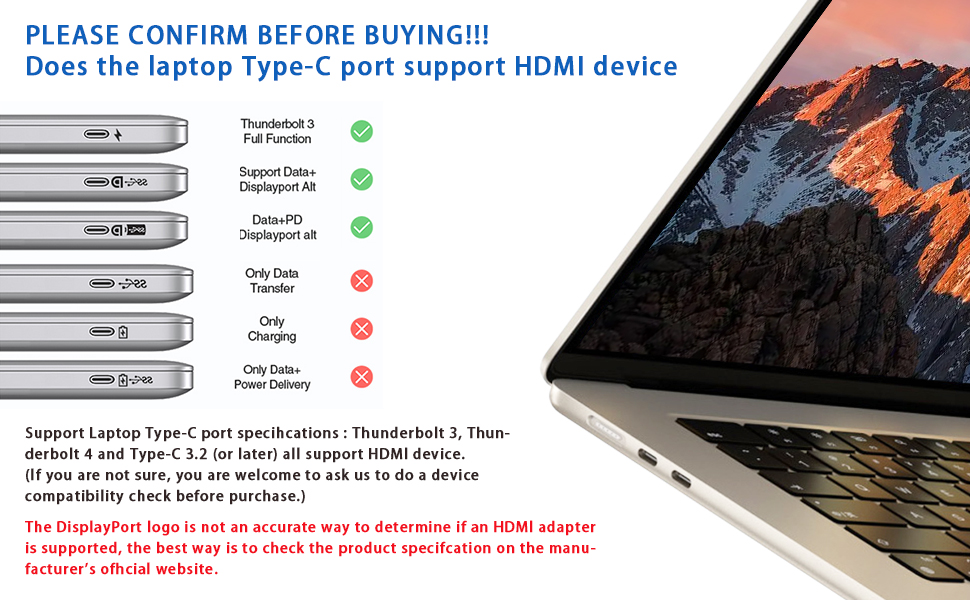
- A1. Make sure your laptop’s USB-C port supports DisplayPort/video output.
- A2. Check your HDMI cable and monitor. (Try connecting the monitor directly to the laptop to see if it works.)
- A3. Make sure the USB-C hub provides enough power.
works fine
Decent little USB C to dual HDMI adapter with included USB ports. Very handy to have if you have a USB C port, can also be used on Steamdecks if required
Great essential accessory
I am very happy with this USB-C to HDMI adapter/splitter. Simple to plug into your laptop USB C port and then connect 1 or 2 HDMI cable to your monitor(s).
Note, your USB-C port on your laptop MUST be a Thunderbolt or DisplayPort type otherwise this adapter (or any other adapter for that matter) will not work. There will be a symbol next to the USB-C port – lightning for Thunderbolt or “D” for Display port. If the symbol is a battery then the only option allowed on this port type is for charging/data transfer.
There is a USB-A port also to allow you to connect other device (e.g. mouse, external keyboard etc) if you so wish and a PD for to fast charging of USB-C devices.
HDMI Splitter - one video source duplicated
As someone not overly familiar with technology, I was hopeful that this device would meet my expectations. I’ve converted a spare room into a mini cinema using an affordable projector, a Dolby Atmos surround sound system, and my laptop. My laptop, audio amplifier, and an additional monitor are neatly housed in a small coat closet in my hallway. The HDMI adapter is connected to my laptop via the USB-C port, with dual outputs running to a monitor and, through a high-quality HDMI cable, to my projector. I simply start the movie on my laptop, and it plays seamlessly. The monitor allows me to view the output, which is simultaneously sent to the projector in my cinema room. The setup works wonderfully.
This adapter is a fantastic tool for extending a single monitor to two external displays, supporting dual 4K@30Hz resolution. It’s a “Plug and Play” device, requiring no driver installation or software. It guarantees stable performance with all new USB-C/Type C/Thunderbolt 3 laptops that support DP Alt mode on the USB-C port. For a crystal-clear 4K UHD image, a single HDMI port can deliver up to 4K@60Hz resolution. When both HDMI ports are used, the resolution reaches 4K@30Hz. However, ensure your devices are 4K-capable and connected with an HDMI 2.0 cable or better for the best experience. Note that if your USB-C port doesn’t support video output or DP Alt Mode, the adapter won’t function with your laptop. The instructions recommend using high-quality devices, like a 4K monitor and HDMI 2 cable, for optimal output. I powered the setup externally and kept my laptop charged during streaming. This device is excellent for my needs, although there are more expensive options with additional features.
Great HDMI Adapto
This HDMI adaptor is very hand
It connects via USB-C connection and provides output for 2 HDMI ports, a USB-A socket & a fast charging USB-C port
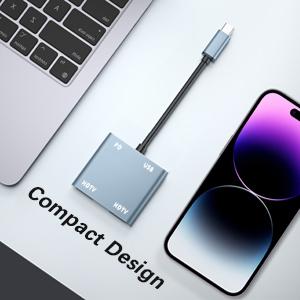
It’s a very efficient design so not very big to have in a bag
So far everything is working as expected with no problems
Solidly built unit that converts Display Port enabled USB devices to up to two HDMI monitors.
This Avigers USB C to dual 4K HDMI splitter takes the video out from a USB C socket with “Display Port Alternative Mode” without using any drivers, supplying video over HDMI to one or two monitors at 4K.
The unit is housed in a flattened metal tube which cuts down on interference and makes the whole thing quite solid. A USB C PD power supply can be plugged into the PD USB C socket and that will power the device that the unit plugs into so you are not running down the battery too quickly.
This is a solidly built little device that is capable of supplying HDMI video to two monitors simultaneously.
Works fine
This dual HDMI adapter works fine with my laptop and gives more slots to use. Small and compact design which is easy to carry and can fit into your pocket.
USB HDMI adapte
This USB C to HDMI adapter offers a convenient way to connect your devices to larger screens or projectors. It’s part of a 3-in-1 design that includes other useful ports, making it versatile for various connectivity needs. The adapter itself is compact and easy to carry, ideal for travel or presentations. However, it’s important to note that the build quality feels a bit flimsy, which could affect its durability over time. For occasional use, though, it’s a handy tool that gets the job done without fuss.
A really handy adapte
This USB-C to HDMI adaptor has several useful features over a basic HDMI adaptor. With two HDMI outputs, it can drive two displays at the same time. With my equipment, it displays the same image on both outputs avoiding the need for an HDMI splitter but I understand on some Windows devices it can output different images on each output.
It has a couple of other features useful when you have a limited number of USB-C ports. First, it has a USB-C PD input so you can power the adaptor and pass power through to the laptop or tablet. Second, it has a USB-A port so you can connect a storage device or input device like a mouse all on one port.
By ticking the voucher box, this is currently available for just over 11 which I think is good considering its versatility.
Good
This is a simple but good adapter. It’s very compact so you can travel around with it easily, the design is very slick so it looks good and the materials used for it make it very durable and sturdy. It has USB-C, USB-A and HDMI ports. These are the three main ones used on most devices now. You can easily connect everything, I didn’t need to download any drivers, it worked from the off on my MacBook. The adapter also charges what you have connected too, it’s not just to connect. It’s a neat little product and well priced at 7.99.
I picked up this Avigers USB C dongle (2 x HDMI output) to use with my work’s MS Surface laptop. That came with a large ‘brick’ style docking/power station; I’ve used dongle form factor adaptors with it in the past and this slimline one looked ideal to reduce desk clutter.
In terms of operation – it did the job fine. All ports were working okay. The problem I had was that I wanted it to drive 2 monitors – one at 1920×1080 and the other is an ultra wide at 2560×1080. For some reason the ultrawide resolution was unable to be pushed to its native values (not mirrored by the way). I don’t know if it getting the resolution from the first monitor and using that as the default etc. I tried several HDMI cables just in case but no dice.
So while I can’t use this for my purpose – the rest of its operation was fine. I had power running into it and it was charging the laptop okay. It did get a little hot but I’ve definitely seen worse!
Only FullHD
Using only one HDMI port it wasn’t able to show 4k in my monitor. It was limited to 1080p. My monitor has resolution of 3440×1440 and it was very low quality image.
The box is light and has USB and power USB-C port, what is good if you use connected with a usb-c charger laptop.
In the end I was disappointed with the resolution achieved. I am using another device to control ports and this one is capable of deliver the full resolution with the same HDMI cable.
Tried with a MacBook Pro M1 and with a wide curved monitor Philips.
Well built & light adapter. The HDMI port allows you to extend your display as well as mirror i
I purchased a similar adapter before but it didn’t have the two things that makes this a must buy in my opinion, that’s assuming you want it for the same function as I do. Those two features that this has are the ability to not only mirror you display through the HDMI port on it, but also to extend your display so that you can have a dual monitor setup whereby the two screens appear as one and you can move your mouse across from one screen to the other, etc. The second feature, and equally as important for me is that fact that you can still charge you device though this connector whilst using up the USB port on your device to connect this adapter to, as this has a USB-C port of it’s on that is capable of delivering power to your device.
The third port on this adapter is a regular USB-Type A port which supports USB 3.0, so you can connect things like external drives, USB Memory sticks and other peripherals to your device, depending on what device you are using it for of course.
The adapter itself is very well made and feels nice and sturdy and it has a nice thick cable between the connectors which should ensure that it lasts you for a fair while. Both the USB C connector and the adapter with the 3 ports are made of aluminium. It certainly delivers on everything it promises and it is at a fantastic price when you compare it to others on Amazon and I would highly recommend it.
Plug and play for ios/android
Worked straight away with an iPhone 15 and a Samsung Galaxy S23 Ultra. Just plug it in and it’s working.
We couldn’t get it to work though with an older mac book. We later found a usbc to usba adapter and still couldn’t get it to work.
Lovely Adapte
The USB C to HDMI Adapter has been an absolute game-changer for me, providing seamless connectivity between my devices and external displays. This versatile adapter offers a convenient solution for anyone looking to expand their screen real estate or enjoy content on a larger display.
The 3-in-1 design of this adapter is incredibly practical, featuring HDMI, USB 3.0, and 100W Power Delivery (PD) ports. With the HDMI port supporting 4K resolution, I can enjoy crystal-clear video and audio output when connecting my iPhone 15, MacBook Pro, iPad Pro, or Samsung device to a compatible monitor or TV.
The inclusion of the USB 3.0 port is a fantastic bonus, allowing me to connect peripherals such as keyboards, mice, or external storage devices with ease. This adds extra functionality to the adapter, enabling me to create a more productive workstation or entertainment setup.
One of the standout features of this adapter is its 100W Power Delivery support, which means I can charge my device while using the adapter. This eliminates the need for multiple cables and chargers, streamlining my setup and keeping my devices powered throughout the day.
The build quality of the adapter is excellent, with a durable construction that feels robust and reliable. The compact and lightweight design makes it highly portable, allowing me to take it with me wherever I go, whether I’m working in the office, traveling, or presenting in a meeting.
Overall, the USB C to HDMI Adapter has exceeded my expectations in terms of performance, versatility, and convenience. Its ability to provide high-quality video output, support for various devices, and charging capabilities make it an indispensable accessory for anyone with USB C-enabled devices. I highly recommend it to anyone looking for a reliable and versatile multiport adapter.
Nice Adapte
Nothing negative to say about this adapter really. It’s a pretty standard and cheap, yet high quality adapter that works. Having HDMI and USB throughput is a great combo because you can use just one USB-C port to power your display and an external USB device – or devices like a keyboard and mouse with an extra USB hub.
Works as expected
In the video, i was able to connect my phone to a screen and a mouse! It is perfect for you little office on the go if you access via phone. I wish there were two usb ports but honestly this is great for turning your phone into an office on the go.