Fuzzytronix Digital Photo Frame WiFi – Wireless Picture
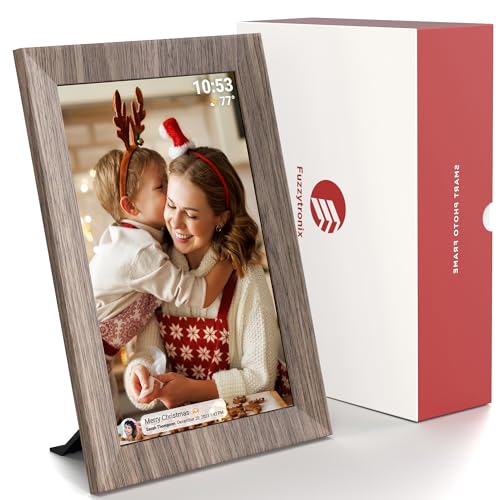
Fuzzytronix Digital Photo Frame WiFi – Wireless Picture Frame with & 32GB Storage & 10.1 Inch Touch Screen | The Best Gift to Connect Friends & Families via Frameo App
From the brand



More than digital frame
Our prime focus is to ensure that our social photo frame solution is widely accessible, user-friendly, and inclusive for everyone.
Our vision
Our vision is to revolutionize the electronics industry by blending creativity, innovation, and quality to create products that truly make a difference. We strive to bring joy and amazement to people’s lives through our unique electronic devices, making the ordinary extraordinary.
We believe that by constantly pushing the boundaries of possibility, we can create solutions that not only solve problems but also inspire and delight. Our goal is to become a leading brand in the electronics space, known for our creativity, quality, and commitment to making a positive impact on the world.
| Dimensions: | 30.5 x 20.3 x 2.5 centimetres |
| Brand: | Fuzzytronix |
| Model: | 101F |
| Part: | 101F-Wood-1 |
| Colour: | Wood – 10.1" |
| Dimensions: | 30.5 x 20.3 x 2.5 centimetres |
Fantastic photo digital frame
Fantastic digital picture frame, I have a sd card with around 40 photos of my family on it and I love when it rotates though them. The quality looks amazing and is nice and bright. It really stands out on my unit in my front room, everyone who visits always asks where I got it from so I always direct them to this product. Highly recommended.
Blown away - more than a digital frame; it's a smart album built around sharing
I was blown away by this Fuzzytronix Digital Photo Frame – this is more than just a way to show digital pictures; it’s a digital album designed for sharing pictures.
My parents love seeing pictures of my kids, but I send them through phone messages, they remain small, and they don’t really print off pics from the phone. This digital picture frame was perfect to share with them the latest pics on a big 10″ (24cm, 1280 x 800 resolution) screen. It also allows you to add “friends” who are granted access to be able to upload pics and short videos to the frame. This was great as it allowed my brother’s family to upload pics of his children too.
Setup takes a few minutes through the frame’s touchscreen (connect to your wifi and “add friends”).
You can upload photos via USB-C, USB-A or an SD card. But my preferred route was via wifi. That way, the album can sit in my parents house and I can send the latest pics straight to the frame over the internet. You’ll need to download the Frameo app – it’s free and simple enough to use (though there is a limit of 10 uploads per batch). There are probably one or two more button taps needed than necessary, but using the app allows you add captions to the pic. The recipient of the photos can also choose to comment or react (heart, sad-face etc), and you receive a notification that the recipient has responded.
Another feature I liked is the select ability to the “most important part” of the photo, so that if the frame is rotated, from portrait to landscape, the most important part remains central to the pic (rather than being cropped off the edge). It works really well.
Frame can be displayed portrait or landscape, free standing or wall mounted in either orientation. It does need a mains power supply to keep working (supplied). Build quality is excellent, and the frame has a wood effect trim.
Overall, I love this frame. Whilst the original intention was to let my parents have a continuous stream of their grandchildren’s activities, my wife thinks we should get one ourselves, to get photos off our phones and shared (she has so many pics on her phone that can now be viewed on a bigger screen!). Great product, easy to use.
Excelle
This feels a lot like a computer, it starts like a laptop and feels like this in quality, too. The quality of the picture is great, too (I wish I had all my photos in camera quality, phones do not live up to it). It needs to be connected to the socket at all times in order to work as it has no battery life of its own. it can be placed vertically or horizontally and it is rather bright (although you, of course, can adjust it). It is easy to operate it since it is very similar to a laptop so most will know how to run it, or should be able to find someone to help them.
It looks very decent – like a real wooden frame (I wish it were in wood and had more of the real thing to it as, I will be honest, once you touch it, the plastic betrays itself). It is not particularly lightweight but it is definitely not a heavy thing to have on your desk.
The modern version of a digital picture frame
We had a couple of digital photo frames many years ago when they were first popular, and also gave one to an elderly relative who loved being able to see family photographs on rotation. Things have certainly moved on since then, and with this frame it’s even possible for multiple family members to send pictures directly by using the Frameo app. Picture quality is okay, though it’s worth noting that it isn’t as high-definition as the displays on better tablet devices. To make the most of the frame the user also needs Wi-Fi available, which is unfortunate as we have a couple of elderly relatives now who don’t have internet but would really love something like this. However, in their case it is still possible to use this frame with an SD card like the frames from years ago.
Great for social media avoiders!
I had a digital photo frame quite a long time ago and i’m astounded at how much better they have got, the ability to allow anyone to add photos is brilliant for people that either can’t or won’t use social media, where so many of us share our photos.
I’ve set this up in my parents front room and given each of the grandchildren access to be able to send photos whenever they like, obviously this could become a terrible idea when they are all teenagers but its currently very wholesome.
The set up was simple, basically download the ap and connect the frame to wifi, its powered via a dc charger so needs to be plugged in at all times and then you can just leave it to do its thing.
The pictures download quickly to the frame and you can add captions and titles, such as who/where the photo is, there are options to crop the pics and you can even send short videos (the frame has a basic speaker).
This is the idea gift for my parents, they can see what’s going on with everyone but its not intrusive in any way and blends into their decor well.
I had to have help BUT I am assured it is easy to set up!
Whilst I did ask my (adult) son to help me set this up that was mainly because I am something of a technical ‘idiot’. My son assures me that most reasonably competent users would find it very simple to get this up and running to display their photographs.
The screen quality is very good as is the touch-screen facility which we find gets used more often when we have visitors!
I can really see why it is a worthwhile investment to purchase this ‘digital photo frame’ but, forgive me that I needed to be convinced because I was born when films needed to be taken in to the local high street chemist to be ‘developed’ and made available several days later!
A positive, well-made addition to the digital world into which I have been dragged kicking and screaming (well not quite, but please be assured this is a good product and is simple to set up).
Very good photo frame
I’ve used a few digital photo frames before, but this one is a step up in several ways.
The touchscreen display is 1920x1080p resolution, and it’s an IPS panel. It can be viewed from a wide range of angles, and the images are clear, with good colour saturation. The touchscreen function works very well.
It’s based on a version of Android, and it designed to work with the Frameo app – tyhis makes it easy to add pictures from you phone, and friend can also upload pictures from their devices to the frame – if you allow them to do so. This really enhances the product’s ease of use. The app only seems to allow transferring one photo at a time, but I hope that that will change as it’s updated.
Power is via a DC cable, and not via USB, which means it has to be reasonably near an electrical socket.
Overall, I’m very happy with this. It works very well and looks great.
The price is currently listed at 84.88, but there is a 50% off voucher on the product page at the time of writing that takes the price to under 42.50. This is really great value; it’s a steal at that price, and worth every penny.
Corded power only
The frame works well.
Doesn’t stick out on a shelf as an electronic, it blends in nicely and screen is like on a kindle device, helps with stealth.
It runs some sort of android OS as the menu look similar to what I remember from years ago on my old Samsung. Not the quickest to respond and sending photos via the app from a phone to the frame takes a lot longer than you’d expect.
At first I thought I didn’t set it up correctly but it actually takes up to a minute sometimes for photos to transfer to the frame and become available. At that point, at first, you probably sent the same photo several times as things don’t work this slow these days, or at least you don’t expect them too!
Other than that, quite happy, changes through photos nicely so I can update them as and when needed as our son grows and I want to relive some of the captured moments.
I’d love it if had a built-in battery though as you can only power it via DC cable. It has USB C and A at the back, but only to play photos from. Shame as the perfect place I’d like to place it in doesn’t have a socket anywhere near and for the other, I’d have to drill a hole in a cabinet to run the cable through. Which isn’t going to happen.
I’d even be happy to place a small power bank behind it and power via USB but that’s not supported either.
Such a shame, it would’ve made it much more portable and easier to place around the house, exactly to your liking.
In summary, it’s a nice digital frame, a little slow to set up and corded only, currently on sale down to 76 so a worthy contender if you’re looking for one but check if you have a socket near the place you’d want it in.
Very easy to use
This digital photo frame is very easy to set up. Just needed to download the app and make an account, then it’s good to go. It is a little time consuming to upload the photos because you can only select 10 photos at a time, the uploading speed is actually quick. The images are quite clear. Anybody could upload photos if they are sent a code, which can be easily generated on the photo frame. I have not tried using a SD card yet but there’s an option to do so. It can be used as portrait or landscape.
Grea
Bigger than a normal photo print out you get from analog cameras but not massive. The picture quality is decent and I appreciate the flexibility with the features included in this. You can have several people send photos of you prefer, or just control it yourself, and set it to turn off when not needed.
It can be placed in both portrait and landscape mode and has a foot that attached easily. The cable isn’t the most slightly thing but not awful.
You can put pictures on it by different methods and they’re all very easy and straight forward. The use of the frame is pretty intuitive and there hasn’t been any snags.
Fuzzytronix Digital Photo Frame
The Fuzzytronix digital photo frame is such a lovely way to enjoy digital photographs and a really simple and smart way to share photographs with older relatives or those without social media.
The frame itself is very well made, and even though it’s made of plastic, the wood effect looks good and fits nicely as a decorative piece in my living room. The screen is a good size, big enough to enjoy the images without taking up excessive space. The quality of the photographs really comes through on the screen too.
I found it simple to set up the device and the Frameo app is easy to navigate. I liked that you have a range of options for importing photographs and videos to the device, whether through the app, an SD card or USB, and the ability for family and friends to share photographs via the app is a nice touch. The 32GB storage is pretty generous, but you can always expand this using a larger SD card if needed. There are a host of additional features that help you to personalise and tailor the device to your needs as well, such as the sleep mode, fit to frame options, hide photo, emoticon reactions etc
The frame does need to be plugged into a socket to work, which has its pros and cons – I had to rearrange a few things to find a space to plug it in, but at least I won’t be forgetting to charge it up.
Overall, an effective way to share and enjoy your favourite memories – it would make a lovely gift too.
High definition digital photo frame
This digital photo frame is amazing. With included Wi-Fi, photos can be sent to this frame from anywhere in the world. An excellent gift for loved ones. My parents have this frame so both my brother and I can send photos of their grandchildren directly to it and they get updated photos regularly. Each photo stays on the screen for about a minute before changing to the next photo so there’s always a new photo to look at.
So simple to set up, just plug it in and then follow the prompts using the touchscreen to complete the setup. There’s an app to download on your phone that can be used to send photos to the frame and this app can be installed on multiple devices and they can all send photos to the frame.
I love the energy saver on this frame too, I have it set so that at 11pm, it goes to sleep, so it turns the image and backlight off, and then wakes up again at 6am to continue displaying photos from where it left off. 32Gb is more than enough for hundreds of photos.
The one thing I would like to see is being able to delete photos that I have added to the frame from the Frameo app rather than having to delete them on the frame.
easy to use
This digital photo frame is a neat idea, especially for staying connected with family who aren’t super tech-savvy. My grandma loves seeing pictures of the grandkids, and this frame makes it super easy for her. She doesn’t need to mess with wires or anything, all I have to do is use the Frameo app on my phone to send photos straight to the frame. The touchscreen is great too, it’s nice and responsive so grandma can easily swipe through the slideshow and zoom in on pictures to see them better. The picture quality is pretty good. However, setting it up was a little tricky. It took a while to get it connected to the wifi, and the instructions weren’t super clear.
Well thought-out positive visual stimulation.
This Fuzzytronix digital WiFi picture frame has a 10.1 inch screen and displays your favourite images with an interval of your own choosing – you can select the option to have it stop displaying overnight or on a daily basis over a week.
It is powered via a DC socket on the back and doesn’t have any batteries that you need to charge up. Next to the DC socket are USB C and a USB A sockets and a headphone socket. Next to that is an SD reader socket. The SD card reader is one of the ways that you can load your pictures onto it – the other way being through WiFi.
At the back is a socket for the stand and you have the option of having the frame oriented horizontally or vertically – the frame knows and if you rotate the frame, it will turn it around in the same way that your smart phone does so, if you have taken all of your photographs with your mobile phone oriented in portrait, it will display them filling the frame and not having to resort to having bars down each side.
As far as software goes,when you use it for the first time, it checks to see if the current version is the most up-to-date and if it isn’t it downloads and installs it for you.
With the latest version running, you can download your photographs and configure how to display them.
It does have WiFi and you can configure it so that your friends can send you photographs remotely and they will display on the frame.
Originally, I wasn’t convinced that the area of my desk that this would occupy would warrant it but having a new picture of something that you like appear every 20 or 30 seconds has quite a positive impact on the way that you feel.
In all, this is well worth having because of the positive effect that it has on you – whether it is on your desk or on the side board.
Fuzzytronics Digital Photo Frame
This product was sent to me to review, as part of Amazon Vine. The below is my own real-world experience of using it.
The frame itself has a sturdy build quality, and is of a fairly good size in terms of the display area, but it doesn’t have too much of a footprint, so it’s not too difficult to find a space for it – do bear in mind, though, that the power cable is not overly long, and that might limit the placement. It has a plastic ‘foot’ that you can attach to the back, which allows you to orientate the frame in either portrait or landscape mode. I liked it, but it was a little difficult to clip on. I really liked the ‘wood’ effect design – blends in so much better with home decor, vs. a solid black one.
Setting the device up did not take a large amount of time, though there is a bug (having tried a few different Frameo models, it seems to be quite common) which takes you back to start after the setup wizard realises there is an update (which applied itself quite quickly). The Android operating system built into it is very responsive – I was able to navigate through all of the various settings without too much lag (though the touch screen controls can sometimes need more than one press).
There are a variety of ways that you can add photos to the frame – using the Frameo app, a USB connection, or an SD card. I have installed the app, and found that sending pictures across to the frame is straightforward. You can also give the frame’s code to friends and family, so that they can send pictures, too. For a little fun, you can ‘react’ to your received images with emojis.
I added my own high capacity SD card, and have been able to display them in a slideshow. The resulting picture quality is really good – the resolution and colours seem as accurate as when I originally shot the photos.
Overall, it is a mostly good value item that would also make a lovely gift.
Touch Screen Digital Photo Frame at Great Price (just needing a bit of refinement in places)
Digital photo frames are a great way of displaying a lot of photos in a small space, plus you can change the photos it displays without having to worry about printing “static” photos every time you fancy a change.
With a 10-inch screen (think digital tablet size) this ‘Fuzzytronix’ digital photo frame is a good physical size to view your collection of digital images. The wood-effect frame works well ascetically, and makes a difference from the typical black-frame seen on many other models. It is easy to set-up and use with the free photo-sharing app which gives you unlimited free cloud storage. You could use the built in storage as an alternative, or if you don’t have wi-fi or a smart phone etc, but at 32mb of storage you may want to invest in a larger micro-SD card. Again, this would only be needed if you didn’t want to (or couldn’t) use the cloud storage and photo app. The photo frame has a touch-screen as well which makes using it day-to-day easy and keeps things simple. You can also playback videos, which I’ve had a bit of mixed results with, but this is likely down to the files (their size and resolution) that I was trying to view.
This is a good value, easy to use digital photo-frame that just needs a bit more refinement. For example, you can only transfer 10-images at once in the app, and the power button is located at the back of the frame (not ideal if you want to wall mount this). Still, considering some of the features and the quality – it is worth considering.
Share Memories !
We got this digital photo frame as a gift for my in-laws, so they could view pictures of their grandchild, as we live far away. I like that the app can be shared with multiple people, and I can upload and send photos and videos. However, there are some downsides: the frame must be plugged in at all times and turned on to receive new photos. If the frame is not powered on, the images won’t be sent, which can be a bit frustrating.
There are so many clever functions on this one. The high-speed transfer is impressive. Other frames I’ve tried don’t even accept certain types of videos but this one seems to be fine. Additionally, you can adjust the displayed picture to centre it as you like, which is really wonderful. My favourite thing about their app is that it allows us to share pictures wirelessly between our frames, even though we live far apart.
It’s great that many people can add their pics and videos to the frame using the app and code combination. You can set it up to show them in any order or on shuffle. Plus, it’s super convenient that the frame turns off automatically at night. This one’s only problem is the colour. Most houses are decorated in light, neutral colours, so this dark-coloured frame might not be the best option.
The screen’s picture quality is very good and it’s a touch screen, so it’s easy to use and adjust settings. It even has a clock and weather feature that you can turn on or off as you like. You can also choose when you want the frame to be active.
Overall, I think it’s a fantastic gift. However, I personally believe that the price is a bit steep compared to other options available in the market. Although there are many similar products available, the app that comes with this frame is very user-friendly, making sharing very easy. Therefore, I highly recommend it.
Hope this review helps someone out.
attractive frame, nice quality touchscreen, easy app, others can send photos. Proprietary cable
PROS
-attractive frame (plastic, but looks very much like wood)
-touch-screen
-Frameo app easy to use, and very functional (I especially like that others can send photos to your frame)
-32GB built-in storage is plenty for photos, but can add an SD card if you’re going to show lots of videos
-well written manual
-can upload photos either via the app, a memory card, or via USB-A or USB-C.
-has an accelerometer: it knows when it’s horizontal or vertical (and it rotates photos accordingly)
-can set it to sleep at certain times (so it e.g. won’t stay on all night)
–
CONS
-proprietary charging cable (don’t lose it!)
-only plays 15 seconds of any video (but you can choose _which_ 15 seconds it’ll show)
-speaker isn’t that great (but can connect to an external speaker via a patch cable)
-it won’t detect duplicate files
-can’t adjust what are normally typical display parameters e.g. saturation, tint, temperature, contrast (you _can_ adjust brightness)
NOTES
-the product description likened this frame to social media, for those without social media. Very apt, I send photos to my Grandparents frame, and they are surprised every day with some new ones (and no advertising 🙂
-it would be nice to have a battery-powered version, so you don’t need to see a trailing cable if you mount it on a wall
MY STAR RATINGS:
1* substandard, mostly cons
2** barely acceptable, cons outweigh the pros
3*** meets the basic requirements, cons balance the pros
4**** good product, pros outweigh the cons
5***** exceptional, all (or almost all) pros
Wonderful!
We have a couple of digital photo frames in the house as i really like them. This one is definitely an upgrade however! the frame can take a SD card (like my other frames) but the whole point is that you can send photos via wi-fi. This makes it so much easier to refresh the pictures on there and keep them current. I must admit my other frames very rarely get updated so this is a great concept. There is also a feature to give a code to family and friends who can also send photos to it! what a lovely idea especially with family members overseas and for people who may not use social media.
Unfortunately i haven’t been able to test this properly as although i can connect my frame to the wifi it doesn’t have Internet access. This is apparently an issue with my router and it needing IPv4 addresses enabled.
The frame itself is a stylish black colour and there are different fixings on the back (although bare in mind it does need to be plugged into a power source).
I really like it and think its a great idea, its just a shame that my router isn’t working with it at the moment.
Great for displaying those memories.
I’m really impressed with this photo frame. It feels quality and has a performance to match. The display is bright and sharp and can either be wall mounted or placed using the detachable stand. The frame can be stood in either landscape or portrait orientation.
Set up was easy and requires you to download the Frameo App available via both the Apple and Play store. Once installed, the app allows you to connect to the frame and send pictures and videos up to 15 seconds long via your mobile device.
It connects to your home wifi, which enables friends and family to send photographs to your frame from anywhere where there’s an internet connection. You’re protected from unauthorised content because your family and friends have to enter a unique code that is sent to them by you. The Frameo app is subscription free and has unlimited cloud storage.
The frame has a 32GB internal memory, which is sufficient for hundreds of photos. It also has a slot for an SD memory card. There are also both USBa and USBc ports for wired uploads.
The frame software is operated using the touch screen. It allows you to set several parameters with regard to the display and connectivity.
This would make a great gift for loved ones, allowing you to share those precious memories instantly.
Simple Set Up
This was surprisingly simple to set up, just need to make sure you have a standard plug socket close to where you are going to be putting it. The cable was just long enough for me to be able to mount this on a shelf above my computer without it tugging and pulling.
The unit comes with a USB-A and a USB-C port. A Headphone Socket and a DC In for the power. The stand twists on and off and allows the frame to be used in either portrait or landscape mode. Unfortunately the stand is prone to falling out and isn’t the most sturdy.
When first plugged in it steps you through setting the frame up for your wifi and then choosing your location settings so you can have the time and temperature displayed. It will then perform any updates to the unit (of course there were updates, there are always updates).
It comes with 32Gb of onboard storage and roughly 27Gb of this is available for actual storage so you can get quite a lot on there. You can add photos to it by either inserting an SD Card (not included) with your images on, sending photos via the Formeo App or by uploading directly from your laptop or Desktop PC. As a test I sent 30 photos across to it and it was super simple so when next off work I am going to go through all our holiday photos and transfer the better ones across.
You can change the length of time each image is displayed (default is 30 seconds) and there is a shuffle option which is what I went with. The display is crisp and clear and seems to accurately resize the images (even when displaying a landscape in portrait mode). The clock and temperature are in the upper right in white and large enough to read but not distracting.
You can also set when the screen will display – the default is “sleep mode” between 11pm and 7am and I have left it as that for now.
I haven’t tried the app as all my photos are stored digitally on an external hard drive so I will just drag and drop to the unit – this is super easy to do via USB (I transferred by using USB-A out of my laptop and USB-C into the frame). Not too sure about inviting other people to be able to send photos to the frame as it is connected to your wifi and theoretically your network so you would need to trust them implicitly in my opinion. Nice touch if you have family or very close friends you see rarely.
Would be nice to send the images via bluetooth or through the network rather than messing with cables. Still, once they are on there they aren’t going anywhere it’s just a pain due to the necessity to have it plugged in and then juggling cables.
Fuzzytronix: Digital Photo Frame
This digital photo frame operates through the Frameo App which is a standard amongst most digital frames; it’s a straight-forward app to use, making it easy to send photos over the internet, be it you or a family/friend that you’ve granted permission to do so.
The frame has a plain matt-black style, but it does look quite smart and the quality overall feels decent too.
The aspect ratio is 16:10, so you’ll find most photos displayed will be cropped to fill the screen or not fully filling the screen (depending on what setting you have it on).
Nice enough digital frame.
This is a nice enough frame. It’s pretty easy to set up as it is, but the Frameo app is a little clunky to use, but the ability to allow family members or friends to send pictures from anywhere is a nice thing.
The picture quality is good and you can adjust brightness etc, it will even play videos.
Overall it’s a nice bit of kit but is a little bit fiddly to get set up and use.
32GB onboard memory lets you have plenty of photos on there.
Am internet connected picture frame
This digital picture frame is connectable to the internet. You can have friends or family send you pictures via the Frameo app. Your frame is protected from unwanted pictures as it is has an unique code you can share, anyone who uses the identity code can send it pictures.
The frame has 32GB of storage, but 3.03GB is taken up by system files. You can also expand the storage size with an SD card.
You can upload pictures from a SD card, from a computer or from an external drive via USB A or C.
The frame can be hung on the wall or free standing in either vertical or horizontal configuration,
The frame is well made and runs a fork of Android, though there are no apps. Holding on a picture let’s you enter settings.
One problem is with the power button on the back, you’ll have to take it down to turn it back on. Another problem is that it charges via a proprietary connector rather than type C, which might be hard to replace if it gets damaged.