AKNES Gulikit KK3 Max Controller with 4 Back Buttons, Hall
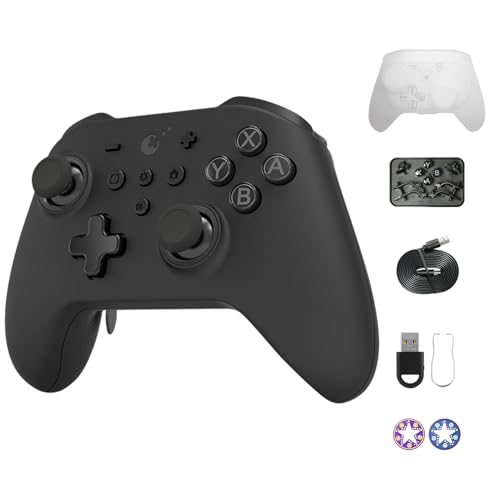
AKNES Gulikit KK3 Max Controller with 4 Back Buttons, Hall Joysticks and Triggers,1000Hz Polling Rate for Windows, Compatible with Switch/Steam Deck/Android/iOS/MacOS – Black
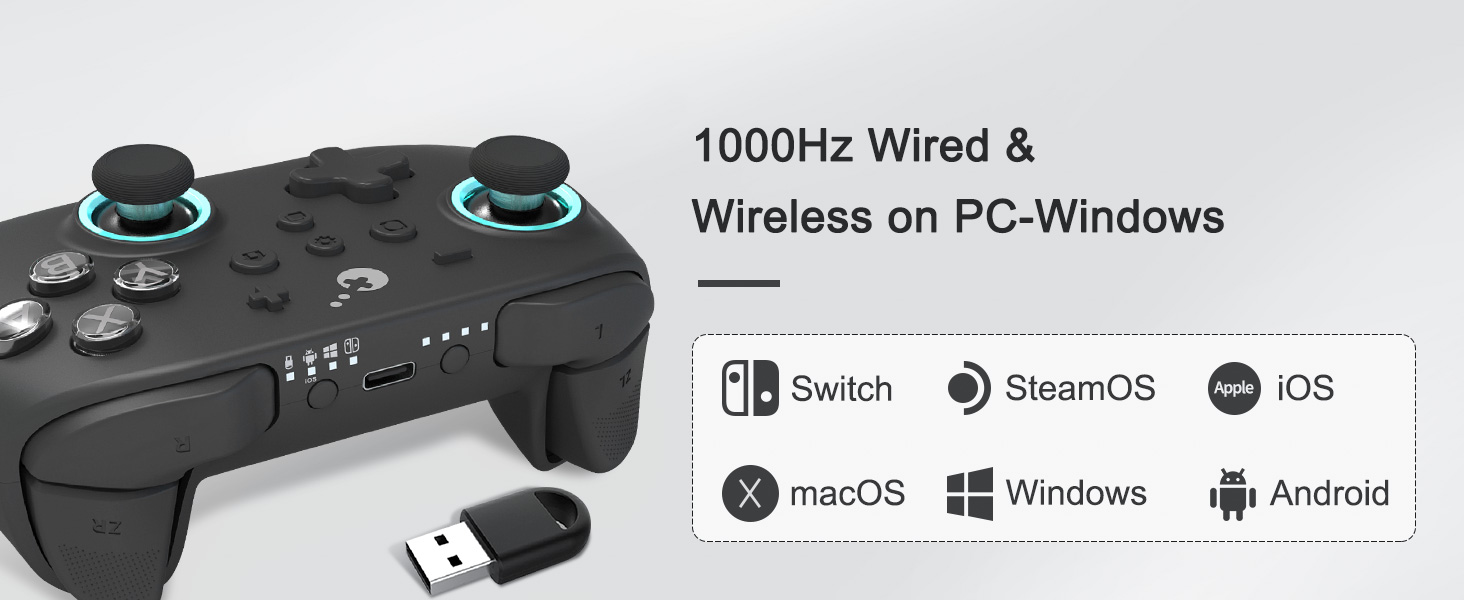
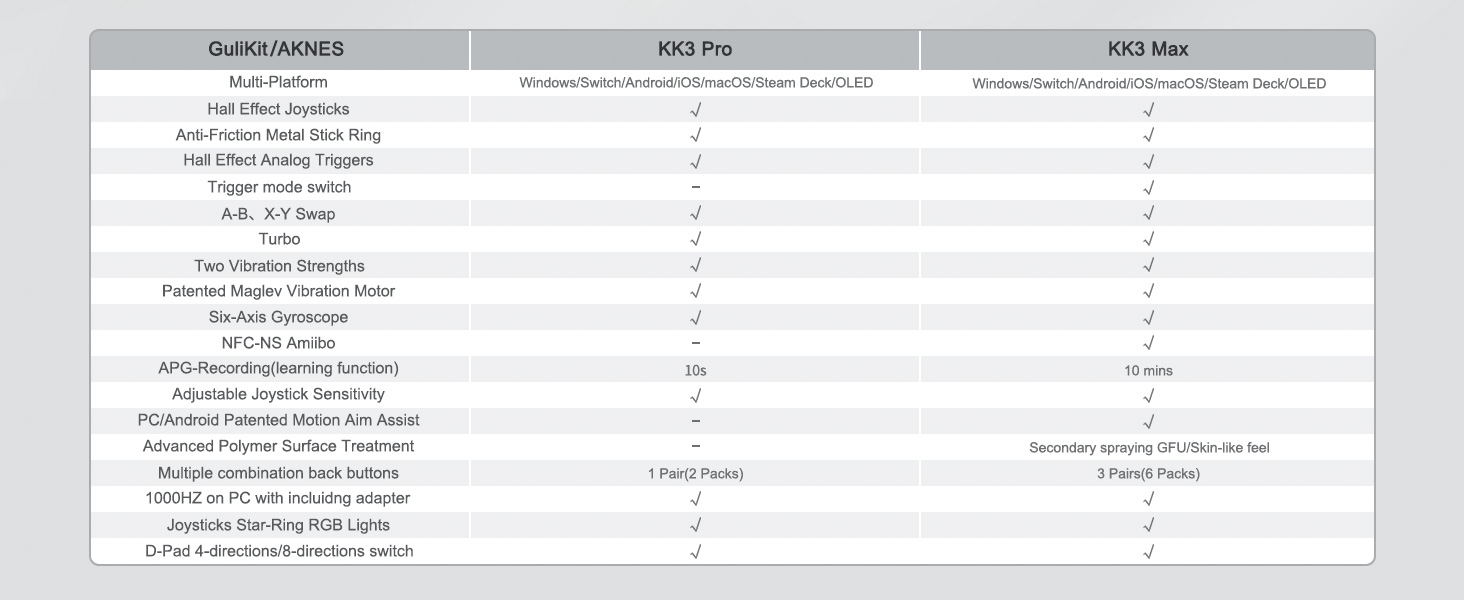
What’s the 1000Hz polling rate means?
1000Hz polling rate is used to describe the speed at which data is exchanged with the device, the higher the value, the faster the speed and the lower the latency is proved. 1000Hz for KK3 Max is only supported on PC-Windows, wired or wireless.
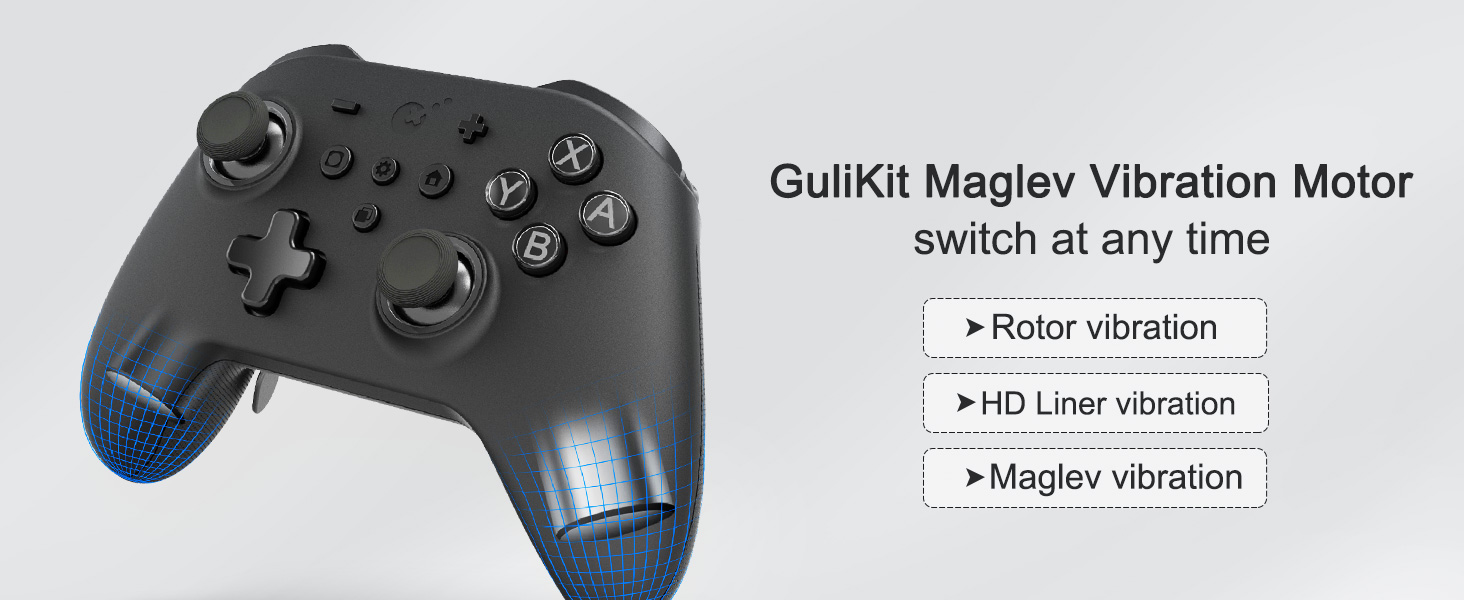
What does Maglev Motor mean?
Maglev Motor is a new generation motor developed by GuliKit, it has three modes at the same time, Rotor motor mode, HD Liner motor mode, and Maglev vibration mode, you can switch your favorite mode at any time.
What’s the Patent ‘Smarttrigger’ technology of hall triggers?
The technique is that you can slide the switches on the back, to set for Digital Triggers enabling an ultra-fast rate of fire for shooting game, or Analog Triggers enabling pressure-sensitive action for car racing games.
What is the new upgraded version of KK3 Max and KK3 Pro? What is upgraded? Is this linked to a new version?
Yes.
The mainly optimizes the internal structure of the back buttons, and has been tested.
In addition, the RGB ring material around the joysticks has also been optimized and is smoother.
There are also some optimizations for internal materials.
What is the relationship between GuliKit and AKNES?
We are the exclusive agent of GuliKit.
There are different sellers currently selling.
AKNES, focusing on the products we provide, also attaches great importance to buyer services. You can search (AKNES) everywhere to see what we’re doing.
Works On Linux
Switch mode works out of the box on Linux. Needed to install/enable xboxdrv for dongle and Android modes. Windows mode is borked on Linux but that is expected since it isn’t technically an Xbox controller. It just vibrates indefinitely and goes through a connect/disconnect loop.
Controller feels great, I would have paid extra for the case. My only complaint is that I would swap the home/screenshot buttons with the +/- buttons, but I got used to it after a few weeks.
Perfetto
Perfettamente funzionante, testato su Mac OS X 14.5 e 14.6.1, processore M1. il dongle di connessione a 2.4 gHz purtroppo non funziona su mac, ma la connessione bluetooth va perfettamente. Compatibile anche con Steam Input.
Muy pro
Viene con su funda rigida tipo caja, tampien una caja con accesorios para cambiar los mandos por el desgaste. Es super de calidad. Se parea al momento, va genial, no tiene lag, los comandos son ajustables y van super comodos.
El tacto es pro, se nota la calidad. La bateria es un 10 y puedes jugar horas. No resbala con el sudor, es comodo, es super configurable y va super bien con todos los juegos. Sin duda es un 10!
A Good Controller but Not Right for Me
A few weeks ago, I purchased the KK3 Max to be my universal controller. While it does perform well in many areas, I experienced skin irritation from the faceplate’s texture, which forced me to return it. Despite this, I’ll review the controller as if this issue didn’t affect me, as it may not affect many users. Below, I have highlight the standout features.
The Good:
Joysticks: The joysticks feel great and have perfect tracking. However, they are quite small with a thin outer ridge, so your thumb might slide off more easily than with other controllers. Thumbstick caps are included if this is an issue for you.
Face Buttons: The customization out of the box is excellent, allowing you to switch between NS and Xbox layouts seamlessly. Note that these advertised tactile buttons are just standard membrane buttons in a fancy housing.
Connectivity: I was pleasantly surprised by how easily the controller connected to various adapters. Here’s a list of devices I used it with:
Included PC wireless adapter: Worked well for the short amount of time I used it.
Brook Wingman XB 2: Worked perfectly when set to Android/Bluetooth mode on Xbox 360.
Gulikit Goku: Connected easily and had no issues on an Xbox Series when set to Windows mode.
Nintendo Switch: Worked as expected.
Customization Settings: The KK3 Max offers great on the fly customization, such as switching the d-pad between 4 and 8 way modes, changing lighting effects, adjusting rumble, and more. While I didn’t change settings much, it’s convenient to make adjustments without needing an app, just press two buttons, and you’re good to go.
The Bad:
Digital Triggers: One of the main reasons I chose the KK3 Max over the KK3 Pro was the digital triggers. Unfortunately, this feature didn’t work as expected. On the back of the controller there is a switch that slides out a clicky button that should be your new digital input. However, once you have pressed the clicky button once the trigger now activates at 100% before the clicky button is pressed. This causes my actions in game to feel disconnected and too early.
The Okay:
Triggers: Gulikit made a strange choice with the triggers, giving them a spring that is noticeably stiffer than a standard Xbox controller. Initially, it was uncomfortable, but I got used to it over time. Still, I wish they had opted for a lighter spring.
Back Paddles: The back paddles are well built and function as intended, but they are difficult to remove. I remove paddles regularly, and with these taking a lot of effort I found myself not using them as much as I normally would.
Additional Notes:
I did not test the battery life as I didn’t use the controller long enough to complete multiple full charges. The bumpers and d-pad worked fine but were unremarkable. Additionally, I did not evaluate the gyro or HD rumble features, as I did not use them.
Overall, I think the Gulikit KK3 Max is a good controller for its price, but it wasn’t the right fit for me. Ultimately, I purchased the KK3 Pro, as its plastic faceplate didn’t cause the skin irritation of the Max, and it lacked the digital triggers that I didn’t like.
Für mich Negatives und Positives
Positiv:
– Halleffekt Sticks (die bekommen kein Stickdrift).
-Bluetooth und auch mit Dongel dazu fr die die kein Bluetooth auf dem Pc haben.
-Sehr viele features z.B Turbo, mode switch zwischen Xbox und Switch Layout, LED an aus, Vibration u.s.w. Der Controller hat auch noch eine eigene Hub, ich kann von dort aus auf meinem Pc direkt auf Apps wie Spotify zugreifen.
-Hochwertiges Gefhl, allgemein fhlt sich vieles qualitativ gut ist aber nicht zu schwer, die ABXY und anderen Knpfe vorne haben sind nicht tactile aber dennoch fhlt es sich gut an nix ist lose. Die Sticks sind so gemacht, dass es keinen verschlei gibt was auch sehr gut ist, allgemein ist das Gefhl der sticks sehr flssig.
– 4 Paddles die man raus nehmen kann und so formieren kann wie man will und LT und RT kann man entweder normal und als Klick Trigger umstellen, es ist zwar nicht wie bei einer Maus, aber dennoch gut.
Negativ:
-Viele features sind zwar nett, aber fr viele kann es zu viel werden, da man immer die Anleitung bei Hand haben muss um Dinge zu ndern, fr mich ist es aber kein Problem.
-Das Material des Controllers ist zwar hochwertig, aber es sammelt Fingerabdrcke und allgemein ist es anfllig fr Flecken, das ist der Grund warum ich einen Stern abziehe, fr Leute die sehr schwitzige Hnde haben, kann das nmlich sehr unangenehm werden.
Insgesamt ein Controller der fr mich fast alles richtig macht und einem fr den Preis von 80 alles bietet was sndere Pro Controller auch anbieten fr mehr als 80, nur die Anflligkeit fr Fingerabdrcke ist etwas was ich besonders hervorheben muss. 4/5 Sterne
Solid controller 👍😲
I’ll admit this took some faffing to get connected to my Windows 11 mini pc but I managed to get it connected how I wanted it via using the included USB dongle.
Once connected I then used the little tool to swap around the letter keys so they was accurate to the the apps I was using to play my PC games.
Once this was done I got to testing on some well known gaming apps and found the controller worked really well.
When you get hold of it you can feel it’s definitely well made and not cheap plastic version’s like I’ve had in the past.
It’s really nice to hold, nice and responsive with no noticeable input lag and the whole gaming experience on this is a joy
When I first saw the price I was thinking it was overpriced but in it’s defence it delivers what it says and definitely feels more of a premium controller and is now my go to number one pad for my PC gaming.
So on that note a definite recommendation from me and you will not be disappointed
Smooth and responsive, very comfortable to use.
This is an amazing pro-level controller with a quality build and performance to match. The joysticks are Hall effect and consequently feel much smoother than standard analog sticks. The pad also feels very comfortable to hold with premium feeling grips and buttons.
It can be used wired and also pairs easily via Bluetooth. Whilst it comes pre-configured for the Nintendo switch, the package also contains a kit of replacement buttons to covert it for use with windows PCs. The buttons are easily swapped using a supplied tool.
I was intending to use it as a PC stick, but for some reason was unable to get the USB Bluetooth dongle to work. Whilst I could pair the pad to my PC by searching for the device itself, the Bluetooth dongle is the best solution as it offers a far superior response time (one suitable for competitive gaming). Not sure I wasn’t missing something obvious, but I believe I followed the instructions. I could of course have used a wired connection to achieve the same performance, but as I already had a good wired pad I ended up using this one as my main switch controller.
Overall, now that I have used it for a while on the switch, I am very satisfied with this pad. It is easily the up there with the best I have used.
Everything I could ever want in a controller.
Without a doubt the single best controller I’ve ever put my hands around.
Comfortable, grippy, it feels as premium as it look and looks as premium as it feels, comes with a bunch of accessories, and is consciously designed for the end user as far as I can tell.
Right out of the box, the instructions can seem overwhelming, but they’re only one page (the “front” is in English, the “back” is in Chinese) and the sections therein describe functions for the various systems you might want to connect to and the methods of connecting to them. So it’s really easy to find what you’re looking for. That’s a major A+ in my books.
After that, it comes with a bunch of accessories I kinda wouldn’t expect to see at this price point. Extra buttons/methods of pushing buttons so you don’t have to let go of your thumb sticks if you’re playing an FPS or something like that.
Personally, I’m not very good at FPS games but I wouldn’t ever try and play one seriously with anything other than a keyboard and mouse, but having extra means of pushing your face buttons is never a bad thing.
Wired, wireless, bluetooth, you can connect this controller a whole bunch of ways, and while I’ve only tried wired so far, it inspires a lot of confidence in me.
If you check out my photos, you’ll see a carrying case that comes with a wireless dongle and a button puller cause you can swap out the position of your buttons if you want! (X and Y and A and B make pairs, and you switch between the two button sets instead of just pulling up one and putting it somewhere else. They’re all different sizes and not interchangeable like that.)
Now, it’s going to be hard to see, so I’ll apologize for the photo quality, but on the front of the white carrying case are shortcuts so you know how to change certain features like the lighting, the rumble, etc. without needing to carrying around the instruction sheet with you! That’s thinking ahead and putting the customer first if you ask me!
There are so many options that I’m not 100% familiar with, but I know that Hall joysticks and triggers are meant to not drift eventually like other joysticks and triggers are known to do in the worst case scenario, so once again, a really high quality controller.
Call me optimistic, but I think these guys know what they’re doing since they make other controllers too, and they’ve got my vote of confidence.
It’s a great controller if you’re looking for even half of the options it comes with, and I’d definitely recommend it.
5/5 from me.
gutes Handling, perfekte Sticks, Plattformunabhängig, leise Taste
Der Controller ist sehr schwer und gut verarbeitet. Fr meine bevorzugten Games am PC und Switch, ist er vermutlich viel zu kostenintensiv und eher berdimensioniert. Aber bei Jump ‘n’ Run Spielen hat er verdammt gute Ergebnisse abgeliefert. Ebenso bei RPGs. Ein Input-Lag konnte ich nicht feststellen.
Der Controller bietet viele Extras. Daher kann man viel Zeit damit verbringen, diesen erst einmal nach Belieben einzustellen. Ein grndlicher Blick in die Bedienungsanleitung ist unumgnglich.
Einige hiervon empfinde ich als schn, aber nicht zwingend notwendig. Wie beispielsweise die Einstellungen fr die Vibration, APG-Recording oder die zustzlichen Motion-Aim-Assist fr Shooter-Spiele. Fr mich ist dieser Assistent schon eine Art von cheaten.
Dazu kommen weitere Features wie einstellbare Joystick-Sensibilitt, Rapid-Fire, A-B X-Y Tausch, einstellbare Beleuchtung, 4 oder 8 Richtungen fr D-Pad solche Einstellungen empfinde ich als uerst ntzlich und habe ich bei anderen Controllern vermisst.
Stick-Drift war bei keinen der Sticks vorhanden. Jedoch sollte man die Einstellung der Dead-Zone korrekt whlen, sonst erscheint der Mittelpunkt eventuell nicht zentriert.
Die Tasten sind wechselbar, je nach Plattform, an der man den Controller nutzen mchte.
Der KK3 Max muss hierfr nicht demontiert werden. Die Tasten werden mittels einem mitgeliefertem Tool herausgezogen. Dies sollte man jedoch vorsichtig machen. Rutscht man ab, zerkratzt man den Controller oder die Tasten.
Alle Tasten arbeiten sehr leise.
Ebenso wechselbare sind die Paddel fr die Unterseite. Diese werden lediglich durch stecken montiert. Sie wurden aus Metall gefertigt und knnen daher nicht brechen. Ich bevorzuge Controller ohne Paddel und lasse diese daher demontiert. Bisher habe ich sie auch nicht bentigt. Fr manche Spieler und spezielle Games ist dies jedoch sicherlich von enormen Vorteil.
TOP !
J’ai command cette manette de jeu Aknes noire pour mon fils qui en voulait une pour sa Switch.
Aprs avoir configur la fonction de vibration de sa console Switch, il a trouv que les boutons de la manette taient bien positionns et faciles utiliser.
Sur le dessus de la manette, il y a un bouton pour l’appareillage et quatre autres pour slectionner l’appareil utilis (Switch, Windows, tlphone, ou dongle). Ces voyants s’allument individuellement en fonction de l’appareil choisi, ce qui rend la connexion trs intuitive.
La manette offre plusieurs fonctionnalits avances. Par exemple, pour ajuster les vibrations, il suffit d’appuyer sur le bouton avec le logo du soleil et d’utiliser la croix directionnelle pour augmenter ou diminuer l’intensit. Le mode turbo est un autre atout majeur, permettant de programmer une action rpte sur un bouton spcifique, ce qui est trs pratique pour les jeux ncessitant des actions rptitives.
Il a galement test l’intensit des vibrations et cela fonctionne parfaitement. La batterie de 950 mAh offre environ 12 heures d’autonomie, ce qui est amplement suffisant pour de longues sessions de jeu. Les touches et les pads sont ractifs, et les boutons L, R, ZL et ZR sont robustes.
Il semblerait que l’un des aspects les plus pratiques de cette manette est sa facilit de connexion. Elle se connecte automatiquement la console lorsqu’on l’allume, et elle s’teint ou se met en veille en mme temps que la console. De plus, on peut rveiller la console en appuyant sur le bouton “Home” de la manette.
En termes de fonctionnalits promises, comme le mode turbo et les diffrentes intensits de vibrations, tout fonctionne merveille. La manette dispose de trois modes de moteur (rotor, HD Liner, Maglev), et on peut facilement passer de l’un l’autre selon les prfrences. La nouvelle fonction “Smarttrigger” pour les gchettes de hall est galement un ajout bienvenu, qui permet d’ajuster les gchettes pour une prise de vue ultra-rapide dans les jeux de tir ou un fonctionnement sensible la pression dans les jeux de course.
Selon mon fils, cette manette est l’une des plus compltes et qualitatives qu’il a pu essayer !
Ricorda il gamepad Elite di Microsoft, alcune funzioni sono interessanti. Preciso.
Questo joystick vuole essere un degno sostituto del pad serie Elite di Microsoft proponendo soluzioni interessanti che lo fanno spiccare non poco rispetto alla concorrenza.
La confezione ben realizzata ed all’interno troviamo tutto il necessario per iniziare a giocare fin da subito e possiamo collegare il controller con tre sistemi diversi. Oltre al controller troviamo anche la chiavetta wireless che resta il modo migliore per la connessione viste anche le ottime prestazioni, in termini di lag, offerte da questo sistema di connessione.
Come dicevo poco fa, ci sono tre sistemi diversi di collegamento. Molto ma molto buono con il cavo grazie a dei valori di latenza particolarmente bassi e quindi idoneo al competitivo online. Il Bluetooth va come su tanti altri modelli, a latenza abbastanza alta e quindi poco ideale per il gioco competitivo. Risultati eccellenti invece con il sistema wireless, tramite la pennetta USB inclusa, grazie ad un polling particolarmente elevato per la categoria. Una reattivit da primato.
Molto buoni gli stick, hanno un bel ritorno ed un bel range di movimento che li rende veramente piacevoli da utilizzare in ogni circostanza. La “zona morta” gestibile grazie alle configurazioni ma gi di base i risultati mi sono parsi molto buoni. I pulsanti hanno un click piacevole che restituisce delle belle sensazioni durante l’utilizzo. Si fanno trovare sempre pronti ad ogni pressione ed i grilletti supportano vari tipi di pressione, sia analogica che digitale. Un ottimo modo per avere la massima versatilit nei comandi. La crocetta direzionale ha solo 4 direzioni come pulsanti fisici ma possibile scegliere tra due modalit, appunto a 4 direzioni oppure 8.
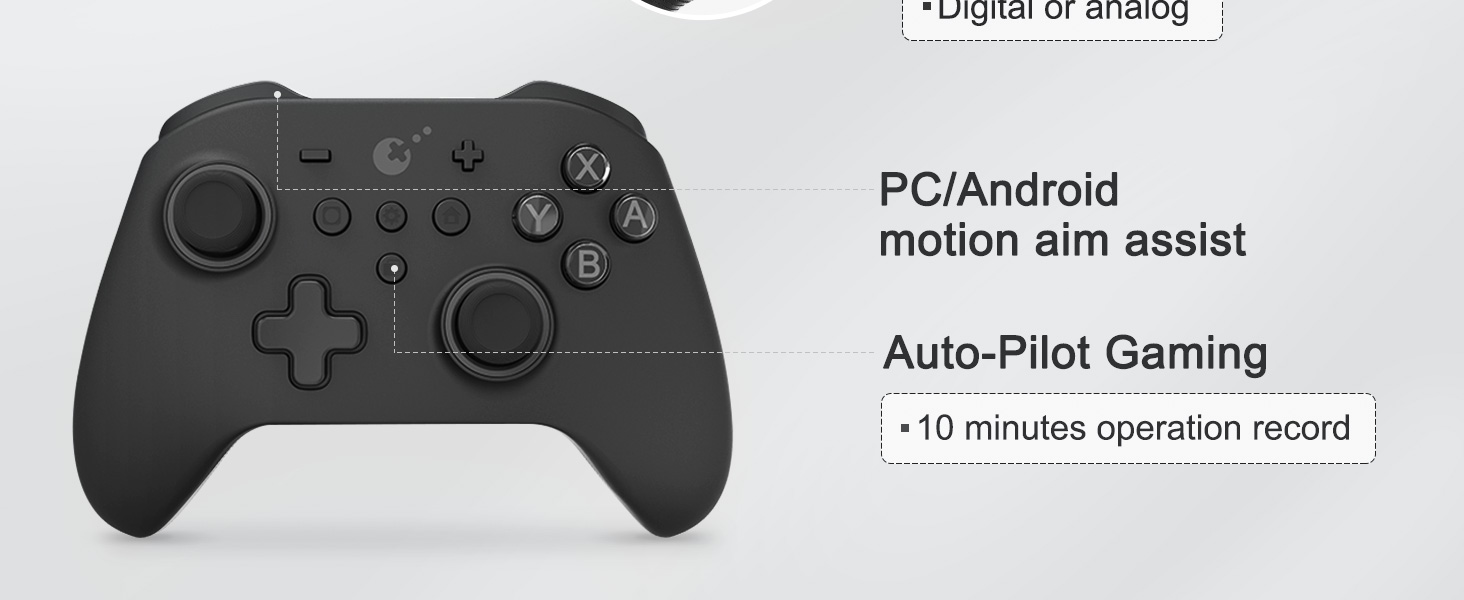
presente una funzione di registrazione con autopilota che essenzialmente una funzione macro potenziata visto che riesce a gestire sequenze di comandi della durata di ben 10 minuti. difficile arrivare a testare tutti i 10 minuti in quanto occorrerebbe un gioco dove essenzialmente non cambia nulla nel gameplay, con delle certezze tipo i giochi di ruolo alla giapponese anche se neanche ricalcano benissimo questo contesto. comunque una funzione interessante che, per quanto provato, mi parsa funzionare parecchio bene.
Trovo molto interessanti anche i motorini dedicati alla vibrazione, in grado di offrire tre modalit di vibrazione differente tra cui anche una aptica. L’effetto generale superiore a molti controller che ho provato e su alcuni giochi mi ha lasciato sensazioni molto piacevoli anche se nulla a che fare con un sistema Dual Sense. Dal punto di vista delle vibrazioni comunque una delle esperienze pi piacevoli provate negli ultimi tempi.
Buona la qualit costruttiva con un design che ricalca lo stile del controller Elite di Microsoft con tanto di 4 pulsanti addizionali sul lato posteriore. Peccato non vi sia la stessa possibilit di personalizzare gli stick, probabilmente l’unica cosa che gli manca a livello funzionale anche se in generale resta un ottimo prodotto alternativo. Certo, con tutte le funzioni che ci sono c’ tanto da imparare, peccato che il manuale sia esiguo. Quattro stelle.