WD 6TB My Passport portable external storage, external hard
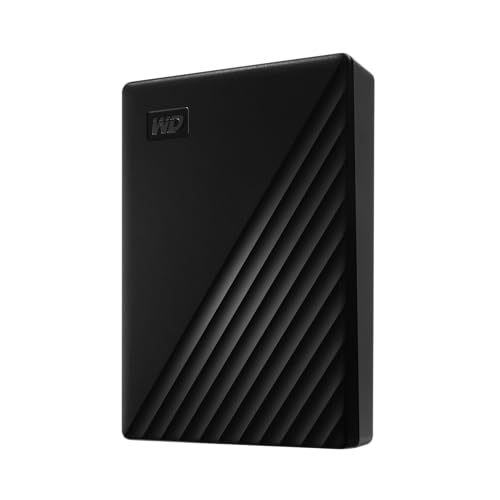
WD 6TB My Passport portable external storage, external hard drive, USB 3.0, portable HDD with software for device management, backup and password protection, works with PC, Xbox &Playstation, Black

Slim style.
Make the most of your journey with style that suits you. The new My Passport has been redesigned to feature a convenient, slim form factor and is available in a range of vibrant colors.
Backed up.
Make sure everything you create while on your own life journey – photos, videos, music, and documents – doesn’t get lost. The My Passport drive comes equipped with backup software that can be set to run automatically to your schedule. Just pick the time and frequency to back up important files from your system onto your My Passport drive.
Locked down.
Make sure everything you create while on your own life journey – photos, videos, music, and documents – doesn’t get lost. The My Passport drive comes equipped with backup software that can be set to run automatically to your schedule. Just pick the time and frequency to back up important files from your system onto your My Passport drive.
Super easy.
My Passport portable storage is ready right out of the box including all necessary cables. And with SuperSpeed USB, you can quickly start backing up everything in your life and keep driving forward.
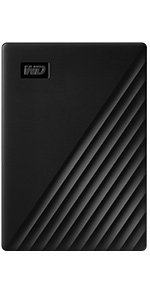 | 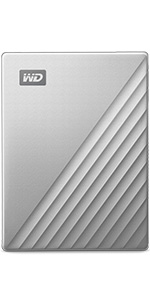 | |
|---|---|---|
| Customer Reviews | 4.5 out of 5 stars 9,696 | 4.4 out of 5 stars 1,581 |
| Price | £102.99 | £132.09 |
| Technology | HDD | HDD |
| Interface | USB 3.0/2.0 | USB-C/3.0/2.0 |
| Password protection | Hardware Encryption | Hardware Encryption |
| PC/Mac Ready | WD Backup for PC | WD Backup for PC |
| Shock resistant | PC | PC |
| Great for | Backup & Storage | Backup & Storage |
Western Digital, the Western Digital logo, WD, the WD logo, and My Passport are registered marks or marks of Western Digital Corporation or its affiliates in the US and/or other countries. USB-C is a mark of USB Implementers Forum. Mac is a mark of Apple, Inc. All other marks are the property of their respective owners. Product specifications subject to change without notice. Pictures shown may vary from actual products. 2022 Western Digital Corporation or its affiliates. All rights reserved.
Troubleshooting:
Undiscoverable by PC and cannot be repaired via software – Connect to another computer to verify if issue is with local host or product. Additionally product MUST be safely removed or ejected from host as not properly removing product form PC will also create issues such as mentioned below.
For Password protection, must install included software to enable password protection.
drive clicking, this device requires USB power only we would recommend trying the device on another computer, try another cable
Every trip needs a passport. The My Passport hard drive is reliable portable storage that gives you the confidence and freedom to move forward in life. With a sleek new design that fits in the palm of your hand, there’s plenty of room to store, organize and share all your photos, videos, music and documents. Perfectly paired with WD Backup software and password protection, the My Passport drive helps protect the contents of your digital life. The total capacity available on a 5TB drive is 4.6TB. The storage industry as a whole measures capacity in decimals. Windows based computers measure based on the binary, that’s why the drive shows as a smaller capacity
| Weight: | 209 g |
| Dimensions: | 10.7 x 2.06 x 7.5 cm; 208.65 g |
| Brand: | WD |
| Model: | WDBR9S0060BBK-WESN |
| Colour: | HDD Black |
| Manufacture: | Western Digital Technologies, Inc. |
| Dimensions: | 10.7 x 2.06 x 7.5 cm; 208.65 g |
Hard drive data backup.
This product is used for personal backup of data. It’s straight forward to set up and use and the unit is robust. This is not the only one of these drives that I use and find them good value for money.
WD 5Tb External Hard Drive
I’ve got a few different makes of external hard drives , this is my 3rd WD hard drive I’ve not had any issues with any of them so I thought I’d switch a tried and tested brand.
I like this style of drive as it’s powered by the usb socket it’s plugged into.
Nice and compact so they don’t take up too much space.
Tiny profile for so much storage
Incredibly fast read-write rate, small, thin profile and really portable. Perfect for my use as a back-up drive on my Mac and as it’s always pre-formatted for Mac, I was up and running in moments.
Neat little unit.
A neat little unit which I bought hoping that the included backup software will be faster than Kaspersky which I am currently using. Looks good so far as it allows a selection of different types of backup; Full, incremental etc and a lot of options that I would never have thought of. I’m hoping that this part remains free to use as the advanced offering which I don’t need is $40/year. The lead could do with being longer too. All external HDDs seem to be supplied with a 50cm lead; Too short to be of any use to me.
5 Stars — Compact, Reliable, and Mac-Ready!
I recently purchased the WD 2TB My Passport for Mac, and I couldn’t be more pleased with its performance. Here’s why I highly recommend it:
Pros:
Mac Compatibility: This hard drive is truly plug-and-play with Mac devices. It’s already formatted for macOS, and I had no trouble connecting it to my MacBook Pro. It also integrates seamlessly with Time Machine, making backups incredibly easy.
Compact Design: The hard drive’s compact size and sleek midnight blue color make it portable and stylish. It easily fits into my bag without taking up much space, perfect for those always on the go.
Fast Transfer Speeds: With USB 3.0, transfer speeds are impressive, and I was able to quickly move large files without any hiccups. It has made storing my media files, backups, and work documents effortless.
Security Features: The built-in password protection is a great bonus for those who prioritize data security. The included software is easy to use and allows for efficient device management and backup.
Storage Capacity: 2TB provides plenty of space, perfect for large files like photos, videos, and design projects. It’s ideal for someone who needs reliable external storage without worrying about running out of space too soon.
Cons:
Short Cable: The USB cable included is a bit on the short side. If you like to have more flexibility in where you place your drive, you might want to invest in a longer cable.
Overall, the WD My Passport for Mac delivers everything I need: speed, security, and reliability in a compact package. Whether you’re using it for daily backups or transferring large media files, this hard drive is a fantastic choice!
Would I purchase again ? “yes I would”
WD 5TB HDD.
Performs to the limits of what can be expected from a 2.5″, 5400rpm spinning hard disk. Works with MacOS. The USB-C interface is fast and efficient. It’s a very cost-effective way to archive or backup data when you don’t need crazy high transfer speeds (ie: it’s good enough for backing up docs, photos, short video clips etc. but not best suited for intensive tasks like direct video editing for example – SSDs are much better for that sort of stuff).
First delivery of this was a dead disk. The device light comes on when connected but no further interaction – all manners of connection failed across multiple desktops and laptops. Nothing audible nor any signs of movement. Got on to product support and they agreed disk is faulty and sent out a replacement.
The replacement works fine – connects first time. So now I got 5TB in a single disk, hurray. Noted what other reviews said about the connection cable, I will try get a better quality one to try – speed is poorly. Between another USB 3 disk (“X”) via the desktop to this 5TB disk (type C), over the same USB powered hub (100w), the speed maxed at 30MB/s, with a bit of 31. Slightly slower speed, averaging about 22MB/s when copying from same 5TB disk to itself. Maybe 5400rpm answers it.
This is copying 120GB folders and files.
I am after the capacity, much less about the speed.
Further tests, copying from X drive to internal SATA disk on another computer over the same LAN, the speed peaked about 40MB/s, mostly in the region of 32MB/s. Copying back to the same SATA disk peaked at 82MB/s, mostly 45MB/s. The SATA disk is for storage rather than speed, 5400rpm.
While writing this, I also discovered that using my alternative type c cable (not sure if it is better or worse than the supplied short cable), along with the type c – A adaptor, has been stable, compared to (a) the same cable and adaptor to the usb port on the front panel (motherboard header), and (b) the same cable on to the type c, front panel on mb header. In both cases of (a) and (b), the drive “disappeared” / disconnected when not in use for say 2-3 minutes. I assume that’s because of the quality of the cable and lack of power. Using the powered USB hub solved the problem. But next on shopping list is a good quality type c cable.
Happy to give 5 star however for many people speed will be important. In longer term with larger capacity, this disk with its speed will quickly rank near bottom. When I start using this for live reading and writing video processing and scratch temp it will struggle to keep up. So, 4 star.
–Update–
With a new 100w type c cable :
— On type c header on motherboard,
– copying from from the X drive to the 5TB, this peaked at 40MB/s, with a bit of 41,
– writing back to the 5TB (copying) peaks at just over 13MB/s (didn’t achieve the 22MB/s above)
— On type C with USB adaptor into the 100w powered USB hub
– copying X to 5TB: surprisingly, this time it is peaking 20MB/s (second test, same outcome)
– copying 5TB to itself: also just over 13MB/s
Rather confused with the lower speed with the new type c cable. Is it doing some load balancing / queueing.
I then tried copying one file 565GB from same X drive to the 5TB (over 100w hub), peak is 20MB/s. Copying the file to 5TB itself, same as above, just over 13MB/s.
Not sure what to make of it. A big tanker indeed but not sailing in a rush.
This review is for the My Passport 2 TB standard version (not Ultra) – I just got this drive yesterday, and I’m a bit wary of writing such a positive review so early on, but I know if I don’t do it now then I never will and I’ll forget all the details. I’ll definitely update it if I do start to have any problems with it later though. Be warned – this review might be very long, but there don’t seem to be that many reviews of this particular model so I’d like to cover everything that would have been useful to me in case any of it helps anyone else.
The reason I went for this particular drive is that I needed a portable drive of at least 2 TB, but wanted it to be as small and light as possible, so while 4 TB would have been nice, those seem quite a bit bigger and heavier and the reviews for them seem worse in terms of both performance and reliability, so decided to stick with 2 TB. All the drives I could find to have plenty of reports of them failing etc in the reviews, but the WD ones *seemed* to have less, and I get the impression that most knowledgeable people on other forums etc with experience of different drives tend to favour WD for reliability over other manufacturers these days. I almost went for the Ultra version, as my new laptop has USB-C and it does seem nicer than the extra-wide MicroUSB 3 connector, but I didn’t particularly want it to be made of metal (it’s just extra weight for me), and my laptop’s USB-C ports are usually taken up by the charger and a hub anyway. Plus lots of reviews say the USB-C cable that comes with it is really bad, and I didn’t like the choice of colours. So when I realised the standard version was 20 cheaper, available in black, and doesn’t seem to have any real drawbacks apart from the wider connector (maybe the performance is slightly worse, but I’m not sure because that’s not really mentioned anywhere) I decided to go for that one instead.
Amazon’s packaging of it wasn’t great – I saw other reviews saying to order other items at the same time as a hard drive so that they get packed around it in the box, so I did, but unfortunately that didn’t help because the packaging consisted of one small strip of the large air bubble type stuff placed on top of all the items, which left literally half the outer box empty for everything slide around in. Just picking up the box after it was delivered, everything loudly slid over and thudded into the other side of the box. It seems to have survived ok though (and of course it was in its own retail box which I would hope provided some protection). From looking into it I’ve found people saying that hard drives these days can survive huge forces as long as they’re not turned on at the time, so anything that was enough to damage it in transit would have caused visible damage to the casing too (in this case even the cardboard retail box it was in doesn’t have any signs of damage), and that it would be likely to not work properly at all straight away rather than just failing later. So I think it’s fine.
I currently have two similar-style drives – an older WD My Passport (Essential SE, apparently) 1 TB from sometime around 2010 which has a MicroUSB 2 connector, and a slightly newer Samsung M3 1 TB with MicroUSB 3 (same as this drive), so it’s interesting to see how this compares to those. The first thing I noticed when unboxing it was that it is considerably smaller than either of those (about half the height, despite having double the capacity), and also noticeably lighter. So I am impressed and pleased with that – it looks very sleek, and the casing feels solid, so definitely no complaints about the plastic of the drive itself from me. When plugged in and spinning, it is slightly noisier than my Samsung M3, but still pleasantly quiet (no noticeable seeking noises at all so far, just the constant spin). And this is with a Razer Blade Stealth (late 2019) laptop which is almost completely silent when not doing much, and the drive in front of it at the moment, so I probably wouldn’t be able to hear it at all if I wasn’t in such a quiet environment.
The cable that came with it seems to be working fine so far, but possibly is of similar bad quality to the USB-C version – it is quite stiff, possibly a bit wobbly when connected in the ports on both ends (although no loss of connection so far even when moving it) and is noticeably thinner than the cable (of the same type) that came with my Samsung M3 drive. So I might still get a better cable at some point, at least if/when this one starts to have any connection issues.
In terms of performance (which I’m surprised isn’t mentioned at all in the product details/marketing etc, other than I think I saw the USB 3.0 maximum speed of 5Gbit/s mentioned somewhere which is obviously ridiculous as the drive won’t be capable of anywhere near that), I’m getting maximum read/write speeds of 126/116 MB/s in ATTO Disk Benchmark, and sequential read/write speeds of 138/116 MB/s in CrystalDiskMark (just as it came, with NTFS formatting and nothing on it yet). My Samsung M3 (which I remember performance being a point of when I bought it, although I hadn’t been able to make full use of that until recently as my old laptop only had USB 2) seems to be maxing out at about 85 MB/s for both read and write (although with a lot more data on it, if that makes any difference), so I’m pleased with this.
One issue I have with my old My Passport drive is that it always seems to spin down (to a lower speed if not completely off, I’m not sure) about 20 seconds after it was last accessed, and then takes about 5 seconds to get going when something tries to access it again, which can get very frustrating. I’ve tried increasing/turning off the sleep timer in both WD Drive Utilities and the Windows Power Management “Turn off hard disk after” setting, but neither makes any difference, it seems to have its own fixed internal idle timer for some sort of low-power mode which even WD’s own software can’t change. Thankfully that doesn’t seem to be an issue with this new drive.
I’ve tried enabling the encryption on this drive to see if it makes any difference to performance – it doesn’t, but as the “encryption” process is so basic (it’s basically just setting a password on the drive in the “WD Security” software, and it seems to take effect immediately), I’m guessing the drive is actually encrypted at the hardware level all the time (as otherwise it would surely take time to encrypt/decrypt the existing data when setting/unsetting the password). So I’d say that’s a drawback as it means even if you don’t use the drive encryption, if the controller fails but not the drive itself, you can’t take out the actual drive and connect it up to something else, but on the other hand you apparently can’t do that with these particular WD drives anyway as the controller board is soldered directly to the drive rather than it using standard SATA connectors or anything. I’m not sure how the password system would work if you connect it to other devices such as phones/tablets etc (on Windows, the drive having a password set causes it to appear as a CD drive with an executable file on it which you run and enter the password into, which then causes the actual hard drive to show up as well), but if I wanted the drive encrypted I don’t think I’d rely on this as a solution anyway as WD’s system apparently has a lot of vulnerabilities.
I also tried enabling write caching for the drive in Windows (before trying the encryption), but it seemed to make barely any difference at all (write speeds very slightly higher, read speeds possibly actually lower, but probably all within the margin of error anyway) so I’m going to leave that off as it’s not worth the extra risk if the drive gets disconnected by accident (especially if the cable does become dodgy).
I think that just about covers everything I’ve thought of so far, so I hope someone finds it useful 🙂