Thrustsmaster T.16000M FCS Joystick with H.E.A.R.T Technology – Compatible with PC via USB in Windows

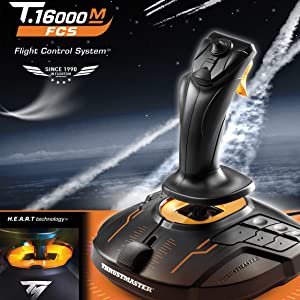
T.16000M FCS Joystick
Thrustmaster has devoted its 25 years of expertise in flight sim controllers to meet the growing demand from flight simmers in general – and space simmers in particular.
The T.16000M FCS has been designed for advanced fliers looking for comprehensive, realistic controls as an alternative to using a mouse and keyboard.
The T.16000M FCS (Flight Control System) flight stick is compatible with PC via USB in Windows 10, 8 and 7 (32-bit and 64-bit).
| | | |
|---|---|---|
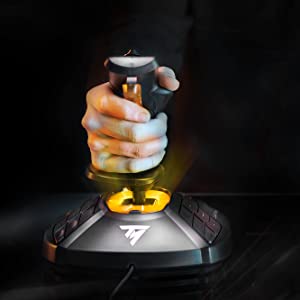
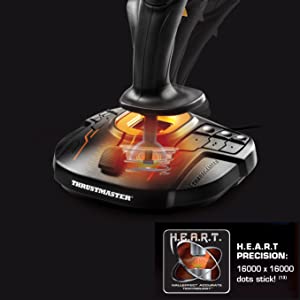
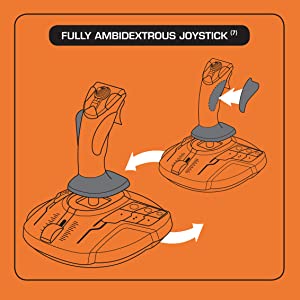
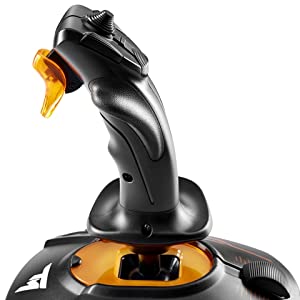
T.16000M FCSThe T.16000M FCS features 4 independent axes, including twist rudder (controlled by rotating the stick), 16 action buttons with “braille”-style physical button identification, one 8-way Point of View (PoV) hat switch and an ergonomic trigger. Its striking orange accents and backlighting bring gamers’ immersion to a whole new level. | H.E.A.R.T HallEffect AccuRate TechnologyIn order to deliver exclusive high-precision performance, pitch and roll on the T.16000M FCS flight stick employ H.E.A.R.T HallEffect AccuRate Technology (U.S. patent US08471815) for 16-bit resolution (i.e. 16000 x 16000 values) – the same pinpoint accuracy delivered by the extremely high-end HOTAS Warthog joystick, allowing gamers to engage their enemies with surgical precision. The helical spring (0.1” / 2.8 mm in diameter) inside the stick provides firm, linear and smooth tension. | Ambidextrous designThe joystick’s unique ambidextrous design can be easily switched between right-handed and left-handed use. Its twisting handle controls the rudder by default, but can also be locked in place. Piloting with a joystick in each hand is now possible in all games compatible with two joysticks. |
| | | |
|---|---|---|
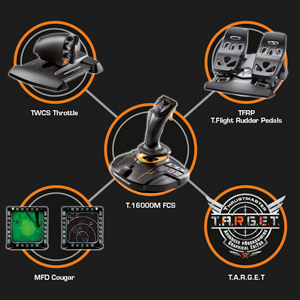
Thrustmaster advanced flying ecosystemThese products are part of a range of flight simulation peripherals that can be used in conjunction with one another: a complete ecosystem featuring the FCS flight stick, TWCS throttle, TFRP rudder pedals* and MFD* (Multi-Functional Display) cockpit panels. These elements are also compatible with the T.A.R.G.E.T advanced programming software. * Sold separately. | T.A.R.G.E.T advanced programming software on PC: program up to 256 buttons in the flying ecosystemThrustmaster Advanced pRogramming Graphical EdiTor software: combine with other Thrustmaster devices (so that they are recognized as a single USB device), and load or create specific mapping profiles for each game. Tailor your own profiles to enhance most Thrustmaster flight controllers, and share them with the Thrustmaster community. | Ergonomic design for optimum comfort and precisionThanks to its design and ergonomics, the T.16000M FSC provides players with multiple recognizable features, allowing them to become more effective and accurate when in flight. This enhanced access to flight controls proves even more essential when players are fully immersed in the exceptional flight experience delivered by VR-compatible games. |
| Dimensions: | 10 x 10 x 3 cm; 1.3 Kilograms |
| Model: | 2960773 |
| Origin: | China |
Not cheap - but good
Work well with Condor Gliding SIm. Rudder control is critical for a glider so adds degree of realism. Easy to set up and work perfectly. Well made and sturdy. Not cheap but worth it.
Awesome sticks, especially for the price
I bought these for getting into space flight games, and almost went with more expensive sticks but decided to be good and stick to my budget.
I’m very glad I did, these sticks are exactly what I wanted!
Initially I thought they not be good quality because of the price compared to other joystick sets but I’m very happy with them so far.
They are made of plastic, and have a good weight to them so don’t feel cheap.
There are plenty of buttons, sliders and other inputs so you’re not short of controls.
As for feel, they are robust so far, and responsive. I’ve been using them for a few weeks so I’ll have to see how they hold up long term, but I’m fairly confident they should last well.
Software wise, you can download the Target software from their website, although the games I’ve played (Star Citizen and Elite) haven’t needed it as they recognised the sticks fine.
The one criticism I have is the base buttons could do with a little more obvious identification on the button so you can more easily find the right ones without looking.
Don’t get me wrong, they do have indents and ridges to help, but they kind of blend together, to me at least.
That said, that’s a minor niggle and just really takes practice to get the motor functions down.
All in all, a great set of sticks at a bargain price!
My husband went from using a premium brand single stick with throttle to using a pair of these to play Elite. He has waxed lyrical about how he can now fight ‘Thargoids’ and the high quality of the ‘gimble’. I generally smile and nod.
He’s happy, I’m happy and apparently Thargoids are unahppy. It’s a win, win, loose situation!
Work a trea
Can’t really add much to what others have said before me. Bought primarily for star citizen and they work great for that. No issues what so ever.
It did the job
It is accurate, but you can feel the friction as you move the joystick around.
well made and stable
has a good weight which reduces movement on the desk. So far zero creep when zeroed as well. easy to setup in my game, all the buttons are simple to assign as well. You can program all manner of things with it but so far no need for me to do that.; have recommended to friends as well.
quality ambidextrous joystick
I bought this to replace a matcatz stick that was getting beyond its best. I chose thrustmaster based upon previous experience. The stick is easy to use – plenty of buttons and the stick movement is smooth. I did choose this stick because I am very much left handed, only to find that on converting it to left hand mode (which is quite easy) I am now so conditioned in using a right-handed joystick that using it in left hand mode was nigh on impossible – so back to right hand moce it has been. Good quality – recommended.
Thrustsmaster T.16000M FCS Joystick
Bought this product for a starter into DCS and I love it it is very smooth and accurate, makes everything 10 x easier and is overall a great product!
Great combo, with lots of programmable buttons
Having had a Logitech this combo is easy to use with lots of programmable buttons and is better as an all round unit.
Abbastanza soddisfatto
Ovviamente il pacco arrivato per la data prevista, ottimo imballaggio completamente intatto.
Il joystick abbastanza pesante, buone le rifiniture della plastica, sembra abbastanza preciso e sensibile.
Non do 5 stelle per un semplice motivo piccole imperfezioni nel montaggio, come ad esempio la base appena sotto l’impugnatura fa un gioco che non dovrebbe fare, ho provato ad eliminarlo cercando di stringere le viti, ma nulla da fare.
E poi il software di configurazione, anche se sembra non essere necessario per la configurazione, un po’ complicato.
Onestamente al momento non ho ben valutato il joystick, sia per mancanza di tempo che per mancanza del gioco per il quale l’ho acquista, che uscir a breve.
Cmq l’hardware a me sembra affidabile e se mi chiedessero consiglio per acquistarlo, direi di si; anche se ci sono joystick pi economici con le stesse identiche prestazioni e con meno imperfezioni. 🙂
Only decent joystick for the price
Strong build, no problems with deadzone, its a good all rounder. You wont find better at this price, its a far superior stick then the x56. Only issues i had was the stick has alot of tension like a steering wheel with no power steering and a lack of a much needed shift key. After using the x56, T16000m and the mach2, In the end i went for the raptor mach 2 stick which is a vkb gladiator replica. Movement of the stick is smoother has shift key to increase hat and trigger functions. Only issue was the Twist axis needed more of twist before it would register, the t16000m has a better twist axis.
Neutral gear without shake
Because of Hall’s sensors in joystick after years it will have the same behavior.
Excellent does everything you ask of it smoothly and comfortable.
The thrust master 1600 is an excellent joystick, a great compliment to the thrustmaster Airbus side stick. The 1600 has the ability to react quickly for combat while the Airbus is ideal for passenger aircraft. Both are excellent in their own way.
Excelle
Just plug it in to a usb port on the back of my computer and the basics ware all ready to go, can easily switch from left and right handed operation, very accurate in use, spare keys are very easy to program and a good price. Without question it has improved my enjoyment and skills on fs2020.
Excelle
Just plug it in to a usb port on the back of my computer and the basics ware all ready to go, can easily switch from left and right handed operation, very accurate in use, spare keys are very easy to program and a good price. Without question it has improved my enjoyment and skills on fs2020.
Complemento per flight simulato
Avevo il vecchio Flight Simulator 2000 ma su Windows 10 non funziona pi e nemmeno il vecchio joystick originale. Quindi ho scaricato il nuovo Flight Simulator 2020 e di conseguenza dovuto acquistare questo modello. Devo dire che tra tutti quelli in commercio, questo mod. T16000 il migliore rapporto qualit-prezzo. Non ha molta “manetta” ma funziona bene anche in strambata.
Hallo. Habe den Joystick gekauft, da fr Linkshnder geeignet. Spiele den Flight Simulator damit. Bin einarmig Links. Durch die seitlichen Knpfe und den einfachen “Schubhebel” lsst es sich dennoch gut fliegen. Durch das zustzliche Steuerkreuz oberhalb am Joystick kann man gut einhndig sich umsehen im Flugzeug und die Instrumente kontrollieren. Der Joystick ist nicht zu leicht. Bin soweit sehr zufrieden mit dem Thrustmaster 16000M
Thrustmaster T. 1600M FCS joystick.
Bought for MSFS 2020. Perfect. Did what I wanted it for. Straight into the game and no setting up.
In linea con le attese, bello, stabile e peciso
Arrivato ben confezionato e nei tempi bello, funzionale e ricco di tasti. La precisione buona e funziona bene con Flight Simulator X e 2020. Solo che va configurato, ma questo normale, i tasti devono comunque essere personalizzati. Ha un peso sufficiente a dargli stabilit quando si pilota e il terzo asse (quello del timone dio coda) completa questo piccolo capolavoro. Se si vuole pilotare i simulazione questo joystick il minimo di cui bisogna dotarsi. Soddisfatto.
Two of these for Elite Dangerous work grea
Having upgraded from a 20 year old MS Sidewinder Precision 2, these are amazing.
I specifically got two of these to play Elite Dangerous. This is a fairly common HOSAS set up for this game and I even think the orange hints were designed to match Elite’s orange HUD.
By having tap/hold macros and setting one key on each stick to become [Shift] after 0.5s I can 3 different actions per button (for example, I have one button that’s engine boost on tap, supercruise on hold for 0.5s and combined with shift on the other stick it functions as system jump. So even with the fairly limited buttons I can play the entire game while never removing my hands from the sticks.
Build quality seems good, I’m not sure what the point of the LED in the base is, I’d rather just have the stick and save a little cost.
I’ve now got about 100 hours of use in-game with them and they are performing excellently. I am slightly concerned about people complaining about broken Z axis on here but I haven’t had any issues yet.
First impressions.
Fabulous ! within minutes had full control of the aircraft, as yet to set up properly
Very happy with this stick from point of purchase
Love the sheer amount of hat switches this thing has, 4 switch types, and 1 analogue multi-dir.. very nice indeed!
Stick is very solid to the feel and the primary front facing firebutton is way less flimsy than i thought it was going to be.. its very comfortable and doesn’t dig into your fingers like the cheaper HOTAS-X tflight.
Overall the stick as i currently have it is very precise, and i can make micro adjustments more precisely than the one this stick replaced too.. so its good if you are jus wanting to trim off a little on your axis
Loads of buttons on the stick and if you configure a button as a shift function you can double up too! So no complaints there at all!
What don’t i like so much?
Ok the throttle control itself i like, but I have to say i would have liked a forward/reverse thrust control with a noticable notch in the middle for centreing.. i’ve worked around this but still, it would have been nice to have that.
I look after my equipment and can see many years (hopefully) of use from this stick.
I recommend!
Arrived a day earlier than expected...
Arrived a day earlier than expected, but still had to wait about 7 days from ordering ( came from France to UK – kept in touch with seller who was extremely helpful – thank you ). Unboxed and connected joystick and throttle to a 4 USB 3rd gen ‘gang’, bought separately but advertised to go with this package on Amazon at the bottom of the seller’s advert for an extra cost, the rudder pedal’s RJ12 connector fits into the throttle body, which has it’s own USB connector ( all 3rd gen ). Read the leaflets ( 1 for each controller – joystick – throttle – rudder / pedals ), went to Thrustmaster’s website and downloaded manuals and drivers and calibration software easily – couldn’t wait so took a Cessna 172P training aircraft for a little ‘taxi’ on the tarmac ( I’m really new to Flightgear 2021 ), and all was well except for the rudder / pedals – found another driver ‘all-in’ software pack on the Thrustmaster website and downloaded that too. So far all is well and looking forward to learning to fly ! ( The last time I looked the package was 20 cheaper – during the Covid pandemic prices went up – everyone sheltering from Covid wanted to learn to fly so prices went up as the bundle became scarce I believe – so should be a little cheaper now. If you get this bundle YouTube has plenty of videos reviewing the bundle – and I can’t argue with anything I came across so far – Happy Days !! Overall, pleased with the experience and taking to the skies soon hopefully ! Simulator bought for this was Flightgear 2021 – 6 disk pack – World scenery – Over 50 aircrafts including a helicopter or two – Tutorial disk with vocal instructions – Many World airports. Patience is the key to learning to fly with Flightgear – A flight simulator many flight trainees use on PC which is more real World experience including air traffic controller vocals – more a starter to real flying than a game for shooting things so beware. Can be intensive, but, if you want to get very close to the real thing Flightgear’s right up your alley for this bundle. Finally, Flightgear does use up quite a heavy amount of PC resources, so consider something more like a good flying game if all you want to use this bundle for is to just get into the skies and shoot down an enemy with this flight controller kit. Flightgear uses openGL settings and a graphics card similar to Nvidia GeForce 1050 Ti GTX which is what I have, and a CPU starting around 3300- 3600 MHz. Find out all you can before buying a flight sim to use with this kit. All in all pleased. 4 Stars for now simply because there is better out there but is so much more expensive. This a great ‘middle of the road’ piece of kit. ( This meets my budget, and first-time learning to fly experience with Flightgear 2021 ! ) Good luck ! UPDATE: Having tried to get the Thrusmaster T16000m fcs running with Flightgear, I’ve since had to get a Thrustmaster T.RJ12 USB ADAPTER for the pedal’s T.RJ12 connector, which doesn’t register in Flightgear if plugged into the throttle female T.RJ12 connector, and a USB 3.0 HUB to accommodate 3 USB 3.0 connectors, ( 1 for the joystick, and throttle and pedals ). You will also have to at some point learn .XML or HTML language for the odd programming and script writing to be able to change some settings ! Having said all of that…I wanted Flightgear for the helicopter tutorials and I’m going to stubbornly continue my quest ! p.s. If you prefer to get a Microsoft Flight Sim’ be very well aware of what you will need, and whether the version you get for this Thrustmaster package has been discontinued. And if you think it’s all hard work, I’ve seen some cracking flight simulator rigs that have taken over the lives and provide a lot of entertainment for some !! A labour of love ! Good luck !
You can Biggles to your hearts delight.
Goods arrived in good time and in perfect order. Unit is sturdy.
Works as advertised, just wish there where more modern games that works with it though. I haven’t used other joysticks so I don’t know how it compares but it felt responsive and tight to me.
For Casual use it is perfec
I don’t consider myself a hardcore player of flight sims and flight combat sims but I do find them very fun to play so I got the HOTAS for a better experience.
It is very worth it, you will not go back to a controller or a KB-M set up anytime soon if you get it.
Good value for money.
Very good product, easy set up Works well with Xplane 11.
Hard to get hold of but worth i
For my husband’s birthday I wanted to get him the one thing he really wanted but with Brexit I’d almost given up these are great best he’s owned and were very rare to get hold of at the original price too thank you!
Quality Produc
More buttons ! Better build quality than my XB one. Did I mention there’s more buttons?!
Good for the price, has slight downfalls you need to consider.
Got this alongside a thrustmaster t16000m joystick in order to play Elite Dangerous and so far I haven’t had any real issues. Only thing I’ve found to be a bit annoying is that sliding the throttle can be a bit stiff, although that seems to be getting better with time. Also worth mentioning is that the throttle itself is surprisingly big and my hands aren’t the biggest so there’s a bit of maneuvering required to get to all the buttons and especially the paddles, but I don’t consider it that big an issue. Just something to be mindful of.
Good joystick, not sure about slide
A very good joystick, but the slider doesn’t respond as I’d expect. But perfectly good for most things.
Ich habe bislang noch keinen Joystick besessen und bin nur mit Tastatur geflogen. Mit dem Thrustmaster ist es nun endlich mglich, die Steuerung exakt zu bedienen. Die Installation war kinderleicht – Treiber vom Hersteller heruntergeladen, danach Joystick angeschlossen und ich konnte direkt fliegen. Keine Kalibrierung, keine Konfiguration. Inzwischen bin ich ein paar Stunden geflogen und habe mir die Buttons so umkonfiguriert, dass sie meinen persnlichen Wnschen entsprechen.
Die zustzliche Script-Editor-Sw habe ich mir nicht gro angesehen und brauche sie bislang auch nicht. Treiber reicht.
Ansonsten Verpackung gut, Aussehen chic, Verarbeitung mittelklasse und dem Preis angemessen. Der Rest wird sich in ein paar Monaten zeigen.
Great Throttle Uni
A great throttle unit for flight simmers and gamers. Ideal partner for the T16000M flight stick.
Best joystick Ive had in years
Love this, as a left handed gamer, joysticjs have always been annoying since its hard to find decent left handed ones, so the ability to take the thumbrest off and put left thumbrest on is genius, the ability to rotate the wrist rest to be left handed, also genius.
Joystick is heavoer than others ive had in the past, which is good since its lesss likely to slide about, button layout is done so a left or right person can use them all easily. Feels nice to grip.
Not really anything bad to say about i
Great left handed budget joystick
The Thrustmaster T16000M FCS is in the price range of budget joysticks but stands out from the rest due to the quality build and superior sensors to other joysticks in this price range.
Quick and well priced.
So much better than I thourt it would be, came well packed and on time and at a good price when compared with anyone els at the time of my ordering
Quick and well priced.
So much better than I thourt it would be, came well packed and on time and at a good price when compared with anyone els at the time of my ordering
Only downside and why I’ve not given it 5 Stars is that majority of games do auto-map to the buttons as needed, however when the button prompt pops up on screen it just says “button 12” or “button 6” – WHICH ONE IS THAT, THERE’S 20+ BUTTONS OVERALL! They would benefit from having some sort of imprinted numbering on each button to be honest!
awesome
easy to program, loads of buttons . good feel on the grips, feels well made and robust.
Very good and precise joystick, the best for the price.
Very good and precise joystick, the best for the price.
Best joysticks for the price
i must of been lucky as i got these for a good price and very lucky that they were in stock as these have been hard to get. Ii use them nearly everyday and love them..
Thank you
Best joysticks for the price
i must of been lucky as i got these for a good price and very lucky that they were in stock as these have been hard to get. Ii use them nearly everyday and love them..
Thank you
Great fu
Great product. Been playing Elite Dangerous and Squadrons and works perfectly. Only issue I have is more of an inconvenience where I need to plug the USBs in the “correct” ports so that the joystick bindings are correct – but this is more of a game issue and happens rarely.
Great all round and lots of fu
Stunning joystick
This is a great joystick that is easy to program with enough feed back that wont give you wrist ache
Ideal for Elite Dangerous
Thruster movement is very smooth and there 10 other buttons that can individually be assigned different actions.
Viele haben Probleme mit einer zitternden Z-Achse. Mittlerweile habe ich dieses Problem bei beiden Joysticks recht simpel lsen knnen:
Entfernt alle Schrauben am Griff, auch die kleine Schraube am Feuerknopf. Anschlieend drckt ihr die beiden Halbschalen des Griffs vorsichtig (!) auseinander. Der kleine Poti den ihr genau in der Mitte sehen knnt, bentigt an seiner Dreh-Achse etwas Schmierung, anschlieend verschwindet das Problem komplett. Ich habe hierzu etwas WD-40 mit einem Wattestbchen angetupft, da es gute Kriecheigenschaften hat. Bei beiden Joysticks ist das Problem komplett verschwunden!
Wenn ihr das Problem erfolgreich lsen konntet, hinterlasst hier doch eine kurze Rckmeldung. Danach habt ihr einen super Joystick. Obwohl es bei mir gut funktioniert hat, gebe ich keine Garantie darauf, dass es bei jedem funktioniert. Das ffnen und reparieren erfolgt auf eigene Gefahr, ich bernehme dafr keine Verantwortung.
Easy to Use Thruster for Elite Dangerous
Good build quality, smooth thrust motion action, plenty of on-line suggestions for bindings.
perfec
used for elite msfs star citizen with no hassle easy to set up easy to use
Solid build quality.
This a nice controller with a good pedigree, solid build and all the buttons you could need.
Good value for money
I have one already and this is an updated version. I use it for FSX as it is adequate for my needs. Recommend it.
udder pedals
product looks good but as yet untried still waiting for the rest of the flight sim ki
udder pedals
product looks good but as yet untried still waiting for the rest of the flight sim ki
udder pedals
product looks good but as yet untried still waiting for the rest of the flight sim ki
udder pedals
product looks good but as yet untried still waiting for the rest of the flight sim ki
This is an excellent HOTAS (Hands on Throttle and Stick!) but there are some caveats. Firstly for the price vs performance I would say this is spot on for both simulator enthusiasts and everyday gamers looking for an enhanced experience. Do note however, that at time of writing its currently retailing around 135 (I got this for 80ish a few years back).
How is it for Flight Simulator 2020?
= Good, almost everything can be done from the controllers – the throttle in particular has about 16 different buttons (including D-axies) in addition to the stick itself. I would highly recommend rebinding many of the keys so that you aren’t having to constantly put both hands on the joystick for adjusting the flaps or trim for example. The main thing that irked me is the throttle axis for ‘free look’ was constantly pulling right and I could find no way to calibrate the axis, in the end having to rebind this entirely. You will be regularly pushing CTRL-C to check which button corresponds to which urgent request flashing on screen.
How is it for Elite Dangerous?
= Excellent, everything can be done from the HOTAS setup. For Elite I think this set-up is king, although I may be saying this from greater familiarity with the setup then compared to FS2020.
How is it on other games?
I’ve greatly enjoyed using this stick for a range of combat simulators, notably IL 2 Sturmovick but its also great for Truck Simulator 2 and a range of other simulator driving games if you don’t have a wheel or prefer something a bit more hefty then an xbox controller.
How is the software?
, I have tried using Target a few times, and hoped I could re-calibrate the axis through it but yet to find a way. They make a song and dance of it and I’m sure it is useful for those that wish to exploit it but as an ‘everyday’ gamer rather then an ‘enthusiast’ I’ve got other things to be doing.
How is its durability?
I’ve mentioned the wandering axis which is a shame, but thankfully one of the minor ones (its the little thumb stick at the front of the throttle). Nothing else seems to have broken in the last few years. The throttle and flapping pads in particular feel excellent (especially in Elite), the joystick likewise fits well in my large hand – I’m hoping this will continue to last me many years.
One odd thing, the joystick has a lovely orange LED glow which is really cool – and meant to show when its in use. But even when my computer is turned off it continues to glow at all times – odd that.
Perfect for Microsoft Flight Simulator 2020
Got this to play Microsoft Flight Simulator 2020. It was detected automatically and ready to go straight way. Its comfortable to play with for extended periods. It feels durable. Very pleased with it.
Will only last less than a year, if your lucky !!!!!!
The feel is good and the response to controls is accurate, so I give it 4 Stars out of five.The cost is reasonable too.
Unfortunately for me, my replacement T16000m has developed the same fault as my previous one.After only about 10 months of light use the calibration for the Rudder and Nose wheel fails and makes is it impossible to control the aircraft on take off and in flight. The blue calibration line flickers from left to right and does not respond.
Its a shame because I do like this joystick, but I am afraid I will have to resort back to my trusted Microsoft Sidewinder Force Feedback Joystick , which I have owned for around ten years and it still going strong.Hummmmm!
Great HOTAS. Highly recommended.
I’ve been using this for a few months now. I use it for Elite Dangerous and X-Plane 11 and it works a treat. It is a completely plastic construction and feels very light. Dispute this it sits nicely on a desk and doesn’t move around under heavy use.
The resistance on the stick is just about right, not too strong but not too light.
The trigger is VERY plastic and feels quite flimsy but I haven’t had any issues with it yet. I would prefer much more tactile feedback from it and a more firm click but for the price it’s ok. The other buttons on the stick are also a bit too soft and again could do with a much for tactile feedback to confirm presses. Again I’ve had no issues with missed button presses or anything I just think it would add to the feeling of quality.
The size and ergonomics of the stick are good. It’s comfortable to use for long sessions. Issue I’m having with mine is that the hand rest at the bottom is loose and doesn’t seem to be possible to tighten it. You can change the right hand setup to a left hand I’ve with included changeable rests.
The throttle is very nice. The buttons here feel very different to the stick buttons and the many, many hats are also really good a nice feeling. It’s weird why they feel so different to one another.
Issue with the throttle is the slide. At the standard setting it becomes sticky very quickly. This isn’t because of the lube used on the throttle but the resistance they have set. When you get the throttle push it all the way forward and on the bottom there will be a screw revealed which will allow you to increase or reduce the resistance of the throttle. With a little bit of fiddling I got it to feel far less sticky and to my liking.
Throttle is quite big but all buttons and hats are easily reached.
I really recommend this throttle if you want to get into flying. It’s versatile enough to be used with various sims and feels like it could last a good amount of time.
Excelle
Have been using it to play DCS for several weeks has all the buttons I need and we’ll build thought the thrillers plastic does feel cheaper than thw joystick
These are for the determined player! The magnetic sensor they use does not wear out like a potentiometer. So while these are expensive the sensor will be consistent over the entire life of the product. I have used these for years and eventually the ball joint just becomes sloppy and the trigger switch will fail. However that takes years, ordinary joysticks fail very quickly because the potentiometer wears out. These just go on forever.
The last three of these I have bought the trigger switch has failed. This is largely because the trigger switch is just a generic, cheap micro switch. I have even bought a pack of switches now so I can repair them in future! But even so, inside about three years the ball joint will wear out and that will be the end of the joystick. It does help if you frequently add some silicon lubricant but sooner or later it will be the death of the stick.
By the way, these are in fact just two identical joysticks. They even supply the parts to convert from right to left and left to right handed for both of them. The set just represents a saving over buying two separate joysticks.
Unfortunately, in recent years the price of these have just gone through the roof. When I first started buying the single joysticks they were 25 each. Now they are 110 the pair. That’s insanity. These are good sticks but there is no way they are THAT good. The quality just isn’t there. Given how expensive they are, Thrustmaster should solve the problem of the sloppy ball joints and the cheap trigger switches so they justify their high price.
Recommended with some complaint!!
Worth!
i use these playing Star Citizen and they work so well!
A name you can trus
Quality bit of kit every bit as good as all the others on the market.
Easy to rig, the only nuisance is having to go on line to download the drivers.
A name you can trus
Quality bit of kit every bit as good as all the others on the market.
Easy to rig, the only nuisance is having to go on line to download the drivers.
Incredibly Helpful Company
I had an issue and contacted the company, they responded very quickly and generously.
Many companies customer services treat customers as a tiresome necessity, not this company!
They heard my issues without rancor or frustration, offered me a decent set of options, quite generous considering the frequent reactions.
I have changed my rating to 5 stars for the prompt delivery, human and decent customer service.
Do not fear to purchase anything from this company, they care about customers and will try their utmost
to resolve the issues fairly, quickly and with consideration.
Feels Good and Responsive
Bought to play IL2-Sturmovik, Very responsive and feels good in hand. the Rudder pedals do slide a bit on the floor but is manageable. buttons are all in a easy to reach position with no need to take your hands off the instruments
Required for Elite Dangerous
One of the best joysticks out there
Dual setup useful for Elite
Software easy to use
Compatibility with most sim games
Negative: a bit light, feel could be more solid, but you get what you pay fo
Grea
Purchased to use with X-Plane on PC and it’s been fantastic. Took very little time to calibrate and works well with the sim. The instructions were sparse but it’s fairly obvious how to set up. The rudder pedals are quite close together but are tolerable for my size 12 feet. All in all, these are great value for money while I save up for (and justify to my wife) the full Warthog rig
easy to use not for you.
ok the buildquolity is amazing and this is the 2nd product from thrustmaster I have living up to there standards but it’s not easy to program in the slightest unlike the tmx wheel witch is incredibly easy to program. overall if you love driving tanks flying plane ext then ye go ahead
This is a REALLY good flight system for it’s price BUT….the peddles are a waist of time. Just get the stick and throttle combo as the peddles are practically useless and are compatible with practically nothing. Other wise this is a really good set. But if you want my advice….just got for the warthog set up as it is supported by most games where this you have to try set up EVERYTHING yourself…and warthog is apparently better.
he bes
bought for my husband, an upgrade of his previous, he just keeps saying wow its amazing
Good value, well built, nice feel.
Great feel, very little play in controls, plenty of buttons, already mapped for Elite Dangerous all I had to do was learn them. Only issue is the joystick base lights up only when the stick is moved. Slightly annoying, I would have preferred if it was on or off.
great buy easy use
So easy to program either with TARGET IN FSX or under p3d direct nice kit highly recommended
Does the Job better than every other make i have bough
I have been using this for a year now, and have it set for left handed use. I use it for every PC game I play as I have restricted dexterity in my left hand and find it impossible to use keyboard (basically W,A,S,D and every other key you use with left hand) So its a year old and still going strong where other sticks have failed or buttons stop working after a few months of such intense use. would I buy it again, Absolutely Yes.
Well worth the money!
Great product, went from just a joystick to this! upped my game in Il-2 sturmovik rather quickly with the very good amount of buttons and sliders. The throttle is really nice and glides back and forth. Got it Same day delivery aswell which was brillia
Great product and value for money!
Take some getting used to, but very good! A must for those starting in simulation.
New ??
Given 5 stars for the joystick, but not too sure it was brand new the joystick was just in a plastic bag with some sellotape wrapped to close it. The box was a little battered but that could have been the delivery also no seal on the flap and the holding cardboard inside was all loose. Bit disappointed as I like to retain boxes.
Non sono esperto in materia ma sto facendo esperienza velocemente e devo dire che i consigli di alcuni amici con cui gioco online a Star Citizen si sono confermati positivi in riguardo a questo prodotto.
Probabilmente il costo contenuto deriva dal fatto che non e’ perfettamente rifinito in ogni particolare (ad esempio i tasti si avverte che son leggeri) ma la meccanica, l’estetica e anche la funzionalit adattabile per mancini (che dovrebbe essere uno standard nel rispetto di ogni utente, non un optional) e’ eccezionale.
Testato anche con un gioco un po’ datato ma che mantiene bene i suoi anni (Wings of Prey) e che presenta addirittura il pre-settaggio per questo modello. E’ vero cio’ che dicono anche altri recensori: confermo che non ne farete pi a meno e quando padroneggerete il vostro personale allineamento tra sensibilit e periferica…lo calzerete come un guanto. Un bel guanto da aviatore 😉
Saluti!
eally good value
he the throttle is not as good as the stick
Ottimo joystick a prezzo giusto 👍
Ho preso questo joystick per sostituire mio Vingman 3D di Logitech. Devo dire che differenza si nota subito. Viene subito riconosciuto da windows e non necessita nessuna installazione a parte. Joystick robusto e ben fatto. Molla centrale ha resistenza giusta e riporta la leva sempre in centro. 16 bottoni sono sufficienti per commandi principali del Flight simulator, per altri bisogna usare la tastiera. Un punto negativo e breve corsa del throttle e bisogna fare la pratica per effettuare livello desiderato. Io ho la mano di media grandezza e trovo leva del stick un po’ grande ma non tropo, ci si abitua. Consiglio acquisto a tutti che vogliono un buon joystick a prezzo giusto. Prodotto e arrivato in tempo previsto e ben immbalato, con scatola protettiva.
Great all-around stick
Bought for use with flight simulation software mainly P3D. I have it set up in left hand mode and it works great, the joystick is sturdy and has many buttons and a wide axis of movement. Easy to set up and use, saw it recommended online in a few places, a definite upgrade from my old logitech joystick and not as expensive as the warthog.
Perfect for Elite Dangerious
It was either this or the Logitech equivalent. The logitech one has build quality issues which the Thrustmaster certainly does not have.
Anyway my review. Stunning I play Elite Dangerious and the stick and throttle was made for this game.
Throttle.
Precise easy to setup and it has a little joystick on the back of it, when bound to thruster control just works like a dream. Also the little joystick can be pushed in and acts as a button. Handly for landing gear.
Combat – noting gets a shot in, the accurate thruster controls enable you to get in behind your foe and stay there.
In short just buy this it makes you better at the game and enhances the flying experience.
great produc
bought this stick combo to be used along with VR to play DCS and its brilliant. Couldn’t ask for any better for this price range
Best Joystick I’ve used in years
The size and weight are perfect, the motion is smooth and precise, works great in Elite Dangerous.
Heya,
genug Aussagen ber den 16k gibts schon daher mache ich mal eine “kleine” pro Contra Liste und vergleiche ihn mit dem X52 Pro, der ja auch preislich in einer hnlichen Klasse liegt, und da sich auch die meisten Interessenten diese Frage stellen – x52 oder 16k?
16K:
+mehr als genug Tasten zum belegen (3 coolies + Stick am throttle!)
+mini Jostick am throttle fr Steuerdsen und/oder Rundumblick
+steife zentrierung am stick
+keine oder minimale deadzones
+gute Ergonomie
+Gute P/L
Cons:
-throttle luft hackelig
-wenig Tasten am Stick selbst
-belegt 2 usb ports
-nutzlose bzw./und schlechte Software/Treiber
Pro und Con
-/+ Haltbarkeit: grte Schwachstelle: Poti der Z-Achse. Meine hat nach ca 100h gehoben. Ist ein ganz billiges teil das gerne dazu neigt rumzuspinnen. Aber es lsst sich easy mit nem Spritzer Kontaktspray wieder beheben. Ansonsten hlt der 16k locker einige 1000 h (aus Erfahrung von Clan mates die das Ding seit Ewigkeiten benutzen)
X52 Pro:
+ tolle Optik und Haptik
+ sehr gute Ergonomie
+ sehr feinfhliger und weich laufender Throttle (Hrte einstellbar)
+ viele und gut platzierte Tasten am Stick (2 coolies)
+ Gute Treiber
Cons:
– viel zu wenig tasten gesamt vor allem am throttle (nur 1 coolie), ein zustzlicher coolie wre perfekt gewesen.
– Begrenzungsnippel am throttle nerven und verhacken auch irgendwann (aufschrauben und rausholen notwendig)
– Deadzones am Stick
– nutzloses mfd
Pro und Con:
Haltbarkeit: ca. 1500 h hat meiner 1ster gehoben dann ist Zentrierungsfeder an der Z-Achse gebrochen (irreparabel).
Beim 2ten ist die Elektronik Amok gelaufen (Laufzeit unbekannt aber vermutlich 500h+).
An sich also nicht schlecht bezglich der Haltbarkeit, aber da knnte durchaus mehr gehen.
Fazit:
keiner der beiden ist perfekt! Schlagender Vorteil vom 16k und der grter Nachteil vom x52 sind die Quantitt der Tasten. Daher ist es die Frage fr welches Spiel er eingesetzt werden soll, braucht man so viele Tasten? Fr Elite Dangerous: JA – fr andere Sims kann ich nicht sprechen. Fr ED reichen die Tasten vom x52 gerade so mit ach und krach das man die allerwichtigsten Sachen belegen kann mit Einschrnkungen. Man wird dennoch zur Tastatur greifen mssen. Bei VR eine blde Sache!
Haltbarkeit: Hier lsst sich schwer eine Empfehlung sprechen, aber die Tendenz geht klar Richtung 16k. Zumal der Stick sich einzeln nachbestellen lsst fr 55 und wenn was kaputt geht, dann ist das der Stick!
Accurate and feels nice in the hand
Works well acreate cable could be longer but isn’t a problem in a small desk owend for a year no proy so far in elite dangerous all is good
Works out of the box
Works with FSX straight out of the box on Windows 10 with full flight control and some basic buttons. No driver needed.
Perfect with warthog
Had other pedals from saitek . Was never really able to get it working but these are really good . Set up and they work well with the warthog stick. Are a little light so will slip on smooth flooring.
Perfect with warthog
Had other pedals from saitek . Was never really able to get it working but these are really good . Set up and they work well with the warthog stick. Are a little light so will slip on smooth flooring.
Best entry level joystick
Sticks are very easy to setup and use although the associated software itself (T.A.R.G.E.T) could do with some minor improvements for when you need to use the sticks in a more specialised way. I personally use them for playing Elite Dangerous and Star Citizen for which they are extremely suited for. They feel very ergonomic in the hand although depending on the set up of your desk and position of your computer relative to your play srea you may find the USB cables to be a little short.which is an issue I currently have with the left stick but this can be solved with a good quality extension cable.
I would definitely recommend these as a cost effective entry point to dual stick play or joysticks in general when purchasing the single unit or HOTAS version. I have not yet purchased the pedals but definitely plan on doing so and would recommend it to anyone looming to enhance their experience with these sticks just thst little bit more.
Good but flawed
This was bought to replace my T.Flight HOTAS X that had started to feel a little tired. I plumped for this one based on the throttle unit with its multiple hats, and because it was seemingly designed with Elite:Dangerous in mind.
Initial impressions are good – there’s plenty of controls within finger reach and the precision of the joystick is superb. I was (and still am) in two minds about the on-rails throttle. It’s probably a matter of personal preference, but I dislike the need to move your arm more fully to adjust the throttle, when more-traditional pivoting types can be done more lazily. There’s also no obvious centre notch for sims with a reverse throttle, so either you need to map a ‘toggle reverse’ button or just deal with it. However with some practice it is possible to be more accurate with this style, or at least in principle. In practice it’s tricky to move the throttle in small, precise amounts thanks to the type of grease used inside. I’ve since opened it up and replaced it with some damping grease and it’s made the whole thing feel a lot higher-end – better tactile feel and far more accurate. The other thing with the throttle is the whole thing felt a little too fat for my hands – if it was slimmed down slightly it would make reaching all the inputs easier.
The throttle provides numerous inputs too, including three hats by the thumb, an analogue stick under a finger, a flappy paddle and about five digital buttons. That’s plenty to play with, but the layout could be better. The analogue stick in particular feels entirely in the wrong place under the left forefinger, where I never feel like I have the tight control I’d like. I wish it was one of the ones accessible using the thumb, where it would be easier to move accurately and would make more sense when mapping controls onto it.
The stick is very accurate as I’ve mentioned, but lacking in convenient inputs. Given the wealth of hats on the throttle I’m surprised there’s only the one on the stick – I would like to see at least an analogue one in thumb’s reach. There are twelve additional buttons on the base of the unit, but those are only suitable for functions where you have the time to take your hands off one of the units. Still, with a bit of thought I managed to map pretty much the entire E:D control scheme onto the HOTAS by using a couple of buttons as shift keys, effectively letting me put multiple functions onto each input.
Overall it’s a decent set – a bit lightweight in use and ergonomically the cheaper HOTAS X felt better in the hands, but you can’t argue with the accuracy of the sensors, and the throttle especially gives lots of flexibility. It’s a good purchase but make sure it suits you before buying it, as this sort of product can be highly subjective.
Love i
Got this to play elite dangerous set up was easy can play the game how it’s ment to be played
Great HOTAS
First off I’ve previously had the X52 HOTAS. That has a superior joystick with two hats and several buttons in easy reach. Sadly that unit didn’t have the best quality Throttle it should have been so I’ve had to upgrade and decided to go for the T-1600M.
Getting used to the layout of the throttle unit didn’t take long at all – the rudder like paddle switch is also very interesting and at one point I was using it as a gear changer before I obtained the G29 steering wheel. Because the throttle is on a slider with ample space in front of it, placement on a computer desk is absolutely fine for both – ideally depending on your desk you may want to keep them in reach as you lean back slightly, however functionally the Throttle nor the Joystick didn’t disappoint.
The Joystick base has twelve buttons on the base. I don’t know why or how useful they are especially in the heat of a dogfight situation, you really don’t want to take your hand off the stick and depending what’s mapped to the throttle that too may be inconvenient. I guess if you aren’t in keyboard or MFD panel range then they are optional plan B button layouts. I wouldn’t like to try to find them if I were to be wearing a VR headset.
If this throttle was compatible with the X52 Stick it would be an amazing set up.
Thrustmaster T.16000M
Very well made, the hall effect tech is brilliant, and in most flight sims i have only had to set the dead zone to be a few pixels maximum.
Easy to customise for each plane or sim, very good value for money.
Being left handed, it also helps massively being able to use it in this mode.
Great For Elite Dangerous (ED)
ED is a complicated game! this takes so much of the complexity out of it however; a complicated game needs a complicated device. It has taken me some time to work through the ED settings and get this device set up as I want was well worth the time spent. The build of this device is good and sturdy.
Good product.
To be fair, in use I would rate it 5 star in its price class. However, the stick died when 13 months old due to, allegedly, a small piece worth less than 10p. The excellent Thrustmaster support team replaced it without question but be warned, it is lengthy and complex to do and took around 3 weeks. Could be a long time to a ardent gamer!
Perfect for Elite Dangerous
Fantastic product, comfy to use, maybe a bit expensive as it is mostly plastic but still very good produc
Well made, work well
Works great makes your flight sim better and easier to play, well made and a lot less expensive then some.
Are they worth buying? Yes they are.
I was worried that they might be too narrow (I’m a big chap) but no they are not.
Worked out of the box no down loads and nothing to change in X plane 11.
It is a gift for my eldest so
It is used daily without a problem. Good item for the money.
Me compr el joystick para jugar al Star Citizen. Nunca antes haba usad joystick, siempre he usado ratn y teclado.
Inicialmente pensaba usarlo en mano izquierda para control de strafe, thruster, y algunas funciones a asignar en los botones superiores, pero al final lo estoy usando en mano derecha para pitch,yaw, roll en lugar del ratn.
As que ya de primeras le he sacado partido a la ventaja de que sea un joystick adaptable izda-dcha.
Es cierto que las teclas de la base se quedan algo incmodas, ya que hay que soltar el joystick para llegar a ellas, pero basta con asignar funciones no crticas/no necesarias durante vuelo.
En mi caso el led naranja que se enciende en la base del joystick no me molesta, no es especialmente intenso.
Como contra, decir que la vuelta del joystick a punto 0, o el empuje que hace para volver a su posicin recta, complica un poco algunas cosas que requieren precisin. En esto s noto la perdida con respecto a un ratn, aunque entiendo que hace falta un perodo de adaptacin.
Por lo general, la inmersin en el juego es mucho mejor y me divierto ms volando las naves, aunque es un punto atrs, al menos de momento, en las “dogfights”.
Mi intencin es reemplazarlo a medio-largo plazo por un joystick de gama superior (VKG, Virpil), pero creo que la relacin calidad-precio que ofrece ste es insuperable, no puedo ms que recomendarlo.
Great for newbies
I’m new to flight simulators, and wanted a product that would enhance my experience without being too pricey. This seemed a good balance. The product feels weighty and well built, and I’ve really benefited from controlling the aircraft in this fashion. I’m using it with Xplane 11 and it just works, with plenty of options to map buttons etc. I can recommend this product heartily, although bare in mind I’m just a newbie and cannot comment on what else is out there.
Very please work very well
Larger than I hoped but very please work very well, easy to setup unlike the steam controller.