Thrustmaster T16000M FCS Hotas – Joystick and Throttle, T.A.R.G.E.T Software, PC

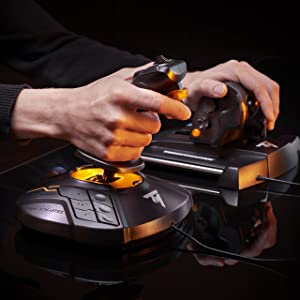
HOTAS (Hands On Throttle And Stick) control of all cockpit elements.
Thrustmaster has devoted its 25 years of expertise in flight sim controllers to meet the growing demand from flight simmers in general – and space simmers in particular – who have requested a mid-range HOTAS joystick.
The T.16000M FCS HOTAS has been designed for advanced fliers looking for comprehensive, realistic controls as an alternative to using a mouse and keyboard.
It is composed of the T.16000M FCS (Flight Control System) flight stick and the TWCS (Thrustmaster Weapon Control System) throttle. The T.16000M FCS HOTAS is compatible with PC via USB in Windows 10, 8, 7 and Vista (32-bit and 64-bit).
| | | |
|---|---|---|
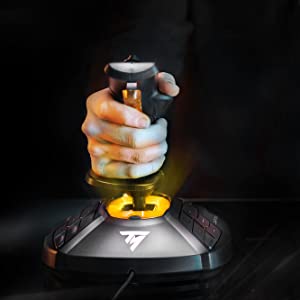
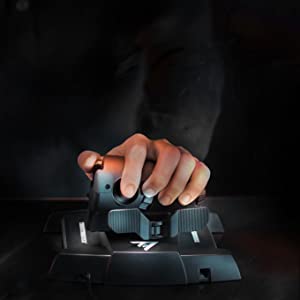
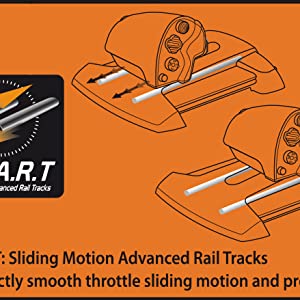
T.16000M FCSIn order to deliver exclusive high-precision performance, pitch and roll on the T.16000M FCS flight stick employ H.E.A.R.T HallEffect AccuRate Technology (U.S. patent US08471815) for 16-bit resolution (i.e. 16000 x 16000 values) – the same pinpoint accuracy delivered by the extremely high-end HOTAS Warthog joystick, allowing gamers to engage their enemies with surgical precision. The helical spring (0.1” / 2.8 mm in diameter) inside the stick provides firm, linear and smooth tension. The T.16000M FCS features 4 independent axes, including twist rudder (controlled by rotating the stick), 16 action buttons with “braille”-style physical button identification, one 8-way Point of View (PoV) hat switch and an ergonomic trigger. Its striking orange accents and backlighting bring gamers’ immersion to a whole new level. | TWCS ThrottleTWCS (Thrustmaster Weapon Control System) throttle: use your left hand to increase your combat speed and manage your spaceship or jet fighter. The TWCS throttle’s lower positioning compared to quadrant-based systems provides unrivalled comfort. To give simmers complete control, the TWCS throttle includes 14 buttons and one 8-way-PoV hat switch that are added to those of the joystick. In total, this provides gamers with 5 axes, 30 buttons and two 8-way PoVs – plus 3 extra axes via the optional TFRP rudder*. The TWCS throttle features 5axes and a rear RJ12 connector offering 3 additional axes via the external optional TFRP rudder* from Thrustmaster’s flight product ecosystem. *Sold separately. | S.M.A.R.T (Sliding Motion Advanced Rail Tracks) technologyA unique system of slide rails for perfectly smooth throttle sliding motion – precise and comfortable, with 3.2 inch/80 mm range of travel for precise maneuvers. The tightening screw allows users to adjust the throttle’s friction level to suit their own personal taste. |
| | | |
|---|---|---|
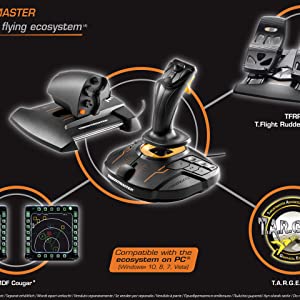
Thrustmaster advanced flying ecosystemThese products are part of a range of flight simulation peripherals that can be used in conjunction with one another: a complete ecosystem featuring the FCS flight stick, TWCS throttle, TFRP rudder pedals* and MFD* (Multi-Functional Display) cockpit panels. These elements are also compatible with the T.A.R.G.E.T advanced programming software. * Sold separately. | T.A.R.G.E.T advanced programming software on PC: program up to 256 buttons in the flying ecosystemThrustmaster Advanced pRogramming Graphical EdiTor software: combine with other Thrustmaster devices (so that they are recognized as a single USB device), and load or create specific mapping profiles for each game. Tailor your own profiles to enhance most Thrustmaster flight controllers, and share them with the Thrustmaster community. | Ergonomic design for optimum comfort and precisionThanks to its design and ergonomics, the T.16000M FSC HOTAS provides players with multiple recognizable features, allowing them to become more effective and accurate when in flight. This enhanced access to flight controls proves even more essential when players are fully immersed in the exceptional flight experience delivered by VR-compatible games. The T.16000M FCS HOTAS is the most natural and intuitive way to sit in a cockpit with one’s hands on the throttle and stick. |

| Dimensions: | 27 x 23 x 27 cm; 2.1 Kilograms |
| Model: | 2960778 |
| Origin: | China |
Star Citizen joysticks
Bought this for star citizen and not disappointed, even of its been out for some years.
5.0 out of 5 stars great for star citize
ot much to say, does what it says on the tin, simple plug and play
Works grea
It’s not the coolest looking design for a HOTAS at this price, but works really well. Very smooth and with an absolute wealth of functions and software to control them.
Works well
I use this on Elite and Star Citizen and works a treat as long as there are profiles in game and find the joystick and throttle.
Not so good on flight sim 2020
Amazing precision versus Hotas X and comparable to the Warthog
I bought this product as a Father’s Day present to myself to play DCS World. In particular F/A-18 and the super carrier DLC. It has the “real feel” element when combined with an Oculus Rift S headset. One thing to remember is that it takes practice to master any game but with this stick and a bit of practice you can quickly zone in to perfect even carrier landings. Massive accuracy/realism boost compared to my Hotas X.
4.0 out of 5 stars Useful way to pilot a sim
Fun and uniquely cool way to pilot in flight simulators. Not quite as smooth action as I’d like but not bad for the price.
DCS
Great entry level Joystick and Hotas for anyone wanting to play DCS or Flight Sim
Slightly less than four stars
After my Logitech x56 failed after 15 months (button issues on the joystick) I bought the Thrustmaster T16000 HOTAS. It’s OK in general and easy to use but all the reviews about the throttle not being smooth is true. At the moment it’s quite usable after loosening the brake but it will at some point need the mod as described on youtube. Another design flaw is that the hat switch on the throttle is sharp and uncomfortable and would like to find a silicone mini joystick cover, perhaps one made for the thumb-stick on the Nintendo switch might fit. I think Thrustmaster could have done better with the design.
Brillia
Upgraded to this HOTAS from a previous much simpler HOTAS, Glad i made the switch. There are 12 buttons on the stick base alone, which gives you many options. Stick feels good in the hand, the only issue i have is a lack of a 2 stage trigger. As for the throttle, it is quite large but most of the buttons are easily reachable, plus the smooth surface means you can just slide your hand up smoothly.
Overall, I do not know if i would recommend this stick to a beginner, the amount of buttons, whilst very nice and good to have, can be a bit intimidating, or even overwhelming, But its a very good system overall.
Thrustmaster T.16000 joystick works v. well, straight out of the box, with MS Flight Simulato
Thrustmaster T.16000 … such an improvement over my (20 years?) old joystick. True, that was one of the ‘force-feedback’ variety, which was fun, but this is perfectly adequate for an average user like me. High spec home pilots may look for something more of course. But perfect for me, using MSFS without other hardware equipment: very sensitive and true – the 16,000 separate Hall-effect-sensor detected points on each axis make for a smooth and sensitive response. Recommended.
Bought for boyfriend
Bought this for my boyfriend’s birthday. Haven’t seen him since. Think he likes i
Bought for boyfriend
Bought this for my boyfriend’s birthday. Haven’t seen him since. Think he likes i
Value for money
Could do with a set up for binding in.Also a control/buttons diagram layout picture.
Great joystick
Works great, just make sure u download latest drivers and software from website.
Great quality
Makes elite dangerous awsome to play. I am just a casual player by the way. Also good for Star Wars squadrons.
Awesome sticks, especially for the price
I bought these for getting into space flight games, and almost went with more expensive sticks but decided to be good and stick to my budget.
I’m very glad I did, these sticks are exactly what I wanted!
Initially I thought they not be good quality because of the price compared to other joystick sets but I’m very happy with them so far.
They are made of plastic, and have a good weight to them so don’t feel cheap.
There are plenty of buttons, sliders and other inputs so you’re not short of controls.
As for feel, they are robust so far, and responsive. I’ve been using them for a few weeks so I’ll have to see how they hold up long term, but I’m fairly confident they should last well.
Software wise, you can download the Target software from their website, although the games I’ve played (Star Citizen and Elite) haven’t needed it as they recognised the sticks fine.
The one criticism I have is the base buttons could do with a little more obvious identification on the button so you can more easily find the right ones without looking.
Don’t get me wrong, they do have indents and ridges to help, but they kind of blend together, to me at least.
That said, that’s a minor niggle and just really takes practice to get the motor functions down.
All in all, a great set of sticks at a bargain price!
Very accurate controlle
My husband went from using a premium brand single stick with throttle to using a pair of these to play Elite. He has waxed lyrical about how he can now fight ‘Thargoids’ and the high quality of the ‘gimble’. I generally smile and nod.
He’s happy, I’m happy and apparently Thargoids are unahppy. It’s a win, win, loose situation!
Very accurate controlle
My husband went from using a premium brand single stick with throttle to using a pair of these to play Elite. He has waxed lyrical about how he can now fight ‘Thargoids’ and the high quality of the ‘gimble’. I generally smile and nod.
He’s happy, I’m happy and apparently Thargoids are unahppy. It’s a win, win, loose situation!
Work a trea
Can’t really add much to what others have said before me. Bought primarily for star citizen and they work great for that. No issues what so ever.
It did the job
It is accurate, but you can feel the friction as you move the joystick around.
well made and stable
has a good weight which reduces movement on the desk. So far zero creep when zeroed as well. easy to setup in my game, all the buttons are simple to assign as well. You can program all manner of things with it but so far no need for me to do that.; have recommended to friends as well.
Great produc
Dislike target software so just use Windows easy to setup
Dece
Does a good job, throttle is sticky outside of the box but i expected that so its not too big of a deal.
quality ambidextrous joystick
I bought this to replace a matcatz stick that was getting beyond its best. I chose thrustmaster based upon previous experience. The stick is easy to use – plenty of buttons and the stick movement is smooth. I did choose this stick because I am very much left handed, only to find that on converting it to left hand mode (which is quite easy) I am now so conditioned in using a right-handed joystick that using it in left hand mode was nigh on impossible – so back to right hand moce it has been. Good quality – recommended.
Thrustsmaster T.16000M FCS Joystick
Bought this product for a starter into DCS and I love it it is very smooth and accurate, makes everything 10 x easier and is overall a great product!
quality ambidextrous joystick
I bought this to replace a matcatz stick that was getting beyond its best. I chose thrustmaster based upon previous experience. The stick is easy to use – plenty of buttons and the stick movement is smooth. I did choose this stick because I am very much left handed, only to find that on converting it to left hand mode (which is quite easy) I am now so conditioned in using a right-handed joystick that using it in left hand mode was nigh on impossible – so back to right hand moce it has been. Good quality – recommended.
Great combo, with lots of programmable buttons
Having had a Logitech this combo is easy to use with lots of programmable buttons and is better as an all round unit.
Nice solid feel
What I needed and available when hard to find elsewhere
Only decent joystick for the price
Strong build, no problems with deadzone, its a good all rounder. You wont find better at this price, its a far superior stick then the x56. Only issues i had was the stick has alot of tension like a steering wheel with no power steering and a lack of a much needed shift key. After using the x56, T16000m and the mach2, In the end i went for the raptor mach 2 stick which is a vkb gladiator replica. Movement of the stick is smoother has shift key to increase hat and trigger functions. Only issue was the Twist axis needed more of twist before it would register, the t16000m has a better twist axis.
Only decent joystick for the price
Strong build, no problems with deadzone, its a good all rounder. You wont find better at this price, its a far superior stick then the x56. Only issues i had was the stick has alot of tension like a steering wheel with no power steering and a lack of a much needed shift key. After using the x56, T16000m and the mach2, In the end i went for the raptor mach 2 stick which is a vkb gladiator replica. Movement of the stick is smoother has shift key to increase hat and trigger functions. Only issue was the Twist axis needed more of twist before it would register, the t16000m has a better twist axis.
Excellent does everything you ask of it smoothly and comfortable.
The thrust master 1600 is an excellent joystick, a great compliment to the thrustmaster Airbus side stick. The 1600 has the ability to react quickly for combat while the Airbus is ideal for passenger aircraft. Both are excellent in their own way.
Excellent does everything you ask of it smoothly and comfortable.
The thrust master 1600 is an excellent joystick, a great compliment to the thrustmaster Airbus side stick. The 1600 has the ability to react quickly for combat while the Airbus is ideal for passenger aircraft. Both are excellent in their own way.
Excelle
Just plug it in to a usb port on the back of my computer and the basics ware all ready to go, can easily switch from left and right handed operation, very accurate in use, spare keys are very easy to program and a good price. Without question it has improved my enjoyment and skills on fs2020.
Very accurate plenty if buttons.
I had had a cheap joystick before and this is hugely better.
Amazing fine adjustment.
I can now fly in Msfs far far better.
Very accurate plenty if buttons.
I had had a cheap joystick before and this is hugely better.
Amazing fine adjustment.
I can now fly in Msfs far far better.
Dece
Good product just a shame the hotas flight stick sucks which makes this product useless if the joystick doesn’t work
DCS and IL2
for those who can’t afford the big guns there is nothing to complain about it.
I love the hotas and rudders package received
Two of these for Elite Dangerous work grea
Having upgraded from a 20 year old MS Sidewinder Precision 2, these are amazing.
I specifically got two of these to play Elite Dangerous. This is a fairly common HOSAS set up for this game and I even think the orange hints were designed to match Elite’s orange HUD.
By having tap/hold macros and setting one key on each stick to become [Shift] after 0.5s I can 3 different actions per button (for example, I have one button that’s engine boost on tap, supercruise on hold for 0.5s and combined with shift on the other stick it functions as system jump. So even with the fairly limited buttons I can play the entire game while never removing my hands from the sticks.
Build quality seems good, I’m not sure what the point of the LED in the base is, I’d rather just have the stick and save a little cost.
I’ve now got about 100 hours of use in-game with them and they are performing excellently. I am slightly concerned about people complaining about broken Z axis on here but I haven’t had any issues yet.
Two of these for Elite Dangerous work grea
Having upgraded from a 20 year old MS Sidewinder Precision 2, these are amazing.
I specifically got two of these to play Elite Dangerous. This is a fairly common HOSAS set up for this game and I even think the orange hints were designed to match Elite’s orange HUD.
By having tap/hold macros and setting one key on each stick to become [Shift] after 0.5s I can 3 different actions per button (for example, I have one button that’s engine boost on tap, supercruise on hold for 0.5s and combined with shift on the other stick it functions as system jump. So even with the fairly limited buttons I can play the entire game while never removing my hands from the sticks.
Build quality seems good, I’m not sure what the point of the LED in the base is, I’d rather just have the stick and save a little cost.
I’ve now got about 100 hours of use in-game with them and they are performing excellently. I am slightly concerned about people complaining about broken Z axis on here but I haven’t had any issues yet.
This is Brillia
Nothing to dislike here. Positives all around here. Solid build and is weighted brilliantly for the desk (no sliding about).
Great twist action and throttle.
Very happy with this stick from point of purchase
Love the sheer amount of hat switches this thing has, 4 switch types, and 1 analogue multi-dir.. very nice indeed!
Stick is very solid to the feel and the primary front facing firebutton is way less flimsy than i thought it was going to be.. its very comfortable and doesn’t dig into your fingers like the cheaper HOTAS-X tflight.
Overall the stick as i currently have it is very precise, and i can make micro adjustments more precisely than the one this stick replaced too.. so its good if you are jus wanting to trim off a little on your axis
Loads of buttons on the stick and if you configure a button as a shift function you can double up too! So no complaints there at all!
What don’t i like so much?
Ok the throttle control itself i like, but I have to say i would have liked a forward/reverse thrust control with a noticable notch in the middle for centreing.. i’ve worked around this but still, it would have been nice to have that.
I look after my equipment and can see many years (hopefully) of use from this stick.
I recommend!
Very happy with this stick from point of purchase
Love the sheer amount of hat switches this thing has, 4 switch types, and 1 analogue multi-dir.. very nice indeed!
Stick is very solid to the feel and the primary front facing firebutton is way less flimsy than i thought it was going to be.. its very comfortable and doesn’t dig into your fingers like the cheaper HOTAS-X tflight.
Overall the stick as i currently have it is very precise, and i can make micro adjustments more precisely than the one this stick replaced too.. so its good if you are jus wanting to trim off a little on your axis
Loads of buttons on the stick and if you configure a button as a shift function you can double up too! So no complaints there at all!
What don’t i like so much?
Ok the throttle control itself i like, but I have to say i would have liked a forward/reverse thrust control with a noticable notch in the middle for centreing.. i’ve worked around this but still, it would have been nice to have that.
I look after my equipment and can see many years (hopefully) of use from this stick.
I recommend!
Very happy with this stick from point of purchase
Love the sheer amount of hat switches this thing has, 4 switch types, and 1 analogue multi-dir.. very nice indeed!
Stick is very solid to the feel and the primary front facing firebutton is way less flimsy than i thought it was going to be.. its very comfortable and doesn’t dig into your fingers like the cheaper HOTAS-X tflight.
Overall the stick as i currently have it is very precise, and i can make micro adjustments more precisely than the one this stick replaced too.. so its good if you are jus wanting to trim off a little on your axis
Loads of buttons on the stick and if you configure a button as a shift function you can double up too! So no complaints there at all!
What don’t i like so much?
Ok the throttle control itself i like, but I have to say i would have liked a forward/reverse thrust control with a noticable notch in the middle for centreing.. i’ve worked around this but still, it would have been nice to have that.
I look after my equipment and can see many years (hopefully) of use from this stick.
I recommend!
Arrived a day earlier than expected...
Arrived a day earlier than expected, but still had to wait about 7 days from ordering ( came from France to UK – kept in touch with seller who was extremely helpful – thank you ). Unboxed and connected joystick and throttle to a 4 USB 3rd gen ‘gang’, bought separately but advertised to go with this package on Amazon at the bottom of the seller’s advert for an extra cost, the rudder pedal’s RJ12 connector fits into the throttle body, which has it’s own USB connector ( all 3rd gen ). Read the leaflets ( 1 for each controller – joystick – throttle – rudder / pedals ), went to Thrustmaster’s website and downloaded manuals and drivers and calibration software easily – couldn’t wait so took a Cessna 172P training aircraft for a little ‘taxi’ on the tarmac ( I’m really new to Flightgear 2021 ), and all was well except for the rudder / pedals – found another driver ‘all-in’ software pack on the Thrustmaster website and downloaded that too. So far all is well and looking forward to learning to fly ! ( The last time I looked the package was 20 cheaper – during the Covid pandemic prices went up – everyone sheltering from Covid wanted to learn to fly so prices went up as the bundle became scarce I believe – so should be a little cheaper now. If you get this bundle YouTube has plenty of videos reviewing the bundle – and I can’t argue with anything I came across so far – Happy Days !! Overall, pleased with the experience and taking to the skies soon hopefully ! Simulator bought for this was Flightgear 2021 – 6 disk pack – World scenery – Over 50 aircrafts including a helicopter or two – Tutorial disk with vocal instructions – Many World airports. Patience is the key to learning to fly with Flightgear – A flight simulator many flight trainees use on PC which is more real World experience including air traffic controller vocals – more a starter to real flying than a game for shooting things so beware. Can be intensive, but, if you want to get very close to the real thing Flightgear’s right up your alley for this bundle. Finally, Flightgear does use up quite a heavy amount of PC resources, so consider something more like a good flying game if all you want to use this bundle for is to just get into the skies and shoot down an enemy with this flight controller kit. Flightgear uses openGL settings and a graphics card similar to Nvidia GeForce 1050 Ti GTX which is what I have, and a CPU starting around 3300- 3600 MHz. Find out all you can before buying a flight sim to use with this kit. All in all pleased. 4 Stars for now simply because there is better out there but is so much more expensive. This a great ‘middle of the road’ piece of kit. ( This meets my budget, and first-time learning to fly experience with Flightgear 2021 ! ) Good luck ! UPDATE: Having tried to get the Thrusmaster T16000m fcs running with Flightgear, I’ve since had to get a Thrustmaster T.RJ12 USB ADAPTER for the pedal’s T.RJ12 connector, which doesn’t register in Flightgear if plugged into the throttle female T.RJ12 connector, and a USB 3.0 HUB to accommodate 3 USB 3.0 connectors, ( 1 for the joystick, and throttle and pedals ). You will also have to at some point learn .XML or HTML language for the odd programming and script writing to be able to change some settings ! Having said all of that…I wanted Flightgear for the helicopter tutorials and I’m going to stubbornly continue my quest ! p.s. If you prefer to get a Microsoft Flight Sim’ be very well aware of what you will need, and whether the version you get for this Thrustmaster package has been discontinued. And if you think it’s all hard work, I’ve seen some cracking flight simulator rigs that have taken over the lives and provide a lot of entertainment for some !! A labour of love ! Good luck !
You can Biggles to your hearts delight.
Goods arrived in good time and in perfect order. Unit is sturdy.
Works as advertised, just wish there where more modern games that works with it though. I haven’t used other joysticks so I don’t know how it compares but it felt responsive and tight to me.
You can Biggles to your hearts delight.
Goods arrived in good time and in perfect order. Unit is sturdy.
Works as advertised, just wish there where more modern games that works with it though. I haven’t used other joysticks so I don’t know how it compares but it felt responsive and tight to me.
Versatile
Easy switch from right to left handed operation. With the flight simulation software I use the joystick is easy to calibrate.
For Casual use it is perfec
I don’t consider myself a hardcore player of flight sims and flight combat sims but I do find them very fun to play so I got the HOTAS for a better experience.
It is very worth it, you will not go back to a controller or a KB-M set up anytime soon if you get it.
For Casual use it is perfec
I don’t consider myself a hardcore player of flight sims and flight combat sims but I do find them very fun to play so I got the HOTAS for a better experience.
It is very worth it, you will not go back to a controller or a KB-M set up anytime soon if you get it.
Hard to get hold of but worth i
For my husband’s birthday I wanted to get him the one thing he really wanted but with Brexit I’d almost given up these are great best he’s owned and were very rare to get hold of at the original price too thank you!
Good for the price, has slight downfalls you need to consider.
Got this alongside a thrustmaster t16000m joystick in order to play Elite Dangerous and so far I haven’t had any real issues. Only thing I’ve found to be a bit annoying is that sliding the throttle can be a bit stiff, although that seems to be getting better with time. Also worth mentioning is that the throttle itself is surprisingly big and my hands aren’t the biggest so there’s a bit of maneuvering required to get to all the buttons and especially the paddles, but I don’t consider it that big an issue. Just something to be mindful of.
Work Great!
Ok, these are one of the two affordable rudder pedal sets available on the market so you’re not exactly blessed with choice. These are plastic with metal sliders but they do feel fairly solid and I don’t feel like I’m in danger of breaking them unless I do something daft. They’re plug and play and I had no issue with the PC (Windows 10) detecting them. The only downside I would say is that the pedals are quite close together and they could really do with being another six inches further apart.
I must admit, I wasn’t too happy forking over the money for these but I’ve wanted a set of rudder pedals ever since I first played FSX over a decade ago. With a bit of luck they will last as long as some of my other controllers and will end up being a good investment.
good but..
Good stick, shame it took 5 months to arrive , ordered in sept 2020 arrived mid Feb. Also price has gone up 20. No doubt paying for demand during Covid.
Best joystick Ive had in years
Love this, as a left handed gamer, joysticjs have always been annoying since its hard to find decent left handed ones, so the ability to take the thumbrest off and put left thumbrest on is genius, the ability to rotate the wrist rest to be left handed, also genius.
Joystick is heavoer than others ive had in the past, which is good since its lesss likely to slide about, button layout is done so a left or right person can use them all easily. Feels nice to grip.
Not really anything bad to say about i
Quick and well priced.
So much better than I thourt it would be, came well packed and on time and at a good price when compared with anyone els at the time of my ordering
Only downside and why I’ve not given it 5 Stars is that majority of games do auto-map to the buttons as needed, however when the button prompt pops up on screen it just says “button 12” or “button 6” – WHICH ONE IS THAT, THERE’S 20+ BUTTONS OVERALL! They would benefit from having some sort of imprinted numbering on each button to be honest!
Best joysticks for the price
i must of been lucky as i got these for a good price and very lucky that they were in stock as these have been hard to get. Ii use them nearly everyday and love them..
Thank you
Great fu
Great product. Been playing Elite Dangerous and Squadrons and works perfectly. Only issue I have is more of an inconvenience where I need to plug the USBs in the “correct” ports so that the joystick bindings are correct – but this is more of a game issue and happens rarely.
Great all round and lots of fu
This is an excellent HOTAS (Hands on Throttle and Stick!) but there are some caveats. Firstly for the price vs performance I would say this is spot on for both simulator enthusiasts and everyday gamers looking for an enhanced experience. Do note however, that at time of writing its currently retailing around 135 (I got this for 80ish a few years back).
How is it for Flight Simulator 2020?
= Good, almost everything can be done from the controllers – the throttle in particular has about 16 different buttons (including D-axies) in addition to the stick itself. I would highly recommend rebinding many of the keys so that you aren’t having to constantly put both hands on the joystick for adjusting the flaps or trim for example. The main thing that irked me is the throttle axis for ‘free look’ was constantly pulling right and I could find no way to calibrate the axis, in the end having to rebind this entirely. You will be regularly pushing CTRL-C to check which button corresponds to which urgent request flashing on screen.
How is it for Elite Dangerous?
= Excellent, everything can be done from the HOTAS setup. For Elite I think this set-up is king, although I may be saying this from greater familiarity with the setup then compared to FS2020.
How is it on other games?
I’ve greatly enjoyed using this stick for a range of combat simulators, notably IL 2 Sturmovick but its also great for Truck Simulator 2 and a range of other simulator driving games if you don’t have a wheel or prefer something a bit more hefty then an xbox controller.
How is the software?
, I have tried using Target a few times, and hoped I could re-calibrate the axis through it but yet to find a way. They make a song and dance of it and I’m sure it is useful for those that wish to exploit it but as an ‘everyday’ gamer rather then an ‘enthusiast’ I’ve got other things to be doing.
How is its durability?
I’ve mentioned the wandering axis which is a shame, but thankfully one of the minor ones (its the little thumb stick at the front of the throttle). Nothing else seems to have broken in the last few years. The throttle and flapping pads in particular feel excellent (especially in Elite), the joystick likewise fits well in my large hand – I’m hoping this will continue to last me many years.
One odd thing, the joystick has a lovely orange LED glow which is really cool – and meant to show when its in use. But even when my computer is turned off it continues to glow at all times – odd that.
This is an excellent HOTAS (Hands on Throttle and Stick!) but there are some caveats. Firstly for the price vs performance I would say this is spot on for both simulator enthusiasts and everyday gamers looking for an enhanced experience. Do note however, that at time of writing its currently retailing around 135 (I got this for 80ish a few years back).
How is it for Flight Simulator 2020?
= Good, almost everything can be done from the controllers – the throttle in particular has about 16 different buttons (including D-axies) in addition to the stick itself. I would highly recommend rebinding many of the keys so that you aren’t having to constantly put both hands on the joystick for adjusting the flaps or trim for example. The main thing that irked me is the throttle axis for ‘free look’ was constantly pulling right and I could find no way to calibrate the axis, in the end having to rebind this entirely. You will be regularly pushing CTRL-C to check which button corresponds to which urgent request flashing on screen.
How is it for Elite Dangerous?
= Excellent, everything can be done from the HOTAS setup. For Elite I think this set-up is king, although I may be saying this from greater familiarity with the setup then compared to FS2020.
How is it on other games?
I’ve greatly enjoyed using this stick for a range of combat simulators, notably IL 2 Sturmovick but its also great for Truck Simulator 2 and a range of other simulator driving games if you don’t have a wheel or prefer something a bit more hefty then an xbox controller.
How is the software?
, I have tried using Target a few times, and hoped I could re-calibrate the axis through it but yet to find a way. They make a song and dance of it and I’m sure it is useful for those that wish to exploit it but as an ‘everyday’ gamer rather then an ‘enthusiast’ I’ve got other things to be doing.
How is its durability?
I’ve mentioned the wandering axis which is a shame, but thankfully one of the minor ones (its the little thumb stick at the front of the throttle). Nothing else seems to have broken in the last few years. The throttle and flapping pads in particular feel excellent (especially in Elite), the joystick likewise fits well in my large hand – I’m hoping this will continue to last me many years.
One odd thing, the joystick has a lovely orange LED glow which is really cool – and meant to show when its in use. But even when my computer is turned off it continues to glow at all times – odd that.
This is an excellent HOTAS (Hands on Throttle and Stick!) but there are some caveats. Firstly for the price vs performance I would say this is spot on for both simulator enthusiasts and everyday gamers looking for an enhanced experience. Do note however, that at time of writing its currently retailing around 135 (I got this for 80ish a few years back).
How is it for Flight Simulator 2020?
= Good, almost everything can be done from the controllers – the throttle in particular has about 16 different buttons (including D-axies) in addition to the stick itself. I would highly recommend rebinding many of the keys so that you aren’t having to constantly put both hands on the joystick for adjusting the flaps or trim for example. The main thing that irked me is the throttle axis for ‘free look’ was constantly pulling right and I could find no way to calibrate the axis, in the end having to rebind this entirely. You will be regularly pushing CTRL-C to check which button corresponds to which urgent request flashing on screen.
How is it for Elite Dangerous?
= Excellent, everything can be done from the HOTAS setup. For Elite I think this set-up is king, although I may be saying this from greater familiarity with the setup then compared to FS2020.
How is it on other games?
I’ve greatly enjoyed using this stick for a range of combat simulators, notably IL 2 Sturmovick but its also great for Truck Simulator 2 and a range of other simulator driving games if you don’t have a wheel or prefer something a bit more hefty then an xbox controller.
How is the software?
, I have tried using Target a few times, and hoped I could re-calibrate the axis through it but yet to find a way. They make a song and dance of it and I’m sure it is useful for those that wish to exploit it but as an ‘everyday’ gamer rather then an ‘enthusiast’ I’ve got other things to be doing.
How is its durability?
I’ve mentioned the wandering axis which is a shame, but thankfully one of the minor ones (its the little thumb stick at the front of the throttle). Nothing else seems to have broken in the last few years. The throttle and flapping pads in particular feel excellent (especially in Elite), the joystick likewise fits well in my large hand – I’m hoping this will continue to last me many years.
One odd thing, the joystick has a lovely orange LED glow which is really cool – and meant to show when its in use. But even when my computer is turned off it continues to glow at all times – odd that.
This is an excellent HOTAS (Hands on Throttle and Stick!) but there are some caveats. Firstly for the price vs performance I would say this is spot on for both simulator enthusiasts and everyday gamers looking for an enhanced experience. Do note however, that at time of writing its currently retailing around 135 (I got this for 80ish a few years back).
How is it for Flight Simulator 2020?
= Good, almost everything can be done from the controllers – the throttle in particular has about 16 different buttons (including D-axies) in addition to the stick itself. I would highly recommend rebinding many of the keys so that you aren’t having to constantly put both hands on the joystick for adjusting the flaps or trim for example. The main thing that irked me is the throttle axis for ‘free look’ was constantly pulling right and I could find no way to calibrate the axis, in the end having to rebind this entirely. You will be regularly pushing CTRL-C to check which button corresponds to which urgent request flashing on screen.
How is it for Elite Dangerous?
= Excellent, everything can be done from the HOTAS setup. For Elite I think this set-up is king, although I may be saying this from greater familiarity with the setup then compared to FS2020.
How is it on other games?
I’ve greatly enjoyed using this stick for a range of combat simulators, notably IL 2 Sturmovick but its also great for Truck Simulator 2 and a range of other simulator driving games if you don’t have a wheel or prefer something a bit more hefty then an xbox controller.
How is the software?
, I have tried using Target a few times, and hoped I could re-calibrate the axis through it but yet to find a way. They make a song and dance of it and I’m sure it is useful for those that wish to exploit it but as an ‘everyday’ gamer rather then an ‘enthusiast’ I’ve got other things to be doing.
How is its durability?
I’ve mentioned the wandering axis which is a shame, but thankfully one of the minor ones (its the little thumb stick at the front of the throttle). Nothing else seems to have broken in the last few years. The throttle and flapping pads in particular feel excellent (especially in Elite), the joystick likewise fits well in my large hand – I’m hoping this will continue to last me many years.
One odd thing, the joystick has a lovely orange LED glow which is really cool – and meant to show when its in use. But even when my computer is turned off it continues to glow at all times – odd that.
Perfect for Microsoft Flight Simulator 2020
Got this to play Microsoft Flight Simulator 2020. It was detected automatically and ready to go straight way. Its comfortable to play with for extended periods. It feels durable. Very pleased with it.
Perfect for Microsoft Flight Simulator 2020
Got this to play Microsoft Flight Simulator 2020. It was detected automatically and ready to go straight way. Its comfortable to play with for extended periods. It feels durable. Very pleased with it.
Great HOTAS. Highly recommended.
I’ve been using this for a few months now. I use it for Elite Dangerous and X-Plane 11 and it works a treat. It is a completely plastic construction and feels very light. Dispute this it sits nicely on a desk and doesn’t move around under heavy use.
The resistance on the stick is just about right, not too strong but not too light.
The trigger is VERY plastic and feels quite flimsy but I haven’t had any issues with it yet. I would prefer much more tactile feedback from it and a more firm click but for the price it’s ok. The other buttons on the stick are also a bit too soft and again could do with a much for tactile feedback to confirm presses. Again I’ve had no issues with missed button presses or anything I just think it would add to the feeling of quality.
The size and ergonomics of the stick are good. It’s comfortable to use for long sessions. Issue I’m having with mine is that the hand rest at the bottom is loose and doesn’t seem to be possible to tighten it. You can change the right hand setup to a left hand I’ve with included changeable rests.
The throttle is very nice. The buttons here feel very different to the stick buttons and the many, many hats are also really good a nice feeling. It’s weird why they feel so different to one another.
Issue with the throttle is the slide. At the standard setting it becomes sticky very quickly. This isn’t because of the lube used on the throttle but the resistance they have set. When you get the throttle push it all the way forward and on the bottom there will be a screw revealed which will allow you to increase or reduce the resistance of the throttle. With a little bit of fiddling I got it to feel far less sticky and to my liking.
Throttle is quite big but all buttons and hats are easily reached.
I really recommend this throttle if you want to get into flying. It’s versatile enough to be used with various sims and feels like it could last a good amount of time.
These are for the determined player! The magnetic sensor they use does not wear out like a potentiometer. So while these are expensive the sensor will be consistent over the entire life of the product. I have used these for years and eventually the ball joint just becomes sloppy and the trigger switch will fail. However that takes years, ordinary joysticks fail very quickly because the potentiometer wears out. These just go on forever.
The last three of these I have bought the trigger switch has failed. This is largely because the trigger switch is just a generic, cheap micro switch. I have even bought a pack of switches now so I can repair them in future! But even so, inside about three years the ball joint will wear out and that will be the end of the joystick. It does help if you frequently add some silicon lubricant but sooner or later it will be the death of the stick.
By the way, these are in fact just two identical joysticks. They even supply the parts to convert from right to left and left to right handed for both of them. The set just represents a saving over buying two separate joysticks.
Unfortunately, in recent years the price of these have just gone through the roof. When I first started buying the single joysticks they were 25 each. Now they are 110 the pair. That’s insanity. These are good sticks but there is no way they are THAT good. The quality just isn’t there. Given how expensive they are, Thrustmaster should solve the problem of the sloppy ball joints and the cheap trigger switches so they justify their high price.
Recommended with some complaint!!
These are for the determined player! The magnetic sensor they use does not wear out like a potentiometer. So while these are expensive the sensor will be consistent over the entire life of the product. I have used these for years and eventually the ball joint just becomes sloppy and the trigger switch will fail. However that takes years, ordinary joysticks fail very quickly because the potentiometer wears out. These just go on forever.
The last three of these I have bought the trigger switch has failed. This is largely because the trigger switch is just a generic, cheap micro switch. I have even bought a pack of switches now so I can repair them in future! But even so, inside about three years the ball joint will wear out and that will be the end of the joystick. It does help if you frequently add some silicon lubricant but sooner or later it will be the death of the stick.
By the way, these are in fact just two identical joysticks. They even supply the parts to convert from right to left and left to right handed for both of them. The set just represents a saving over buying two separate joysticks.
Unfortunately, in recent years the price of these have just gone through the roof. When I first started buying the single joysticks they were 25 each. Now they are 110 the pair. That’s insanity. These are good sticks but there is no way they are THAT good. The quality just isn’t there. Given how expensive they are, Thrustmaster should solve the problem of the sloppy ball joints and the cheap trigger switches so they justify their high price.
Recommended with some complaint!!
These are for the determined player! The magnetic sensor they use does not wear out like a potentiometer. So while these are expensive the sensor will be consistent over the entire life of the product. I have used these for years and eventually the ball joint just becomes sloppy and the trigger switch will fail. However that takes years, ordinary joysticks fail very quickly because the potentiometer wears out. These just go on forever.
The last three of these I have bought the trigger switch has failed. This is largely because the trigger switch is just a generic, cheap micro switch. I have even bought a pack of switches now so I can repair them in future! But even so, inside about three years the ball joint will wear out and that will be the end of the joystick. It does help if you frequently add some silicon lubricant but sooner or later it will be the death of the stick.
By the way, these are in fact just two identical joysticks. They even supply the parts to convert from right to left and left to right handed for both of them. The set just represents a saving over buying two separate joysticks.
Unfortunately, in recent years the price of these have just gone through the roof. When I first started buying the single joysticks they were 25 each. Now they are 110 the pair. That’s insanity. These are good sticks but there is no way they are THAT good. The quality just isn’t there. Given how expensive they are, Thrustmaster should solve the problem of the sloppy ball joints and the cheap trigger switches so they justify their high price.
Recommended with some complaint!!
Incredibly Helpful Company
I had an issue and contacted the company, they responded very quickly and generously.
Many companies customer services treat customers as a tiresome necessity, not this company!
They heard my issues without rancor or frustration, offered me a decent set of options, quite generous considering the frequent reactions.
I have changed my rating to 5 stars for the prompt delivery, human and decent customer service.
Do not fear to purchase anything from this company, they care about customers and will try their utmost
to resolve the issues fairly, quickly and with consideration.
Incredibly Helpful Company
I had an issue and contacted the company, they responded very quickly and generously.
Many companies customer services treat customers as a tiresome necessity, not this company!
They heard my issues without rancor or frustration, offered me a decent set of options, quite generous considering the frequent reactions.
I have changed my rating to 5 stars for the prompt delivery, human and decent customer service.
Do not fear to purchase anything from this company, they care about customers and will try their utmost
to resolve the issues fairly, quickly and with consideration.
Super smooth and reasonably priced - but braking can be hard when using the rudde
It’s good and works really nicely. Easy to clean compared to my previous set of rudder pedals from Logitech. The pedals feel smooth and easy to move, but if you are pushing the toe brakes then you will find it very hard to move the pedals. From time to time, I have also found it quite hard to keep the pedals in the centre as it is not very distinct where the centre is.
Great value and do the job!
Great product for price paid! The most notable thing with these pedals is that they grip to my carpet easily out of the box, no need to drill them into the floor compared to slightly more expensive options.
My only complaint is the detent on this is very weak so be careful if resting your foot on the pedals as you may be applying unwanted yaw to the aircraft!
Great buy and recommend for people that want pedals that simply just do the job.
Required for Elite Dangerous
One of the best joysticks out there
Dual setup useful for Elite
Software easy to use
Compatibility with most sim games
Negative: a bit light, feel could be more solid, but you get what you pay fo
Feels Good and Responsive
Bought to play IL2-Sturmovik, Very responsive and feels good in hand. the Rudder pedals do slide a bit on the floor but is manageable. buttons are all in a easy to reach position with no need to take your hands off the instruments
Required for Elite Dangerous
One of the best joysticks out there
Dual setup useful for Elite
Software easy to use
Compatibility with most sim games
Negative: a bit light, feel could be more solid, but you get what you pay fo
Feels Good and Responsive
Bought to play IL2-Sturmovik, Very responsive and feels good in hand. the Rudder pedals do slide a bit on the floor but is manageable. buttons are all in a easy to reach position with no need to take your hands off the instruments
Nice and large.
Read people complaining about the throttle sticking. If anything I think it moves too freely when screwed in, but I’m very heavy handed. I also have “bear paws” for hands and the large handle fits me lovely. Smaller hands may struggle to use the yaw paddle. Enjoying using it for elite dangerous.
Grea
Purchased to use with X-Plane on PC and it’s been fantastic. Took very little time to calibrate and works well with the sim. The instructions were sparse but it’s fairly obvious how to set up. The rudder pedals are quite close together but are tolerable for my size 12 feet. All in all, these are great value for money while I save up for (and justify to my wife) the full Warthog rig
Grea
Purchased to use with X-Plane on PC and it’s been fantastic. Took very little time to calibrate and works well with the sim. The instructions were sparse but it’s fairly obvious how to set up. The rudder pedals are quite close together but are tolerable for my size 12 feet. All in all, these are great value for money while I save up for (and justify to my wife) the full Warthog rig
easy to use not for you.
ok the buildquolity is amazing and this is the 2nd product from thrustmaster I have living up to there standards but it’s not easy to program in the slightest unlike the tmx wheel witch is incredibly easy to program. overall if you love driving tanks flying plane ext then ye go ahead
easy to use not for you.
ok the buildquolity is amazing and this is the 2nd product from thrustmaster I have living up to there standards but it’s not easy to program in the slightest unlike the tmx wheel witch is incredibly easy to program. overall if you love driving tanks flying plane ext then ye go ahead
Good value, well built, nice feel.
Great feel, very little play in controls, plenty of buttons, already mapped for Elite Dangerous all I had to do was learn them. Only issue is the joystick base lights up only when the stick is moved. Slightly annoying, I would have preferred if it was on or off.
Good value, well built, nice feel.
Great feel, very little play in controls, plenty of buttons, already mapped for Elite Dangerous all I had to do was learn them. Only issue is the joystick base lights up only when the stick is moved. Slightly annoying, I would have preferred if it was on or off.
Excelle
Really nice quality and good sensors that dont wear off over time. Been flying Il-2 Battle of Stalingrad and it didnt let down so far. A must for entry lvl flight sims.
Excelle
Really nice quality and good sensors that dont wear off over time. Been flying Il-2 Battle of Stalingrad and it didnt let down so far. A must for entry lvl flight sims.
Does the Job better than every other make i have bough
I have been using this for a year now, and have it set for left handed use. I use it for every PC game I play as I have restricted dexterity in my left hand and find it impossible to use keyboard (basically W,A,S,D and every other key you use with left hand) So its a year old and still going strong where other sticks have failed or buttons stop working after a few months of such intense use. would I buy it again, Absolutely Yes.
Does the Job better than every other make i have bough
I have been using this for a year now, and have it set for left handed use. I use it for every PC game I play as I have restricted dexterity in my left hand and find it impossible to use keyboard (basically W,A,S,D and every other key you use with left hand) So its a year old and still going strong where other sticks have failed or buttons stop working after a few months of such intense use. would I buy it again, Absolutely Yes.
Well worth the money!
Great product, went from just a joystick to this! upped my game in Il-2 sturmovik rather quickly with the very good amount of buttons and sliders. The throttle is really nice and glides back and forth. Got it Same day delivery aswell which was brillia
These rudder pedals are a pretty much must have for any flight sim setup for example I pretty much play only DCS World and before I used these pedals I was using a twist grip on my joystick which was fine but it hurts the wrist a lot when dogfighting so I bought these and I gotta say it’s improved my skills in dogfighting a lot more now since I don’t have to worry about using the twist grip. 10/10 best buy
Need to use the adjustments to get the right feel
The rudder pedals work fine but take a lot of adjustment to get right. I found it important to have a null zone. Also the brakes feel a bit soft and woolly. A lot of movement is required to get descent braking action.
Excellent addition to my flight sim hardware
Lots of extra buttons which i needed and the throttle is good albeit a little stiff, which will go with time. It’s probably down to the way i use it (positioning), but the angle at which you place your hand can be a bit awkward for your wrist.