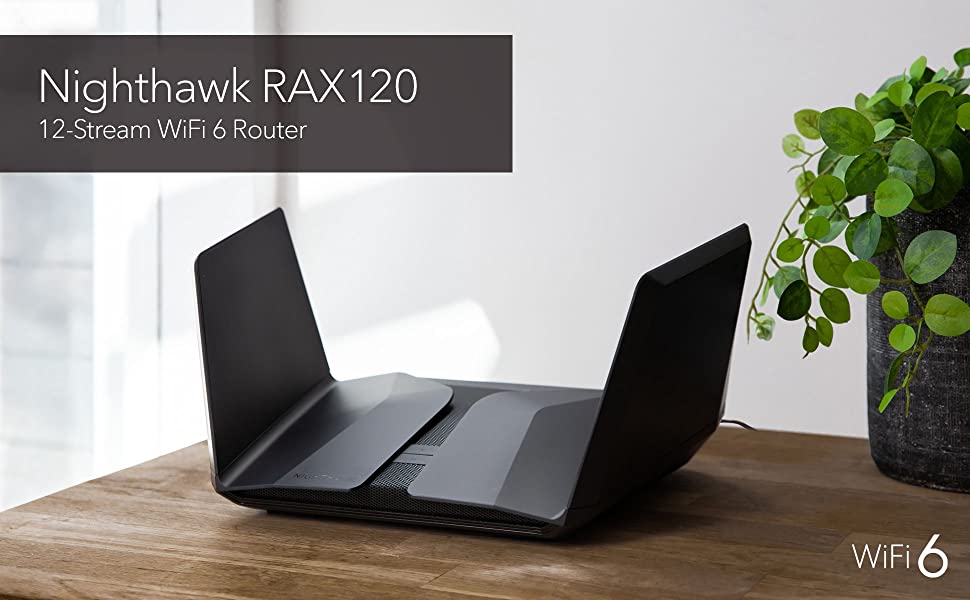
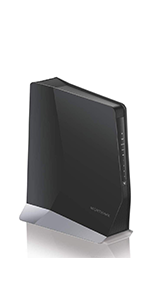
NETGEAR Nighthawk Wifi 6 Router (RAX120) | AX6000 Wireless Speed (Up to 6 Gbps) | PS5 Gaming Router Compatible

| | | |
|---|---|---|
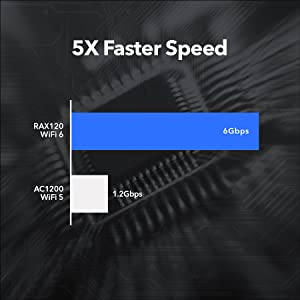
The Super-Fast Speed You NeedUp to an amazing 6Gbps for smooth 4K/8K Ultra-HD streaming, lag-free online gaming, uninterrupted video calls, and no more waiting for content on smart phones, computers and tablets. | More Capacity for 30+ WiFi Devices12 WiFi streams give you 6X the capacity of previous WiFi. More streams greatly increase the bandwidth available to your devices and the amount of data you can send and receive. Now there’s nothing to hold you back from a true high-speed internet experience. | More Efficiency, Less CongestionArmor Advanced Threat Protection Stop paying for multiple anti-virus subscriptions. NETGEAR Armor multi-layer security software resides in your router to protect all your connected smart devices, smartphones and computers with anti-virus, anti-malware, and data theft protection. Included for 3 years free. |


| | | |
|---|---|---|
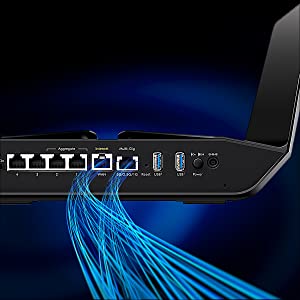
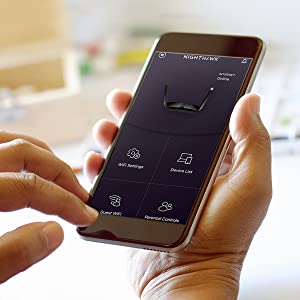
Longer, Stronger CoverageEight high-powered antennas, concealed under the wings, are optimally positioned to deliver ultra-reliable long-distance WiFi coverage indoors and outdoors. Move from the basement TV to the backyard patio with no loss in performance. | Easy Setup & ManagementThe Nighthawk App makes it a snap to set up your router and get more out of your WiFi, including great features like Internet speed test, remote access to your network, internet pausing and more | Supports Multi-Gig Internet up to 2GbpsRAX120 is one of the first routers to support a WAN port to deliver more than one gigabit of Internet speed to your WiFi devices. Requires compatible fiber or cable modem supporting Multi-Gig internet speeds (sold separately). |

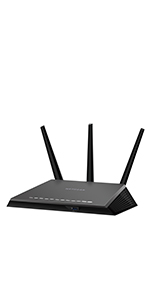 | 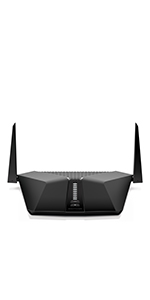 | 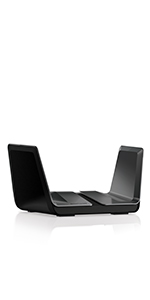 | 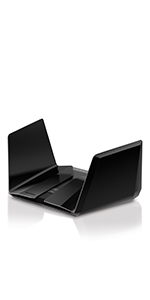 |  |  | |
|---|---|---|---|---|---|---|
| WiFi Speed | AC1900 (Up to 1900Mbps) | WiFi 6 – AX3000 (Up to 3Gbps) | WiFi 6 – AX6000 (Up to 6Gbps) | WiFi 6 – AX6000 (Up to 6Gbps) | WiFi 6 – AX11000 (Up to 11Gbps) | WiFi 6 – AX6000 (up to 6Gbps) |
| WiFi Coverage | Small to Medium Homes | Small to Medium Homes | Large Homes | Large to Very Large Homes | Large Homes | Add up to 2500 sq. ft. coverage |
| # Simultaneous Streams | 3 Streams | 4 Streams | 8 Streams | 12 Streams | 12 Streams | 8 Streams |
| Wired Ethernet Ports | 4 x 1G | 4 x 1G | 5 x 1G, Supports Port Aggregation and up to 2G WAN | 4 x 1G, 1 x 1G/2.5G/5G (WAN or LAN), Supports Port Aggregation | 4 x 1G, 1 x 2.5G (WAN or LAN), Supports Port Aggregation | 4 x 1G |
| USB ports – For Shared Storage | 1 x 3.0, 1 x 2.0 | 1 x 3.0 (storage only) | 2 x 3.0 (storage only) | 2 x 3.0 (storage only) | 2 x 3.0 (storage only) | 1 x 3.0 |
| Parental Controls (schedule device access, etc) | Circle app | Basic controls | Basic controls | Basic controls | Basic controls | |
| Network Security | WPA2, DoS, Double Firewall | WPA2, DoS, Double Firewall | WPA2, DoS, Double Firewall | WPA2/WPA3, DoS, Double Firewall | WPA2, DoS, Double Firewall | WPA2 |
| ISP/Cable Provider Bandwidth Supported | Up to 1Gbps | Up to 1Gbps | Up to 2Gbps | Up to 2Gbps | Up to 2Gbps | |
| Advanced Technology | Dual Band, Beamforming+, Smart Connect | Dual Band, Beamforming+, OFDMA | Dual Band, MU-MIMO, Beamforming+, Smart Connect, OFDMA | Dual Band, MU-MIMO, Beamforming+, Smart Connect, OFDMA | Tri-Band, MU-MIMO, Beamforming+, Smart Connect, OFDMA | Dual-Band, Smart Connect, MU-MIMO, Beamforming+, OFDMA |
| Other Features | Personal Cloud Storage, VPN, Guest WiFi Secure Access, Amazon Alexa Voice Control | VPN, Guest WiFi Secure Access, Amazon Alexa Voice Control | Personal Cloud Storage, VPN, Guest WiFi Secure Access, Amazon Alexa Voice Control | Personal Cloud Storage, VPN, Guest WiFi Secure Access, Amazon Alexa Voice Control | Personal Cloud Storage, VPN, Guest WiFi Secure Access, Amazon Alexa Voice Control |
| Dimensions: | 30.99 x 19 x 4.5 cm; 2.12 Kilograms |
| Model: | RAX120-100NAS |
| Batteries Included: | 1 Lithium ion batteries required. |
| Manufacture: | Netgear |
| Origin: | China |
I've been using this router for a few months now and I love it. The range is great, the speeds are phenomenal, and the interface is very user-friendly. It's also pretty easy to set up and use on your smartphone or tablet as well. This router has all of the features you need to keep connected wherever you go with its dual band WiFi capabilities; it can handle both 2.4GHz and 5GHz connections at full speed!
I’ve been using this router for a few months now and I love it. The range is great, the speeds are phenomenal, and the interface is very user-friendly. It’s also pretty easy to set up and use on your smartphone or tablet as well. This router has all of the features you need to keep connected wherever you go with its dual band WiFi capabilities; it can handle both 2.4GHz and 5GHz connections at full speed!
Wi-Fi issues sorted in minutes
Strong signal and excellent speed throughout my house. Having the 2nd 5Ghz band is fantastic and management and setup couldn’t have been easier. VM router speeds sucked – this bad boy is giving me the line speeds I pay for every month. My only regret is waiting so long to buy.
The Internet never looked so good
This Netgear Nighthawk was purchased to replace a set of three Apple AirPort Extremes which were being used to form an extended mesh network.
It gives better range and with the intellect switching allows for even better range and also device control to disconnect via the app.
The internet now reaches my garden and covers four floors and with wifi6 the speed my devices are getting are great.
The setup was simple and easy, download the nighthawk app, follow the instructions and connected to my Virgin Media SuperHub with high fidelity Cat6e networking cable and your off.
Wi-Fi issues sorted in minutes
Strong signal and excellent speed throughout my house. Having the 2nd 5Ghz band is fantastic and management and setup couldn’t have been easier. VM router speeds sucked – this bad boy is giving me the line speeds I pay for every month. My only regret is waiting so long to buy.
Slick and Powerful
What a revelation from my out dated router. My Apple devices no longer say “weak security” and I now have full signal on my Mac in the study. The facility to have guest wifi is most exciting too.
Great all round WiFi and LAN Route
Moving to FTTP – Fibre to the Premises with 400mbs I needed something that could handle 5GHz WiFi 6 and many older 2.4GHz IOT devices that don’t work well with smart single named Access Points.
After around a month the RAX120 has been very reliable with all devices from IOT switches, lights and timers, remote controls that need to work every time to multiple high speed WiFi 6 and LAN connected video streaming.
I signed up to the Armor security service, which is very reasonable for the first year at least. This seems to catch denial of service attacks, spam sites etc
Looks amazing too, like a space ship
Great all round WiFi and LAN Route
Moving to FTTP – Fibre to the Premises with 400mbs I needed something that could handle 5GHz WiFi 6 and many older 2.4GHz IOT devices that don’t work well with smart single named Access Points.
After around a month the RAX120 has been very reliable with all devices from IOT switches, lights and timers, remote controls that need to work every time to multiple high speed WiFi 6 and LAN connected video streaming.
I signed up to the Armor security service, which is very reasonable for the first year at least. This seems to catch denial of service attacks, spam sites etc
Looks amazing too, like a space ship
Loved my old one - Love This New One
Netgear just do it right. This is my second Nighthawk product, My old R7000p was great for 3 years and I upgraded to 1GHz broadband from my ISP and decided to upgrade and grab the AX6000 WiFi 6 model. This thing just worked straight out of the box configured in under 5 minutes with the nighthawk app and up and running with Wifi download speeds of 948Mbps and up which was great. My family and I live in a very connected smart home, we have lots of wired and wireless devices from Synology NAS, Philips Hue bridge with 20 wifi bulbs and several smart plugs, Gaming Consoles, Android TVs all relying on stable wifi connections and the AX6000 just handles them all with ease. Finally I would just like to say its appearance is awesome, it looks so cool sitting pride of place in our main room like something sneaked out of Area 51 – I just love it – Well done Netgear …agai
Loved my old one - Love This New One
Netgear just do it right. This is my second Nighthawk product, My old R7000p was great for 3 years and I upgraded to 1GHz broadband from my ISP and decided to upgrade and grab the AX6000 WiFi 6 model. This thing just worked straight out of the box configured in under 5 minutes with the nighthawk app and up and running with Wifi download speeds of 948Mbps and up which was great. My family and I live in a very connected smart home, we have lots of wired and wireless devices from Synology NAS, Philips Hue bridge with 20 wifi bulbs and several smart plugs, Gaming Consoles, Android TVs all relying on stable wifi connections and the AX6000 just handles them all with ease. Finally I would just like to say its appearance is awesome, it looks so cool sitting pride of place in our main room like something sneaked out of Area 51 – I just love it – Well done Netgear …agai
Uno dei migliori, velocità e copertura
Arrivavo da un ottimo e fedele Netgear R7800, cambiato solo per fare un upgrade ad un sistema pi recente con wifi6 e maggiore banda, passato da un rax50 che ho sostituito in quanto difettoso, e per non rischiare ho punto ancora pi alto con questo RAX70 che per le mie esigenze quasi troppo..ma mi trovo benissimo. Villetta di 2 piani 80mq a piano, ottima copertura anche in giardino e al secondo piano nel pjnto pi lontano, certo magari non alla massima velocit ma si naviga e guardano film full hd anche a distanza. In soggiorno dove ho il router il mio tablet si collega a 1,2Gbps! Top. Trasferimento da pc ad ups ultraveloci. Consigliato
Ce routeur NetGear m’a permis de rsoudre mes problmes de rseau, sa porte tant bien meilleure qu’une box de FAI. D’autant plus le Wifi 6 permet vraiment un gain significatif en terme de dbit. J’ai pu gagner 10fois plus de dbit dans une pice un peu loigne sur un appareil compatible WiFi 6. En terme d’installation tout se gre par une application Nighthawk, c’est facile d’utilisation avec des menus assez complets pour comprendre l’utilisation rseau, les appareils connects voire le contrle parental. Il est facile de grer le code et le nom des 3 rseaux mis par le routeur. Le rseau reste trs stable mme avec beaucoup d’appareils sur les trois possibilits de connexion.
Bien que le routeur soit un prix prmium, les performances sont largement au rendez-vous, je conseille vivement le routeur si vous avez des problmes de dbit en partie d votre box, la nature de votre logement (nombreux murs pais) ou encore si vous voulez tirer parti au maximum des capacits du WiFi 6.
Fantastic WiFi Router NETGEAR
Amazingly fast and it feels like I was transported from Jurassic age to modern age when I started using this router. I bought five of these WiFi routers for the entire house after using the first one.
It’s value for money even though it’s expensive but worth each penny.
Mi ha davvero sorpreso questo modello, un best buy uscito nel 2020 di Netgear, questo modello non quello che compare nella foto di Amazon, quindi pu ingannare un po con le sigle , ma involontariamente.
Lo sto usando da pi do una settimana, e ripeto, ha superato di gran lunga delle aspettative, ha una portata Wifi davvero eccelsa, sia sulla 2,4 e 5 Ghz davvero molto stabile, pensate che stavo usando anche un Asus RAX82U, che attualmente uno dei top di gamma di Asus sui prodotti consumer e l ho dovuto mettere momentaneamente da parte, perch l Rax10 riesce a risultare pi prestante sulla portata del segnale, incredibile davvero.
L installazione del tutto immediata, non ho visto problemi o particolari ritardi nella configurazione, la nuova interfaccia Nighthawk semplice e intuitiva, forse un po scarna di funzionalit, ma ripeto questo modello uscito come un best Buy!! Segnalo che sul router fisico manca anche l interruttore on/off e la porta Usb, potevano fare qualcosa in pi, ma ripeto ancora… Non uscito per essere un top di gamma, se volete tutte queste opzioni in pi bisogna andare sui modelli di router pi costosi, oltretutto questa la filosofia della Netgear.
In linea di massima, sono molto contento di averlo preso e attualmente diventato con mia mera sorpresa il router preferito, arrivando a preferirlo addirittura all Asus citato.
Enjoy!!
Simple and fas
Easy to set up, great connectivity and features for managing everything on the home network. Came with a free security advisor tool which scans connected devices for potential issues. Also looks pretty cool on the shelf. Would definitely recommend!
Good coverage but intermitte
Good product, the intermittent connection as the speeds are not always consistent. The coverage is good as long as the router is in the right open location so the signal can spread.
Also I got this on an Amazon warehouse deal and I am not sure if there was an issue before as they don’t tell you anything. Lesson is not to order a warehouse produc
Good coverage but intermitte
Good product, the intermittent connection as the speeds are not always consistent. The coverage is good as long as the router is in the right open location so the signal can spread.
Also I got this on an Amazon warehouse deal and I am not sure if there was an issue before as they don’t tell you anything. Lesson is not to order a warehouse produc
Fast, Easy setup & Stable so far & it looks great! Wish it had Parental Controls.
This Netgear router is fast & stable in a 2 story, maintaining both 5ghz and 2ghz coverage throughout. Devices closer to the unit have faster connections, of course, but good connections throughout overall. Although I am an expert in various technologies, I believe the documentation provides accurate information for setup, and the actual setup was a breeze.
I would have liked Parental Control / Content filtering like I had with my old Netgear. Additionally, I could not find an area that logs websites visited.
I have 1 device that is connected at 2.5gigs. As of this writing mainstream is 1gbs, but the router supports 5gbs. My gaming PC has a NIC that supports only up to 2.5gbs, so that’s the max that I can get on the LAN ATM.
Great router, fantastic for most home network/internet needs, Stable VPN for work- great for Gaming!
The best Wi-Fi 6 Route
It is simply the best Wi-Fi six Router around. 12 data streams. Two 5 GHz bands. Incredible range with a strong signal throughout our home. Armor Cyber Security Software included.
It outperforms all other Wi-Fi 6 Routers (just read the outstanding reviews in all the Computer Magazines – as we did)
What’s not to like?
I have been working remotely since November 2020 and I have been a victim of lag from day one. My ISP-supplied router, even though it was using “state of the art technology”, just wasn’t enough to keep me linked to my employer’s VPN. My connection would time out every few minutes. Every time I would check my internet connection on fast.com the loaded latency would be over 100ms. The issue was so bad that I had to unplug every network-connected device in the house while I was working. This Nighthawk router fixed all my issues immediately. My loaded latency has dropped to under 20ms. I have been using this router for just over a month and I have yet to experience any connection issues. Setup was pretty simple. The router installed a quick firmware update and the nighthawk app had me connected to the internet pretty quickly. This router has truly been amazing.
I have been working remotely since November 2020 and I have been a victim of lag from day one. My ISP-supplied router, even though it was using “state of the art technology”, just wasn’t enough to keep me linked to my employer’s VPN. My connection would time out every few minutes. Every time I would check my internet connection on fast.com the loaded latency would be over 100ms. The issue was so bad that I had to unplug every network-connected device in the house while I was working. This Nighthawk router fixed all my issues immediately. My loaded latency has dropped to under 20ms. I have been using this router for just over a month and I have yet to experience any connection issues. Setup was pretty simple. The router installed a quick firmware update and the nighthawk app had me connected to the internet pretty quickly. This router has truly been amazing.
The best Wi-Fi 6 Route
It is simply the best Wi-Fi six Router around. 12 data streams. Two 5 GHz bands. Incredible range with a strong signal throughout our home. Armor Cyber Security Software included.
It outperforms all other Wi-Fi 6 Routers (just read the outstanding reviews in all the Computer Magazines – as we did)
What’s not to like?
Absolutely amazing bit of kit.
Fantastic equipment, easy to use with simplistic instructions to set it up and it has a great WiFi signal. The app which controls it is amazing and netgears customer service support so far has been second to none. All in all a great router. I would highly recommend this product.
I’ve recently moved to Virgin as Sky although stable could only supply 35mb on average to my property. I’ve opted for the 200mb Virgin offering, although via ethernet I was getting full speed the WiFi would vary from 10mb to around 100. I work from home and although I’ve added ethernet for the office my son and other half are also home so I needed stable full speed WiFi. Having read a load of reviews of different routers I opted for the Netgear Nighthawk, what can I say other than night and day! Faster speeds and throughput on ethernet and almost full speed WiFi throughout the house. Having 3 channels means I can balance the load per channel as we have several smart devices.
A quick tip for anyone on Virgin, set the hub to modem only mode and you need to use port 1 on the router to connect to this router. Also if you do need to access the virgin hub once in modem mode the ip address will have changed to 192.168.100.1.
I used the nighthawk app to set this up, all done in 10 mins and has been solid since. Recommended.
Needs a separate modem to enable it to work
Unfortunately I was unable to use this and returned it as I didn’t have a separate modem
Great route
Small issues when setting up that were easily fixed via watching a YouTube guide, since then has been flawless working with Virgin.
Nice piece of kit.
This is a great router, I turned my vigin hub 4 into modem mode and connected the nighthawk as the router. This seems to be working well with a good WiFi signal, not exceptional but good enough. I also connected to this a nighthawk WiFi extender placed on my bedroom windowsill to cover my garden. So far all has been very stable, everything is connected ok without any issues.
Note you can turn off the led’s if you wish there is a switch at the back to allow you to do this. All in all very pleased.
Nice piece of kit.
This is a great router, I turned my vigin hub 4 into modem mode and connected the nighthawk as the router. This seems to be working well with a good WiFi signal, not exceptional but good enough. I also connected to this a nighthawk WiFi extender placed on my bedroom windowsill to cover my garden. So far all has been very stable, everything is connected ok without any issues.
Note you can turn off the led’s if you wish there is a switch at the back to allow you to do this. All in all very pleased.
from R9000 to RAX200
I love this unit. Tech support is very beneficial. The only problem I have had, the app and the unit have a link to a speed test, i was worried as i was getting speeds all over the place on the app and router when i tested directly from the nighthawk Lan and got 930 downloads every time, works well with virgin hub 4 in modem mode, great deals from Netgear for 3 yrs support which includes accidental damage. Happy upgrade
from R9000 to RAX200
I love this unit. Tech support is very beneficial. The only problem I have had, the app and the unit have a link to a speed test, i was worried as i was getting speeds all over the place on the app and router when i tested directly from the nighthawk Lan and got 930 downloads every time, works well with virgin hub 4 in modem mode, great deals from Netgear for 3 yrs support which includes accidental damage. Happy upgrade
Top di gamma della linea, potentissimo, impeccabile ed user-friendly
Poco da dire su quello che il prodotto di punta della storica linea nighthawk dei router Netgear ad oggi a 12 stream e con wifi6. sicuramente il migliore in termini di processore e gestione dei flussi, potenza di segnale wifi e, a mio parere, il pi bello di tutti con questo design che, pi degli altri, ci ricorda inevitabilmente Star Wars. Stabilit incredibile del multi stream testata su dispositivi 4 e 8K con multiview e multigaming in casa domotica con pi di 30 device connessi contemporaneamente, non va mai in overclock, non attiva mai la ventola, non perde mai la connessione. il prodotto pi facile ed affidabile da installare presente sul mercato user-consumer, da scegliere per chi vuole la qualit ma non si vuole dotare di sistemi professionali o non vuole sistemi mesh. inevitabile in una conformazione domestica con domotica e con grandi schermi, visti i contenuti attuali digitali in streaming, la profondit dell’attuale grafica del gaming o per chi lavora in web design e si trova in un luogo di metratura contenuta nei 100mq o comunque con volumi, anche multipiano, compatti. Con queste caratteristiche non teme ostacoli, il segnale solido ed efficace anche dopo 4 muri e due piani. Unica pecca: materiale esterno molto plasticoso e le “ali”, dove sono contenute le antenne, sono bellissime ma poco solide alla scocca una volta tirate su.
The best Router by fa
I recently purchased this router for home, compatible and very easy to connect to Virgin broadband. I can honestly say that I am very happy with the device and it was very easy to install. The wifi signal is strong enough for the whole family to use right throughout the house and garden!! By purely installing the Nighthawk the wireless internet speed has increased significantly. I thoroughly recommend this router for anyone who is looking to upgrade their internet services at home or work.
The best Router by fa
I recently purchased this router for home, compatible and very easy to connect to Virgin broadband. I can honestly say that I am very happy with the device and it was very easy to install. The wifi signal is strong enough for the whole family to use right throughout the house and garden!! By purely installing the Nighthawk the wireless internet speed has increased significantly. I thoroughly recommend this router for anyone who is looking to upgrade their internet services at home or work.
Calidad y estabilidad
Gran Router, la calidad del material y elegante que es lo puedes sumar a la gran potencia que tiene.
Fcil de instalar, el Wifi 6 es una pasada.
Lo tengo conectado a un pc, ps5 y varios dispositivos a la vez y todos cogen la potencia que te ofrece este Router.
Lo recomiendo para aquellos que quieren una conexin estable y sobretodo que te ofrezca en todo momento la conexin que tienes.
Sin cortes y con una estabilidad en la conexin.
Facil de controlar con la aplicacin de Netgear.
Con la aplicacin puedes controlar todos los dispositivos conectados y programar el Router a tu antojo.
Todo un producto a la altura de lo que buscaba.
Netgear smbolo de calidad y eficacia.
Virgin user. Excellent decision to take the plunge.
Excellent, I moved from BT fibre to cabinet 63mb. I signed up for virgin Media 200mb, the hub that was supplied received the full 200mb so devices when hard wired got full wack however my bt hubs wireless was better, with virgin on wireless I was only getting 30mb. So I purchased this nighthawk, I put virgin hub into modem mode via Web interface. connected nighthawk to virgin hub and renamed ssid and password so I did not have to change all smart devices and laptops etc. 10 minutes max and I am getting full 200mb on nighthawk wireless on the 5Ghz… only 97mb available via 2.4Ghz. I am still using my Tenda mesh for upstairs as I still find blank spots due to all brick house. Very happy although I have not used Netgear Armour or the children circle. Great decision to add this into my network, just a pity Virgin don’t offer a paid for router option, then people could enjoy the speeds they pay for..
Seems to be performing well.
I needed to upgrade my router to cope with all the internet linked devices that I now have in the house. My previous, 5 year old router, was becoming unstable. This router, after a bit of trouble setting it up, is now performing well. My broadband upload and download speeds also appear to have increased by 3 Mbps!
Total improveme
The wi-fi signal on my system has improved from 40% to 98%. Easy to setup and use.
Seems to be performing well.
I needed to upgrade my router to cope with all the internet linked devices that I now have in the house. My previous, 5 year old router, was becoming unstable. This router, after a bit of trouble setting it up, is now performing well. My broadband upload and download speeds also appear to have increased by 3 Mbps!
Great Router.
Easy setup, works great with my 1 Gig connection. I get the complete 1Gig wired and I get great speeds via WIFI 6 with a new PC I built. I have very solid, thick walls, a real test for any router, and I get 0.5Gig using the old WIFI standard on my Ipad, iPhone etc., at the furthest point in the house. This contrasts with my ISP modem, which delivers around 0.25Gig, and that’s with an extender. I’m delighted, the device is very stable, and I use the Internet a lot. I have TV, PlayStation, phones, Macs, Pc all connected, and things run very well. I paid 410, so the current 350 seems a great deal. I like the software which runs on IOS, Mac, Pc very smoothly.
I’m not a technical expert; I wanted a router that could consistently deliver fast speeds throughout my house, without the need for a mesh system. I’m more than happy that for my needs this router does that. I attach an external USB 3.0 hard drive to the router via one of its USB ports, and it works very well for quick internal file-swapping and sharing.
I’m happy to recommend it, particularly at this new lower price.
Great Router.
Easy setup, works great with my 1 Gig connection. I get the complete 1Gig wired and I get great speeds via WIFI 6 with a new PC I built. I have very solid, thick walls, a real test for any router, and I get 0.5Gig using the old WIFI standard on my Ipad, iPhone etc., at the furthest point in the house. This contrasts with my ISP modem, which delivers around 0.25Gig, and that’s with an extender. I’m delighted, the device is very stable, and I use the Internet a lot. I have TV, PlayStation, phones, Macs, Pc all connected, and things run very well. I paid 410, so the current 350 seems a great deal. I like the software which runs on IOS, Mac, Pc very smoothly.
I’m not a technical expert; I wanted a router that could consistently deliver fast speeds throughout my house, without the need for a mesh system. I’m more than happy that for my needs this router does that. I attach an external USB 3.0 hard drive to the router via one of its USB ports, and it works very well for quick internal file-swapping and sharing.
I’m happy to recommend it, particularly at this new lower price.
Great for flats
I’ve had a lot of issues with different wifi setups being in a flat with a lot of nearby wifi networks and thick brick walls. Google’s mesh network didn’t really help much, so a friend recommended this. The 2.4GHz channel is really great for IoT things and having the triband is fantastic because I don’t think anyone else is using it, so I am getting at least 600mb speeds on the wireless devices, whilst the wired ones are getting the full gigabit internet. The range of the router is also impressive, It has more coverage than the two node google mesh network I was using, and compared to the “superhub 4” it has about 3x the area coverage. For those put off by the price, I rationalised it as a buy once use forever sort of device, but even short term it’s such a nice feeling to not be annoyed by the constant dropouts, and lag I was getting on the old setups. 10/10 recommend for those with gigabit internet to get the most out of i
Great for flats
I’ve had a lot of issues with different wifi setups being in a flat with a lot of nearby wifi networks and thick brick walls. Google’s mesh network didn’t really help much, so a friend recommended this. The 2.4GHz channel is really great for IoT things and having the triband is fantastic because I don’t think anyone else is using it, so I am getting at least 600mb speeds on the wireless devices, whilst the wired ones are getting the full gigabit internet. The range of the router is also impressive, It has more coverage than the two node google mesh network I was using, and compared to the “superhub 4” it has about 3x the area coverage. For those put off by the price, I rationalised it as a buy once use forever sort of device, but even short term it’s such a nice feeling to not be annoyed by the constant dropouts, and lag I was getting on the old setups. 10/10 recommend for those with gigabit internet to get the most out of i
Good strong signal on both 2.4ghz and 5ghz. No issues so far.
I bought this to replace a 4 year old Netgear Router (d6220) that was starting to lock up on a daily basis. The AX1800 was a pain to set up but that’s because my modem was non standard (a modem router configured to modem only mode) and the AX1800 wouldn’t see the BT Internet connection. However, that was my fault. This router will work out of the box (only need the standard BT username and password configured on the router) with the standard BT VDSL modems such as the Huawei or Draytek Vigor 130 – I tested both. The Wi-fi signals are strong all around a four bedroom modern house – I.e. thin walls. I noticed compared to my old netgear router the 5ghz wireless is about as good but the 2.4ghz Wi-fi is much better on the AX1800 achieving full broadband speeds all around the house which the old router couldn’t achieve. The router user interface via a browser is fast to load and navigate. I’ve got over 40 devices connected (mostly Wi-fi plugs and lights) and it can cope with them without a hiccup. I’ve noticed that web pages load more quickly too even though latency and Wi-fi speed is no better than my old router. Perhaps because the new router has more memory and more and faster CPUs. Only minor quibble is it has no power switch (which my older router had) and no USB port which in all honesty I don’t use anyway. It also runs warm and not hot to the touch like my old router. Gaming wise it has a good stable low ping connection and no lag. And one thing I like about Netgear routers, and why I buy them, is I always achieve open Nat with just the uPnP enabled (for some other brands I’ve tried this has been a pain to achieve).
Good Choice of Route
Bought to replace an older Netgear router. Set-up was straight forward and has been 100% reliable so far!
Nice bit of ki
Purchased this to replace an ageing Apple Airport router. This was an easy install and provides so much information and options for putting devices on to different networks. Love it. My sons gaming PC has its own WIFI network now and not had any complaints so far. Obtaining a constant 220Mbps download with my provider (Virgin). Replicated my guest network for the freeloaders 😉 that visit. All is good. OK, its expensive, but I think it is worth the expense.
Nice bit of ki
Purchased this to replace an ageing Apple Airport router. This was an easy install and provides so much information and options for putting devices on to different networks. Love it. My sons gaming PC has its own WIFI network now and not had any complaints so far. Obtaining a constant 220Mbps download with my provider (Virgin). Replicated my guest network for the freeloaders 😉 that visit. All is good. OK, its expensive, but I think it is worth the expense.
Excellent router with very high bandwidth on ax standard. Firmware is rock solid and quad core processor is snappy! Thermals are excellent and looks are eye catching too. I have uploaded a detailed video review on my channel M-DIY Exposing Lies so I won't be able to explain all that in text, so look it up.
Excellent router with very high bandwidth on ax standard. Firmware is rock solid and quad core processor is snappy! Thermals are excellent and looks are eye catching too. I have uploaded a detailed video review on my channel M-DIY Exposing Lies so I won’t be able to explain all that in text, so look it up.
Reliable wi-if at las
Bought this so I could use my ISP hub as a modem only after suffering unreliable signal and weak spots. Wi-if is now strong around the house and working continuously with download speeds not dropping below 160Mbps. Also comes with good security.
Reliable wi-if at las
Bought this so I could use my ISP hub as a modem only after suffering unreliable signal and weak spots. Wi-if is now strong around the house and working continuously with download speeds not dropping below 160Mbps. Also comes with good security.
Dopo aver avuto, per dieci anni, il mio fedele Router D-Link Archer D7, in una casa di circa 100 metri quadrati, ho sentito il bisogno, dettato anche dagli ultimi acquisti di un Apple iPad Pro e di un Samsung Galaxy S21 Ultra 5g, di avere un WiFi pi performante e veloce come quello nella versione 6 del Nightawk (RAX200). Da sempre nel campo dell’elettronica in generale ho avuto il meglio, ecco perch ho acquistato anche in questo caso il Top. Il RAX200 collegato al Modem Fibra di Tim in cascata, premetto, che ho la fortuna di avere proprio sotto casa la cabina telefonica con la fibra e solo 50 metri di Cavo di rame che me la portano nell’appartamento, oltretutto con passaggio interno nel palazzo. Risultato, con misurazione Ookla Speedtest 96 Mb in download e 20 Mb in upload. Tramite l’applicazione Netgear, scaricabile sia per Android e sia per Ios, posso configurare il Tri-band del Router a mio piacimento. Io per avere pi velocit nello Streaming, usufruisco esclusivamente delle due bande a 5 Ghz che mi seguono in tutta casa senza darmi mai alcun Lag, e in tutte le stanze riesco avere gli stessi risultati in Down ed Up, anche collegando pi apparecchi contemporaneamente. Con l’applicazione, che definisco fantastica, ho tutto sotto controllo, dalla velocit, alla potenza del segnale, dai grafici temporali dei pacchetti scaricati, alla protezione dagli accessi indesiderati e molto altro ancora. Il Router molto bello ed avveniristico nella sua forma, il colore dei LED mai invadente, ed una ventola di raffreddamento pronta ad intervenire per raffreddare la potente CPU in caso di uso intensivo. In conclusione, se vogliamo parlare del prezzo, uno sa, che se vuole una Ferrari, deve spendere e cos per il Nighthawk, dove c’ una giusto rapporto tra Qualit e Prezzo. Se si ha la pretesa di avere il meglio e di godersi lo Streaming video di You Tube, di Sky, di Dazn e si vuole giocare on line con giochi di ultima generazione proteggendo anche con un ottimo Parent Control i propri cari, e si vuol essere connessi tutti insieme in famiglia o con amici tramite la funzione Guest WiFi con il RAX200 vai sul sicuro e ti dimenticherai dei fastidiosi blocchi di connessione del passato. Grazie Netgear un nome, una garanzia.
At first I thought I was having a problem with the router. A call to tech help and the settings were adjusted and it worked great, for a day. I called again and settings were checked. Then I called my internet provider and it turned out I had too many devices (9) for my data plan. I upgraded the plan and the new router and modem have had no problem since. Highly recommend the products and their support people.
At first I thought I was having a problem with the router. A call to tech help and the settings were adjusted and it worked great, for a day. I called again and settings were checked. Then I called my internet provider and it turned out I had too many devices (9) for my data plan. I upgraded the plan and the new router and modem have had no problem since. Highly recommend the products and their support people.
It works!!
Apart from the great design, this is working very well. I’m using it as Access Point with Sky Broadband. Very easy to setup.
Connecting a Devolo power line adapter to my Sky router and then connecting this one to another Devolo power line upstairs.
I replaced a Linksys Velop AX4200 that didn’t work with this one.
It works!!
Apart from the great design, this is working very well. I’m using it as Access Point with Sky Broadband. Very easy to setup.
Connecting a Devolo power line adapter to my Sky router and then connecting this one to another Devolo power line upstairs.
I replaced a Linksys Velop AX4200 that didn’t work with this one.
Facile parametrage via Smartphone
Booster l’ensemble de la maison au lieu de mettre plusieurs rptiteurs 50.
Interface smartphone rapide pour le parametrage . Paramtres Avancs accder si Pb accs filaire pour module box TV et lecture multi-media.
Support technique Netgear rapide
This is an awesome router with wonderful coverage. My house is an old house, where there are big depth walls. I get good signal when I am on terrrace too. Specifically, this model is more stable as compared to a Wifi 6 router of Tip-link with same specification. One will not regret after purchase. Should go for this product, if you have old house like mine.
This is an awesome router with wonderful coverage. My house is an old house, where there are big depth walls. I get good signal when I am on terrrace too. Specifically, this model is more stable as compared to a Wifi 6 router of Tip-link with same specification. One will not regret after purchase. Should go for this product, if you have old house like mine.
Works all around the house
This router, although a little more expensive than I was looking to pay is worth paying for. It gives a more stable signal than my old netgear router and the signal works all round the house. As 2.4G goes further, I use the 5G signal on my fixed location devices like the TVs and media boxes and the 2.4G on mobile devices like phones and tablets. Also has a guest setting if you want visitors to use a different password. Device works in all areas of the house inc loft conversion room, would definitely recommend this router to friends and family.Alsoso easy to install with the Netgear Nighthawk app.
Must buy
Excellent piece of kit for the best and most stable internet. Highly recommended
The best router I’ve ever owned
This router is everything I wanted it to be and more. Previously in my office I was getting speeds of 120 mbps, I was considering running an Ethernet cable to the office but instead thought I would try and make use of WiFi 6 and make use of all the advantages that come with it. Now I get 550 mbps, it’s like having a cable to all your wireless devices. Would highly recommend, if your still thinking about it go for it, you won’t be disappointed!
Excellent WiFi Route
After trying several other WiFi Routers, really impressed with the capabilities and range of this device. Setup was straightforward, software very comprehensive, connection is stable, good coverage throughout my 3 story house.
Excellent WiFi Route
After trying several other WiFi Routers, really impressed with the capabilities and range of this device. Setup was straightforward, software very comprehensive, connection is stable, good coverage throughout my 3 story house.
Very Impressed
Purchased to sort out poor wifi on Virgin Superhub 3. Put Virgin hub into modem only mode, connected up Nighthawk, updated Firmware to latest and the results are like night and day. Huge performance from this router on wired and wireless. Happy family of demanding device users! You will not regret buying this router!!
Very Impressed
Purchased to sort out poor wifi on Virgin Superhub 3. Put Virgin hub into modem only mode, connected up Nighthawk, updated Firmware to latest and the results are like night and day. Huge performance from this router on wired and wireless. Happy family of demanding device users! You will not regret buying this router!!
Best route
I have tried many routers but this is one found best router.
As mentioned in description, you will get proper speed during connect with multiple devices.
I am using fiber internet with Syotech router which the worst router but you have to use it because there is no option to connect direct fiber cable in Netgear router.
You can use RJ45 cable between both routers
Super fast and stable WiFi
Bought this to replace a BT HomeHub 2. It’s like night and day: I have a lot of Echo, Homepod, Hue, and other devices that are all running fast and stable for the first time. Setup and management is simple.
I’ve been a Netgear customer for years and love their products. When I upgraded my Virgin Broadband to 1gb, the existing Netgear router could not push out the speed needed so I kept to my ISP’s router. This was the most painful experience ever. Dropout connections and poor Wifi were everyday occurrences. I knew it was time to upgrade and I started researching Netgear’s new range of Wifi 6 routers and the Nighthawk AX8 was the one for me. My wireless devices are getting 600mb+ and my Ethernet devices at times are getting 900mb+. Solid connection, incredible range with the Wifi and no dropouts. Love this product!
Super fast and stable WiFi
Bought this to replace a BT HomeHub 2. It’s like night and day: I have a lot of Echo, Homepod, Hue, and other devices that are all running fast and stable for the first time. Setup and management is simple.
Good upgrade to WiFi 6
I’ve recently upgraded from my 6-7 year old Netgear 6200 to a RAX 70 Nighthawk. Initial setup was a breeze using an app on my phone. I also renamed the supplied SSID and password to match my original WiFi from the old router. This saved going to every device already connected and changing them. You can also use a Web based interface to access settings too. Once you enter your Service provider login details, you are away. It took me about 45 minutes to make the change over. WiFi coverage is far better than my old router. Connections are much more stable and faster too. It comes with a 30 day subscription to Bitdefender. I’m not sure if I will continue to use that or not. It keeps reporting the same devices as new devices.
Easy to use, great bit of ki
I thought it’d be difficult to set up a new router but it was actually very easy.
The accompanying app makes it all very simple. I set up the guest network to be the same as my outgoing router so that everything would stay connected while I changed over the networks on each device. I could have done this for my home network but wanted to take the opportunity to have a much stronger password.
The nighthawk is so much better than my old router, I no longer need to set up separate networks for those devices that only operate on the 2.4ghz band and I handles the traffic effortlessly. WiFi coverage is now much improved and areas that were problematic and required extenders to reach are now covered by the router itself. I’ve given my extenders to friends now!!
Another nice touch is we can turn off all the lights on it (apart from the static power one). Which means if anyone comes to stay they are not disturbed by all the lights as the router is in the spare room/office.
Overall I’m very impressed with the RAX70 router and would certainly recommend it.
Also it kinda looks like a sting-ray :o)
Yes, get reet about it.
This router is fantastic. It looks dangerous, is easy to set up and use and the app is really user friendly.
I was able to get rid of the wifi extenders I originally needed because this router reaches everu corner of my Gaff.
Netgear again showing why they are top tier.
Excelle
Bought to replace virgin super hub and immediately gave far better coverage around the house
RAX70 Nighthawk Review
I was skeptical about this NETGEAR Nighthawk AX8 8-Stream AX6600 WiFi 6 Router (RAX70) at first due to reviews on Amazon. However, take Amazon reviews with a grain of salt due to their reviews can spread over multiple routers of the same make.. this is why I added my product name to the top of the review.
I live in a 4 bedroom ranch style house. Router is located on the main story on one side of the house (my entertainment system area). I currently work from home and work downstairs farthest away from the router & still have full bars. Even outside of the house on my half acre, full bars outside at my garage. Hope this gives a better idea for range. As for speed, I see 850/900mbps as I’ve been checking occasionally throughout the week I’ve had it. The triband is a nice feature as well, especially for someone who has a lot of smart home connections. Definitely a great router for the price and works great with Xfinity/Comcast.
So I purchased the RAX200 on APR-15-2021 and have been using it for a week now. My previous router was a TP LINK ARCHER AX11000. Well the RAX200 beats the TP LINK ARCHER AX11000 hands down. The difference in speeds is very obvious and there’s almost a 10% increase in speed. Also the range of the RAX200 is far reaching. This is clear when I can see my 5GHz SSID at places where the TP LINK only offered 2.4GHz. All in all a very power packed performer. And I believe its way ahead of its competition right now. This device will hold you good for atleast another 10 years. Very happy with the performance. Thanks TEAM NETGEAR.
This replaced my nighthawk 1900 and let me say it has the simplest setup out of any router I have ever set up. I am finally getting the internet speeds that I pay for and the coverage in my house is so much better. We have a lot of smart devices and they were starting to overwhelm our old setup. This upgrade was well worth the money and I am glad I made the step to better and more reliable wifi
This replaced my nighthawk 1900 and let me say it has the simplest setup out of any router I have ever set up. I am finally getting the internet speeds that I pay for and the coverage in my house is so much better. We have a lot of smart devices and they were starting to overwhelm our old setup. This upgrade was well worth the money and I am glad I made the step to better and more reliable wifi
Could be more customizable but overall not bad product for your money
Could be more customizable but overall not bad product for your money
Really good
It’s really good and provides good speed considering the amount of devices I have connect. Very satisfied
Fantastic route
After having fibre optic broadband installed to the house, we weren’t particularly impressed with the speed around the house, so we were advised to get a Netgear Nighthawk…this router is simply amazing…we have fantastic speeds around the house and conservatory, and the app is also brilliant..i thoroughly recommend this produc
Good basic wifi router, with OK but not great GUI
A bit difficult to set up (they want you to use the app, but you can force it to use your laptop) but once it’s running it’s a pretty good basic Wifi 6 router. Better than CCP-owned companies with backdoors and at a lower price too
Pros:
WPA3
Wifi 6 speeds and device handling (no more dropped smarthome devices as with Wifi 5)
Good signal quality/range
Cons:
Ugly
Lots of flashing lights on the front, but these can be switched off in the setup options
Needs a fairly good understanding of computer hardware to get running properly with all settings tuned the way you really wa
Good basic wifi router, with OK but not great GUI
A bit difficult to set up (they want you to use the app, but you can force it to use your laptop) but once it’s running it’s a pretty good basic Wifi 6 router. Better than CCP-owned companies with backdoors and at a lower price too
Pros:
WPA3
Wifi 6 speeds and device handling (no more dropped smarthome devices as with Wifi 5)
Good signal quality/range
Cons:
Ugly
Lots of flashing lights on the front, but these can be switched off in the setup options
Needs a fairly good understanding of computer hardware to get running properly with all settings tuned the way you really wa
Great Wifi signal
Well worth the cost. Strong stable wifi throughout 4 storey home and garden. VM customer.
The essential connected home upgrade
After so many WiFi issues with our standard BT Homehub in a house with multiple WiFi devices I decided to buy this for an upgrade. Multiple game consoles, Google nest hubs , wireless printer, PCs and Hue lights as well as mobile phones connected. After a few setup changes (with help from the Netgear community) and we are up and running and the difference is like night and day. Almost no dropouts all across our house and the ping for online gaming is insanely good. Well worth the asking price.
The essential connected home upgrade
After so many WiFi issues with our standard BT Homehub in a house with multiple WiFi devices I decided to buy this for an upgrade. Multiple game consoles, Google nest hubs , wireless printer, PCs and Hue lights as well as mobile phones connected. After a few setup changes (with help from the Netgear community) and we are up and running and the difference is like night and day. Almost no dropouts all across our house and the ping for online gaming is insanely good. Well worth the asking price.
NETGEAR Nighthawk AX12/12-Stream AX6000 WiFi Route
Wanted to update my previous Netgear router which was about 15 years old. Needed something that would cope with a lot of traffic and multiple devices accessing at the same time. This was easy to set up and seamless switchover. Performance is a lot better and exactly what I wanted. Can’t fault it, also like the App that goes with it.
Powerful, Stylish, Excellent Coverage, Super-Fas
Great Router, brilliant upgrade from the 7500
WIFI covers the whole 3 bed house and the speeds are tremendous
brilliant bit of ki
brilliant bit of kit never had such a great internet connection doesn’t constantly drop out like my virgin connection used to with their hub
Awesome Route
This product takes WiFi to a new level, simple setup, awesome execution and an outstanding product!
Wi Fi
Like everyone else, Your given a very crap Router.
This beast does what it says on the Box.
802.11AX with multi-gig.
RAX120 Review: Great 802.11AX little (well smallish) box. Does all I need plus a 5GB multi-gig connection. Be nice to have, at least, 3 multi-gig connections!
NETGEAR Nighthawk Tri-Band AX8 WiFi Router is amazing
Add this router to my existing 2 Netgear WIFI extenders and now I can walk around the house and not lose connection while on Teams calls. I also have taken the NETGEAR Armor subscriptions and it works very well. The router has a lot more features that I am very happy with.
NETGEAR Nighthawk Tri-Band AX8 WiFi Router is amazing
Add this router to my existing 2 Netgear WIFI extenders and now I can walk around the house and not lose connection while on Teams calls. I also have taken the NETGEAR Armor subscriptions and it works very well. The router has a lot more features that I am very happy with.
Wifi 6 speeds and stable connectivity
I took the plunge and upgraded to Wifi 6 to future proof my network for new devices. The RAX120 was easy to set up and connected to the internet ISP through my Draytek modem with ease. I set up the router with the Nighthawk app which was relatively simple but you do need to go into the web based settings page to tune the quality of service and security settings. I have set the router to smart connect and this works great for me. All my devices connect seamlessly and the router takes care of managing the streams and bandwidth so I always have excellent connectivity and streaming properties across all devices. The only drawback with this router is the price, it is very expensive however it should last for many years so I can swallow the price in exchange for the premium quality of the product.
A substantial improvement in wifi coverage and speed over my BT Smarthub 2
I purchased the RAX120 to obtain better wifi compared to my BT Smarthub 2 router which was OK, but patchy at longer distances to the router.
First the aesthetics: it is quite a big router and does look like something out of Star Wars. But it is well put together and the lights aren’t too intrusive (although you can turn them off). The ‘wings’ do contribute to its wifi performance, but not everyone will like the design, or want it on full parade in the middle of their lounge.
Onto the setup: I have a BT G.Fast connection which limits what I can use as a modem. My BT Smarthub 2 is a combined modem router so I wanted to use the BT Smarthub 2 as a modem and the Netgear as my router. Unfortunately the BT Smarthub 2 cannot work in modem only mode which I thought would mean a bit more manual setup in the RAX120 to sync the gateways, but the Netgear wizard was quick to identify a potential clash of IP addresses on the original BT network and automatically setup a new network passing the internet traffic through automatically – great job and no more than about 5 minutes to setup. Then it was another quick job to change the wifi security on the RAX120 before switching off the BT Smarthub 2 wifi. All done in about 30 mins. I didn’t really get on with the Nighthawk App; the web interface for setting up the router is much better IMHO. YMMV.
So how does it compare?
At close range, my original BT router and the RAX120 were both good – I would have to be moving large files to really notice the difference. However the Netgear starts to show its real strength at range, both in the house, or out in the garden. Mine hasn’t put a foot wrong since I initially switched it on. I can only assume that some of the poor experiences of the RAX120 you can read on the internet are down to early firmware, defective items, or user error.
Would I recommend it?
Yes – but there are some caveats. If you have a smaller home or flat, or a good Mesh network already, this may be overkill for you needs. Likewise it works well with devices that support wifi 6 (such as newer Android or iPhones) but if you have older devices, then its like having a sports car but never getting out of third gear.
Finally, my understanding is that there is a newer version of the RAX120 on the way with a different (improved?) chipset. To be clear, mine is the V1 which works great. As a consequence I got it at a slightly reduced price – still not the cheapest, but quality rarely is.
A substantial improvement in wifi coverage and speed over my BT Smarthub 2
I purchased the RAX120 to obtain better wifi compared to my BT Smarthub 2 router which was OK, but patchy at longer distances to the router.
First the aesthetics: it is quite a big router and does look like something out of Star Wars. But it is well put together and the lights aren’t too intrusive (although you can turn them off). The ‘wings’ do contribute to its wifi performance, but not everyone will like the design, or want it on full parade in the middle of their lounge.
Onto the setup: I have a BT G.Fast connection which limits what I can use as a modem. My BT Smarthub 2 is a combined modem router so I wanted to use the BT Smarthub 2 as a modem and the Netgear as my router. Unfortunately the BT Smarthub 2 cannot work in modem only mode which I thought would mean a bit more manual setup in the RAX120 to sync the gateways, but the Netgear wizard was quick to identify a potential clash of IP addresses on the original BT network and automatically setup a new network passing the internet traffic through automatically – great job and no more than about 5 minutes to setup. Then it was another quick job to change the wifi security on the RAX120 before switching off the BT Smarthub 2 wifi. All done in about 30 mins. I didn’t really get on with the Nighthawk App; the web interface for setting up the router is much better IMHO. YMMV.
So how does it compare?
At close range, my original BT router and the RAX120 were both good – I would have to be moving large files to really notice the difference. However the Netgear starts to show its real strength at range, both in the house, or out in the garden. Mine hasn’t put a foot wrong since I initially switched it on. I can only assume that some of the poor experiences of the RAX120 you can read on the internet are down to early firmware, defective items, or user error.
Would I recommend it?
Yes – but there are some caveats. If you have a smaller home or flat, or a good Mesh network already, this may be overkill for you needs. Likewise it works well with devices that support wifi 6 (such as newer Android or iPhones) but if you have older devices, then its like having a sports car but never getting out of third gear.
Finally, my understanding is that there is a newer version of the RAX120 on the way with a different (improved?) chipset. To be clear, mine is the V1 which works great. As a consequence I got it at a slightly reduced price – still not the cheapest, but quality rarely is.
Allow your broadband to flow
Easy setup, great smartphone app. I can finally stop yelling at BT, Virgin or SKY, as their broadband is not the bottleneck, but the stone aged dual use modem/routers they provide. Switched them into modem use, connect the Nighthawk router, and the MBs flow freely. If you connect more than 8 WIFI devices, which many of us have (SmatTV, smartPhone, Light-switches, RING, etc), a modern router like Nighthawk is a must, otherwise the TV stops streaming when the doorbell rings.
Allow your broadband to flow
Easy setup, great smartphone app. I can finally stop yelling at BT, Virgin or SKY, as their broadband is not the bottleneck, but the stone aged dual use modem/routers they provide. Switched them into modem use, connect the Nighthawk router, and the MBs flow freely. If you connect more than 8 WIFI devices, which many of us have (SmatTV, smartPhone, Light-switches, RING, etc), a modern router like Nighthawk is a must, otherwise the TV stops streaming when the doorbell rings.
RAX200 la Porsche dei router domestici/piccolo ufficio
Router strabiliante quanto a capacit di trasmissione wireless, copre una area di 80 mq gestendo device come S21 Ultra a una capacit di 1,1 Gbps a 12/14 metri, un PC Win10 con Intel 9560 a 1560/1300 sulla frequenza 5Ghz a circa 16 metri .
Firmware V1.0.3.106_1.0.58 stabile. Non fidatevi delle recensioni US basate sui primi fw che probabilmente peccavano di fine tuning. Niente disconnessioni. Abbinato al U Fiber Nano G di Ubiquity (non facile di installazione in Italia) d il meglio: FTTH a 940/930 standard su speedtest BBell da rete Wind. Picchi di 985 in download. Testato anche con ONT Huawei HG8001H medesime performance, quest’ultimo decisamente meno ostico del Nano G da configurare.
E’ importante avviare l’install del RAX200 dall’apk Nighthawk per riuscire ad attivare Armor di Bitdefender. Una volta avviato il setup esclusivamente via smartphone e apk su rete NETGEAR30 con le credenziali fornite non proseguire per ultimare la configurazione al provider (nel mio caso Wind FTTH), andare alla console sul 192.168.1.1 e modificare (entrerete con le user id e password standard indicate) in Configurazione avanzata/ Impostazioni/ VLAN/Bridge portandolo da 10 a 835. A questo punto completate il setup via Nighhawk apk e avrete l’attivazione Armor (il fwall di Bitdefender).
Per questo applicativo ho contattato l’assistenza Netgear con due ticket e abbiamo risolto il problema di attivazione dell’abbonamento completo annuale acquistato.
In se un apparato decisamente performante e soprattutto flessibile e si pu gestire in remoto in sicurezza ed attivare anche la condivisione in remoto di un eventuale disco collegato alla porta USB3. L’attivazione del servizio DDNS veloce e semplice. Ho attivato il mio servizio VPN usando il servizio Netgear by NO-IP e il file di configurazione scaricato dal router perfetto, basta seguire le indicazioni e in 10 minuti mettete in piedi una vostra VPN al pari delle aziendali.
Quanto all’efficienza di Armor decisamente adeguata, appena entra in rete un apparato viene scansionato a livello HW e SW generando un report, comportamento e vigilanza continua. Diverse chiamate sulle porte di malware sono state intercettare immediatamente.
Che dire ? Router da 10 e lode. Ci sono solo PRO soprattutto per chi usa la rete con parecchi dispositivi in 2.4 e 5GHZ. La gestione wifi6 sorprendente per chi ha apparati gi in questa classe S21Ultra, iPhone, PC con scheda di rete Intel 9560 r AX201/200 su Intel 10Th generation. Per tutti gli altri dispositivi meno recenti WiFi, 5ghz al massimo delle prestazioni comunque.
E’ gi un multiport e quindi nel caso vi abilitassero a FTTH a 2,5Gbps la porta dual perfetta e non vi costringe a usare il modem del provider (es. Fastweb). La stessa porta pu essere usata anche se avete FTTH a 1 Gbps, in automatico lavorer a 1Gbps.
L’aggregazione porte eth stratosferica se avete una NAS degna e capace.
I CONTRO?
-per chi non mastica bene l’inglese, il manuale solo in inglese, ma un problema minore;
-viene evidenziato poco che l’attivazione di Armor deve avvenire con il setup via apk e non dalla console:
-manca una autorilevazione delle impostazioni internet e di default parte con un IDVlan poco usato in Italia, sarebbe meglio che gi in fabbrica fosse definito in 835 (comune per Tim e WIND) altrimenti occorre modificarlo passando alla console web;
-Sarebbe utile come avviene per altri marchi introdurre un setup per i maggiori provider italiani (magari da gestire via selezione campo) dove inserire in unica videata gi da subito, utente, password per accedere alla rete internet e Id Vlan. Nel mio caso l’autorilevazione ha fallito con Wind perch non pu accedere a Internet sulla class ID 10 ma serve appunto la 835.
Conclusione.
E’ un router sicuramente non a buon prezzo, ma le prestazioni tri-band e la capacit di trasmissione gestita da 8 antenne davvero ottima. Se considerate che i provider vi addebitano 5 euro mese per 48 mesi, scoprirete che pagate 240 euro dei router che non valgono nemmeno 100 euro con prestazioni scadenti che vi obbligano a usare degli extender e firmware e setup il pi delle volte bloccato.
Con 440 euro (prezzo Italia Amazon di gennaio 2021) vi liberate per sempre dagli obblighi del provider e qualsiasi cambio operatore vi rende indipendenti e non succubi.
Ultima cosa, il router non dotato di gestione separata linea telefonica, per intenderci usare il telefono e la linea telefonica abbinata alle offerte dei gestori. Potete risolvere con un telefono VOIP ethernet da 50 euro e configurarlo con i parametri che il vostro gestore vi deve dare. problema risolto se proprio non volete fare a meno di usare la linea telefonica che ormai tutti vi regalano a “illimitato”. Io non la ho mai usata per cui per me una caratteristica non influente.
Great Router with solid Wi-Fi
Had issues with other mesh systems got this and it’s been solid as a rock for Wi-Fi wish I had got this firs
Approvato!
Avevo il modem di FASTWEB…ora finalmente riesco ad avere stabilit e Wi-Fi potente in tutta casa
Way more than I need - I could run a big office on this by itself - strong signal, great diagnostic software, high speed Ethernet, crazy fast wireless, Netgear Armor (Bitdefender Antivirus Subscription) is a nice - a really good bonus, but maybe a little pricey but works for every device on the network...VPN options, faster than you need now connectivity. Easy to setup really Techie options, if you know just enough to click the right box. but will punish a bad guess. (Did you know you can't do QOS with WAN Port Bonding?) Paired this with the Netgear CM1200 modem on Comcast Gig, bonded the WAN ports (overkill, yeah baby), bonded a pair of the Gig Ethernet to a Cisco switch for more gooey bandwidth love... going to add a Netgear mesh extender option just to roll in crazy bandwidth. I had a few glitches during activation (all worked but didn't show correct details in management web) - Support took care of it all, not the first week but it is smokin' now, thanks guys! This rocks - if you probably don't need tri-band on the RAX70, get the RAX80 which has some tiny differences, and maybe better for a single access point device wireless solution for most. Love this toy!!!
Way more than I need – I could run a big office on this by itself – strong signal, great diagnostic software, high speed Ethernet, crazy fast wireless, Netgear Armor (Bitdefender Antivirus Subscription) is a nice – a really good bonus, but maybe a little pricey but works for every device on the network…VPN options, faster than you need now connectivity. Easy to setup really Techie options, if you know just enough to click the right box. but will punish a bad guess. (Did you know you can’t do QOS with WAN Port Bonding?) Paired this with the Netgear CM1200 modem on Comcast Gig, bonded the WAN ports (overkill, yeah baby), bonded a pair of the Gig Ethernet to a Cisco switch for more gooey bandwidth love… going to add a Netgear mesh extender option just to roll in crazy bandwidth. I had a few glitches during activation (all worked but didn’t show correct details in management web) – Support took care of it all, not the first week but it is smokin’ now, thanks guys! This rocks – if you probably don’t need tri-band on the RAX70, get the RAX80 which has some tiny differences, and maybe better for a single access point device wireless solution for most. Love this toy!!!
Fibre use
I noticed improvement in the speed and wifi reach. Overall happy with the purchase.
Buggy but amazing when working
Got this router today, and as some reviews stated its full of problems. Bought anyway as I thought they would be fixed by firmware updates by now. How wrong I am. Out the box the 5ghz is enabled but not showing to any of my devices. I’ve updated firmware and reboot to no avail. After consulting the netgear forums I tried a full factory reset with the pin and alas the 5ghz now shows up. Seems to be a bug where a factory reset is needed after a firmware update. This is a pain after setting up loads of options, taking a settings backup once all running is recommended.
Buggy but amazing when working
Got this router today, and as some reviews stated its full of problems. Bought anyway as I thought they would be fixed by firmware updates by now. How wrong I am. Out the box the 5ghz is enabled but not showing to any of my devices. I’ve updated firmware and reboot to no avail. After consulting the netgear forums I tried a full factory reset with the pin and alas the 5ghz now shows up. Seems to be a bug where a factory reset is needed after a firmware update. This is a pain after setting up loads of options, taking a settings backup once all running is recommended.
NETGEAR Nighthawk Wi-Fi 6 Router (RAX120) , AX6000 Wireless Speed (up to 6 Gbps)
Top of the line able to watch IPTV without buffering have 15 devices and 4 wired work simultaneously without any hiccups contacted technical support regarding setting up absolute A* service no regrets purchasing this produc