USB C Docking Station, QGeeM 12 in 1 Triple Display Hub, USB C Hub with 4K Dual HDMI, 1080P VGA,100W PD, Ethernet,USB C to USB 3.0, Card Reader, USB-C Data Compatible with MacBook,USB C Dock

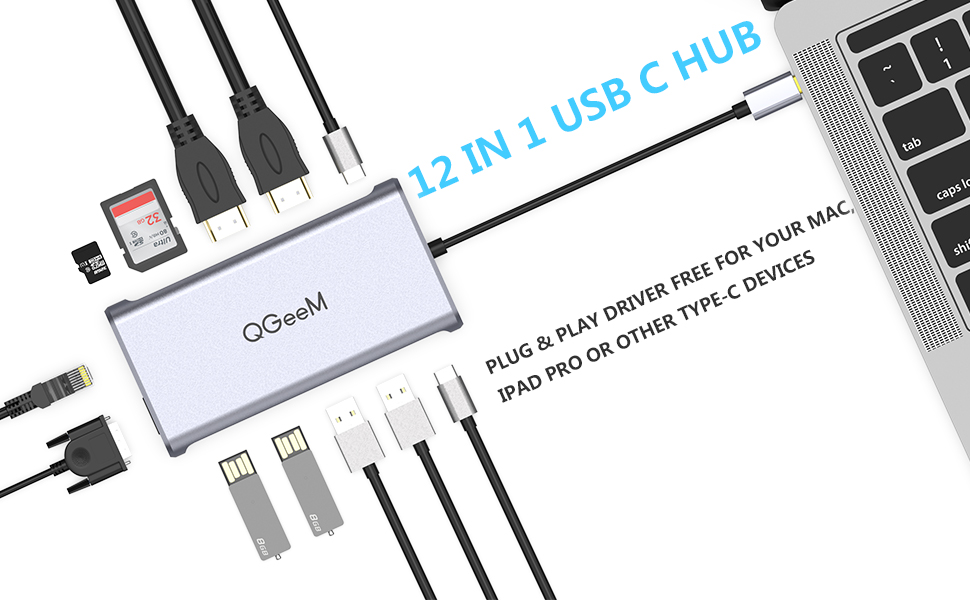
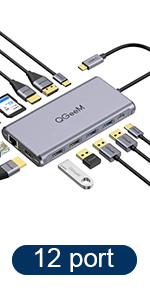
QGeeM 12 Ports USB-C HUB
Make your tiny laptop desk into a wide, multifunctional tool table where miracle takes place
- Multiple display for Mac – Mirror mode : A+A,A+AA,A+AAA ; Expansion mode: A+B, A+BB, A+BBB
- Multiple display for Wins – Mirror mode: A+A, A+AA, No signal+AAA ; Expansion mode: A+B, A+BB, A+BC, No signal+ABC
- Note 1 – Please make sure the laptop has Thunderbolt 3 / USB-C 3.1 Gen 2 / USB-C 3.2 Gen 2 to support multiple displays before purchasing. USB-C 3.1 Gen 1: 5 Gb/s (data transfer only) cannot support video display, the USB c docking station is incompatible with the USB-A to USB-C Adapter.
- Note 2 – Only if your devices support 4K resolution will the video output be 4K. Make sure you are using an HDMI 2.0 cable or higher. When HDMI and VGA are running at the same time, the monitors resolution drops to 1080P/60Hz.
- Note 3– Triple Display only support Windows system, MAC OS does not support triple display. It only supports mirror mode and extended mode (the three external monitors display the same but different from the host.)Due to MAC OS not support MST.
- Note 4 – Functions as USB C hub only; may not provid full power for tablets and smartphone devices.
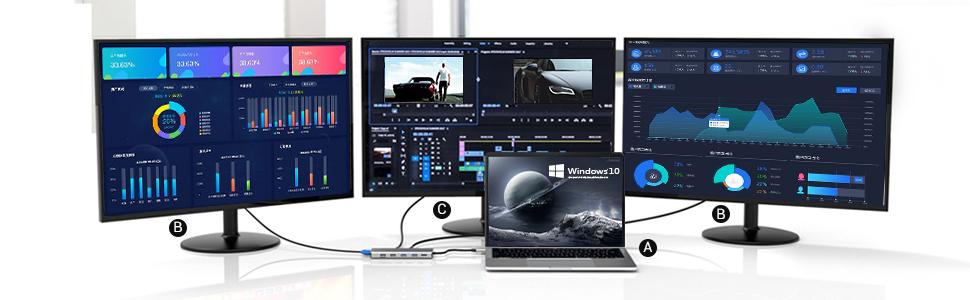
How to set the Triple Display&Dual Display
1.Triple Display(Windows)
Please click Intel Graphics Settings for multi-display setting or hotkey: Windows P
Note:You can set Display, Resolution and Refresh Rate on the General Setting.
Resolution can only reach up to 1920*1080/60HZ when connecting three monitors at the same time. It’s not suggested to do so. But if you need to do so, please turn off the laptop screen ( Click“Second screen only”) after connecting.
2.Mirror Mode & Non-mirror Mode(Mac OS)
Setting: About This Mac>Display>Arrangement>Mirror Displays (Yes or No)
Note: When MAC OS needs to extend the display, you need to click on “Display” in Preferences, select the Arrangement, and then click Cancel “Mirror displays”.
| | | |
|---|---|---|
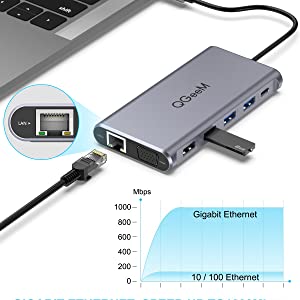
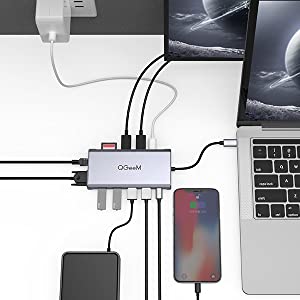
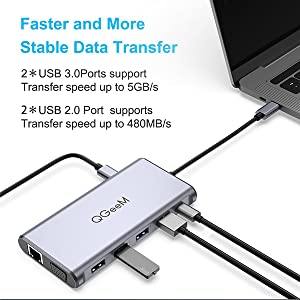
Max 1000 Mbps Speedy EthernetOffering full 10/100/1000 Mbps Gigabit Ethernet performance over the RJ45 Ethernet port ensures you a stable, wired Internet connection. | Charge & Use SimultaneouslyAllows maximum 100W pass-through charging while using. The real output is based on the adapter used (For Type-C laptop or Type-C smartphone charging). | 5Gbps USB 3.0 Fast Data TransferIncluded 2*usb 3.0 port,2*usb 2.0 port Speedy data transfers of up to 5Gbps, fast enough to transfer a high-definition movie in seconds. *Data ports are not recommended for charging due to low output. |
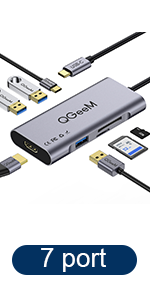 | 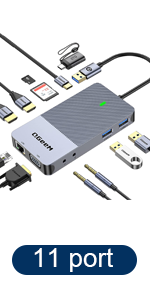 | 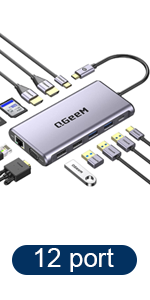 |  |  | |
|---|---|---|---|---|---|
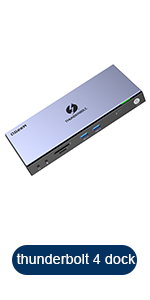
| Maximum Resolution | 3840×2160 4K@30Hz | 1920*1080@60HZ | 3840×2160 4K@30Hz | 3840×2160 4K@30Hz | 8K@30Hz or 4K60Hz |
| Video Ports | HDMI | 2*HDMI+VGA | 2*HDMI+VGA | 2*HDMI+Displayport | Thunderbolt ports*3+HDMI+Displayport |
| Laptop Connection | USB-C | USB 3.0 + USB-C | USB-C | USB-C | Thunderbolt 4 |
| Ethernet Port | x | ✓ | ✓ | ✓ | ✓ |
| SD / TF Slots | ✓ | ✓ | ✓ | ✓ | ✓ |
| Wide Compatibility | MacBook, Surface Book 2/Go, Xiaomi, Dell, Asus, Lenovo, Huawei Mate20/30/P30, Samsung S10/S10+, S20 and More Type C Devices. | MacBook Pro M1, ChromeBook, Dell XPS 13/15, Lenovo Yoga, ASUS ZenBook, Huawei Matebook, Works on Mac OS X 10.6 or higher; Windows XP, 7 or higher; Chrome OS | Macbook、Macbook Air Pro、Dell、XPS、Samsung and More Type C Devices | Macbook、Macbook Air Pro、Dell、XPS、Samsung and More Type C Devices | Any laptop with a thunderbolt 4/3 port or USB 3.1 type c port |
| Dimensions: | 32.79 x 11.3 x 2.4 cm; 210 Grams |
| Model: | HC1203-hub |
| Manufacture: | QGeeM |
| Origin: | China |
Great addition to working from home
Works perfectly as intended, I have a personal set up of 3 monitors for my Desktop PC, which I am then able to use this to connect them all to my work laptop too. Highly recommend.
Great Produc
Great product for getting all devices you need connected, especially when you have loads of new equipment. I was able to connect several different components simultaneously with no problems. Highly recommend.
QGeeM USB C Hub,12-in-1 USB C Docking Station 4k Triple Display
Great product fast delivery. Works out of the box very well.
Value for money and works as you'd expec
Brilliant product. Easy to install and works perfectly. Would totally recommend
Great value and quality
It’s been in use for a month with a triple monitor setup and no issue at all. Like the aluminium light case and build quality.
Pleasantly surprised
Bought this unit to replace a HP Thunderbolt dock 5 as I changed employer. Just as before I am able to connect 2 additional monitors to my work windows laptop and a single extra screen on my Chromebooks. Currently running four USB devices (Phone Cradle, Mouse, Keyboard & Headset) with no performance issues). Not using the VGA or Ethernet (will try using this for print network) at the moment. One of my chromebooks has a single USB-C port and when used for power pass through, the hub does get warmer, but all others are fine.
It worked straight away! Very happy
It works brilliantly. 2 x UHD 24 inch monitors on extended mode via the 2 HDMIs. Plug and play (no updates/software required). Useful as has 4 USBs. Small and portable. Doesn’t get hot.
I bought this to replace a different brand docking station that was a similar price but unable to run both my monitors at the recommended resolution and was really slow to load them. I looked at loads of different docking stations and lots of reviews.
Really happy with my purchase.
I use it with a standard laptop with USB C connection.
Awesome produc
This is an awesome product. Compared to the other cheap ones from eBay, the build quality is better. You can connect 3 screens in an extended mode which is great. I had an unbranded 12 in 1 USB c hub but that doesn’t work in extended mode and shows the same content on both the monitors.
This is an excellent addition to my HP spectre 360. Working from home is so easy now.
This is an awesome product. Compared to the other cheap ones from eBay, the build quality is better. You can connect 3 screens in an extended mode which is great. I had an unbranded 12 in 1 USB c hub but that doesn’t work in extended mode and shows the same content on both the monitors.
This is an excellent addition to my HP spectre 360. Working from home is so easy now.
Perfect for multi screen working
for multi screen working
I received the QGeeM USB C Hub quickly and it was easy to set up. I’m now able to work on 2 monitors and my laptop while also using multiple devices.
My home office set up is now complete.
The hub works perfectly and I’m so much more productive now I can connect everything through this excellent device.
Thank you!
Very handy little piece of kit!
This is a great piece of kit if your laptop (like mine) has limited ability to connect extra devices. The unit is well made and comes well packaged. It’s also small enough to fit in your laptop bag if you need to take it with you. It’s certainly given me all the expanision I need and I use it to connect to the internet (as my wired connection is much faster tha my wifi) and to expand the number of screens I use whilst working at home.
The one thing I would point out is that whilst it does have a display port socket, I couldn’t get this to work unless I also plugged in a HDMI monitor too. If you’re only intending to use a display port monitor with this unit, you may need a display port to HDMI converter cable which I bought for around 6 and now it works perfectly. That being said, my disply port monitor is quite old so it may work fine with newer kit.
Either way, it’s ideal for my needs and I wouldn’t be without it!
Very handy little piece of kit!
This is a great piece of kit if your laptop (like mine) has limited ability to connect extra devices. The unit is well made and comes well packaged. It’s also small enough to fit in your laptop bag if you need to take it with you. It’s certainly given me all the expanision I need and I use it to connect to the internet (as my wired connection is much faster tha my wifi) and to expand the number of screens I use whilst working at home.
The one thing I would point out is that whilst it does have a display port socket, I couldn’t get this to work unless I also plugged in a HDMI monitor too. If you’re only intending to use a display port monitor with this unit, you may need a display port to HDMI converter cable which I bought for around 6 and now it works perfectly. That being said, my disply port monitor is quite old so it may work fine with newer kit.
Either way, it’s ideal for my needs and I wouldn’t be without it!
Bought 2, will buy more
Bought 2 of these for my work laptop. One for travelling around and one for my desk while working from home.
Super fast USB, 3 monitors connected via the one USBC connection and even charges my laptop while working.
For the price, these are excellent!
Great produc
Finally found a port to connect my two to my laptop. One monitor has HDMI connection and the other DP. I couldn’t find a port that accommodated both without breaking the bank. I could have bought a new monitor for the price but there was nothing wrong with the monitors. There’s enough USB slots for my peripherals as well. Working well, glad I found this.
Great dongle
Great product, easy to install, works across all features – Mac compliant…
Plug and Play
Very small and neat docking station. laptop power supply plugs into docking station and cable out *USB-C) powers laptop-easy. Dual HDMI work to provide independent dual monitors for laptop. USB connections in docking station allow wireless devices to connected easily. Device does everything expected with no fuss.
Quality
Very happy I got this adaptor. It arrived quickly, was nicely packaged, clearly with care. And it works as intended! (for about a month now) I use it to have my Macbook plugged into a bunch of things: power, Apple Display (via another adaptor), ethernet and I get extra USB ports, which is super handy.
Very happy I got this adaptor. It arrived quickly, was nicely packaged, clearly with care. And it works as intended! (for about a month now) I use it to have my Macbook plugged into a bunch of things: power, Apple Display (via another adaptor), ethernet and I get extra USB ports, which is super handy.
Excellent Docking Statio
What more can I say, I am impressed the docking station is awesome and easy to set up.
A great USB-C hub for all the laptop needs
I bought this instead of a complicated DisplayLink system to create a Macbook dock and I’m absolutely happy with the choice I made. The hub is displaying 4K resolution and accepts all peripherals. A great addition for my toolbox.
Its plug and play, no additional settings required
This device does what it says on its description. Plug and play, don’t have to do anything extra to set it up. It came well packaged and on time.
All the ports I need with PD > 65W
Bought to replace an old hub which was not able to deliver enough power. This one works perfectly and has all the ports I need. My requirements are Ethernet, 2 x HDMI, PD above 65W and as many USB as possible. This one has it all – and I was not able to find many that would tick all these boxes. So, perfectly happy with this one after a full day of use without any issue. It’s currently powering a new Samsung Galaxy Book Pro and they seem to get along really well. Tried with Huawei Matebook Pro X and – again – no problems. Recommended.
Exactly what I needed
My MacBook Pro USB 3.0 ports were getting used up very quickly, so I needed an adaptor that could handle all of my devices. I wanted to be able to unplug a single adaptor, rather than lots of different ones whenever I needed to take my laptop out of its main workstation. I also needed something that could take an ethernet cable, as well as a DP port. This adaptor fits all of those needs and has been working perfectly, I’m very happy with this purchase.
My MacBook Pro USB 3.0 ports were getting used up very quickly, so I needed an adaptor that could handle all of my devices. I wanted to be able to unplug a single adaptor, rather than lots of different ones whenever I needed to take my laptop out of its main workstation. I also needed something that could take an ethernet cable, as well as a DP port. This adaptor fits all of those needs and has been working perfectly, I’m very happy with this purchase.
Does what it says with great performance
Got this one in for the dual 4K HDMI in particular, which works well. The whole unit works brilliantly and the USB performance feels very quick and error free. I like the padded contacts on the underside which prevent scratching. Costs a little more when compared to its competitors, but I’m already discovering that this shows in the features and performance gain, so definitely a worthwhile investment. Recommended.
eally a fantastic product I’ve ordered 2 more one wife and son as they both work from having the hub has saved space on the desk and less clatte
Great device! has second USB-C port for MacBook 12.
This QGeeM USB C Hub,12-in-1 USB-C Docking Station, is great, I have been looking for a hub for my MacBook 12 inch, with a second USB-C port and also PD so I can charge and use an USB-C port at the same time, there are very few devices on the market that offer this for the MacBook 12 inch with LAN and all the other available ports, I have not tried the HDMI or DisplayPort ports vet but I think on a MacBook 12, I am only able to add one monitor only.
Although its quite expensive, it seems to be a very good product, well made and durable for travel, I think this will be good for my travel bag, as its small and compact.
Work exactly as expected
It’s light, portable and finished to good quality. Works perfectly with my macBook as in the description. Very reasonable price to pay as well comparing other similar product. Highly recommended!
Grea
Really impressed with this little device. Was the only product I could find that struck a perfect balance with the ports I needed and the price. Also feels expensive and good quality.
Many in one - great produc
Happy with the purchase. Product works beautifully. It was dispatched on time. I get my two monitors connected through HDMI and VGA (still old monitor gets connected). Good things is about it’s memory card reader slots. good to have extra supported ports. Would recommend it.
Perfect for 2 monitors
Great product. Bought for working from home it’s perfect. I’ve got it connected to monitors and it even charges my laptop through the dock
GREAT PRODUCT
Great quality highly recommend to anyone passed my expectations immensely
Reliable, affordable and worth it.
Can’t really fault this. Use this hub so I have access to multiple usb A ports. It functions perfectly and is a solid purchase.
Working solution for two monitors
I’ve a surface pro 7 and with WFH required two monitors. Originally I used the HP port and HDMI for the screens but the HP port was slow so I switched to having both HDMI and works great. Also use the USB for wireless mouse and keyboard. It might be that my HP cable isn’t great so can’t be sure what the issue was there.
Great Purchase
The QGeeM 12 port adapter is brilliant. Definitely worth the purchase, suits all my needs for my macbook pro and has never failed me after 4 months of daily use now. Very happy with the adapter best one i have used would recommend a purchase!!
Works well, great service
I received this docking station about a week ago and it’s working very nicely.
I had another make previously which stopped working and had a few odd issues where I had to unplug and plug back in again.
This QGeeM works just fine. My MacBook sleeps and wakes nicely. Screen display (Displayport) is great. I have a keyboard, mouse, scanner and disk plugged in and all are performing well.
Thanks
The QGeeM 12 port adapter is brilliant. Definitely worth the purchase, suits all my needs for my macbook pro and has never failed me after 4 months of daily use now. Very happy with the adapter best one i have used would recommend a purchase!!
Great addition to my desk setup!
I use this to add another monitor to my Macbook Pro desk setup. I now have three monitors (including Macbook) on my desk, I also utilise the USB 3.0 ports for my external SSD 1TB, Microphone and touch screen monitor. This along with the RJ45 network port really helps with productivity. I couldn’t suggest this hub enough.
Good quality USB accessory
This is a reliable and straightforward to use USB hub
I bought this to replace a large and clunky HP hub that was beginning to fail on me. It is compact, and really solid with all the connections I needed to plug my work laptop in and keep in the cable tray under the desk so I can work with a clear desk above. I attached it to the desk structure with double-sided velcro (see photo). It was completely plug-and-play and I have no problems with waking everything from sleep mode by moving the bluetooth mouse. So far I’m very happy: 5 stars!
I bought this to replace a large and clunky HP hub that was beginning to fail on me. It is compact, and really solid with all the connections I needed to plug my work laptop in and keep in the cable tray under the desk so I can work with a clear desk above. I attached it to the desk structure with double-sided velcro (see photo). It was completely plug-and-play and I have no problems with waking everything from sleep mode by moving the bluetooth mouse. So far I’m very happy: 5 stars!
Lightweight and Compac
Bought the product for my daughter who finds very helpful for her university works, especially who needs to connect multiple peripherals like monitor, digital pad etc. Can be put in the laptop bag as it’s lighter and compact in size.
Followed the herd on this one – lots of positive reviews and seems to work well with my M1 Mac Mini so far. I was interested in whether it would charge my iphone through a USB -> lighting cable and it does 🙂
I ran out of ports so after reading several reviews, picked out this hub. It’s solid, the metal case in nice and the whole thing feels solid and doesn’t get too hot. The fittings in the ports are nice and tight, it has good connections and enough variety of ports for most needs.
I’m running it from an HP Spectre and have got an HDMI monitor, Webcam, Microphone, LED lamp and charging for my phone running from it. All have just been plug and play with no issues.
Excellent adapter with 4K at 60Hz and DisplayPo
I purchased this adapter as it supports 4K at 60Hz, has a DisplayPort and is small and light. These features make it ideal as a docking station for working from home or to just use it as an adapter when traveling. I use it on a Linux laptop and it works perfectly out of the box delivering 4K at 60Hz to my monitor with a nice and stable connection. Also the built quality is excellent, it has a nice housing that dissipates any heat extremely well. There are plenty of ports which are of very good build quality (the ethernet port has the standard two LEDs for connection and traffic and there is a white LED for the SD card slot). In summary this adapter packs high spec docking station features into a light, well built and small adapter making it great value for money compared to comparable high spec USB-C hubs.
It’s amazingly compact and ideal for travel. It allows power feed-through so I can just plug it into the MacBook and plug the charger into it. This prevents the MacBook from needing to power this little thing (it can, but I do a lot of all-day presenting where I need the charger connected the whole time). Not all customers have upgraded to HDMI for projectors so the addition of VGA is very useful. Ingenious piece of kit.
Great value
Using this at work on the Hot Desk, it makes sharing the desk so much simpler.
It’s amazingly compact and ideal for travel. It allows power feed-through so I can just plug it into the MacBook and plug the charger into it. This prevents the MacBook from needing to power this little thing (it can, but I do a lot of all-day presenting where I need the charger connected the whole time). Not all customers have upgraded to HDMI for projectors so the addition of VGA is very useful. Ingenious piece of kit.
Sleek, connected straight away, good value produc
Hooked up straight away, have no troubles so far, seamless connectivity and looks good by the imac.
Dex Station with display port.
I wanted a hub that had display port, a memory card reader as well as gigabit ethernet to use as a dex station. Seems they are few and far between, so glad I found this one. Feels solid and well made. If your a fan of unboxing, you will like this. Comes in quality packaging. All in all, very happy with my purchase and worth spending that little bit extra over the cheaper models.
Fantastic product.
Fantastic product. Easy to set up. Lightweight and plug and play was easy to setup. No interaction required other than plug in and away you go.
Highly recommend.
Great USB C adapte
Really like the slim design of this adapter, it’s easy enough to tuck away to keep my desk tidy. Plenty of ports, all good connections. Really happy with it.
Really easy to use
Very small device that is really easy to set up. I was worried it was so small it might lack functionality, but it’s been great. It will even charge my hp laptop at the same time.
QGeeM USB-C Hub review
Excellent USB-C Hub providing my my MacBook Pro with 200 MBp/s ethernet speed and with a port for DisplayPort provides the good quality when connected to my BenQ monitor. Also has 2 additional HDMI ports and 2 USB 3.0 ports / 2 USB 2.0 speed ports.
Recommended if you are looking for USB-C Hub with any connection type.
Great product for working from home, allows full functionality, 2 large monitors and laptop with 4 USB connections
Excellent produc
I use this for working from home to connect to Laptops and extended monitor. There are so many uses to this piece of garget. Good buy.
This is very well made. the quality of the material is very good. I am using it on my MS Surface 7 pro and it has been excellent. It coonnnects to the USBC port on my Surface. I am able to connnect 2 edditional monitors at full 4k (75fps and 30fps) one is extrawide (at 30fps) using Dispaly Port DP and HDMI (cables matter, ensure that you have bought the riight HDMI cables not all cables will transmit full4K. I am ablle to use the network ort at 1000Mbps and allso using 2 of the USB ports to connect an external camera and headset (working from home).
I have had no issues at al. It is portable and easily carried around to where I need it to be. I am also able to power the Surface through the PD USB C port power port on the hub. it is my one stop shop for everything. Drivers work by default.
Item arrived on time and very well packed. I bought this for my grand daughter and she is well pleased with it. It is sleek in design and smart looking in slate grey. This hub fits perfectly into a small pocket in her backback for school. I definitely recommend.
Item arrived on time and very well packed. I bought this for my grand daughter and she is well pleased with it. It is sleek in design and smart looking in slate grey. This hub fits perfectly into a small pocket in her backback for school. I definitely recommend.
I’ve been searching for a compact USB hub for a while, most of the USB hubs out there only have one USB C port and it’s for charging device only. This one has two USB C ports, one for charging, one for data which is really handy. It also does not require a power supply to function, which is ideal for remote working with laptops. I now can have all my devices connected and everything runs smoothly as I expected. Great product!
I needed a solution that would allow me to connect 2 external monitors to my laptop giving me 3 monitors in total. Having tried 2 other products claiming to give this level of functionality, the first didn’t work and the second became extremely hot then stopped working. The QGeem product worked perfectly – plug and play with no drivers required. I’ve been using this product for over 2 weeks and it’s still working perfectly and does not get hot. If you’re looking for an all in one USB C hub that covers all eventualities, then I’d 100% recommend this product.
Great hub for MacBook Pro
Bought this for MacBook Pro 2020 and it is performing as expected, very happy with it. The colour of space grey is nicely matching the laptop and it’s not overheating when in use. It’s slightly bulky, but that’s understandable having 12 ports.
Don't hesitate!
Does everything that it says it will do. I’ve had no concern with heat as others have mentioned.
Future product request: include a longer USB cable to connect to the device. No one wants all of the cables on the desk! 🙂 (I tried a USB C extension cable and that isn’t capable).
Does everything that it says it will do. I’ve had no concern with heat as others have mentioned.
Future product request: include a longer USB cable to connect to the device. No one wants all of the cables on the desk! 🙂 (I tried a USB C extension cable and that isn’t capable).
Works as advertised!
I’ve been using this device for over a month. Works flawlessly. Every supported ports are functional. It’s a really needed device for my Dell XPS 13 (2019) which has only USB Type-C ports. And it’s very portable and not bulky.
The only downside is that when I plug the charger into the device charging port, it did not provide enough power, so I need to have both cables connected to my laptop when I need charging and the use of the device ports, but that was not a real issue for me.
I bought it to organize my desk more neatly without too many connection on my laptop that I use as main computer connected to an external monitor, mouse and keyboard. I also needed several USB ports as charging station for working and private phone. This hub does the job, leaving only one connection to my laptop. My IT department indicated that this option would be cheaper that any other option they would be able to provide, so it is a very good value for the cost. The only suggestion I would give to the manufacturer would be to offer a longer connecting cable from the computer to the hub, because I find the current one too short if I want to keep the hub on the back of my desk and the laptop closer to me.
I’ve been using this device for over a month. Works flawlessly. Every supported ports are functional. It’s a really needed device for my Dell XPS 13 (2019) which has only USB Type-C ports. And it’s very portable and not bulky.
The only downside is that when I plug the charger into the device charging port, it did not provide enough power, so I need to have both cables connected to my laptop when I need charging and the use of the device ports, but that was not a real issue for me.
Does what it says it will well
Bought for my wife to accompany the new MacBook Air, and it’s been brilliantly helpful freeing up ports and allowing time before upgrading to wireless/Bluetooth peripherals.
Would definitely buy this again if we got another thunderbolt device
Easily swap between machines
I have a Dell XPS (home) and HP ProBook (work), both with USB-C connectors. I got this dock so I could easily swap between the two when at my desk. One cable is all it needs, I’m able to charge the battery, connect to my two monitors in “Extend” mode (both HDMI), and use an external keyboard/mouse. My only issue is the length of the cable coming from the hub, which is only ~6″ (15cm) long. I purchased a male-female USB-C extension cable to solve this, which means I can tuck the hub under my desk and just have the one cable on show.
I have a Dell XPS (home) and HP ProBook (work), both with USB-C connectors. I got this dock so I could easily swap between the two when at my desk. One cable is all it needs, I’m able to charge the battery, connect to my two monitors in “Extend” mode (both HDMI), and use an external keyboard/mouse. My only issue is the length of the cable coming from the hub, which is only ~6″ (15cm) long. I purchased a male-female USB-C extension cable to solve this, which means I can tuck the hub under my desk and just have the one cable on show.
Pretty decent. I’ve bought it for my HP elitebook X360 and it doesn’t have enough ports. I largely bought this over another one as it supports USB CPD for 100W. I have a 90W charger
The cheaper docking station on Amazon only charges at 65W, so whilst this costs a bit more, it’s worth it purely for the fact that the USB C PD is far superior.
Good amount of ports, including an additional USB C port too, which is useful for many. Would recommend
So after my usual amount of ridiculous research I ended up taking the plunge on this little gizmo to expand my connectivity options. The issue I had was I could find no useful reviews for my particular laptop (Huawei Matebook 14 (2020) AMD) so it was a bit of a punt.
Luckily that “punt” paid off.
Lightweight, well built, with what looks like an aluminium cover, solid connections all round. PLUS it works flawslessly with the Huawei fast charger, delivering the same passthrough charging speed as if I was going straight into the wall. (For all you tech heads this is just an observation not backed up by any scientific measurements)
So far, all the conncetions have worked perfectly with no noticable drop from native USB transfer speeds (obviously depending on the media used) and all AV connections just work as you would hope.
My only issue is heat (and this is probably just me being picky) as it does get a bit toasty especially when using pass through charging. We are not talking “fry an egg” levels of heat by any means but I do think making the casing from metal as opposed to plastic was a really good call as it seems to be acting as a quite efficient heatsink keeping the internal components as cool as possible on a device this size.
Well worth a buy if you’re craving more ports.
Works perfectly
Great USB C hub has all the ports one might need.
This USB hub is superior to other ones I’ve bought because has 12 ports and I am using almost all of them. I remember the days when you didn’t need external hubs, but with the latest MacBook Pros there’s just so little you can attach to them. I like to use wired keyboard, mouse, external monitor, podcast mic, headset mic for speech recognition. Often I need to connect an ethernet cable. It’s all here. Highly recommended.
Lots of ports, great for macbooks
A huge number of ports, which makes working from home great, especially with dual monitors. Charging via USB C couldn’t be easier, really allows for all your devices to be plugged into one hub, making it easy to detatch your laptop.
Build quality is great, very impressed
A huge number of ports, which makes working from home great, especially with dual monitors. Charging via USB C couldn’t be easier, really allows for all your devices to be plugged into one hub, making it easy to detatch your laptop.
Build quality is great, very impressed
This is a great value option for anyone wishing to extend their laptop display to multiple monitors using USB-C.
The unit is well built and feels very durable with a metal body. I’m sure it will stand the test if time.
I used this to add two HDMI monitors to my Dell XPS 9360 and it worked instantly (see photo). You can extend your display accross all three screens for multi-tasking, or alternatively you can mirror to use for presentations.
I have used the unit for two days now with no problems or concerns whatsoever. The product is well packaged with foam so you can be assured it will arrive safely. I highly recommend this product.
This is a great value option for anyone wishing to extend their laptop display to multiple monitors using USB-C.
The unit is well built and feels very durable with a metal body. I’m sure it will stand the test if time.
I used this to add two HDMI monitors to my Dell XPS 9360 and it worked instantly (see photo). You can extend your display accross all three screens for multi-tasking, or alternatively you can mirror to use for presentations.
I have used the unit for two days now with no problems or concerns whatsoever. The product is well packaged with foam so you can be assured it will arrive safely. I highly recommend this product.
The QGeeM 12 in 1 Triple Display Hub is an excellent product.
have had a combination of similar products in the past, but this 12 in 1 will reduce my carry on items.
Plus its inevitable that I leave at least 1 of the options on my Home desk when I’m out on the road.
Tried it as an alternate to Dell’s Hub for my laptop, was concerned about power thru, no issues.
Can recommend.
The QGeeM 12 in 1 Triple Display Hub is an excellent product.
have had a combination of similar products in the past, but this 12 in 1 will reduce my carry on items.
Plus its inevitable that I leave at least 1 of the options on my Home desk when I’m out on the road.
Tried it as an alternate to Dell’s Hub for my laptop, was concerned about power thru, no issues.
Can recommend.
Nice and slim
This worked great with my Microsoft Surface Laptop 3. It’s nice and light and slim making it ideal to carry around
I would recommend i
Allowed me to run 3440x1440
Great product,
Since this dock has a DP out it allowed me to hook my MacBook up to my 3440×1440 ultra wide display, also really hand that it has micro and full size as card slots, usb c and Ethernet connectivity’s.
Considering this is the only sub 100 dock I could find with all of the above I can’t fault it at all.
Does What It Says On The Ti
Does the job well. All connections work and gives me the extension to dual monitors via HDMI that I need.
It does the job but the cable between plug-in and the device itself is too short perhaps future changes where they accommodate the typical use case such as surface pro standing meaning when you plug the cable into it the device hangs on the side instead of lying down on table. Side note. You may struggle to use three additional monitors to your surface pro 7 and it’s not device fault just surface pro issues according to my research but it’s works just requires a little fiddling now I have 4 monitors including the surface pro. You may see one monitor greyed out that should tell you not the device fault but Microsoft surface pro not being able to adjust properly. All in all good device.
It does the job but the cable between plug-in and the device itself is too short perhaps future changes where they accommodate the typical use case such as surface pro standing meaning when you plug the cable into it the device hangs on the side instead of lying down on table. Side note. You may struggle to use three additional monitors to your surface pro 7 and it’s not device fault just surface pro issues according to my research but it’s works just requires a little fiddling now I have 4 monitors including the surface pro. You may see one monitor greyed out that should tell you not the device fault but Microsoft surface pro not being able to adjust properly. All in all good device.
worked as expected out of the box
Tried the product right away, connected 2 HDMI displays while charging my chromebook using this adaptor and was using the 2 USB 2.0 ports plus 1 of the USB 3.0 simultaneously and it worked flawlessly. Very satisfied with the product!
Great Value for Money
Great product, has all the ports I need to use my macbook pro with my music production setup and dual monitors. Amazing build quality, feels sturdy and I like the rubber feet so it doesn’t slip off of my desk. Would recommend. 🙂
Does what it says, lightweight, high quality, recommend to anyone!
Got this for my MacBook and it works amazing. Super light with a high build quality.
Would recommend to anyone!
I have been using the USB hub in a home office environment for my laptop (Lenovo T470s) and it works fine. The configuration has 2 monitors connected to the hub via HDMI cables. The displays are in extended mode (the display mode can be configured in Windows, via using the Intel HD Graphics Control Panel) thus I have 3 different screens (laptop + 2 monitors) in full HD resolution (see the attached pictures). Also a mouse and a headset are connected to the hub and work fine.
The hub has a nice compact aluminium case, the connectors are of good quality. The case gets warm during operation (and stays warm after turning the laptop off too) but it doesn’t get hot. (I can rest my hand on it if I’m cold. 🙂 )
The power delivery works properly too – the laptop charger (65W) is connected to the hub and the power is supplied to the laptop through the hub. The result is the same as connecting the charger directly to the laptop.
The device is stable, I have been using it for 2+ weeks now (8+ hours every day) and it had no issues (no lost signal or disconnected devices).
Bottom line: the item is good value for the money, it’s perfect for my home office environment.
Get this
This piece of kit is brilliant, it’s lightweight and does everything is says on the time.
Very pleased with this purchase.
Got this on a lightning deal so even happier.
I have been using the USB hub in a home office environment for my laptop (Lenovo T470s) and it works fine. The configuration has 2 monitors connected to the hub via HDMI cables. The displays are in extended mode (the display mode can be configured in Windows, via using the Intel HD Graphics Control Panel) thus I have 3 different screens (laptop + 2 monitors) in full HD resolution (see the attached pictures). Also a mouse and a headset are connected to the hub and work fine.
The hub has a nice compact aluminium case, the connectors are of good quality. The case gets warm during operation (and stays warm after turning the laptop off too) but it doesn’t get hot. (I can rest my hand on it if I’m cold. 🙂 )
The power delivery works properly too – the laptop charger (65W) is connected to the hub and the power is supplied to the laptop through the hub. The result is the same as connecting the charger directly to the laptop.
The device is stable, I have been using it for 2+ weeks now (8+ hours every day) and it had no issues (no lost signal or disconnected devices).
Bottom line: the item is good value for the money, it’s perfect for my home office environment.
Good quality product at a decent price
Bought during Black Friday at a reasonable price. The quality is good and it works efficiently. I have not used it for Hdmi splitting so I cannot advise on that (it works with my mobile P20 pro)
Incredible Feature and Value
I was a bit skeptical about buying such docking stations as I came from a Thinkpad 4XX series with incredible docking functionalities.
This dock AMAZED me tho, everything works seamlessly, I have 1 ethernet, 2 hdmi cables, 1 USB audio amplifier (as from picture) and I also have 1 USB Hub connected to it. Everything works seamlessly.
Really Solid product and also really nice polish, the dock itself is pleasant to look at.
I was a bit skeptical about buying such docking stations as I came from a Thinkpad 4XX series with incredible docking functionalities.
This dock AMAZED me tho, everything works seamlessly, I have 1 ethernet, 2 hdmi cables, 1 USB audio amplifier (as from picture) and I also have 1 USB Hub connected to it. Everything works seamlessly.
Really Solid product and also really nice polish, the dock itself is pleasant to look at.
The first impression was really good. The packaging and unboxing experience was nice. The hub has a pleasant metallic feel to it, it’s strong and seems well put together. It’s really light so I feel there is no problem throwing this into a backpack.
I believe the port selection is really good. You can have multiple monitors with 2 HDMI, and it’s great that you have a VGA if you find an old monitor or projector. For a laptop, 4 extra USB ports should be enough (2 high-speed, 2 lower speed USB A ports, and 1 USB type-c). It has ethernet which works great so the only thing missing might be an audio jack.
It’s great that you can charge your laptop using this dock. Potentially, you can run only 1 cable from your laptop which is great for decluttering and would make a great docking experience (you only have 1 cable to worry about when you take your laptop from the backpack and you move to a desk with monitors, keyboard etc).
That is exactly what I wanted to do and this is a great option for the price, but the cable is too short. I would want to tuck this cable mess out of sight and only have a clean cable running from my laptop on the desk. I couldn’t find any option on the market that offers this port selection with a long cable.
In my opinion you should make this with a removable USB-C to USB-C cable. Make a port instead of putting a short cable, so the user can choose custom length cables.
The first impression was really good. The packaging and unboxing experience was nice. The hub has a pleasant metallic feel to it, it’s strong and seems well put together. It’s really light so I feel there is no problem throwing this into a backpack.
I believe the port selection is really good. You can have multiple monitors with 2 HDMI, and it’s great that you have a VGA if you find an old monitor or projector. For a laptop, 4 extra USB ports should be enough (2 high-speed, 2 lower speed USB A ports, and 1 USB type-c). It has ethernet which works great so the only thing missing might be an audio jack.
It’s great that you can charge your laptop using this dock. Potentially, you can run only 1 cable from your laptop which is great for decluttering and would make a great docking experience (you only have 1 cable to worry about when you take your laptop from the backpack and you move to a desk with monitors, keyboard etc).
That is exactly what I wanted to do and this is a great option for the price, but the cable is too short. I would want to tuck this cable mess out of sight and only have a clean cable running from my laptop on the desk. I couldn’t find any option on the market that offers this port selection with a long cable.
In my opinion you should make this with a removable USB-C to USB-C cable. Make a port instead of putting a short cable, so the user can choose custom length cables.
Its rarely something out of the box works straight away when it comes to tech! This little beauty plugged straight in and I was back to having to 2 screens. My laptop was recently upgraded from work and so the vga output had disappeared – back down to 1 screen. the Dell docking station is 170 and needs you to have a display port on your monitors to allow multiple screens – crazy, as all my monitors would need to be upgraded. So the product speaks for itself – recommended to my colleagues at work. Great produc
Excellent product, very sleek design which took moments to setup and a nice tidy setup with still enough space to add 2 USB’s, memory card slot and 2 USB-C’s.
Currently have 2 HDMI cables and a wired keyboard and mouse.
The finish of the product is of metal and has a sleek slim design.
Excellent value for money, cleared desk space and frustrating cables.
Excellent product, very sleek design which took moments to setup and a nice tidy setup with still enough space to add 2 USB’s, memory card slot and 2 USB-C’s.
Currently have 2 HDMI cables and a wired keyboard and mouse.
The finish of the product is of metal and has a sleek slim design.
Excellent value for money, cleared desk space and frustrating cables.
Excellent value
Small but mighty. Quick and simple to use and takes up no room at all on my desk. Everything worked first time and it is very good value for money. Recommended