XP-PEN Artist 22 (2nd Generation) 21.5 Inch Drawing Tablet with Screen 1080p Graphic Pen Display with 86% NTSC Color Gamut, Battery-free Stylus and Adjustable Stand, Supports Windows and Mac
Kind Reminder:
How does it work?
XP-PEN Artist 22 (2nd Generation) is not the standalone product. It must be connected to a computer to work. Regarding to the supported system, please refer to the description below.
What type of interface you need for connection?
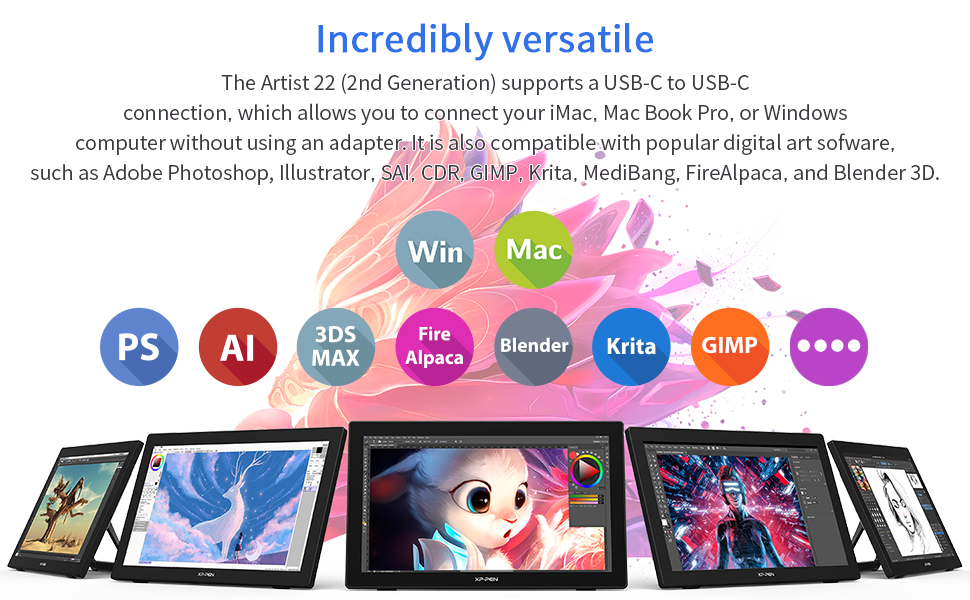
The Artist 22 (2nd Generation) drawing tablet supports a USB-C to USB-C connection, so you can directly connect your iMac/Mac Book Pro and other Windows computers that support USB-C input to the Artist 22 (2nd Generation) drawing tablet without using a Type-C to HDMI &USB adapter.
If your computer does not have a USB-C port, please do not worry, there are also HDMI cable and USB-A to USB-C Cable come together with the tablet.
Driver Download and Installation Tips
Before installing XP-PEN’s driver, please remove other brand’s driver from your computer and reboot, otherwise this might cause the conflict problems.
XP-PEN’s driver will be regularly updated, so please go to our official web to download the newest driver, and install it on your computer.
Box includes:
1 x 21.5” Graphics Display; 1 x PA6 Battery-free Stylus
1 x USB-C to USB-C Cable; 1 x USB-A to USB-C Cable;
1 x HDMI Cable; 1 x Power Adapter; 1 x Power Cord
1 x Pen Holder (comes with 8 pen nibs)
1 x Quick Guide; 1 x Cleaning Cloth; 1 x Black Drawing Glove
| | | |
|---|---|---|
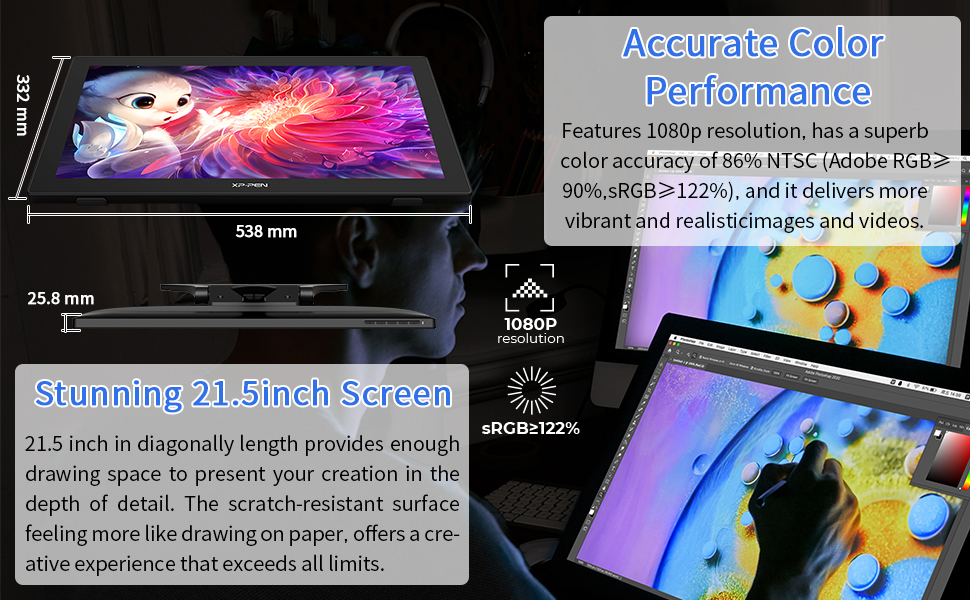
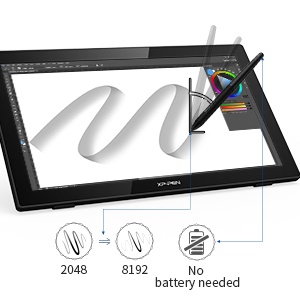
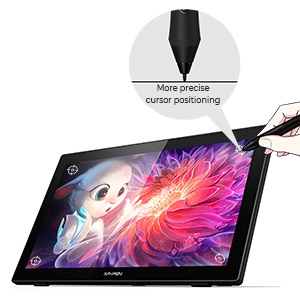
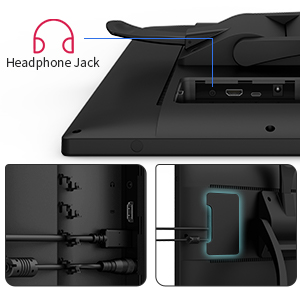
| More Natural Brush Effects: The battery-free stylus doesn’t require charging. Supports up to 60 degrees of tilt function and 8,192 pressure sensitivity levels, helping you to effortlessly create exquisite strokes and seamless shading. | Better Accuracy: The Artist 22 (2nd Generation) lets you draw with more precise cursor positioning, even at the four corners. This ensures a satisfying drawing experience. | More Convenient: The specially designed cable slot and detachable back cover keep your cables protected and organized. A additional Headphone Jack allows you to listen to music while drawing. |
Bundle Software for Artist 22 (2nd Generation)!
Enrich your experience and improve your creation skills, XP-PEN provides you with bundle software for different purposes.
- Explain Everything
- ArtRage 6
- openCanvas
- Cartoon Animator 4 Pipeline Version (12-Month Full Version)
How to obtain your software?
Step 1: Create or log into your XP-PEN account.
Step 2: Certify your purchase’s serial number.
Step 3: Select a software option, find the activation key of the software and visit the corresponding page to install it.
Specifications:
Dimensions: 538 x 332 x 25.8mm; Active Area: 476.064 x 267.786mm; Display Resolution: 1920 x 1080
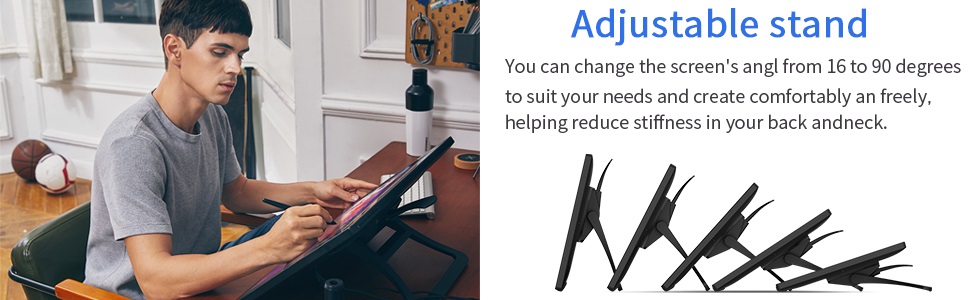
Color Gamut: 86% NTSC, Adobe RGB≥90%, sRGB≥122%; Mechanical Buttons: 5; Viewing Angle: 178°; Adjustable Stand: 16–90°; Brightness: 250 cd/m2; VESA Mount: 100x100mm;
Stylus: Battery-free; Tilt: 60°; Pressure Sensitivity: 8192 levels; Contrast: 800:1; Report Rate: ≥ 220RPS; Accuracy: ±0.5mm (Center),±1.5mm (Corner);
Response Time: 8ms; Resolution: 5080LPI; Reading Height: 10mm
Compatibility: Windows 10/8/7, Linux (Detailed versions) and Mac OS X 10.10 (and higher)
 |  |  |  | |
|---|---|---|---|---|
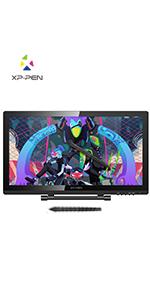
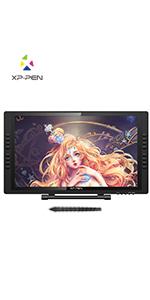
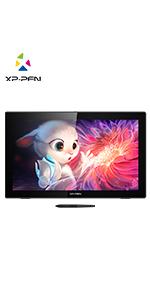
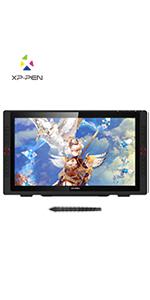
| Active Area | 476.64×268.11mm | 476.64×268.11mm | 476.064 x 267.786mm | 476.064*267.786mm |
| Shortcut Keys | x | 16 Customizable Shortcut Keys | x | 20 Customizable Shortcut Keys |
| Red Dial | x | x | x | ✓ |
| Color Gamut | Adobe RGB≥77-82% | Adobe RGB≥77-82% | 86% NTSC, Adobe RGB≥90%, sRGB≥122% | 88% NTSC, Adobe RGB≧90%, sRGB≧120% |
| Response Time | 14ms | 14ms | 8ms | 14ms |
| USB Interface | USB port 1.1 | USB port 1.1 | 1 x USB-C, 1x HDMI, 1 x Power Jack, 1 x Headphone Jack | 1x USB-C port, 2x USB Hub,1x HDMI port,1x VGA port,1x DC port |
| Stylus | P02S Battery Stylus | P02S Battery Stylus | PA6 Battery-free Stylus | PA2 Battery-free Stylus |
| Tilt | x | x | 60 Degrees | 60 Degrees |
| Compatibility | Windows 7/8/10, Linux (Detailed versions) and Mac Os X 10.10 or later | Windows 7/8/10, Linux (Detailed versions) and Mac Os X 10.10 or later | Windows 10/8/7, Linux (Detailed versions) and Mac OS X 10.10 (and higher) | Windows 10/8/7, Linux (Detailed versions) and Mac OS X 10.10 (and higher) |
| Dimensions: | 53.8 x 33.2 x 25.8 cm; 8.72 Kilograms |
| Model: | Artist 22 (2nd Generation) |
| Manufacture: | XP-PEN |
Such Fu
I have to be honest and admit I’m still exploring the capabilities of this drawing tablet as there is so much to take in. What I can say is that I am having a lot of fun with simple designs and artwork. Set-up is relatively easy and I was able to connect without issue to my computer ( Windows 10) and tablet. Software selection is straightforward and you are ready to go. The pen is the most precise I have ever used and the screen resolution just incredible. The tablet ( the size of a small TV) has a great adjustable stand that helps to get exactly the right angle to hone your work.
This is by far the best and the most comfortable experience that I ever had with a graphics tablet.The XP-Pen is a worthy contender of being the best budget graphics tablet out there. When you look at some of the competition coming in at well over one thousand pounds, you can see why this is such an appealing piece of kit.
The display itself is beautiful and the colour, contrast and sharpness is spot on. Unfortunately there is a glossy overlay to the display which reflects almost any light, making for an irritating experience when light this the surface. , it definitely has everything a digital artist needs: huge levels of pressure sensitivity, battery-free stylus, generous canvas size to work with.
Now, I don’t use the buttons on things anyway so the lack of implemented ones on here as shortcut keys didn’t bother me. There is none! But to be fair just use your keyboard its just as good. I prefer to use the keyboard shortcuts or a wireless number pad. The design is very sleek and it truly feels well made. I personally prefer its compact design but that doesn’t mean its light weight, there is quite a heft to this pice of kit. It certainly is the most ideal piece of technology if you have portability in mind.
The 2-button, battery free stylus is very impressive . It is quite responsive, with very little lag. The specs indicate that the pen has tilt sensitivity up to around 60 degrees. I don’t utilize pen tilt much in my digital painting technique, but I tried it briefly with an airbrush and it worked remarkably well. The stylus moves very smoothly across the surface, and it is a joy to hold and to work with. Plus, I don’t ever have to worry about charging the stylus!
All in all for the price, considering the competition, this is a fantastic piece of kit that merits a well deserved ‘best budget graphics tablet’ title. I cant recommend it enough.
PROS
– Affordable.
– High quality screen, great resolution.
– Precise pen with lag free feedback
CONS
– Screen glare
– Not exactly ‘portable’ quite heavy
This is by far the best and the most comfortable experience that I ever had with a graphics tablet.The XP-Pen is a worthy contender of being the best budget graphics tablet out there. When you look at some of the competition coming in at well over one thousand pounds, you can see why this is such an appealing piece of kit.
The display itself is beautiful and the colour, contrast and sharpness is spot on. Unfortunately there is a glossy overlay to the display which reflects almost any light, making for an irritating experience when light this the surface. , it definitely has everything a digital artist needs: huge levels of pressure sensitivity, battery-free stylus, generous canvas size to work with.
Now, I don’t use the buttons on things anyway so the lack of implemented ones on here as shortcut keys didn’t bother me. There is none! But to be fair just use your keyboard its just as good. I prefer to use the keyboard shortcuts or a wireless number pad. The design is very sleek and it truly feels well made. I personally prefer its compact design but that doesn’t mean its light weight, there is quite a heft to this pice of kit. It certainly is the most ideal piece of technology if you have portability in mind.
The 2-button, battery free stylus is very impressive . It is quite responsive, with very little lag. The specs indicate that the pen has tilt sensitivity up to around 60 degrees. I don’t utilize pen tilt much in my digital painting technique, but I tried it briefly with an airbrush and it worked remarkably well. The stylus moves very smoothly across the surface, and it is a joy to hold and to work with. Plus, I don’t ever have to worry about charging the stylus!
All in all for the price, considering the competition, this is a fantastic piece of kit that merits a well deserved ‘best budget graphics tablet’ title. I cant recommend it enough.
PROS
– Affordable.
– High quality screen, great resolution.
– Precise pen with lag free feedback
CONS
– Screen glare
– Not exactly ‘portable’ quite heavy
Good value, great suppo
This is a work in progress review that I will update. Some initial points:
* there is only one peelable screen protector to remove, not two as mentioned in one online review;
* a USB C to USB C lead may not provide a video signal with some hubs;
* whilst it will run in Windows 10 without downloading a driver, there is a beta (March) driver download;
* a free download of drawing software – choice of one from three – not mentioned in the quick start.
The screen is full HD IPS that is bright, with good clarity, colour and viewing angles. Buttons to adjust the display and volume are on the top right of the screen surround. The integral stand adjusts from almost horizontal to vertical, so it can double as a second monitor if your equipment allows. I tried connecting the screen with a USB C cable to a Plugable Thunderbolt 3 hub fed from a Windows 10 system, but there was no video signal. I changed to an HDMI cable direct to the Windows 10 computer and that solved the problem; the provided USB A to USB C cable also has to be connected to enable the stylus to work. I’ve contacted XP-PEN support twice and they are brilliant; far better than any other product whether it’s software, hardware, or BMW.
Whilst the screen will install on Windows 10 without downloading drivers, the XP-PEN beta Windows driver enables screen and pen information. There is a free download of one drawing program, either Open Canvas or ArtRage5; you can only pick one and the descriptions don’t really help the choice. To get the free download you need to register the screeen using the serial number; this is printed on the top left of the box the screen comes in and, in the connections compartment on the back of the screen. You’ll then need toi set up an account for the software, get a product code, register it and download it. Too much faffing about! I choose ArtRage that reminds me of PhotoShop as it has layers. Using a mouse, it produced realistic textured “paint” as though I’d used a palette knife. There is a user guide available by clicking on the screen; I’m going to need to spend a lot of time reading it and trying the options. I have tried drawing with the included XP-PEN, but no luck so far.
At the moment I’ve given five stars based on performance, cost and, it seems less tiring on the eyes.
I absolutely love this tablet!
I have been slowly saving my pennies to buy a Wacom. A friend suggested these as a much cheaper alternative. I’m SO glad I got this. It’s very accurate. Colour resolution is spot on. I love how easy it it to install and use. Came with all the accessories. (XP-Pen… sell it with a cover, you’ll thank me)
and almost 5 times cheaper than the Wacom equivalent. I’ve used it for almost 5 months now solidly every day (i’m a graphic designer) and have not been disappointed at all.
I absolutely love this tablet!
I have been slowly saving my pennies to buy a Wacom. A friend suggested these as a much cheaper alternative. I’m SO glad I got this. It’s very accurate. Colour resolution is spot on. I love how easy it it to install and use. Came with all the accessories. (XP-Pen… sell it with a cover, you’ll thank me)
and almost 5 times cheaper than the Wacom equivalent. I’ve used it for almost 5 months now solidly every day (i’m a graphic designer) and have not been disappointed at all.
Value for money - Professional quality
If you are an illustrator, artist or a designer on a budget and you want to upgrade your previous smaller with/without display graphic tablet, this is a device you should definitely consider.
This is my 2nd product from this company I got with a good discount after contacting XP PEN as I had issues with my previous artist12. Customer service is extremely helpful and quick to reply and solve issues.
Display quality is pretty good. It comes with everything you need to connect on your laptop or desktop. It doesn’t work independently. The design is very professional and the quality is durable. The screen is quite big and a bit heavy, comes with an adjustable already fitted stand so you don’t have to buy one.
The quality and accuracy of the pen cannot surpass a Wacom display tabled (never owned one, just used few times), although, you pay far less. The design of the pen is much better that the previous one I had. Very light and nice to hold. Mine came with a 2nd one as a present. Charged it 3-4 weeks ago, still haven’t charged it yet.
The application is quite easy to use, although I believe it could be a bit better when it comes to creating profiles for shortcuts and exporting them. Sometimes it doesn’t respond to the right imported shortcuts.
The screen is pretty big and makes it easier to read, draw, design or browse. I use it as my primary screen tbh. Has 16 shortcut keys which are very helpful.
Overall I am very satisfied and happy for this investment so fa
Value for money - Professional quality
If you are an illustrator, artist or a designer on a budget and you want to upgrade your previous smaller with/without display graphic tablet, this is a device you should definitely consider.
This is my 2nd product from this company I got with a good discount after contacting XP PEN as I had issues with my previous artist12. Customer service is extremely helpful and quick to reply and solve issues.
Display quality is pretty good. It comes with everything you need to connect on your laptop or desktop. It doesn’t work independently. The design is very professional and the quality is durable. The screen is quite big and a bit heavy, comes with an adjustable already fitted stand so you don’t have to buy one.
The quality and accuracy of the pen cannot surpass a Wacom display tabled (never owned one, just used few times), although, you pay far less. The design of the pen is much better that the previous one I had. Very light and nice to hold. Mine came with a 2nd one as a present. Charged it 3-4 weeks ago, still haven’t charged it yet.
The application is quite easy to use, although I believe it could be a bit better when it comes to creating profiles for shortcuts and exporting them. Sometimes it doesn’t respond to the right imported shortcuts.
The screen is pretty big and makes it easier to read, draw, design or browse. I use it as my primary screen tbh. Has 16 shortcut keys which are very helpful.
Overall I am very satisfied and happy for this investment so fa
I love it!
My first tablet and it’s so fun and easy to use.
So far, so good.
Had this a couple of weeks and, so far, only positive things to say:
– The item is well packaged, seems solidly made, and is full of the nice little extra touches that you normally find on the top-end products (e.g., the pen comes with a case that includes storage for spare nibs, doubles as a charging port, and also a pen stand for when in use).
– It was easy to set up and very clear instructions are available via the XP-Pen website, including the free download of a simple to use software package to fine tune the tablet and function keys.
– When in use, the screen display is clear, crisp and has good colour render. The pen is responsive and I have found can be used with subtlety when required.
The last thing I would add is that, as part of registering with XP-Pen, you get a free download of 1 or 3 pieces of graphics software, which is a nice little bonus. All in all, so far I am very pleased with the purchase, it was excellent value for money considering I managed to time it with a Black Friday discount, and am looking forward to using it more going forward.
So far, so good.
Had this a couple of weeks and, so far, only positive things to say:
– The item is well packaged, seems solidly made, and is full of the nice little extra touches that you normally find on the top-end products (e.g., the pen comes with a case that includes storage for spare nibs, doubles as a charging port, and also a pen stand for when in use).
– It was easy to set up and very clear instructions are available via the XP-Pen website, including the free download of a simple to use software package to fine tune the tablet and function keys.
– When in use, the screen display is clear, crisp and has good colour render. The pen is responsive and I have found can be used with subtlety when required.
The last thing I would add is that, as part of registering with XP-Pen, you get a free download of 1 or 3 pieces of graphics software, which is a nice little bonus. All in all, so far I am very pleased with the purchase, it was excellent value for money considering I managed to time it with a Black Friday discount, and am looking forward to using it more going forward.
Bigger is better.
Ordered from amazon the 15.6 version it is amazing last year just want the bigger version with stand i know i wont be dissapointed.
I can’t get it to switch o
I need help! I have followed the instructions and looked up 4 different set up videos but I can’t get it to switch on! Can anyone help me fix this?
It's amazing
So much better than an ordinary drawing tablet! Feels more natural and easier to draw. Installing it was fine, some bits may need to be collaborated but can do that in the drivers you download (I opted for the beta drivers). I downloaded the drivers after reading the instructions and before connecting it up. you do need to uninstall other graphics tablet drivers so that they don’t interfear with each other. I did this before downloading the drivers. Delivered well. Packaged well (felt like Xmas) the screen is so much better than I expected. I’ve been using photoshop on it with no issues. Love i
It's amazing
So much better than an ordinary drawing tablet! Feels more natural and easier to draw. Installing it was fine, some bits may need to be collaborated but can do that in the drivers you download (I opted for the beta drivers). I downloaded the drivers after reading the instructions and before connecting it up. you do need to uninstall other graphics tablet drivers so that they don’t interfear with each other. I did this before downloading the drivers. Delivered well. Packaged well (felt like Xmas) the screen is so much better than I expected. I’ve been using photoshop on it with no issues. Love i
No limitations
Excellent drawing tablet!! Very easy for beginners too. So many options for different drawing styles. Would highly recommend. Perfect screen size too.
Perfec
This is my first pen tablet and just love it. Easy to set up but has occasional hiccups and easy rectified. Very smooth under your hand even without a glove. No going back from here.
Perfec
This is my first pen tablet and just love it. Easy to set up but has occasional hiccups and easy rectified. Very smooth under your hand even without a glove. No going back from here.
I Love I
Being an iPad artist for many years this is a transition. Although I had have experience some years ago with pen monitors when Wacom was the go to monitor.
Build of the unit is excellent, very sturdy, and well built
I am very happy with this product, but, and here’s my but, the pen/stylus keeps disconnecting after a few hours, in order to resolve the issue I had to open Pen Tablet Setting and it automatically re-connects.I am running this from my MacBook.I have seen many reviews online in regards to this issue and a Mac, it seems this disconnecting issue has been around for a few years, the updated driver didn’t fix it. Would be nice to get a fix, however its not a major inconvenience to just open up the Pen Tablet Setting to reconnect, it takes a few seconds.
Apart from that the XP-Pen 22E Pro is an amazing piece of kit and I have no regrets buying it.My only wish is, please get rid of the hard plastic stylus tips, rubber tips all the way, which is something I am going to miss in regards to my Apple Pencil.
This monitor will be with my for the next 3-4 years before I upgrade, which will be for a 4k bonded glass monitor, but for now lets go make some art.
Grea
Great thank you. Easy to install, easy to use. 5 stars
So happy!!!
My daughter has been into graphic drawing for years now, she loves this, her 1st real adult drawing tablet, started off with one’s under 100 then under 200, this is truly amazing, she loves i
Occasionally have to reinstall the drive
This a great tablet as I needed something for drawing technical diagrams that I would normally do on a whiteboard. The size makes drawing a lot easier than the 50 A5 tablet with no screen that my work supplied to me. Drawing is easy and it links very well to Microsoft Whiteboard. My Windows 10 PC treats it as just another screen and I’m lucky enough to have a graphics card with 4 outputs so the installation was very easy. My only negative comment is that once a while when I’m using it to teach the pen just stops working and I have found the only way to get it back is the reinstall the driver, that’s the only reason for the lack of 5 stars.
Occasionally have to reinstall the drive
This a great tablet as I needed something for drawing technical diagrams that I would normally do on a whiteboard. The size makes drawing a lot easier than the 50 A5 tablet with no screen that my work supplied to me. Drawing is easy and it links very well to Microsoft Whiteboard. My Windows 10 PC treats it as just another screen and I’m lucky enough to have a graphics card with 4 outputs so the installation was very easy. My only negative comment is that once a while when I’m using it to teach the pen just stops working and I have found the only way to get it back is the reinstall the driver, that’s the only reason for the lack of 5 stars.
Info for Mac use
Firstly, all the unboxing videos I watched showed a short white cable to connect to the Mac. This is not in the one I purchased from Amazon.
The only HDMI cable is full size and a Mac needs either a Thunderbolt to HDMI or the newer ones need a HDMI to USB C I believe (you need to check this if your Mac is later than mine. Mine is 2015
This is a very useful Tablet and lives up to the claims made. I didn’t find any big problems in setup.
There doesn’t seem to be confusion over when to install the driver.
On my PC I downloaded the software, plugged in the monitor, set it up as a 2nd screen and then ran the software.
On my Mac I did the same thing and all ran well. make sure on the Mac you untick the box to mirror displays.
Great features and quality
Spent far too long thinking about this purchase. Could it possibly be as good as a Cintiq? It’s amazing. Works perfectly with my set up. A joy to use. Great price. Screen texture is perfect for drawing. Love i
Good budget tablet, buy extra cables !
I am a full time freelance animator amd use the product every day for long hours. Very happy with the price point and extras included in the package, however due to sub par hardware i would recommend buying am extra usb b type cable, as i had nothing but trouble with mine and xp pen support team are impossible to get a hold of. Spent nearly 50 on extras trying to get the product into usable condition.
Good budget tablet, buy extra cables !
I am a full time freelance animator amd use the product every day for long hours. Very happy with the price point and extras included in the package, however due to sub par hardware i would recommend buying am extra usb b type cable, as i had nothing but trouble with mine and xp pen support team are impossible to get a hold of. Spent nearly 50 on extras trying to get the product into usable condition.
Looked great out the box, did not perform to standard, brigness issues.
Dont normally my write reviews but this had me so dissapointed. The screen arrived and upon unboxing it looked great, the quality of it looked tantastic for the price so i hurried to set it all up.
Software was a breeze to install and all looked good. The screen looked a little dark so i set it up with my spyder 4.
On trying the screen (not the touch) i noticed the screen gettibg intermittently brighter and darker. This persisted no matter what type of connection i gave it. Tried for abput an hour to rectify it. Returned it. Dissapointing. Back to my old cintiq it is for now.
Looked great out the box, did not perform to standard, brigness issues.
Dont normally my write reviews but this had me so dissapointed. The screen arrived and upon unboxing it looked great, the quality of it looked tantastic for the price so i hurried to set it all up.
Software was a breeze to install and all looked good. The screen looked a little dark so i set it up with my spyder 4.
On trying the screen (not the touch) i noticed the screen gettibg intermittently brighter and darker. This persisted no matter what type of connection i gave it. Tried for abput an hour to rectify it. Returned it. Dissapointing. Back to my old cintiq it is for now.
a decent screen tablet for cheap
i`ve been using this product for 11 months now. have to bin my intuos due to ageing.
very pleased with the specs and aesthetics of this screen tablet.
using A22E-Pro for work at home and i have a G460S to travel with.
Hello!
I am writing as a former Wacom Cintiq Pro user! And an IPad 6th Gen & Apple Pencil user!
I also recommend reading the instructions to install and the other reviews. (Uninstall other drawing tablet drivers and install the xp-pen one before plugging in to pc, and read the readme that comes with the driver to install – I am Mac user and it took a moment to do all this but no issues ).
First of all I couldn’t believe the price of the xp-pen. I pain 499 and got 22 inches of workable space on a nice screen and 2 pens! (1 spare came free), the glove, and a pen case, chargers, plugs and it just felt like it kept giving!
This is one of the main reasons I didn’t go for the Wacom again this time; budget. But I honestly didn’t expect to get as much stuff with the XP-PEN either. It was a nice surprise.
To get the Wacom 24HD Pro, just quick google shows today you’ll spend over 2000. When I had my Cintiq, I payed 1700 at the time for 13 inches of workable space.
Back to the XP-Pen:
The screen quality is great!
The pen feels lighter, but reaction time is fast. So far I have only tested it in Photoshop. One thing in Photoshop, that I’ve noticed is that the pressure isn’t working, I don’t know if this is something I need to fiddle in the settings with, but there is no real pressure capabilities. This was not an issue with Wacom.
The screen is also not touch screen, which is fine. But I did notice myself at times trying to touch the screen to zoom out, as my Wacom had that and I guess I missed it more than I thought.
Overall, so far I am loving the XP-Pen. I bought it as an upgrade from the IPad/Pencil, and a replacement for my Wacom, and I will continue to use it but eventually plan to get another Wacom.
So I would recommend this as a great middle level tablet for say students of Digital Art, or people who are hobbyists and don’t have the funds for the Wacom – the XP-Pen is impressive for what it does and it is something I will continue to use in my career.
Hello!
I am writing as a former Wacom Cintiq Pro user! And an IPad 6th Gen & Apple Pencil user!
I also recommend reading the instructions to install and the other reviews. (Uninstall other drawing tablet drivers and install the xp-pen one before plugging in to pc, and read the readme that comes with the driver to install – I am Mac user and it took a moment to do all this but no issues ).
First of all I couldn’t believe the price of the xp-pen. I pain 499 and got 22 inches of workable space on a nice screen and 2 pens! (1 spare came free), the glove, and a pen case, chargers, plugs and it just felt like it kept giving!
This is one of the main reasons I didn’t go for the Wacom again this time; budget. But I honestly didn’t expect to get as much stuff with the XP-PEN either. It was a nice surprise.
To get the Wacom 24HD Pro, just quick google shows today you’ll spend over 2000. When I had my Cintiq, I payed 1700 at the time for 13 inches of workable space.
Back to the XP-Pen:
The screen quality is great!
The pen feels lighter, but reaction time is fast. So far I have only tested it in Photoshop. One thing in Photoshop, that I’ve noticed is that the pressure isn’t working, I don’t know if this is something I need to fiddle in the settings with, but there is no real pressure capabilities. This was not an issue with Wacom.
The screen is also not touch screen, which is fine. But I did notice myself at times trying to touch the screen to zoom out, as my Wacom had that and I guess I missed it more than I thought.
Overall, so far I am loving the XP-Pen. I bought it as an upgrade from the IPad/Pencil, and a replacement for my Wacom, and I will continue to use it but eventually plan to get another Wacom.
So I would recommend this as a great middle level tablet for say students of Digital Art, or people who are hobbyists and don’t have the funds for the Wacom – the XP-Pen is impressive for what it does and it is something I will continue to use in my career.
Best Decision of my life!!!
Love this product, I am a media uni student about to go into digital graphics and honestly getting to know this through this pandemic was the best choice. I dabble in drawing and honestly, it is so easy to use and set up it is the best first tablet ever, would recommend because of the price to buy a cheap tablet first or figure out if you will use it but it is so big and the screen is so HD it easily doubles up as a monitor. Would recommend this product. It has such a professional feel to it if you want to get into digital drawing, thinking of getting a screen upgrade or just an upgrade from current drawing tablet, get this one.
I absolutely love this drawing monitor. It’s a complete minefield when you are trying to research these products as so many you tubers are not neutral (the company has given them a tablet for free and heavily leans on them to give a positive review)
I started by choosing a huion, which was faulty straight out of the box, I returned it and got a replacement, this also had issues so was returned. In the meantime the xp-pen 22e Pro came up on a lightening deal. I decided there was nothing to lose as the reviews online are all biased and the best way was to try it for myself.
It arrived packed in a huge box. Its a massive screen which to me is the best thing, so much space to work.
There were two pens included. The pens with this model need charging, however don’t let that put you off as the charge lasts ages (I’ve not recharged the first pen yet weeks later with daily use)
The buttons down each side of the monitor are well placed and work perfectly.
The lever at the back let’s to change the tilt of the monitor a very useful range, flat to upright.
The screen quality to me is brilliant, I’ve found no lag, great resolution and quality. The cursor and where I’m touching the screen with the pen tip always match up perfectly.
The set came with a cleaning cloth and a glove.
I’ve been using it for a few weeks now and have nothing bad to say.
The Huions I tried were supposedly the most recent models with better screens… I don’t think so, I would highly recommend an Xp-pen drawing tablet or monitor to anyone looking.
Don’t be swayed by the you tubers… They are not impartial customers of these units
I absolutely love this drawing monitor. It’s a complete minefield when you are trying to research these products as so many you tubers are not neutral (the company has given them a tablet for free and heavily leans on them to give a positive review)
I started by choosing a huion, which was faulty straight out of the box, I returned it and got a replacement, this also had issues so was returned. In the meantime the xp-pen 22e Pro came up on a lightening deal. I decided there was nothing to lose as the reviews online are all biased and the best way was to try it for myself.
It arrived packed in a huge box. Its a massive screen which to me is the best thing, so much space to work.
There were two pens included. The pens with this model need charging, however don’t let that put you off as the charge lasts ages (I’ve not recharged the first pen yet weeks later with daily use)
The buttons down each side of the monitor are well placed and work perfectly.
The lever at the back let’s to change the tilt of the monitor a very useful range, flat to upright.
The screen quality to me is brilliant, I’ve found no lag, great resolution and quality. The cursor and where I’m touching the screen with the pen tip always match up perfectly.
The set came with a cleaning cloth and a glove.
I’ve been using it for a few weeks now and have nothing bad to say.
The Huions I tried were supposedly the most recent models with better screens… I don’t think so, I would highly recommend an Xp-pen drawing tablet or monitor to anyone looking.
Don’t be swayed by the you tubers… They are not impartial customers of these units
Just buy it already!
Absolutely amazing. Most underrated product I’ve found. If you want a big draw pad that is precise and easy to use on photoshop, just get this. I know you’re probably comparing this to other draw tablets but honestly I couldn’t rate this high enough. You won’t be disappointed. Unfortunately I had delivery issues and ended up buying elsewhere but still a great table
Still undecided
I haven’t really used this a great deal yet to be honest so may update my review later.
I took a punt on this after watching some positive you tube video reviews. however, in hindsight I wished i’d have gone for a smaller sized display (15″) as this is massive and takes up a lot of desk real estate.
I also had some initial issues getting this to work correctly with a 3 year old Macbook Pro even though I downloaded the latest drivers from them. The main problem is getting the software to retain my personalised photoshop shortcut settings with the quick keys. I’ll set these up and then sometime later they go back to defaults which is a pain and is the reason why I haven’t really been using this a great deal. I may check see if there are some newer drivers available since I purchased it.
With the large display I was expecting the quality of the display to be a little better as well. The resolution isn’t fantastic so on a screen this size it doesn’t look that crisp. Another reason why I think the smaller display would be abetter option. However, I can’t complain for the price and was the primary reason for purchase as I couldn’t justify a similar Wacom screen.
Still undecided
I haven’t really used this a great deal yet to be honest so may update my review later.
I took a punt on this after watching some positive you tube video reviews. however, in hindsight I wished i’d have gone for a smaller sized display (15″) as this is massive and takes up a lot of desk real estate.
I also had some initial issues getting this to work correctly with a 3 year old Macbook Pro even though I downloaded the latest drivers from them. The main problem is getting the software to retain my personalised photoshop shortcut settings with the quick keys. I’ll set these up and then sometime later they go back to defaults which is a pain and is the reason why I haven’t really been using this a great deal. I may check see if there are some newer drivers available since I purchased it.
With the large display I was expecting the quality of the display to be a little better as well. The resolution isn’t fantastic so on a screen this size it doesn’t look that crisp. Another reason why I think the smaller display would be abetter option. However, I can’t complain for the price and was the primary reason for purchase as I couldn’t justify a similar Wacom screen.
Excellent produc
With this being a cheaper brand than Wacom I expected there to be many issues with the IMonitor, however installing and working with the screen is easy and highly accurate…
For the price when I brought it..
This is an amazing GPD for the money you spend and has been my first GPD.
It suits my needs and has done perfectly fine for what I personally needed, I highly reccomend it.
I’m a professional 3d artist, so use this for both 3d and 2d. I’m so impressed with this product, I’ve only had it for a week and it’s been great so far. Installation was fine, no problems encountered. Works perfectly with all the software I use. The only problem I did run into was with Substance Painter, so I contacted their tech support. They got back to me the following day and were extremely helpful, turned out it was because I hadn’t updated to latest version of Substance Painter. I updated and it now works perfectly. Fantastic tech support response, very impressed with the product and their support team. If you’re not prepared to spend ridiculously high prices that Wacom charge then I’d highly recommend this product. Watch out Wacom!
I’m a professional 3d artist, so use this for both 3d and 2d. I’m so impressed with this product, I’ve only had it for a week and it’s been great so far. Installation was fine, no problems encountered. Works perfectly with all the software I use. The only problem I did run into was with Substance Painter, so I contacted their tech support. They got back to me the following day and were extremely helpful, turned out it was because I hadn’t updated to latest version of Substance Painter. I updated and it now works perfectly. Fantastic tech support response, very impressed with the product and their support team. If you’re not prepared to spend ridiculously high prices that Wacom charge then I’d highly recommend this product. Watch out Wacom!
It was ok
I’ve given it four stars as it does provide facility. Like any new tool it takes time to match that with ones own capacity.
However after a couple of days use the screen died so I’ve returned it. Things to note. The pen works well but the cursor is the thickness of the glass away; which I had to get use to. The position of the hand / pen sometimes shadows the cursor so you have to move the pen so you can see where your about to make a mark. The 14msec response time was noticeable in Painter and also when moving the cursor over the desktop, with some gosting of the pointer and lag time for the cursor to catch up to the pen. In mitigation I was using this on an iMac from 2008 connected via a mini DVI to DVI adapter cable and USB via a powered Hub. So responsiveness maybe a specific issues for my set up.
Build quality was as you’d expect at this price point. It was let down by small things; the glass screen had a small gap around it which immediately started attracting asher. The top left corner of the screen was slightly raised above the surround. Little things but noticeable in an otherwise well presented package.
It was ok
I’ve given it four stars as it does provide facility. Like any new tool it takes time to match that with ones own capacity.
However after a couple of days use the screen died so I’ve returned it. Things to note. The pen works well but the cursor is the thickness of the glass away; which I had to get use to. The position of the hand / pen sometimes shadows the cursor so you have to move the pen so you can see where your about to make a mark. The 14msec response time was noticeable in Painter and also when moving the cursor over the desktop, with some gosting of the pointer and lag time for the cursor to catch up to the pen. In mitigation I was using this on an iMac from 2008 connected via a mini DVI to DVI adapter cable and USB via a powered Hub. So responsiveness maybe a specific issues for my set up.
Build quality was as you’d expect at this price point. It was let down by small things; the glass screen had a small gap around it which immediately started attracting asher. The top left corner of the screen was slightly raised above the surround. Little things but noticeable in an otherwise well presented package.
Amazing product well worth the price
I love this product so much, just as good as the high end brands like wacom but rather than being 1 to 2 grand its only 400 pounds! Only issue is that you will need to adjust the colour settings when you first get it but that does not take long and its easy to do, apart from that it is amazing I would highly recommend.
Amazing product for drawing.
Bought this for my daughter and she loves it. Set up was easy and fully compatible with my iMac very impressed.
Amazing product for drawing.
Bought this for my daughter and she loves it. Set up was easy and fully compatible with my iMac very impressed.
Great product!!
This is a great product for the price, it works great and look very professional. It also comes with a stand and lots of tools and accessories. I would recommend this product.
Brilliant for a
Studying digital art, this is amazing! Such a big and bright screen, stylus is as sensitive as my intuos and I cannot rave about this enough. It’s as good as a cintiq.
Having used a Cintiq 13HD for around 7 years, I decided it was time to upgrade to a larger model, but there was no way I could afford to buy one of the larger Cintiqs for myself (the 13HD was a gift I received whilst at University, as I was majoring in Animation and Concept Art). I browsed around for a while and the XP-Pen name kept popping up as a really good competitor. In all honesty, I was dubious to begin with because it was so cheap compared to the leading brand! I kept thinking that it had to be lacking in some way to warrant such a price discrepancy.
Well, after watching a tonne of Youtube Reviews about the product, I decided to dive in and brought the XP-Pen Artist 22E Pro, and I’ve got to say I don’t regret it one bit!
Pros –
– So much more space!
– You can adjust the tilt to whatever degree you’re more comfortable at.
– So many buttons! They’ve all been assigned different things and it makes switching between different tools so much easier.
– As a leftie, installing the Cintiq was a pain as I had to flip the whole monitor upsidedown to allow me to use the buttons (this also messed with my other monitor which took me ages to sort out). The XP-Pen is just a simple “left handed” tick of a box! With the buttons either side, there’s no need for me to flip it upsidedown.
– Two pens! One is always on charge, so if the one I’m using runs out I can just swap them over.
– Talking about pens, I much prefer the balance and weight to the XP-Pen than to the Cintiq pen. Although I got used to the Cintiq pen after years of usage (it was top heavy), the XP-Pen feels much more like holding a regular pencil, insofar that there is no weight imbalance.
– Personally, I found it really easy to install. I know some people have had problems with the drivers, but I think that may be because they didn’t uninstall the drivers of their last drawing tablet, which can cause major problems. On my end, everything was set up and ready to use in less than half an hour.
– Smooth drawing. I’ve suffered no stuttering or wonky lines. I draw in ClipStudio (MangaStudio), so the stabilizer helps, but even without it my linework is still very smooth.
Cons (there’s not many) –
– I’ve noticed slight parallax. It’s not too jarring and I’m sure I’ll get used to it.
– Needs more calibration points. I feel that for a screen this size, and because of the parallax, there should be more than 5 calibration points. Personally, I think 9 would help out tremendously and would just cut down on the parallax and make it even less noticeable. Again, not a massive con, just one that I’ve noticed. But hey, I’m reviewing from the perspective of someone who has only ever used Cintiq’s, so I’m pretty sure XP-Pen are doing an awesome job compared to some lesser brands 🙂
– The Express Key settings need to be reworked a little bit. It won’t let you do a combination of left/right click and then a command such as ALT or CTRL, which was a pain because I had keybound changing my pen size to Right click + ALT, so I had to go into the program itself and rework a lot of my keybinds. I’ve sorted it now so all I have to do is hold down the button on the pen and I can drag my pen size to whatever I want it to be, but it was a little annoying having to alter all the ones I had set up in ClipStudio because the XP-Pen tablet wouldn’t allow those combinations on its Express Key settings.
Also, not so much a Con, but an observation – if you move the screen forward/backward, just remember to lift the whole thing, otherwise it makes this godawful noise that shakes your whole desk! I suppose that’s a Pro too because it means the little grippy feet are doing their job right!
Overall, an amazing product and I am one very satisfied customer 🙂
Easy Peasy
Unpacked,set up on the desk, plugged in to the system and drivers installed all within 15 minutes. Works like a dream. Best 400 ( I did get this on Amazon Deal ) I’ve spent in a longtime. Looking in to purchasing another for our other system setup.
Easy Peasy
Unpacked,set up on the desk, plugged in to the system and drivers installed all within 15 minutes. Works like a dream. Best 400 ( I did get this on Amazon Deal ) I’ve spent in a longtime. Looking in to purchasing another for our other system setup.
Great value
The tablet is much better value than any equivalent Wacom device, solid in every aspect. Don’t listen to all the people complaining that the drivers are “useless” and “difficult to install” all you need to do is install a launcher from the website, then download the driver from that.
Amazing value!
Ive been using this for about a couple of months now and it is amazing. For this price the quality is bang on. Only thing id prefer as an improvement is if the screen was thinner, but other that it is amazimg and im now making art work muchhhh much faster!
Really good table
Iv’e had this display for nearly a year now and it’s a huge improvement over my last tablet (which was a wacom bamboo, so you would hope so), I’d say it’s a solid choice for anyone who doesn’t want a cintiq, the only problem iv’e had is that it sometimes flashes with static intermittently when iv’e just turned it on but it’s easily fixed by minimizing whatever programs I have open or unplugging the hdmi and popping it back in. Other than that, it’s accurate, you get loads of free gifts…can’t complain!
Really good table
Iv’e had this display for nearly a year now and it’s a huge improvement over my last tablet (which was a wacom bamboo, so you would hope so), I’d say it’s a solid choice for anyone who doesn’t want a cintiq, the only problem iv’e had is that it sometimes flashes with static intermittently when iv’e just turned it on but it’s easily fixed by minimizing whatever programs I have open or unplugging the hdmi and popping it back in. Other than that, it’s accurate, you get loads of free gifts…can’t complain!
I’ve had this for over a year now and it’s been a pleasure to use. The screen is the perfect size for me, and I imagine will be for most hobbyists. it’s noticeably lacking in crispness and colour next to a retina display on my MacBook but as long as you’re using it alongside a high quality monitor that you can check the colouring etc on, it won’t be a problem. I did wonder why they gave me an extra pen, I’m always a bit suspicious when you get free replacement parts and sure enough the first pen I was using has broke. It’s my fault as I have let it fall from my desk plenty times but you can tell they are not the best build quality. No complaints on how the pen works with the screen and I find the pressure sensitivity fine, it’s just the build quality that’s lacking – if it wasn’t for the replacement pen included I’d probably have dropped a star.
The set up isn’t straight forward on mac, I didn’t have many issues with it as I work with Computers but it’s not plug and go on the mac you need to download the drivers and then add a few things into your Accessibility settings otherwise the Setup won’t work. Once everything is going though it’s great, and when you compare it to Wacom who still think it’s acceptable to charge over a thousand pounds it’s an amazing piece of kit at a bargain price!
I’ve had this for over a year now and it’s been a pleasure to use. The screen is the perfect size for me, and I imagine will be for most hobbyists. it’s noticeably lacking in crispness and colour next to a retina display on my MacBook but as long as you’re using it alongside a high quality monitor that you can check the colouring etc on, it won’t be a problem. I did wonder why they gave me an extra pen, I’m always a bit suspicious when you get free replacement parts and sure enough the first pen I was using has broke. It’s my fault as I have let it fall from my desk plenty times but you can tell they are not the best build quality. No complaints on how the pen works with the screen and I find the pressure sensitivity fine, it’s just the build quality that’s lacking – if it wasn’t for the replacement pen included I’d probably have dropped a star.
The set up isn’t straight forward on mac, I didn’t have many issues with it as I work with Computers but it’s not plug and go on the mac you need to download the drivers and then add a few things into your Accessibility settings otherwise the Setup won’t work. Once everything is going though it’s great, and when you compare it to Wacom who still think it’s acceptable to charge over a thousand pounds it’s an amazing piece of kit at a bargain price!
This is a great alternative to the Cintiq for a fraction of the price. I am a professional Illustrator and I can highly recommend the XP-Pen to any one who wants to get into digital painting. I have been painting digitally for 16 years (using only Wacom products), but after the my last Cintiq didn’t last very long I decided to try this one.
The pressure sensitivity and the colours of the display are very good. The lines are very clean and without jitter.
The pen feels great in your hand and has a long battery life. It also comes with an extra pen and a lot of other accessories.
There are only two down sides: number one, sometimes when you paint a little to quickly it doesn’t register every stroke, for example if you paint fur or if you hatch something. It just takes some time to get used to it.
Number two: the nibs wear off very quickly, but it comes with a good amount of replacement nibs and you can purchase more.
This is a great alternative to the Cintiq for a fraction of the price. I am a professional Illustrator and I can highly recommend the XP-Pen to any one who wants to get into digital painting. I have been painting digitally for 16 years (using only Wacom products), but after the my last Cintiq didn’t last very long I decided to try this one.
The pressure sensitivity and the colours of the display are very good. The lines are very clean and without jitter.
The pen feels great in your hand and has a long battery life. It also comes with an extra pen and a lot of other accessories.
There are only two down sides: number one, sometimes when you paint a little to quickly it doesn’t register every stroke, for example if you paint fur or if you hatch something. It just takes some time to get used to it.
Number two: the nibs wear off very quickly, but it comes with a good amount of replacement nibs and you can purchase more.
Extraordinary value for money
Having used a Wacom Cintiq 13HD before I can say that this larger display tablet is not only half the price, it is perfectly good in almost every sense. The display quality and response time are very very slightly worse than a Wacom, but when you consider how much money you save, it’s really a small price to pay.
On top of the excellent value for money the tablet itself represents, they send you a free screen protecting half-glove-thing for your hand, a free extra stylus, 8 replacement nibs, and the whole thing is on a 12 month warranty.
This actually saved my ass today as the first stylus did unfortunately stop working on me. This was after 3 months of quite intensive use, but still a little disappointing, so points against it for that. Of course it didn’t matter, because I had the extra free stylus! And I’m fairly certain they would have sent me a replacement stylus if needed anyway.
Strongly recommend this tablet to anyone – honestly even if you can afford the similarly sized Cintiq, the difference between the two is relatively slight, but the price difference is enormous. If you really have money to burn then yes the Wacom will probably be a smoother experience (and maybe the stylus wont break) but I’m sitting here with a working stylus anyway and 700 in my bank account that otherwise wouldn’t be there, so I have absolutely no regrets.
Extraordinary value for money
Having used a Wacom Cintiq 13HD before I can say that this larger display tablet is not only half the price, it is perfectly good in almost every sense. The display quality and response time are very very slightly worse than a Wacom, but when you consider how much money you save, it’s really a small price to pay.
On top of the excellent value for money the tablet itself represents, they send you a free screen protecting half-glove-thing for your hand, a free extra stylus, 8 replacement nibs, and the whole thing is on a 12 month warranty.
This actually saved my ass today as the first stylus did unfortunately stop working on me. This was after 3 months of quite intensive use, but still a little disappointing, so points against it for that. Of course it didn’t matter, because I had the extra free stylus! And I’m fairly certain they would have sent me a replacement stylus if needed anyway.
Strongly recommend this tablet to anyone – honestly even if you can afford the similarly sized Cintiq, the difference between the two is relatively slight, but the price difference is enormous. If you really have money to burn then yes the Wacom will probably be a smoother experience (and maybe the stylus wont break) but I’m sitting here with a working stylus anyway and 700 in my bank account that otherwise wouldn’t be there, so I have absolutely no regrets.
Good
Great tablet however was too big for me so i returned it and brought a smaller one, the stand is sturdy and its pretty easy to use
Good
Great tablet however was too big for me so i returned it and brought a smaller one, the stand is sturdy and its pretty easy to use
Very good.
The quality is of very good quality. I have had no issues trying to use this product as of yet.
Not sketchy
Great for the price. Nice pressure sensitivity, good useable screen space and plenty if macro buttons. The stylus feels a bit cheap, but works perfectly. I find the plastic nibs wear down quickly.
The screen will accumulate some scratches over time. It’s a shame but better than losing pressure sensitivity to the screen protector.
For the money, it’s an excellent high-end digital drawing solution. Just make sure you manually adjust the pressure sensitivity in the settings if you don’t want to flatten your nibs by the second day
Not sketchy
Great for the price. Nice pressure sensitivity, good useable screen space and plenty if macro buttons. The stylus feels a bit cheap, but works perfectly. I find the plastic nibs wear down quickly.
The screen will accumulate some scratches over time. It’s a shame but better than losing pressure sensitivity to the screen protector.
For the money, it’s an excellent high-end digital drawing solution. Just make sure you manually adjust the pressure sensitivity in the settings if you don’t want to flatten your nibs by the second day
Good people of Amazon, gather here to be told of the woes of the Great Graphic Tablet Saga… If you’re reading these reviews, you’re either considering buying this tablet (please do) or you’re stuck trying to install it (I feel ya). This is how to do it:
1 – Don’t plug anything in, just go directly to the XP Pen site and download the correct driver (instructions for your computer) for your operating system (windows or osx) – if you’re struggling here, get an adult to help you.
2 – Restart your computer when the drivers have installed (don’t skip this).
3 – There are MANY cables in the box. You will pick up the HDMI cable, this is where most of the people go wrong. The HDMI cable will ONLY allow your to use your new tablet as a monitor. You’ll click the XP Pen program and it won’t work and you’ll get cross. By all means plug it in, BUT ALSO PLUG IN THE USB CABLE.
Why this isn’t written in their manual, I have no idea. You computer needs BOTH cables. The XP Pen program will now work like a charm. Congratulations, you won.
Pen not working? Is it charged? Your medal is in the post.
Good people of Amazon, gather here to be told of the woes of the Great Graphic Tablet Saga… If you’re reading these reviews, you’re either considering buying this tablet (please do) or you’re stuck trying to install it (I feel ya). This is how to do it:
1 – Don’t plug anything in, just go directly to the XP Pen site and download the correct driver (instructions for your computer) for your operating system (windows or osx) – if you’re struggling here, get an adult to help you.
2 – Restart your computer when the drivers have installed (don’t skip this).
3 – There are MANY cables in the box. You will pick up the HDMI cable, this is where most of the people go wrong. The HDMI cable will ONLY allow your to use your new tablet as a monitor. You’ll click the XP Pen program and it won’t work and you’ll get cross. By all means plug it in, BUT ALSO PLUG IN THE USB CABLE.
Why this isn’t written in their manual, I have no idea. You computer needs BOTH cables. The XP Pen program will now work like a charm. Congratulations, you won.
Pen not working? Is it charged? Your medal is in the post.
You will love when finally installed
After setting up which wasn’t the easiest. It’s the best for getting the small details
Awesome produc
Love using the XP-Pro. It’s a lot of screen real estate for a nice price.
Excellent Table
The Artist 22E Pro is an incredible alternative to more expensive monitor drawing tablets. It is superb value and I would absolutely recommend it as it is so easy to use, and feels incredibly smooth. Overall – very pleased – it’s fantastic.
seems like the issue is with the drivers and not the tablet itself, althoughhh – had to re plug it in, re-install the drivers, its mostly a issue of just re starting it by pressing the power button at the bottom right of the tablet itself. setting up the hot keys is a bit tricky, but do-able. this is my first drawing tablet, love it apart from the driver issue’s its brilliant, xp-pen gives you a extra one month free warranty with it anyway. would recommend this – the stand for it is VERY stable and easy to adjust. Pen is comfortable to hold, again my only issues is the drivers (last one for mac is 14th september 2018) these seem to get updated frequently thankfully. SIDE NOTE_ if your using a 2017 imac like me, buy a usb c/thunderbolt to hdmi adapter connecter as it comes with a hdmi- to hdmi cable to plug into your computer to project the display across, if your on pc or just a apple computer/laptop with a hdmi port, you dont need to worry about this!
seems like the issue is with the drivers and not the tablet itself, althoughhh – had to re plug it in, re-install the drivers, its mostly a issue of just re starting it by pressing the power button at the bottom right of the tablet itself. setting up the hot keys is a bit tricky, but do-able. this is my first drawing tablet, love it apart from the driver issue’s its brilliant, xp-pen gives you a extra one month free warranty with it anyway. would recommend this – the stand for it is VERY stable and easy to adjust. Pen is comfortable to hold, again my only issues is the drivers (last one for mac is 14th september 2018) these seem to get updated frequently thankfully. SIDE NOTE_ if your using a 2017 imac like me, buy a usb c/thunderbolt to hdmi adapter connecter as it comes with a hdmi- to hdmi cable to plug into your computer to project the display across, if your on pc or just a apple computer/laptop with a hdmi port, you dont need to worry about this!
I have used the XP Pen Artist 22E for the past month and I must point out that
this is amazing pen display at a great price. It came with a really fast delivery
and was boxed really well so It doesn’t get damaged on its way. The monitor has 16
express keys which I found extremely helpful, because you can set them as shortcuts
for variety of commands such as redo, undo, zoom in, zoom out and really ease the workflow.
You also get another pen stylus, which is awesome. I would like to point out that the display
comes with an installed screen protector which has that matte paper feel and I really like. If
you wish to remove it you can do it really easy, however this depends on your personal preference
as some people would prefer the glossy feel. If however you choose to stick to the matte protector
I would recommend you to increase the pressure sensitivity and not to push the pen nib to hard as
that would scratch the surface of the protector, which DOES NOT AFFECT the way you see the monitor
when it is turned on in any way. You would only be able to see the scratches when it is turned off
which is not a problem at all. I would also like to mention that the drivers were also easy to download
and install.
I have used the XP Pen Artist 22E for the past month and I must point out that
this is amazing pen display at a great price. It came with a really fast delivery
and was boxed really well so It doesn’t get damaged on its way. The monitor has 16
express keys which I found extremely helpful, because you can set them as shortcuts
for variety of commands such as redo, undo, zoom in, zoom out and really ease the workflow.
You also get another pen stylus, which is awesome. I would like to point out that the display
comes with an installed screen protector which has that matte paper feel and I really like. If
you wish to remove it you can do it really easy, however this depends on your personal preference
as some people would prefer the glossy feel. If however you choose to stick to the matte protector
I would recommend you to increase the pressure sensitivity and not to push the pen nib to hard as
that would scratch the surface of the protector, which DOES NOT AFFECT the way you see the monitor
when it is turned on in any way. You would only be able to see the scratches when it is turned off
which is not a problem at all. I would also like to mention that the drivers were also easy to download
and install.
Nervous yet Happy when I got i
Very happy, thank you. Works fine with photoshop. ToonBoom crashes when I try to use the tablet with it that seems to be an issue with my laptop and not the Tablet itself. The colour between my laptop screen and the tablet took a bit of adjusting to get close to each other but It has not been an issue as I do not work professionally.
The plastic screen cover is class. It isn’t stuck to the screen so it doesn’t cause the bubbles phone screen protectors cause.It’s a sheet of plastic that hangs down over and can be lifted up for a better view on the screen.
I’m no expert on tablets, only ever had a small Wacom one before. I was happy to see that this tablet has different pressure sensitivity when drawing in photoshop.
This was a purchase that I was nervous about But all in all delighted I took the risk and bought great size screen. I got a quick reply from their customer service too which was nice.
Nervous yet Happy when I got i
Very happy, thank you. Works fine with photoshop. ToonBoom crashes when I try to use the tablet with it that seems to be an issue with my laptop and not the Tablet itself. The colour between my laptop screen and the tablet took a bit of adjusting to get close to each other but It has not been an issue as I do not work professionally.
The plastic screen cover is class. It isn’t stuck to the screen so it doesn’t cause the bubbles phone screen protectors cause.It’s a sheet of plastic that hangs down over and can be lifted up for a better view on the screen.
I’m no expert on tablets, only ever had a small Wacom one before. I was happy to see that this tablet has different pressure sensitivity when drawing in photoshop.
This was a purchase that I was nervous about But all in all delighted I took the risk and bought great size screen. I got a quick reply from their customer service too which was nice.
90% as good as the Wacom
My wife approves this product! She loves it. 90% as good as the Wacom, but 3 times cheaper!
90% as good as the Wacom
My wife approves this product! She loves it. 90% as good as the Wacom, but 3 times cheaper!
Revolutionary tool
I’ve paid a lot of money over the years for artist related tools and books, both computer and traditional ware, but I don’t think I have or will buy anything as so important for my progressive artistic development.
Thank you, this has been revolutionary.
Revolutionary tool
I’ve paid a lot of money over the years for artist related tools and books, both computer and traditional ware, but I don’t think I have or will buy anything as so important for my progressive artistic development.
Thank you, this has been revolutionary.
It really exceeded my expectations
I was oscillating between a used Cintiq or a new XP-Pen but after 2 months of usage, I’m certain that the XP-Pen was the right choice.
The pressure sensitivity is great, the strokes don’t have any lag at all and it’s very comfortable to draw on since it doesn’t heat up very much.
When I first installed it the express buttons weren’t working properly and the pressure sensitivity was broken but after some debugging it turned out to be the USB cable that was faulty, I contacted XP-Pen support and they offered to replace the cable and now everything works perfectly.
I only wish that there was a better screen protector for it available that didn’t exhibit the rainbowing effect and had better transparency.
Had it for a while now and it's still working ...
Had it for a while now and it’s still working perfectly well. I’ve drawn a lot on here and the huge drawing space is well worth any incredibly minor setbacks it may have. Trust me.
I have the XP Pen Artist 22E around 2 weeks and works perfect!! Pretty much similar to Cintiq.
You can cuatomize all the buttons.
I use it with Maya, Photoshop and After Effects and works great!!!
The only thing that I didn’t found yet is the way to switch from one screen to another one with the button, like Cintiqs. I mean when you’re drawing in XP Pen screen (or in Cintiq screen), Cintiqs has one button that you can switch to the other screen(secondary one) and use the Cintiq as a mouse.
There is a little parallax, but to me works fine, not such a big problem
I have the XP Pen Artist 22E around 2 weeks and works perfect!! Pretty much similar to Cintiq.
You can cuatomize all the buttons.
I use it with Maya, Photoshop and After Effects and works great!!!
The only thing that I didn’t found yet is the way to switch from one screen to another one with the button, like Cintiqs. I mean when you’re drawing in XP Pen screen (or in Cintiq screen), Cintiqs has one button that you can switch to the other screen(secondary one) and use the Cintiq as a mouse.
There is a little parallax, but to me works fine, not such a big problem
For the price – fantastic! I am not a professional artist, just a hobbyist. I enjoy computer art and cannot afford the top end of the market. But to be realistic I do not need a top end machine. Prior to spending my hard earned cash, I watched the various reviews on U-tube and while the competition for this level of device is fairly even XP-Pen seem to offer the best value and function. Do you need the top end products? When you look at the sketches of great artists charcoal and paper seem to work just as well. I have been using the Sketchbook software on the XP-Pen and it is just great fun. If you are an art student or a professional digital artist – I really don’t think you can go wrong with an XP-Pen.
The product comes with two pens, that once charged – last ages. They fit in the hand well enough and once you train yourself to stop looking at the nib and look at the cursor instead are fine. The calibration was easy, as was installing the drivers.
Translating screen colours to print is not something I have a great deal of experience with, so I cannot comment.
The only down side and the thing that has annoyed me is the screen protector. Don’t use it, I am looking at alternatives. It is attached via a single strip at the top of the screen and no matter how much time you spend fiddling you get air underneath with a mosaic oily rainbows across the screen. That said when you are actually drawing etc it becomes barely noticeable, just irritating. Which distracts you from enjoying an excellent product.
For the price – fantastic! I am not a professional artist, just a hobbyist. I enjoy computer art and cannot afford the top end of the market. But to be realistic I do not need a top end machine. Prior to spending my hard earned cash, I watched the various reviews on U-tube and while the competition for this level of device is fairly even XP-Pen seem to offer the best value and function. Do you need the top end products? When you look at the sketches of great artists charcoal and paper seem to work just as well. I have been using the Sketchbook software on the XP-Pen and it is just great fun. If you are an art student or a professional digital artist – I really don’t think you can go wrong with an XP-Pen.
The product comes with two pens, that once charged – last ages. They fit in the hand well enough and once you train yourself to stop looking at the nib and look at the cursor instead are fine. The calibration was easy, as was installing the drivers.
Translating screen colours to print is not something I have a great deal of experience with, so I cannot comment.
The only down side and the thing that has annoyed me is the screen protector. Don’t use it, I am looking at alternatives. It is attached via a single strip at the top of the screen and no matter how much time you spend fiddling you get air underneath with a mosaic oily rainbows across the screen. That said when you are actually drawing etc it becomes barely noticeable, just irritating. Which distracts you from enjoying an excellent product.
Good wacom cintiq alternative
Much cheaper equivalent of a wacom cintiq. Has some limitations, but hopely tilt sensitivity will be added in the form of a new pen at some point, and the screen offset is minimal
Good wacom cintiq alternative
Much cheaper equivalent of a wacom cintiq. Has some limitations, but hopely tilt sensitivity will be added in the form of a new pen at some point, and the screen offset is minimal
so far so good, it has been 2 weeks since i bought ...
so far so good, it has been 2 weeks since i bought it and is functioning perfectly, no complaints. if it stays in the 600 range i absolutely recommend i
so far so good, it has been 2 weeks since i bought ...
so far so good, it has been 2 weeks since i bought it and is functioning perfectly, no complaints. if it stays in the 600 range i absolutely recommend i
It's a nice tool and excellent for this price
It’s a nice tool and excellent for this price. My only “problem” is the feeling of draw when the pen’s tip touch the screen (with or without screen protector too). This is why only 4 stars.
It's a nice tool and excellent for this price
It’s a nice tool and excellent for this price. My only “problem” is the feeling of draw when the pen’s tip touch the screen (with or without screen protector too). This is why only 4 stars.
This is the first time I’ve ordered a product and told myself I need to review it. After searching all over the Internet for a review (for the XP Pen 22E and not just the 22), I couldn’t find an decent information about the product other than the XP pen website.
First of all, the packaging. I was initially afraid there would be some damage to the tablet since the box it came in looked like UPS was throwing it around the place – but to my avail, it was well packaged and secured in foam and another box which contained everything.
The display is beautiful. I have a HD I connected directly from my PC tower to the 22E (which they provide, amongst other needed cables) so it’s fully HD which is already a set up from my current monitor.
There 8 keys on each side of the display which are all fully customizable and it is very to set up and get going. I did have to Uninstaller my Wacom drivers before installing the XP pen ones but it didn’t matter, I doubt I’ll be using Wacom again unless I coming into a small fortune of $3000 for a cintiq. If anything this is way up there with a cintiq.
It works extremely well with photoshop. The pressure sensitivity is really good and there is little to no jitter.
I was considering saving up for a cintiq for a while until I did my research about XP Pen and I am so glad I didn’t fork out the money for Wacom, which I’m sure would also have been amazing, but if you’re like me and you cant afford a cintiq… Then I highly urge you to buy the XP Pen 22E. Yes, I know there’s not a lot of information out about it yet since it only came out early December but trust me it was more than worth the money.
This is the first time I’ve ordered a product and told myself I need to review it. After searching all over the Internet for a review (for the XP Pen 22E and not just the 22), I couldn’t find an decent information about the product other than the XP pen website.
First of all, the packaging. I was initially afraid there would be some damage to the tablet since the box it came in looked like UPS was throwing it around the place – but to my avail, it was well packaged and secured in foam and another box which contained everything.
The display is beautiful. I have a HD I connected directly from my PC tower to the 22E (which they provide, amongst other needed cables) so it’s fully HD which is already a set up from my current monitor.
There 8 keys on each side of the display which are all fully customizable and it is very to set up and get going. I did have to Uninstaller my Wacom drivers before installing the XP pen ones but it didn’t matter, I doubt I’ll be using Wacom again unless I coming into a small fortune of $3000 for a cintiq. If anything this is way up there with a cintiq.
It works extremely well with photoshop. The pressure sensitivity is really good and there is little to no jitter.
I was considering saving up for a cintiq for a while until I did my research about XP Pen and I am so glad I didn’t fork out the money for Wacom, which I’m sure would also have been amazing, but if you’re like me and you cant afford a cintiq… Then I highly urge you to buy the XP Pen 22E. Yes, I know there’s not a lot of information out about it yet since it only came out early December but trust me it was more than worth the money.
XP-Pen’s Artist 22 was a good product at a great price. It had a few flaws compared to the much more expensive Wacom alternative: no shortcut keys; cables exited the tablet bottom rear, getting in the way & preventing the tablet stand being used in its lowest position; the screen protector was tricky for some users to apply.
XP-Pen’s revised version, the Artist 22E fixes all of these & is a great product particularly when the only serious competition is nearly two & a half times as expensive. It adds shortcut keys, fixes the cable issue by routing them out to the right side at the rear & comes with a new screen protector that’s easy to install as it attaches only along the top edge which also allows tracing of any docs placed between the screen & protector.
I had a minor issue with the drivers but this might be specific to my Win 10/64 system. A reboot would stop the tablet working. This turned out to be due to the service WinTab not starting, despite being set to automatic. I managed to fix this by changing it to automatic (delayed).
The drivers could also benefit from more flexible configuration options but this is nothing that can’t be worked around with a product such as Lazy Nezumi Pro.
Overall, I’m extremely pleased with the Artist 22E & wouldn’t hesitate to recommend it to any interested purchaser who baulks at the prospect of paying for a Cintiq 22HD.
XP-Pen’s Artist 22 was a good product at a great price. It had a few flaws compared to the much more expensive Wacom alternative: no shortcut keys; cables exited the tablet bottom rear, getting in the way & preventing the tablet stand being used in its lowest position; the screen protector was tricky for some users to apply.
XP-Pen’s revised version, the Artist 22E fixes all of these & is a great product particularly when the only serious competition is nearly two & a half times as expensive. It adds shortcut keys, fixes the cable issue by routing them out to the right side at the rear & comes with a new screen protector that’s easy to install as it attaches only along the top edge which also allows tracing of any docs placed between the screen & protector.
I had a minor issue with the drivers but this might be specific to my Win 10/64 system. A reboot would stop the tablet working. This turned out to be due to the service WinTab not starting, despite being set to automatic. I managed to fix this by changing it to automatic (delayed).
The drivers could also benefit from more flexible configuration options but this is nothing that can’t be worked around with a product such as Lazy Nezumi Pro.
Overall, I’m extremely pleased with the Artist 22E & wouldn’t hesitate to recommend it to any interested purchaser who baulks at the prospect of paying for a Cintiq 22HD.
By Amazon Customer – 10 Dec. 2016
I’m writing this review because I took a gamble and ordered the XPPen 22E without being able to see anything more than an XP Pen promo video for the monitor.
I watched many videos about the XP Pen 22HD and decided that I would like that monitor. I noticed that there were some criticisms of the 22HD namely that the cables are in the bottom and get caught in the stand and there are no shortcut buttons.
The XP Pen 22E has solved those issues by moving the cables to the side and adding customisable short cut buttons!
In terms of a review apart from the short cut buttons and shifted cable ports, the 22E is basically an upgrade of the 22HD.
The pack comes with 2 rechargeable pens, cleaning cloth, all the cables you need, basically all as the 22HD. The screen handles 1080p and you can use it like I plan to – work from home with dual screens, finish work and get drawing.
I used the monitor last night for several hours and I love it the more I use it.
I am just a hobby artist and I saved up for months to buy this and I am totally delighted. I wanted to get a review out there for anyone else who wonders about the 22E and can’t seem to find a review.
Overall for an amateur like me who hasn’t used anything beyond a Wacom bamboo this is a major upgrade at a reasonable price. After getting the 22E I am now seriously considering getting the XP Pen artist 10S for portability as an addition and I see there is now a shortcut key remote.
By Amazon Customer – 10 Dec. 2016
I’m writing this review because I took a gamble and ordered the XPPen 22E without being able to see anything more than an XP Pen promo video for the monitor.
I watched many videos about the XP Pen 22HD and decided that I would like that monitor. I noticed that there were some criticisms of the 22HD namely that the cables are in the bottom and get caught in the stand and there are no shortcut buttons.
The XP Pen 22E has solved those issues by moving the cables to the side and adding customisable short cut buttons!
In terms of a review apart from the short cut buttons and shifted cable ports, the 22E is basically an upgrade of the 22HD.
The pack comes with 2 rechargeable pens, cleaning cloth, all the cables you need, basically all as the 22HD. The screen handles 1080p and you can use it like I plan to – work from home with dual screens, finish work and get drawing.
I used the monitor last night for several hours and I love it the more I use it.
I am just a hobby artist and I saved up for months to buy this and I am totally delighted. I wanted to get a review out there for anyone else who wonders about the 22E and can’t seem to find a review.
Overall for an amateur like me who hasn’t used anything beyond a Wacom bamboo this is a major upgrade at a reasonable price. After getting the 22E I am now seriously considering getting the XP Pen artist 10S for portability as an addition and I see there is now a shortcut key remote.