USB C Docking Station Dual Monitor HDMI for Dell HP, Laptop Docking Station Thunderbolt 3/4 Dock USB C Hub Multiport Adapter with 2 HDMI,VGA,Ethernet,5 USB,100W PD,SD/TF, Audio for Lenovo,Surface Go
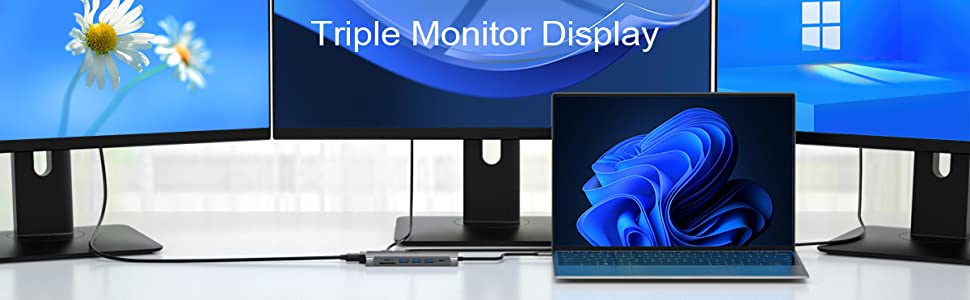
Common FAQ for USB C Docking Sation
| Q1: | Does this usb c docking station compatible with my laptop? |
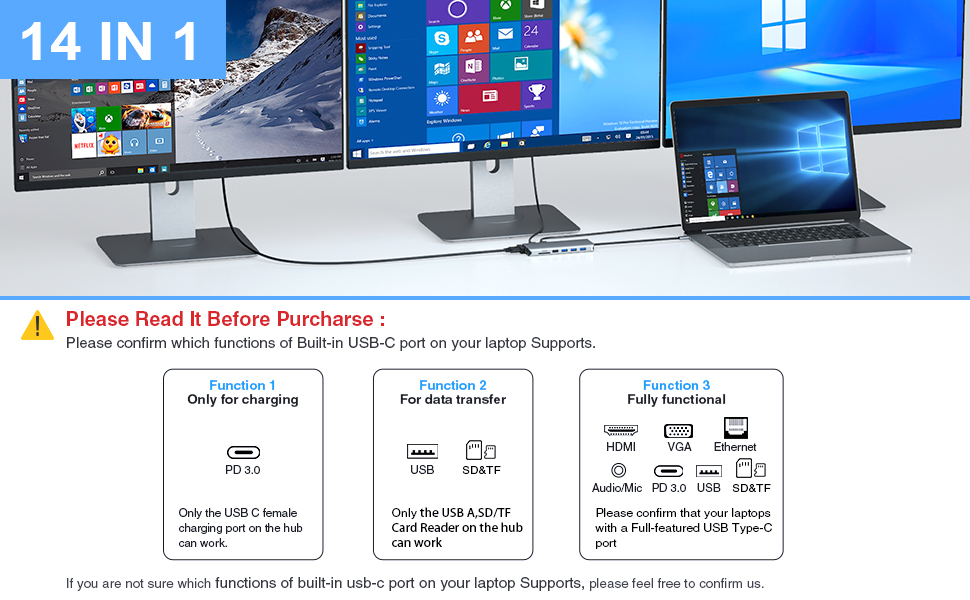
| A: | Please check which type of the built-in USB C port of your Laptop’s first, only if your laptop’s built-in USB C port is fully functional port which support Data transfer & Video Display & PD charging, you can use the full functions of our docking station. |
| Q2: | Below types of USB C port are Fully Functional Port |
| A1: | Thunderbolt 3 |
| A2: | The USB Type C 3.1 Gen 2 with Power Delivery & DisplayPort, |
| A3: | USB Type C 3.2 Gen 2 with Power Delivery & DisplayPort |
| Q3: | Why there is no pictures of the external monitors when I connect the monitors via the HDMI or VGA port of this docking station. |
| A1: | First, please check which type of the built-in USB C port of your Laptop’s first, if the type of the built-in USB C port of your laptop isn’t the Fully Functional port, then the HDMI,VGA of the hub doesn’t work for your laptop. |
| A2: | Check your HDMI cable. |
| A3: | Plugin the Laptop’s power adapter to the USB-C PD port before connecting external hard drives or multiple devices to the hub. |
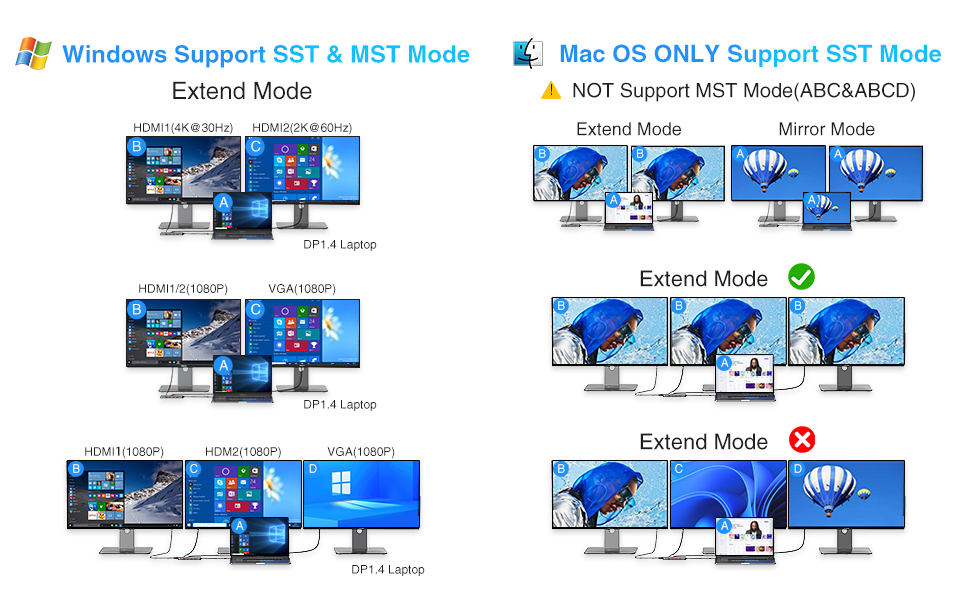
| Q4: | Why can’t my Mac laptop extend the display screen to the monitors? |
| A: | For Mac OS, due to its system restrictions the docking station could only support to extend one monitor, the other monitors could only copy the monitor you extend. |
| Q5: | Why I can’t charge my Dell/HP Laptop with the usb c charging port of this usb c docking station? |
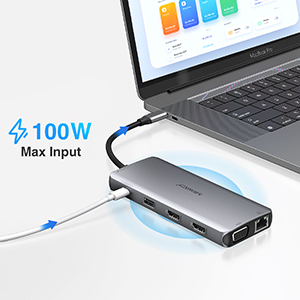
| A: | The USB C Power Charging function of our docking station doesn’t works for laptop use a AC charging adapter over 100W. Those Laptop (Dell/HP/ThinkPad…) do not allow 3rd party charger to charge their laptop in other ways. |
 |  |  | | |
|---|---|---|---|---|
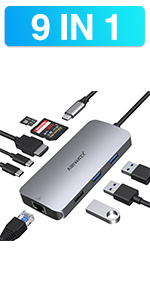
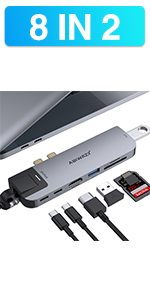
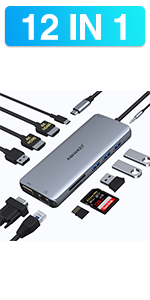
| Feature | 9 IN 1 | 8 IN 2 | 13 IN 1 | 11 IN 1 |
| HDMI | 1* HDMI -Max resolution up to 4K@30hz | 1* HDMI -Max resolution up to 4K@30hz | 2* HDMI – Triple Display for Windows Laptop -Max resolution up to 4K@60hz | 2* HDMI – Triple Display for Windows Laptop -Max resolution up to 4K@60hz |
| VGA | 1*VGA -Max resolution up to 1080P@60HZ | 1*VGA -Max resolution up to 1080P@60HZ | ||
| Ethernet | 1*Ethernet-1000Mb/s Lan | 1*Ethernet-1000Mb/s Lan | 1*Ethernet-1000Mb/s Lan | 1*Ethernet-1000Mb/s Lan |
| USB Port | 2*USB3.0 & 1*USB2.0 Ports | 1*USB3.0&1*USB2.0 Ports | 2 *USB3.0 Ports & 2*USB 2.0 Ports | 2 *USB3.0 Ports & 2*USB 2.0 Ports |
| USB C Port | 1* USB C Data Transfer Port-Max speed up to 5Gbps & 1* USB C Charging Port-Max 100W Charging | 1* USB C Data Transfer Port-Max speed up to 5Gb/s | 1* USB C Charging Port-Max 100W Charging | 100W Power Delivery |
| SD Card Slot | Max speed up to 104Mb/s | Max speed up to 104Mb/s | Max speed up to 104Mb/s | Max speed speed up to 104Mb/s |
| Micro SD Card Slot | Max speed up to 104Mb/s | Max speed up to 104Mb/s | Max speed up to 104Mb/s | Max speed up to 104Mb/s |
| Thunderbolt 3 Port | 100W Power Delivery &5K@60hz video output &40Gb/s Data transfer | |||
| 3.5mm Port | 1*3.5mm Audio & Microphone | 1*3.5mm Audio & Microphone |
| Dimensions: | 17.1 x 9.1 x 2.4 cm; 160 Grams |
| Model: | ABTT61 |
| Manufacture: | ABIWAZY |
| Dimensions: | 17.1 x 9.1 x 2.4 cm; 160 Grams |
| Origin: | China |
Envoi rapide, emballage correct.
Une fois sorti, l’objet a l’air fiable (ce n’est pas du plastique, matriaux “prmium”).
Le branchement est simple et rapide sur un Mac* ( peine 1 seconde et tout fonctionne).
* Attention sur les Mac M1 pas de double cran diffrent connect en HDMI possible -> je n’ai pas essay pour le vrifier …
En utilisation courante, la station ne chauffe pas (trs lgrement : temprature infrieure une temprature moyenne on va dire), pas de coupure, pas de saut d’image, pas d’arrt de recharge.
La charge est rapide mme si ce point dpend du chargeur (utilisation du chargeur fourni par dfaut).
La longueur du cable : dans la description il est crit cable court mais il juste ce qu’il faut il est plus long que certains cables court d’autres stations et il est de la bonne longueur si l’on pose sa machine sur un support (pour mon cas un Rain Design Mstand) ; en effet, la station branche reste pose sur le bureau sans suspendre en l’air.
Ce que je n’ai pas utilis / test : le port RJ45, le port VGA, l’utilisation de la station avec un PC Windows
Good layout and decent length cable
This works fine with my 65W charger, HDML display, network cable, web-cam, USB headset, wireless keyboard etc. Very pleased.
It has a good physical layout with the ports I leave connected on one side (power, HDML, keyboard USB dongle) and the ports I need frequent access to (other USB ports and SD card slots) on the other side.
The Type-C connector cable is about 230mm long.
Works well.
Simple plug and go. no issues. Care, some USB outputs are data only. Recommend this HUB
Works a Trea
I was looking for something to tidy up my desk and this works a treat. Great value for money. And I don’t have to reach under the table to push my camera cars in, i can either pop them in the station or just attach my DSLR. Easy.
Great for Dell XPS 15 (9510)
Only bought this as the DELL version was out of stock, and this was half the price. I’ve used it with HDMI (only one screen as not greedy), LAN and USB’s. All works very well and great value.
Works perfectly with HP Envy x360 laptop
Bought this to replace my old Kensington dock as the USB ports were intermittent on it. Also wanted something more portable as the old dock was mains powered so I couldn’t really take it with me. Arrived quickly and was as simple as plug in my 2 extra monitors to the hdmi ports, plug in the speakers to the usb and 3.5mm jack and everything was as before. Very easy to setup. Took it straight from the box and plugged things in, easy as that. I would highly recommend this to anyone who has a new laptop with a usb-c port.
I bought this to act as a docking station for a Dell XPS 15 9510 laptop (which has 3 USB type-C ports and little else).
I can confirm that it works well with an additional 2 monitors using the 2 HDMI ports, providing me with an extended view across 3 monitors including the laptop itself.
I also use the ethernet port to connect directly to my network, and no issues to report there either.
The 5 additional USB ports (3 USB 3.1 and 2 USB 2.0) come in very handy for adding other peripherals, such as wireless keyboard and mouse, and USB external storage.
The docking station case is good quality and robust (I think it’s brushed aluminium – it’s certainly not plastic) and the main USB Type-C cable is sturdy and a good lenght (approx 24cm).
I connect my laptop to dual monitors (via HDMI), mouse, keyboard and headset, along with the network cable. All works great. The only issue is I am unable to connect an external HDD to the hub – it just switches off. This is not a powered hub, and plugging in the USB-C laptop charging cable does not power the USB ports. Still, I’m very happy with it.
Works perfectly on Surface Pro 7 plus
Using it as a docking station for my Microsoft Surface 7 plus this works perfectly. I have 2 monitors, ethernet and several USB devices connected and it works well for me.
Works fine but for the wired network
Matched a usbc power supply to my laptop and it drives the laptop, two hdmi monitors and 3 std usb peripherals fine. Network adapter not working though.
Overall this is a solid USB C hub with lots of connectivity and has worked well so far. It’s let down by the limitation of 1080p when using both HDMI ports, I wanted to drive a 1200 and 1080p screen but both output at 1080p. I was able to get 3 screens going at once by using the VGA as well so if you have 1080p displays this is great, and if it’s just 1 display you want to use this should do the job up to 4K.
Good produc
My PC only has USB C ports and with this works wonders. So far I have tried USB, USB C, HDMI and Ethernet so far the only down fall is the fact that the USB C that has power written on is a slow charge.
The monitor cannot be connected through USB-C
The monitor cannot be connected through USB-C. Overall, it is fine.
The monitor cannot be connected through USB-C
The monitor cannot be connected through USB-C. Overall, it is fine.
Great piece of equipment, lightweight, portable and compatible with Dell laptop and extending two monitors. Works perfectly as I have thunderbolt USB-C on laptop. Literally plug and play. Fantastic and recommend if you want to work iff laptop and two monitors.
Expansion for HP Envy laptop
Great expansion for new HP17″ Envy laptop, required ETHERNET port, great that I can through feed my USB C power supply, gained extra USB and SD card reade
This has replaced for adapters. Unlike the others it is rock solid and works every time. (E.g, A previous hdmi-Thunderbolt adaptor had to be disconnected and reconnected after every restart)
Great and exactly what I needed
I recently got a Samsung notebook and this hub is perfect for everything I need. It has all the ports I need and some extras when I need to use for something else.
Does the job
I’m not qualified to comment on technicals, but it works, and that’s good enough. had no issues with it so far.
Does the job
I’m not qualified to comment on technicals, but it works, and that’s good enough. had no issues with it so far.
We used the docking station to connect a HP latop to a BENQ and Samsung monitors, wireless MS keyboard and wireless Jelly Comb mouse. We have had no issues with compatibly and connectivity works well. The unit appears to be of good quality with a robust metal outer case. My only complaint would be the length of the USB C connecting lead which is far to short to give it the flexibility to push the docking station to the back of our desks out of the way.
I use this neat little device to bring together dual monitors, and 5+ USB devices. It works very well, connecting my camera, external speaker, keyboard, mouse, light ring, 2 HdMI monitors and various other items into on single plug into the laptop – everything is now tidy, neat and it’s easy to swap out laptops if you have one for home and work as I do. I’ve had no compatibility issues and everything works seamlessly. I did find the connector cable to the laptop a little short to get everything tucked away under my desk, but bought a suitable extension and everything was then perfect.
Good bit bit of ki
Not the best but good value for money, could have spent a lot more for little benefit. This hub works well, just check compatibility before you buy i
Good bit bit of ki
Not the best but good value for money, could have spent a lot more for little benefit. This hub works well, just check compatibility before you buy i
We used the docking station to connect a HP latop to a BENQ and Samsung monitors, wireless MS keyboard and wireless Jelly Comb mouse. We have had no issues with compatibly and connectivity works well. The unit appears to be of good quality with a robust metal outer case. My only complaint would be the length of the USB C connecting lead which is far to short to give it the flexibility to push the docking station to the back of our desks out of the way.
Purchased this to work go with a new work laptop (Dell Precision 5760) and it works great.
Allows me to have 2 monitors both with HDMI connections and connect extra USB devices.
With the laptop open I have 3 screens which is what I wanted.
Good value for money and works as intended.
Used on my Dell Vostro 5515 and worked smoothly out of the box.
I have every single port in use (2 mice, keyboard and web cam, as well as two screens (VGA and HDMI) and the ethernet connection.
Only thing to note is that this product does not come with a power adaptor (somehow from the images I thought it would) and I had to buy that separately. The device now also powers my lap top, all via the same, one USB-C port.
Used on my Dell Vostro 5515 and worked smoothly out of the box.
I have every single port in use (2 mice, keyboard and web cam, as well as two screens (VGA and HDMI) and the ethernet connection.
Only thing to note is that this product does not come with a power adaptor (somehow from the images I thought it would) and I had to buy that separately. The device now also powers my lap top, all via the same, one USB-C port.
Early days, but intial feedback is good for my Legion laptop (charges) and great price, BUT the cable to laptop is fairly short, so hard to keep the desk tidy. No PSU included here, so you will need a 100W PD USB C charger like those used for the mac books.
Early days, but intial feedback is good for my Legion laptop (charges) and great price, BUT the cable to laptop is fairly short, so hard to keep the desk tidy. No PSU included here, so you will need a 100W PD USB C charger like those used for the mac books.
Bought latest apple laptop. When it arrived realised that only had 2 thunderbolt 4 input/outputs. Wanted to connect to TV, use memory cards and dongle using USB and occasionally use VGA projector. This adapter seemed ideal. Thought about just using separate cables for each function but this looked a much better option.Very confused about offerings doing similar things on internet with huge price differences and variable reviews. Was also not sure if would work with Thunderbolt 4 but it does. I have no idea if data transfer is optimal but it works well connecting to TV with HDMI.Was just plug and play. A few adjustments to get audio via TV rather than laptop but easy to sort. Gets quite warm when used for a while but well built and quality item. Very happy with purchase so far. Compact design so easy to carry around.
Bought latest apple laptop. When it arrived realised that only had 2 thunderbolt 4 input/outputs. Wanted to connect to TV, use memory cards and dongle using USB and occasionally use VGA projector. This adapter seemed ideal. Thought about just using separate cables for each function but this looked a much better option.Very confused about offerings doing similar things on internet with huge price differences and variable reviews. Was also not sure if would work with Thunderbolt 4 but it does. I have no idea if data transfer is optimal but it works well connecting to TV with HDMI.Was just plug and play. A few adjustments to get audio via TV rather than laptop but easy to sort. Gets quite warm when used for a while but well built and quality item. Very happy with purchase so far. Compact design so easy to carry around.
So far so good, all ports work. Plugged into my laptop, worked immediately and every USB device I’ve plugged in has worked, and while I havent measured the speed it’s fast. Stays cool. I havent tried to use all ports at once as I have no need to. Just needed to add USB ports and HDMI to new laptop that only has thunderbolt / USB C ports
Everything works as expected, running 2 monitors at 1080p and using USB-C PD.
I use the hub with a HP Envy laptop. Yes, it does work and the fit is more secure than my previous hub (every time I moved the laptop, it lost connection with 2nd monitor, hence buying this one). But with the HDMI, the graphics settings for my 2 screens seemed to default, so the mouse did not easily move from one to the other. This was simply fixed by right-clicking onscreen to get graphics settings, then swapping position of the 2 screen depictions on landing page.
I use the hub with a HP Envy laptop. Yes, it does work and the fit is more secure than my previous hub (every time I moved the laptop, it lost connection with 2nd monitor, hence buying this one). But with the HDMI, the graphics settings for my 2 screens seemed to default, so the mouse did not easily move from one to the other. This was simply fixed by right-clicking onscreen to get graphics settings, then swapping position of the 2 screen depictions on landing page.
I use the hub with a HP Envy laptop. Yes, it does work and the fit is more secure than my previous hub (every time I moved the laptop, it lost connection with 2nd monitor, hence buying this one). But with the HDMI, the graphics settings for my 2 screens seemed to default, so the mouse did not easily move from one to the other. This was simply fixed by right-clicking onscreen to get graphics settings, then swapping position of the 2 screen depictions on landing page.
I use the hub with a HP Envy laptop. Yes, it does work and the fit is more secure than my previous hub (every time I moved the laptop, it lost connection with 2nd monitor, hence buying this one). But with the HDMI, the graphics settings for my 2 screens seemed to default, so the mouse did not easily move from one to the other. This was simply fixed by right-clicking onscreen to get graphics settings, then swapping position of the 2 screen depictions on landing page.
I use the hub with a HP Envy laptop. Yes, it does work and the fit is more secure than my previous hub (every time I moved the laptop, it lost connection with 2nd monitor, hence buying this one). But with the HDMI, the graphics settings for my 2 screens seemed to default, so the mouse did not easily move from one to the other. This was simply fixed by right-clicking onscreen to get graphics settings, then swapping position of the 2 screen depictions on landing page.
I use the hub with a HP Envy laptop. Yes, it does work and the fit is more secure than my previous hub (every time I moved the laptop, it lost connection with 2nd monitor, hence buying this one). But with the HDMI, the graphics settings for my 2 screens seemed to default, so the mouse did not easily move from one to the other. This was simply fixed by right-clicking onscreen to get graphics settings, then swapping position of the 2 screen depictions on landing page.
Purchased this for my iPad Pro after trying several others. With this. I can connect AND power my audio interface while maintaining power to the iPad. So don’t need to worry about battery drain. Also able to connect my usb midi keyboard, usb stick and run the iPad internet from the Ethernet/rj45 connection . All this and still spare usb connections as well as memory card slots. In my experienced opinion this is the best hub for IPad Pro. Excellent and robust all rounder.
Purchased this for my iPad Pro after trying several others. With this. I can connect AND power my audio interface while maintaining power to the iPad. So don’t need to worry about battery drain. Also able to connect my usb midi keyboard, usb stick and run the iPad internet from the Ethernet/rj45 connection . All this and still spare usb connections as well as memory card slots. In my experienced opinion this is the best hub for IPad Pro. Excellent and robust all rounder.
Good value compared to some other hubs. It has all the ports I needed, although I can’t see me ever using both HDMI outputs. Quite light and compact (14 x 5.5 x 1.5 cm), and the cable is a sensible length (around 23cm) and flexible enough so the hub can be tucked out of the way.
We needed a docking station for our dual monitor with access to ethernet cable as well. We had tried a few other brands available on Amazon but we found this one to be the best – easy plug and play.
We connected it to our new Dell laptop which comes with USB C connection mainly so this little gadget is perfect for this. It also allows us to connect our wireless keyboard and mouse through the USB 3.0 connection.
The hub allows me to connect 2 external displays (plus my laptop screen) and plug my charger into it while still having a free USB C port. My wireless keyboard & mouse works perfectly via the USB receiver. It is so easy to plug my laptop into all the accessories when I’m sat at my desk.
This is one of three different adaptors that I have bought, and the only one that has worked well.
I was having issues with my previous USB-C hub, disconnecting, not reconnecting, not charging the laptop at times. So updated to this in the hope that it might solve the issues. Thankfully it did.
It’s a nice unit, feels well made and provides all the connectivity I needed (Ethernet, HDMI, USB-PD and USB-A).
Works well with my 2020 macbook Pro. I am using the USB-A connectors for a keyboard, mouse and webcam and all work well along with the ethernet port. I’ve not tried using the HDMI ports as monitor is VGA based and uses a separate converter. Runs cool and I have experienced no issues in the week since I bought and installed it. 🙂
Nice compact docking port which has a range of ports which I use to extend the number of ports on my LG gram 16. Could not get charger to pass through the docking station but everything else seems to work and the extra HDMI and VGA ports have proved very useful.
Nice compact docking port which has a range of ports which I use to extend the number of ports on my LG gram 16. Could not get charger to pass through the docking station but everything else seems to work and the extra HDMI and VGA ports have proved very useful.
Got this docking station in preparation for getting a large ultrawide screen and single screen combo.
Overall the station holds up well for the signal from the monitors so far. It falls down however when it’s seemingly overloaded. Example if I plug my webcam into it, the camera picture flickers and stutters as if it’s not getting enough power. This happens with all the ports regardless of which you pick. Shame as I don’t like using the main ports on my laptop to power something like a webcam.
Got this docking station in preparation for getting a large ultrawide screen and single screen combo.
Overall the station holds up well for the signal from the monitors so far. It falls down however when it’s seemingly overloaded. Example if I plug my webcam into it, the camera picture flickers and stutters as if it’s not getting enough power. This happens with all the ports regardless of which you pick. Shame as I don’t like using the main ports on my laptop to power something like a webcam.
Used with output from Dell XPS 13 2in1 USBc port.
I have 2 monitors connected via HDMI. This has enabled me to work on one monitor and extend the desktop to monitor 2. It is possible to drag an open window between the monitors. This is useful when following instructions. E.g You can have the instructions from a website open on one monitor and apply them on the second monitor. Windows 11 split-screen would allow you to do this though I prefer to have a full-screen display.
You can connect the computer manufacturer’s USBc charger to the unit and this keeps the laptop charged sufficiently in my experience though on boot up the computer reports a low power input. You can remove this warning in the bios if it is annoying.
The VGA and remaining USB3 & 2 ports all work as expected.
Used with output from Dell XPS 13 2in1 USBc port.
I have 2 monitors connected via HDMI. This has enabled me to work on one monitor and extend the desktop to monitor 2. It is possible to drag an open window between the monitors. This is useful when following instructions. E.g You can have the instructions from a website open on one monitor and apply them on the second monitor. Windows 11 split-screen would allow you to do this though I prefer to have a full-screen display.
You can connect the computer manufacturer’s USBc charger to the unit and this keeps the laptop charged sufficiently in my experience though on boot up the computer reports a low power input. You can remove this warning in the bios if it is annoying.
The VGA and remaining USB3 & 2 ports all work as expected.
ABIWAZY VERY GOOD HUB
14 in 1 USBC Hub/Port doing everything I’ve asked so far ..
Thunderbolt 3 Hub
Worked straight out the box with my HP Spectre 360 13 (2020). Excellent build and feel, and lightweight. Highly recommend.
Easy to install and compatible with connecting screen to laptop.
Easy to use, just wish the connecting lead was a little bit longer.
Connects my HP laptop to my monitor as well as other devices.
This works well in most respects. I’ve tried it with my personal laptop (Dell XPS13) and my work one (HP Elitebook). There are more than enough USB ports for my desktop setup – a wireless USB mouse, a wired keyboard, plus a USB HD webcam. All that is fine. It’s driving two monitors – an older LG with a DVI input (using an HDMI to DVI adapter) and a fairly new Benq 1080p HD screen. I don’t have any 4K screens, so I can’t comment on that. If I move the dock while in use, the HDMI signal sometimes drops, but I don’t move it while in use, so that’s all good.
I also bought a half-metre thunderbolt extension cable. That makes this a much more useable proposition. The built-in cable is very short.
The power supply (I’m using the HP charging block for both machines) works perfectly – keeping the dock going and thru-charging the laptops when in use. Similarly the ethernet wired internet functions exactly as it should.
The unit gets slightly warm in use, but not worryingly so. If I were using it more intensively (eg for 4K video) I suppose that might put it under more pressure, but I’m not. I’m being disciplined for the moment and remembering to switch off the power supply at the plug when I turn off my computer, which I’m hoping will reduce the possibility of components burning out too quickly.
There’s one problem – for which I’ve docked it a star. The audio output doesn’t work. I’ve tested it with three laptops, and none of them produce any sound – just pops, clicks and buzzes. I think it might be a confusion between USB and audio out from the computer.
However there were still two slots free on the hub, and I had an old USB soundcard hanging around, which I’ve used to connect to my speakers. It’s not enough of an issue for me to send it back, but it adds a bit more to the wire tangle, and I’d rather just plug directly into the dock than have to find a workaround.
Overall, this thing cost me just over fifty pounds, plus a tenner for the extension cable, and it means I can retire my full-sized desktop PC. Comparable units from Dell or other big manufacturers will set you back up to five times that amount of money. I’m happy with it.
This works well in most respects. I’ve tried it with my personal laptop (Dell XPS13) and my work one (HP Elitebook). There are more than enough USB ports for my desktop setup – a wireless USB mouse, a wired keyboard, plus a USB HD webcam. All that is fine. It’s driving two monitors – an older LG with a DVI input (using an HDMI to DVI adapter) and a fairly new Benq 1080p HD screen. I don’t have any 4K screens, so I can’t comment on that. If I move the dock while in use, the HDMI signal sometimes drops, but I don’t move it while in use, so that’s all good.
I also bought a half-metre thunderbolt extension cable. That makes this a much more useable proposition. The built-in cable is very short.
The power supply (I’m using the HP charging block for both machines) works perfectly – keeping the dock going and thru-charging the laptops when in use. Similarly the ethernet wired internet functions exactly as it should.
The unit gets slightly warm in use, but not worryingly so. If I were using it more intensively (eg for 4K video) I suppose that might put it under more pressure, but I’m not. I’m being disciplined for the moment and remembering to switch off the power supply at the plug when I turn off my computer, which I’m hoping will reduce the possibility of components burning out too quickly.
There’s one problem – for which I’ve docked it a star. The audio output doesn’t work. I’ve tested it with three laptops, and none of them produce any sound – just pops, clicks and buzzes. I think it might be a confusion between USB and audio out from the computer.
However there were still two slots free on the hub, and I had an old USB soundcard hanging around, which I’ve used to connect to my speakers. It’s not enough of an issue for me to send it back, but it adds a bit more to the wire tangle, and I’d rather just plug directly into the dock than have to find a workaround.
Overall, this thing cost me just over fifty pounds, plus a tenner for the extension cable, and it means I can retire my full-sized desktop PC. Comparable units from Dell or other big manufacturers will set you back up to five times that amount of money. I’m happy with it.
This works well in most respects. I’ve tried it with my personal laptop (Dell XPS13) and my work one (HP Elitebook). There are more than enough USB ports for my desktop setup – a wireless USB mouse, a wired keyboard, plus a USB HD webcam. All that is fine. It’s driving two monitors – an older LG with a DVI input (using an HDMI to DVI adapter) and a fairly new Benq 1080p HD screen. I don’t have any 4K screens, so I can’t comment on that. If I move the dock while in use, the HDMI signal sometimes drops, but I don’t move it while in use, so that’s all good.
I also bought a half-metre thunderbolt extension cable. That makes this a much more useable proposition. The built-in cable is very short.
The power supply (I’m using the HP charging block for both machines) works perfectly – keeping the dock going and thru-charging the laptops when in use. Similarly the ethernet wired internet functions exactly as it should.
The unit gets slightly warm in use, but not worryingly so. If I were using it more intensively (eg for 4K video) I suppose that might put it under more pressure, but I’m not. I’m being disciplined for the moment and remembering to switch off the power supply at the plug when I turn off my computer, which I’m hoping will reduce the possibility of components burning out too quickly.
There’s one problem – for which I’ve docked it a star. The audio output doesn’t work. I’ve tested it with three laptops, and none of them produce any sound – just pops, clicks and buzzes. I think it might be a confusion between USB and audio out from the computer.
However there were still two slots free on the hub, and I had an old USB soundcard hanging around, which I’ve used to connect to my speakers. It’s not enough of an issue for me to send it back, but it adds a bit more to the wire tangle, and I’d rather just plug directly into the dock than have to find a workaround.
Overall, this thing cost me just over fifty pounds, plus a tenner for the extension cable, and it means I can retire my full-sized desktop PC. Comparable units from Dell or other big manufacturers will set you back up to five times that amount of money. I’m happy with it.
This works well in most respects. I’ve tried it with my personal laptop (Dell XPS13) and my work one (HP Elitebook). There are more than enough USB ports for my desktop setup – a wireless USB mouse, a wired keyboard, plus a USB HD webcam. All that is fine. It’s driving two monitors – an older LG with a DVI input (using an HDMI to DVI adapter) and a fairly new Benq 1080p HD screen. I don’t have any 4K screens, so I can’t comment on that. If I move the dock while in use, the HDMI signal sometimes drops, but I don’t move it while in use, so that’s all good.
I also bought a half-metre thunderbolt extension cable. That makes this a much more useable proposition. The built-in cable is very short.
The power supply (I’m using the HP charging block for both machines) works perfectly – keeping the dock going and thru-charging the laptops when in use. Similarly the ethernet wired internet functions exactly as it should.
The unit gets slightly warm in use, but not worryingly so. If I were using it more intensively (eg for 4K video) I suppose that might put it under more pressure, but I’m not. I’m being disciplined for the moment and remembering to switch off the power supply at the plug when I turn off my computer, which I’m hoping will reduce the possibility of components burning out too quickly.
There’s one problem – for which I’ve docked it a star. The audio output doesn’t work. I’ve tested it with three laptops, and none of them produce any sound – just pops, clicks and buzzes. I think it might be a confusion between USB and audio out from the computer.
However there were still two slots free on the hub, and I had an old USB soundcard hanging around, which I’ve used to connect to my speakers. It’s not enough of an issue for me to send it back, but it adds a bit more to the wire tangle, and I’d rather just plug directly into the dock than have to find a workaround.
Overall, this thing cost me just over fifty pounds, plus a tenner for the extension cable, and it means I can retire my full-sized desktop PC. Comparable units from Dell or other big manufacturers will set you back up to five times that amount of money. I’m happy with it.
Works with iPad Air 4
Really well made, works fine. Don’t worry about the brand name. Best hub I could find – does everything I want and more. Excellent value for money.
cant get dual 4K to work.
great item but I cant get the 4K to work on both HDMI outputs. 1st monitor is fine but second one locks to 800×600 and I cant change the resolution in Windows.
I needed something for my new laptop that would allow me to run 2 external monitors and this seemed to fit the bill. I dual boot Windows 11 and Mint Linux, One of the monitors is 2560×1440 and the other 1920×1080. With just the 1440p monitor attached all good, however with both it wants to put both monitors to 1920×1080. I have been able to get round this in Windows by creating a custom resolution in the AMD software (CPU is AMD 5500u so built in AMD graphics) for the 2560×1440 resolution. On Linux if i plug the hdmi cable in for the 1920×1080 monitor after boot then i get the external monitors running at there native resolutions. So i can get laptop display and 2 external monitors running correctly but it took a bit more effort than it should do. If you only have 1920×1080 monitors should not be a problem.
Only really used the usb ports otherwise, i can see the ethernet is detected in both windows and linux but haven’t had a reason to use it yet.
Compact and unobtrusive this docking station works really well. Very happy with this and would recommend it.
I needed something for my new laptop that would allow me to run 2 external monitors and this seemed to fit the bill. I dual boot Windows 11 and Mint Linux, One of the monitors is 2560×1440 and the other 1920×1080. With just the 1440p monitor attached all good, however with both it wants to put both monitors to 1920×1080. I have been able to get round this in Windows by creating a custom resolution in the AMD software (CPU is AMD 5500u so built in AMD graphics) for the 2560×1440 resolution. On Linux if i plug the hdmi cable in for the 1920×1080 monitor after boot then i get the external monitors running at there native resolutions. So i can get laptop display and 2 external monitors running correctly but it took a bit more effort than it should do. If you only have 1920×1080 monitors should not be a problem.
Only really used the usb ports otherwise, i can see the ethernet is detected in both windows and linux but haven’t had a reason to use it yet.
This is a great quality USB-C hub with one of the widest expansion capability. Based on my actual testing, it works well with 2020 M1 Macbook Air, and the Microsoft Surface Pro 7 +.
The only thing negative is that the 2nd product photo shows the HDMI 1 has 4K@60Hz, that is NOT correct. As stated in the product description, both HDMI port are 4K@30Hz, which agrees with my actual testing. Therefore, your product photo was misleading and should be updated.
Based on my actual testing with this product and Surface Pro 7+, it ONLY support 4K@30Hz. With some research I realized that it is actually pretty rare to have USB-C hub that support 4K@60Hz while providing many of the expansion port (some may only have one USB 2.0 port, LAN port, but not USB 3.0 port etc.).
Therefore, for anyone looking for the best of both world, there is almost none. You either use the USB-C port for a great expansion like this hub, but suffer from 4K@30Hz (relatively low refresh rate by today’s standard), or you use the USB-C port with more dedicated adapter or even cable (USB-C to Displayport or HDMI) to support a high res monitor at better refresh rate, but have to get other expansion capabilities somewhere else (on the 2nd USB-C port if you have one, or one of the USB3.0 port for expansion).
Excellent product bought 1 for me then I bought 1 for my nephew for university. He is very pleased with it as well.
I need to swap between two laptops and two external monitors.
Laptop (1) HP EliteBook 840 G7 Notebook PB – Windows10 64bit
Laptop (2) HP ProBook – Windows10 64bit
This works well with 2x External monitors (via adaptor and HDMI ports), Ethernet, USB (keyboard and mouse), plus External USB-C PSU (100W).
I have found that I can’t hot-swap the laptops 🙁 but not sure if this is a window or hardware limitation?
But if I reboot the laptops when I swap them over to this adaptor, then this works fine.
The HP ProBook won’t charge through this adaptor (via external USB-C PSU supply) 🙁 but the HP Elite will, so this is not an adaptor limitation, but a laptop limitation.
Very small footprint and simple to setup.
Q. What device do you use the adapter for?
A. I use it to expand the ports that I have on my Dell laptop. I make use of one HDMI port, one USB 3.0 port, one USB 2.0 port and the Ethernet port. All work well.
Q. Did the adapter compatible/work well with your device?
A. Yes
Works with my Chromebook
Having tried another dock that did not work, this one works with my Asus C434T Chromebook
Does what it says on the tin!
Plugs in and works on my iMac, no messing about.
does what it says on the ti
it works great for the MacBook Pro for what I need
Je cherchais depuis un moment une docking station abordable avec 2 ports HDMI. J’ai fini par trouver cet article et j’en suis vraiment trs content !
Il fait exactement ce qu’il est cens faire, pour beaucoup moins cher que la plupart des autres solutions du march.
Voici les avantages que je garde en tte :
– facile utiliser : c’est du plus & play, tout simplement. Vous branchez et a marche ! Y compris avec Linux ou d’autres distributions plus exotiques. Aucun driver installer, contrairement d’autres produits.
– bonne qualit : le produit semble robuste. J’ai quelques doutes toutefois sur la dure de vie du cble. C’est d’ailleurs le plus gros point faible.
– pratique : lger et peu encombrant, vous pourrez mme l’emporter avec vous lors de vos dplacements si beosin.
– multi fonctions : c’est tout ce qu’on attend d’une docking station. Mais ce prix-l, on s’attendait moins de fonctions. Celle-ci inclue l’usb 3, l’USB type C, doublenport HDMI + 1 port VGA et mme la capacit de dlivrer de l’nergie afin d’avoir toutes ces fonctions en branchant 1 seul cable sur votre PC.
Pour tre honnte, je me demande encore quel est le dfaut ce cet article, qui affiche un prix BEAUCOUP moins cher que des solutions similaires.
Le plus gros dfaut mes yeux : le cble USB type C semble un peu petit (25 cm / 9.8 po ; voir les photos) et fragile. Il risque de ne pas trop supporter d’tre pli dans tous les sens. Je recommande donc l’utilisation d’une “rallonge” USB C afin de moins l’abmer.
Bref, je recommande 100% !
The hub works straight out of the box. The extra display vga works great with the mac mini m1. The foot print with the cables coming out at all angles make it awkward on the tabletop And takes up quite a bit of space. The machined finish on the bottom is fairly sharp. I attached a couple of soft furniture feet pads to it so I didn’t scratch anything. However, everything connects well and the speed is excellent and the sheer number and variety of connections is outstanding.
I’ve found this hub to be really useful. I’ve taken advantage of all the ports for usb devices (mouse, usb headphones, charging wireless ear pods, wireless charging for iPhone … all work well). The power-through usb c works well. HDMI was good.
I have 2 devices, Macbook for personal and HP Probook for work .. it was really useful to be able to seamlessly plug the hub into either one with all the peripherals coming along with it. The power-through worked for both and all other ports I was using. The power-through is especially handy for the HP Probook as it means I don’t have to use the standard clunky adapter for power.
Loading photos onto my Mac via the SD card slot was impressive. 5gb of photos transferred in just over 2 minutes.
I like the finish on the product also … it has a matt brushed grey finish which is very much like the grey of my Mac .. similar colour and finish. For me it’s been so useful with so much working from home. 5 stars as it does everything asked of it.
I’ve found this hub to be really useful. I’ve taken advantage of all the ports for usb devices (mouse, usb headphones, charging wireless ear pods, wireless charging for iPhone … all work well). The power-through usb c works well. HDMI was good.
I have 2 devices, Macbook for personal and HP Probook for work .. it was really useful to be able to seamlessly plug the hub into either one with all the peripherals coming along with it. The power-through worked for both and all other ports I was using. The power-through is especially handy for the HP Probook as it means I don’t have to use the standard clunky adapter for power.
Loading photos onto my Mac via the SD card slot was impressive. 5gb of photos transferred in just over 2 minutes.
I like the finish on the product also … it has a matt brushed grey finish which is very much like the grey of my Mac .. similar colour and finish. For me it’s been so useful with so much working from home. 5 stars as it does everything asked of it.
I’ve found this hub to be really useful. I’ve taken advantage of all the ports for usb devices (mouse, usb headphones, charging wireless ear pods, wireless charging for iPhone … all work well). The power-through usb c works well. HDMI was good.
I have 2 devices, Macbook for personal and HP Probook for work .. it was really useful to be able to seamlessly plug the hub into either one with all the peripherals coming along with it. The power-through worked for both and all other ports I was using. The power-through is especially handy for the HP Probook as it means I don’t have to use the standard clunky adapter for power.
Loading photos onto my Mac via the SD card slot was impressive. 5gb of photos transferred in just over 2 minutes.
I like the finish on the product also … it has a matt brushed grey finish which is very much like the grey of my Mac .. similar colour and finish. For me it’s been so useful with so much working from home. 5 stars as it does everything asked of it.
I’ve found this hub to be really useful. I’ve taken advantage of all the ports for usb devices (mouse, usb headphones, charging wireless ear pods, wireless charging for iPhone … all work well). The power-through usb c works well. HDMI was good.
I have 2 devices, Macbook for personal and HP Probook for work .. it was really useful to be able to seamlessly plug the hub into either one with all the peripherals coming along with it. The power-through worked for both and all other ports I was using. The power-through is especially handy for the HP Probook as it means I don’t have to use the standard clunky adapter for power.
Loading photos onto my Mac via the SD card slot was impressive. 5gb of photos transferred in just over 2 minutes.
I like the finish on the product also … it has a matt brushed grey finish which is very much like the grey of my Mac .. similar colour and finish. For me it’s been so useful with so much working from home. 5 stars as it does everything asked of it.
I’ve been using this item for a while now and have almost nothing to say but positives. To begin it has a wide selection of ports so you won’t ever need to scavenge for other cables me can have a clean one hub with all the ports. The profile is slim and the height is great, it doesn’t feel like I’m carrying a big and heavy brick. The multiple display ports is a very nice addition as it prevents the mess of cables you would usually get. If I had to say what I would change, I wish the cable was a bit longer so I could stick the hub under my table and the cable would reach. If it came with Velcro to strap it to something or a bit of rubber underneath it to stop it sliding on the table that would be great too. All in all though a great item, would recommend.
My working from home laptop is a Microsoft Surface Laptop 3 which came with a Microsoft Surface Dock 2.
The laptop only has outputs for 1x USB 3 and 1x USB C-with display support.
I like to use wired (Ethernet, mouse and keyboard), and Viewsonic PX800HD projector as my super large screen main display.
With the Microsoft Dock 2, the display flickered on and off constantly (more off than on) and was totally unusable.
The Ethernet was a complete failure.
So I bought this Docking Station byABIWAZY
It worked out of the box with no problems whatsoever
Ethernet works fine
Display: (USB-C to HDMI) works fine, no difficulty getting a display, no flickers or disconnects.
USB Mouse and Keyboard totally fine.
All works as should be expected really, but I do note that Microsoft could not get their over 230 thing to work ‘with a Microsoft Laptop’ and this hub works out of the box at a much lower price point.
Works great for connecting my new laptop to multiple devices – wired keyboard, heaphones/mic, mouse, USB sticks, and (although it didn’t work at first – I had to download the specific Philips 4k monitor drivers) my 4k external monitor via the HDMI socket.
The only negative, though possible it’s the laptop’s fault (it’s a brand new 2021 LG Gram 16″), when I plug the USB C charger into it then plug the hub into the laptop, the charge doesn’t pass through to the laptop. Not a show-stopper though as the utility of the rest of the hub beats anything else I have hands-down.
Works great for connecting my new laptop to multiple devices – wired keyboard, heaphones/mic, mouse, USB sticks, and (although it didn’t work at first – I had to download the specific Philips 4k monitor drivers) my 4k external monitor via the HDMI socket.
The only negative, though possible it’s the laptop’s fault (it’s a brand new 2021 LG Gram 16″), when I plug the USB C charger into it then plug the hub into the laptop, the charge doesn’t pass through to the laptop. Not a show-stopper though as the utility of the rest of the hub beats anything else I have hands-down.
Works great for connecting my new laptop to multiple devices – wired keyboard, heaphones/mic, mouse, USB sticks, and (although it didn’t work at first – I had to download the specific Philips 4k monitor drivers) my 4k external monitor via the HDMI socket.
The only negative, though possible it’s the laptop’s fault (it’s a brand new 2021 LG Gram 16″), when I plug the USB C charger into it then plug the hub into the laptop, the charge doesn’t pass through to the laptop. Not a show-stopper though as the utility of the rest of the hub beats anything else I have hands-down.
Works great for connecting my new laptop to multiple devices – wired keyboard, heaphones/mic, mouse, USB sticks, and (although it didn’t work at first – I had to download the specific Philips 4k monitor drivers) my 4k external monitor via the HDMI socket.
The only negative, though possible it’s the laptop’s fault (it’s a brand new 2021 LG Gram 16″), when I plug the USB C charger into it then plug the hub into the laptop, the charge doesn’t pass through to the laptop. Not a show-stopper though as the utility of the rest of the hub beats anything else I have hands-down.
All you could need in one!
Trialling this product, has everything you could need! Is larger than other adaptors but having that many usb ports hdmi etc is really useful and can never run ou
Really good value for money.
Excellent hub. Does what I needed(connect 2 screen via a laptop) and more.
The only thing I have a grumble with is I wish the cable was longer to give more flexibility on placement. Going between different laptops(personal and work) can be a pain.
As part of setting up the work from home, I was looking for a docking station and tried this one. It fits all of my requirements. I am having couple of monitors, keyboard, mouse and couple of USB chargers. It works really well without any issues, so far.
Downside:
a) Once you connect the docking station to the laptop, it takes 4-5 seconds to enable the monitors, keyboards to work
b) Charging the laptop through docking station didn’t work when I tried couple of occasions. Then, I used my own charger which is not an issue for me. However, I will try again sometime this week and update my findings in the review
Excellent Docking Statio
This docking station is excellent value for money, we are a web business and have now purchased 4 of these devices and have devices from most leading manufacturers attached with no issues.
It is smaller than expected but is well constructed. It gets warm but so far there is no sign of overheating. My new windows 10 machine only has a Thunderbolt 4 and 1 USB3 connection. A thunderbolt hub like this seems an ideal solution for forward and backward compatibility. So far, I have found the multiple USB connectors work fine as does the ethernet and audio connection. The two card slots are fine and don’t need to be pushed in too far. A graphic beside them does tell you which way to insert them. I have still to try the VGA connector to a projector.
So far, I have found two disappointments. There is no through charge to my Dell laptop (charger – hub – Dell) which will become a problem if added power load through the hub drains the battery faster. I also found that my Transcend external hard drive missed a few simple commands like opening a new folder. I now connect this direct to the computer.
I am upgrading my iPad as well and have hope this unit will allow connection to this system as well.
It is smaller than expected but is well constructed. It gets warm but so far there is no sign of overheating. My new windows 10 machine only has a Thunderbolt 4 and 1 USB3 connection. A thunderbolt hub like this seems an ideal solution for forward and backward compatibility. So far, I have found the multiple USB connectors work fine as does the ethernet and audio connection. The two card slots are fine and don’t need to be pushed in too far. A graphic beside them does tell you which way to insert them. I have still to try the VGA connector to a projector.
So far, I have found two disappointments. There is no through charge to my Dell laptop (charger – hub – Dell) which will become a problem if added power load through the hub drains the battery faster. I also found that my Transcend external hard drive missed a few simple commands like opening a new folder. I now connect this direct to the computer.
I am upgrading my iPad as well and have hope this unit will allow connection to this system as well.
Excellent device, it just works
Very easy to use, just plug and play. Simple setup to extend my laptop screen to two additional monitors and extra usb capacity.
This is hands down the best and reliable docking station I have bought. I have a Dell XPS-13 that I use for software development primarily. I was able to configure 3 monitors without issues with this docking station. 2 HDMI outputs to my Samsung monitors works like a charm and I have 1 VGA output to a third HP monitor. Extra ports on the docking station allows me to connect things like chargers/memory sticks etc. Best part is, it is light in weight and very portable. Now it is so easy for me to simply unplug the docking station and take my laptop with me, and connect it easily back. I have a colleague who tested this with their Microsoft Surface Book 3 and it worked fine too. Very happy with the purchase and recommend it.
This is hands down the best and reliable docking station I have bought. I have a Dell XPS-13 that I use for software development primarily. I was able to configure 3 monitors without issues with this docking station. 2 HDMI outputs to my Samsung monitors works like a charm and I have 1 VGA output to a third HP monitor. Extra ports on the docking station allows me to connect things like chargers/memory sticks etc. Best part is, it is light in weight and very portable. Now it is so easy for me to simply unplug the docking station and take my laptop with me, and connect it easily back. I have a colleague who tested this with their Microsoft Surface Book 3 and it worked fine too. Very happy with the purchase and recommend it.
Does what it says! Better for twin HDMI!
Plenty of ports and great to have twin HDMI, the only issue I have identified is that the VGA is very tight with a Ethernet cable inserted.
Using this dock with my laptop to mean I only have to plug in 1 connection to the laptop when I want to use hard wired network and separate monitors, keyboards and mouse.
The unit seems to work really well I have no internet connection issues and all the desk devices connected are working as they should
very good I use it for my ipad pro 12.9 2020
I tried malny but it is the only one
ipad took it as accessories.
it doesn’t effect Netflix or any other streaming apps
and you do can control the voice.
the charge a bit not fast but it is okay as it is charge and take multiple USB types.
Works with Mac Mini M1. Despite included instruction booklet stating this will not work in extended display mode with Mac, that’s not actually true. So long as your main monitor uses the M1 Mac Mini’s built-in HDMI output the second screen can be from a USB C source. Didn’t try extending to three screens. Ethernet works seamlessly. Card reader works no problems at all.
Well done hardware
Very good quality hardware. Works perfectly. All ports do the job. One star less because I has not got hols for screws for VGA connection. Only push.
I had my work laptop changed but it didn’t come with a docking station or port replicator. It also didn’t have enough ports to support all the peripherals I use. This seemed to offer the most and the best mix of ports. It works really well and can handle all the peripherals I have and passes the power through it as well, saving a usb-c in the laptop too. The only downside is that it’s less tidy on the desk than my old docking station…but then it was a fifth of the price! So, I’d happily recommend this as it works brilliantly for me.