USB C Docking Station Dual Monitor HDMI for Dell HP,
USB C Docking Station Dual Monitor HDMI for Dell HP, Thunderbolt 3/4 Dock USB C Hub Multiport Adapter Triple Monitor to 2 HDMI 4K,Ethernet,VGA,USB 3.1/2.0, 100W PD for Lenovo,Surface,MacBook Laptops
USB C Power Charging Port
Max Power Input Up to 100W
Allows you to charging your type c devices at power up to 100W, no need to worry about power storage while connecting multiple peripherals.
Notice: USB C PD Charging doesn’t works for laptop own a AC charging adapter, those laptop (Dell/HP/ThinkPad…) do not allow 3rd party charger to charge their laptop in other ways.
4 USB Ports & SD/TF Slots
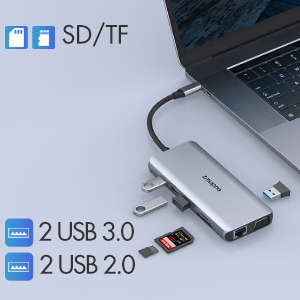
2 USB 3.0 Ports & 2 USB 2.0 Ports
This MacBook pro usb adapter comes with 3 usb 3.0 and 2 usb 2.0 ports,which allows your to connect usb keyboard, mouse, usb driver, usb hard disks to your laptop with high speed.
SD & Micro SD Slots – 104Mb/s
Transfer hundreds photos in seconds – Max transfer data speed up t 104Mb/s and SD & TF support work simultaneously.
USB C to Gigabit Ethernet & 3.5mm Jack
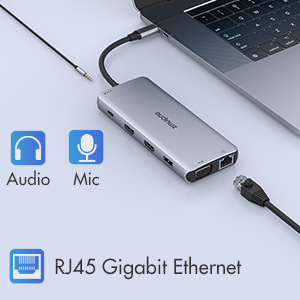
Max support Gigabit Lan
Enjoy the ultra-fast gigabit ethernet speeds and the reliability of a wired connection directly to make your work more effective.Worryfree about wifi’s instability and interference from USB 3.0
3.5 mm Audio and Microphone
This usb c dock have a 3.5mm jack for you to put in your wired headset or microphone, so that you can enjoy music without disturbing others.
Common FAQ for 12 IN 1 USB C Laptop Docking Stion
| Q1: | Does this usb c docking station compatible with my laptop? |
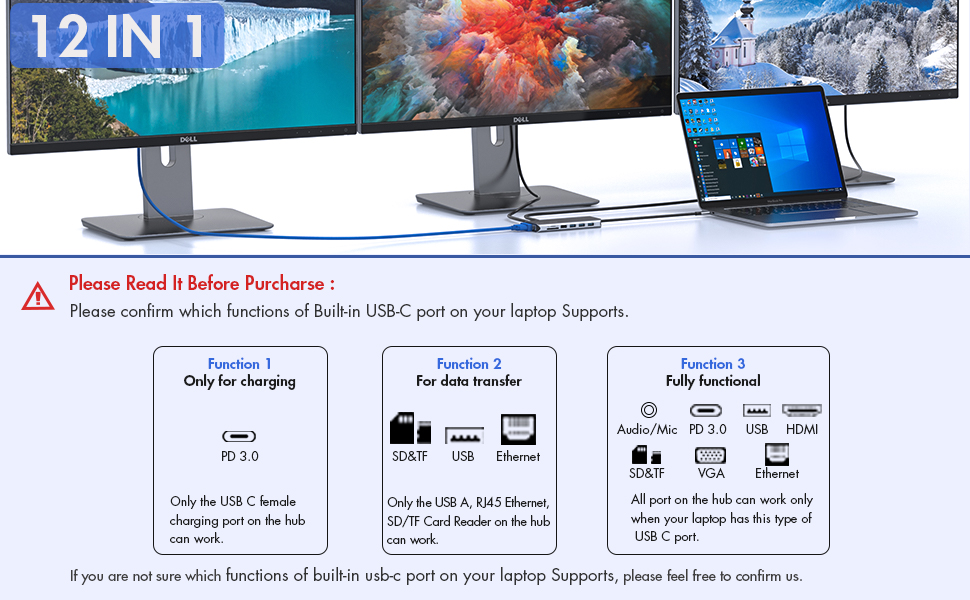
| A: | Please check which Functions supports by your Laptop’s built-in USB C port first, only if your laptop’s built-in USB C port is fully funcitonal port which support Data transfer & Video Display & PD charging, you can use the full functions of our docking station. |
| Below types of USB C port are Fully Funcitonal Port:Thunderbolt 3,The USB Type C 3.1/3.2 Gen 2 with Power Delivery & DisplayPort | |
| Q2: | Why there is no pictures of the external monitors when I connect the monitors via the HDMI or VGA port of this docking station? |
| A: | 1. Please check which function supports by your laptop’s built-in USB C Port, if the type of the built-in USB C port of your laptop isn’t the fully funcitonal port, then the HDMI,VGA, 3.5mm Jack of the hub doen’t work for your laptop. 2. Check your HDMI cable. 3. Plugin the Laptop’s power adapter to the USB-C PD port before connecting external hard drives or multiple devices to the hub. |
| Q3: | Why can’t my Mac latop extend the display screen to the monitors? |
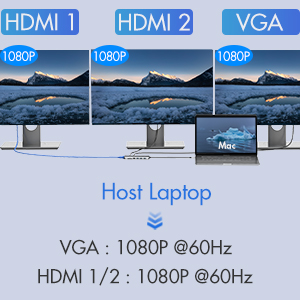
| A: | For Mac OS, due to apple system restrictions the docking station could only support to extend one monitor, the other monitors could only copy the monitor you extend. |
| Q4: | Why I can’t charge my Dell/HP Laptop with the usb c charging port of this usb c docking staion? |
| A | The first USB C charging port of this docking station is not suitable for laptops(like Dell/HP/ThinkPad…)with AC charging adapters,since they don’t allow third-party chargers to charge them in other ways. |
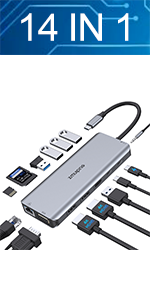 | 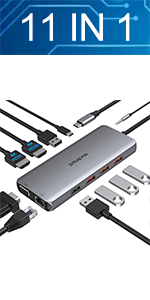 | 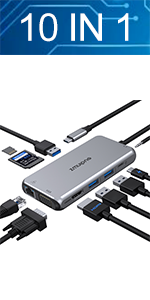 |  | |
|---|---|---|---|---|
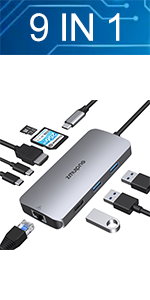
| Feature | 14 IN 1 | 11 IN 1 | 10 IN 1 | 9 IN 1 |
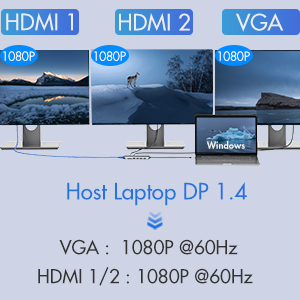
| HDMI | 2* HDMI – Triple Display for Windows Laptop -Max resolution up to 4K@60hz | 2* HDMI – Triple Display for Windows Laptop -Max resolution up to 4K@60hz | 1* HDMI – Max resolution up to 4K@30hz | 1* HDMI – Max resolution up to 4K@30hz |
| VGA | 1*VGA -Max resolution up to 1080P@60HZ | 1*VGA -Max resolution up to 1080P | 1*VGA -Max resolution up to 1080P@60HZ | |
| Ethernet | 1*Ethernet-1000Mb/s Lan | 1*Ethernet-1000Mb/s Lan | 1*Ethernet-1000Mb/s Lan | 1*Ethernet-1000Mb/s Lan |
| USB Port | 3 *USB3.0 Ports & 2*USB 2.0 Ports | 3*USB3.1&2*USB2.0 Ports | 2*USB3.0 Ports & 1*USB 2.0 Ports | 2 *USB3.0 Ports & 1*USB 2.0 Ports |
| USB C Port | 1* USB C Data Transfer Port-Max speed up to 5Gbps & 1* USB C Charging Port-Max 100W Charging | 1* USB C Charging Port-Max 100W Charging | 1* USB C Charging Port-Max 100W Charging | 1* USB C Data Transfer Port-Max speed up to 5Gbps |
| SD Card Slot | Max speed up to 104Mb/s | Max speed up to 104Mb/s | Max speed up to 104Mb/s | |
| Micro SD Card Slot | Max speed up to 104Mb/s | Max speed up to 104Mb/s | Max speed up to 104Mb/s | Max speed up to 104Mb/s |
| 3.5mm Port | 1*3.5mm Audio & Microphone | 1*3.5mm Audio & Microphone | 1*3.5mm Audio & Microphone |
| Dimensions: | 16 x 9 x 2 cm; 140 Grams |
| Model: | ZM1833-UK |
| Manufacture: | ZMUIPNG |
| Dimensions: | 16 x 9 x 2 cm; 140 Grams |
| Origin: | China |
Bought this docking station as my work requires the use of multiple displays. Very happy with the product. I really like that it is plug and play with no software installation required.
Bought this docking station as my work requires the use of multiple displays. Very happy with the product. I really like that it is plug and play with no software installation required.
My work updated my laptop but provided no docking station. I used this to connect two monitors through hdmi, a keyboard and mouse, and the connection was easy, and operation quick and responsive. Great product.
My work updated my laptop but provided no docking station. I used this to connect two monitors through hdmi, a keyboard and mouse, and the connection was easy, and operation quick and responsive. Great product.
I've purchased many USB hubs in my life and most of them failed pretty fast or never really worked. This one is the exception. It works really well and has all the ports you may need. Strongly recommend!
I’ve purchased many USB hubs in my life and most of them failed pretty fast or never really worked. This one is the exception. It works really well and has all the ports you may need. Strongly recommend!
I initially had some issues with one of the display ports, but customer service was very kind and quick to send out a new one to me to fix the issue! Great for laptop setups for work or even general multi-tasking.
I initially had some issues with one of the display ports, but customer service was very kind and quick to send out a new one to me to fix the issue! Great for laptop setups for work or even general multi-tasking.
Very useful
Really good value, as a student this has everything I need to be able to run my devices effectively. Very space savings which a student is premium. Fast to transfer data too
So many ports
Brilliant docking hub, needed for my laptop which seems to be usb deficient, fits well and has a really good range of different socket types. So helpful in not jamming the laptop up and everything plugs into it so then when I need to grab the laptop and go I only then need to unplug the hub instead of a bunch of USB.
Great compatibility with all devices
1.What device do you use the adapter for?- monitor, Jabra Headset, wireless mouse, USB-C power cord, other USB devices
2.Did the adapter compatible/work with your device? Adapter worked with all my devices. It even worked when I connected my Ipad to adapter as the main device. All accessories seemed to work with Ipad that were plugged into dock
3. How do you like it ? I like it alot. Small, lightweight, and does exactly what I bought it fo
I purchased the ZM3310 USB-C dock to use with my HP EliteBook and Dual HDMI monitors. This dock has performed well. I have two Acer Monitors, Ethernet, Audio, webcam, usb2 and usb3 connections. I have also used this dock with MacBook's. This dock has worked well with all of the devices I have connected to it. I have even used this do in an environment containing a CKL KVM Switch and dual monitors. If you have a need for this type of dock for your environment I would recommend that you purchase one of these.
I purchased the ZM3310 USB-C dock to use with my HP EliteBook and Dual HDMI monitors. This dock has performed well. I have two Acer Monitors, Ethernet, Audio, webcam, usb2 and usb3 connections. I have also used this dock with MacBook’s. This dock has worked well with all of the devices I have connected to it. I have even used this do in an environment containing a CKL KVM Switch and dual monitors. If you have a need for this type of dock for your environment I would recommend that you purchase one of these.
Full featured hub at 20 percent the price.
I’m using this hub for a M2-powered MacBook Air. The hdmi and various usb with SSD and power work out of the box.
The tangle of wires limits moving on the desktop and portability means carrying a kitbag of chargers, 1 TB SSD and several usbs to audio interface, etc. (more hardware to carry around!). Anker seems up to the task and looks as good for my purposes as the one that costs $279. Done. Cheers.
One stop
This is a one stop hub perfect for the person on the go that has many needs
It arrives in the branded box shown on removing your meet with what i can only describe as one stop hub for all your needs, the hub is packed with loads of ports, VGA, USB, USB Type C, Ethernet, HDMI, Thunderbolt, SD, TF cards and aux
This hub is well made durable and lightweight. The cable from the hub to the usb-c is a nice length that allows me to connect my MacBook and iPad Pro to multiple devices, This hub is definitely one for a more professional user, probably most likely a business user who needs all the additional ports as part of their job.
It can connect a mouse and keyboard, and supports various forms of mobile data storage including flash drives, SSDs and portable hard drives. It will support external hard drives too, the SD and TF card support is great for when im out as it allows me to plug in my drone sd card to download footage.
As like many hubs it allows PD pass through it does make the hub warm but if im honest not as warm as others i have used in the past.
Over all i love this been using it for a while now perfect for my needs. Happy to recommend this
A Bit Big, But Very Versatile
If you’re the type of person who uses a large range of media and devices, this dock is invaluable. It is a little bulky at W5.5cm x L 11cm x D1cm, but at the benefit of having 2 USB 3.0, 1 USB 2.0, 1 USB-C, SD and Micro SD slots, HDMI, Ethernet and even a 15 pin serial port. Unlike other similar units, most of the cards/drives plug in the same way up. Except the micro sd card, which is a bit frustrating, but not a major turn off.
The dock’s rugged outer case makes it travel friendly, and there is a good gap between the sockets which allows for devices of various widths to be plugged in at the same time. The connecting cable is around 25cm long, which is helpful for using the dock with laptop computers.
Hub has lots of ports I needed for a specific use. One complaint I have is that the unit tends to run hot.
Hub has lots of ports I needed for a specific use. One complaint I have is that the unit tends to run hot.
Quality docking station with multiple connections
Wow, what can I say, this 14 in 1 docking station (yes, 14 ports) will cover virtually every need you could have in a dock, with more ports to cover everything. There are 2xUsb 3, 2xUsb2, 2xUsb c, 2xHDMI, SD and TF ports, Ethernet cable, 3.5mm audio port, DP port (4k) and a 100w PD port (fast charge port I believe).
So far I have used this on 2 laptops and also on my Steam Deck which allows the Deck screen to be output to a monitor (see picture). I also ran a mouse, keyboard and RGB mouse mat through the docking station with no problems.
The Dock is made from metal, and can get warm over prolonged use (it didn’t help that the Steam deck exhaust port blew hot air directly onto this dock which made this heat much quicker. You may be best having air flow around this to keep the temperature down.
Overall a really good, if a little expensive Docking station that should cover anything you could need to use it for, with 14 ports to use.
Speedy and reliable.
A great USB hub that was fully functional when plugged in.
All ports were secure and the perfect fit.
It felt robust and should be durable for a long time.
Great speeds.
Lots of ports.
Extending the USB C port of a laptop or similar device with a hub – when so many are short of ports is useful.
This port at a competitive price point leverages the appropriate C port in 14 ways.
I say appropriate because it’s worth noting not all USB C ports are made equal, and it’s important that the port in question supports displayport alternate mode, at least.
That said with the right hardware you still have to consider the graphics card, and then the Operating System as both can effect your outcomes with multiple displays, which is the main advantage of these hubs.
This one offers three display ports, two HDMI and one DP.
What it also offers in addition is good connectivity; Ethernet and a 3.5 audio jack port supporting both mic and headphone combination.
For SD cards there’s the standard size and also Micro-SD/TF slots.
There’s a couple of USB 2.0 ports, old-school perhaps – but this still the standard for Mice/Keyboards and Webcams for example.
For data there are two USB 3.0 Ports, and two USB C ports, and a USB C power port. Meaning you can use pass through charging and still connect two USB C cable to devices for data (at 5Gps) – if you so need.
It’s worth noting these hubs can get hot under load, so you may need to mitigate that in use.
Design is simple, a round rectangular alloy box with the usual short cable ending in an alloy USB C plug to connect to the host device.
Size is relatively compact so comparable to a mobile phone, making it relatively portable.
At this price point you get a lot of ports, which is good, whether this is the device for you depends to some degree on how many extra displays you wish to run, but the six USB ports, – in addition to a power in port, is also worth noting, especially since two of those are USB C albeit USB 3.0/5Gps standard.
In conclusion there are great many USB C hubs to choose from, and the right one – is really the one that has the ports you need. This example provides a really good range of connections, and if you need this level of expansion it is worth consideration.
I got it to both connect to an older monitor with my m1 mini mac and have lots of additional USB ports -- it's nice because 3 of them are USB 3.1 plus additional 2.0 ones when most of these devices usually give you 3.0 and 2.0 only. Been working fine now with no issue after using it daily for hours for just over a week. I covered the unused ports with tape to prevent them from filling with dust and it doesn't seem to negatively effect the device.
I got it to both connect to an older monitor with my m1 mini mac and have lots of additional USB ports — it’s nice because 3 of them are USB 3.1 plus additional 2.0 ones when most of these devices usually give you 3.0 and 2.0 only. Been working fine now with no issue after using it daily for hours for just over a week. I covered the unused ports with tape to prevent them from filling with dust and it doesn’t seem to negatively effect the device.
Hooked up 2 hdmi, 1 vga, speakers, camera, keyboard, mouse with 3 USB ports for expansion. The only downside is the power cord has to connect to the laptop directly. Also the connecting cable is a little short. However, takes very little room on the desk. Great value.
Hooked up 2 hdmi, 1 vga, speakers, camera, keyboard, mouse with 3 USB ports for expansion. The only downside is the power cord has to connect to the laptop directly. Also the connecting cable is a little short. However, takes very little room on the desk. Great value.
Lightweight and compac
Not bad product, bit lightweight and due to that doesn’t seem to be top quality for some reason, however it works as it suppose to.
It’s literally plug and go, no software is required. TIP: use velcro sticky tape to stick it to the back of your laptop screen and you don’t have to worry about dropping or losing it.
Fantastic hub
I got this 10n1 USB C hub for my MacBook Pro 2020. It’s small, compact and easily fits inside my laptop bag. I wanted a hub that had an ethernet connection which my old one didn’t have.
All ports work perfectly. I can charge up my MacBook and other devices without any problems.
It just works, right out of the box
I bought this because my employer switched hardware from Microsoft Surface Book to HP Elite Book, which rendered the charging cable from my MS Surface Dock obsolete.
I received this order on time and plugged everything in. I was up and running on my hardware and all peripherals (two monitors, webcam, keyboard and mouse) in moments.
No bloated software required to download prior to installation. No complicated instructions. Just plug in and go.
The whole dock is almost as light as a regular USB multi-adapter but packs enough power to operate all peripherals and wire into my modem via Ethernet.
Connections on all devices is stable for the past month. No monitor flickering/refusal to wake after sleep periods (which was a constant issue with my MS dock).
Can’t speak for longevity at this point but at 30 days in I give this 5 stars.
My previous docking station was twice the size and weight of this one. My additional screens stopped working with that device. This new docking station worked like a dream as soon as I plugged in! I also travel for my work, so it makes for easy travel and use.
My previous docking station was twice the size and weight of this one. My additional screens stopped working with that device. This new docking station worked like a dream as soon as I plugged in! I also travel for my work, so it makes for easy travel and use.
As I've only had this a short time I gave 4 stars but all is well and it connected right away with my HP laptop, HP Monitor. , and Acer Monitor. No lag or issues so am happy with the functionality.
As I’ve only had this a short time I gave 4 stars but all is well and it connected right away with my HP laptop, HP Monitor. , and Acer Monitor. No lag or issues so am happy with the functionality.
I acquire this device to work with a Dell Latitude 5520. Size smaller than expected. Connected printer, monitor, Ethernet and USB drive, all working without any noticeable problem or transfer speed reduction. No 5 stars due a low charge message, but, so far, no problems keeping the devices charged.
I acquire this device to work with a Dell Latitude 5520. Size smaller than expected. Connected printer, monitor, Ethernet and USB drive, all working without any noticeable problem or transfer speed reduction. No 5 stars due a low charge message, but, so far, no problems keeping the devices charged.
We needed to replace an older USB dock that had some occasional issues, so on prime day we decided to look for a modern dock, and this USB-C/Thunderbolt compatible unit stood out as having dual-monitor HDMI plus the ports we needed. The best part was just plugging it in, along with all the cables, and the laptop screen plus all monitors came back in the same configuration (thank you Windows 11, too). Only thing was to re-pick the default communications device. The performance improvement is noticeable. It is also much smaller, and doesn't require a separate power supply.
We needed to replace an older USB dock that had some occasional issues, so on prime day we decided to look for a modern dock, and this USB-C/Thunderbolt compatible unit stood out as having dual-monitor HDMI plus the ports we needed. The best part was just plugging it in, along with all the cables, and the laptop screen plus all monitors came back in the same configuration (thank you Windows 11, too). Only thing was to re-pick the default communications device. The performance improvement is noticeable. It is also much smaller, and doesn’t require a separate power supply.
ZMUIPNG USB C hub implementatio
The ZMUIPNG USB C hub was purchased for use with a new HP Envy 16-h0003na laptop to provide separate input (on the hub) and output (speakers attached direct to laptop) to allow input from a record deck. I also have a second monitor (Dell) attached via the HDMI port and external mouse and keyboard via the USB ports. The device was plug and play and performed from first boot up much as expected (once I had configured correct input and output on the applications used – iTunes and Audacity. It was simple to deploy and performs the functions for which it was bought. Well done and than you
I bought this to add additional screens to my home computer for future use. I already tried it very successfully with my office Lenovo Thinkpad, a Dell XPS computer and a Dell 17" monitor. It actually made my wiring much easier than before, and I can still add both computers, and it looks like an additional monitor if needed. It was easy to figure out too. I just used the diagram that came with the unit, and I had my configuration in place in about 5 minutes! I would recommend this item as a fairly inexpensive way to create docking capabilities for several PC's and peripherals.
I bought this to add additional screens to my home computer for future use. I already tried it very successfully with my office Lenovo Thinkpad, a Dell XPS computer and a Dell 17″ monitor. It actually made my wiring much easier than before, and I can still add both computers, and it looks like an additional monitor if needed. It was easy to figure out too. I just used the diagram that came with the unit, and I had my configuration in place in about 5 minutes! I would recommend this item as a fairly inexpensive way to create docking capabilities for several PC’s and peripherals.
Got it on Prime Day. I bought it just for a try at the beginning, but love it after using it to set up my small home office with my 2 monitors. Light weight, good value. It definitely will be one of my must-have items in my travel bag with my laptop. 4 stars just because it is feeling a bit hot after running it for about 6 hours.
Got it on Prime Day. I bought it just for a try at the beginning, but love it after using it to set up my small home office with my 2 monitors. Light weight, good value. It definitely will be one of my must-have items in my travel bag with my laptop. 4 stars just because it is feeling a bit hot after running it for about 6 hours.
Fine if you just need extra ports, but not useful dual display on Macbook Pro
I know I should have read the description but there were a lot of images that were false advertising. With any MacBook the dongle only supports extending to 1 monitor. If you plug in another monitor, it will just get mirrored. I honestly don’t see the point in that at all. If you just need extra ports for your Mac, go with something else.
Aside from that. Everything else it does well. Can’t vouch for Windows laptops, though.