TP-Link M7350 4G LTE MiFi, Portable Travel Wi-Fi, SD Card
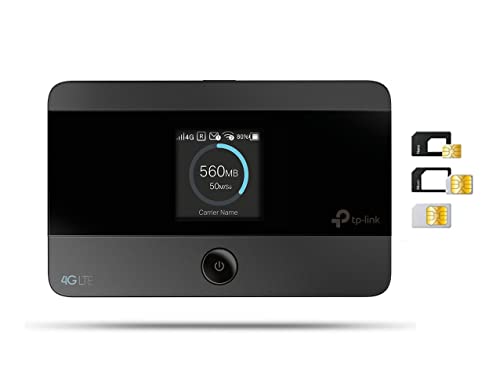
TP-Link M7350 4G LTE MiFi, Portable Travel Wi-Fi, SD Card Slot, Unlocked Mobile Wi-Fi Hotspot, 8 Hours Long Lasting Battery, Easy tpMiFi App Management, Black
From the brand
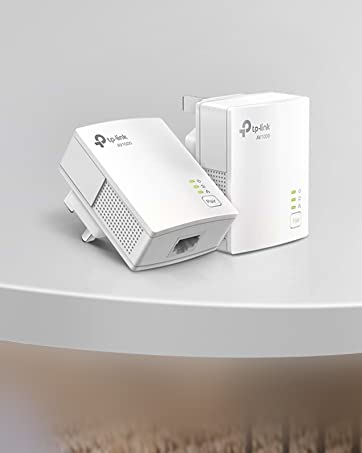
AV1000 Gigabit Powerline Kit
- HomePlug AV2 Standard – high-speed data transfer rates of up to 1000 Mbps
- Gigabit port
- Up to 300 Meters
| Weight: | 120 g |
| Dimensions: | 6.6 x 1.6 x 10.6 cm; 120 Grams |
| Brand: | TP-Link |
| Model: | M7350 (EU) |
| Colour: | Black |
| Batteries Included: | Yes |
| Manufacture: | TP-Link |
| Dimensions: | 6.6 x 1.6 x 10.6 cm; 120 Grams |
Ideal mi-fi for caravanners
Bought the TP Link M7350 mi-fi to use in our touring caravan in the UK. Set up was OK once I’d cracked how to insert the SIM card correctly! Had to resort to YouTube video as the enclosed Quick Start did not cover it properly. There’s also a v good detailed user guide online though.
Logged into the TP-Link user admin site for the unit to change the wireless and admin passwords to improve security. Then away you go – it’s not too difficult.
It’s a pocket-sized unit and in the first caravan site we used it in we got 4G signal and the little unit connected easily and worked really well for us – 2 or 3 tablets/phones using it. We just loaded it with a 4GB Smarty SIM card (Three network) to try it out. An hour’s worth of watching catch up TV uses about 0.9GB, but just browsing and emailing much less. Switch it off when not in use (it should auto switch off anyway when not in use).
So far, very pleased with it and will put a bigger SIM card in next time, but we don’t expect 4G signal at every site – sometimes only 3G or no signal in more remote locations. It’s just good to be able to connect sometimes and not pay exorbitant caravan site wi-fi fees.
So Far So Good
I purchased this for use in our caravan as the site WiFi is usually poor. I have not given it a real test yet, but have tried it in a cottage away from home and it was good. Will add to this review after I have tried it more thoroughly.
Easy to set up and use
Bought to take camping. So easy to use! Popped a pre~paid sim into it and was on mobile internet in under a minute. Easy to pair devices, and download the TP app and you can see how much data you’re using. Nice and simple, no fuss easy to use device.
So far, so good....
Bought for use in a caravan which will also be rented out. Very surprised it worked so well with four people using at least 2 devices each needing wi-fi. Good coverage in a 37ft van – could stream at either end of the van when the router was located near the middle and really easy to use password just the once and be connected during our whole stay. Haven’t yet looked at the options for providing guest passwords via the app, which was part of the reason I picked this product, but hope it’s as easy as the original set up to manage. With so many people using wi-fi, the battery didn’t last long at all, so we had to keep the router plugged in as the constant use meant it was never fully charged. For our family, this was perfect as we could just leave it alone without having to repeatedly turning off/on or unplugging, and the consistent signal was as good as broadband at home. Would definitely recommend.
Amazing little route
I am amazed how good this little box is. We use it in our motor home generally but we also had to use it for 3 months as our main router in our house. Working from home I was reliant on it and it worked incredibly well. If you are heavy users pulling Netflix with a few people also using the internet it can start to struggle but I suppose as well it would depend on what network you are on. Battery isn’t the longest lasting so we have ours plugged into a usb charger 99% time but it’s useful at least that it has a battery built in. Would highly recommend.
Portable, reliable and fast WiFi (depending on the sim you use)
Great for keeping all your devices online while travelling, as long as your network provides reception in that location of course.
I stuck a virgin mobile SIM card in mine and I was getting a very stable connection inside the house and in the garden. As it’s portable I would recommend having it in the same room your connected device is in and if you need to change room take it with you. It doesn’t provide strong WiFi through walls so keep it in the same room for best results.
With my virgin mobile SIM plugged into it I was getting around 31-38 mb/s download and 30-35 mb/s upload. This will vary based on your network and the reception in your area. I was able to stream at 4k on the Disney+ app on my Kindle firestick while it was connected to this portable WiFi hub in the same room.
Then I took it into my computer room and I played a few different online games with my computer connected to it. My ping fluctuated between 40-90 but mostly hovered around the high 50’s which is perfectly acceptable for online gaming.
The screen is really useful for keeping track of how much data you have used and how much data is being transferred per second. The interface is also extremely simple to use. Press the menu button to cycle between different options and then press the power button to confirm. There’s an option to turn on data roaming so I imagine this will work well travelling abroad. And there’s an option for turning power saver off/on. But there really isn’t that much customisation needed. Just plug in your SIM and power it on and then you’re ready to connect to it (the WiFi password will be in the “device” menu).
Overall I can’t fault it and I’m really impressed with how reliable the connection was and how small and portable it is.
Good bit of kit replaces the hom router easily
Needs a good signal from the satellite in my area EE was best. You can add lots of phones pads and computers and it keeps up fine. Streaming can be expensive at 1gb an hour but that depends on you chip package.
Dependable and portable
Bought the M7350 to use to stream live video of sports matches to Facebook page during lockdown. Works exactly as advertised. Very portable, clear display, light and intuitive. Have only tested up to 10m but no issues at this distance. Due to its small size and light weight and excellent battery life would see great potential for this while travelling
Good WiFi for 4/5 Devices
It works great with my Android Phone my Daughters Android Phone my Smart TV my Ring Cam and maybe one more Phone BUT when my Grandchildren come not so good bareing in mind there’s 6 of them
Helpful
I like this product
In this country be careful to not lose money
I just pay 9 for my WiFi it’s a secret and tp links helps me to do tha
Great MiFi uni
It works great for me. Use it at home to watch Amazon Prime, and on the go with my mobile phone. Just slide it in my pocket. It’s half the size of my phone. Streaming speed is great and no more waiting for videos to load.
I use it with my local Pay As You Go card. Battery lasts a few hours when watching videos. Very happy with my purchase.
Excellent Product. I’d buy another if I needed too.
I got this Initially for working aboard, but used at home first to test with an EE unlimited Data sim in & im now considering disconnecting my land line Broardband! Works great & connects with all my devices, I connected 3 iPhones, 2 iPads, Printer, Sky TV (Catch Up) & Amazon Prime to Stream. All work fine. Result. Great Mobile Route
Great signal but poor battery life ...
The Wifi signal I get from the device is VERY good but the only “problem” is the battery … you DEFINITELY need to charge it maybe twice in 8 hours that’s why I keep it plug in all the time because it doesn’t give you any sound or warning when you need to charge it it just turn itself off
Paired this with a SMARTY SIM and, whilst the download speeds were adequate at best (that’s SMARTY’s issue, not TP-Link’s), this little box managed to get that signal across the house and over multiple floors.
Reasonable range, and battery life, for a portable route
Plus points:
Reasonable WiFi range, and battery life, for a portable router. Mobile phone router management app. Internal antenna is OK, get bars most of the time. .
MInus points:
Would have loved an SMA, or similar sub-minature antenna breakout jack, for an external 3/4G antenna, as I’m in a semi blackspot, even on mobile handsets or other brand routers (Note to TP-Link, can you do this on the next version please?)
Great bit of ki
I bought this mainly for our touring caravan as we often travel to places where we cannot get a signal on our mobile. Absolutely great. Have recommended it to friends.
Great, read instructions 1s
Good product, does as says, just needed to logon to router to change to LTE to work before added ‘a credit to sim which then enabled connection as default router settings wasted 10, so read instructions 1st, no other probs, and glad I bought it works great once overcome setup issue…
Does what it says on the tin well
I replaced my home broadband with a 15 SMarty unlimited data bundle. It’s the size of a pack of cards approx. Took no real set up. The app is simple and clear also. So changed the password to a decent one, easily. Put in the sim, the battery, switch on, and bobs a reasonably close relative. And better than home wifi, I just take it in my work bag and I’ve got a secure network anywhere I go.
Tested the battery, lasts about as long as advertised. Powersaving will increase that. At home I just leave it plugged in.
Very good product. Wish it came in other colours instead of plain black. Bigger screen.
It took me a bit of time to work it. But my nephew who is only 13 did it in a jiffy. Very handy to use. We take it every where. Let’s us know how much data we have used.
Great option for WiFi on the move
Purchased this item when moving to a new house. The broadband couldn’t be installed for nearly 2 weeks, and with 3 teenagers on lockdown Internet access was a necessity.
I inserted a Smarty unlimited sim – on the 3 network, and was really impressed with the speed and quality of connection.
At one point we had 10 devices connected without a significant loss of signal.
We managed to use over 80gig during the fortnight.
A great option if you need reliable wireless.
Great piece of equipme
The product was easy to use ,I used it to enable me to connect to the internet at my caravan ,There was no reception on the site so I sited it on a hilltop near the caravan in a waterproof box ,and the reception was great .
Excellent: fast and straightforward
Very easy to set up, just insert the SIM card of your choice and your device picks up the internet. Put in the password supplied, and you immediately have fast internet. Don’t forget it’s battery powered (charge cable included), however, but battery life good: 7-8 hours depending on use.
Brilliant Device
I used this to cover me whilst I was waiting for Broadband to be installed at my new address. Bought an unlimited data Sim only for 18 per month..(1 month rolling), and bought this. I was actually shocked to be getting full 4G LTE speeds upto 30mb…connectivity was good to all devices, 2 Smart TV`s, Phones and 2 Laptops..brilliant device, worth every penny.
This little box is basically a turbo wifi dongle – better battery, much more consistent signal and wifi, better speed (ookla). Works an absolute dream with an EE sim, set up about 3 minutes and running 28 mbps on 4G. o2 sim was a very different, many ISPs attempt to restrict users being able to place their sim which can supposedly be used anywhere – rubbish, if the APN settings or configuration is incorrect it won’t work – THIS IS NOT THE FAULT OF THE TP-LINK, it is rubbish lazy ISP or phone companies that want to tie you in – previously similar issue with Vodafone but the phone provider talked me through it – no dice at all with o2. Bearing in mind an old design Huawei AC6A is 40, this is very good value.
Customer Service brilliant.
Amazing product for use with mifi. Customer Service excellent. Couldn’t have been more helpful. Had problem initially setting it up so contacted them. Richard took me through it step by step. So patient. Worked brilliantly since even when I travelled to different area. Thank you so much. So easy to use once set up. Just turn it on and you are off.
Pretty easy to set-up but I did have to use the TPMIFI app.
Bought MIFI and GIff Gaff sim. Activitated sim and put it in MIFI – worked out I had to put SIM into slot not on top of it (Doh). Turn on MIFI and connected tablet to it – no internet. Install TPMIFI app on phone and change internet settings (APN thingy) to GIff Gaff – very easy. Now everything works. I think this would be even easier if you had a SIM that was already active or an unlocked phone. I had neither and was pleasantly surprised. The only bit of ‘friction’ was having to change APN using the app- but it wsasn’t that hard. I installed the app onto a phone locked to another network.
Good Mifi route
Good product, I’m using this router as my main home internet connection as I have no access to fibre or any other but mobile. The only problem is when I connect more than 4 devices it gets slower and battery is draining quickly. Overall great mifi, can recommend.
Life saver for working remotely in a different country
This device was a life saver for me working remotely from another country.
I didn’t even have the need to buy local mobile line for my phone as I simply had this in my pocket the whole time whenever I’m away. So it kept me connected
Bought this specifically for my car so that I only need one sim card to supply data to my Android Head Unit and my dashcam. I used velcro pads to stick it inside the top of my glovebox and it gets charged by my car.
I like the fact that it’s lightweight and compact. It’s very easy to familiarise yourself with the settings and easy to set up ready for use. It has power saving mode where you can configure the wifi range from low, medium and high, where low consumes the least power and high consumes the most. The low setting is more than enough for my car usage. You can also specify the number of minutes to elapse before it goes into standby mode if there are no connected devices to the wifi. To wake it up, simply tap the power button and it would immediately wake up.
It has a slot for a micro SD card for sharing media amonst connected devices, but I don’t use it.
I have read a few negative reviews about the battery life, but since it’s mainly going to be plugged-in in my car, it won’t really be a problem for me.
Good option for flexible MiFi
Very easy to use.
Had to reset it a couple of times whilst abroad, but it worked again afterwards. When 4G available it picked it up. Certainly good enough for work. Didn’t stream anything so can’t comment.
Very happy with i
From unboxing to working was about 2 minutes. It was very easy to set up (I used an EE sim card from my phone), took the back off, put the nano sim in a little holder and slipped in, battery back on and it found the network and started working right away. I then plugged it into my laptop using the cable and my work computer connected perfectly. I used the wired option here because it will keep it charged. however connecting wireless was easy on the phone.
Easy to set up.
Purchased this to use with a data only SIM at our static caravan where the site’s WiFi is rubbish. Very easy to set up, just insert the SIM (make sure you use the correct holder for the SIM), switch the device on and it will connect to your SIM’s network. Signal strength excellent; I got an O2 SIM, you need to check the network’s signal strength in your area. Can stream programmes and films now using Now TV and Amazon Fire sticks.
It works!
This has a very good, strong and stable signal – much better than a phone hotspot. It is a little fiddly to set up, but thanks to the information in other reviews I could get it working quite quickly.
Sky sim set up
I initially could not get this to work with a Sky SIM. After some research i found a way to make it work which was not easy to initially resolve. I did the following:
1. Open up the TP Mini app
2. Select Tools – Internet settings – APN management
3. Click + in the top right hand corner
4. Enter the following:
Profile name – sky
APN – mobile.sky
leave everything else blank
5. Press done
6. Restart the midi box and it should work fine
Still early days for me to have a detailed view on how it works
great performe
had no trouble with router’ where ever I have used it so long as you use local sim card best deal in Bulgaria
20 Levi for 15gbite = 9.98 no problems talking to NZ Ausie as we as UK.
Love it!
I bought the 4G LTE M7350 to replace my Three mobile wi-fi, due an ongoing issue with poor connection. Setting it up was pretty straight forward. Battery life is amazing too. I have not as yet travelled with it, but I might not bother anyway. Its good to get away from tech no and again. I bought a Giff Gaff sim to give me more flexibility with my plans. You do however need to keep and eye on battery life (there is nothing to indicate low battery) otherwise you’ll find yourself cut off from cyber space! Great little gadget.
Great for internet backup
I bought this for when I need internet for backup or when mobile.
Does the job well and very easy to use. I place a SIM that has data lasting 2 years, that way I do not need to go on a monthly subscription. When data is finished, I’ll just buy a new sim.
No need to register sim, just pop in and off you go
Amazing little box of tricks
This little box has saved me during lockdown as staying at rural location with no signal or broadband. Researched these quite abit and even though they sell a faster version it’s only as good as your software.. so this is perfect, can select 3g or 4g or both..
I stick to 3g only and instantly gives me enough WiFi to download emails onto laptop etc.. been using an 02 pay as you go somewhere which I bought separately. Easy to use, fast charge just make sure you use power save which you can set to anytime scale you like, I set this to 2hrs as a few times I’ve forgotten to switch it off! But battery last all day and some..
Anyway highly recommend 🙂
Handy, cheap and reliable but battery low
Great for travelling, can sit it in the car and everyone in the car can get free WiFi with the sim I have. Battery only lasts 4/5 hours though so best to keep it on the charger if few people are using
Supe
Due to coronavirus nobody was able to install Internet in my flat. I bought this device to use it as a home broadband and it’s doing a great job. You can use any sim card from VOXI, to Superdrug to EE that can also be not-data-only.
Working as expected
Took it on holiday and it allowed the family to have internet on their phone or tablets.
Very easy to use and useful.
FYI, we bought a local SIM card and it worked straight away.
Happy buyer.
Great purchase and service
I’m self employed and was delighted that this arrived the next day esp as my broadband supplier cut me off and won’t reconnect me until May. Simple and easy to use and has kept me online which has enabled me download training courses and run my business account.
Compact and handy!
I use this whilst travelling for work to connect my laptop to the internet. The device was really easy to set up following the instructions in the app, and performs really well. The display is really handy to see the signal strength, battery life, and the amount of data used (especially if you are on a PAYG tariff). Device is compact to carry around in my laptop bag, really pleased with it.
(Y)
Works well.
I got this to use with 4G broadband in Ireland.
I wanted a rechargeable, portable router for more flexibility but the ones from my data provider seemed weak.
I’ve only used it a few times, but have not been disappointed. It’s faster than my current wired broadband, so I use it when I need a stronger connection! Used for working form home, video conferencing, browsing, streaming.
I don’t have any comparable experiences, so don’t know if this is the best buy. But I’m happy with it.
Great kit, keep it plugged in charging
This has been a lifesaver. It works brilliantly and was simple to set up. The battery runs down fast and charges slowly so leave it plugged in. Otherwise – fabulous.
Reliable, good signal, easy to use
Been very pleased with this purchase. Has enabled me to work remotely when on call and has been useful to keep the kids happy on their devices when they’ve been driving me up the wall
Mifi several pros, a few cons.
It does what it says on the tin. Easy to setup after inserting the sim, and with the accompanying app to still be able to read any texts or anything you might receive on the device, as well as easily change the password, solid enough purchase.
Also range of the Mifi compared to the range of using a mobile hotspot was also vastly superior. I could get probably 35ft away, with the device still being inside, and get a decently strong connection.
Having said that I have a few complaints of the device not living up too its promises.
The 8 hour battery life for starters. If you are using it on and off for just quick internet searches or watching a video here and there, perhaps its will last 8 hours. However if you are using it more heavily, it will last maybe 4 hours.
It is also prone to getting quite hot, more so when plugged in and being used at the same time, which negatively affects is mifi performance for internet speeds (after several weeks of logging speed tests at start of use vs when you notice internet feeling sluggish, the device was always pretty hot when such drops would happen, and after allowing the device to rest and physically cool down, speeds would return to normal)
Something else to consider if you are planning on using it for any kind of gaming, it also displays an error called double NAT, which if the mobile app was able to function more like a home router in terms of settings you could adjust, then it would be an easy fix, however, the app is lacking in functionality to fine tune your Mifi experience.
Overall I am happy with the purchase vs the price, and the device is an improvement over using a hotspot if your device isnt the latest and greatest, or you just need to add a consistent mobile signal to an area where getting wifi isnt an option.
TP-Link MiFi instructions need a bit more detail, they didn’t really show which way up to put the SIM (metal down) and a warning as it took several minutes after finding a network signal to allow a data connection to the O2 network.
The menu options are useful but I preferred using the mobile app. to monitor the device.
The battery life is OK, but battery drain seems to depend on network strength, power supplied and data transferred.
Recharging is via the supplied cable into USB port. There wasn’t a main adaptor supplied.
During heavy use charging via my laptop low power USB port only maintained charge at 62% and couldn’t boost it any higher.
The usage monitoring via app also helped show my mobile phone was downloading unexpected amounts of data on WiFi so it’s helpful in checking device behaviour.
Problem using abroad
In Spain everytime you switch it off you have to forget then re enter your password,then change the settings to contract for it to work again which is a bit of a pain, specialy the first time when I didn’t know what was happening, apart from that it has been very good.
This is a good bit of ki
I used this at one of my telecomms customers as their network was abysmal for contract staff, the router worked perfectly (I performed a speed test and was getting ab average of around 40MBPS with a fastest speed of 72Mbps using Ookla and Google test) Of course the router speed is only as good as the data provider, I used mine with a 3 SIM (it probably helped that I was on a 3 site!
Worked perfectly in South Africa
Worked perfectly with a 30 day SIM card in South Africa. We were able to access with 3 different family cell phones and 3 Gig of data lasted us for Gps navigation on journeys and all browsing and e mail use. I liked this model as I was able to see our usage. Very happy buyer.
Good for the price, lots of configuratio
Purchased this router for work remotely and I’m very pleased with it. The software is great, easy to use, lots of configuration options. I even used it as internet source for my home DD-WRT router and worked fine! WiFi signal is strong on the lowest setting. The only issue I have is weak mobile signal and there’s no option to add additional antenna.
Brilliant Purchase for Traveling Abroad
Good signal receiver, long battery life about 8 hours on battery saving mode, and shorter wifi range, easy set up via its mobile phone app or on internet browser. while you are in a poor 4G signal area, recommend to switch to 3G mode for saving more battery and avoid battery temperature is becoming too hot.
Works well.
I bought this as a back-up wifi unit to use when away as quite often hotel wifi services aren’t so good.
I put in the sim card and within a couple of minutes had it set up at home and working fine. Took it to Madeira, and although it took a few minutes to register on the local networks I was getting similar speeds to those at home, and it had no trouble allowing me to use my laptop while streaming Amazon TV onto the hotel telly via a firestick I take with me on my travels.
Overall, very happy.
Easy to use.
Bought this a few months ago so I can have myfi anywhere I go without a contract. It’s a great little device. Small info screen but very clear. Nothing fancy. Easy to use and change sim cards.
.....
Was well worth paying a little more to have a display worked wherever we took it even in the car a must have if you have kids and/or traveling distances
small and compact but does the job
it has come in very hand as I travel through work and have used it numeros time when I’ve lost connection to WIFI in the hotel to continue watching netflix or Amazon Prime, i’m using a Three unlimited data sim, as there is next to no signal for EE in my work area so this allows WIFI calling and also data for computer access to the internet at work when their system crashes (regular occurrence) so all in all great for general use, perfect for traveling, would recommend carrying several SIMs to ensure you get best coverage, so simple to swap SIMS
Really pleased.
So glad we bought this, really easy to connect to, long battery life, we use a three sim in it and so far it has connected everywhere easily and with a strong signal. Even in places where other networks struggle. Would definitely recommend for travelling, caravanning etc.
Neat & Compact - Only 2.4ghz WiFi
A near little item, but note that the M7350 is not dual band. It only works on 2.4ghz – you have to pay about 50 more fur a model that uses the (less congested) 5ghz WiFi band
Bought one of these, together with a “Smarty” sim with unlimited data usage. Recently moved house and the broadband provider had (and still is) unable to provide a service, due to some constant admin errors! So with 4 kids, a business from home to run and no wifi, I had to buy something. This little thing arrive and I was a little sceptical, however after inserting the sim and firing it up, I’d got 4 kids tablets connected, Sky Q, 2 mobile phones and laptop and Ipad Pro. Works great, providing a consistent wifi service that even works well in the adjacent rooms. In an evening I’ve had Netflix on through Sky Q, kids have had tablets streaming and it’s been perfect, albeit slightly slower to initialise Netflix stream to start off with.
Worth the extra
After much research for a portable wifi box we opted for this one. We have not been disappointed. We use it whilst on holiday as a hot spot for all of our devices. Can stream movies as well as access phones. This doesn’t come with a SIM card but is unlocked so you can shop around for the best data deal. Easy to set up and link to your phone.
Worked right out of the box!
If you need a mobile 4g router this seems to do the trick. Worked right out of the box with no config required. SIM goes in, registers and ready to connect
I bought the Huawei E5573 from Amazon twice, and each time they sent me one locked to Three network despite me choosing the UK unlocked version. Total waste of time, twice.
If you need a simple to use Mobile Wifi router – this works easily and quickly
This was brought for WiFi in Spain. When there every time it was powered on I had to reconfigure the APN to GiffGaff my provider via the app. Once done it worked well. Since my initial review I contacted TPLink and manually configured a APN for GiffGaff with a different name, the unit now works flawlessly – am very happy – have therefore upgraded the review to 5 stars. It is handling without issue multiple users streaming video without issues in a 4G area.
Portable WiFi nothing wrong with it. GREAT!!!!! BUT used EE...
Portable WiFI nothing wrong with it. GREAT!!!!! BUT used EE as the internet for other providers was…none existant but, when it came to putting credit on with EE it didn’t come on immediately, within 24 hours? that was poor.
BUT TP-Link M7350 4G LTE MiFi, Portable Wi-Fi for Travel Excellent!!!
Well buil
Pro:
– nicely built
– so easy to setup
– doing both 5 and 2.4 GHz bands are good
– done 40+ GBs in 2 weeks, does the job
Con:
– putting the sim card in is not the easiest
– on a weekly basis it stops for a minute or so
Not sure about the battery as it is plugged in 24/7
A must for travel
Really works well. Saves a fortune in roaming costs, just get a cheap sim card with data, put in in connect and off you go! Battery lasts me around 7/8 hours
Travel essential for connectivity
I purchased this as a 4G upgrade to my older 3G TP Link. Setting up can be a little fiddly but once up and running we find the signal and speeds to be more than sufficient for multiple devices (we’ve had 10 running without problem). We also take this on holiday and buy data sim cards and have remained connected without problem.
Great for travelling
Very easy to use and the wifi speed is excellent. Travelled all over the UK throughout June and it provided the same good service in all locations. Used it in the car to provide navigation (God bless google). All in all a really good product.
Very good
Very good MiFi unit. Battery lasts about 7 hours under constant usage. It is very easy to set up. Just pop your sim in and it will work, no installation or other complicated wet up. Provides fast speeds which is of course dependent on the network. Signal seems to be strong, I use it in an office deep inside a building and have no issues getting a good signal. Overall highly recommended.
Fantastic
I have to say, this small black box does exactly what it says. I set it up in 5 minutes, had 4 devices connected and was steaming HD movies in minutes. Have recommended already.
Worked straight away (after charging). Used on and off for 4 days in different locations – no problem finding a signal but sometimes slower than at other times.
Really useful to have own mini.
Only downside is that the WiFi name & password are both on the unit’s menu, so if it’s lost, anyone can use it. It may be possible to change the password, but no paperwork with the unit explains that.
Great signal received and data speed good on this device. Used for 3 connections typically for work and streaming video and works well. Dropped one star because you can’t seem to charge it and use it at the same time which is a bit annoying on occasions but once you know, it’s easy to keep charged up ready to go. Small (pocket sized) and light and sturdy so overall quite pleased with it.
mobile WIFI
Perfect for out door use. my grandchildren use it on journeys in our mini bus. some drop out but to be expected on the move. aver all perfect for what it is intended fo
Great holiday personal wifi route
Fantastic. Charged, opened and inserted Japan sim card and was surfing with in Japan everywhere from Tokyo to Osaka. The shop assistant said that the prepaid sim only worked for unlocked phones but this mifi device seemed to have no troubles providing is with wifi at all.
Excellent works as I needed, have travelled to Italy and with the right sim (giff gaff) it works very easily. First I tried Vodafone pay as you go sim works ok in uk but couldnt get that to work in italy despite that sim working ok in a mobile whilst there, changed to a giff gaff sim and started working instantly, so went along with that. The web interface / mobile app seems to work ok and is very easy to use.
Just what i`ve been looking for.!!
Great compack unit giving me instant acess to the internet. Very easy to set up and use. I`ve used it in my camper van in Spain & France. Also on our Narrowboat. Just buy a data only sim , slot it in and away you go !! Brillia
Does what it says on the tin.
Really happy with my purchase. The instructions are very easy to follow and I had several devices connected in just a few minutes! I also like the fact that the device is unlocked to allow any SIM card.
Useful and reasonably priced.
Used in a trip to Spain, having figured out…eventually, that I had to delete the requirement to enter a pin in order to initiate, it was easy to use.
How well does it work
This arrived yesterday, well packed and on time. The device was very easy to set up and provides a more than adequate wifi hotspot in my car. Primary use is to give cloud access to my dash cams so events are uploaded to the cloud. The bonus is a wifi connection when travelling.
It works...!
Bought for our ‘out of the way’ caravan with no, other than BT services around, which is quite expensive on contract. Got a three data card and for email, whatsapp, facebook etc uses little data. However, if used for streaming or updates, uses lots! Not the units fault though. At least we can stay in touch when ‘out in the sticks’. Would recommend.
4G LTE Pocket WiFi.
Seems to be well constructed. For anyone wanting Band 28 (700MHz) being offered in the Philippines, this unit doesn’t have it. It is however, unlocked and can be used pretty much in any country.
Bought to replace an 8 year old Huawei e585 which works (and has been excellent over the years) but has a dying battery. I don’t use a mifi much now but they are useful when travelling (on business and when cruising in Europe). I stuck a Giff gaff Sim into this and it worked within 30 seconds.. I switched to the built in Giff gaff profile using the tplink app, and it connected straight away. The screen is a colour OLED and works brilliantly.. Easy access to the main menu items and switched off when not needed. All in all a great device for the money, and 2000 mAh capacity in the battery should mean this lasts longer than the similarly priced current Huawei units. Very pleased I took the tplink route (I have loads of their kit and it’s never lets me down). Get one..
I bought the recommended three item package containing TP M3750, A “3” payg sim card and a case. The MT3750 came in a nice box with some dead easy setup instructions which are summarised below.
1. Take back off – you will see a little gap on the back to put your finger nail into
2. Insert the sim.
3. Put battery in
4. Replace back cover
5. Power on – and it will display the Wifi number to connect your phone or pc to.
6. I opened up my PC wifi settings and connected to the TPLink using the password number from (5) above.
7. I opened the M7350 website as per Quick instructions and created a new “Settings” password so I could access settings. Remember your password.
8. I then connected the TPLink M7350 to my Android phone wifi using the numerical password number (not the settings password you just created)
8. I downloaded the Android app and input my new Settings password just created.
Bingo!! – all set up and ready to go. You can play with the settings later using your android phone app (or pc website). I had no need to update the M7350 firmware as it was already at the latest and it was already pre-charged to 75%.
In summary, I am really impressed and it was so simple and I reckon I will get a lot of use with this eg Hotels, camping, holidays etc. I am going on holiday to Asia shortly and all I will need to do is buy a local payg sim and switch out my existing sim which can be done very easily, and return back to my UK sim when I get back.
By the way, I was really pleased with the 3-sim hich worked immeditelly and at this stage I have not created a “Three” web account for subsequent top-ups
Great piece of kit!
This was great! We used it during a 4 week trip touring France and Spain in our motorhome. It worked very well in most areas, only occasionally we got a poor signal. It enabled us to use our phones,iPads and download onto our kindles! Well worth it!
Excellent so far!
Can’t tell about battery life yet but it couldn’t be easier to use. Literally unpacked it, stuck my sim and battery in, turned it on and connected. Connected both my computer and phone with download speeds I’d expect. Interface is clear, easy to navigate and has all the appropriate options I’d want. Excellent product so far. If I had to think of any downsides, could it be a little smaller? Can’t tell yet because a long battery life would be worth it.
TP-Link are nearly always excellent value
I really like TP-Link as a brand. A budget product that offers way above its price range in terms of quality, reliability and performance.
They might not make “the best” product in the world but they sure try hard to bring high end quality into the everyday marketplace.
Brilliant LTE route
This piece of kit is brilliant, I’m mostly working from home and it saved me when my main internet connection was down.
You have a micro/nano sim adapter in the box, so it will take any kind of sim you have.
For me it worked straight out of the box, I just popped the sim in, got the wifi password by checking device info on the built-in screen, and bam, it worked.
Battery life is great, the info on the screen super useful, wi-fi coverage great, I completely recommend this device.
Thank you TPLink.
I used it in Japan with a local data SIM card bought in an airport shop on arrival; my intention was to share internet connection with others in my travel group. Once I got it set up, it worked very well.
UPDATE 05/10/18: I visited Seoul, S Korea last month for a week; this unit worked perfectly with a 5-day data SIM I ordered and picked up at the airport on arrival. The data SIM had to be first activated in my phone as instructed, then transferred to the TP-Link MiFi.
The following are my tips on using mobile WiFi in general (I have used another model before):
Some data-only SIM cards (at least the ones I have used abroad) do need to be inserted into a smartphone first to be activated, which may involve setting Access Point Name (APN) as instructed; so a bit of technical know-how is needed.
Your bundle of purchased data will very quickly dwindle down to nothing if the phones and devices connected to the portable mobile WiFi are not set to restrict download of updates, videos, photos, files etc over WiFi because they are effectively connected to a WiFi broadcast like any home network. So for example, your phone will check Apps for updates and download them; your WhatsApp will download videos as if you were connected to a home WiFi.
We use this in our motorhome with a three SIM card and so far have had great reception wherever we go. Easy to connect to and great in and immediately close to the motorhome. Have recommended this to friends for their caravans and motorhomes too.
Works well and of course being unlocked you can put any SIM in it. A big selling point for me was the data management feature which not only displays the data used but allows you to set monthly limits and receive a warning as you approach it before cutting you off before you exceed it. This was important as it’s gone to a technophobe parent who needed to be able to use a laptop reliably away from home, but it hasn’t caused any anxiety which is a bonus.
Top tip – turn the Wi-Fi power setting down if you don’t need a lot of range and the battery lasts a lot longer between charges, plus it also works as a wired connection if connected via USB. And if you’re using a computer with Windows 10 on it, make sure you set the Wi-Fi network and cabled equivalent to being metered to help stop Windows downloading those massive updates.
Great little gadget for getting you onto WiFi where ever you go – got so frustrated with Campsites WiFi not working, too expensive or extremely slow due to too many users. This gadget does the trick, easy to set up (hint: gently pry the back off with a small screwdriver, gently go around the edges to unfasten, as you progress round it gets easier) – put in sim card and away you go. Has a password/code which you find on the device before you can link into it – totally secure – been over the UK with this in our tourer, great signal where ever we go, mobile phones, ipads and such like are notorious for weak aerials. Team up with Amazon “Internet with Legs” sim card from Three and you can’t go wrong, We purchased 12GB for 12 months – still working through it. Can take up to 10 devices I think. Uses an ordinary USB with B connector cable (not supplied) to charge, no wires needed to connect to phone etc, open up your WiFi option on your device and login in.
Bought this after doing a lot of research, a tech page rated it in first place over others and having 3 tech obsessed boys i would rather spend a bit more and have happy quite life! We first used it on a caravan site over the Easter week end and it worked a treat with an EE data sim, i also researched which sim would be best at the location we’d be using it at. At one point we had 5 different gadgets connected to it, watching YouTube videos, checking social media and watching Netflix. Data didn’t last long with all that going on but this never missed a beat.
It was also very easy to set up so i would recommend.
Purchased to replace the official VirginMedia mobile broadband device, the IMO Go, which I found hopeless and horrible to use. This little device works like a dream though with my VM 4G mobile broadband SIM. Rock solid in use, no dropped connections, fast, good (adjustable) range (strong when close or weaker but longer range), enter the SIM’s PIN just the once on setup (unlike the Go, which demanded it EVERY startup!), decent and easy to use phone/iOS apps, good clear info on the screen….
All in all, a cracking good little device, I don’t hesitate to recommend it!!
Definitely would recommend
Brilliant, does everything it says on the box. So easy to set up and use, bought it to use in Mar Menor Costa Calida Spain as always had problems with internet here, buy a local data sim for 9 euros for a month and works perfect.
Fast, solid connection. Works out of the box on even tenuous 4G signal. Downloading movies/catch up gobbles allowance but emails and ‘normal’ data transfers hardly noticeable. Take it with me all the time and can be confident of being able to make secure internet use when out and about.
Couldn’t get internet at first even though it said my device was connected to the internet.I downloaded the tpMiFi app on my regular internet, connected my device , opened the app and changed the ANP to Giff Gaff who I got the sim off.Works fine now and is faster than my regular internet with EE.I bought it for our caravan, but wont know if if works well in EU till next spring when we go over to France
Does what we wanted.
Fairly easy to set up, back difficult to remove to put in battery and SIM card, but all works well once card was in correctly. Didn’t work out how to find amount of data left in. Reliable WiFi for resident in nursing home. These reservations stopped fifth star being given.
After struggling with an EE Mini WiFi unit I purchased this. So much better. Easy to setup for monitoring data usage on the device itself. App works well too, but more settings available via the web interface. Also 3 year warranty as standard and a removable battery.
Good purchase
This worked fine in the UK, and in Crete, although I needed to get a Greek SIM card instead of use my 3 UK account roaming option. The device is managed through the MiFi app, and you can download this onto various devices for multiple users. Access is protected through this app.
Good buy, small, neat and served its purpose in hotel room with patchy access.
Well designed and compact portable mobile Wi-Fi Hub
Device arrived speedily and is Sim-free as described. PAYG Sim easily installed and connected wirelessly to the Internet via selected Service Provider. Connecting Windows 10 computer to the TP-Link was more difficult but resolved after e-mail communications with the Manufacture’s Technical Help Desk.
Device works well and efficiently but always dependent on availability and adequacy of the selected Service Provider’s Mobile Signal.