Anker USB Webcam for PC, PowerConf C300 Smart Full HD 1080p Webcam, Noise-Cancelling, AI-Powered Framing & Autofocus, Adjustable FoV, HDR, 60 FPS, Low-Light Correction, Zoom Certified
Clip, Plug, and Play
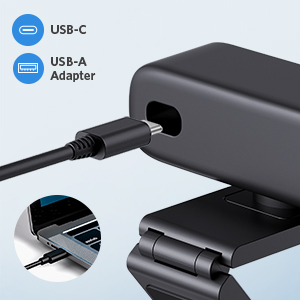
There’s no need to waste time finding the right drivers. Just clip the camera to your laptop or display, plug it in, and start streaming—all in just 3 seconds.
Protect Your Privacy
Prevent prying eyes from peeping on you when you least expect it. Snap the privacy cover into place and slide over the lens after wrapping up your meeting.
Multiple Ways to Mount
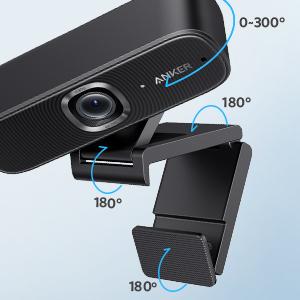
With 4 angles of adjustment, you can place PowerConf C300 webcam for PC almost anywhere you want. You can even mount it to a tripod for complete control over your camera setup.
 |  | 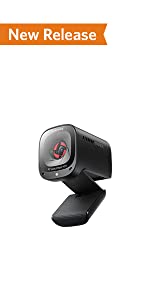 | 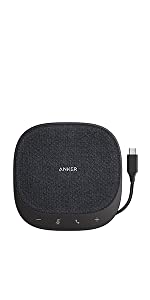 | 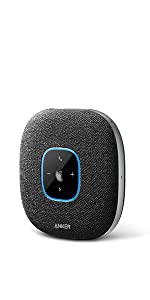 | 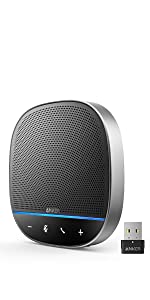 | |
|---|---|---|---|---|---|---|
| Resolution | 2K | 1080p | 2K | — | — | — |
| Light | Auto and manual control for brightness level and color temperature | — | — | — | — | — |
| Audio Technology | VoiceRadar-Voice Enhancement, AI Noise Cancellation, Echo cancellation | Voice Enhancement and Noise Cancellation | Directional Voice Pick-Up (90°,180°) and Noise Canceling | Voice Enhancement and Noise Cancellation | Voice Enhancement and Noise Cancellation | VoiceRadar – Always Focus on the Voice Source |
| Focus Type | AI-powered Auto Focus | AI-powered Auto Focus | Auto Focus | — | — | — |
| Smart Function | AI Image, AI Frame,AI noise Cancellation | AI Image, AI Frame | AI noise Cancellation | — | — | — |
| Adjustable Field of View(FoV) | 65°,78°,95° | 78°, 90°,115° | 65°,78°,95° | — | — | — |
| Privacy Cover | Privacy Cover with Light bar | In package | Built in | — | — | — |
| Mic | 4 Mics Array with AGC/AEC/ANC | Dual Mic | Dual Mic | 4 Mics Array with AGC/AEC/ANC | 6 Mics Array with AGC/AEC/ANC | 4 Mics Array with AGC/AEC/ANC |
| Recommended For | Personal Workspace | Personal Workspace and Small Meeting Room | Personal Workspace | Personal Workspace and Huddle Room | Personal Workspace and Small Meeting Room | Personal Workspace, Medium and Large Meeting Room |
| Video Codec | H264. MJPEG YUV | H264. MJPEG | MJPEG YUV | — | — | — |
Model Number: A3361
Key Features
Zoom Certified: Evaluated and approved by the latest professional standards of Zoom for picture quality, color, and clarity.
1080p Camera: Upgrade your grainy laptop camera and look like a true professional with PowerConf C300’s full HD 1080p/60fps camera–a webcam for PC.
Dual Microphones: The two microphones work together alongside Active Noise Cancellation so callers can only hear your voice, as opposed to distracting background noise.
Adjustable Field of View: Go from up close and personal to fitting everyone in frame all without messing around with settings thanks to the webcam’s automatically adjustable field of view.
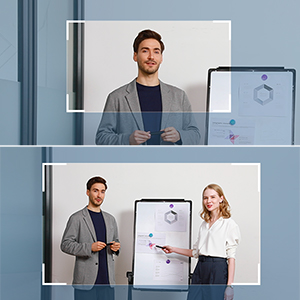
Face Tracking: PowerConf C300 puts you front and center of every meeting. The innovative AI chip recognizes your face and auto tracks your movement via the pan and tilt webcam camera.
Auto Low-Light Correction: Look crisp and clear while on-call, even in heavily backlit or low-light conditions.
Privacy Cover: Snap the included privacy cover onto the camera and slide it over the lens to prevent prying eyes from peeking in on your personal life.
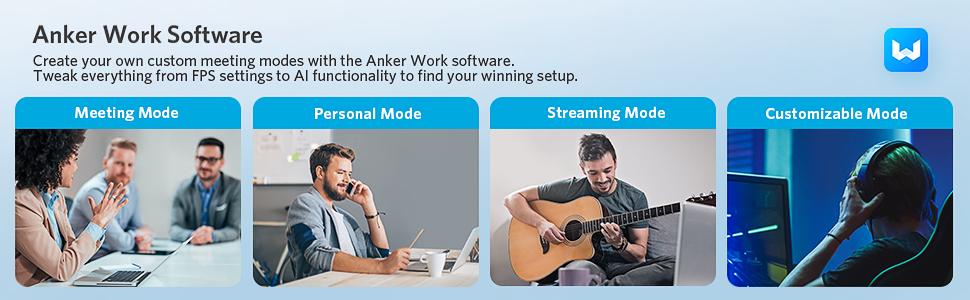
Download the Software: With the AnkerWork software, you can choose from 4 meeting modes to tailor PowerConf C300 to your exact needs. It’s a webcam for pc with which you can customize your own settings.
Note:
- We strongly recommend you download the latest firmware update by following the instruction on the package to make full use of PowerConf C300’s AI features.
- The AnkerWork software supports only Windows 7/8/10/11 and Mac OS 10.14 and above.
- Anker PowerConf C300 can only be used with Windows 7/8/10/11 or Mac OS 10.13 and above.
| Weight: | 4.5 Ounces |
| Dimensions: | 9.9 x 3 x 3 centimetres |
| Brand: | Anker |
| Model: | A3361011 |
| Part: | A3361011 |
| Colour: | Black |
| Colour: | Black |
| Dimensions: | 9.9 x 3 x 3 centimetres |
Great camera, but others have said it has a very wide lense
Great camera, but as others have said very wide angle. The application that comes with it is great, and means you can a narrower angle. Evern with the narrowed anagled, people have commented how dharp and clear the image is on calls. However, I can install the application on my work laptop, so I’m left with a very wide angle. Sound is also great.
So good I bought a second one
This camera is so good that I bought a second one when my wife needed one for use with Microsoft Teams. HDR mode is particularly good at producing a good contrast in back-lit situations. All in all, highly recommended.
Great camera that's worth the money
Decent lense, offers wide angle, quality is great setup and install is nice and easy. Simple software to help manage the camera features. Would recommend.
Great webcam
Bought this for home office and it works great. Great image quality.
Built in mic is superb, very clear pickup. Noise cancellation tech is amazing, I can use the computer’s speakers and the other person doesn’t get any feedback or echo. It even cancels out background noise to a fair extent.
Software allows you to crop your image in three zoom levels and then all apps picking up the camera feed use that setting. Other settings allow great control over brightness and sharpness, FPS rate, etc. You can even adjust for frame offset, if for instance the camera isn’t (and can’t be) centred on your eye line, then you can crop to “move” where the centre of the image is located.
Would have been nice to have a built in privacy shutter. Seems a bit off having to stick one on.
The best webcam I have ever had.
This is the best webcam that I have ever had.
The optics and light adjustments are great.
Would not hesitate to recommend it.
This is the current best choice for the money.
I never really looked into WebCams until recently, it has become something that is useful for communication while online gaming with family and friends. I do have a high-performance gaming PC and like to make sure my choice in peripherals is up to scratch and not sub-par.
My first choice when looking at WebCams was, naturally some might say, the Logitech C920 series. My eldest son has one of these and my youngest son has the newer version. There is no doubt that these are good WebCams but I did a bit of research and narrowed it down to either one of these Logitech or this Anker Powerconf C300, The latter having really good reviews online. I chose the Anker and can safely say that I do not regret my choice. Looking at comparison videos on YouTube between the Logitech and the Anker shows it considerably more capable than any of the current Logitech offerings in all lighting conditions. Crisp detailing, clear sound capture and vivid colours (if not completely natural looking). Excellent effort from Anker.
So, yes I highly recommend this Anker Powerconf C300.
Great camera with nice features
Works great, looks much better than my old 20 web cam. It’s nice to be able to tweak the settings and the face tracking works well.
A big leap over most affordable webcams
The quality of this camera is consistent with what I’ve come to expect from Anker (who I lean on heavily for a number of products).
The multiple choice of viewing angles is a lovely feature (allowing wider shots than you’d expect), as is the auto-focusing where it’ll frame one or several people perfectly. I don’t use the microphone because I have a separate one, so can’t comment on the quality of the audio element, but as far as webcams go it’s excellent.
The optional camera cover is a nice touch too; despite it having a light to indicate when the camera is on, my paranoia is soothed by the ability to slide a physical cover over the camera when not in use. An excellent option for those working from home.
Superb Camera
I was toying with getting another Logitech cam, as the one I have is a few years old now.
I did some research and kept coming across this Anker C300 in various review places.
Download the software from Anker and install, then plug the camera in and check for firmware updates, update the camera and it all just works beautifully.
Fabulous camera, the picture quality is outstanding, and my main room is fairly low light and honestly, seeing the video output from the camera, you would never know, in addition, the sound/mic quality is fantastic, no issues being heard, and I tested the sound/video with a test run first and as I say, the sound was as clear as when using my laptop.
This camera is an absolute steal for the current price, it has some really very useful features, such as being able to switch between 30fps and 60fps, being able to change the view angle depending on what you need, and the autofocus which basically does auto follow and zoom and all this at a similar price for alternative cameras from other vendors that lack some of the features the C300 has.
I am very happy with the camera and I would absolutely recommend it, at the least make sure you have it on your short list.
Wide angle view
Good performance with adjustable field of view. Works well in a small conference format.
Great camera
Simple to plug in and it sorts itself out and works 2mins later good picture quality and a good audio too
Great produc
I bought this for video calls while working from home. I like to use 2 full sized monitors which leaves little room on my desk for me to have my laptop open to use the inbuilt webcam, so I keep this closed and out of the way.
For some bizarre reason, my employer have disabled the use of Logitech webcams, which would have been my usual choice, so I went with Anker (after being disappointed by trying a couple of the cheap ~30 webcams available on Amazon) as they’re a reputable brand.
I work right next to a big window which lets in a lot of light. The cheaper webcams I tried from Amazon struggled to deal with the light from my monitors even when I had the curtain closed to limit the amount of light from my window. I had to turn off one of my monitors and bring up a dark background on my remaining monitor so it wasn’t putting out too much light. The Anker webcam deals well with the bright light that comes in from the window at the side of my desk and from my monitors, and also works well in a low light setting.
The picture quality of the webcam is great, as is the quality of the inbuilt microphone, which can be used even for voice-only calls.
I was reluctant to spend this amount on a webcam for work, but I’m really glad I have now as it’s exceeded my expectations and made my life a lot easier (as I no longer have to retrieve my laptop from its hiding place when I realise everybody else has switched on their video for a call).
Highly recommend.
Excellent Camera for my circumstances
I spent a great deal of effort trying to find the right camera for my taste and went through quite a few different ones.
My requirements were:
Good lighting
Good picture quality
Ability to tweak settings in a dedicated App
I bought this after increasing my budget and honestly I was expecting it to be a similar poor experience as others in the past.
I was pleasantly surprised to discover that this was a much better experience. The feature set described, is pretty accurate and most importantly the App to tweak settings works really well, giving me the ability to adjust the viewing angle, colour and picture quality. I honestly can’t find fault with it.
All in all I would highly recommend this Camera, it is a close competitor to the Razer Kiyo Pro.
Quality Produc
This has worked much better than Logitech on Macbook running MACOS Monterey. The picture is great and a range of programmable auto-adjust options are available. Autoframe function may work well in larger meetings, but slightly annoying behaviour with just two people in the frame.
I was pleased about the quality of the camera at that price.
I was pleased about the quality of the camera at that price.
Great overall camera for department meetings due to wide angle lens. Excellent ratio price/quality.
Great overall camera for department meetings due to wide angle lens. Excellent ratio price/quality.
Cracking little camera
It does what it should and is a rock solid build – very happy with i
An Excellent Webcam
It is a great mid range camera that is plug and play. It delivers great video quality.
Funktioniert super unter Win10 und macOS12 Monterey
Habe mich aufgrund der Nutzung auf mac und Windows fr die Ankerworks entschieden. Sie funktioniert mit beiden Systemen mit der aktuellen Software problemlos. Als 0815 Nutzer, der nur Facetime und MS-Teams damit macht, erfllt das Teil vollends meine Erwartungen. Fr Sonderschnulli und Infaulenzeranwendungen kann ich keine Bewertung machen, dort sind sicher einige Zusatzfunktionen wichtig, die ich nicht nutze.
Funktioniert super unter Win10 und macOS12 Monterey
Habe mich aufgrund der Nutzung auf mac und Windows fr die Ankerworks entschieden. Sie funktioniert mit beiden Systemen mit der aktuellen Software problemlos. Als 0815 Nutzer, der nur Facetime und MS-Teams damit macht, erfllt das Teil vollends meine Erwartungen. Fr Sonderschnulli und Infaulenzeranwendungen kann ich keine Bewertung machen, dort sind sicher einige Zusatzfunktionen wichtig, die ich nicht nutze.
New generation of Webcams
Just remember is doesn’t have speakers, combine with a speaker/microphone unit from Anker for instance the S330
vraiment génial et parfaite
avec l’application recommand, on peut configurer notre camra et c’est gnial. Le mode grand angle de 115 degr nous permet d’tre facilement 4 sur zoom autour d’une table. Le micro est vraiment 360 degr. Il y a la reconnaissance faciale que fait en sorte que la camra va cadr automatiquement sur les visages restant advenant le cas que quelqu’un quitte l’cran. J’en ai acheter quelques une et c’est vraiment ma prfr.
vraiment génial et parfaite
avec l’application recommand, on peut configurer notre camra et c’est gnial. Le mode grand angle de 115 degr nous permet d’tre facilement 4 sur zoom autour d’une table. Le micro est vraiment 360 degr. Il y a la reconnaissance faciale que fait en sorte que la camra va cadr automatiquement sur les visages restant advenant le cas que quelqu’un quitte l’cran. J’en ai acheter quelques une et c’est vraiment ma prfr.
I would have rated it 5 stars but was disappointed there were no color controls to compensate for less than ideal ambient light.
I would have rated it 5 stars but was disappointed there were no color controls to compensate for less than ideal ambient light.
Top Produk
Das Produkt ist eine gute Alternative zu Kameras anderer Namenhaften Hersteller.
The product is really good. I could set up instantly and works very well. The quality is excellent. Highly recommended.
The product is really good. I could set up instantly and works very well. The quality is excellent. Highly recommended.
The camera to have!
I bought this camera to replace a well known brand. I thought that my old camera would be hard to beat, but this Anker cam is excellent and streets ahead. It isn’t cheap, but this is well worth bypassing the lower ranges.
Top Gerä
Spitzenprodukt, das sich vollautomatisch installiert und mit allen gngigen Apps einwandfrei arbeitet. Die Kamera App ermglicht zudem individuelle Einstellungen.
StarTrek-Feeling mit Auto-Framing
Immer der richtige Bildausschnitt, auch wenn man sich vor dem Schreibtisch mal bewegt hat. Sehr schneller Autofokus, klasse Bildqualitt, gute Mikrofone.
Value for money.
I payed the discount price for the so well worth it just for that. Still not as good as a DSLR Camera that give the best clarity in tones etc. Drones have the same size Camera lens as these Web cams even your phone now has a better clarity so why can’t they make the perfect Web Cam yet with today’s technology. But like I said judging from the rest its up there with the big boys if not better in most cases. Just wish the colour tones could be that little bit better whilst using the original program settings.
Killer Quality, wait for a sale
Got it on sale for 65, quality is great (make sure you plug it into a blue USB port), software is good enough (lets you switch modes and FPS, doesn’t need to do anything else), AI tracking and focus are great.
Wouldn’t pay 100 but very happy for 65
Better than all other ones I've seen in this pricerange. The app is great, the AI works and the picture looks decent. It's actually much better than Logitech... sorry
Better than all other ones I’ve seen in this pricerange. The app is great, the AI works and the picture looks decent. It’s actually much better than Logitech… sorry
Killer Quality, wait for a sale
Got it on sale for 65, quality is great (make sure you plug it into a blue USB port), software is good enough (lets you switch modes and FPS, doesn’t need to do anything else), AI tracking and focus are great.
Wouldn’t pay 100 but very happy for 65
Great webcam packed with features and a decent price.
60fps makes a big difference to video call quality. Like that there is control of image focus and scale. Biggest barrier to a lot of video quality when doing video calls seem to be the bandwidth restriction placed by Zoom, Teams etc. Typical good balance of value and quality expected on an Anker product and I’ll continue to buy their products because of this.
Amazing webcam
I did alot of research and struggled to choose but when Anker had an offer I decided to go with Anker…. a great decision… it is amazing.. even in my work laptop which restricts using the Anker settings the quality is amazing, clear, bright and great microphone. As always Anker doesn’t let you down. This is an amazing professional camera.
excelle
Excellent webcam – easy to install, sits well on my monito etc. etc. etc.
Main point the picture quality it fantastic, very sharp even at lower light, I also like the ability to change refresh rate and viewing angle (or it can be set to auto) – really useful for video conference calls.
The microphone is really good too.
An excellent camera for OBS, Skype, Teams etc.
I have used a Logitech 910 for many years, but needed a 2nd camera for use with OBS. Came across the Anker C300 in a review and bought one. I am using this for both amateur TV purposes (DATV) as well as general communications (Skype, Zoom, Teams etc.). Easy to configure with the supplied configuration tool, AnkerWork, and excellent in low light conditions. Have since bought a 2nd C300. Also comes with a standard camera mounting screw, so that it could be fitted to a tripod, or other camera bracket.
Eine super Kamera für die Webinararbei
Die Kamera hat mich in allen Belagen berzeugt. Einfache Installation und sofort hat sie super funktionoert. Meine Webinare sind Bildtechnisch einfach super geworden. Ich freue mich jedesmal wieder, wenn ich sie benutze. Danke
Eine super Kamera für die Webinararbei
Die Kamera hat mich in allen Belagen berzeugt. Einfache Installation und sofort hat sie super funktionoert. Meine Webinare sind Bildtechnisch einfach super geworden. Ich freue mich jedesmal wieder, wenn ich sie benutze. Danke
Nothing to complain. This made my Teams meetings and calls very easy to jump in with my PC.
Nothing to complain. This made my Teams meetings and calls very easy to jump in with my PC.
Runde Sache
Nach schlechten Erfahrungen mit einem weit teureren Konkurrenzprodukt bin mit dieser Kamera sehr zufrieden. Mit Sicherheit ein guter preislicher Kompromiss zwischen Noname-Ware und berteuerten Edelmarken.
Webcam Anker PowerConf C300 Smart Full HD
L’Anker PowerConf C300 un prodotto unico. Una fotocamera tanto bella e compatta quanto efficace, capace di elevare il livello di ripresa in ogni occasione, soprattutto in questi tempi in cui la videoconferenza diventata il pane quotidiano di gran parte del mondo, che sia al lavoro o solo per divertimento. Presentando le sue caratteristiche tecniche, spiccano sicuramente la risoluzione 1080p (abbinata a 60fps) e il massimo 115 gradi di campo visivo senza trascurare la buona qualit del suono grazie ai due microfoni ambientali stereo con riduzione attiva del rumore e ricezione fino a 3 metri. Nella confezione piccola ma compatta troverai anche un cavo di alimentazione USB-C, un utile adattatore da USB-C a USB normale e due cover per privacy camera (non molto estetiche, ma una gradita aggiunta).La consiglio,favolosa
Webcam Anker PowerConf C300 Smart Full HD
L’Anker PowerConf C300 un prodotto unico. Una fotocamera tanto bella e compatta quanto efficace, capace di elevare il livello di ripresa in ogni occasione, soprattutto in questi tempi in cui la videoconferenza diventata il pane quotidiano di gran parte del mondo, che sia al lavoro o solo per divertimento. Presentando le sue caratteristiche tecniche, spiccano sicuramente la risoluzione 1080p (abbinata a 60fps) e il massimo 115 gradi di campo visivo senza trascurare la buona qualit del suono grazie ai due microfoni ambientali stereo con riduzione attiva del rumore e ricezione fino a 3 metri. Nella confezione piccola ma compatta troverai anche un cavo di alimentazione USB-C, un utile adattatore da USB-C a USB normale e due cover per privacy camera (non molto estetiche, ma una gradita aggiunta).La consiglio,favolosa
Webcams seem as bad as 20 years ago.
Bought for 65 on November 2021.
Probably my fault for not spending more time configurating it and so, but the quality is not great at all. Good to use with friends or family, but I would never recommend it for business or anything more demanding than casual videoconferences.
The camera itself looks great and I like its holder and the privacy cover. You can set the zoom level at 3 stages, which can be useful as well and it has an option as well so it follows you if you move around. Furthermore, it works great with low illumination, I frequently use it with the lights of the room completely off and the picture is still fine just because of the light from my monitor.
Incorporated microphone does the job, but I recommend you use another one (I use the one on my headset, for example).
All good for the price I paid but the quality of the picture itself. In general, I barely recommend it for the price I paid (65), but if any higher than that, don’t buy it.
Sehr gute Webcam für Meetings
Die Audio- und Videoqualitt ist auf hohem Niveau und der Einsatz am Windows PC bzw. Mac ist stressfrei. Die Software AnkerWork aktualisiert die Firmware und bietet Optionen zur Einstellung des Kamerawinkels sowie automatischer Verfolgung von einer oder mehreren Personen im Bild. Zur allgemeinen Nutzung ist die Software nicht erforderlich.
Top Kamera
Eine supergute Kamera
Hatte noch keine bessere. Kann ich nur Empfehle
Sehr gute Webcam für Meetings
Die Audio- und Videoqualitt ist auf hohem Niveau und der Einsatz am Windows PC bzw. Mac ist stressfrei. Die Software AnkerWork aktualisiert die Firmware und bietet Optionen zur Einstellung des Kamerawinkels sowie automatischer Verfolgung von einer oder mehreren Personen im Bild. Zur allgemeinen Nutzung ist die Software nicht erforderlich.
Great upgrade for conference calls
I purchased a cheap web-cam at the start of lockdown but wanted to up my image as was so pixelated. First camera I ordered was delivered by amazon but what they sent was a grey spoon holder. So comedy moment, they send another camera the next day and i got to keep the spoon holder as a sorry. The camera is controllable through their own software or the windows device panel. Easier through their software and it allows you to blur just enough to hide wrinkles but keep a decent image (great for the older gentlemen or lady etc). It copes with light levels up or down very well. And also you can set to keep you in frame and multi person mode. So great solution for clear images on a reasonable budget I think. So for me 5 stars. I do like Anker products just have that extra quality design.
Excellent webcam
This is an amazing webcam for the price. It has great picture quality and has many options to configure the image for video calls. I am so happy I chose this, I would totally recomend. (If at first it does not save the settings, wait for the framework update in the application, after that, wow!).
Excellent webcam
This is an amazing webcam for the price. It has great picture quality and has many options to configure the image for video calls. I am so happy I chose this, I would totally recomend. (If at first it does not save the settings, wait for the framework update in the application, after that, wow!).
Does the Job
I bought this webcam on a 65 Black Friday deal, putting it in the price bracket of the ubiquitous Logitech c920.
My Huawei / Honor laptop has silly webcam in a “pop up” key, so always budgeted for an external USB camera.
Having put the Anker C300 through its paces I’m amazed at its low light capabilities and detail under warm living room / home office lighting.
Lots of settings, which do the job.
So many reviewers blow it out with gross studio lamps.
This is an amazing HD webcam, even its microphones sound way better than pro reviewers would have you believe.
I kind of expected pants for my sixty quid, got something amazingly good.
Very much a recommended …
Excellent webcam for WFH
I rarely bother to write reviews but at 60 this is far better than the Logitech C925-E I also tested.
The face tracking works well and the low light performance is decent. The app is easy to use.
Excellent webcam for WFH
I rarely bother to write reviews but at 60 this is far better than the Logitech C925-E I also tested.
The face tracking works well and the low light performance is decent. The app is easy to use.
Relatively expensive but very VERY good!
This is the second of these cameras. Previously I was a loyal buyer of Logitech C920 cameras for years – they are still very good – but suffered supply issues earlier this year and thought I would try an Anker camera. The Anker brand seems to be pushing out some very good products at the moment.
The Anker C300 is excellent. Quite chunky relative to other cameras but there’s lot’s more going on.
THE LIGHTING IS AWESOME with a clear picture even in a darker room or with a bright window behind the subject.
The subject tracking is also much better than others I have used – working well with more than one person and having an uncanny knack of properly framing the whiteboard in our room when we stand up to work through it.
Je l'adore
Amazing cam!!
This is simply the best cam out there and this has sorted my issues with working from home. The image quality is so great and I love the fact that the angle can be changed in the Anker app which persists in other apps like Teams. Also, the blurred background option works just fine (at least in Teams).
I see a small dust like particle in the camera lens like others mentioned but I’m not sure if it’s actually dust or simply a reflection. There is no image or issue with the video. So no complaints as of now.
works with mac mini m1 Monterey OS plug & play
I use this with a Mac Mini M1 updated to Monterey. I plugged in the usb c cable and could use it right away for face time etc. I thought the microphone was very good on its own and so didn’t so use my blue yeti. I haven’t downloaded their software because I don’t need to do anything fancy. I just wanted to reduplicate my 2013 iMac for less money.
Better than the Logitech Streamcam!
Camera provides better colour accuracy than the Streamcam and works SO much better with my greenscreen. 60FPS isn’t as smooth as the Streamcam (about 100ms~ delay?), but otherwise it is leagues above quality wise. Using USB-C connector on an x570 mobo.
Better than the Logitech Streamcam!
Camera provides better colour accuracy than the Streamcam and works SO much better with my greenscreen. 60FPS isn’t as smooth as the Streamcam (about 100ms~ delay?), but otherwise it is leagues above quality wise. Using USB-C connector on an x570 mobo.
Anker C300 Webcam
Gutes Preis/Leistung Verhltnis.
Einfaches Plug & Play
Sehr gute Auflsung. Ideal fr Online Meeting
This is an excellent camera, full featured, high quality and easily portable if needed.
This is an excellent camera, full featured, high quality and easily portable if needed.
Good for video conferencing but lacks some features like windows hello
Good for video conferencing but lacks some features like windows hello
Great item but!
Great camera, stopped working after 2 weeks for some reason. Thanks to amazon got full refund.
gute Nutzbarkei
Habe die Kamera jetzt schon ein paar Tage und bin immer wieder begeistert. Sie fokussiert automatisch und hat eine gute Bildqualitt.
Very impressive, best for the price, and fantastic face tracking. Stop looking, just buy this one
This is by far the best webcam you can get in this price range. To find better image quality one needs to spend at least double, but probably even more, and one still would not necessarily get all the features found here.
After using it every day for over a month I find this webcam is absolutely perfect for professional video calls, it’s a joy to use every single time.
* low light performance is phenomenal, an order of magnitude compared to the more expensive Logitech C930E which I also own and I used for over a year
* it comes with an excellent app, which works fine on M1 Apple Silicon MacBooks and is updated regularly
* exposure, white balance, sharpness and colour temperature are very good out of the box, but can be further customised in the app
* the anti-flickering function deserves special mention, removing any trace of flickering (which normally is a problem with most LED bulbs)
* the HDR functionality helps somewhat on sunny days, reducing the glow of the windows if they come into the frame
* there is double microphone, which I have not used much, but seems to work adequately in a pinch
* the field of view is ultra-wide, and it’s suitable not only for individual use but also for conference rooms; there is an excellent distortion correction, so all the lines in the image are straight despite the very wide angle
* autofocus is fast, accurate and stable, it’s the kind of thing that you don’t even notice because it’s so good
* the killer feature however, the one that wows everyone, is face tracking: this crops the image giving the illusion of a moving camera always keeping your face in an optimal position; to get an idea, it’s pretty much identical to Apple’s Centre Stage; it has two modes, single person and group; this feature has improved even more after some firmware upgrades, and it’s now very responsive and satisfyingly smooth, it’s just fun and a pleasure to use; another impressive aspect is that the computation is done on the camera itself, it does not require any driver nor does it use any additional CPU resources: once selected in the app, it doesn’t even require the app to remain open (unlike Logitech’s customisation features); right now, Sept 2021, to my knowledge the only alternatives on the market are Apple’s Centre Stage on the iPads, and the OBSBOT PTZ webcam, but not at this price
In conclusion I must salute Anker’s efforts here, both for the hardware but especially the software. I think this represents a turning point for them, they have created something truly unique, which is sure to upgrade video conferencing to a professional level. It definitely shows that they believed in this product and worked hard to make it happen, fully deserving the ubiquitous glowing reviews in the technical news. Well done Anker.
Quality expected from this brand
I haven’t had a bad product from Anker yet. I watched lots of reviews before picking this product over the Logitech equivalents, and am happy with the choice.
I use this with a non-standard setup, I connect it to my KVM, so I can share it between my work laptop (2017 MacBook Pro), and two Mac Minis. My work laptop is locked down (corporate), but I can switch to my personal machine, change settings as appropriate using the Anker software, then switch back to my work machine and the settings stick. Exactly what I needed.
I’m not a videophile like some other reviews – from my perspective, the picture quality is excellent, especially compared to the one built into the MacBook. There are plenty of mounting options, including tripod, and it sits perfect on top of my monitor-mounted light (Quntis).
I haven’t tried the audio yet.
The stick on privacy shutter works great, not sure why they include 2, or why they don’t pre-install it. I leave mine closed at most times unless I need it for a meeting.
Happy with the product for the price – I bought it on sale.
Quality expected from this brand
I haven’t had a bad product from Anker yet. I watched lots of reviews before picking this product over the Logitech equivalents, and am happy with the choice.
I use this with a non-standard setup, I connect it to my KVM, so I can share it between my work laptop (2017 MacBook Pro), and two Mac Minis. My work laptop is locked down (corporate), but I can switch to my personal machine, change settings as appropriate using the Anker software, then switch back to my work machine and the settings stick. Exactly what I needed.
I’m not a videophile like some other reviews – from my perspective, the picture quality is excellent, especially compared to the one built into the MacBook. There are plenty of mounting options, including tripod, and it sits perfect on top of my monitor-mounted light (Quntis).
I haven’t tried the audio yet.
The stick on privacy shutter works great, not sure why they include 2, or why they don’t pre-install it. I leave mine closed at most times unless I need it for a meeting.
Happy with the product for the price – I bought it on sale.
Works first time
What’s great about this web cam is that it works great with Zoom And the AI software produces lovely looking quality video
Excellent!!! Does exactly what it says
Excellent webcam. I’m using 2 of them in different positions in a 5 camera zoom situation. Only minor negative is you can’t change the camera settings while it is in use but a minor inconvenience
Excellent!!! Does exactly what it says
Excellent webcam. I’m using 2 of them in different positions in a 5 camera zoom situation. Only minor negative is you can’t change the camera settings while it is in use but a minor inconvenience
Gute Kamera
Die Kamera erfllt gut ihren Zweck. Fr den Preis bekomme ich sicherlich 2 gute andere Webcams, jedoch ist hier von Vorteil, dass ich einzelne Funktionen/Einstellungen mit dem PC/Laptop verndern kann, denn das bieten preiswertere Webcams selten.
Gute Kamera
Die Kamera erfllt gut ihren Zweck. Fr den Preis bekomme ich sicherlich 2 gute andere Webcams, jedoch ist hier von Vorteil, dass ich einzelne Funktionen/Einstellungen mit dem PC/Laptop verndern kann, denn das bieten preiswertere Webcams selten.
Einfach und okay
Ich war etwas unsicher wegen den Rezensionen ber Bildrauschen und Softwareprobleme. Habe die Kamera dann aber bei einer Rabattaktion zu einem relativ gnstigen Preis gekauft.
Von Softwareproblemen habe ich nichts gemerkt bisher, man kann die Ankerwork- Software sogar als nicht-admin-Benutzer installieren. Finde ich nett, dass man dann nur den Benutzeraccount aufblst und nicht das System an sich).
Die Bildeinstellungen sind nicht ppig aber funktionieren, es gibt mehrere Profile und einstellbare Bildweiten. Die Programme, die die Kamera verwenden sollen, haben sich auch nicht beschwert.
Die Bildqualitt … naja. Etwas Rauschen ist schon drin, und besonders scharf wirkt es auch nicht. Die Kamera von meinem P30Pro ist um Welten besser. Fr den normalen Preis von ber 100 wre ich enttuscht, bei den rund 60 die ich in der Aktion bezahlt habe ist es noch okay. Reicht, um in Konferenzen besser auszusehen als mit meiner steinalten Logitech c250. Und die Logitech-Software hat mich auch immer genervt, das hat Anker schon etwas besser gemacht. Schlanker vor allem.
Ton ist so mittel, etwas schade dass man die automatischen “Verbesserungen” nicht ausschalten kann, die machen etwas Pumpen. Ansonsten bin ich klar zu verstehen und Umgebungsgerusche halten sich in Grenzen.
Verarbeitung wirkt ordentlich.
Alles in allem also okay, aber kein Produkt das Begeisterung auslst.
Einfach und okay
Ich war etwas unsicher wegen den Rezensionen ber Bildrauschen und Softwareprobleme. Habe die Kamera dann aber bei einer Rabattaktion zu einem relativ gnstigen Preis gekauft.
Von Softwareproblemen habe ich nichts gemerkt bisher, man kann die Ankerwork- Software sogar als nicht-admin-Benutzer installieren. Finde ich nett, dass man dann nur den Benutzeraccount aufblst und nicht das System an sich).
Die Bildeinstellungen sind nicht ppig aber funktionieren, es gibt mehrere Profile und einstellbare Bildweiten. Die Programme, die die Kamera verwenden sollen, haben sich auch nicht beschwert.
Die Bildqualitt … naja. Etwas Rauschen ist schon drin, und besonders scharf wirkt es auch nicht. Die Kamera von meinem P30Pro ist um Welten besser. Fr den normalen Preis von ber 100 wre ich enttuscht, bei den rund 60 die ich in der Aktion bezahlt habe ist es noch okay. Reicht, um in Konferenzen besser auszusehen als mit meiner steinalten Logitech c250. Und die Logitech-Software hat mich auch immer genervt, das hat Anker schon etwas besser gemacht. Schlanker vor allem.
Ton ist so mittel, etwas schade dass man die automatischen “Verbesserungen” nicht ausschalten kann, die machen etwas Pumpen. Ansonsten bin ich klar zu verstehen und Umgebungsgerusche halten sich in Grenzen.
Verarbeitung wirkt ordentlich.
Alles in allem also okay, aber kein Produkt das Begeisterung auslst.
Amazing Webcam.
Anker makes really good products and even though Anker isn’t know for webcams, they really done an excellent job with this webcam.
Besser als die Alte
Finde die c300 etwas besser als meine alte Logitech 922. Auch mit weniger Licht ist das Bild anschaubar.
Pricey but worth i
My requirements for the picture quality are rather modest, but I was pleasantly surprised by a truly wide angle and how the camera shows the room in low light. Auto-focus seems decent as well. But have to say, I haven’t used the camera much yet.
It worked for me out of the box on by Raspberry Pi in Telegram messenger, I didn’t have to install any additional software, and didn’t have to give any consent for collection of my personal data as Jay from Canada mentioned in their comments. Not saying Jay was wrong. Their note must be the case when you’re going to install some auxiliary Anker software on Windows, of course. However, I’m fine with the basic usage.
Un ottima webcam
Nulla a che vedere con webcam da 10-20 euro
Un prodotto con un packaging serio, ma sopratutto ben funzionante. 30 o 60 fps selezionabili dal suo software dedicato. 3 zoom selezionabili, possibilit addirittura di selezionare il face detector e quindi di farsi seguire digitalmente (lavora sullo zoom e sul suo angolo di ripresa per seguirti al meglio e posizionarti sempre al centro dell’ inquadratura).
Manca una stella per incentivare I produttori a lavorare un pochino sul software di gestione.
Molto semplice, manca la possibilit di aggiornare il firmware della webcam su Windows (ho ovviato al problema collegandola al Mac e aggiornandola da l) una volta riportata su Windows la webcam era aggiornata.
Comunque nel complesso sono piacevolmente stupito dalla solidit e dalla funzionalit di questa webcam
La consiglio.
Un ottima webcam
Nulla a che vedere con webcam da 10-20 euro
Un prodotto con un packaging serio, ma sopratutto ben funzionante. 30 o 60 fps selezionabili dal suo software dedicato. 3 zoom selezionabili, possibilit addirittura di selezionare il face detector e quindi di farsi seguire digitalmente (lavora sullo zoom e sul suo angolo di ripresa per seguirti al meglio e posizionarti sempre al centro dell’ inquadratura).
Manca una stella per incentivare I produttori a lavorare un pochino sul software di gestione.
Molto semplice, manca la possibilit di aggiornare il firmware della webcam su Windows (ho ovviato al problema collegandola al Mac e aggiornandola da l) una volta riportata su Windows la webcam era aggiornata.
Comunque nel complesso sono piacevolmente stupito dalla solidit e dalla funzionalit di questa webcam
La consiglio.
Simply the Bes
I’ll keep this review brief: What you have here is an outstanding bit of kit from Anker. I’ve used this webcam since its release, and it’s fantastic for work and play. The quality of the camera itself is outstanding, with plenty of adjustability in the AnkerWork software which is available for free on Anker’s website.
USB C is a nice touch, but the cable comes complete with a USB A connector adaptor, so it will suit all types of devices.
The inclusion of privacy panels is great and the adjustable mount makes it usable on almost any screen.
You are getting a quality product, as you’d expect with Anker. Highly recommended.
Good stuff
Very solid, clear webcam, great compatibility, nice AI features (auto focus, auto zoom to speaker(s)) etc.
Great camera and even better customer service
The camera is pretty good. Clever AI attention tracking software follows you about and it does an excellent job at adjusting light levels to give good images all the time. I had a technical issue initially that meant contacting Anker customer service who literally couldn’t have been friendlier or more helpful! Highly recommend. They went above and beyond my expectations.
Great camera and even better customer service
The camera is pretty good. Clever AI attention tracking software follows you about and it does an excellent job at adjusting light levels to give good images all the time. I had a technical issue initially that meant contacting Anker customer service who literally couldn’t have been friendlier or more helpful! Highly recommend. They went above and beyond my expectations.
A perfect balance between price and performance
I use a Thinkpad P14S for work, and Teams for video calls. I like to A/B my Pwerconf and my laptop camera for colleagues and see the astonishment on their face – it says it all.
Since it’s a corporate laptop, I was pleasantly surprised that I could load the firmware amd software on my MacBook, make settings changes, and then plug the camera into my work machine and the features I enabled just worked without additional installs.
Favourite features: low light performance, 1080p detail, auto panning feature (played a team game of charades online – it kept me in focus as I made a fool of myself).
Don’t spend more or less. This camera is awesome.
J
A perfect balance between price and performance
I use a Thinkpad P14S for work, and Teams for video calls. I like to A/B my Pwerconf and my laptop camera for colleagues and see the astonishment on their face – it says it all.
Since it’s a corporate laptop, I was pleasantly surprised that I could load the firmware amd software on my MacBook, make settings changes, and then plug the camera into my work machine and the features I enabled just worked without additional installs.
Favourite features: low light performance, 1080p detail, auto panning feature (played a team game of charades online – it kept me in focus as I made a fool of myself).
Don’t spend more or less. This camera is awesome.
J
This camera and its multiple settings is head and shoulders better than the built in units on laptops. It’s an essential tool for those who do video calls.
This camera and its multiple settings is head and shoulders better than the built in units on laptops. It’s an essential tool for those who do video calls.
Great for low light conditions
Setting up was easy as plug and play although had to update the firmware to enable certain features like HDR etc. Highly satisfied with the product quality and picture quality particularly with low light conditions. Good to have the privacy cover although it felt cheap and should have been part of the product. Bought this after returning the Logitech C922 I previously bought but did poorly in my lighting conditions.
Highly recommended!
Great for low light conditions
Setting up was easy as plug and play although had to update the firmware to enable certain features like HDR etc. Highly satisfied with the product quality and picture quality particularly with low light conditions. Good to have the privacy cover although it felt cheap and should have been part of the product. Bought this after returning the Logitech C922 I previously bought but did poorly in my lighting conditions.
Highly recommended!
Excellent product, reasonable price
Very easy to set-up and manage.
Very clear picture with good definition and colour.
No problems with it so far.
Thank you Anker - Finally a Great Camera that works on a Mac with Big Su
Having tried 3 other camera’s from different vendors including Logitech only to find out that the software for the Mac was appalling – I’m seriously impressed with this unit. No regrets – recommend it.
Thank you Anker - Finally a Great Camera that works on a Mac with Big Su
Having tried 3 other camera’s from different vendors including Logitech only to find out that the software for the Mac was appalling – I’m seriously impressed with this unit. No regrets – recommend it.
Very good picture quality
Picture quality is so much better than the camera built into my laptop or the webcams I have used previously. I use an external microphone so don’t really know what the sound is like, but very happy with the camera.
Very good picture quality
Picture quality is so much better than the camera built into my laptop or the webcams I have used previously. I use an external microphone so don’t really know what the sound is like, but very happy with the camera.
my only complaint is that I now look a lot older on video calls and several of my colleagues keep mentioning retirement. I might have to smear some vaseline on the lens… or get botox.
Super wide angle that can be controlled. The light sensitivity is extraordinary. The mic is top quality. Very happy with the choice.
Super wide angle that can be controlled. The light sensitivity is extraordinary. The mic is top quality. Very happy with the choice.
Really like the ability of this unit to track my image. However, I wish it had some abilities to blur the background or add a background rather than trying to use background features of Zoom and Teams.
Really like the ability of this unit to track my image. However, I wish it had some abilities to blur the background or add a background rather than trying to use background features of Zoom and Teams.
Really like the ability of this unit to track my image. However, I wish it had some abilities to blur the background or add a background rather than trying to use background features of Zoom and Teams.
Really like the ability of this unit to track my image. However, I wish it had some abilities to blur the background or add a background rather than trying to use background features of Zoom and Teams.
High quality produc
Robust camera which can be attached to desktop easily and securely. Options for resolution.
**UPDATE** Anker have now fixed the virtual background problem with a software update. The one last criticism I have is that it still occasionally zooms in or out on me at random, no matter what my settings are, so it’s still got a star to earn, but with the excellent resolution on the image it has now become my go to camera for video calls. Hoping they fix that last issue for the final star, as I’m a huge fan of Anker products and it feels weird to not be giving them their usual 5 stars!
You can guess why I bought this. Too many Zoom calls, too low native camera quality on my laptop. I love Anker products, professional reviews said it was great, and the stars seemed to align as a result.
Except that despite the camera providing amazing picture quality I can’t use it for video calls, because it won’t work with virtual backgrounds or the blur background effect on Zoom, Teams, or Google Meet, which makes it pretty much useless if I want to maintain the privacy of my home or family while I’m on a call.
While I gather not everyone has this issue, I seem to not be alone here. I’ve reinstalled the Anker software, updated my video meeting software, and also upgraded the firmware on the device, to no avail. I have tried everything I can and am sufficient techie that no obvious step has been ignored, along with several less obvious.
It’s a real shame. If you don’t need virtual backgrounds, you should absolutely buy this for the image quality. It’s fantastic. But for the rest it may not be ideal.
Good webcam
Needed a new camera for my meetings at home as my last one was really crap and the standard camera on my laptop was rubbish. This webcam was easy to get set up and running and can definitely say the quality of the camera is good compared to my current one that’s for sure. It is truly 1080p hd and the video quality is very smooth as it’s 60fps. It has face tracking and instant autofocus so you never really need to fiddle around with the webcam in meetings. Sound quality is good too! No problems really and does what I need it to do, just think it’s way too expensive for what it is.